普通视图

发现新文章,点击刷新页面。
昨天以前Tomshardware

Hands On: Sharge's Disk Pro 2 Ultra is a compact, magnetic DIY SSD dock with active cooling, 80W passthrough charging, and HDMI 2.1, supporting up to 8TB drives

作者 Matt Safford
2026年9月11日 19:05

With its built-in USB / HDMI hub and a small fan to keep temperatures in check, Sharge's Disk Pro SSD is one of the more interesting (and generally useful) external storage drives in recent memory, easily earning a spot on our Best External SSD list. And the company is following that success up with a more DIY-focused Disk Pro 2, which lets you install your own M.2 drive (supporting 2230, 2242, and 2280 sizes and capacities up to 8TB), while adding greater fan flexibility, media card slots, and an HDMI port that's capable of more bandwidth – depending on the model you choose.

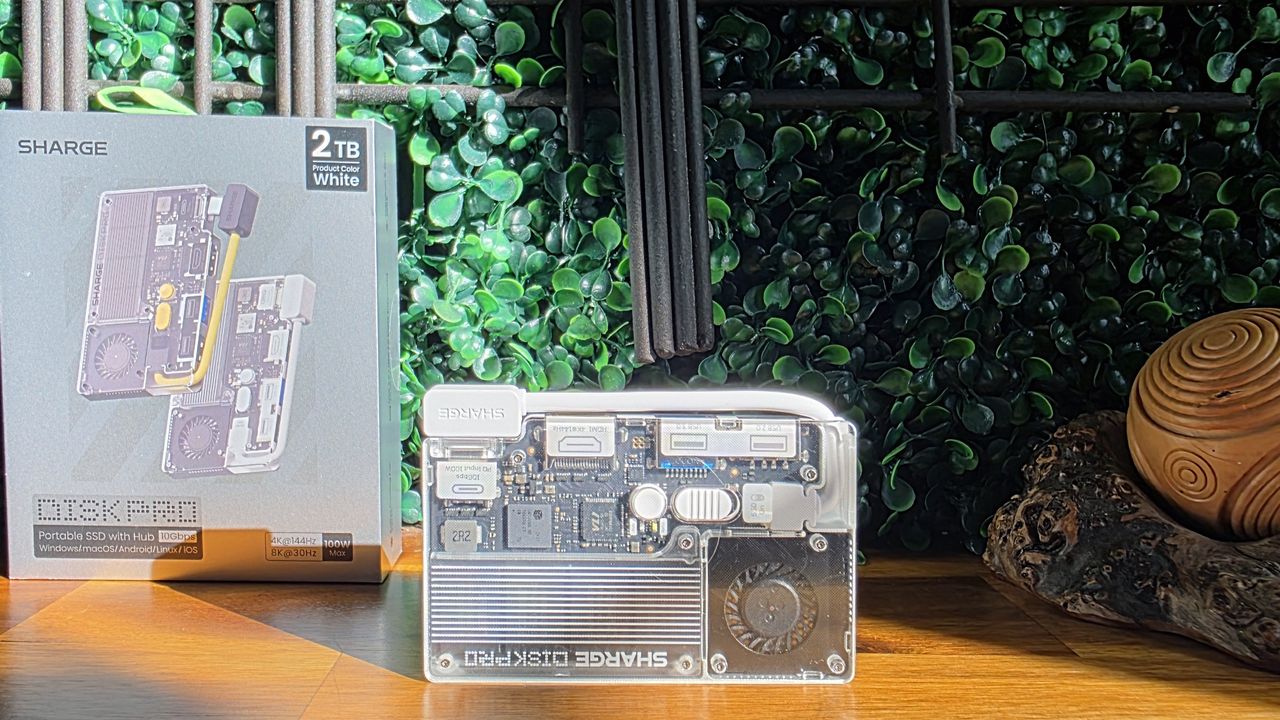
Sharge is offering the Disk Pro 2 in two varieties. There's the Lite model, with HDMI 2.0 (4K@60 Hz) and a 5W minimum operating power, and the Disk Pro Ultra (which we have in for testing) with HDMI 2.1 (4K@144 Hz or 8K@30 Hz), a lower 1.5W minimum power draw, and a faster card reader. Below is the full list of differences, according to the product page. The company even lists the internal chips, some of which you can see through its transparent top.

Disk Pro Ultra

Disk Pro Lite

HDMI

HDMI 2.1, 4K@144 Hz, 8K@30 Hz

HDMI 2.0, 4K@60 Hz

Minimum Operating power

1.5W

5W

Chips

VL822, VL605, RTL9210, SM2705

GVS2201S, VL822, GL3231, RTL9201

SD speed

Read 180 MB/s, Write 120 MB/s

Read 100 MB/s, Write 90 MB/s

Sharge Disk Pro 2 Ultra

(Image credit: Tom's Hardware)

The Ultra model is likely to appeal more to professionals and gamers, offering faster card transfers and higher monitor refresh rates. But the main limitation here is the overall bandwidth, as both models are capped at a 10 Gbps interface, just like the original Disk Pro. That makes either model better as kind of a travel-friendly Swiss Army hub than something you'd want to use as your primary hub / dock all the time. Because any modern M.2 drive can saturate all available throughput by itself, before you connect any video or USB devices. But there's no denying the utility of carrying around a pocket-friendly SSD that also lets you connect to a monitor or TV, plug in a couple extra peripherals, and empty your SD cards without an extra hub, adapters, or cables.

Sharge Disk Pro 2 Ultra

(Image credit: Tom's Hardware)

At 3.65 x 2.33 x 0.531 inches (92.6 × 59.2 × 13.5 mm) without the cable, the Disk Pro 2 is slightly thicker and longer than the original Disk Pro, but still smaller than some standalone drives. Again, with its size and transparent top, it reminds me of an old-school cassette tape.

Sharge Disk Pro 2 Ultra

(Image credit: Tom's Hardware)

One thing that has definitely improved over the original Disk Pro is that Sharge has made the USB-C cable removable. This is good in part because you don't have to worry about the cable breaking over years of use. But also, particularly if you're going to use the drive's hub capabilities, you might want something longer than the included cable's sub-nine-inch length. And when necessary, you might want to plug the drive into a USB-A port. So having the option of using different cables is a big plus.

The cable is also designed to function as a lanyard, which can be handy. But it's held in place solely by the USB-C connection, so I wouldn't trust it for much more than hanging the hub up somewhere at home, so you know where it is when you need it.

Sharge Disk Pro 2 Ultra

(Image credit: Tom's Hardware)

In terms of ports, starting from the bottom edge, you get the main USB-C port, capable of passing through up to 80W of power, a full-size HDMI port (2.1 on the Ultra model we're testing or 2.0 on the lite model), a USB 3.0 Type-A port, and a 10 Gbps USB-C port that can handle up to 100W of power input (and pass through up to 80W for charging a laptop or other device). The previous Disk Pro included a second USB-A 2.0 port here as well, but it's been ditched in favor of the removable USB-C cable, which I think is well worth the sacrifice.

Sharge Disk Pro 2 Ultra

(Image credit: Tom's Hardware)

On the opposite (top) edge, Sharge has added an SD card slot and a microSD card slot. These are capabilities the original Disk Pro didn't have, which make the newer model a lot more versatile for content creators. Just remember the Ultra model offers up faster read and write speeds for the card slots.

Sharge Disk Pro 2 Ultra

(Image credit: Tom's Hardware)

Around back, there's not a lot to see save for the fan intake, but the back is also magnetic, letting you snap the drive onto smartphones that support MagSafe devices or Qi2 magnetic peripherals — it's just a physical mount, though, not receiving power. I've also found this feature handy for sticking the drive to a refrigerator or other iron surface so I always know where it is when I need it.

Sharge Disk Pro 2 Ultra

(Image credit: Tom's Hardware)

It's also worth pointing out that the fan in the Disk Pro 2 is smaller than on the Disk Pro. But there are larger cutouts for air intake on the sides for when the hub is lying on a table or desk, and the Pro offers a three-mode switch (off, on, and turbo), whereas the original's switch had two settings (auto and on). I appreciate the active cooling, and it will certainly be helpful if you're using most of the hub's ports and the SSD at the same time. But if you're mostly using the Disk Pro 2 solely for basic, bursty storage tasks, the 10 Gbps interface and an efficient SSD aren't likely to get warm enough to require active cooling. Of course, that will heavily depend on which drive you install in the enclosure, as well.

Testing with Lexar's 710 SSD

Sharge sent along its Disk Pro 2 Ultra with a Lexar 710 M.2 SSD (a PCIe 4.0 drive that's capable of about 5x the bandwidth of the hub itself), and installing it is about as straightforward as you'd expect. Use the small included screwdriver to remove a tiny screw on the side, and the SSD cover lifts off. Loosen the drive anchor post, install the SSD, tighten the post, put the cover back on, and reinstall the cover anchor screw on the side.

You can, of course, install your SSD of choice, and below the 10 Gbps interface cap, your performance will vary by drive. Still, since the company sent along the Lexar drive, we ran a couple of our external storage benchmarks, and the Disk Pro 2 Ultra performed well for an SSD in this class, just like the original Disk Pro.

Trace Testing - PCMark 10 Storage Benchmark

PCMark 10 is a trace-based benchmark that uses a wide-ranging set of real-world traces from popular applications and everyday tasks to measure the performance of storage devices.
Sharge Disk Pro 2 Ultra

(Image credit: Tom's Hardware)

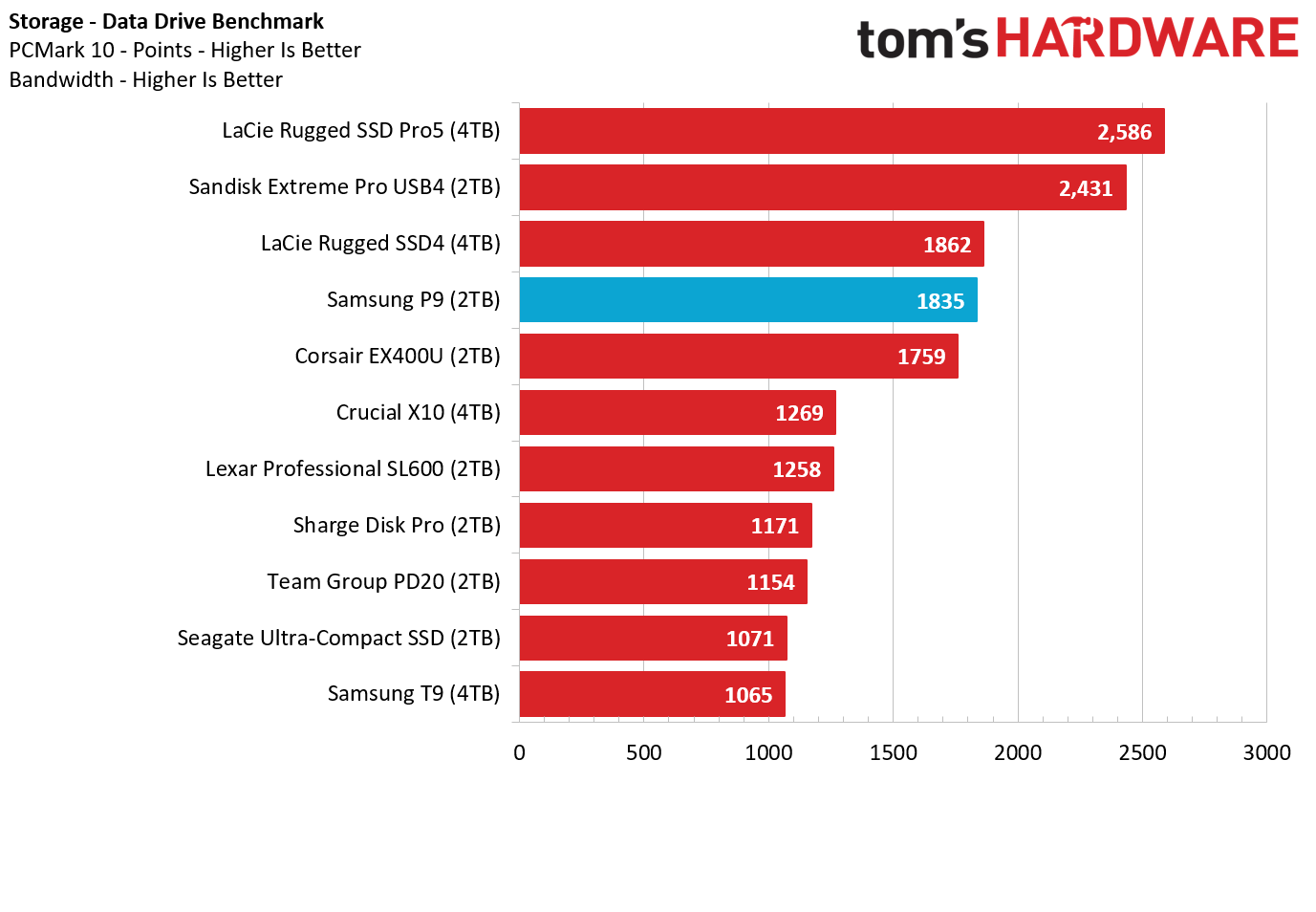
The Sharge Disk Pro 2 Ultra does exceptionally well here, beating everything save for Corsair's USB4-based EX400U. Impressively, the 10 Gbps drive even beat the 10 Gbps X10 Pro on this test, proving available bandwidth isn't everything when it comes to drive responsiveness.

Sharge Disk Pro 2 Ultra

(Image credit: Tom's Hardware)

In this real-world bulk transfer test, Sharge's Disk Pro 2 Ultra lands in a comfortable fourth place, behind 40 Gbps and 20 Gbps drives, and one spot behind the 10 Gbps Crucial X9 Pro drive on reads. But on writes, Sharge's enclosure, running the Lexar SSD, again beats everything in this chart save for Corsair's USB4 drive.

Synthetic Testing CrystalDiskMark

CrystalDiskMark (CDM) is a free and easy-to-run storage benchmarking tool that SSD companies commonly use to assign product performance specifications. It gives us insight into how each device handles different file sizes. We run this test at its default settings

Sharge Disk Pro 2 Ultra

(Image credit: Tom's Hardware)

Lastly, in this best-case-scenario synthetic test, the Disk Pro 2 lands in fifth place when it comes to reads, but fourth place on writes.

Again, the Disk Pro 2's performance on benchmarks will depend largely on what drive you put inside it. But it's clear that the SSD enclosure is capable of performing well, despite its 10 Gbps bandwidth limitations.

Pricing and Bottom Line

Sharge Disk Pro 2 Ultra

(Image credit: Tom's Hardware)

If all you really care about is dropping in a drive and moving some files around, there are plenty of cheap 10 Gbps enclosures, often on sale for $20 or less. But if you travel a lot with tech and like the idea of a drive enclosure that includes a data and video hub with PD power passthrough, the Disk Pro 2 offers a lot to like, with the Ultra version we tested capable of handling video output bandwidth as high as 8K at 30 Hz (or 4K at 144 Hz). And the inclusion of card reader slots makes the enclosure even more useful for creators on the go.

It's far from cheap, at $109 for the Ultra version we tested or $79 for the Lite version, which is still capable of 4K video at 60 Hz, but won't play as well with phones, due to a higher minimum power draw. But Sharge's devices often go on sale, and when this was written, the Late model was selling for $66.51 and $80.91, directly from the company. This is technically a pre-order price, as the enclosures are expected to start shipping on October 15th.

There are also enclosure / hub combos on Amazon and Newegg that promise similar functionality for less. But the ones I saw have generally poor reviews, are larger than the Disk Pro 2, and none of them look as pleasing or are as feature-packed as Sharge's design, with its transparent cover, active cooling, and MagSafe-compatible back. For those looking for portable connectivity and up to 8TB of storage in one device on the go, the Sharge Disk Pro 2 is in a class of its own, and easily earns a spot on our best SSD and hard drive enclosure list.

Lexar announces ‘world’s thinnest portable SSD’ in celebration of the brand’s 30th anniversary – Lexar Muse drive achieves 0.15-inch thickness with proprietary pogo-pin cable, magnetic sleeve for phone mounting

作者 Matt Safford
2026年9月4日 15:00

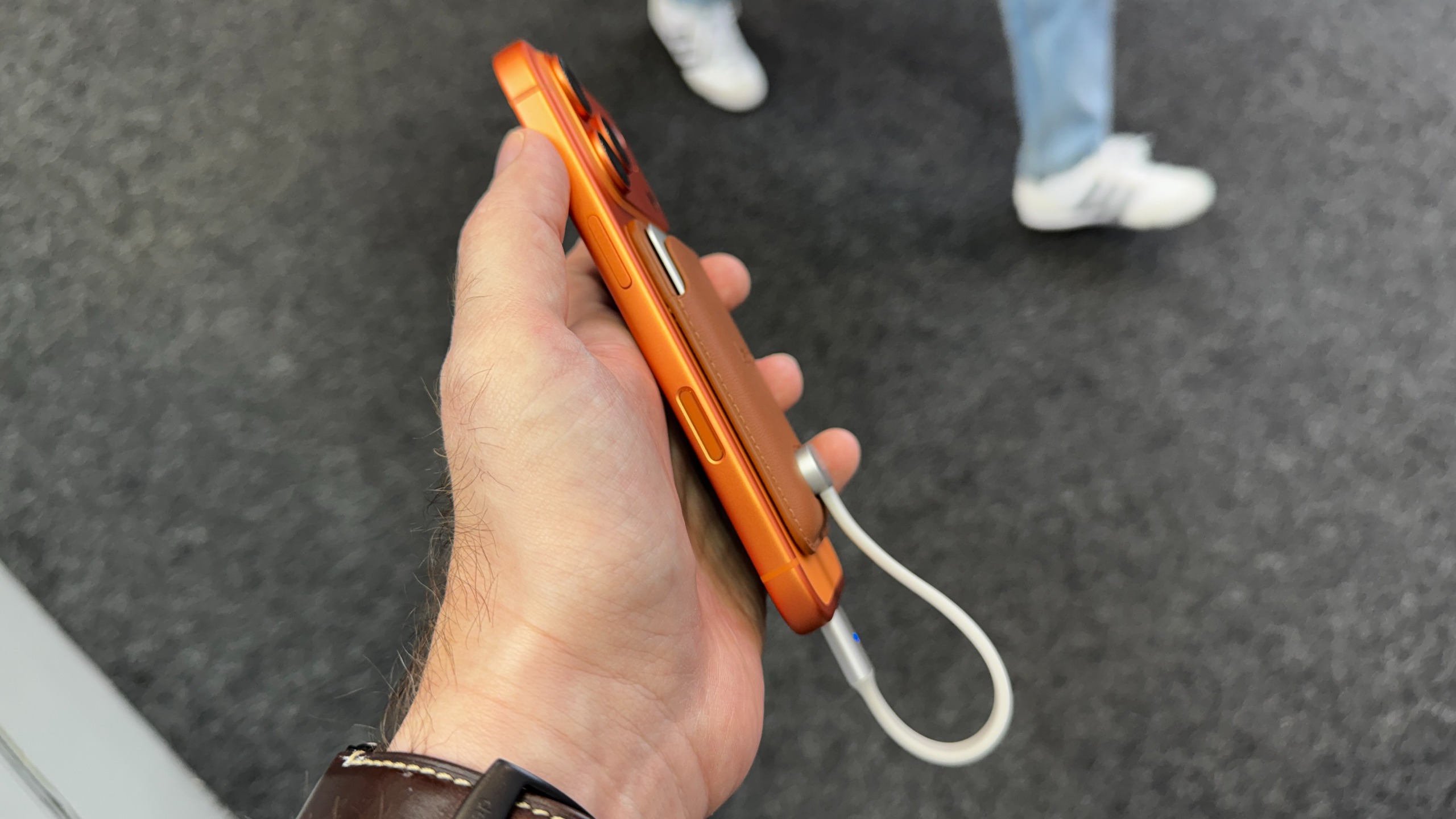
If you’ve ever snapped a 10,000 mAh magnetic battery or other bulky accessory to the back of your compatible Android or iPhone, you know how cumbersome it can be, especially while you’re trying to use your phone rather than just letting it charge. For those who are shooting video or backing up their files on the go, Lexar wants to make that problem go away with its latest external SSD, the Muse.

Tom's Hardware

(Image credit: Future)

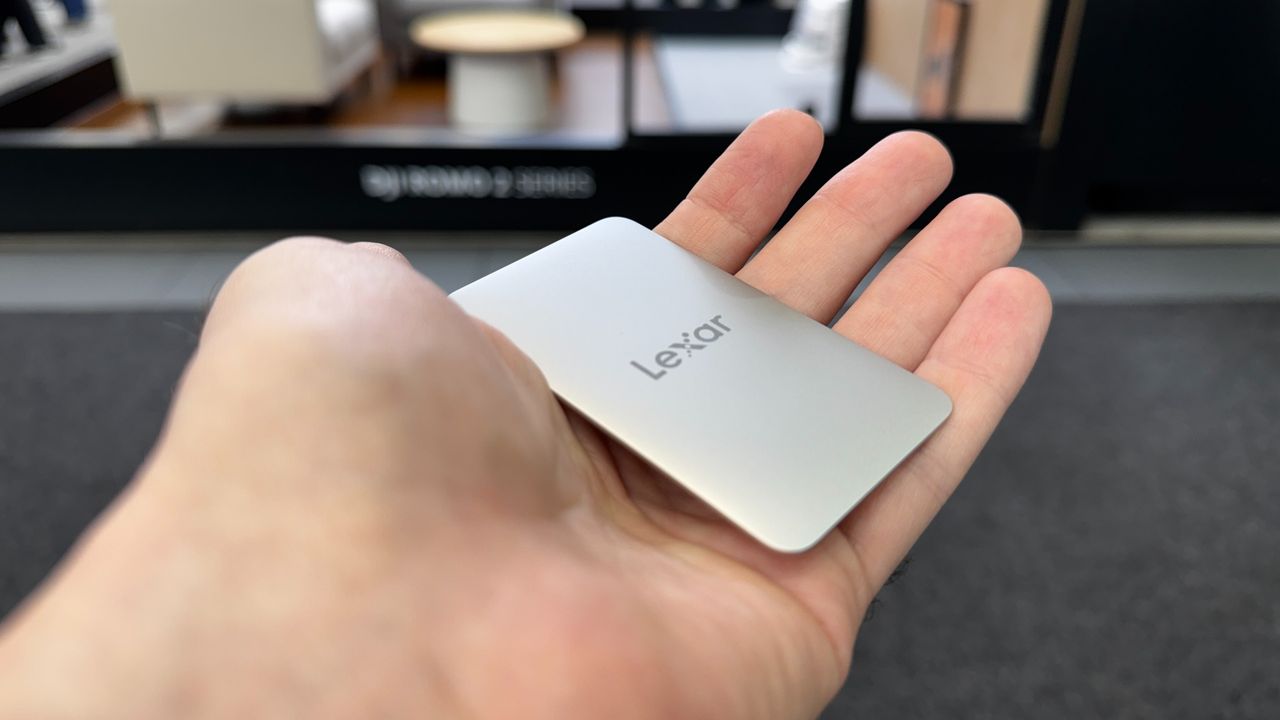
At just 80×48×3.8 mm (3.15x1.89x0.15 inches), with tapered edges that make it feel even slimmer, the company calls it the world’s thinnest portable SSD. And compared to the best external SSDs we’ve tested, it certainly stands out for its tiny size.

Lexar Muse drive on an iPhone, in hand

(Image credit: Tom's Hardware)

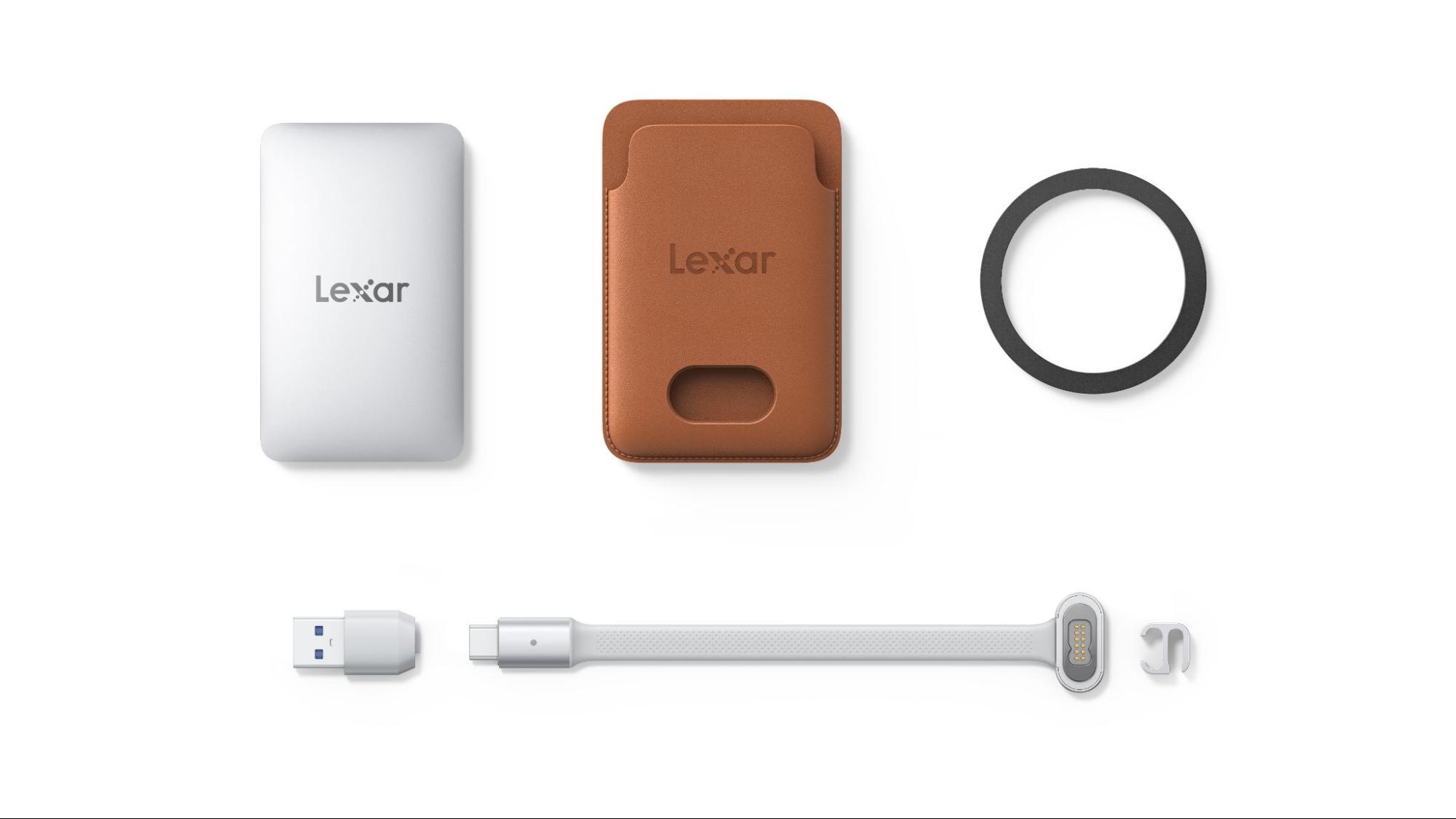
But to get that slim and small, the company is using a proprietary snap-on cable (Lexar calls it SnapLink) that connects to the back of the drive magnetically, via pogo pins. And the pogo pin side looks kind of bulky compared to the drive itself. If you want the drive to magnetically attach to your phone, you’ll need to slide the drive into its sleeve first, which also looks like it could do double duty as a card wallet.

Lexar Muse

(Image credit: Lexar)

In other words, Lexar made serious functional design sacrifices to achieve its slim storage superlative. Still, there’s no denying that the Muse will take up a lot less space on the back of your phone than alternatives like Orico’s BookDrive P10Plus.

Aside from its unique slimness and requisite accessories, the Muse looks to be a fairly typical 10 Gbps drive, with Lexar promising read speeds up to 1,050 MB/s, and write speeds up to 1,000 MB/s. It’ll be interesting to see what kind of sustained write performance is possible in such a thin shell.

As a USB-C storage device, the drive will of course also work with Macs, Android devices, and PCs (although you may need to format the drive first to support other operating systems). Lexar also notes there is app support for automatically backing up footage from iPhones, specifically.

Lexar says the Muse portable SSD will be available in 512 and 1TB capacities, sometime in the last quarter of 2026. Official pricing is up in the air, but representatives at IFA told us the company was aiming for roughly $230 for the 512GB model and $380 for 1TB. As always, devices that claim things like “world’s thinnest” tend to carry a price premium.

Adata Urban Tapsafe 2TB review: Solid-state storage you unlock with your phone

2026年8月30日 20:05

Perhaps as a result of AI hyperscaler demand soaking up all the cutting-edge flash, external storage makers in recent months have seemed to focus less on speed and more on adding unique and helpful features. We saw this with Sharge's Disk Pro and its built-in hub, Orico's Book Drive P10 Plus and its 100W passthrough charging and MagSafe-compatible back. Adata seems to be playing a similar game with its latest drive, the Urban Tapsafe.

The Urban Tapsafe external SSD is quite compact, about the size of a lighter at 2.70 x 1.42 x 0.76 inches, while making space for a built-in clip, NFC support for automatic locking and unlocking of your data with your phone (if you install the requisite app), and even magnetic swappable front plates. Under the hood, it's a fairly typical 20 Gbps drive with performance that's generally fine. But if you need something small and prefer a clip to a magnet for keeping the drive where you need it, it's worth considering. It also ships with a long five-year warranty, compared to the 2-3 years offered by many other drives in this class.

Specifications

Product

1TB

2TB

Pricing

$219

$391

Interface / Protocol

USB 3.2 Gen2 2x2 (20 Gbps)

USB 3.2 Gen2 2x2 (20 Gbps)

Sequential Read

Up to 1,900 MB/s

Up to 1,900 MB/s

Sequential Write

Up to 1,900 MB/s

Up to 1,900 MB/s

Dimensions

2.70 x 1.42 x 0.76 inches / 68.68 x 36.18 x 19.18 mm

2.70 x 1.42 x 0.76 inches / 68.68 x 36.18 x 19.18 mm

Weight

72.61 grams

72.61 grams

Warranty

5 years

5 years

Design and accessories

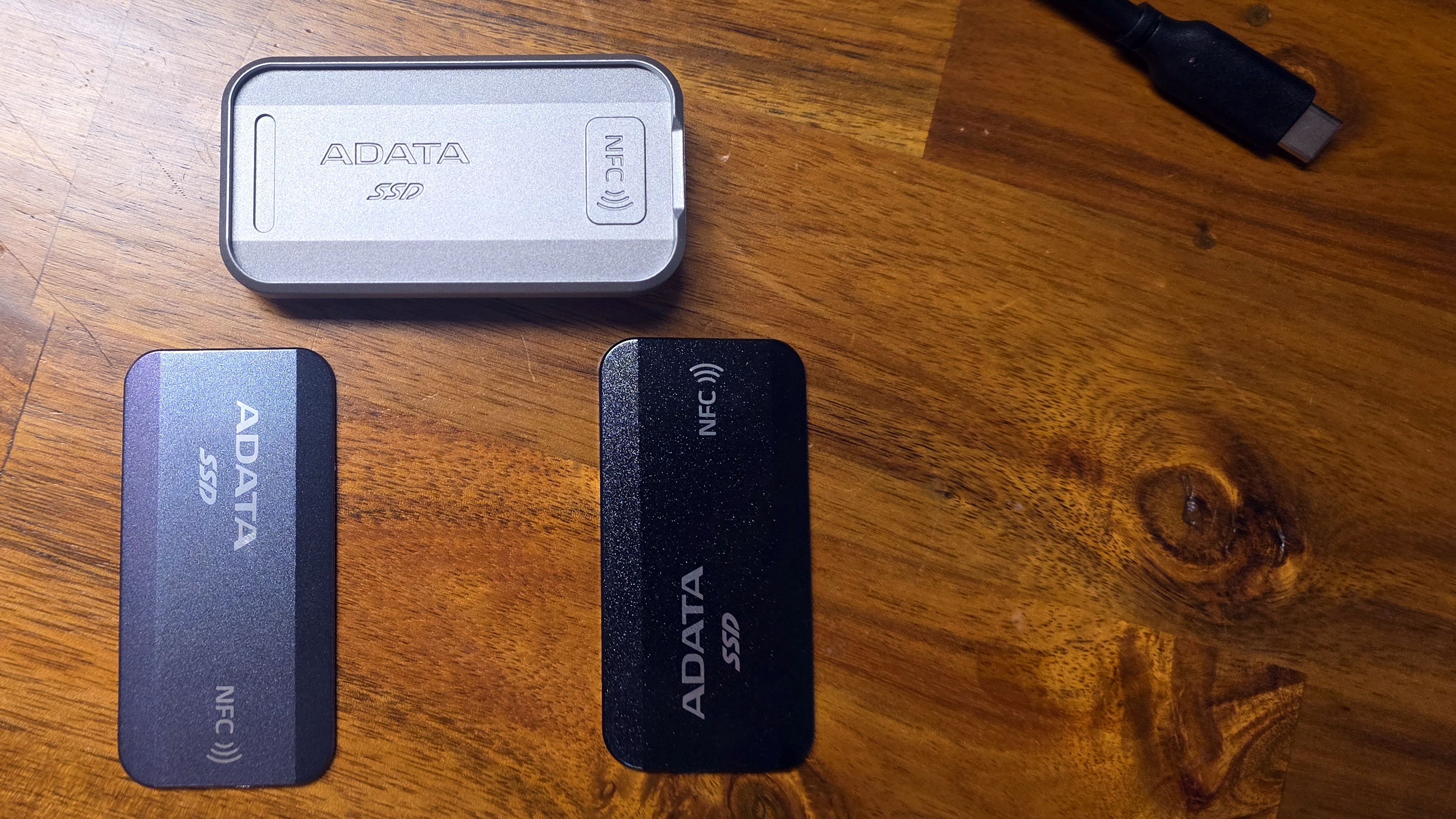
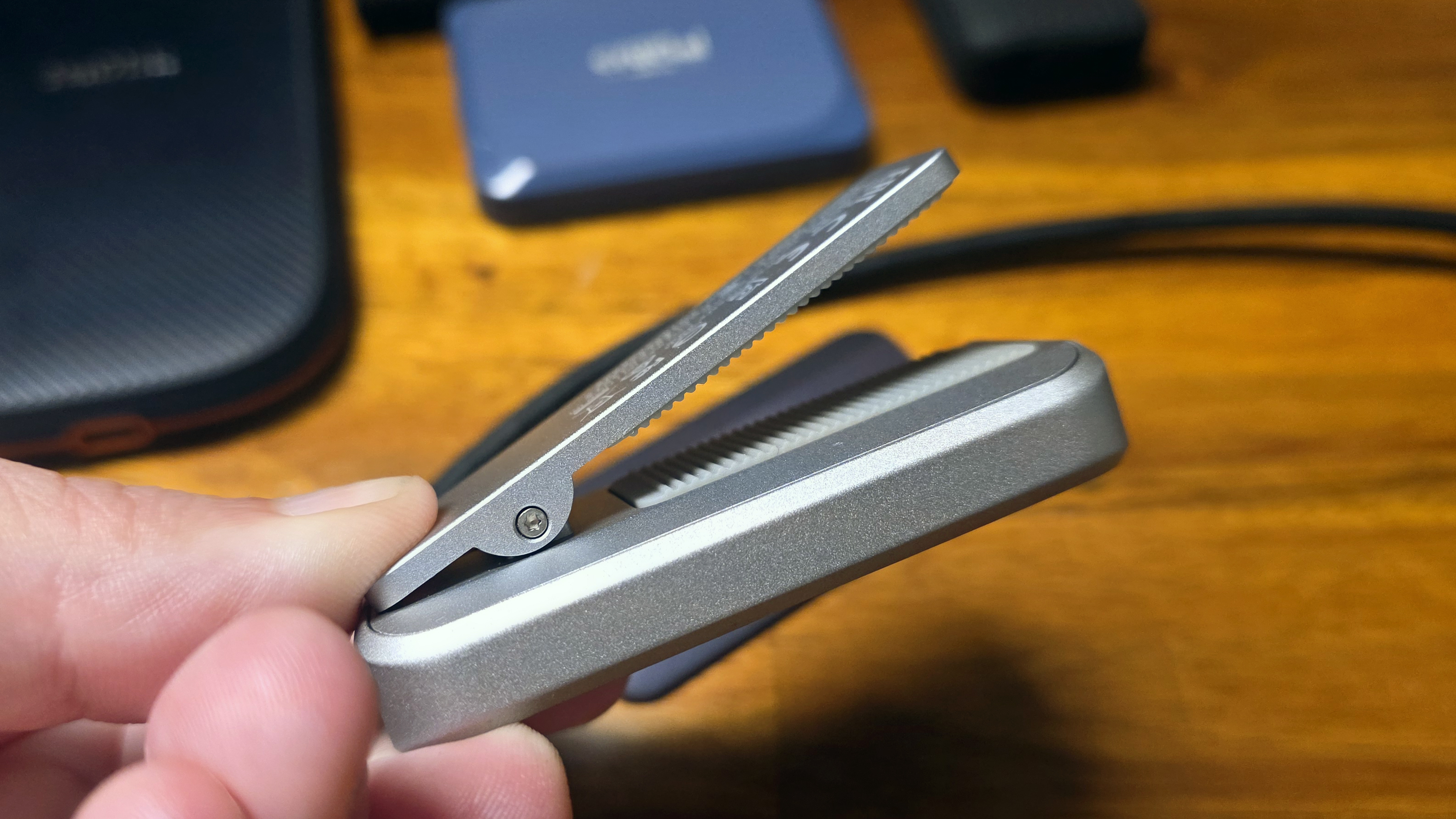
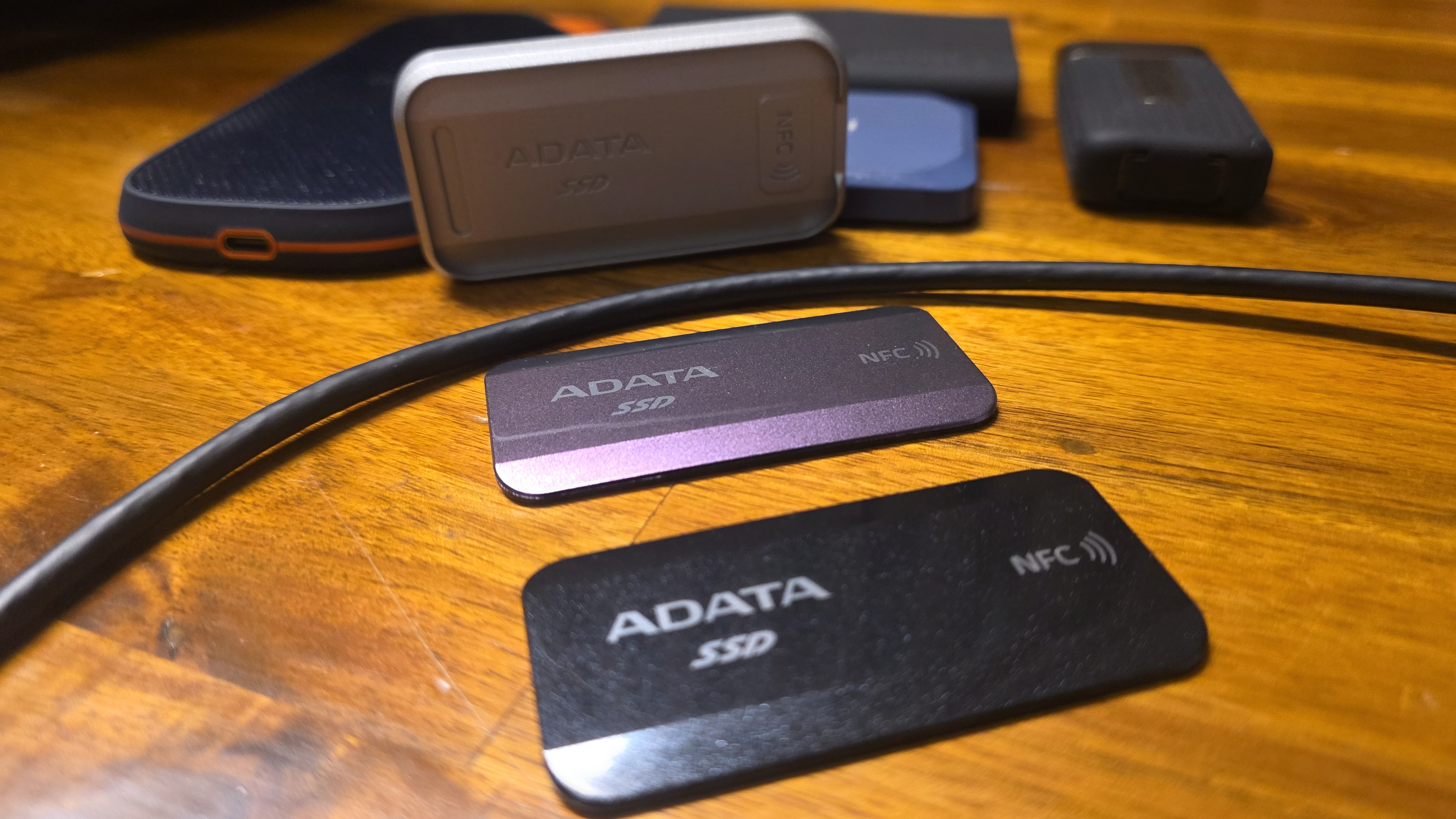
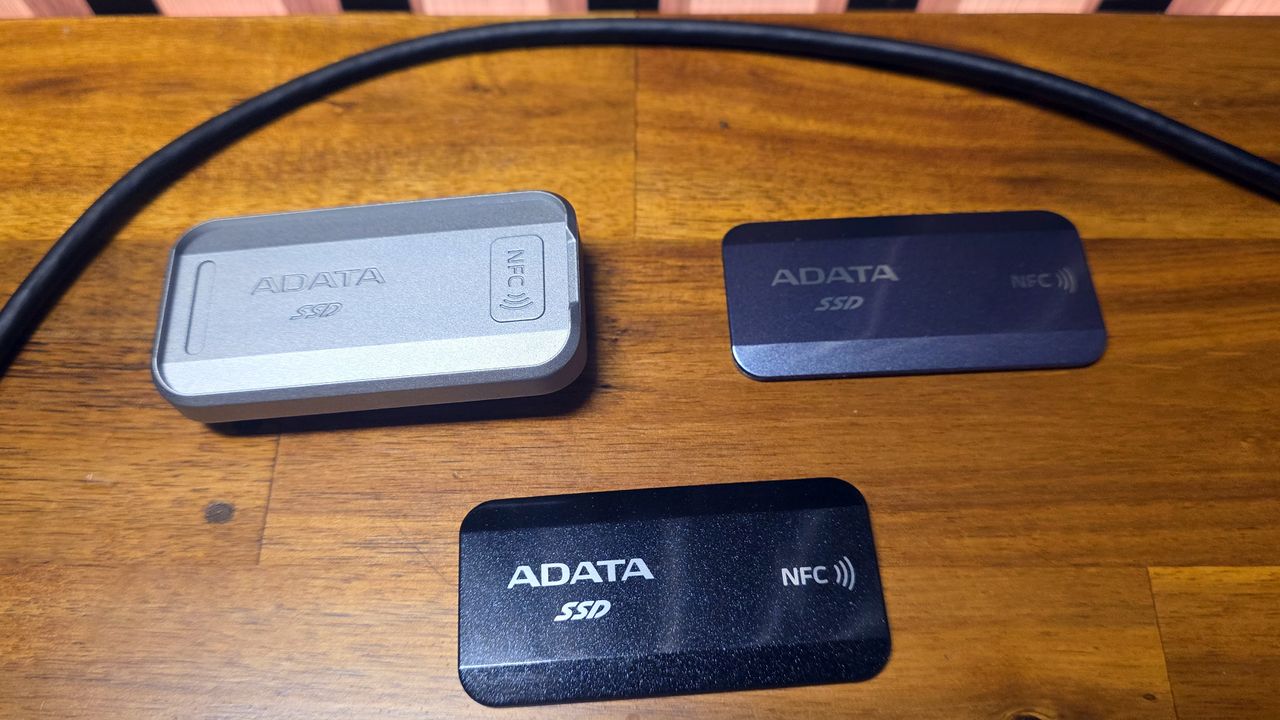
The Urban Tapsafe stands out in terms of design, in part due to its magnetic face plates that snap onto the frame. The company includes both a black plate and one with a color-shifting surface that looks silver, gray, or a light metallic purple, depending on lighting and the angle you look at it from.

Adata Urban Tapsafe 2TB

(Image credit: Tom's Hardware)

And it's not just about the pretty faceplates. The silver metal chassis feels extremely solid and sports a clip with a strong grip, aided by ridged silicone pads on both sides of the opening. This makes the drive easy to clip onto a pocket, your bag, or video rigs. The limiting factor here is that the clip only opens about half an inch, so it won't clip on to anything bulky.

Adata Urban Tapsafe 2TB

(Image credit: Tom's Hardware)

Despite its plethora of design flourishes and features, the Tapsafe is also pretty small, at 2.3 inches long and 0.72 inches thick. Its metal frame means it's not the lightest drive, at 2.56 ounces, but it's obviously not going to weigh you down.

Putting the tap in Tapsafe, with an app

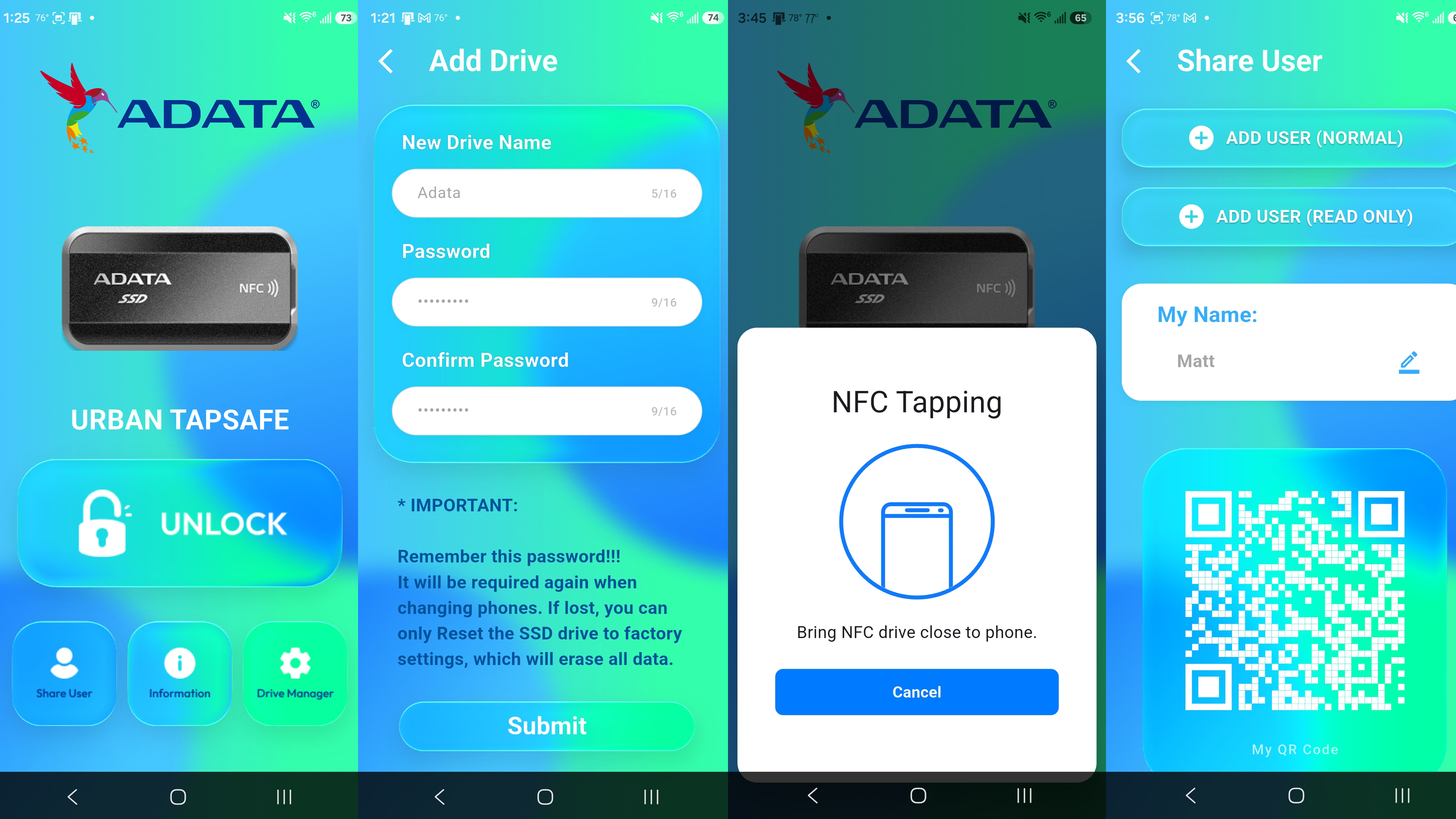
Of course, the Tapsafe drive's main selling point is the ability to unlock the drive via NFC. This is done via the Urban Tapsafe app, which Adata offers for both Android and iOS. And far from just having simple unlock capabilities, it also lets you give access to multiple users, as well as stipulate whether they are limited to read-only or read-and-write access. The app is fairly simple, but everything worked more or less as expected during my time testing the drive.

After installing and launching the app, you'll first need to use your fingerprint or whatever authentication you use to unlock your phone to get access. Once the app is unlocked, you'll need to hit Add Drive, then you'll be asked to name the drive and create and confirm a password. After hitting Submit, you're asked to make sure the drive is plugged in, then tap the back of your phone to the drive.

This didn't work the first time I tried it with the drive plugged into my Samsung S25 Ultra; I got an error saying the drive didn't have power. But when I plugged the drive into my PC and tapped with my phone, the drive registered, and I was able to use my phone to unlock the SSD. Once the drive and app were configured, I went back and tried unlocking the drive when it was plugged into my phone, and it worked as expected. My phone's USB port is a bit fiddly with power connections, so my initial unlocking issue was likely an a problem with my phone, not the drive.

Adata Urban Tapsafe 2TB

(Image credit: Tom's Hardware)

With the drive set up to use the app and password, it will lock whenever the drive is unplugged. Plug it back in, and the drive won't be recognized by your system. The small drive activity light will glow a steady red until you again open the app on your phone, tap Unlock, and move your phone to the drive. Then the drive should unlock, the activity light will turn blue, and, in Windows, the drive and its content will pop up in an Explorer window.

The app also lets you share access to the drive with up to nine other users, and stipulate whether they will have read and write access to the drive, or just read access. They'll also need to have the app installed, and physical access to the drive, then they scan the QR code supplied by your app to grant access. After this, tapping their phone to the SSD will grant the requisite drive access.

Note that the drive isn't being encrypted or decrypted during this process, and Adata makes no specific claims about hardware security. The drive simply will not function or be recognized over USB without using the app to unlock it (if the NFC/password function is enabled, of course). It's possible that if someone had access to the drive and was able to disassemble it, they could get access to the drive's data without app access or the password. So this drive isn't a good fit for situations that call for hardware encryption or high-level data security.

But for those who just want to keep their files private on a basic level, and / or want a drive that lets them selectively share access with other users, there's a lot to like here. The app is pretty well designed and easy to use. The only issue I had was that my phone would occasionally fail to unlock the drive on my first attempt. But once you get used to where your NFC chip is located on the back of your phone (it's in different places, depending on the make and model), the process quickly becomes easier and fairly intuitive.

Comparison products

Adata Urban Tapsafe 2TB

(Image credit: Tom's Hardware)

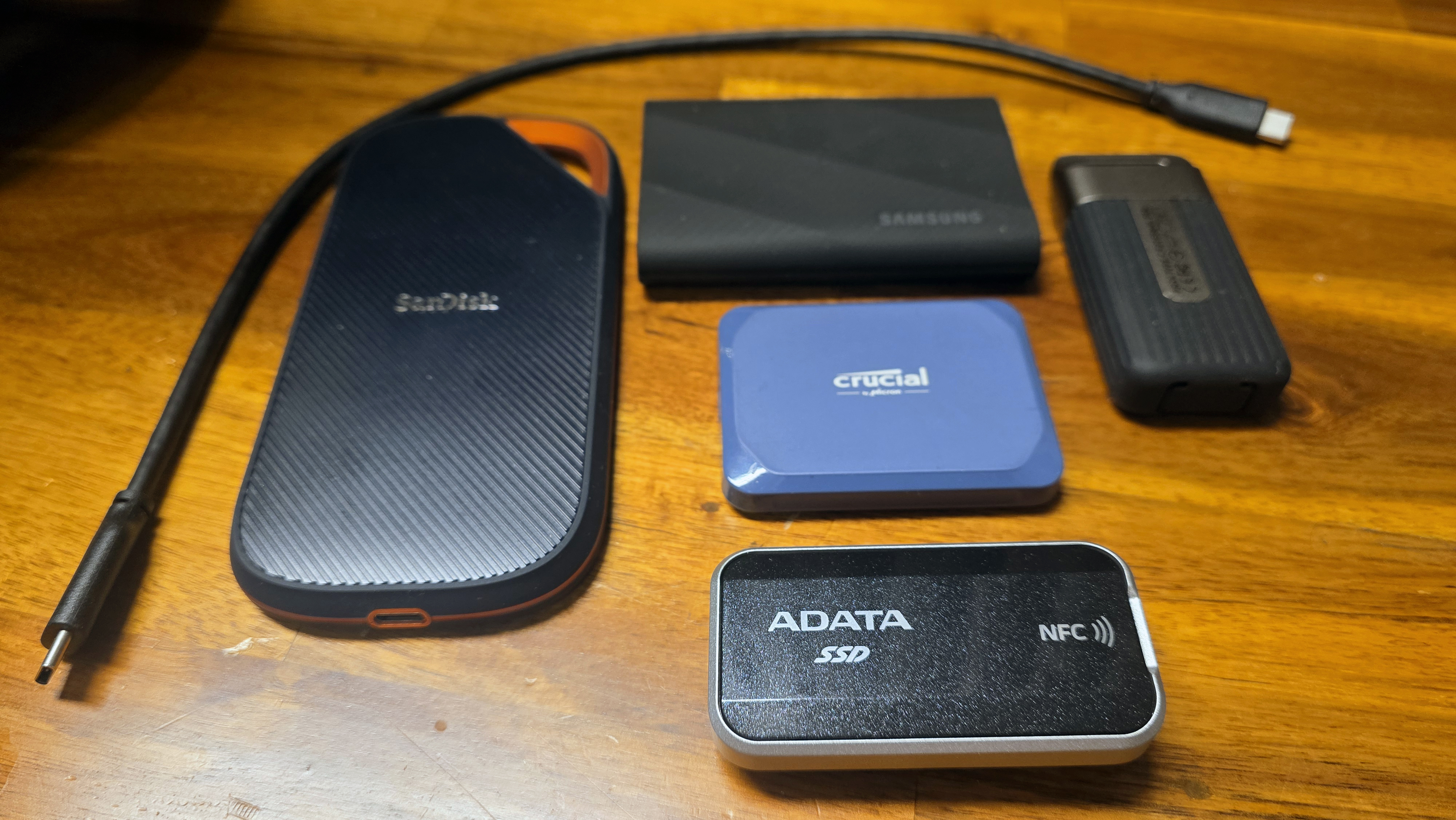
With AI demand gobbling up all the good flash and hiking prices on anything new at the same time, it's a tough climate for drives like the Urban Tapsafe. While the Tapsafe drive sells for slightly less directly from Adata, it's $228 for the 1TB model and $411 for the 2TB option we tested at Amazon, as of this writing. Meanwhile, one of the better 20 Gbps drives we've tested, Crucial's X10 (which launched last year, months before parent company Micron killed the consumer Crucial brand), is still available for $238 (1TB) and $368 (2TB). Even tougher if you mostly care about price in the same drive class, Team Group's also 20 GBps PD20 drive sells for just $235 for the 2TB model at Amazon – so you could get double the capacity with Team Group for $7 more.

To be fair to Adata, those two competitors don't have an NFC chip for access, or a clip for attaching it to other things. But as we'll see, at least one of the above drives performs better than the Tapsafe, too.

Storage Testbed

Storage testbed

(Image credit: Tom's Hardware)

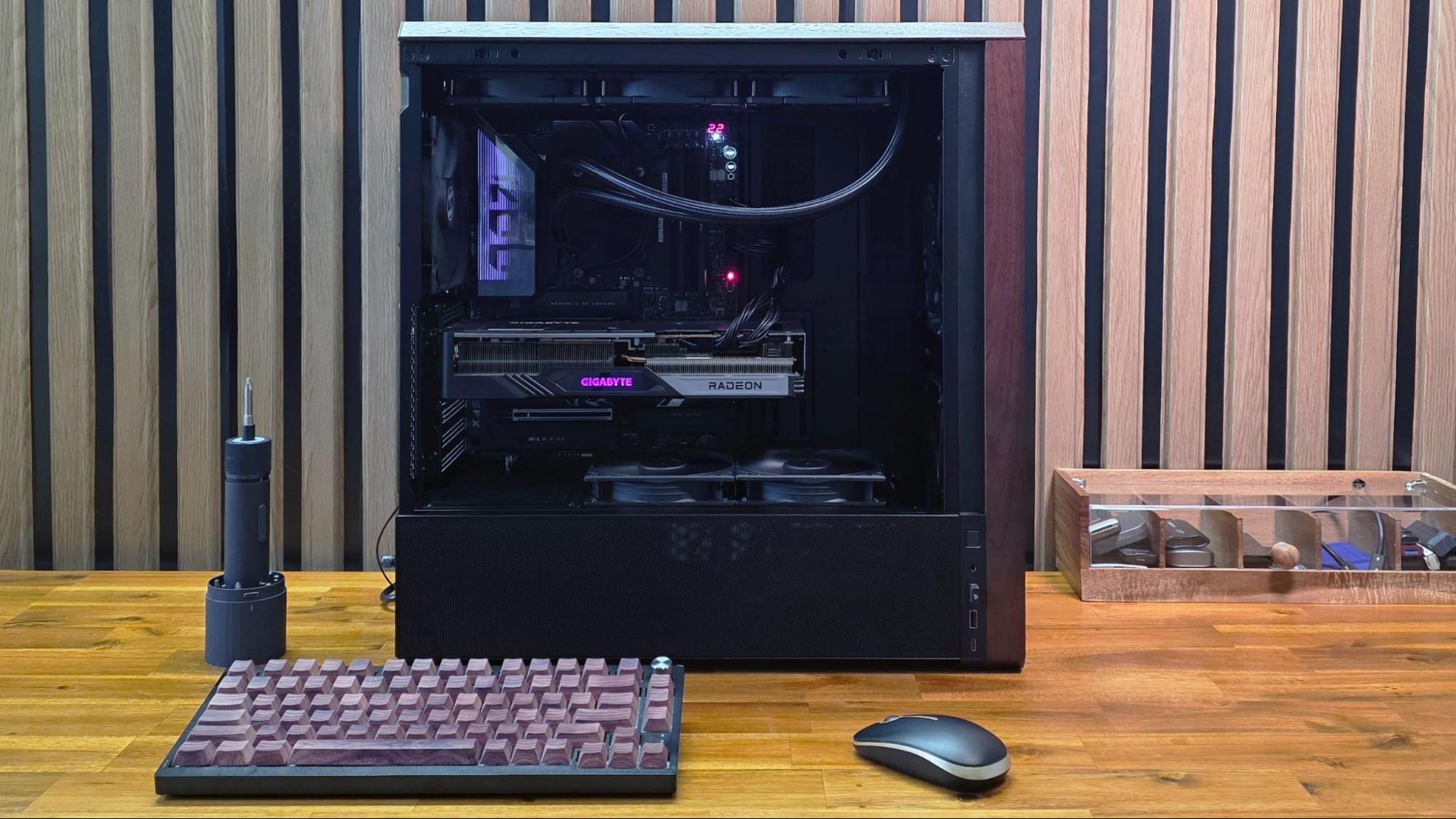
In 2025, we updated our external storage testbed to an AMD Ryzen 7600X-based PC with an Asus ROG Crosshair X870E Hero motherboard, installed in Lian Li’s Lancool 217 case. This was done in part because we needed a system with native USB4 support for upcoming drives (like this one).

All the drives in the charts below have been re-tested on the new X870E system, with the exception of the final Iometer sustained sequential test. That benchmark is less about top speed and more about how long a drive can write before depleting any fast cache onboard. We also updated to CrystalDiskMark 8, rather than the older (and non-comparable) version 7 we used on the previous testbed.

A note on testing, before we jump into the benchmarks: Out of the box, our Adata Urban Tapsafe review unit was oddly inconsistent in benchmarks. Most of the time, its read speed topped out below 1,000 Mb/s, while its write speed was nearly double that. At first I thought there might be an issue with our storage testbed, or the cable. I tried changing both and sometimes the drive would read faster, closer to its expected performance. Then it wouldn't, even when plugged into the same machine with the same cable.

After lots of on-and-off testing, getting inconsistent results that usually didn't match Adata's listed read specs by a long shot, I eventually performed a secure erase on the drive via DiskPart, formatted it, and tried again. Surprisingly, that sorted out the issue, and the drive was finally consistent in both its read and write speeds, matching the drive's sequential ratings. Our testing below reflects the drive's capabilities after that secure erase and reformatting cycle.

Trace Testing - PCMark 10 Storage Benchmark

PCMark 10 is a trace-based benchmark that uses a wide-ranging set of real-world traces from popular applications and everyday tasks to measure the performance of storage devices.

Adata Urban Tapsafe 2TB SSD

(Image credit: Tom's Hardware)

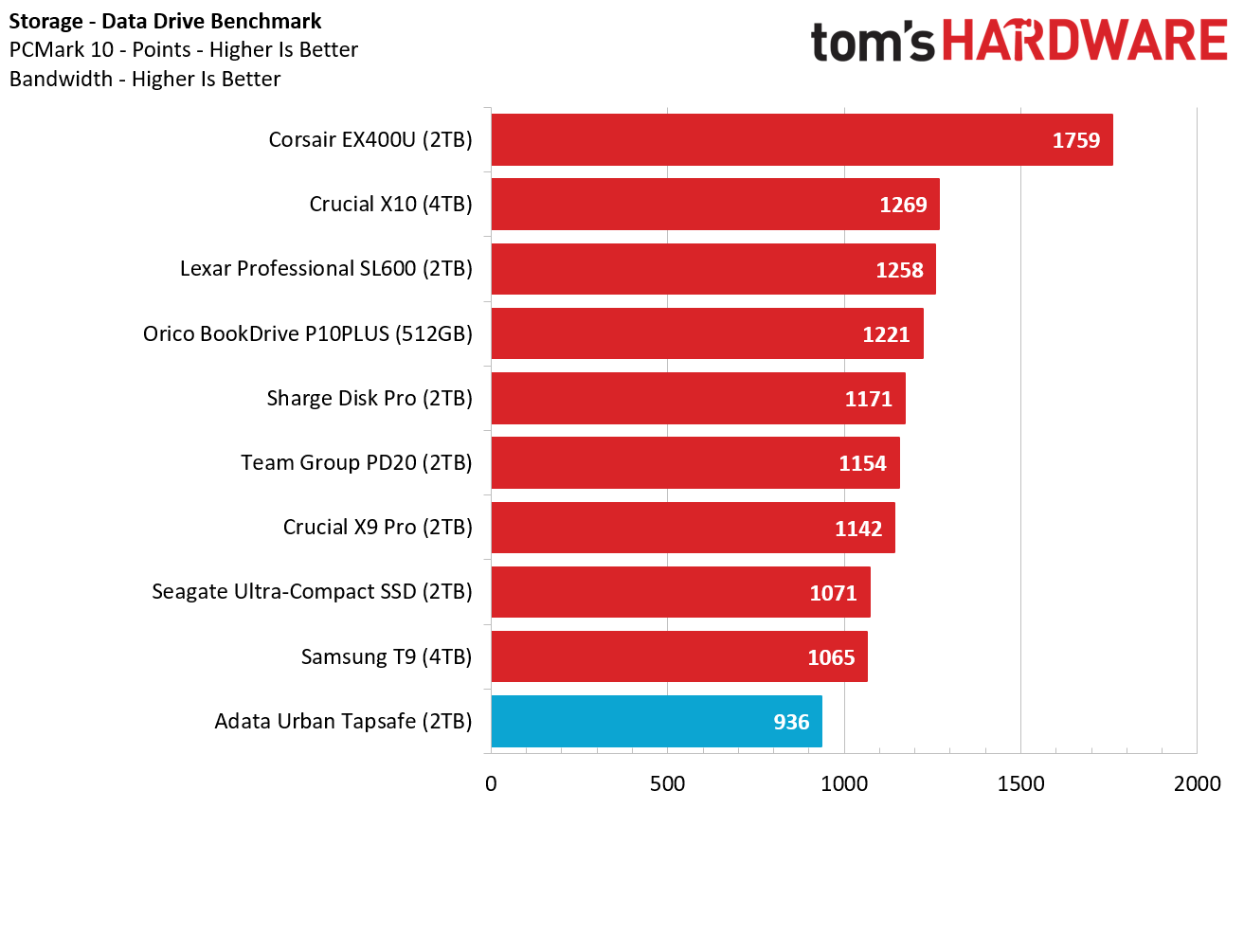
The Adata drive doesn't start out our benchmark run looking its best – in fact, it landed dead last here, bested even by 10 Gbps drives like the Crucial X9 Pro and the Sharge Disk Pro, as well as Samsung's T9. Its performance isn't massively behind the competition, but it's an early indication that this isn't the snappiest of performers.

Transfer Rates – DiskBench

Adata Urban Tapsafe 2TB SSD

(Image credit: Tom's Hardware)

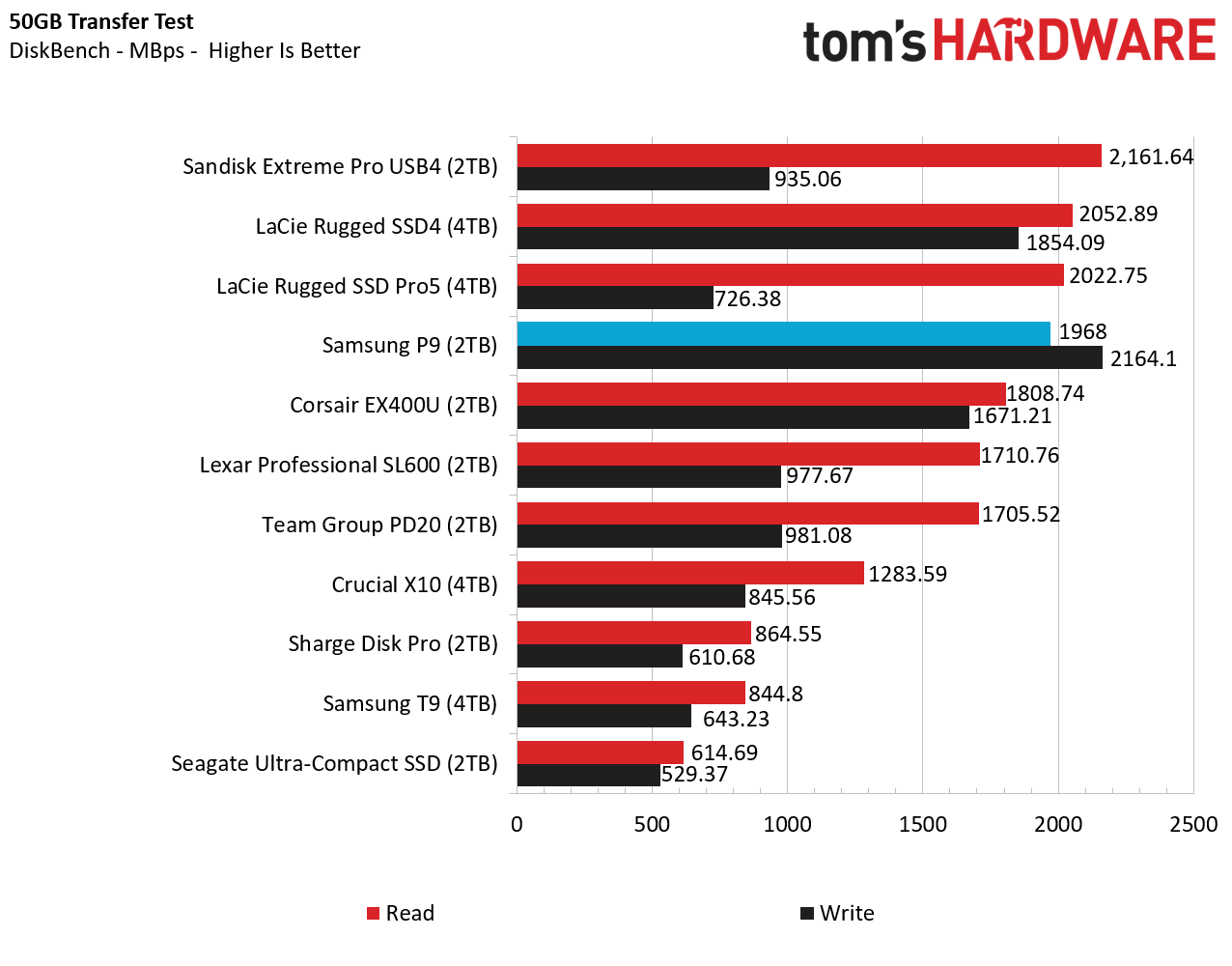
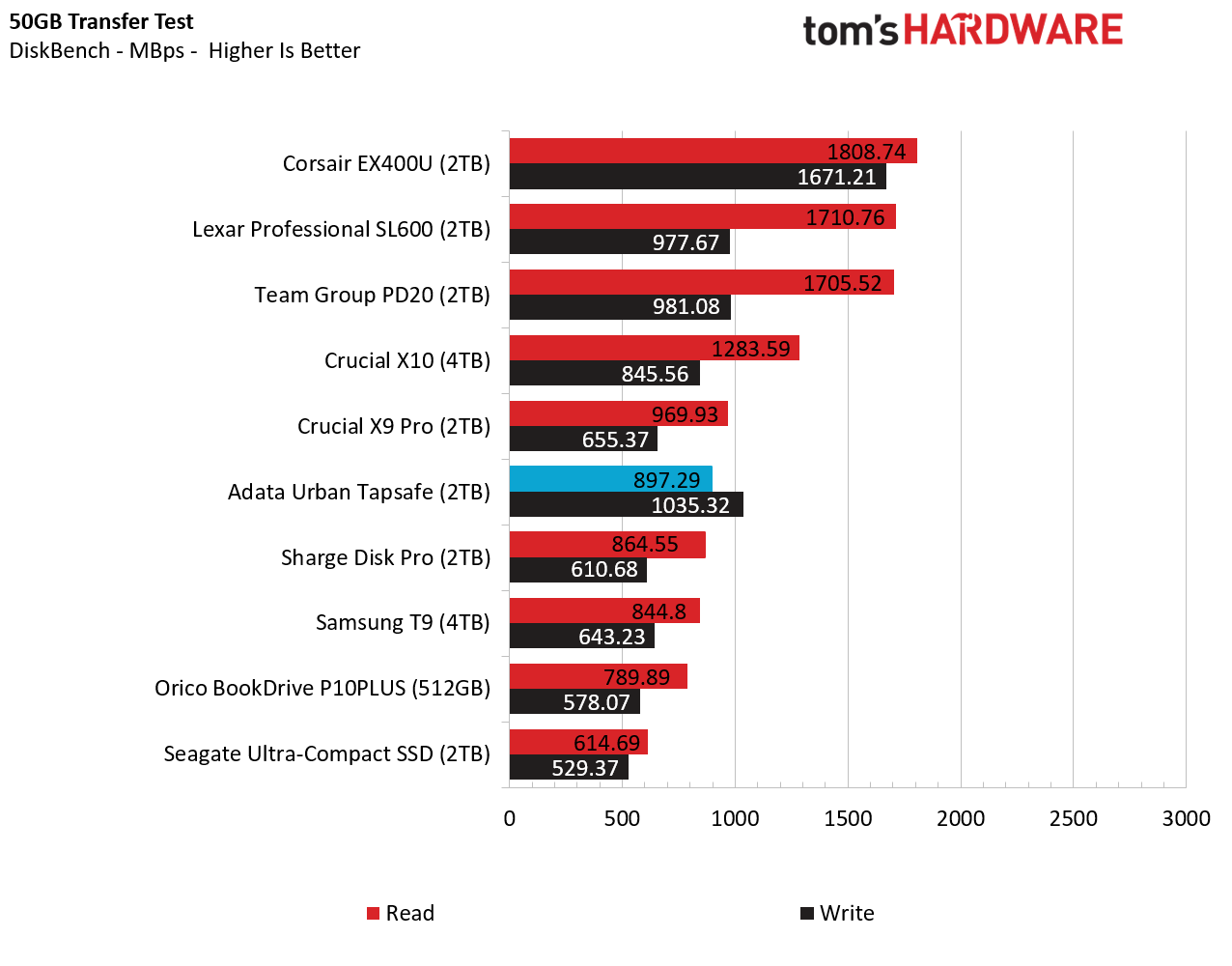
In this real-world file transfer test, the Adata drive fares significantly better, landing in the middle of our charts in terms of read speeds, at 897 MB/s. And its writes were even more impressive, beating everything in our charts save for the 40 Gbps Corsair external SSD.

Synthetic Testing CrystalDiskMark

CrystalDiskMark (CDM) is a free and easy-to-run storage benchmarking tool that SSD companies commonly use to assign product performance specifications. It gives us insight into how each device handles different file sizes. We run this test at its default settings.
Adata Urban Tapsafe 2TB SSD

(Image credit: Tom's Hardware)

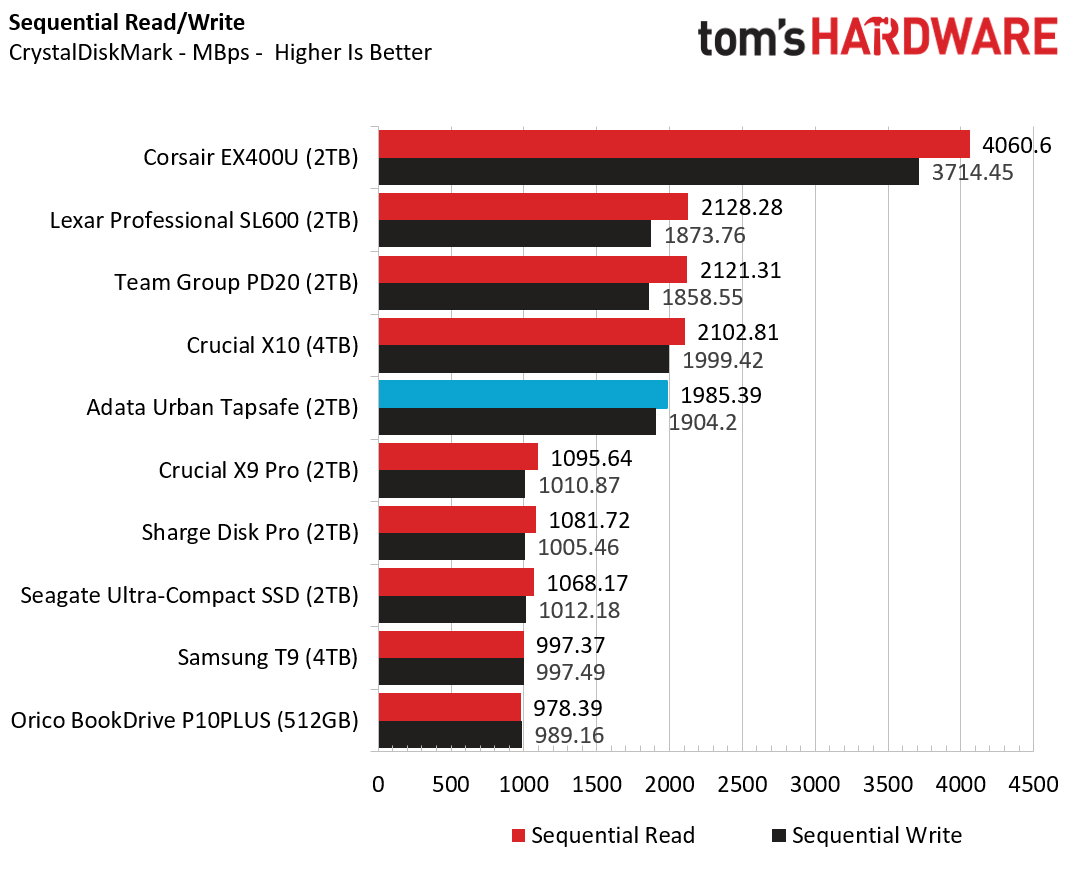
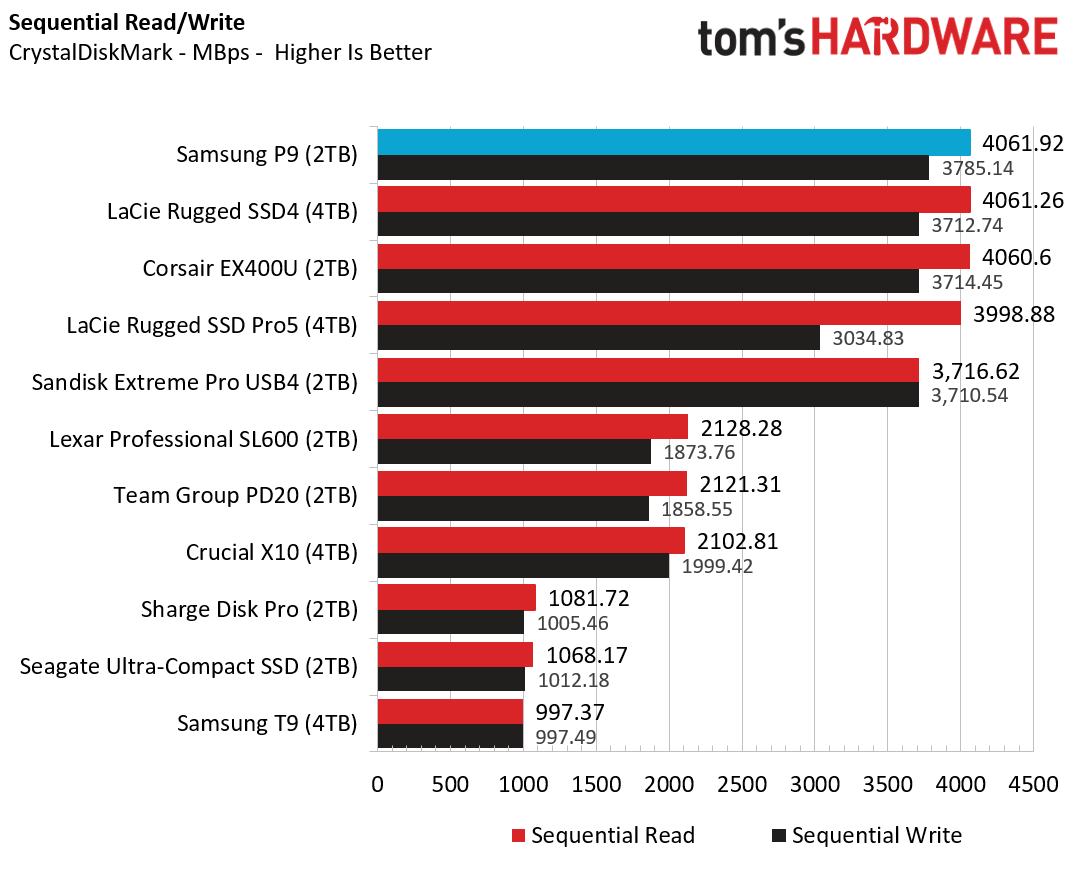
Moving back to synthetic tests and this sequential benchmark, the competing 20 Gbps Crucial and Team Group drives did better on reads again. But on writes, only the Crucial and Corsair drives did better here.

Adata Urban Tapsafe 2TB SSD

(Image credit: Tom's Hardware)

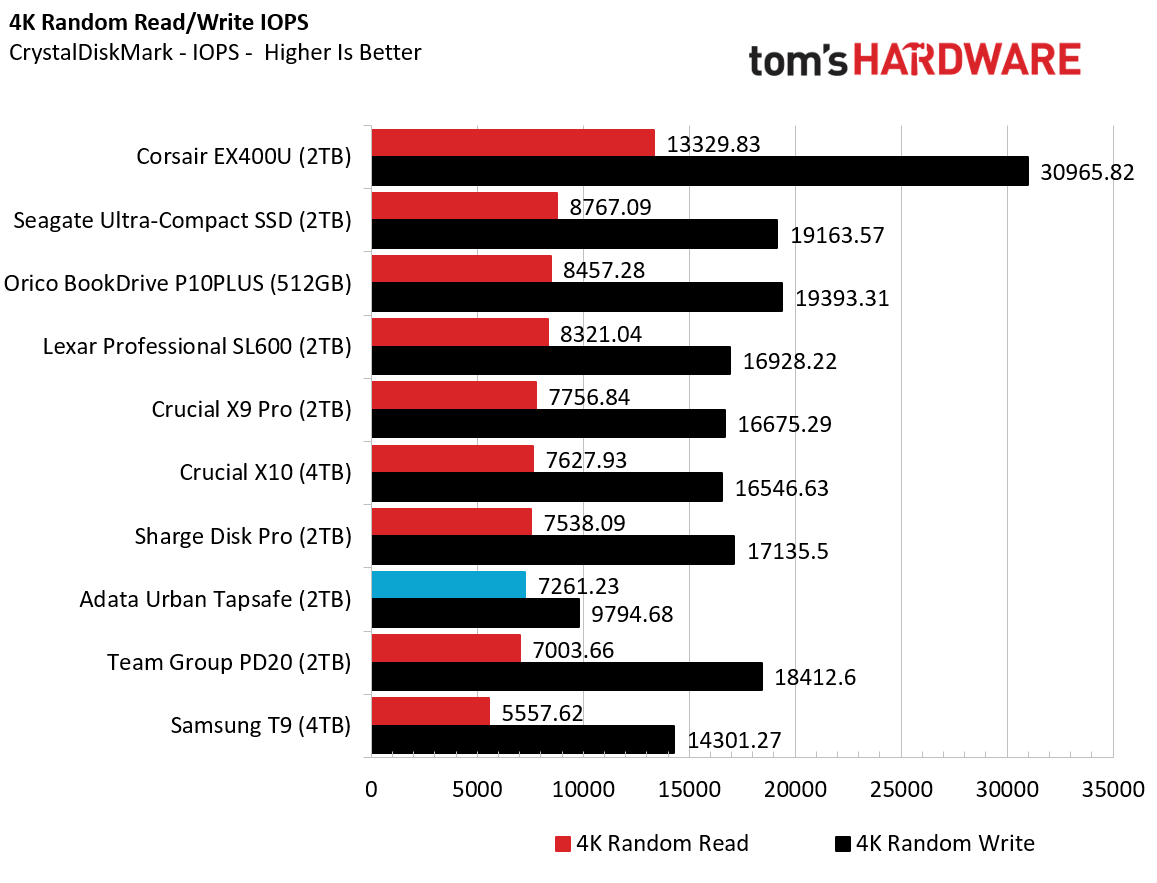
In small file performance, we see perhaps an explanation why the drive also didn't do well on PCMark. Its small-file read performance was third-from-last place, while write IOPS trailed everything else by a significant margin. This performance isn't quite damning, but it does mean the Tapsafe isn't the best option if you want to run programs directly from your drive, or use it as a boot drive.

Sustained Write Performance

A drive's rated write specifications are only a piece of the performance picture. Most external SSDs (just like their internal counterparts) implement a write cache, or a fast area of flash, programmed to perform like faster SLC, that absorbs incoming data.

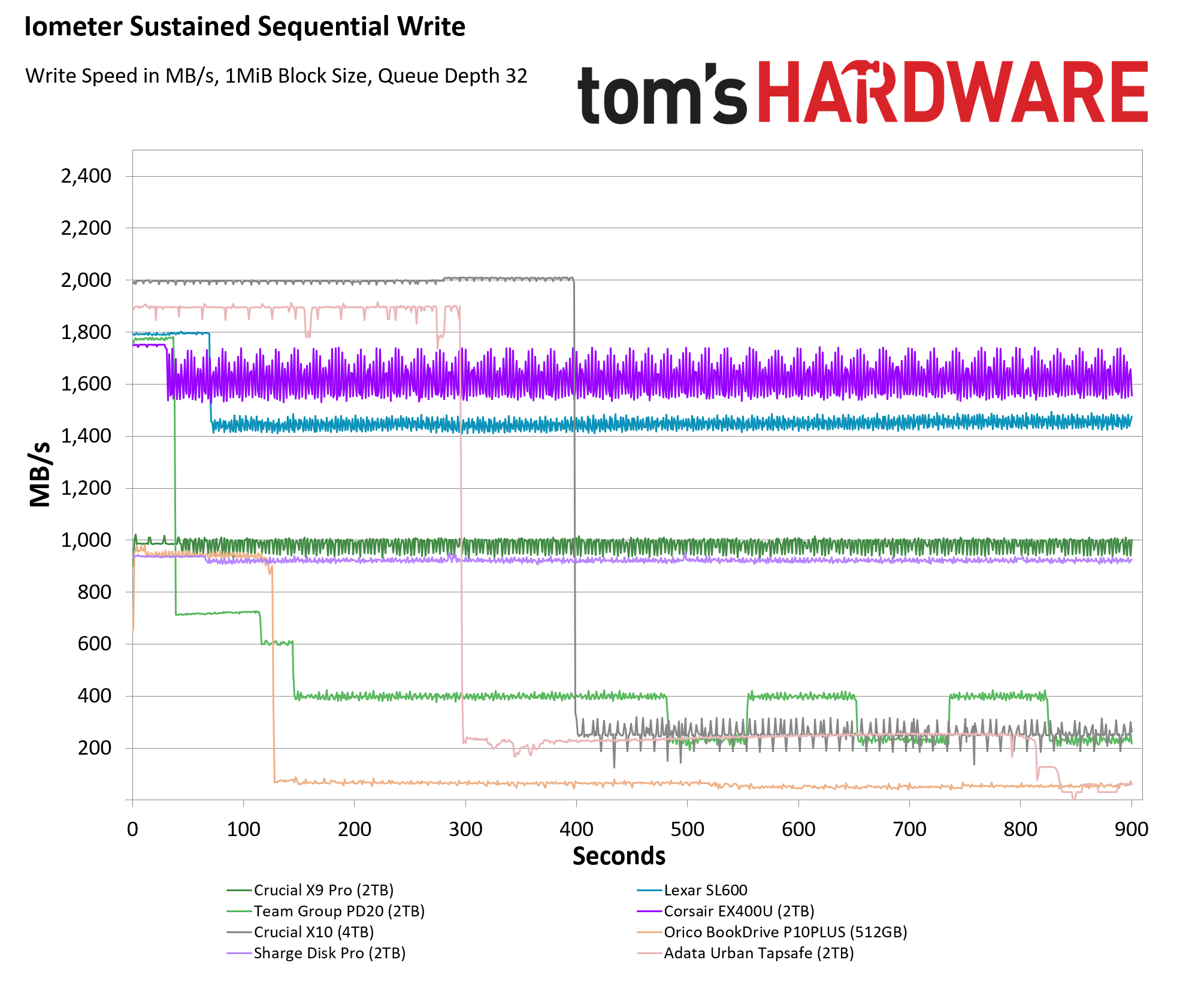
Sustained write speeds often suffer tremendously when the workload saturates the cache and slips into the "native" TLC or QLC flash. We use Iometer to hammer the SSD with sequential writes for 15 minutes to measure the size of the write cache and performance after the cache is saturated.
Adata Urban Tapsafe 2TB SSD

(Image credit: Tom's Hardware)

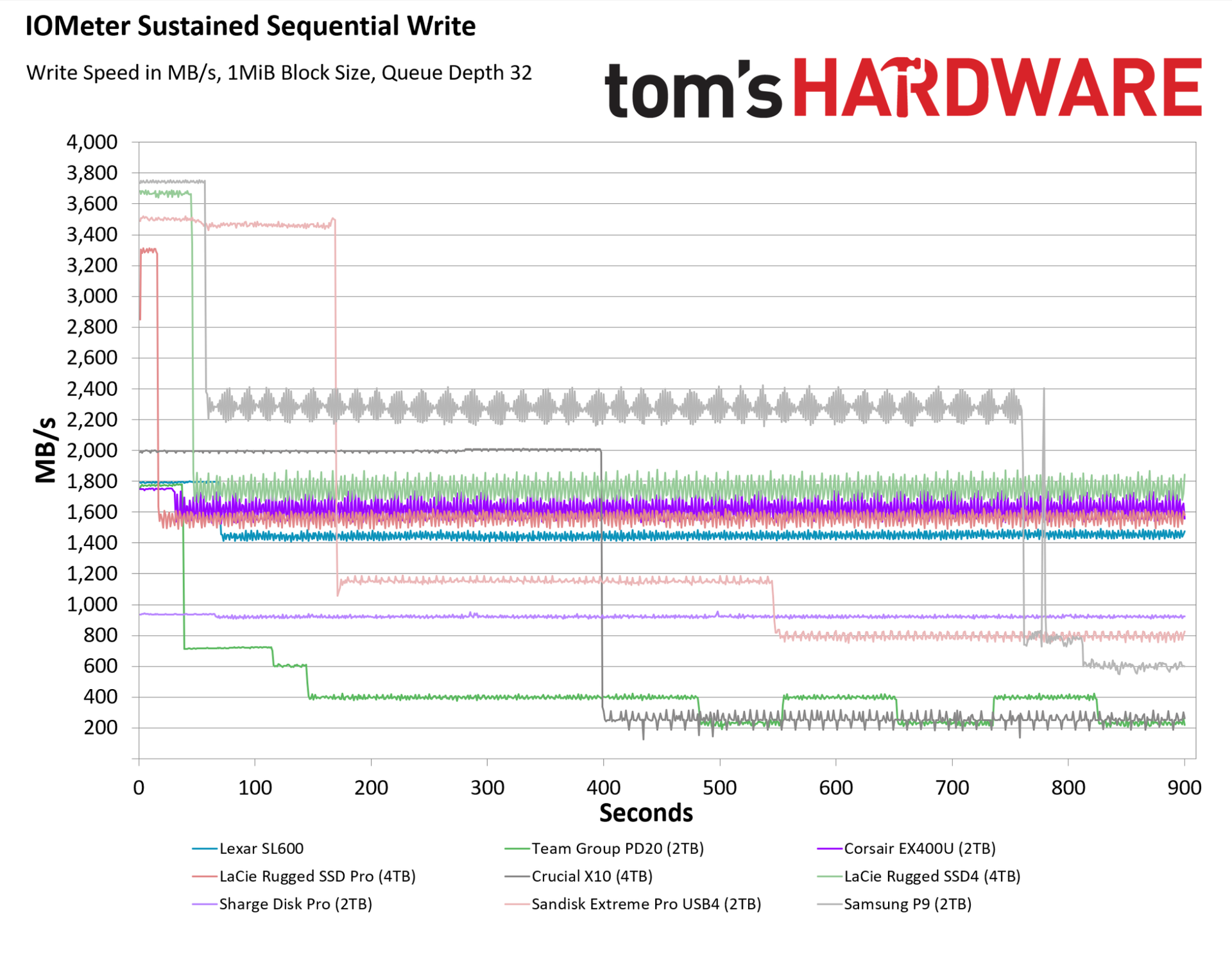
On this grueling sustained write test, the Adata Urban Tapsafe managed to deliver between 1,800 and 1,900 MB/s for a solid five minutes, before dropping to about 250 MB/s, and then dropping again near the end of our 15-minute test to below 70 MB/s. While its speed past about the 14-minute mark is abysmally slow (less than a laptop hard drive), the Tapsafe's showing here is easily better than the competing Team Group drive, which started slower and fell faster. Crucial's X10 is a better option on this sustained test, as is Corsair's USB4 drive (which is of course significantly more expensive). But so long as you aren't expecting a 20 Gbps drive with pro-level write performance, the Tapsafe is speedy and consistent enough to keep most users happy.

Bottom Line

Adata Urban Tapsafe 2TB

(Image credit: Tom's Hardware)

Adata's Urban Tapsafe is a unique drive that's well-suited to those who want basic, convenient control over who has access to the data on their drive, and who want to share that access with a handful of other users who also have physical access to the drive. Its tap-to-unlock, NFC-based access might not be technically as secure as more traditional AES-based encryption, but it worked well during our testing. And the ability to selectively give read or read / write access to up to nine other people via their own phones and apps could make this drive a good fit for collaborative projects or family file storage.

In terms of performance, it's not the fastest 20 Gbps drive, but it's also far from the slowest. For mainstream tasks like video recording or moving large files quickly, its performance is more than speedy enough — just make sure your devices have a 20 Gbps port if you want the fastest possible speeds.
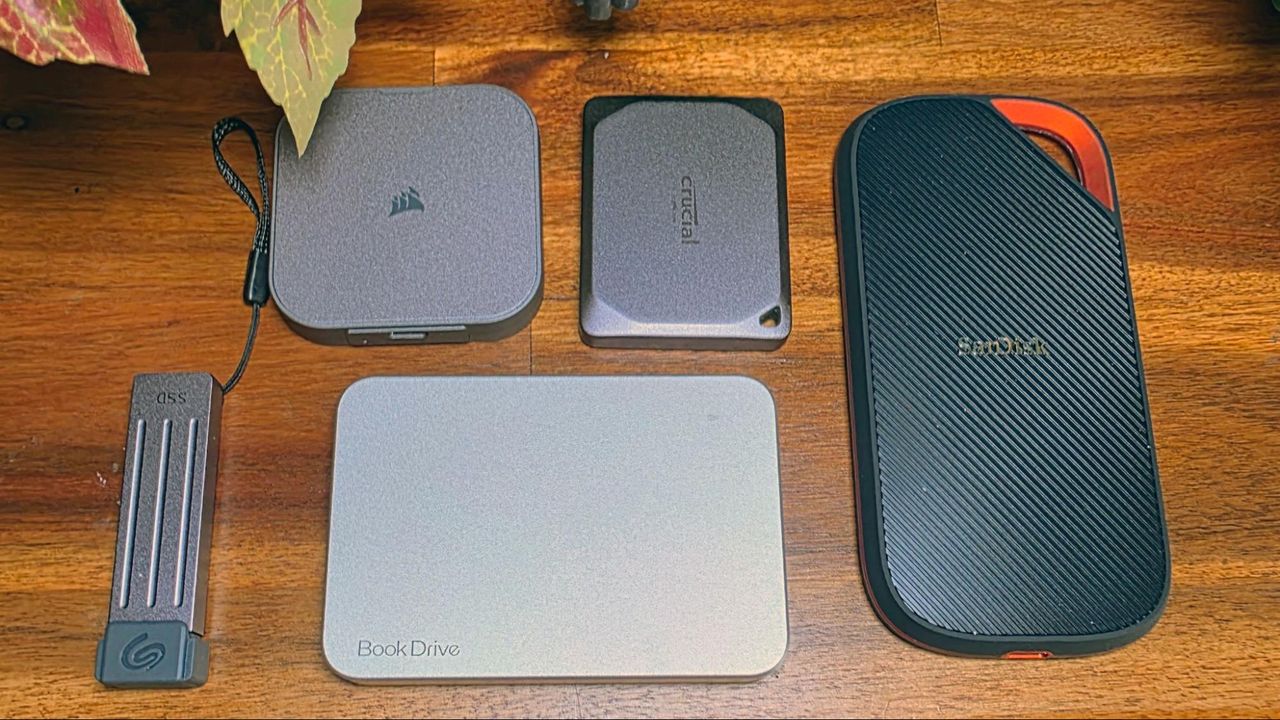
As a niche device for those cases where you need the drive's NFC unlocking and multi-user sharing, the Urban Tapsafe is easy to recommend. But its high price means it's likely to remain a niche, because Team Group's PD20 performs nearly as well (barring sustained writes) while costing much less. And Crucial's X10 drive is a significantly faster 20 Gbps alternative that sells for a little more at the 1TB capacity, and is about $30 cheaper than the Tapsafe at its top 2TB tier.
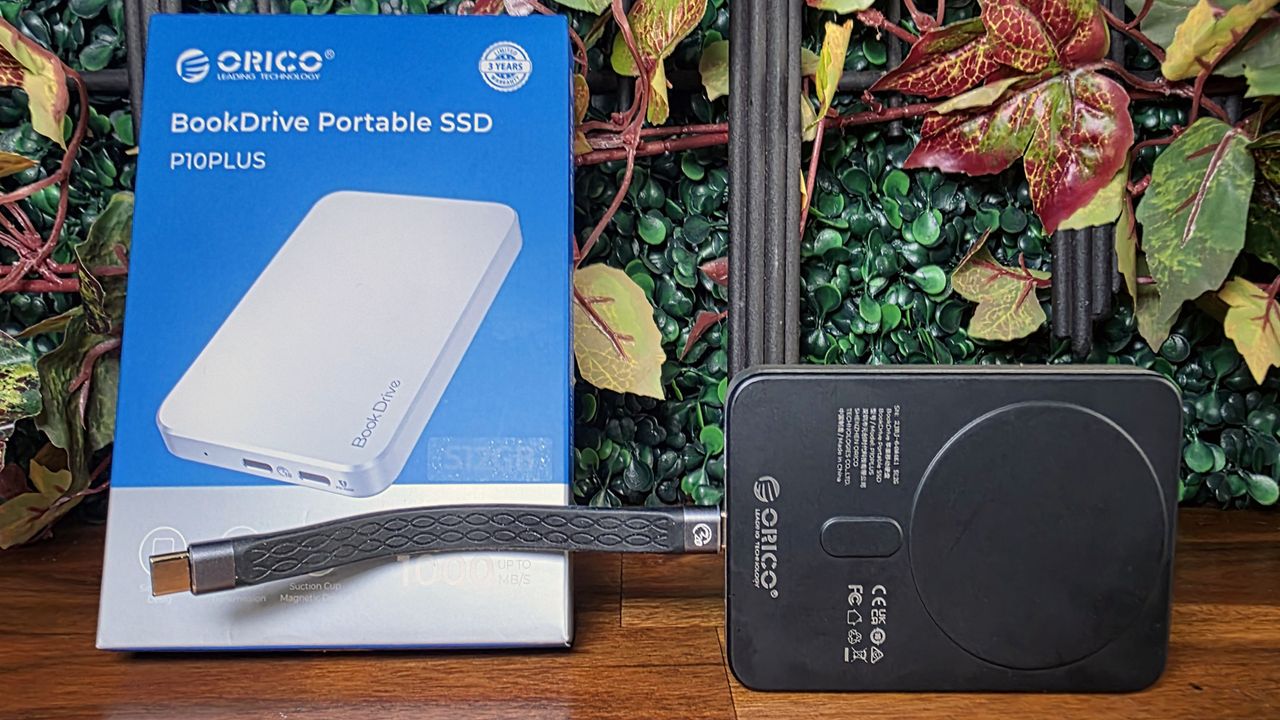
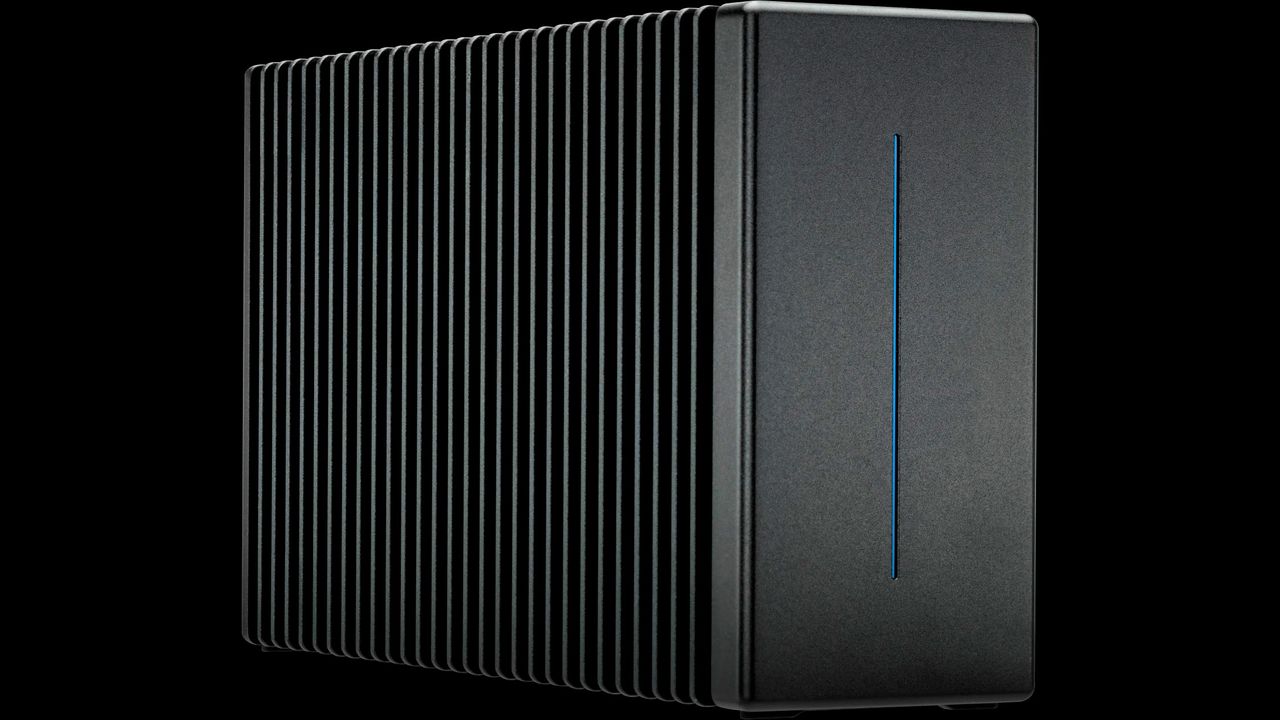
MORE: Best SSDs

MORE: Best External SSDs

MORE: Best SSD for the Steam Deck

Crucial SSD owner offered $200 refund for 4TB drive now selling for over $500 — company finally caves to warranty demands after protracted back-and-forth

2026年8月26日 20:05

Memory and data storage manufacturer Micron announced its exit from the consumer market earlier this year and pledged to honor warranties for existing products. However, according to a recent RMA case on Reddit, the company seems to be struggling to stick to that promise. Instead of replacing a faulty portable SSD, the company offered the customer a refund that was significantly lower than the product’s current retail price.

Explaining their frustrating RMA experience, u/CarefulMeasurement99 said that their Crucial X9 4TB portable SSD stopped working, after which they contacted support, followed the troubleshooting process, and had their RMA approved. Unfortunately, they were later informed that the company did not have any units available for the particular product because the replacement inventory was exhausted. Therefore, instead of providing a 1:1 replacement SSD, the company would issue a refund of $199.99, the same as the original invoice price from last year.

Crucial is forcing a $200 refund for my dead 4TB SSD instead of replacing it because "they have no stock." (4TB SSDs are now $800+). Am I getting scammed?
 from r/pcmasterrace

Due to the ongoing NAND and DRAM crisis, almost every memory and storage product has significantly gone up in price. The Crucial X9 4TB is currently priced at over $500 on Amazon, which basically left the customer facing a loss of nearly $300. The customer explicitly refused to accept the offer and told Micron support that they did not want a refund and requested a 1:1 replacement under warranty. They also offered to accept an alternative 4TB SSD model or wait indefinitely until the RMA inventory was restocked.

After a long ordeal, pushing back eventually paid off for the customer. They sent Micron a firm final email rejecting the refund and demanding a 4TB equivalent replacement or alternative. The customer also mentioned that the case was gaining traction on Reddit and pointed out potential action under the FTC and Magnuson-Moss Warranty Act. Within a few hours, the case was escalated to a different representative, who informed them that a “recent inventory update” had revealed limited replacement stock and approved a direct 1:1 replacement.

While the case raises questions about Micron’s initial claim of no replacement units being available, there is no way to independently verify that. That said, this does not appear to be an isolated case. Earlier this month, we reported a similar RMA horror story in which Micron offered a customer a refund instead of replacing their product due to a lack of inventory. Only after further communication did Micron provide an acceptable solution.

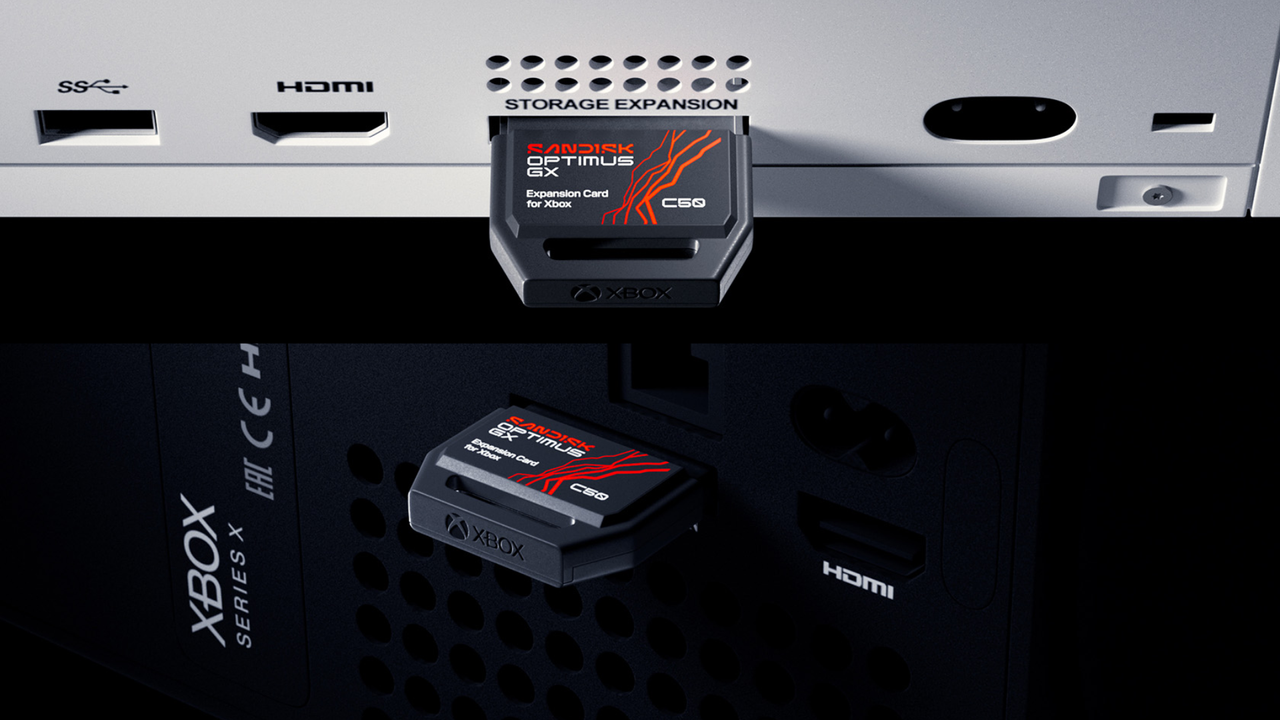
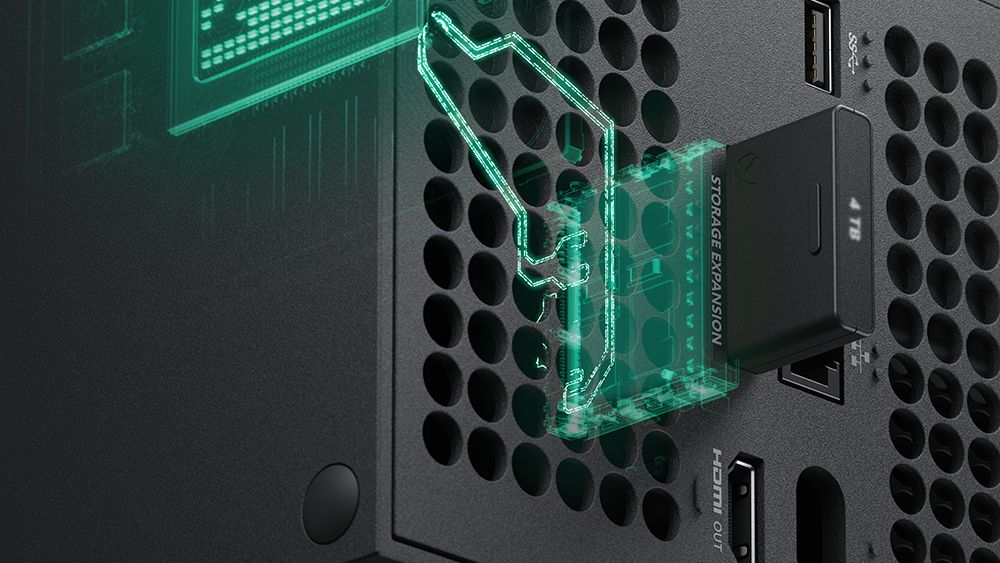
SanDisk expansion cards for Xbox Series X|S now available on Amazon — alternative storage solution to Seagate, WD arrives on the market five years after the launch of the consoles

2026年8月21日 23:25

An alternative storage solution for the Xbox Series X|S finally arrived on the market five years after its launch. The SanDisk Optimus GX C50 starts at 1TB on Amazon and costs $249.99, while the 2TB version will set you back $486.99. SanDisk initially announced the Optimus SSD lineup in early January 2026, but it only revealed this storage solution for the Xbox Series X|S in August of this year. These drives are also listed at a discount directly on the SanDisk website, with the 512GB available for just $109.99, and the 1TB and 2TB versions priced at $199.99 and $339.99, respectively. However, they’re all listed as unavailable at the time of writing, meaning you’ll have to be patient and click on ‘Notify Me’ to get informed once stock becomes available.

Seagate was the only brand to offer a storage expansion card for the Xbox Series X|S at launch, with the Seagate Storage Expansion Card for Xbox Series X|S, initially available at a 1TB capacity with an SRP of $199.99. Unfortunately, the AI-driven memory and storage chip shortage has caused NAND prices to balloon, meaning the cheapest brand-new options from third-party sellers on Amazon now start at $318. The brand followed this up with 2TB and 4TB options, with an SRP of $299.99 and $549.99, respectively, but Amazon pricing has brought the former up to $473.99 while the latter remains unavailable.

The Xbox Series X|S launched in 2020, meaning it has been more than six years since these consoles arrived on the market. Despite that, Seagate and SanDisk are your only options if you want to play games directly off the add-on storage slot. Western Digital also used to make these add-on cards for the Xbox, but its decision to focus on HDDs and the spinoff of SanDisk as a separate entity meant that gamers can no longer buy WD storage expansion cards.

These specialized storage expansion cards are only needed if you want to increase the capacity of your console to install more games directly on it. You can still keep your games offloaded on an external hard drive and just plug it into the console when you want to play it again. Crucially, you'll have to move the games from your hard drive back to your Xbox's SSD to ensure the games run properly, which is why these expansion cards are a popular alternative.

This is a different take from Sony’s PS5, which comes with an NVMe slot right on the console. This means that you don’t have to buy proprietary PlayStation SSDs to upgrade the capacity of the console — any PCIe 4.0 NVMe SSD would work, making capacity upgrades cheaper. The Nintendo Switch 2 took a similar approach, where it allowed users to upgrade the capacity of their handhelds with a microSD Express slot. It must be noted that microSD Express cards are quite niche, though, and more expensive than ordinary microSD cards, but they could potentially be used on other devices that have a similar slot, making them far more useful compared to the Xbox Series X|S expansion cards, which only work with the particular consoles.

Redditor buys suspicious drives on eBay just to report the scamming sellers if they get a fake SSD or HDD — latest '16TB' find has weights and microSD card hot-glued inside the enclosure to make it feel legit

2026年7月10日 00:03

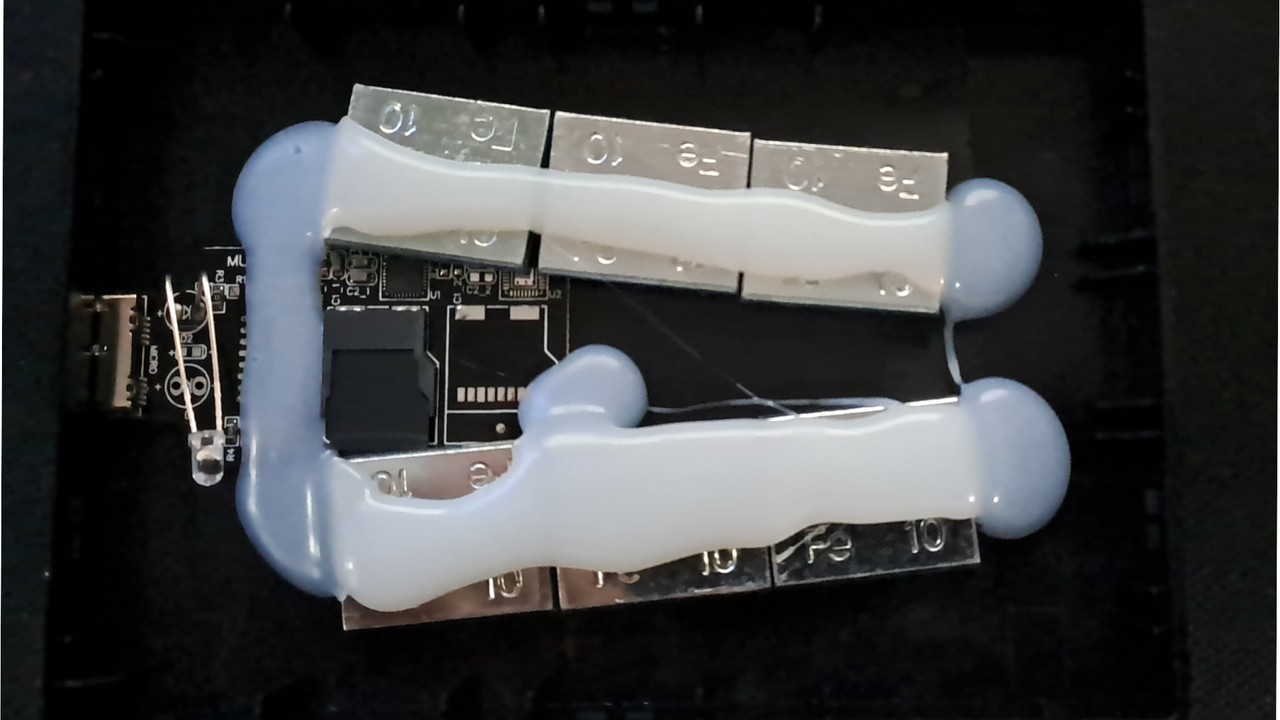
A Reddit user shared the 16TB SSD they bought on eBay for less than $30 (EUR 25), which only contained a board and a microSD card hot-glued with some weights to make it feel like a legitimate drive. u/Hartkralle shared their find, saying that they buy from these suspicious listings when they come across them. Since eBay has a robust consumer protection policy, they get their money back while the seller loses their account.

16 TB SSD for only 25€? What could go wrong? from r/pcmasterrace

"I buy one, check if it's legit or not, and if not, [I] report the seller to eBay. I get my money back, and they (the seller) lose [their] account,” u/HarkKralle said in a comment. “If I couldn't ensure that the money would flow back, I wouldn't do it.”

Another Redditor said that they appreciate what the OP was doing, but they were “99.99% positive” that the scammer would have another account in an hour. The OP replied, saying, “Possible, but even that it's an hour they cannot use to scam people and proof/information for more people that scams like this exist.”

Scams like these have been around for decades now. One commenter even added that back in the ‘90s, they used high-quality 60-minute VHS tapes for their work, but one time received cheap, low-quality tapes that could only hold five minutes of footage instead. The sample that u/Hartkralle showed is also relatively low effort. Because of the ongoing memory and chip shortage, we’ve seen exceptionally good clones of Samsung 990 Pro SSDs, one of the best SSDs you can buy today. They have become so sophisticated that the most reliable way of spotting if they’re fake is to check them on CrystalDiskInfo.

One of the downsides of these fake drives is that you won’t get the read and write speeds that you’d expect from a modern SSD. But the bigger issue here is that using them could lead to complete data loss. For example, the fake drive that u/Hartkralle bought reports a capacity of 16TB, but the microSD card inside it is only 60GB. So, if an unsuspecting user transfers more than 60GB of data, they’d end up corrupting everything stored in the drive.

A 2TB Amazon Basics Portable SSD already costs almost $360, while an 8TB SSD from reputable brands like SanDisk, Crucial, or Lexar already hit $850. So, someone who doesn’t follow developments in the tech industry and stumbles across this cheap drive might think they’re getting a steal, when, in reality, they’re the ones being stolen from. Thankfully, eBay’s consumer protection allows people who were scammed, intentionally or otherwise, to get their money back — that is, if they know they were scammed in the first place.

New flat M.2 SSD adapter doesn't stick out from the motherboard, unlocking PCIe slots hidden under massive GPUs — JEYI's new 'ArcherX' AIC lays completely flush and supports PCIe 4.0 speeds

2026年4月19日 19:00
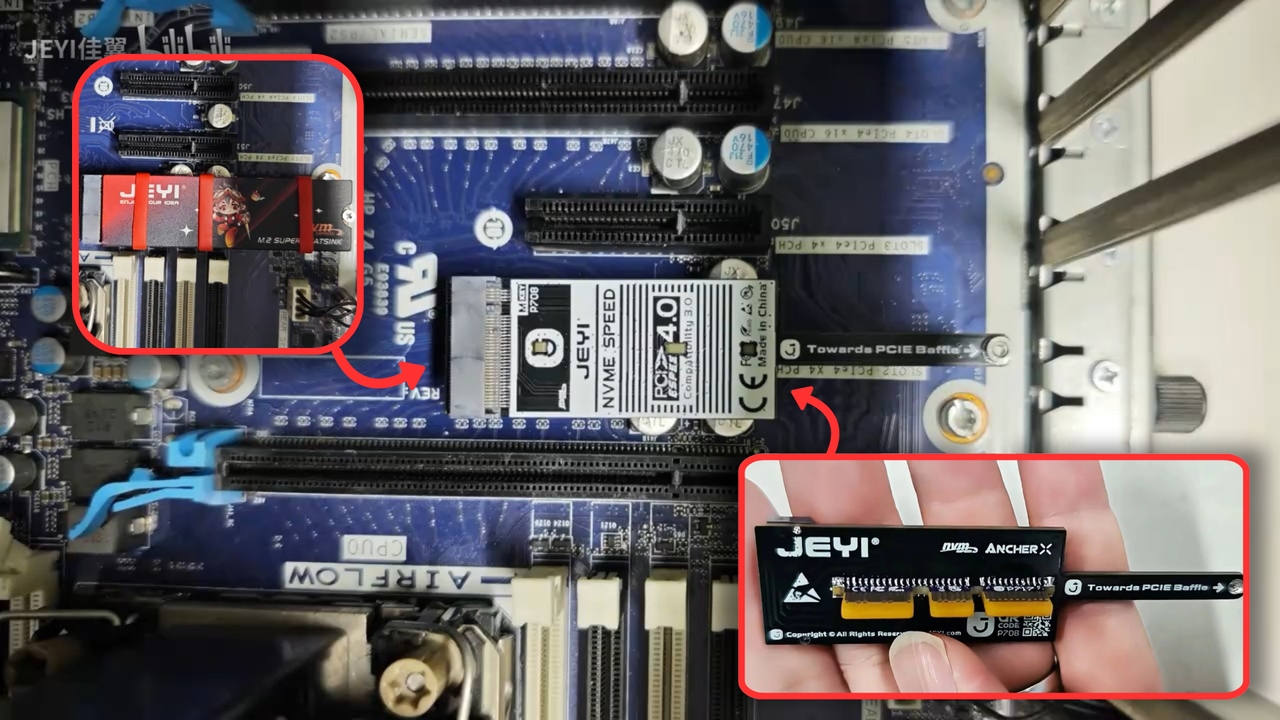
JEYI's new PCIe to M.2 adapter is flat and sits flush with the motherboard when installed in a PCIe slot. It basically takes up no perpendicular space, allowing an SSD to be installed even in tight spaces where the GPU is often blocking the area. The adapter features PCIe 4.0 speeds and is backwards compatible with PCIe 3.0 as well.

Xbox Series X|S storage expansion cards can be used on PC with an inexpensive CFexpress adapter — Speeds top out at 1,560 MB/s in Redditor's testing

2026年4月19日 18:40
You can use Xbox Expansion Cards on PC with a CFexpress adapter since these cards use a standard CFexpress Type-B connector. There are various options available such as PCIe to CFexpress or M.2 to CFexpress, and all of them are inexpensive. You just need to format the Expansion Card before it's useable, but don't expect blazing-fast speeds afterward.

Sharge Disk Pro 2TB review: Great sustained writes, active cooling, and a built-in hub

2026年4月4日 22:16
Sharge's Disk Pro pairs a snappy 10 Gbps SSD with a handy port hub and active cooling, all in a compact, eye-catching shell with a magnetic back. It's an impressive package for gamers and road warriors, but you'll pay a high price for all these features.

Orico BookDrive P10Plus (512GB) review: Magnetic back and 100W passthrough charging

2026年3月1日 21:00
Orico's BookDrive P10Plus feels solid and has a magnetic back for snapping onto smartphones, as well as a 100w passthrough charging port. But its performance is lacking in one key area – especially for professional users.

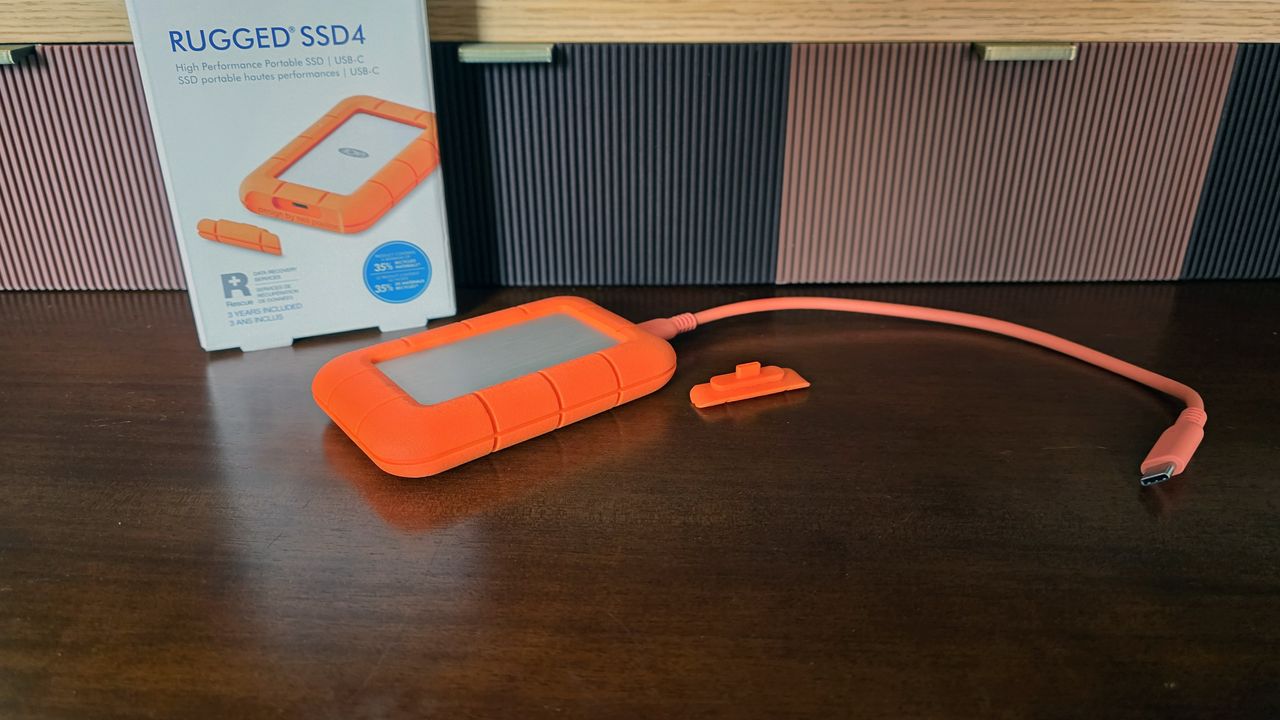
LaCie Rugged SSD4 4TB review: Impressive 40 Gbps speed on Mac and PC

2025年9月15日 16:30
Other drives perhaps make more sense for either macOS or Windows, but the SSD Pro4 is the best drive we’ve tested for those who want fast performance without having to think about what platform they’re plugging into.

❌
❌