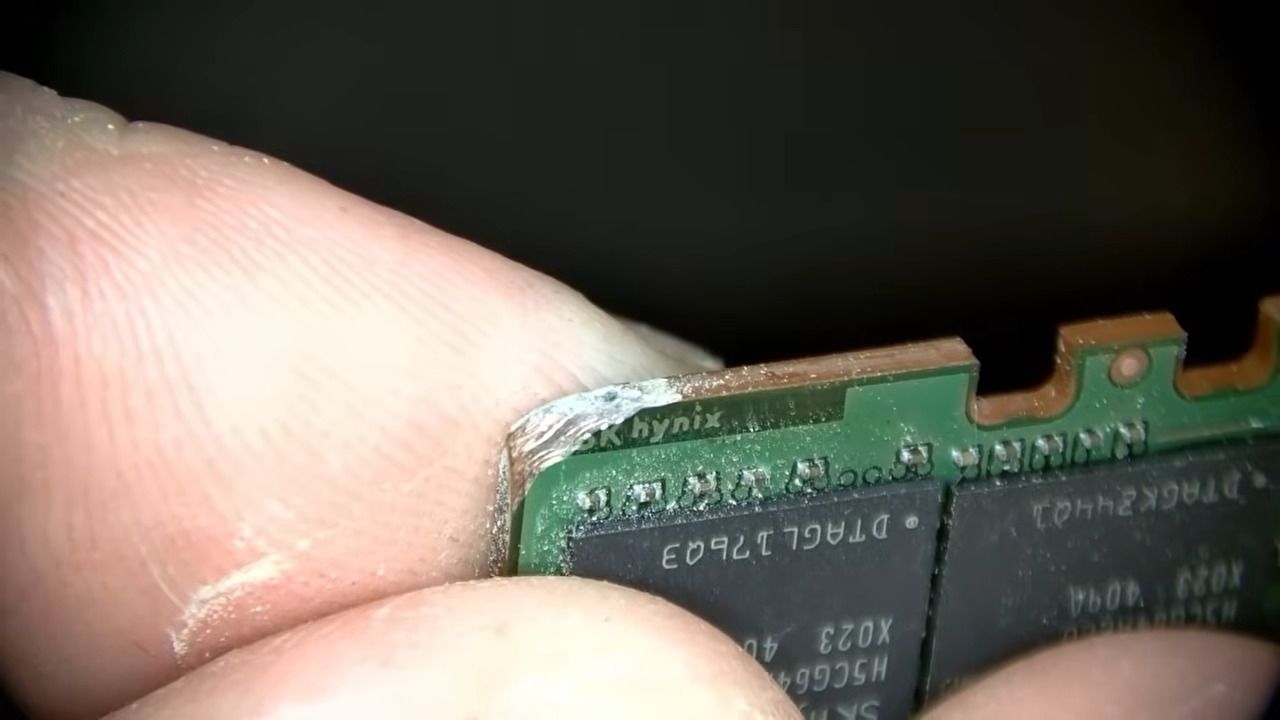
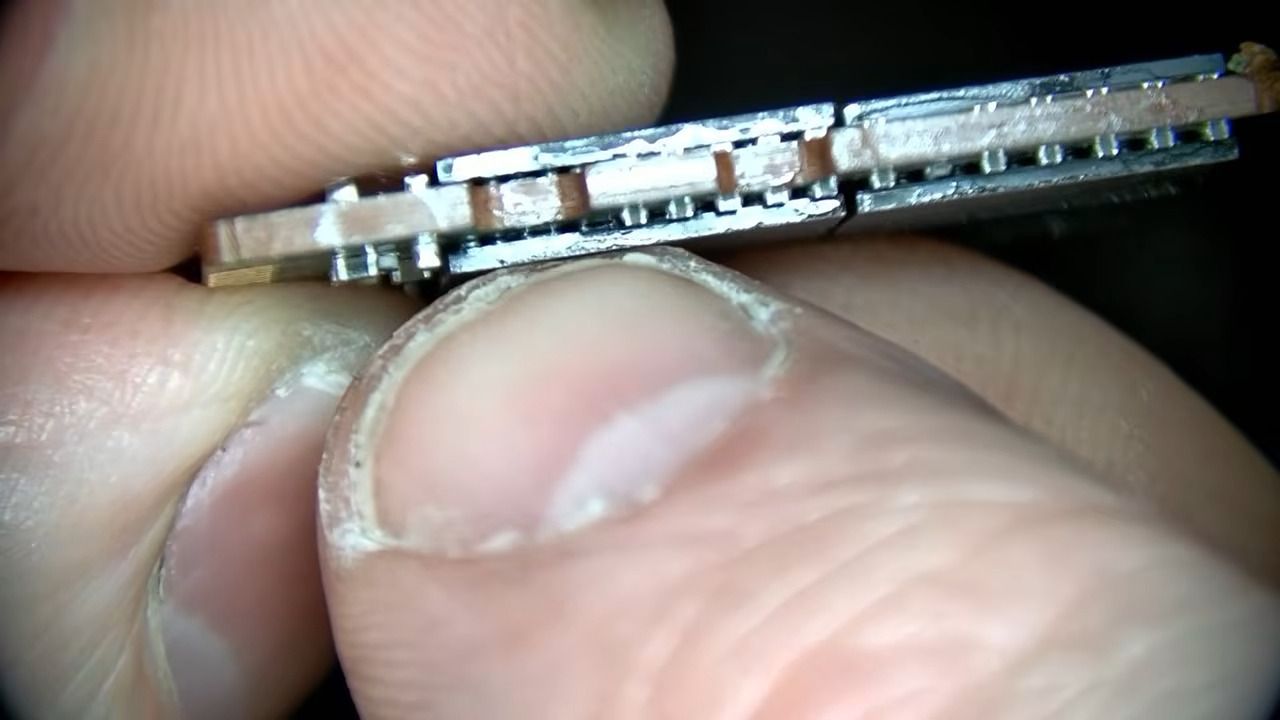
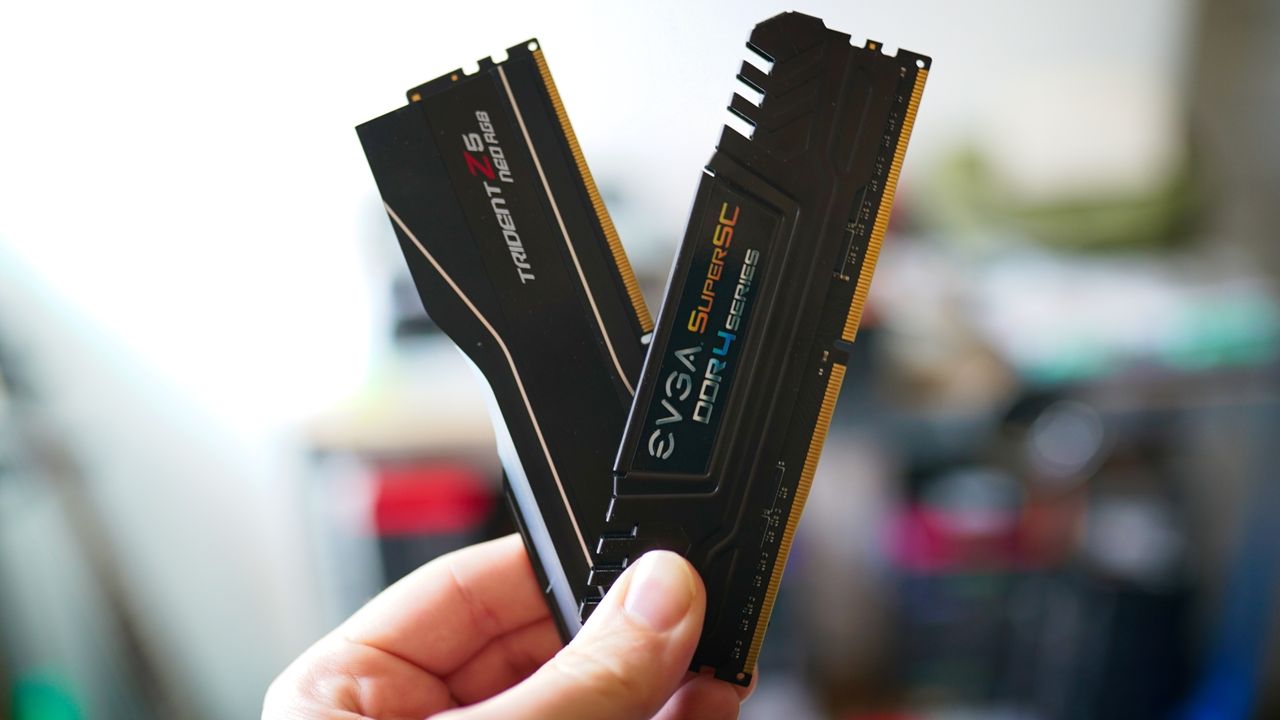
What if you could buy a cheap used DDR5 SODIMM (laptop memory) kit and transform it into a super-fast DDR5 desktop kit? That’s what electronics hobbyist Blighted Agent recently did when they succeeded in converting a SK hynix 2x 16GB DDR5-5600 SODIMM kit they got from Facebook Marketplace for $120 into a 2x 16GB DDR5-7800 desktop kit, claimed to be worth around $1,000. They also had to buy some blank DDR5 desktop memory PCBs from AliExpress for around $16 each, and a set of heatsinks for around $18.
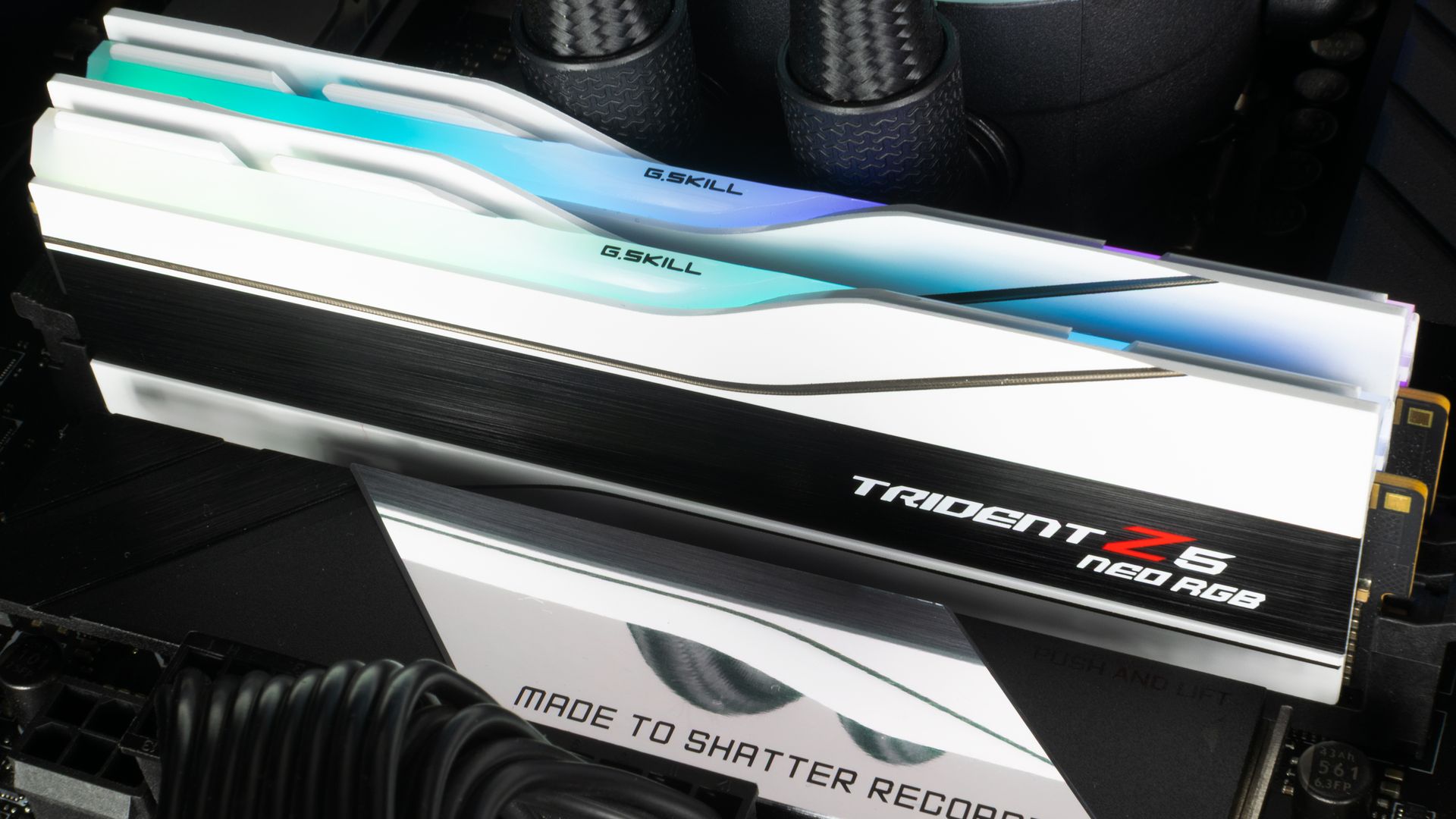
In the above video, our hero says they bought the donor laptop 2x 16GB DDR5-5600 sticks for just $120, which is a bargain. With extra bits and pieces from AliExpress (desktop DDR5 PCBs, etc.), the total bill of materials came to $175. Blighted Agent comments that the SODIMMs used what he believed to be SK hynix A-die modules, which are the same as the ICs used in expensive desktop DDR5 modules like the G.Skill Trident Royal line.
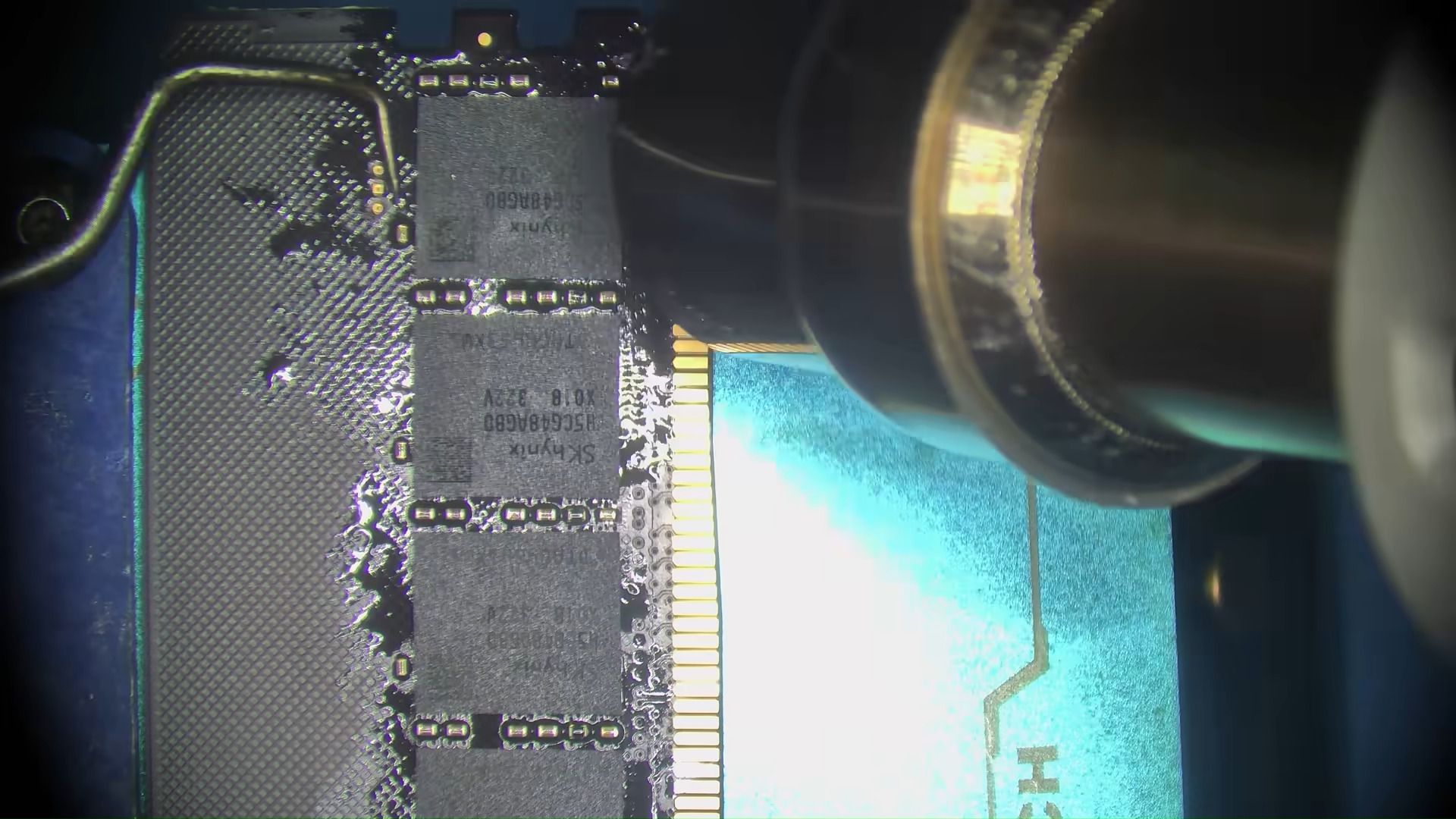
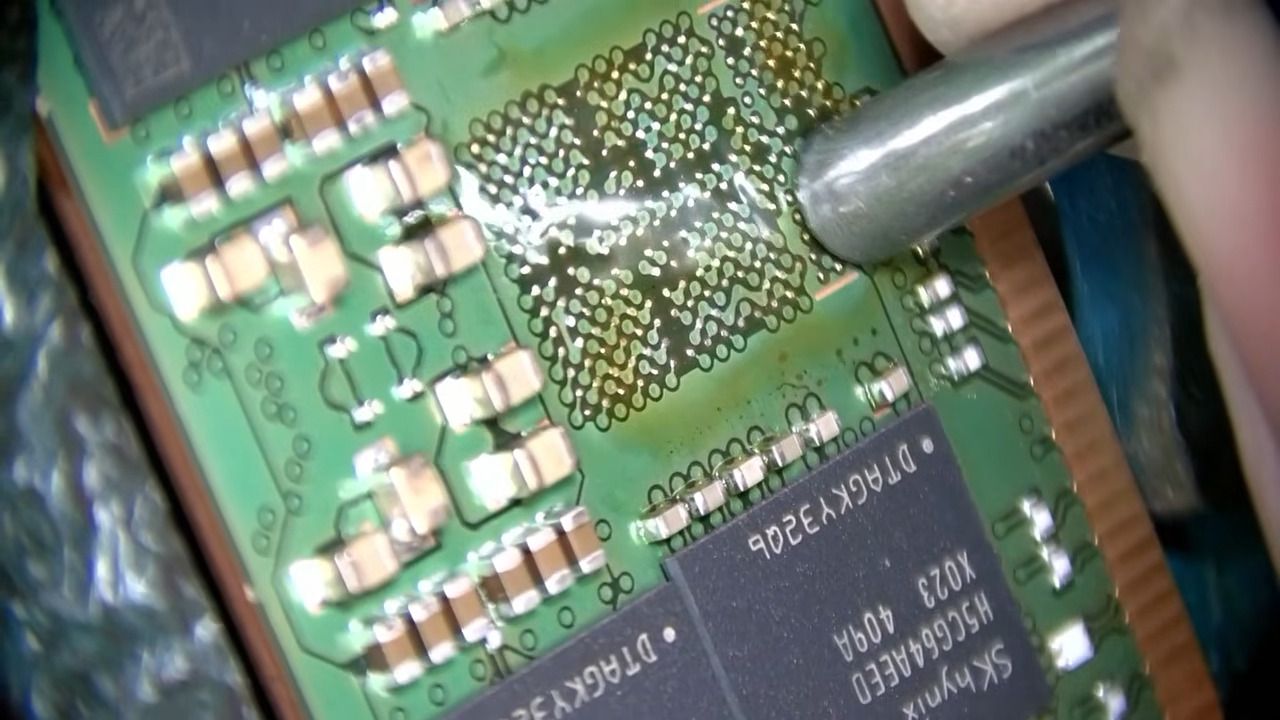
The process began with taking the memory ICs from the donor modules using a hot air station. Then they were cleaned and had 0.45mm leaded solder balls added, using a DDR5 stencil, reballing jig, and hot air. Next, the blank desktop DDR5 PCBs were prepared. A little solder was added to the plethora of BGA connectors to be ready for the memory chips to connect to.
The old DDR5 ICs and the new desktop modules could now be mated, using flux, the preheater, hot air, and watching and prodding carefully with a dental pick. Blighted Agent’s experience lets him know when the BGA chips have successfully mated with the PCB. You can eyeball when they pop precisely into place due to surface tension, and offer up a modicum of resistance to pick prodding.
Finally, the enthusiast added the SPD chip and BIOS chip from the SODIMMs to the new desktop DIMMs. These new desktop DIMMs were quickly tested in a PC before they were finished off with carefully applied thermal pads and the fancy-looking heatsinks.
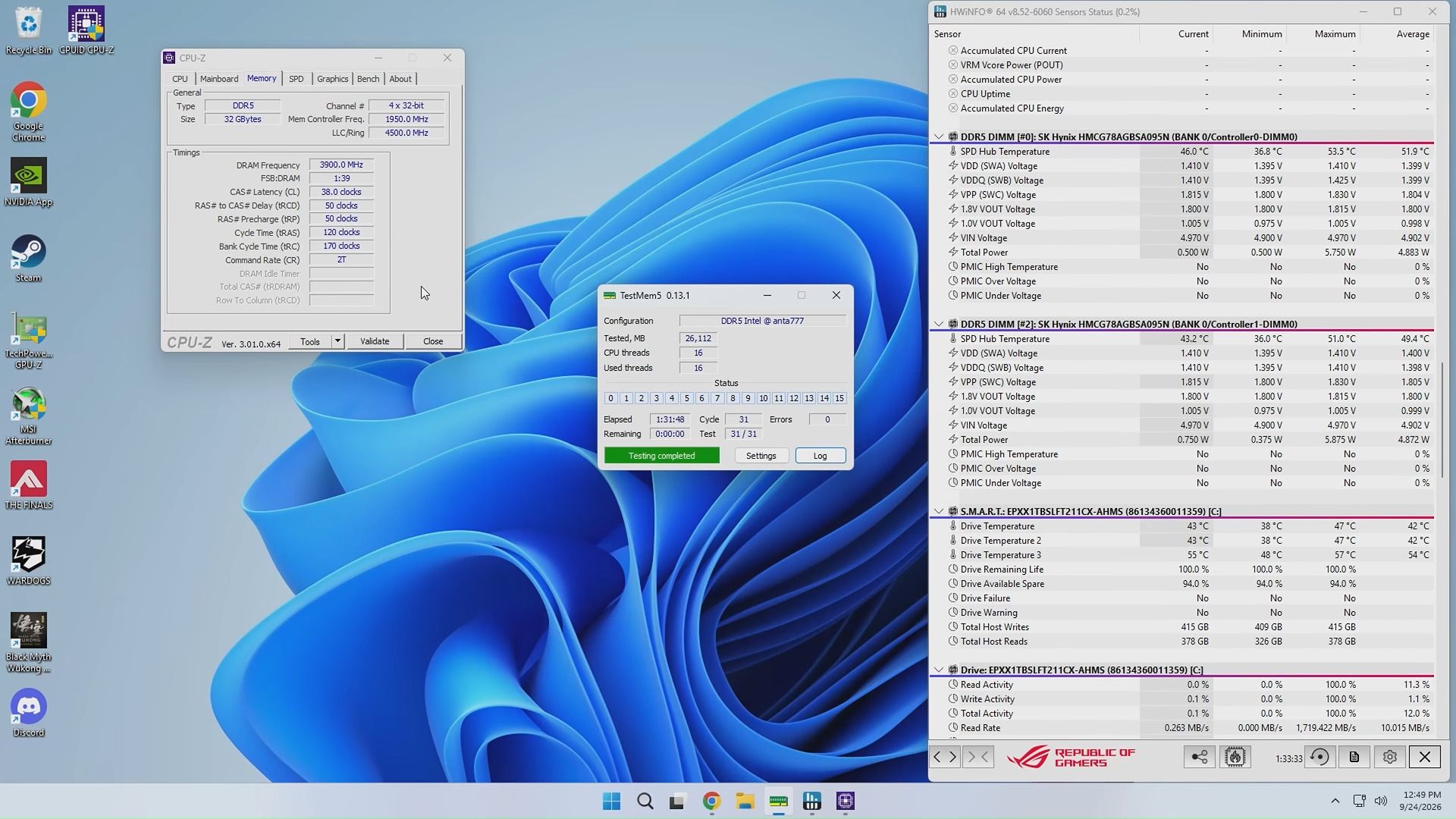
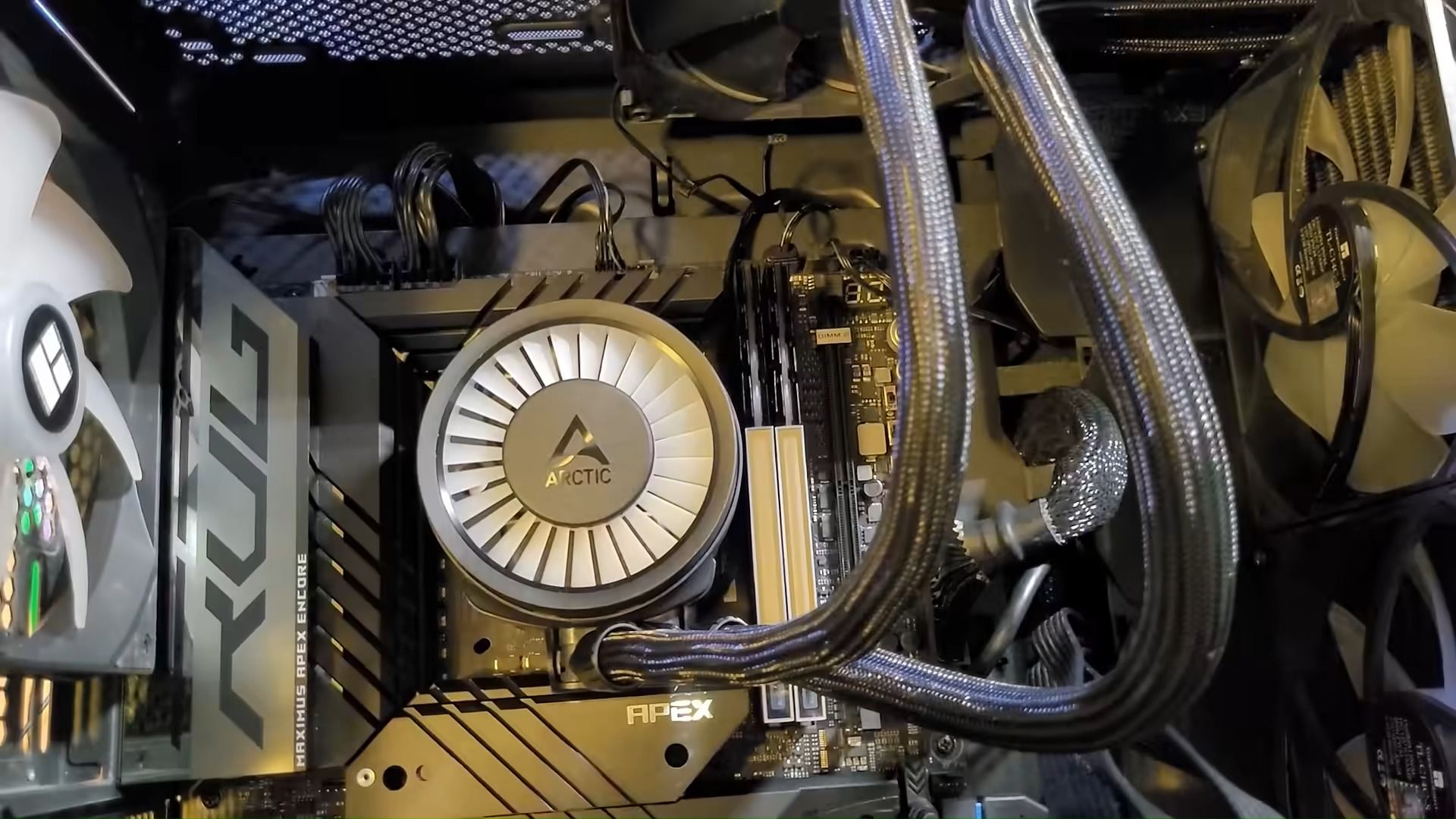
Blighted Agent felt lucky that there were no issues with the newly created desktop modules. There’s a lot of intricate things that can go wrong during such a process. The initial boot verification showed them recognized in his Asus ROG Maximus Z790 Apex Encore motherboard as two “SK hynix 16,384MB 5600MHz” modules, which was correct. Some tuning resulted in rock-steady performance at DDR5-7800 CL38 and 1.40V. This was verified by stress testing for 90 minutes, which the enthusiast reckons was ample for a gaming PC. It is very likely a better result than using those mechanical SODIMM-to-DIMM converters you can buy, which can be problematic.
Blighted Agent seems to specialize in BGA soldering work, and has also successfully upgraded several graphics cards with double the VRAM. Though videos like this are edited to be brief, and they make the process look easy, the TechTuber admits there is a lot that can go wrong during this kind of rework. Moreover, with RAM modules, they lack the testing equipment to locate an issue with any particular IC on the PCB. So, if this module didn’t work, they might have ended up in a world of pain, not knowing which memory chip had an issue due to either an internal fault or a BGA soldering glitch.
Blighted Agent on YouTubeBlighted Agent on YouTubeBlighted Agent on YouTube
Looking around at used DDR5 SODIMMs, it looks like Blighted Agent was very lucky to get a used working 32GB kit for $120. I just checked eBay U.S., and the best deal there was $320. Meanwhile, the best price for a new 32GB DDR5-6000 kit seems to be $449 at the time of writing.
We reported on Russian enthusiast VIK-on succeeding in a similar project earlier this year, but all their costing was in Rubles, and they went the extra mile in flashing custom firmware so the remade modules would be auto-detected with 6400 MT/s XMP support on most motherboards. In late 2026, DDR5 RAM continues to be too expensive.
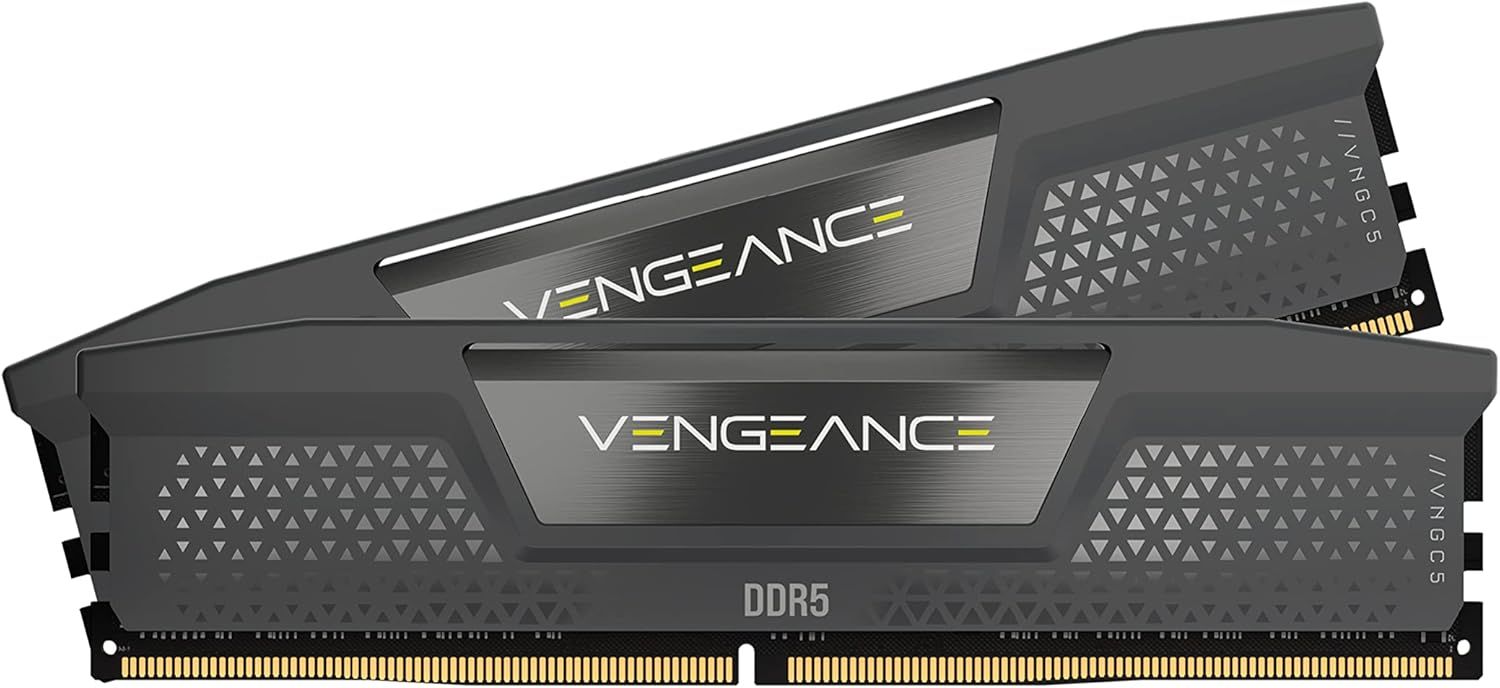
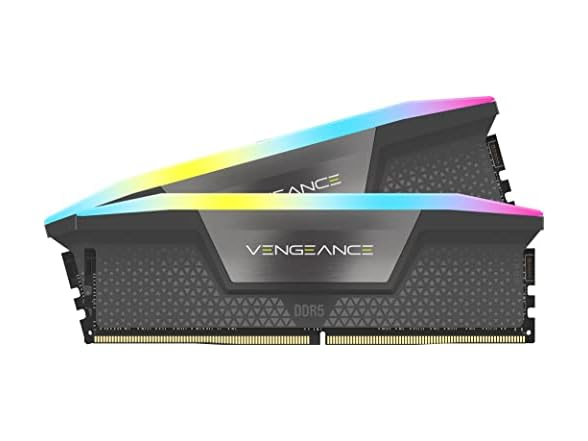
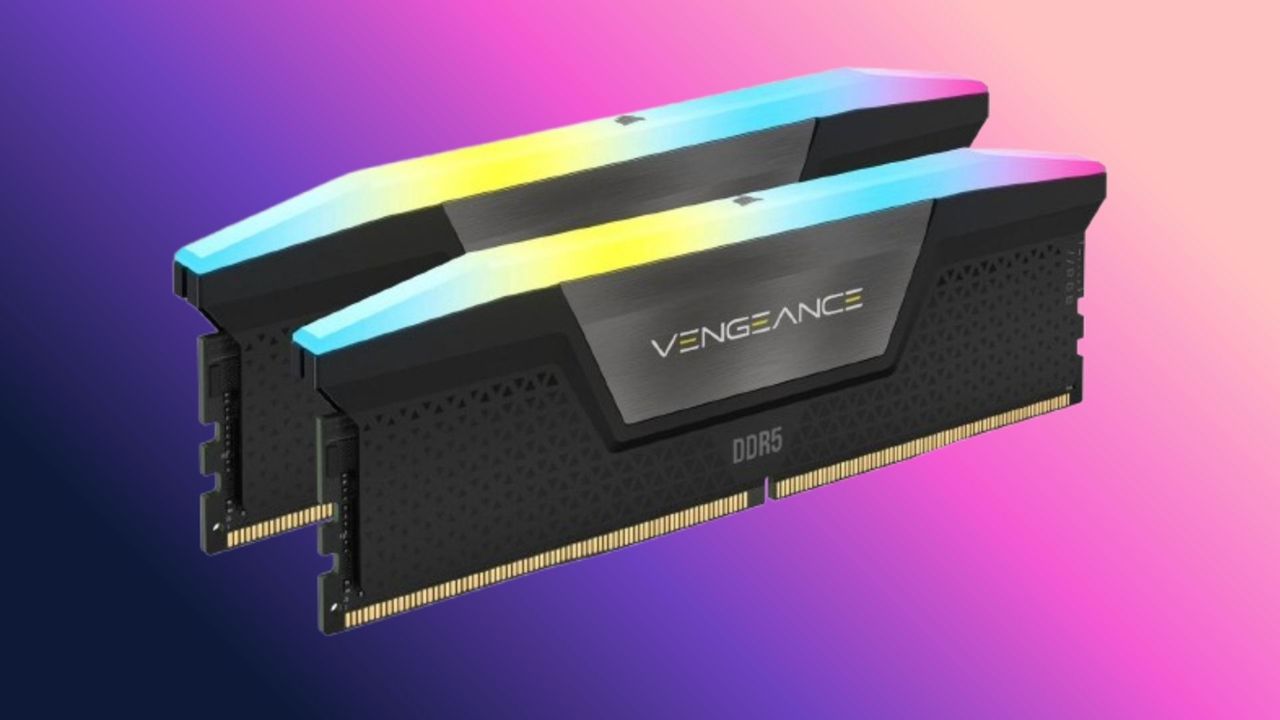
Are you looking to buy RAM for an upgrade or an existing PC? You've no doubt seen the news about the extortionate price rises on RAM and storage, thanks to the ongoing AI boom ruining the component market for PC enthusiasts; well, today, we have some slight light in the darkness, with a $108 price cut on some DDR5 memory from Corsair. You can pick up 32GB of Corsair Vengeance RGB RAM (DDR5-5600) for $409 direct from Corsair. I've checked against our own price tracking info and used various other online resources to confirm that this is indeed the cheapest available to purchase memory kit with these speeds.
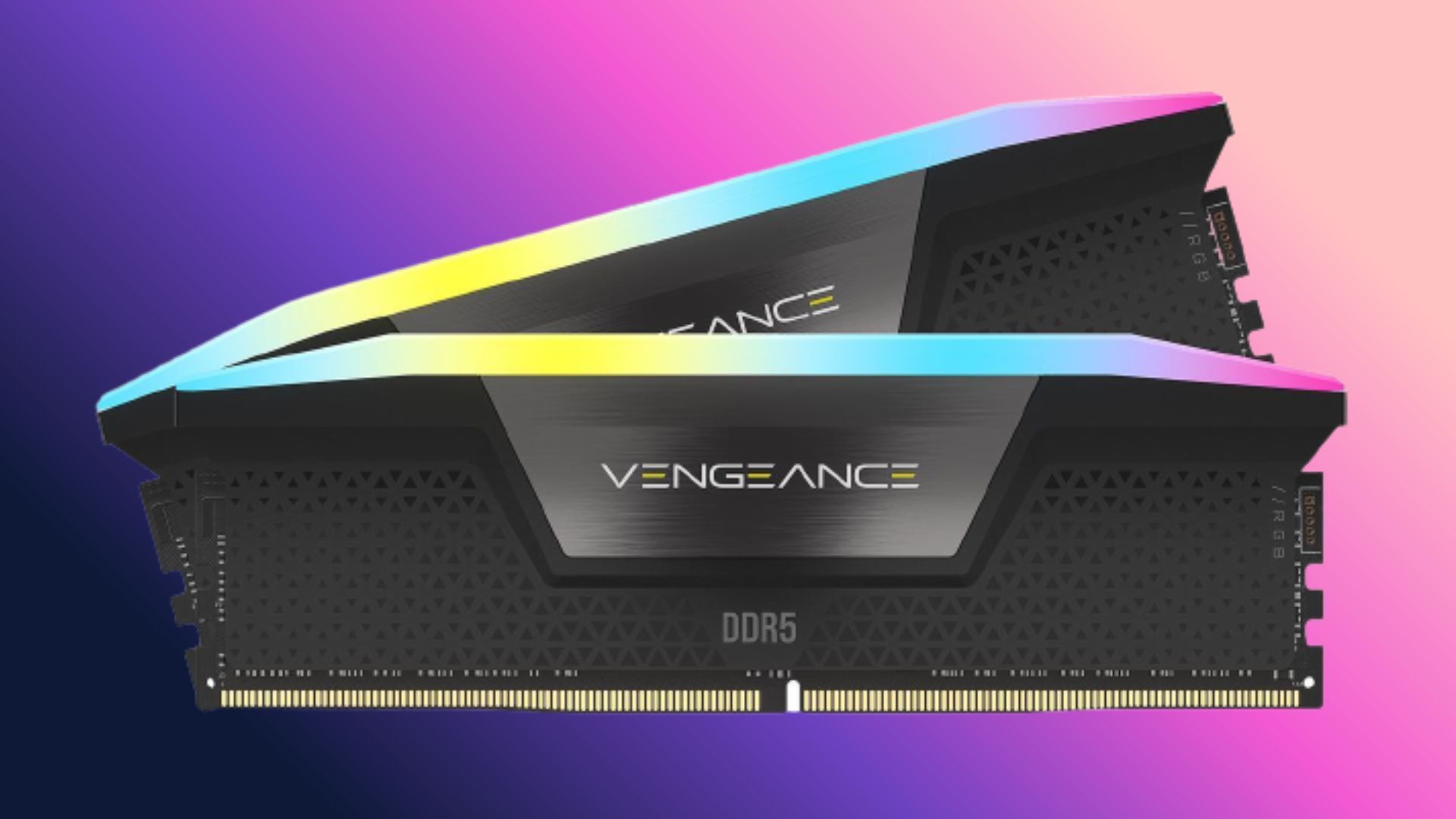
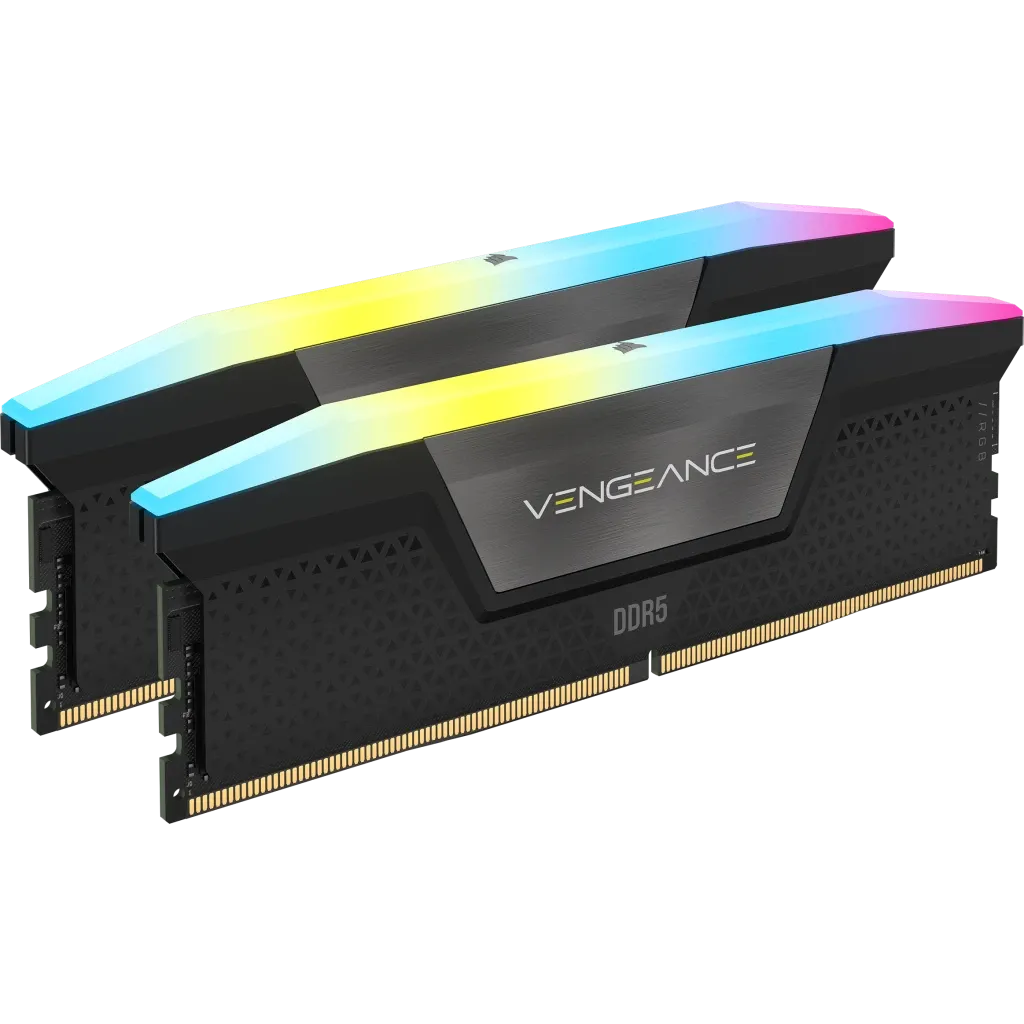
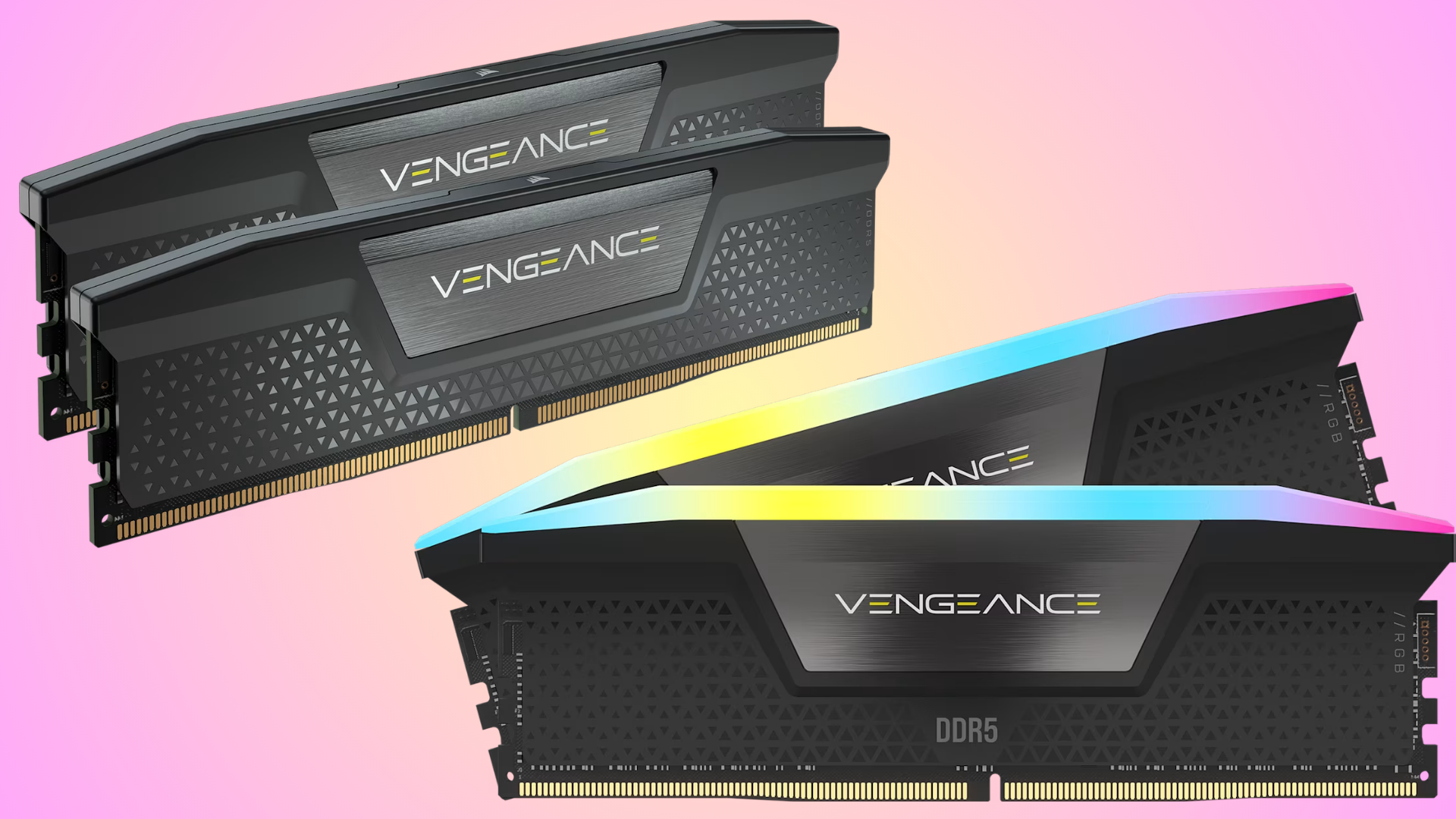
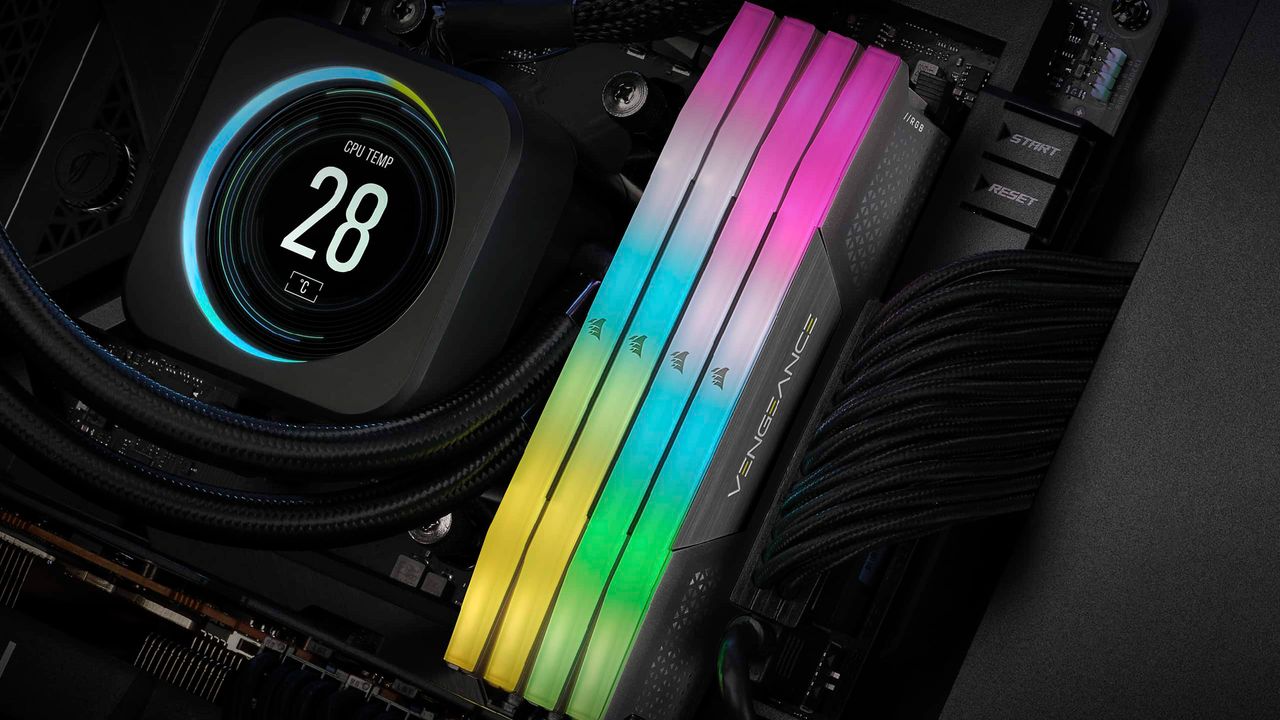
This 32GB kit comprises two 16GB matched memory sticks, both with RGB lighting running along the spine of the heat shroud. The Corsair Vengeance RGB RAM is DDR5 with speeds of 5600 MT/s and a CAS latency of 40. This kit comes with Intel XMP profiles that can be selected in the BIOS.
We can't compare prices of RAM now to those of even a year ago. That's just unrealistic in the current AI economic climate, and whether you love or hate AI, it's not going anywhere soon; the rollouts of large data centers and manufacturers focusing resources on profit-heavy AI component production will continue for the foreseeable future.
There's no denying that RAM prices are tough right now. All the signs point to prices going up even further as scarcity becomes more of an issue for anyone wanting to build a PC in the next few years. If you're waiting for a fall in price, or the AI bubble to burst, you could still be waiting for up to a decade for memory and RAM production to normalize to anywhere near previous figures.
If you desperately need RAM now, this is one of the better prices on a 32GB kit. There are faster memory kits available, but you have to, of course, pay more for them, and the performance upgrades in most situations won't even be perceivable for the average user.
The AI-induced PC component shortage, which has caused drastic increases in the cost of DIY building, continues to get worse. Since last year, RAM prices have increased by more than 500% and show no sign of slowing down. In August, we reported that DDR5 6000 RAM — the sweet spot benchmark for both performance and pricing — had reached $400; now, the price is $450.
As mentioned, because DDR5 6000 RAM is a de facto standard configuration and capacity in terms of performance, tracking the price of this particular spec has proven to be a strong barometer of the industry overall. While we track RAM prices across multiple models and kits, we also track the price of 32GB DDR5 6000 RAM daily.
We've been creeping closer to $450 for some time. As of today, the cheapest 32GB DDR5 6000 kit on the market costs $449.97, or three cents shy of $450. Cheaper RAM is still available; this 32GB DDR5 4800 kit is $399 at Corsair, but good, speedy RAM is now harder to buy than ever before. The 4800 Corsair kit once cost just $80.
As RAM prices and other component hikes have a knock-on effect on PC pricing as a whole, it was recently reported that PC shipments in 3Q26 have tumbled by a massive 20%, with the top three vendors shipping 11.6 million fewer units than the same period last year.
Pre-builts also continue to offer some solace to wannabe DIY builders, with price hikes trickling down to systems more slowly. With industry figures warning that memory shortages could persist well into next year, or even last up to a decade, in the space of just 12 months RAM has gone from being a PC gaming commodity to a luxury few
This is obviously a lot more expensive than the RAM prices from a year ago, but it's as good as it gets in today's market, with prices continuing to rise and showing no sign of letting up anytime soon. The cheapest DDR5 6000 kit — the sweet spot for AM5 gaming — is $437. For slightly more modest speeds, this is a decent saving, and the cheapest kit of this capacity and clock on the market. Crucially (pun not intended), this kit supports both AMD EXPO and Intel XMP, so will work with either platform for best speeds. If your rig runs with an Intel CPU, you can save $5 more with this kit.
There's no denying that RAM prices are tough right now. Unfortunately, all the signs point to things getting worse, rather than better, with some industry figures suggesting the RAM shortage could last an entire decade.
If you need RAM right now, either for a new build or to upgrade your existing system, then this is about as good as it gets.
A YouTube channel best known for its skillful graphics card fixes has published its first RAM module repair video. Tony from NorthWestRepair’s latest video shows his attempts to mend a pair of high-capacity DDR5 sticks worth a purported $16,000. It isn’t the repair skills that are newsworthy here. Rather, it’s the shift in economics that makes the chuck-it-and-replace-it attitude to bad RAM a philosophy that simply doesn’t apply in 2026. The impact of the AI-pocalypse means that spending a couple of hundred dollars on repair labor to save a several-thousand-dollar DDR5 DIMM is now sensible. If you can repair RAM, you can now start a business.
Two DDR5 sticks were sent in to Tony, described as having physical damage. They are both ECC sticks, meant for servers, one with 128GB and the other with 256GB of DRAM ICs onboard. Tony sounded happy at the start of the video, as this is an excuse to use his Unified DDR Flasher Main Board, for which he had just acquired an RDIMM extension that works with these server sticks.
Initial close physical inspection didn’t reveal any conclusive evidence of the source of the problems. So, it was hoped electrical tests would provide more clues. A data line tester didn’t highlight any issues, though. Tony used flux and hot air to reflow the solder on the first DIMM, which is a far simpler process than a reball (where all the memory ICs are taken off, cleaned, and given new solder balls). Initial signs were that the module was now working OK. So, he moved to the next DDR5 DIMM.
NorthWestRepairNorthWestRepairNorthWestRepair
The second DIMM “may have a faulty PMIC chip,” which is why it seemed more severely broken than the first module, Tony indicated. Powering on a system with this DIMM inserted showed no signs of life, and the DIMM didn’t even warm up (thermal camera checks). That contrasts with the first fix.
Because this DIMM is completely dead, Tony did some work on the non-DRAM chips like the PMIC and SPD EEPROM first. Then he decided to reflow some other chips, including memory ICs, like before, while the board was warm. Some ICs were also reballed after inspection, making Tony suspicious of them.
The repairer found a short circuit via voltage injection and thermal camera monitoring. This was fixed with a new capacitor and by fixing the short on the damaged edge of the PCB. Finally, a new PMIC chip ended the quest, and this second DDR5 DIMM powered on and trained successfully.
The repair is good to see, saving these valuable components from e-waste. However, the bigger picture is that repairing memory modules could now be a viable business. Previously, it didn’t make sense to spend a hundred or two on labor to fix a DIMM that would cost about the same or even less to replace with a new one. Now the repair fee might be just a fraction of a replacement price.
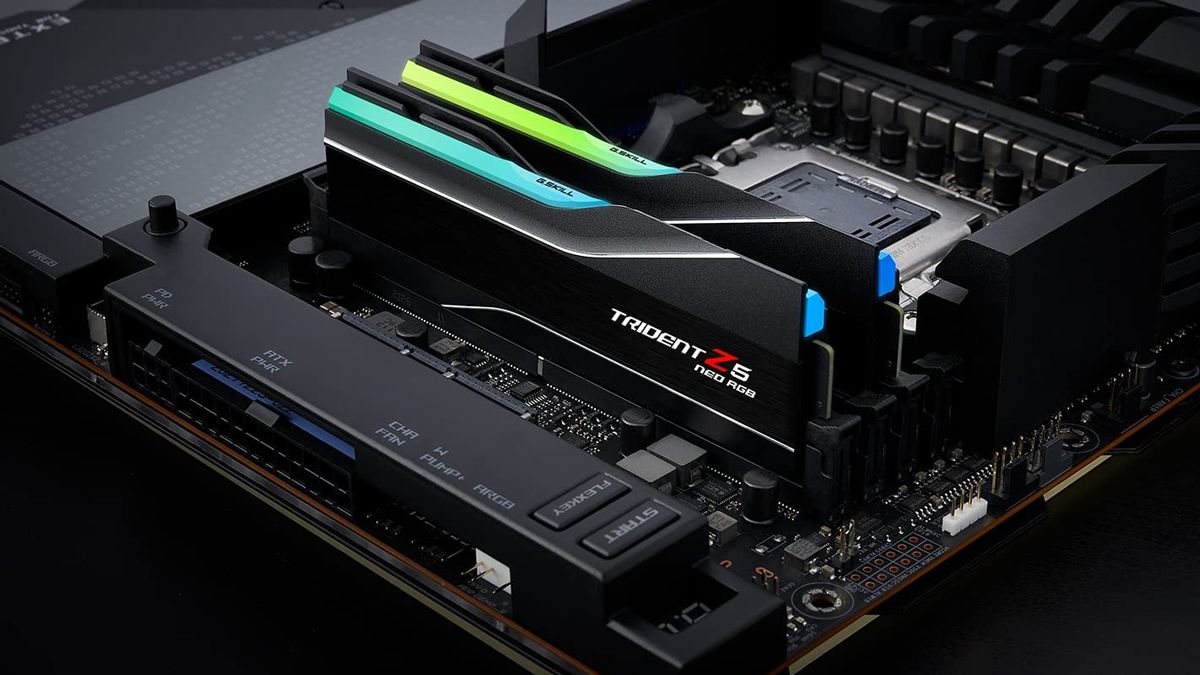
A PC RAM maker has honored its guarantee promises despite the memory kit in question’s price rising eightfold since it was bought. This is news in 2026, as we’ve heard of so many companies dealing with AI-inflated component pricing refusing to replace items, instead refunding the original purchasing price despite the products now being worth many multiples of the original price. These glad tidings come via Redditor Double-South8863, who says their $150 G.Skill Trident Z5 Neo RGB 64GB DDR5-6000 RAM kit, now priced at $1,200 on Amazon, was back at full capacity after the company replaced the stick. They received the replacement within two weeks.
“I will never buy any RAM other than G.Skill for as long as I live,” pledged Double-South8863 on Reddit. They informed their fellow social media posters that one of the 64GB RAM kit’s sticks died at the beginning of September. After some A/B testing, they were sure one of the 32GB sticks was dead.
On September 8, about a week after the issue first reared its head, Double-South8863 decided to start an RMA process and get the dud G.Skill Trident Z5 Neo RGB 32GB DDR5-6000 stick replaced. They remember buying this highly desirable RAM kit online in May 2025 for the princely sum of $150. Now it is worth a king’s ransom at $1,200 on Amazon, and price tracker sites show it's even been as high as $1,300.
Perhaps the Redditor was aware of the reports of companies and their dastardly deeds regarding RMAs, as they are active on the PCMR subreddit. However, they optimistically went ahead and completed the RMA paperwork, then received instructions, including a shipping address to initiate the warranty exchange. Double-South8863 says they mailed the misbehaving memory module back to G.Skill on September 15. The Redditor’s post celebrating G.Skill’s customer service, proclaiming that they were now a “customer for life,” was published on September 26.
If you check the G.Skill site, you will note that this RAM-first firm still offers a limited lifetime warranty on all its popular RAM kits. Please note that, according to the official terms, this lifetime warranty “automatically terminates upon discontinuation or end-of-life ("EOL") designation of that specific model by G.Skill.” That means you shouldn't expect to swap out a faulty DDR5 module for a replacement for the whole of your natural life.
PC enthusiasts and DIYers are having a hard time right now as several key components required for performance builds are at all-time-high pricing. Meanwhile, those with a working setup pray that nothing will go wrong with the precious equipment they already have. Sadly, things do break, some components more than others. However, warranty obligations seem to have come under increased strain in recent months as consumer product scarcity means component makers can’t or won’t follow RMA norms that had been established for decades. Some of the worst cases we’ve seen involve PCs and component makers trying to refund the original (low) prices paid, substituting failed parts with non-equivalent parts, or even worse.
We've talked about the RAMpocalypse extensively, but there's seemingly no end to the continuing rise in memory pricing at the moment. Luckily, Corsair is keeping its store stocked with some gamer-friendly Vengeance RAM, with a 32GB DDR5-6200 set for $419.99, or a slower option for $409.99, offering the best price on these kits in the current market.
No, we're not talking record-low pricing here, but memory prices aren't a joke right now. AI is pushing them higher and higher, and after $400 for 32GB DDR5 was breached recently, you won't find better-priced DDR5 RAM elsewhere. You'll need a kit like this if you're planning a new gaming PC build or upgrade.
The Corsair Vengeance range continues to be a popular option among gamers, and while we've not given this particular kit a test, the similar spec'd Corsair Vengeance RGB DDR5-6000 C36 performs well. You're getting even faster RAM here, at 6,200 MT/s. It isn't the fastest, but this is priced right in the middle of slower kits that range from 4,800 to 5,600 MT/s, so you're at least getting better bang for your buck.
This particular kit comes with two 16GB modules, with those rated speeds of 6,200 MT/s. It's significantly faster than older DDR4 RAM modules, which typically cap out at 3,600 MT/s. It has CAS latency and memory timings of 36-46-46-100, comes in a black colorway, and has a solid aluminum heat spreader to keep things cool. 6,200 MT/s is a good speed for a gaming RAM kit, and while you can get faster, you'll typically pay more.
That said, every dollar counts when gaming PC builds can go for thousands more than they did last year. You can save $10 and get this DDR5-5600 Corsair Vengeance 32GB kit for $409.99. Like the DDR5-6200 model above, this has two 16GB modules, but with a slower speed of 5,600 MT/s, with CAS latency and memory timings of 40-40-40-77. It also comes with adjustable RGB lighting, a feature missing on the spec above, if you want a more colorful kit. You're probably better off spending the extra $10, but if you're building a mid-tier or budget PC, the speed difference isn't likely to matter as much, but any extra savings might.
The $419.99 price for this 32GB Corsair Vengeance DDR5-6200 RAM is the best price you'll find for RAM with these speeds and capacity, although you can go a little cheaper with the $409.99 DDR5-5600 kit instead. Corsair even has cheaper, and slower RAM, but these two offer the best value for performance that you'd expect for a DDR5 gaming PC build. You'll want to grab this deal while you can before the RAM prices inevitably go up even more.
We're seeing 32GB DDR5 RAM prices regularly push above $400 now. That's just where the market is, and as unfair as it might seem, the world is still turning, and people still need memory for their PC upgrades. Luckily, this TeamGroup T-Force Delta RAM deal drops the price to $389.99 at Newegg, as long as you use the coupon code LUYRF228 at checkout.
Deals like this continue to be the best way to pick up new RAM as the ongoing global DRAM shortage, caused by the AI boom, rolls on. We're not going to see lower prices for RAM or SSDs any time soon. Deals like this aren't ground-breaking, and we're nowhere near record lows, but they're the best prices in a difficult market. Sans a time machine, or going second-hand, you won't find better pricing today than this.
As for this particular RAM kit, it's a good option for a mid-tier build. It's DDR5-5200, meaning speeds of 5,200 MT/s. That isn't the fastest RAM on the market, by any means, but it's certainly an upgrade over older DDR4 modules, which would usually see speeds of around 3,600 MT/s at best.
use coupon code LUYRF228 for $40 off
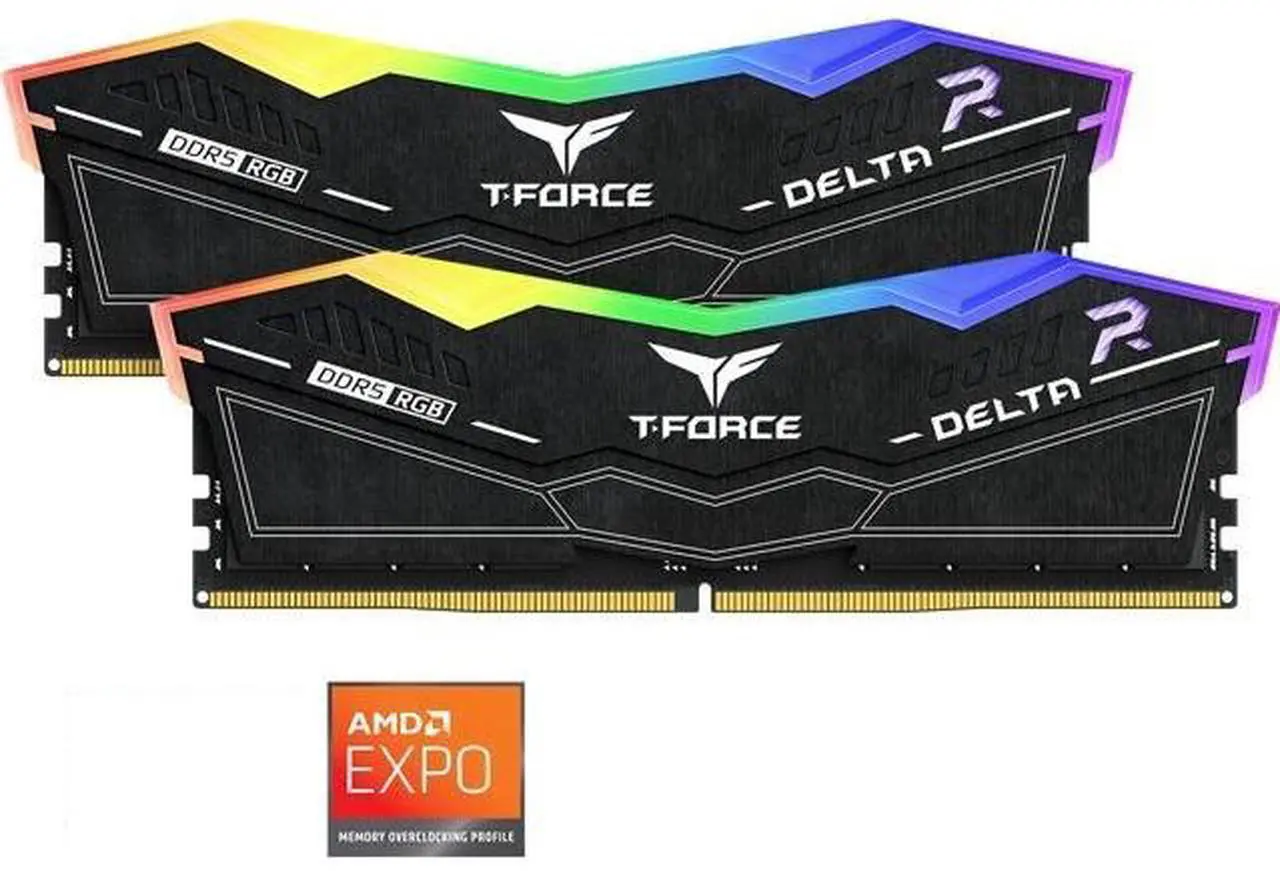
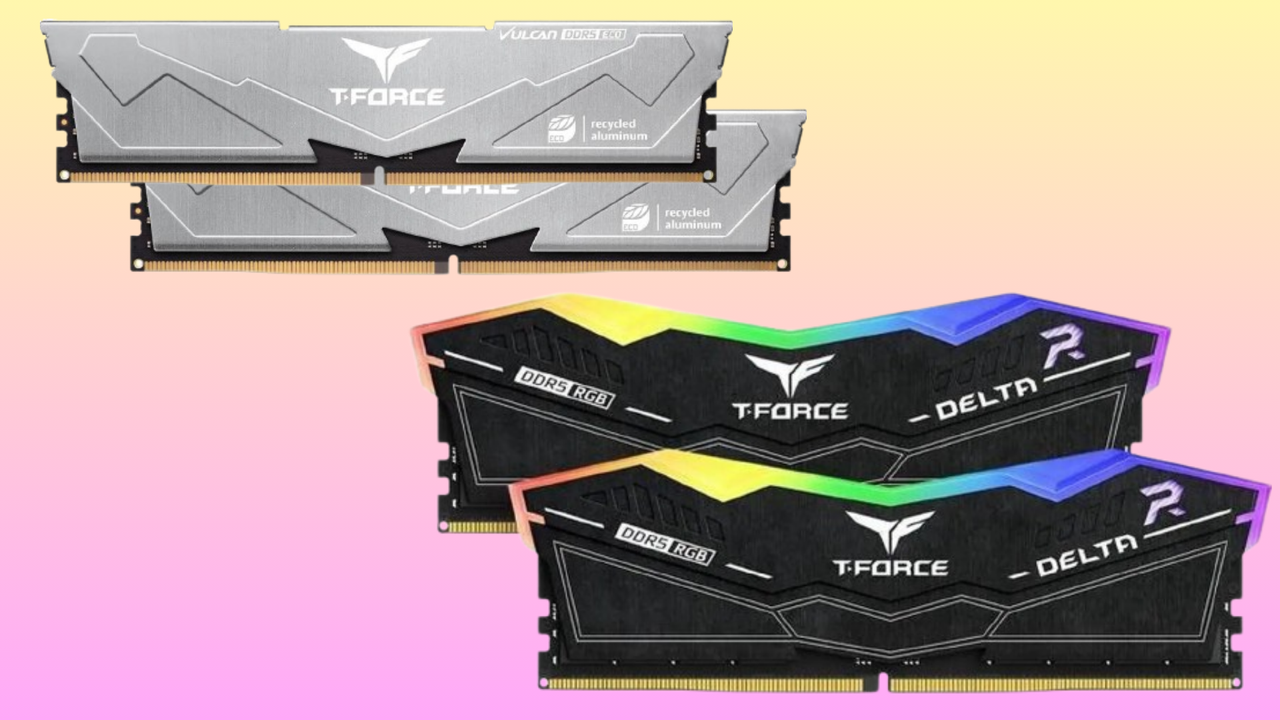
T-Force Delta RGB 32GB (2 x 16GB) DDR5-5200: was $429.99 now $389.99 This RGB kit from Team Group unlocks 32GB of DDR5 memory for your gaming PC or workstation rig. CAS and memory timings of 40-40-40-76, with speeds of 5,200 MT/s, mean this isn't the fastest memory out there, but it's currently the cheapest 32GB DDR5 kit you can buy.View Deal
You're getting two 16GB DDR5 modules here, with CAS and memory timings of 40-40-40-76. This is perfectly fine memory for workstation and gaming use, with built-in RGB lighting to spice up your build. Yes, it won't be the fastest you've used. If you need to max out a build with the best speeds and lowest latency, you'll need to look for higher-end DDR5 memory instead.
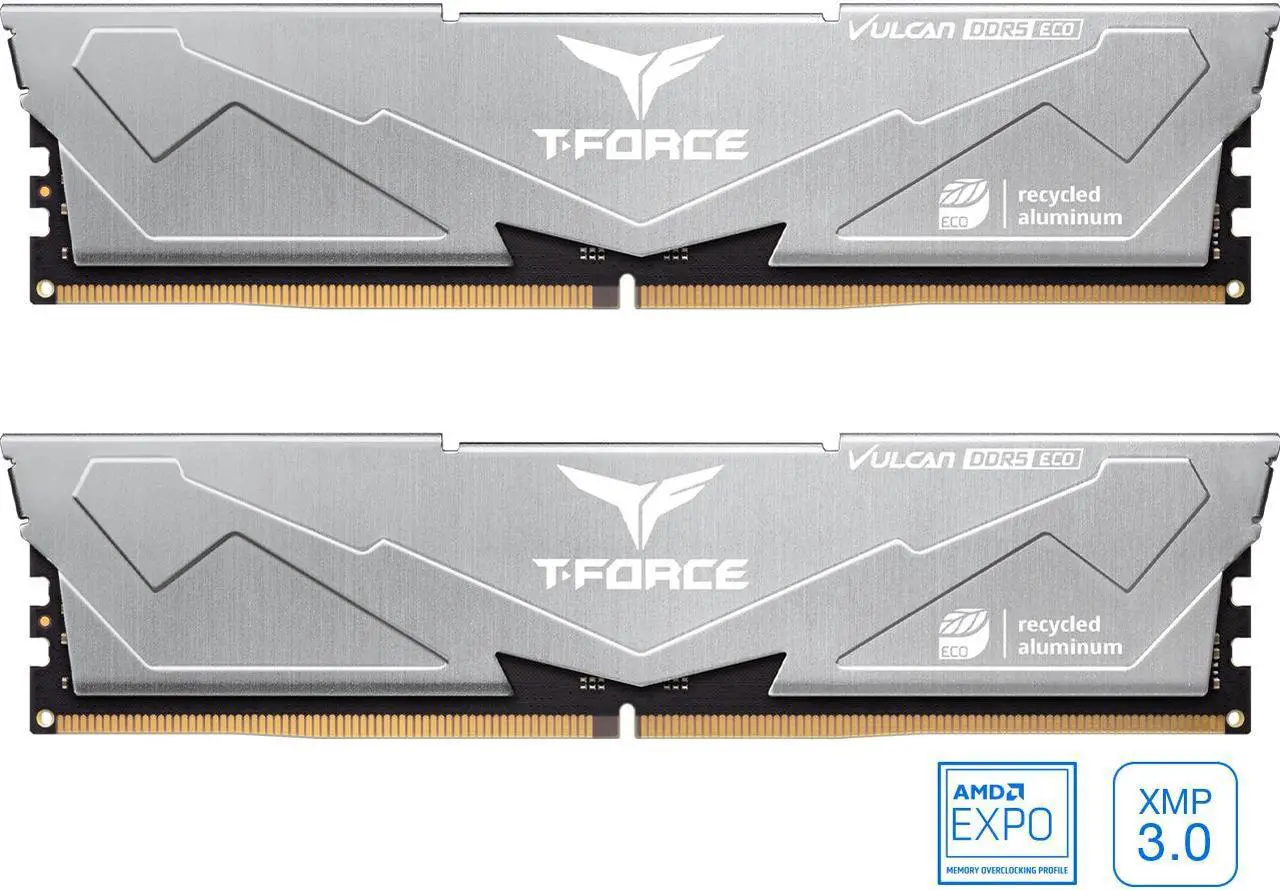
Luckily, you have options there. The next best option with faster speeds is this alternative kit, also from Team Group, for $415.99. The Team Group T-Force Vulcan has CAS and memory timings of 38-46-46-84, with speeds of 6,400 MT/s. Much faster, so ideal for a higher-end rig, but it lacks the RGB lighting. That might be a trade-off you're willing to accept if you've got the extra $27.
T-Force Vulcan Eco 32GB (2 x 16GB) DDR5-6400: $415.99 The next, best 32GB DDR5 RAM kit, also from Team Group, with much faster speeds of 6,400 MT/s. CAS and memory timings are 38-46-46-84. Probably the better option, if your budget can stretch to get it.View Deal
Honestly? The best option here, if you do have the extra cash, is the T-Force Vulcan for $415.99. It's faster, only slightly more expensive, and it's still a bargain compared to rival kits that can go as high as $600 or $700 at the moment. That said, a new PC build or upgrade on a budget requires a few compromises, and unless you're pushing your PC to its limits, the Team Group T-Force Delta RAM kit for $389.99 is a solid option.
Either choice is a deal worth considering in this awfully expensive market that PC builders face at the moment. AI isn't going anywhere, and we're probably going to see prices this high, if not higher, for some time. Deals like these, even if they aren't world-beating, are still the best way to get RAM at the moment.
The RAMpocalypse means that, unfortunately, memory has become one of the most expensive parts in a new gaming PC build or upgrade. The ongoing global DRAM shortage means that you're going to need to pick up deals as they pop up. They're not ground-breaking deals or record lows, but they're the best prices in the current market. That's where this PNY DDR5 offer comes in, bringing the price of 32GB DDR5 down to just $399.99.
Believe it or not, this is where we're at with DDR5 RAM kits right now, and without a time machine (or buying second-hand), you're not going to find better pricing. This is the cheapest kit on sale at this spec and capacity, and after prices recently shot up past $400, it's a good offer to see it drop back below for the time being.
Our RAM price tracker shows how bad the market is for memory right now. You won't find a single option hitting below its record-low price floor, with many of the most popular models out of stock, too.
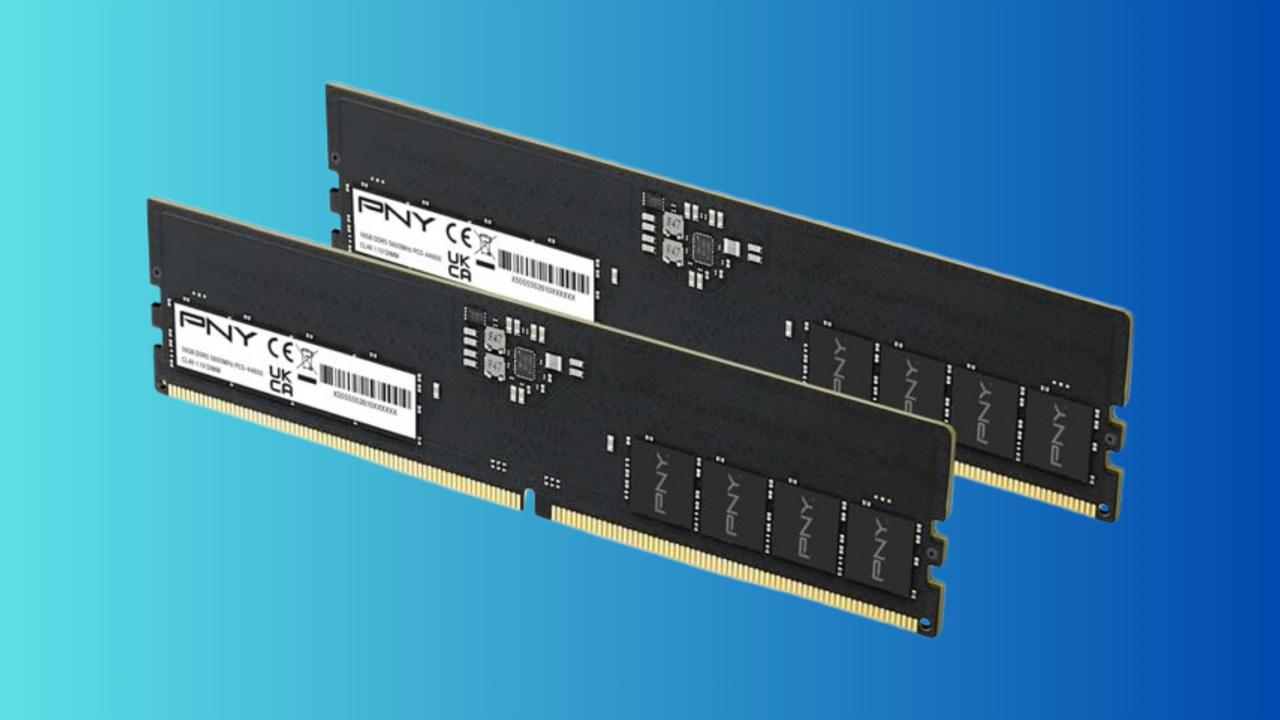
With this PNY kit, you're getting two 16GB DDR5 modules in this kit, capable of running at 5,600 MT/s, with CAS and memory timings of 46-46-46-90. This is high-performance RAM, suitable for gaming and workstation use. It isn't the fastest, but it'll do the job, as long as you're not looking to match the speeds (and higher prices) you'll find in higher-end DDR5 memory.
Unlike some of the RGB-packed options that gamers sometimes prefer, this PNY kit is pretty bare-bones as far as design goes. There's no RGB lighting at all, with just a black PCB finish and no heatspreaders. This is an install-and-forget kit that isn't meant to be flashy.
The $399.99 sale price for this PNY Performance DDR5 32GB memory is the real factor here: it's a price that simply can't be beaten right now. If you're building a new PC or upgrading your existing one, this PNY kit is a deal worth considering in the current market.
When it comes to building a new PC, memory has seen the sharpest rise in pricing in years. Now, you have to seriously consider the cost of the RAM kit in your build, and especially for those stepping up from a DDR4 platform, whether the cost is worth it for the extra performance. Currently, the prices continue to rise with no end in sight. It's hard to suggest holding off on upgrading now, as we have no clue when the prices will start to fall - if at all. However, if you are looking for a brand new pair of DDR5-6000 RAM sticks for a desktop PC, then Corsair's Vengeance 32GB DDR5-6000 kit has just received a $215 discount that brings the price down to $401.99, from its $616.99 list price. This makes it the cheapest 32GB DDR5-6000 kit that you can purchase today.
The kit includes two 16GB DDR5 modules that run at 6000 MT/s with a CAS latency of CL36 and further timings of 38-38-76. Corsair's Vengeance kits are a popular choice among PC building enthusiasts and feature black aluminum patterned heat spreaders with RGB lighting running across the spine of the sticks. They come with Intel XMP BIOS profiles for preconfigured overclocking.
Corsair's Vengeance memory kit consists of two 16GB sticks for a total of 32GB. The kit has a CAS latency of CL36 and further timings of 38-38-76, with a voltage of 1.25V. View Deal
Prices of memory, especially DDR5 kits, are very off-putting at the moment, and looking at upgrading can feel the same. With current-gen game consoles going up in price, expectations for next-gen consoles are that the prices will stretch over a thousand dollars. So if you're thinking of getting a new gaming PC or upgrading from an older DDR4-based system, it's probably best not to wait around. Just be prepared for some hurt to the bank account. Industry figures say the memory shortage could last for years or even a decade, with no relief at all in sight; prices are much likelier to go up rather than down.
When it comes to building a gaming PC, DDR5 RAM clocked at speeds of 6,000 MT/s is often touted as the sweet spot for specs. While slower and faster speeds are available, it's very much the benchmark for both price and performance, which is why it's noteworthy that this particular configuration now costs $400, a more than 400% increase from the low prices we've seen in the past.
In addition to our ongoing RAM price tracking, we perform daily spot checks on pricing for discounts or deals for 32GB (2x16GB) of DDR5 RAM, given its aforementioned significance as the "benchmark" when it comes to capacity. In recent weeks, the price of 32GB DDR5 6000 RAM has been creeping ever closer to that unfortunate $400 milestone, and in the last few hours we've just crossed the threshold. That's not to say that prices might fluctuate back down in a day or two, but generally the traffic is only moving in one direction.
You can buy 32GB of DDR5 RAM at slower speeds for less — this Corsair Vengeance DDR5 4800 is"just" $359 — but good RAM is now harder (and more expensive) to come by than ever before.
According to data from PCPartPicker, this particular 32GB DDR5 6000 kit from Corsair has been as little as $80 in years gone by at Newegg, marking a full 400% price increase on the lowest we've ever seen on this model.
All signs point to the memory shortage, and thereby pricing, getting worse in the coming months. As such, bundles and pre-built PCs remain one of the only ways to insulate yourself from cost increases if you're in the market for new hardware. As mentioned, slower memory speeds are available at lower prices, but compromising for 4,800 MT/s RAM to save $40 when building a PC is an extremely tough state of affairs.
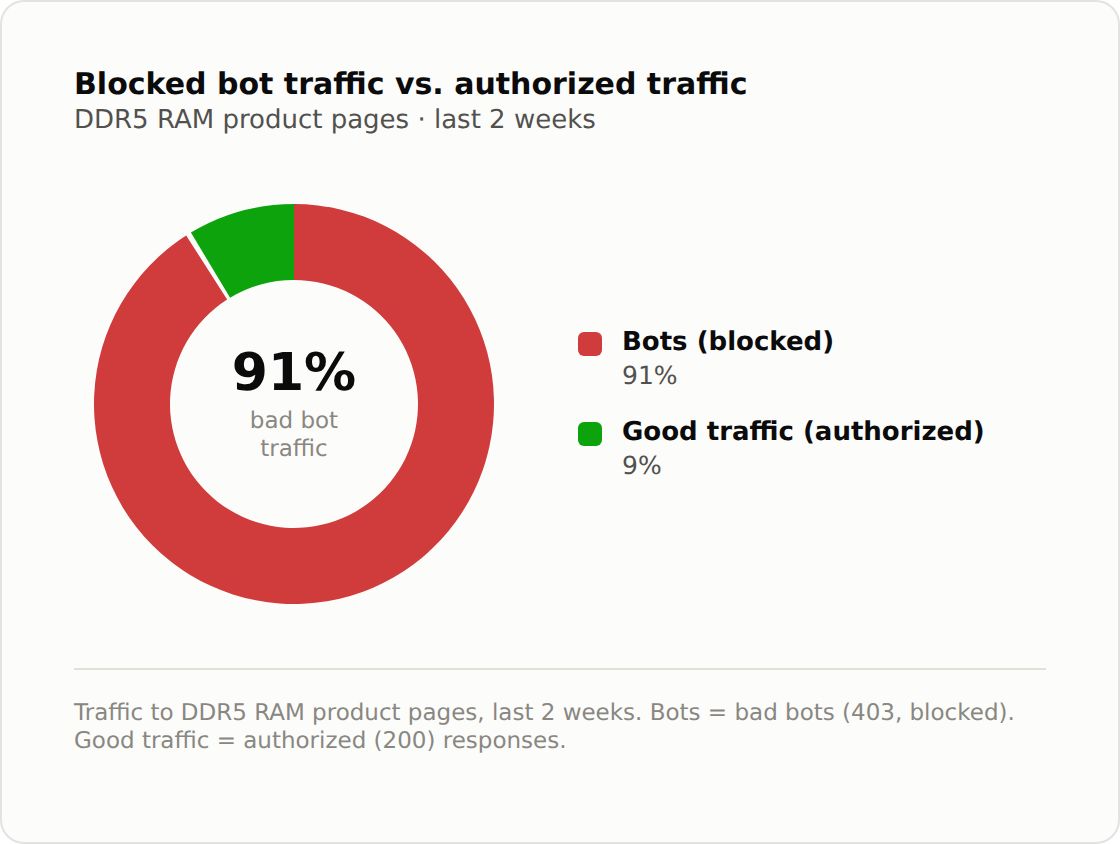
Bad bots account for 91% of the traffic reaching one retailer's DDR5 memory product pages, roughly 10 automated requests for every legitimate visit, according to a LinkedIn post this week from Jérôme Segura, VP of threat research at bot-mitigation firm DataDome. The figure updates research DataDome published in March, which measured the ratio at about 6:1 across several e-commerce sites.
Over the same period, the cheapest 128GB DDR5-6400 kit tracked by Tom's Hardware has reached $3,399, ten times its record low pricing. The Thales 2026 Bad Bot Report puts bad bots at 40% of all web traffic, less than half the share Segura reports on DDR5 listings.
DataDome's March report documented a single operation that generated more than 10 million blocked requests, with a one-hour sample showing 91 DDR5 listings each polled around 551 times, or once every 6.5 seconds. The requests carried cache-busting parameters to defeat cached stock data and targeted industrial module makers such as Micron and Apacer, as well as DIMM socket suppliers Amphenol and TE Connectivity, alongside consumer brands.
Segura wrote on LinkedIn that retailers carrying memory should assume their "traffic analytics are probably understating the problem significantly."
(Image credit: DataDome)
Keep in mind that the 91% figure comes from one unnamed retailer, and DataDome hasn't published a sample window or its methodology. DataDome also sells the product that blocks this traffic, and page requests ultimately aren't purchases, so the ratio measures monitoring pressure on listings rather than how much stock bots actually end up securing, which can’t easily be quantified.
Apacer CEO C.K. Chang said in July that DRAM supply to independent module makers could fall to 30% of 2026 levels next year, and TrendForce expects conventional DRAM contract prices to rise another 13% to 18% in Q3 after roughly 60% in Q2. Hyperscale buyers have reportedly placed deposits against most of 2027's DRAM output.
A 32GB DDR5-6000 kit that averaged $72 this time last year now averages $392 on PCPartPicker. While graphics card and console scalping in 2020 and 2021 ran against scheduled restocks that eventually outpaced resale demand, no equivalent restock date exists for consumer DDR5 before 2027 at the earliest.
Framework stopped selling standalone RAM in November last year, citing scalpers, and Micro Center sells its CPU, motherboard, and 32GB DDR5 bundles in-store only with a one-per-household limit. Newegg and Amazon have run repeated CPU-plus-memory bundles that price a 32GB kit well below its standalone cost, which ties each kit to a processor a reseller then has to move as well. On eBay, we found G.Skill's Trident Z5 Neo 32GB kit listed at $836.54 in December against a $429.99 retail price, roughly double, and about seven times the $117.99 it sold for before the shortage.
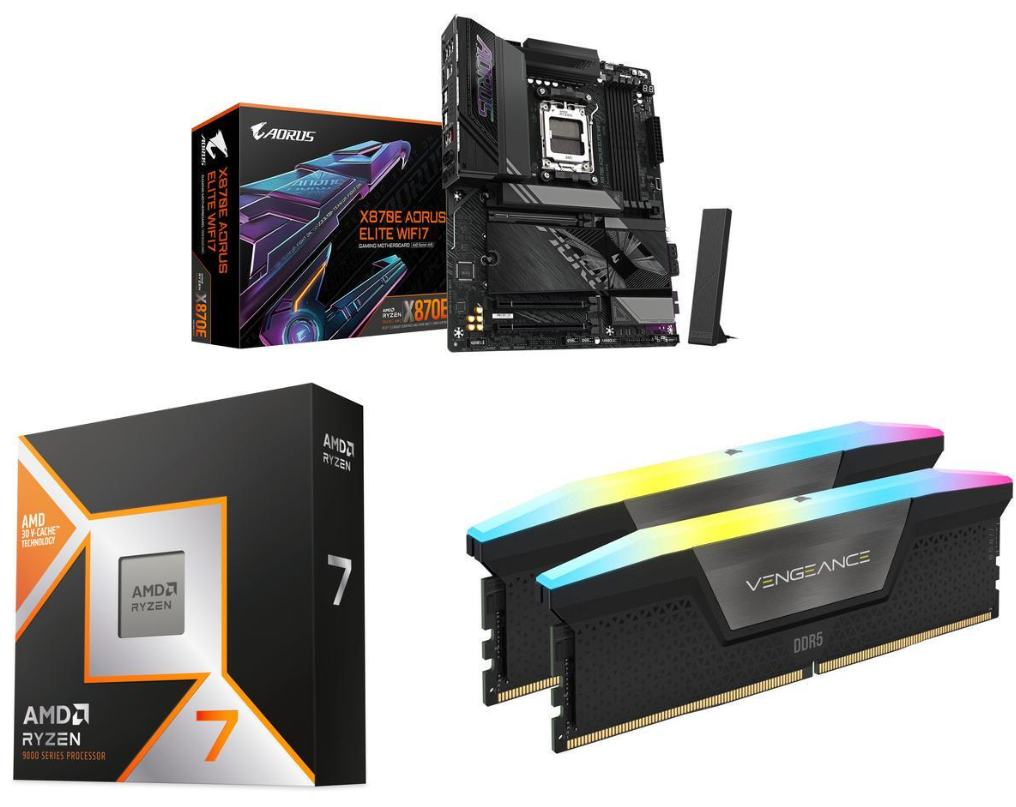
The RAM portion of the bundle, Corsair’s Vengeance RGB 32GB (2x16GB) DDR5-6000 CL36 RAM kit, is currently available on Newegg for an eye-watering $489.99 when bought separately. The good news is that the massive discount brings this RAM down to a reasonable-for-the-times $241. This black kit matches the Aorus Elite Wifi7 board and features a frosted RGB light bar that runs the length of the sticks. If RGB lighting isn’t your thing and you prefer a stealthy, unassuming look, you can turn it off. The DDR5-6000 speed lands in the sweet spot for the AM5 platform and is a worthwhile, good-looking option. The SK Hynix ICs under the heatsink pair nicely with the board and offer plenty of overclocking headroom.
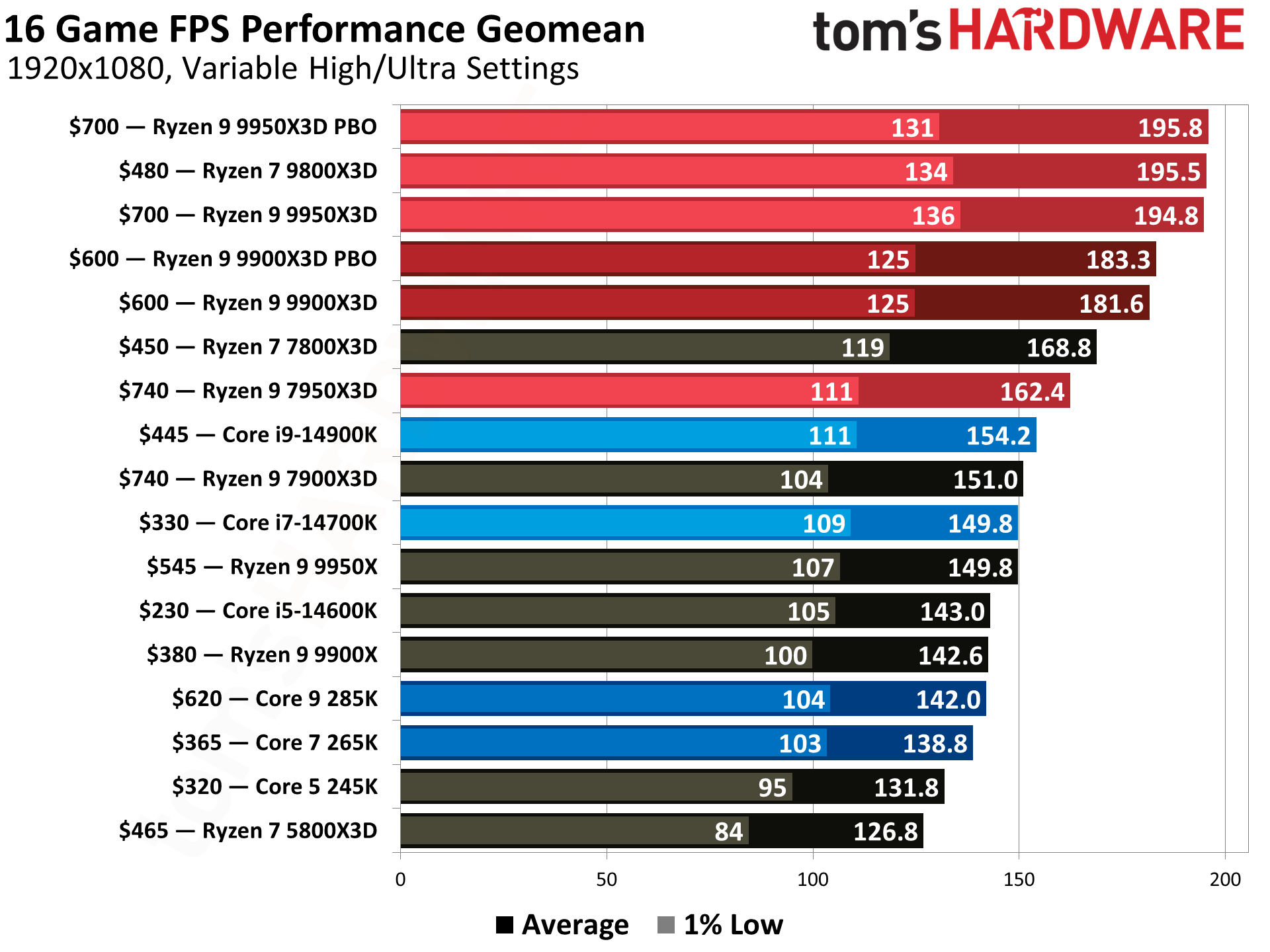
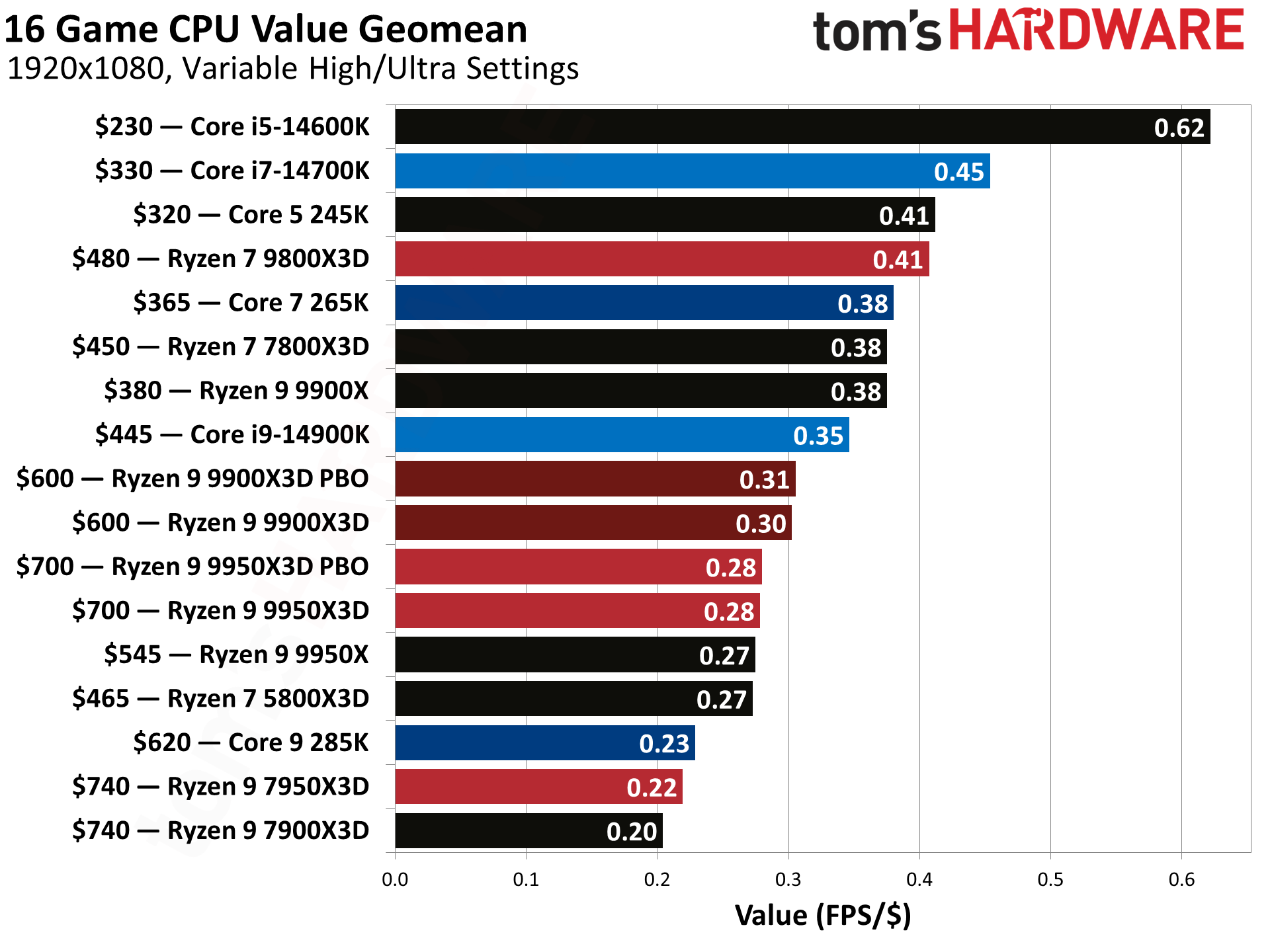
Next is one of the most popular and fastest current-generation CPUs for gaming, the Ryzen 7 9800X3D. This 8-core/16-thread Zen5-based processor has a base clock of 4.6 GHz and a max boost of 5.2 GHz, which is plenty of speed for any task. The X3D variant's 96MB of L3 cache helps with gaming (among other things), making it one of the fastest gaming CPUs available. It is also a well-rounded performer that excels in games and is a good match for most applications. This combo also includes a free Cooler Master Elite Liquid 240 AIO (a $80 value), which easily handles the processor.
Tom's HardwareTom's HardwareTom's Hardware
The Gigabyte X870E Aorus Elite Wi-Fi 7 is a well-rounded mid-range motherboard that offers 12 USB ports on the rear IO, including two USB4 (40 Gbps) Type-C ports. It features a capable VRM to power any processor, four M.2 sockets (3x PCIe 5.0 x4), a PCIe 5.0 slot, fast networking with 2.5GbE and Wi-Fi 7, a last-gen flagship-class audio solution, and several “EZ” features like EZ-Latch Plus and EZ-Latch Click to make building easier. It also supports up to 256B of DDR5 RAM at speeds up to DDR5-8200, which is fast for the platform, as the sweet spot is around 6000-6400 MT/s. The all-black board will also look good in any dark build theme and even incorporates some RGB bling to light up your chassis.
If you’re thinking of building a new AM5-based system but don’t want to pay ridiculous prices, this $1,009.99 Newegg combo is an excellent upgrade or starting point for your next gaming rig. Offers like this usually don’t last long, so grab it before it’s gone!
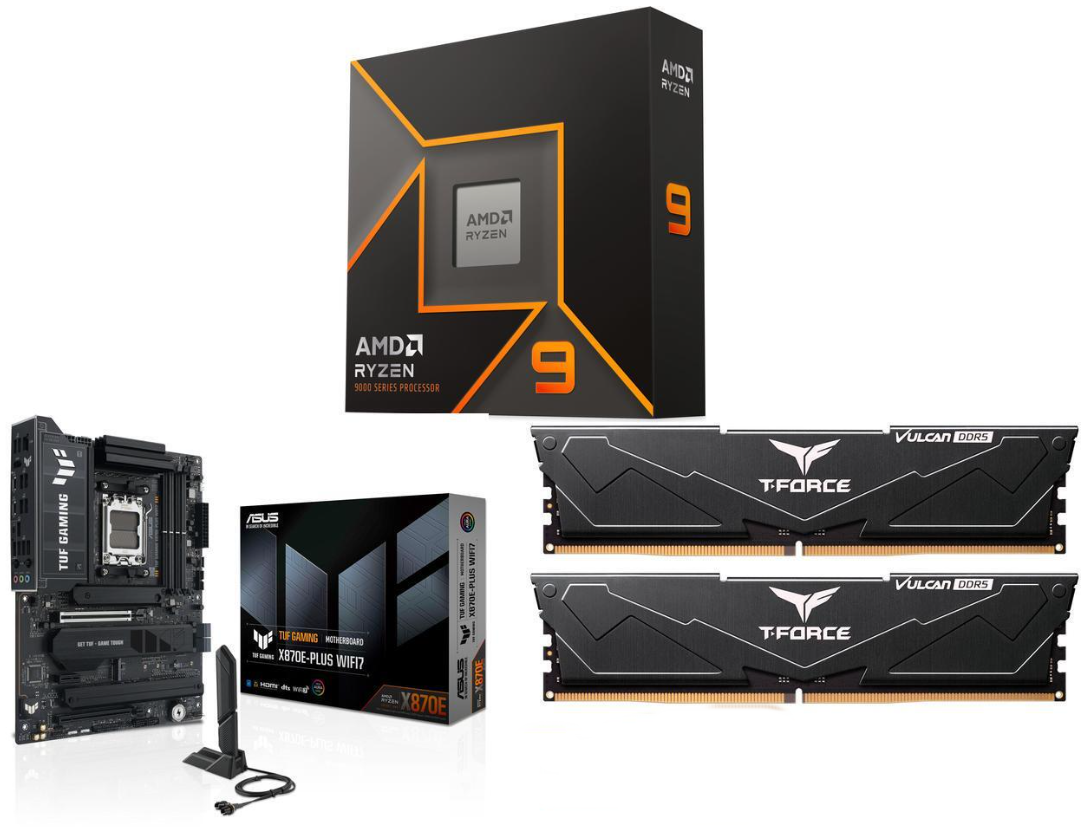
The star of the combo has to be the ‘free’ RAM. The combo offers 16GB (2x8GB) of TeamGroup’s T-Force Vulkan DDR5-5200. And while the RAM speed is outside of AMD’s sweet spot, you’d be hard-pressed to notice a performance difference without looking at a frame counter. These black, non-RGB sticks will also look great with the included motherboard. If you apply the ~$274 discount to the RAM, you’re getting it for free. And if 16GB isn’t enough, buy the same kit again net 32GB for only $240.
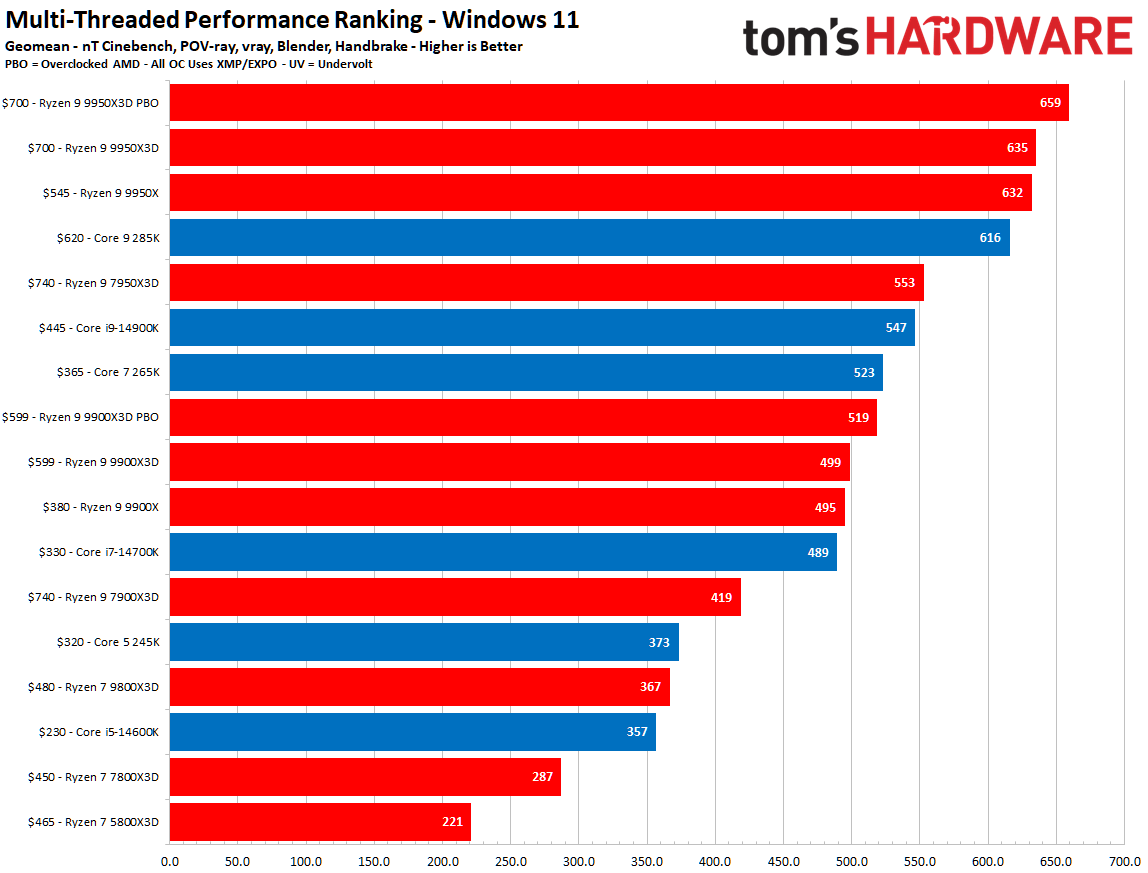
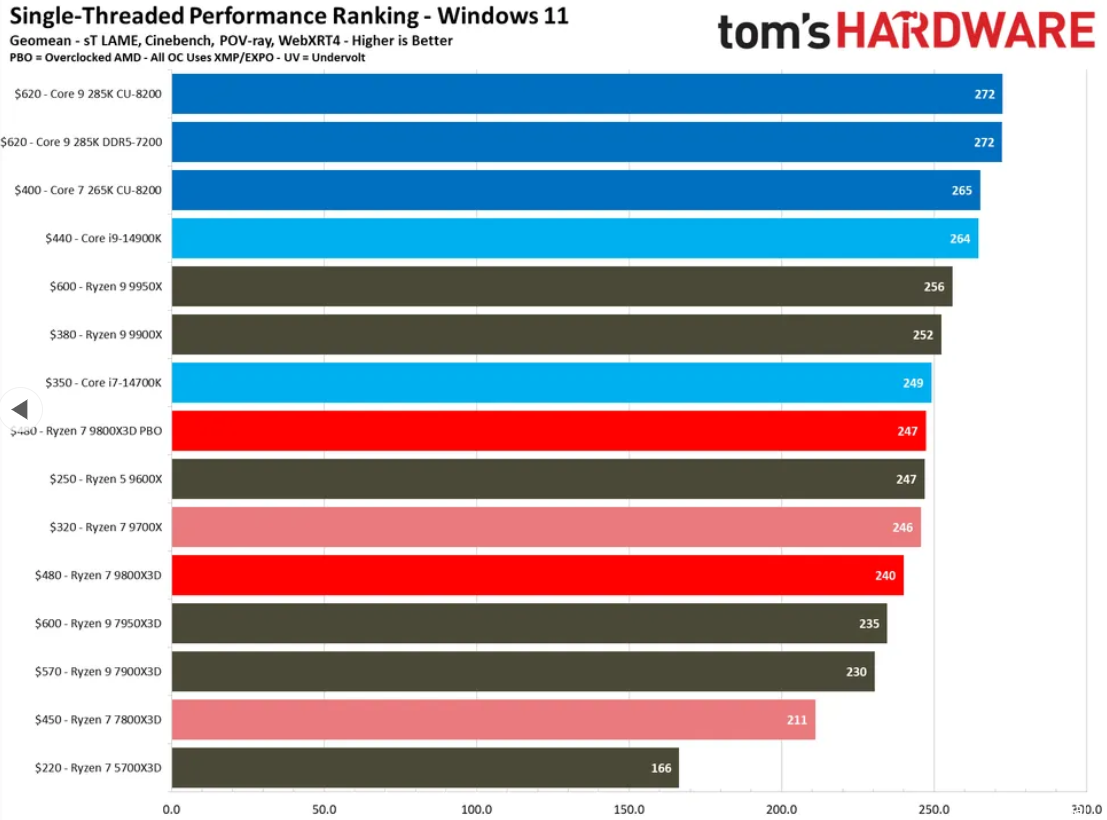
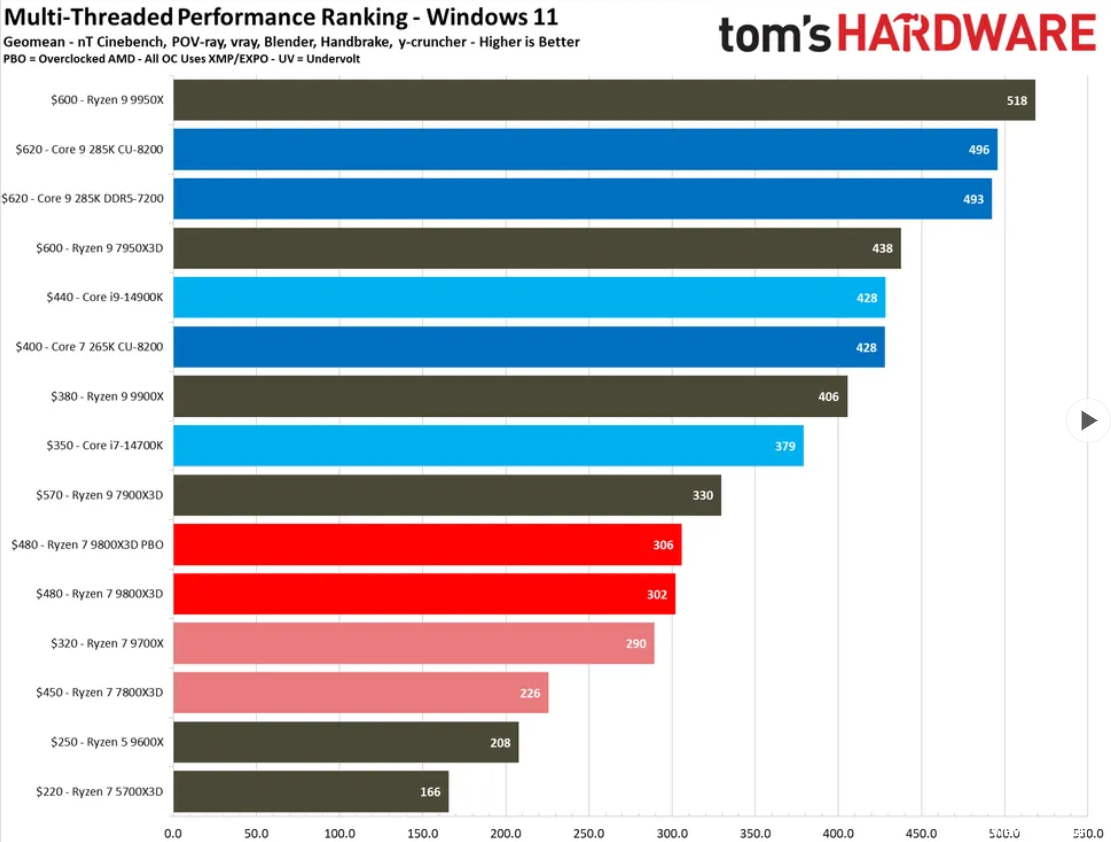
Although we didn’t review AMD’s Ryzen 9 9900X, we know the non-X3D chips, like its big brother, the Ryzen 9 9950X, were generally well received by our reviewer and the public alike. Its strong multicore and single-threaded performance, native AVX-512 support, and backward compatibility with AM5 motherboards make this CPU an excellent choice for someone who uses their PC for more than just gaming and can make use of the additional cores and threads, as you can see from our benchmark data:
FutureFutureFuture
The Ryzen 9 9900X is a 12-core, 24-thread processor built on TSMC’s 4nm FinFET process (6nm for the I/O die) with a base clock of 4.4 GHz and boost up to 5.6 GHz. It has a TDP of 120W and is relatively easy to manage the thermals, even when overclocking the fully unlocked processor. While overclocking isn’t what it used to be, you can still squeeze out a couple of hundred more GHz, and sometimes you can get there, even when lowering the voltage. In short, there’s a lot of performance out of the box, and even a bit more headroom left if you want to overclock.
Last, the Asus TUF Gaming X870E-Plus Wifi 7 is a solid all-around motherboard for the AM5 platform. It delivers sufficient power to support flagship-class processors and easily handles the 9850X3D in the combo, even with some overclocking. It comes with four M.2 sockets (one PCIe 5.0) and two SATA ports for storage, fast networking with integrated Wi-Fi 7 and 2,5 GbE, ample USB ports on the rear IO (13, including two USB4 40 Gbps Type-C), and a quality audio solution based on the last-gen Realtek flagship (ALC1220P). Asus’ AI solutions (AI Cache Boost, Overclocking, Cooling II, and Networking II) and the DIY-friendly design make it easy to build and get the most out of your system.
If you’re in the market for an AM5-based system that isn’t based on an X3D chip, this $658.99 combo (an incredible $274 savings) is one of the better deals available at Newegg right now. And you even get a free 240mm Cooler Master AIO. Getting RAM for what essentially amounts to ‘free’ is not something we see frequently. You can even upgrade to 32GB and still find yourself well ahead versus buying alone. Get this deal while it lasts.
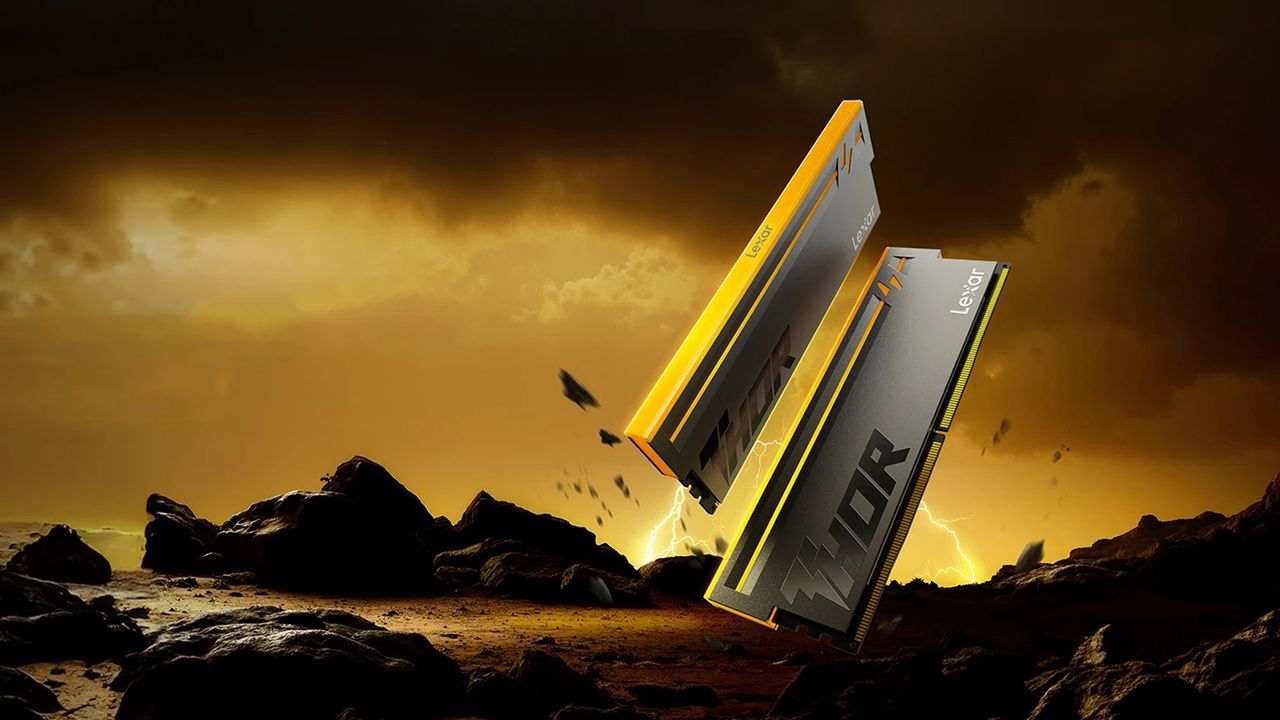
Storage and memory manufacturer Lexar has listed a new 32GB (2x16GB) DDR5-7200 CL38 memory kit in China with a price tag of 3,999 yuan (roughly $592). Part of the second-generation Thor RGB series, the kit features a sandblasted aluminum heat spreader, thermal pads, and eight LEDs that support a variety of RGB lighting effects. It is rated for 38-48-48-86 timings at 1.40V and supports both Intel XMP 3.0 and AMD EXPO profiles.
Lexar says the modules use carefully selected domestically produced DRAM, although it does not specify the actual manufacturer. While there is no confirmation, the company may be using DRAM chips made by CXMT (ChangXin Memory Technologies). Lexar has also published a compatibility list covering 43 motherboards, including 30 Asus models and 13 MSI models across Intel Z890, Intel B860, and AMD B850 platforms. The compatibility list also includes supported boards for a faster 32GB (2x16GB) DDR5-7600 CL38 memory kit.
Interestingly, none of AMD's X870 or previous-generation motherboards appear on the list. That said, the kit should work on most DDR5 boards that Lexar hasn't tested, but the absence of AMD's flagship consumer chipset from the compatibility list is a bit odd. Notably, major motherboard manufacturers, including MSI and Gigabyte, have already started optimizing their motherboards to support CXMT memory ICs.
The arrival of CXMT-made DDR5 chips earlier this year raised hopes that a new DRAM supplier could ease supply constraints and eventually lower memory prices. So far, there seems to be little evidence of that happening. At around $592, Lexar's new DDR5-7200 kit is priced in line or only slightly below many comparable 32GB DDR5-7200 kits currently available in the U.S. Similar kits from brands such as G.Skill, Corsair, and Kingston are currently selling anywhere from $585 to $700.
There’s been a shift toward using a single DIMM of DDR5 to skirt the worst of the RAM pricing crisis. AMD has suggested to us previously, at least, that it’s an option PC builders are exploring, and it’s a wrinkle that’s shown up in dozens of prebuilts; one that we’ve been careful to avoid when recommending products, particularly during peak shopping events. But just how much gaming performance are you giving up with a single DIMM when using one of the best CPUs for gaming?
The conventional wisdom is that you’re giving up quite a bit of performance, resting on the ideas of previous DDR generations, where going down a single stick will cut your bandwidth in half. The same is true with DDR5, but things are a bit messier, which we’ll dig into later.
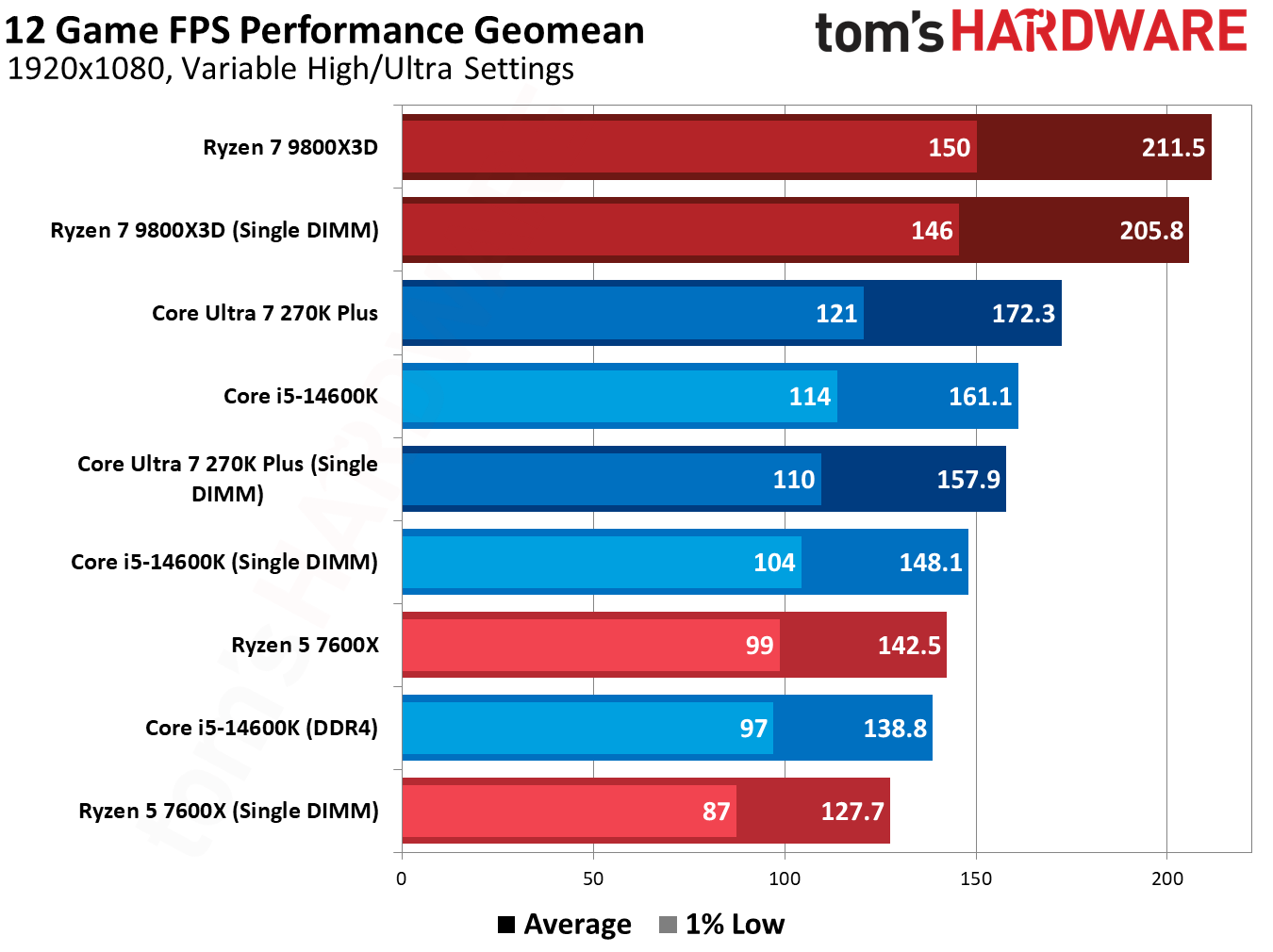
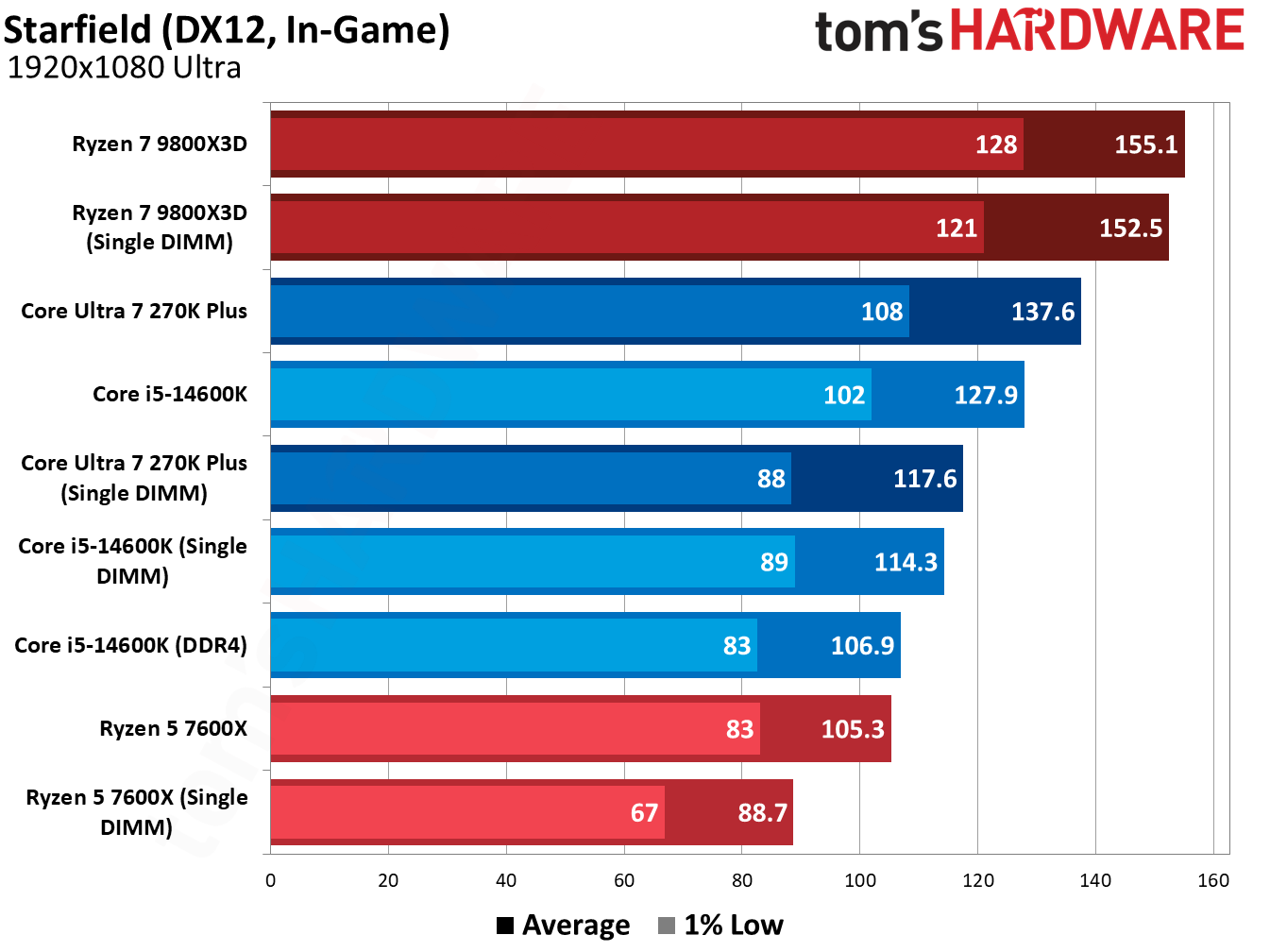
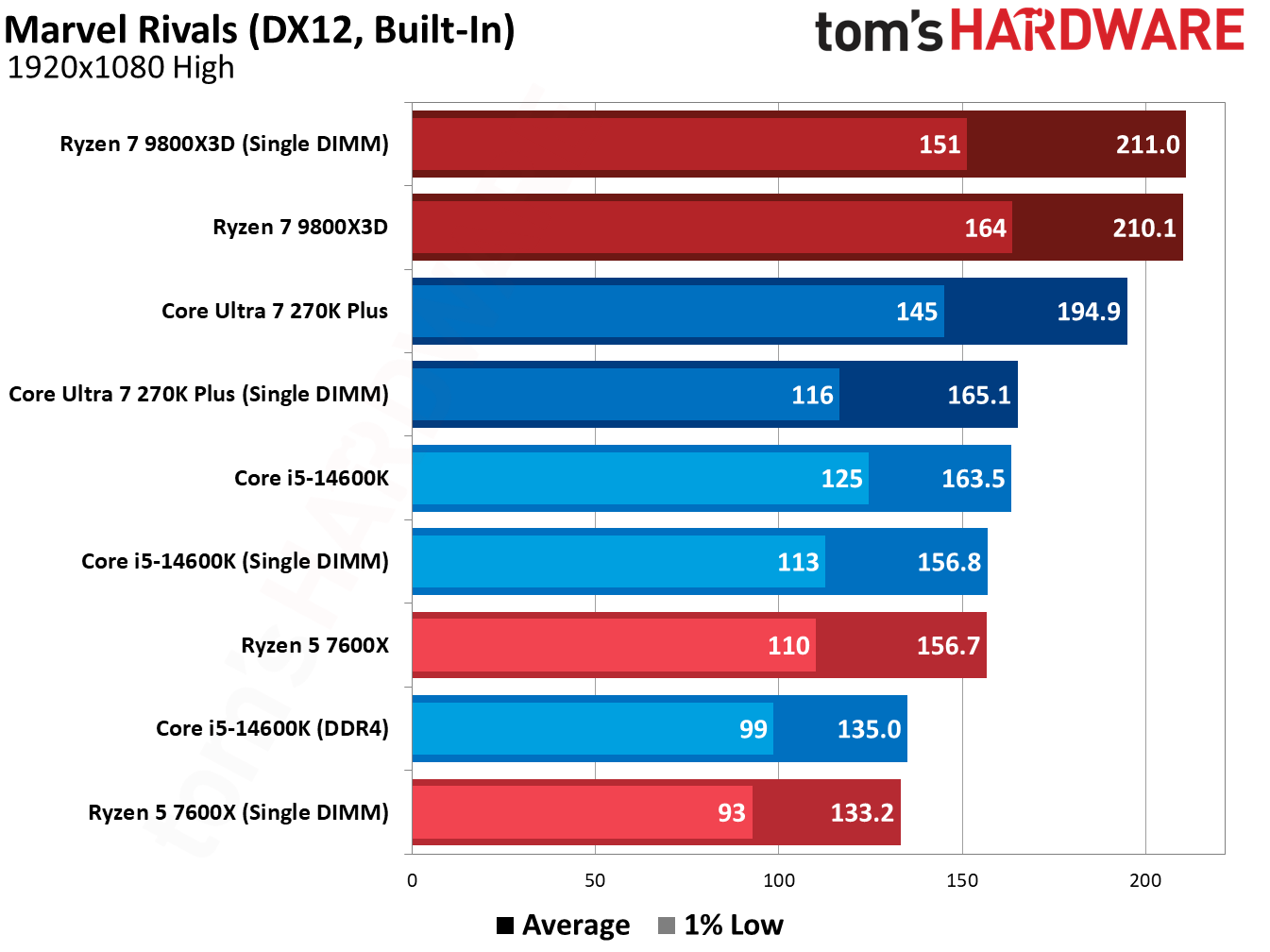
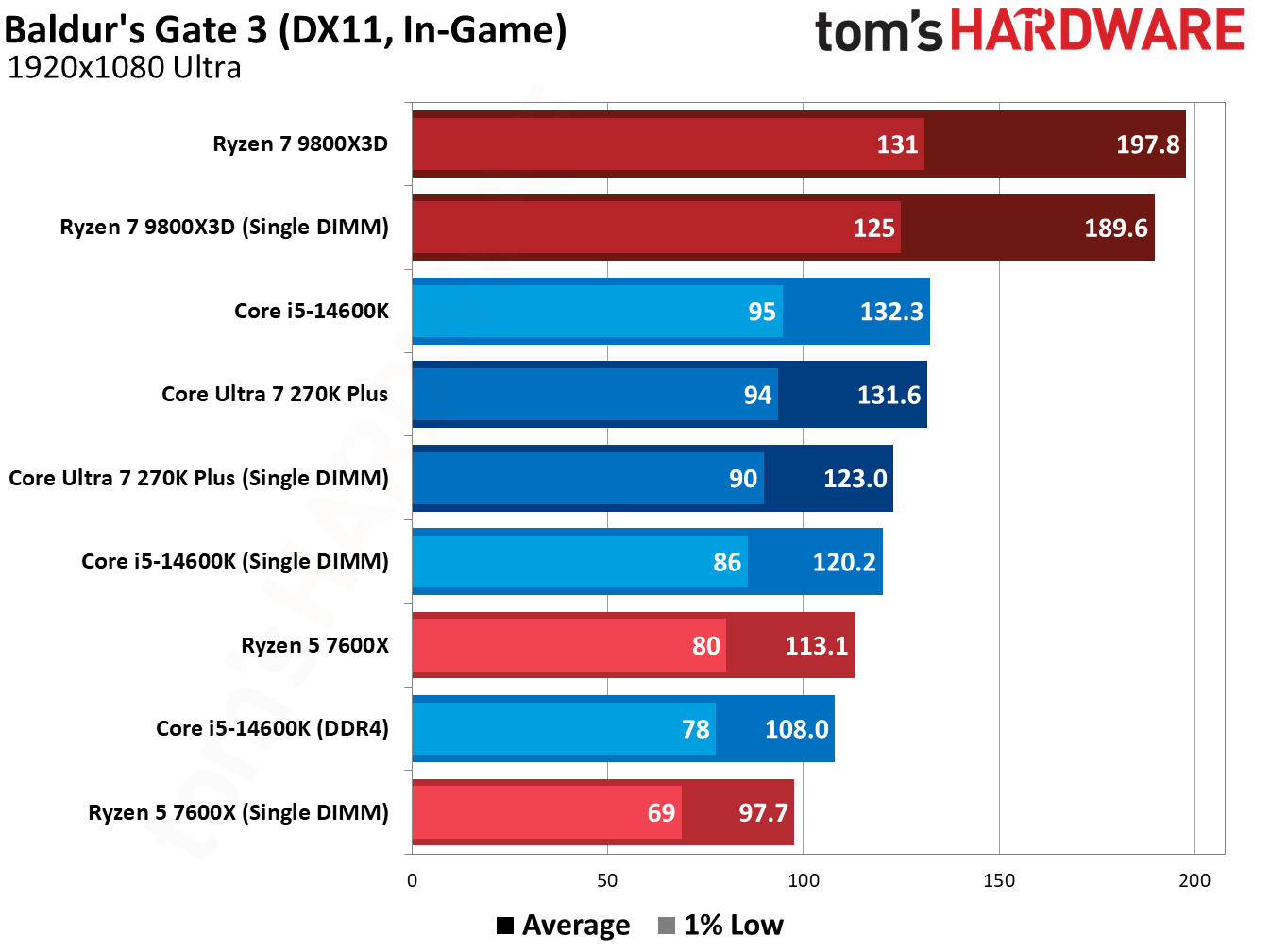
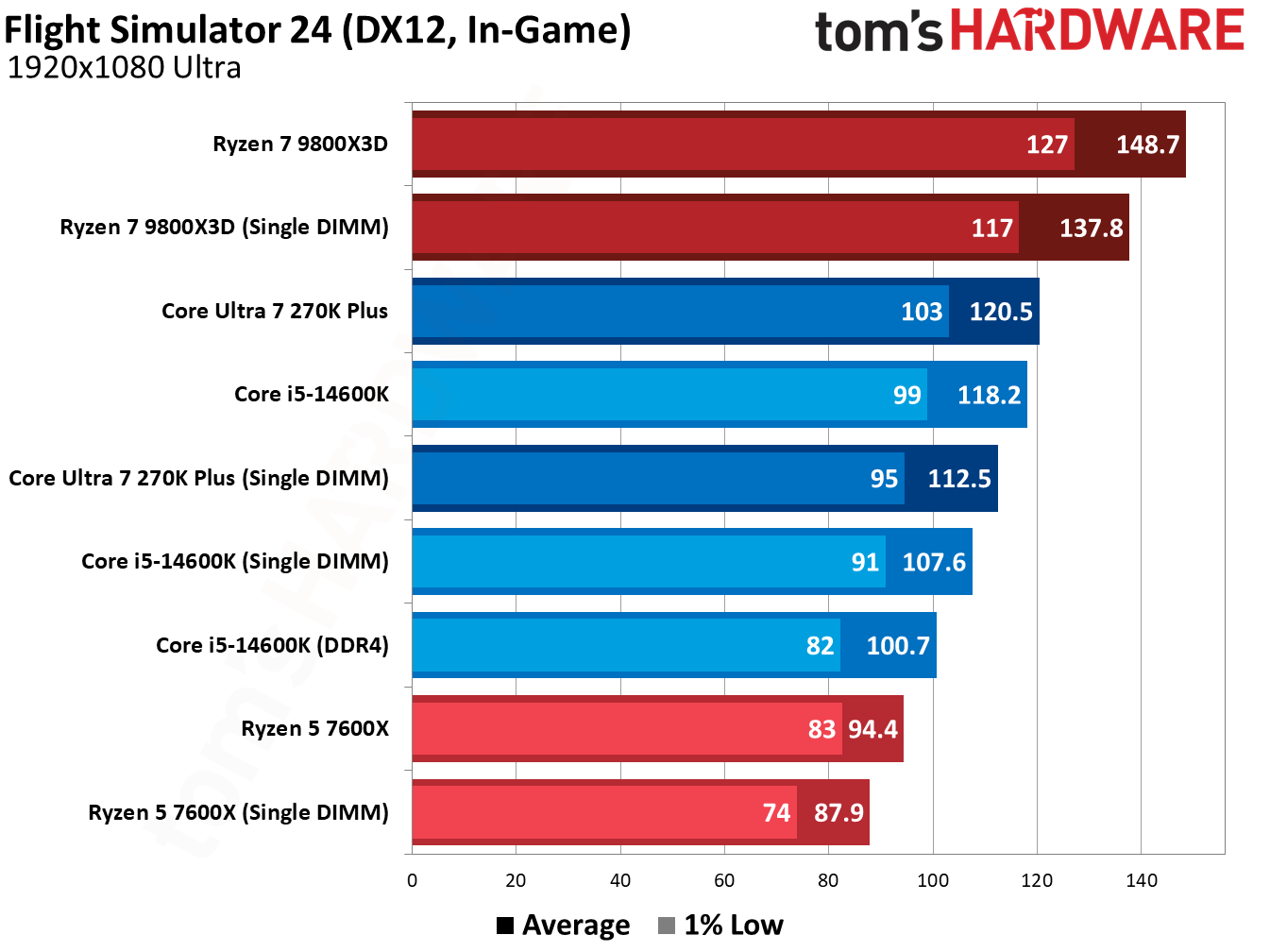
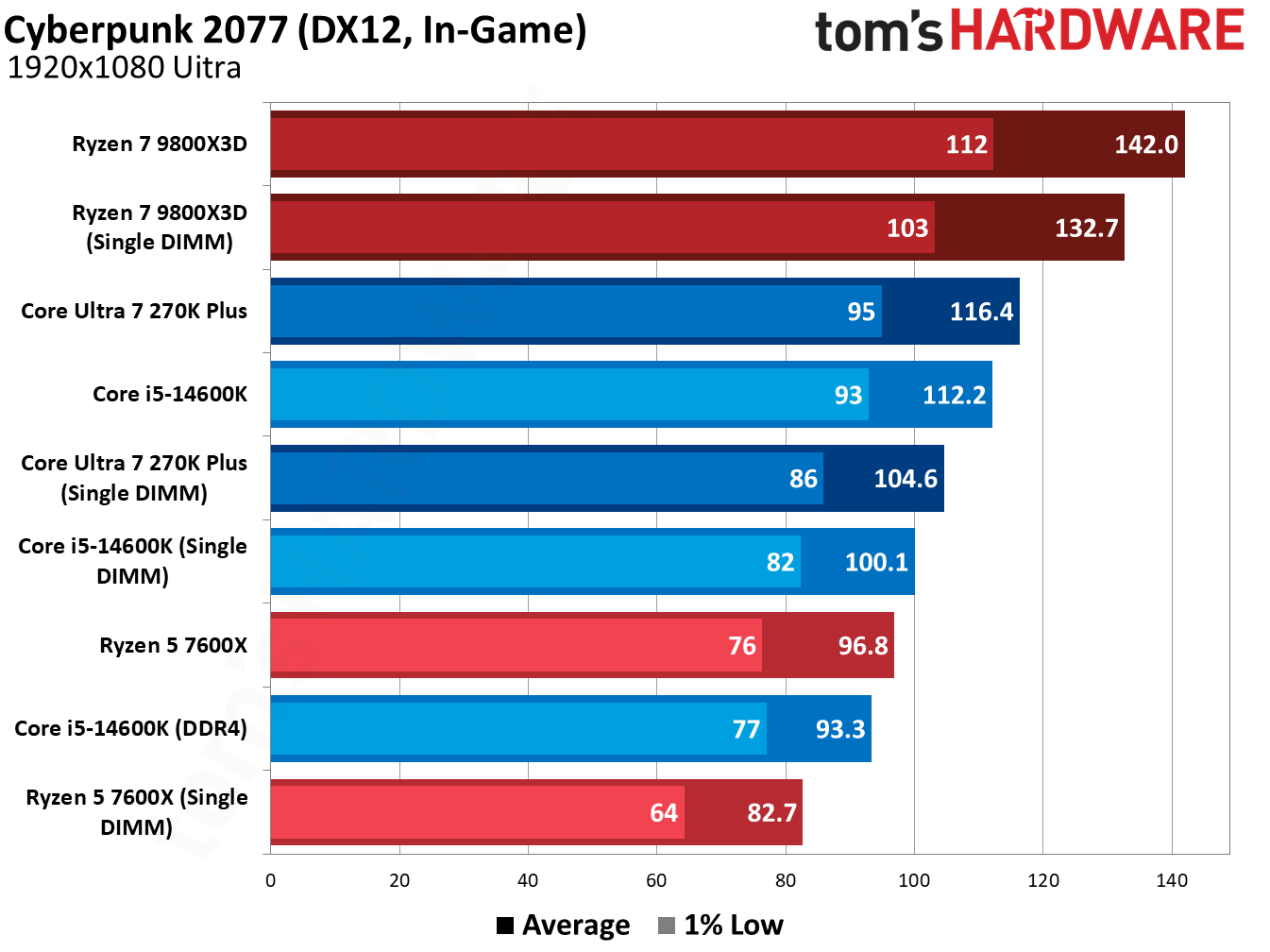
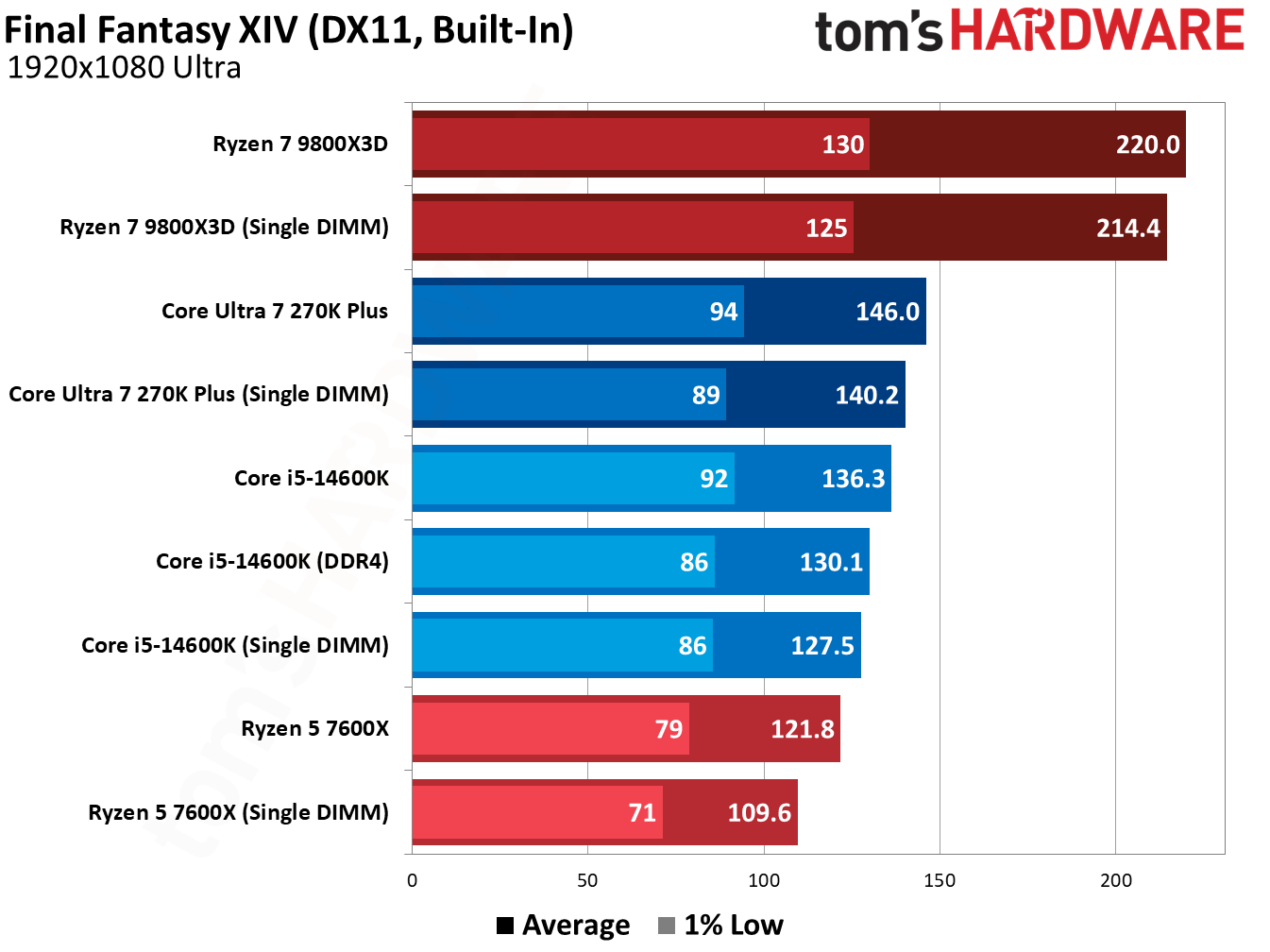
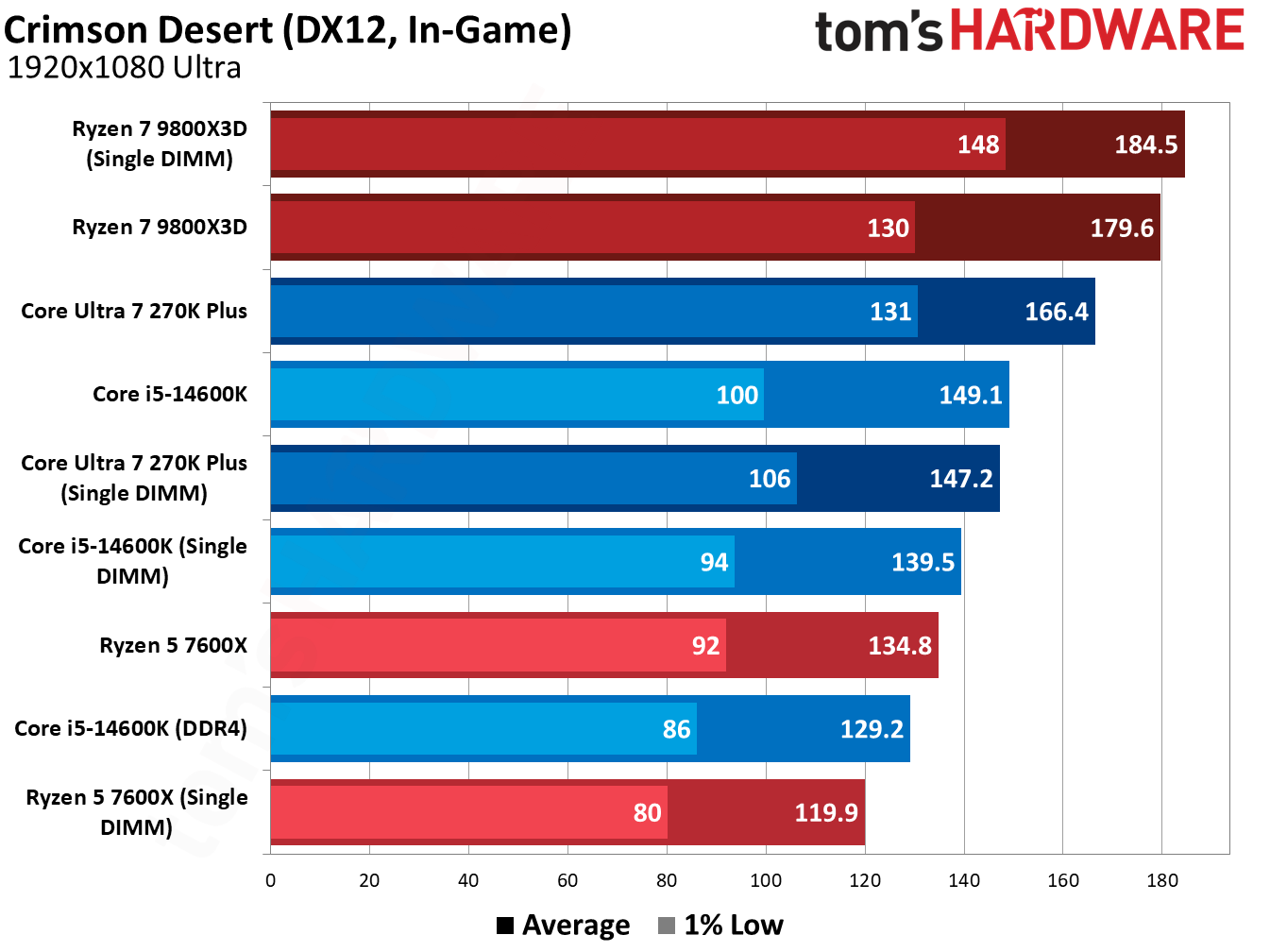
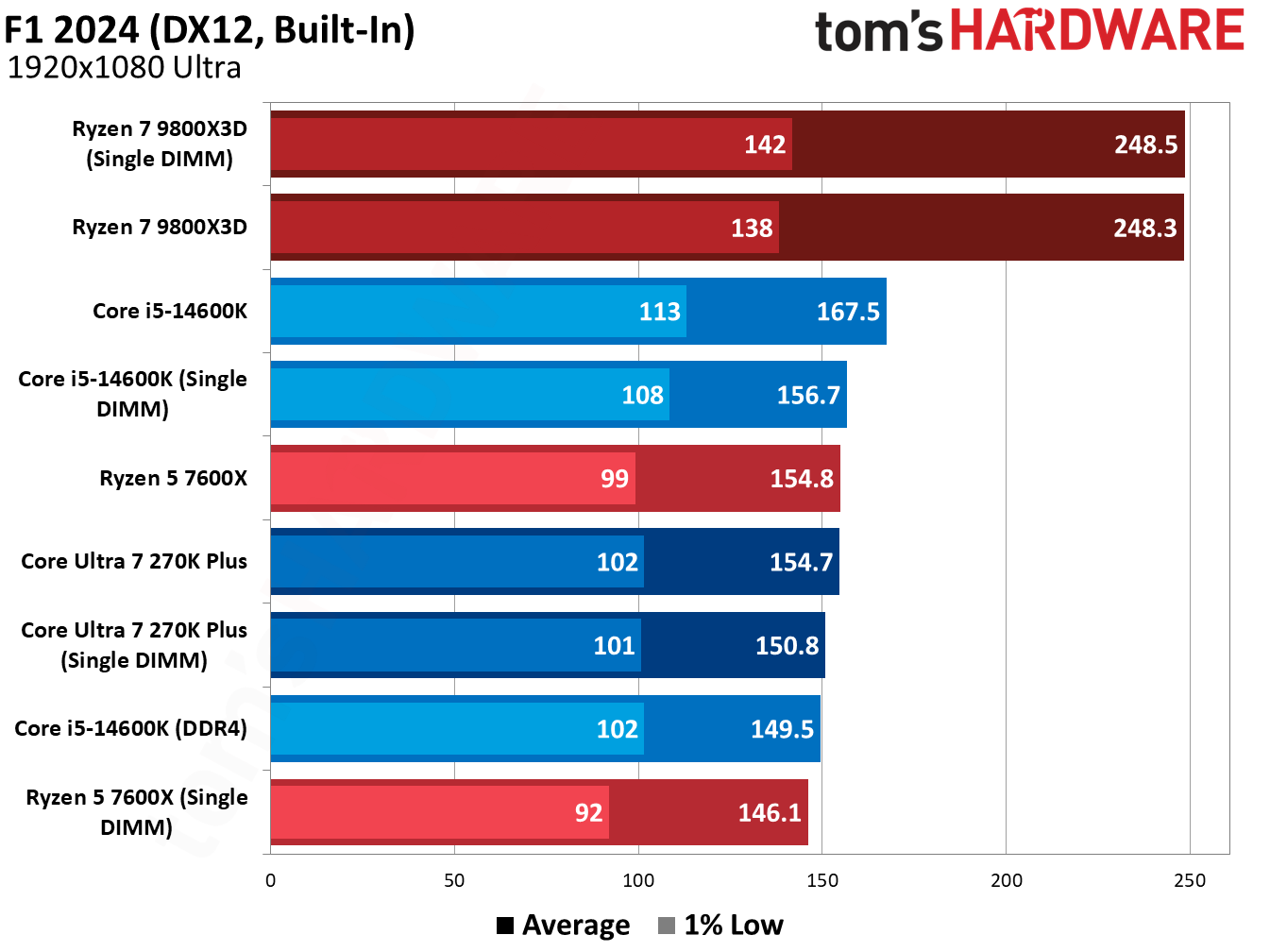
At a high level, using a single DDR5 DIMM doesn’t compromise gaming performance by nearly as much as you might expect. We saw drops of around 8% to 10% across Intel and AMD CPUs, and less than a 5% difference with AMD’s Ryzen 7 9800X3D.
A proper dual-channel configuration is still the way to go for optimal performance. However, our testing shows that even a single DDR5 DIMM offers superior performance to dual-channel DDR4 on CPUs that support both memory generations.
Using a single DIMM isn’t ideal, and it brings up compatibility issues if you plan on adding another DIMM down the line (another area we’ll touch more on in-depth later). But as a stopgap measure amid surging DRAM prices, a single DIMM of DDR5 holds up surprisingly well in gaming scenarios, and it represents a nice on-ramp into a DDR5 platform while prices are out of control.
Testing single-DIMM DDR5 in games
The geomean below speaks for itself. Moving down to a single DIMM drops some performance, but it’s not nearly as stark as I expected. There are some important notes about how we tested before dissecting the results, however.
As usual, we tested at 1080p with a mixture of High and Ultra settings, using Nvidia’s RTX 5090 Founder’s Edition to minimize the influence of the GPU. That’s even more important here, as we’re not evaluating CPUs but the memory that feeds the CPU. We're looking at a separate GPU and CPU here, as well; dual-channel memory is vital if you're using an iGPU.
We also wanted to create a realistic testing scenario. Assuming you’re going for a 2x16GB configuration, that means starting with a single 16GB DIMM, not a 32GB one. That’s what we did here. Our single-DIMM configurations run with just 16GB of memory, while dual-DIMM configurations run with 32GB. Capacity isn’t a major limitation for our testing here, though it will pose performance issues if you’re running several applications alongside your game.
(Image credit: Tom's Hardware)
The Ryzen 5 7600X was our biggest loser, dropping 10.9% of its average performance across our 13-game geomean with a single 16GB DIMM. The Core Ultra 7 270K Plus, meanwhile, dropped 8.7% of its average performance, while the Core i5-14600K similarly dropped 8.3% of its performance. The 1% lows are especially notable here, scaling with average performance rather than falling off a cliff.
Unsurprisingly, the Ryzen 7 9800X3D fared the best, dropping just 2.8% of its performance on average. As you’ll see through our individual game tests, the Ryzen 7 9800X3D shows identical performance with two DIMMs and a single DIMM in multiple games. The large and speedy L3 minimizes the impact of using a single DIMM, giving AMD’s 3D V-Cache CPUs another notch in their belt (as if they needed another).
Tom's HardwareTom's HardwareTom's Hardware
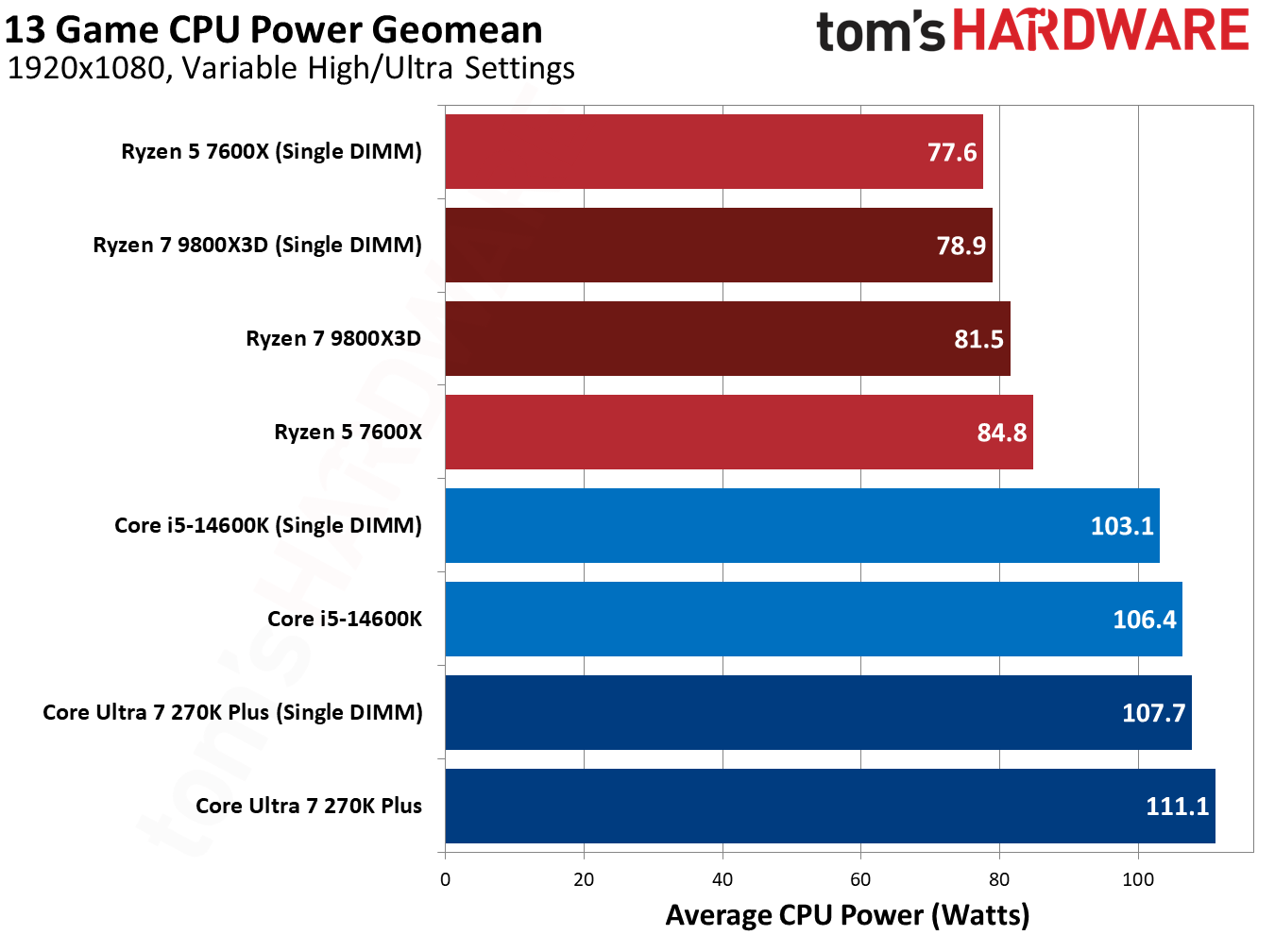
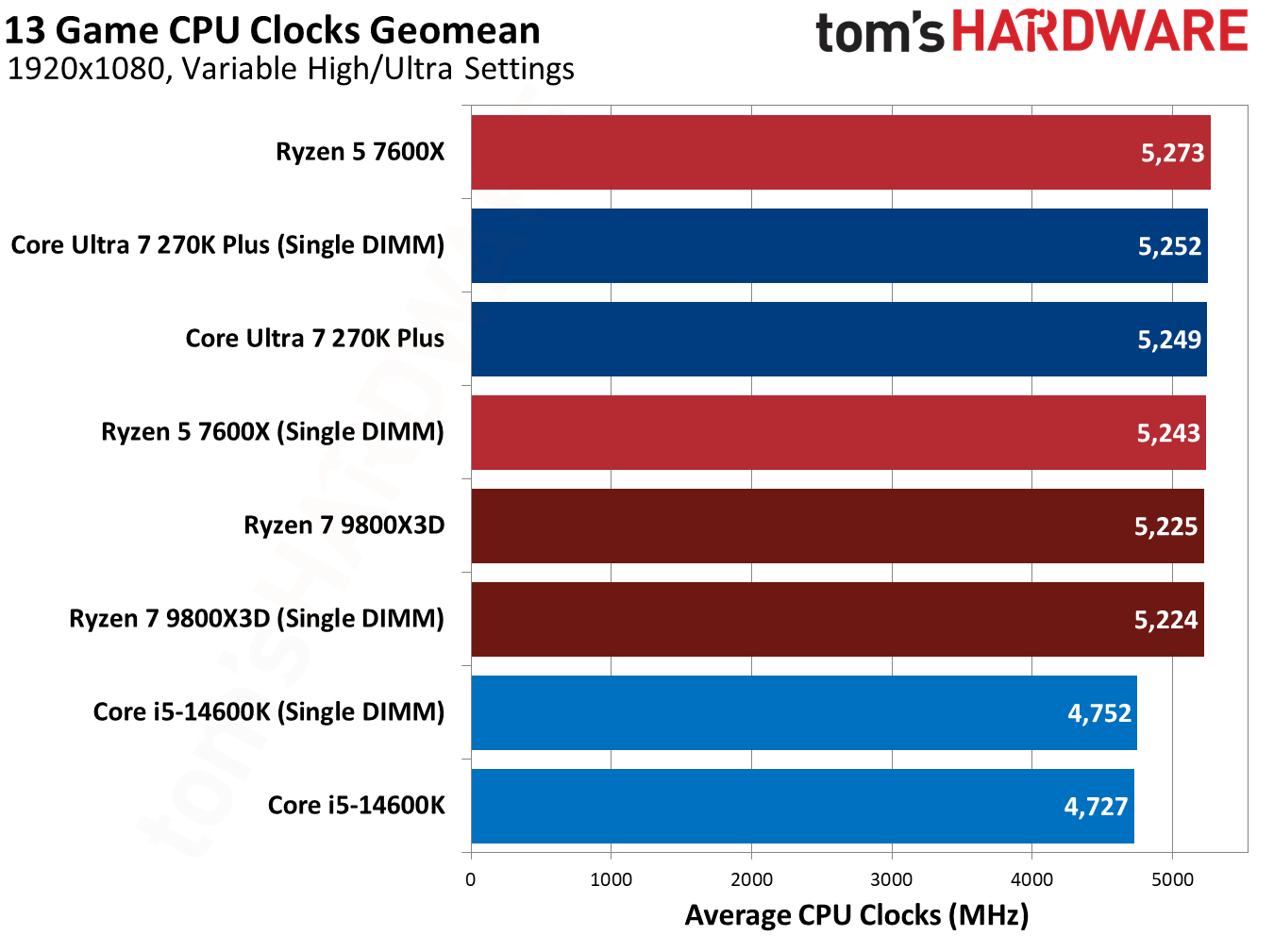
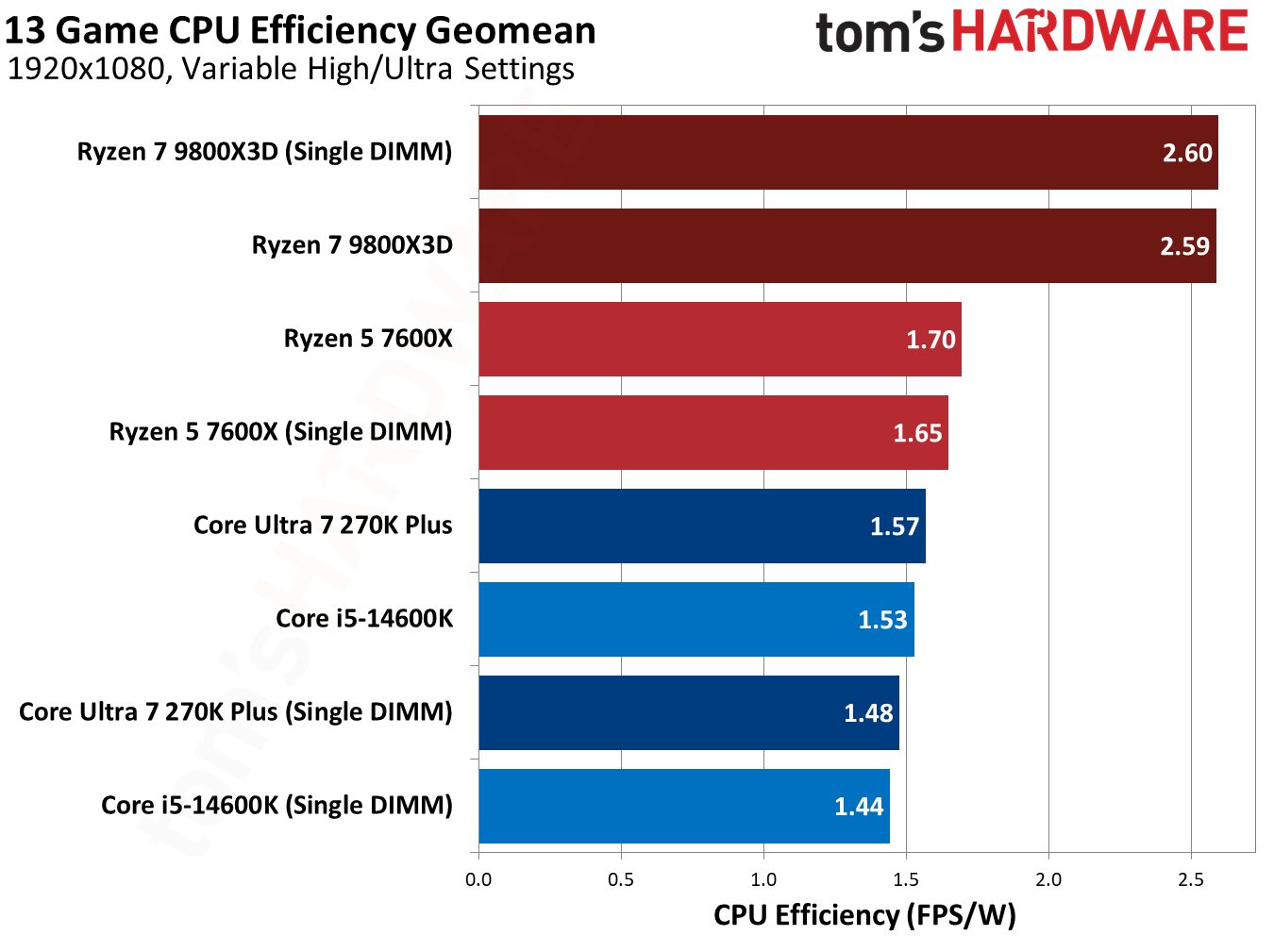
Our other geomeans don’t say much. A single-DIMM configuration consumes a few watts less, leading to slightly lower efficiency when balanced against the lowered performance.
(Image credit: Tom's Hardware)
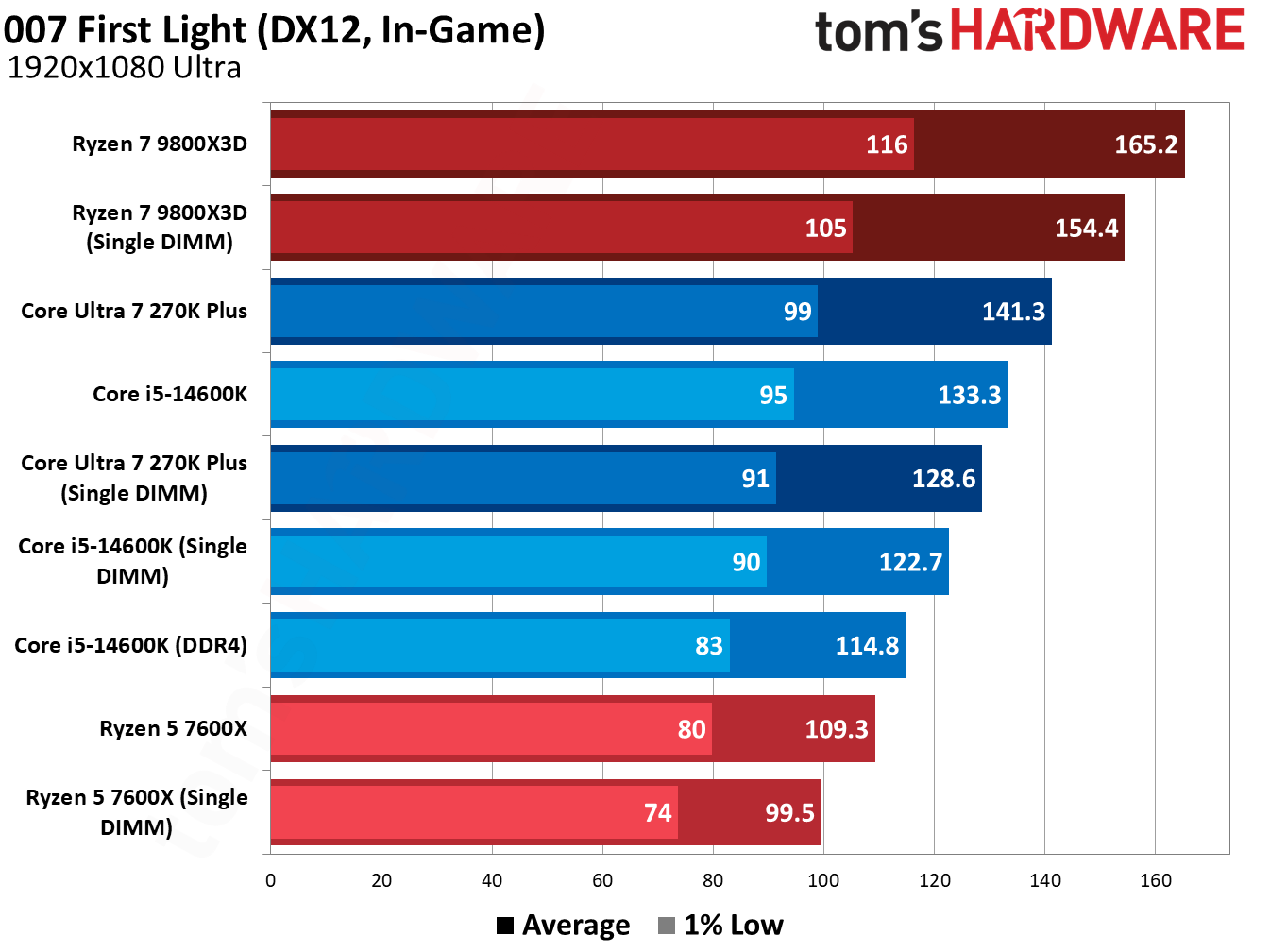
007 First Light, the newest game in our test suite, shows good scaling across our test pool, so it’s a good place to start. The Core Ultra 7 270K Plus dropped 8.9% of its performance with a single DIMM, while the 9800X3D dropped 6.5%. The 14600K is worth highlighting here. A single DIMM lost us 7.9%, but that’s still better than dual-channel DDR4, and by a decent 6.8% margin.
(Image credit: Tom's Hardware)
This trend is fairly consistent, too. Starfield is punishing for single-DIMM configurations, with the 14600K losing 10.6% of its average performance. Even then, a single DDR5 DIMM is 6.9% faster than dual-channel DDR4. Intel platforms can scale up to high data rates, and we use 7,200 MT/s for Intel chips. With slower speeds, the performance will equalize. Still, I’d strongly consider a single DDR5 DIMM if you’ve been eyeing an LGA 1700 platform with DDR4, assuming you’re primarily focused on gaming.
Starfield shows the benefits of 3D V-Cache in this single-DIMM configuration clearly. While the performance losses with other CPUs are brutal in this title, the 9800X3D dropped just a few frames, a 1.6% decrease in average performance.
(Image credit: Tom's Hardware)
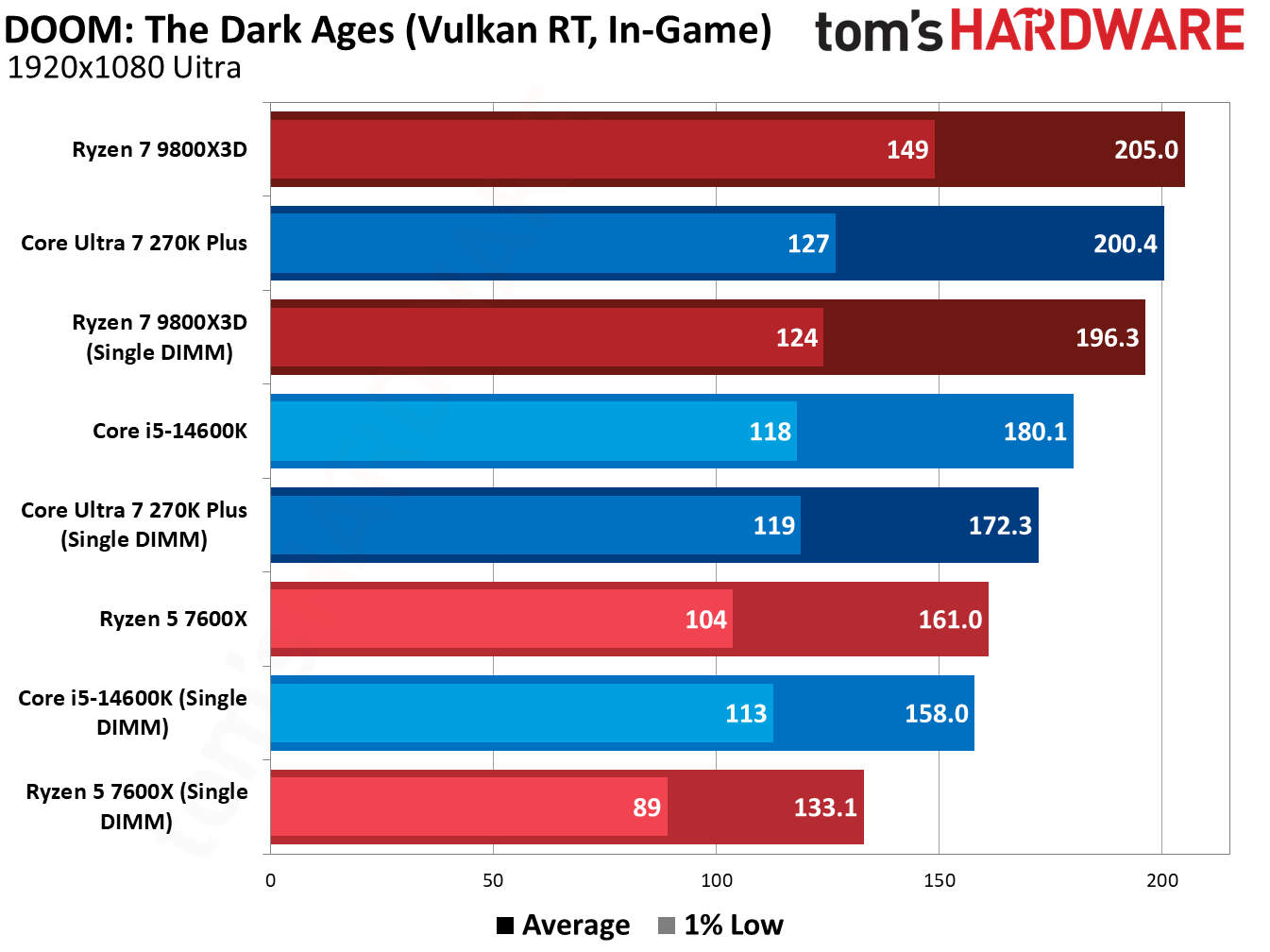
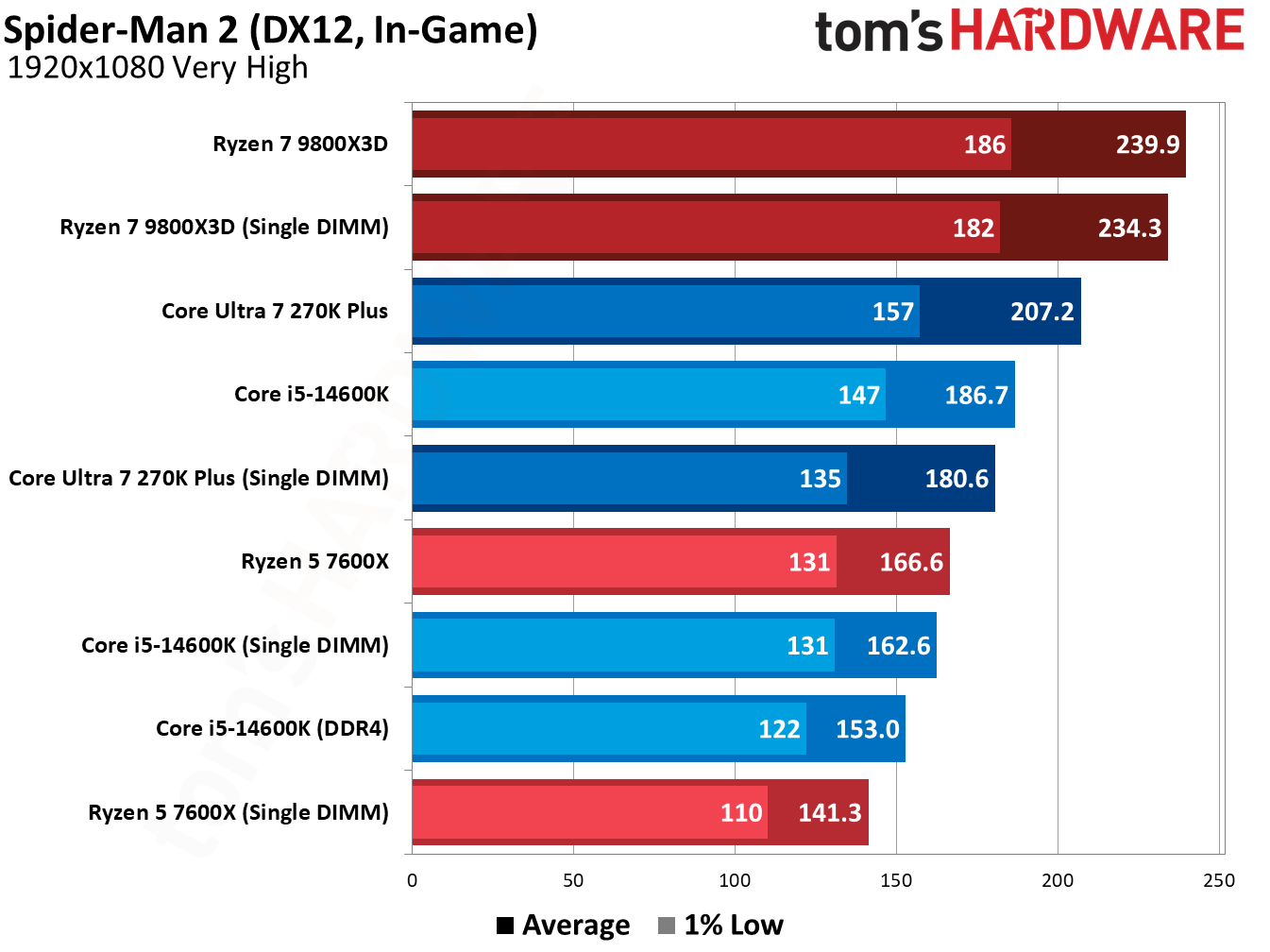
Doom: The Dark Ages is similarly harsh on single-DIMM configurations. The Ryzen 5 7600X dropped 17.3% of its average performance, and the 270K Plus fell by 14%. The 9800X3D holds up well, however, with just a 4.2% average performance loss. Marvel’s Spider-Man 2 (in the gallery below) shows a similar dynamic.
(Image credit: Tom's Hardware)
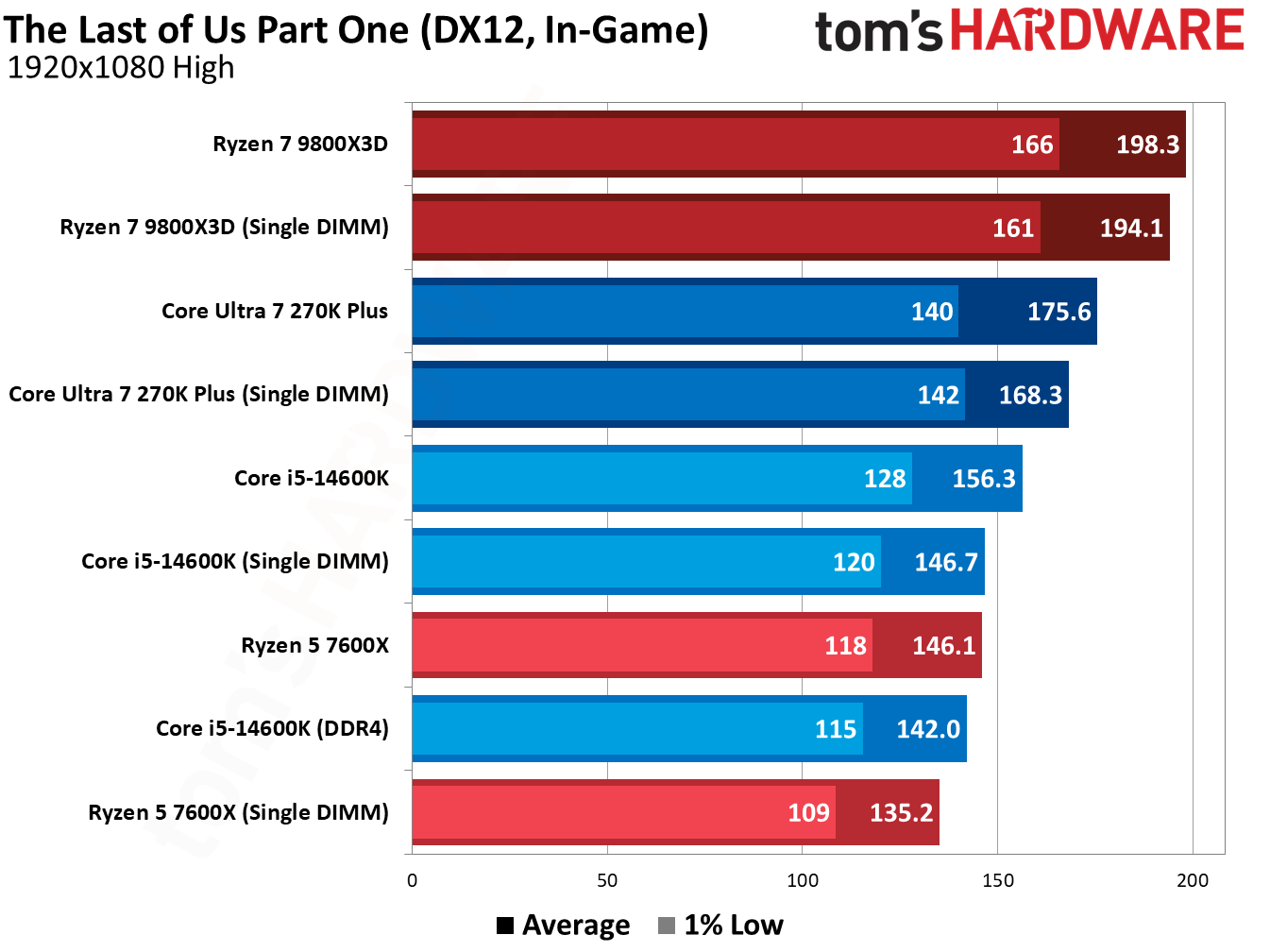
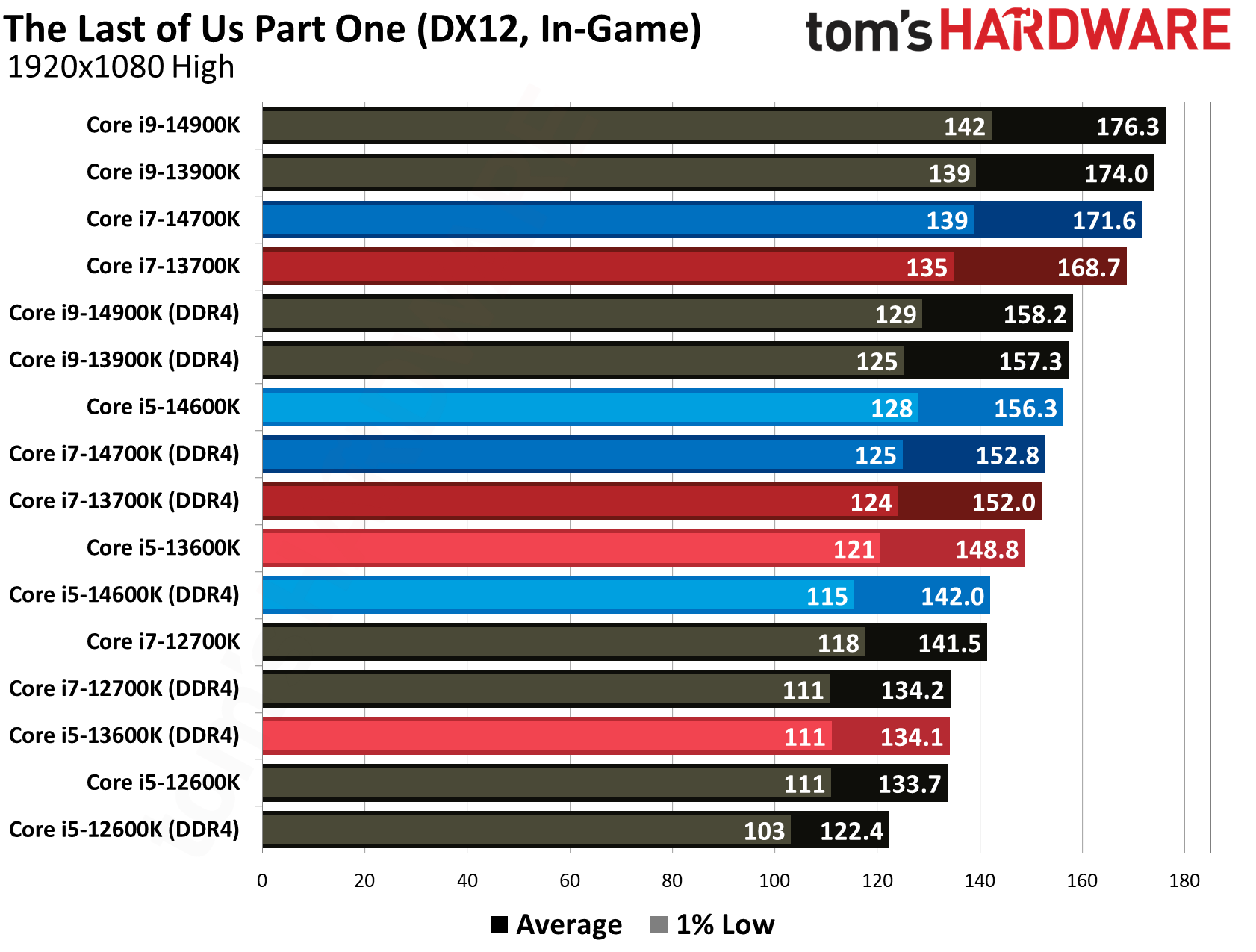
However, the addition of 3D V-Cache mainly helps in these games where we see bigger losses with other CPUs. There are several games in our suite where the performance loss between a single DIMM and dual-channel configuration was minor, particularly in GPU-heavy titles. The Last of Us Part One shows that in action.
(Image credit: Tom's Hardware)
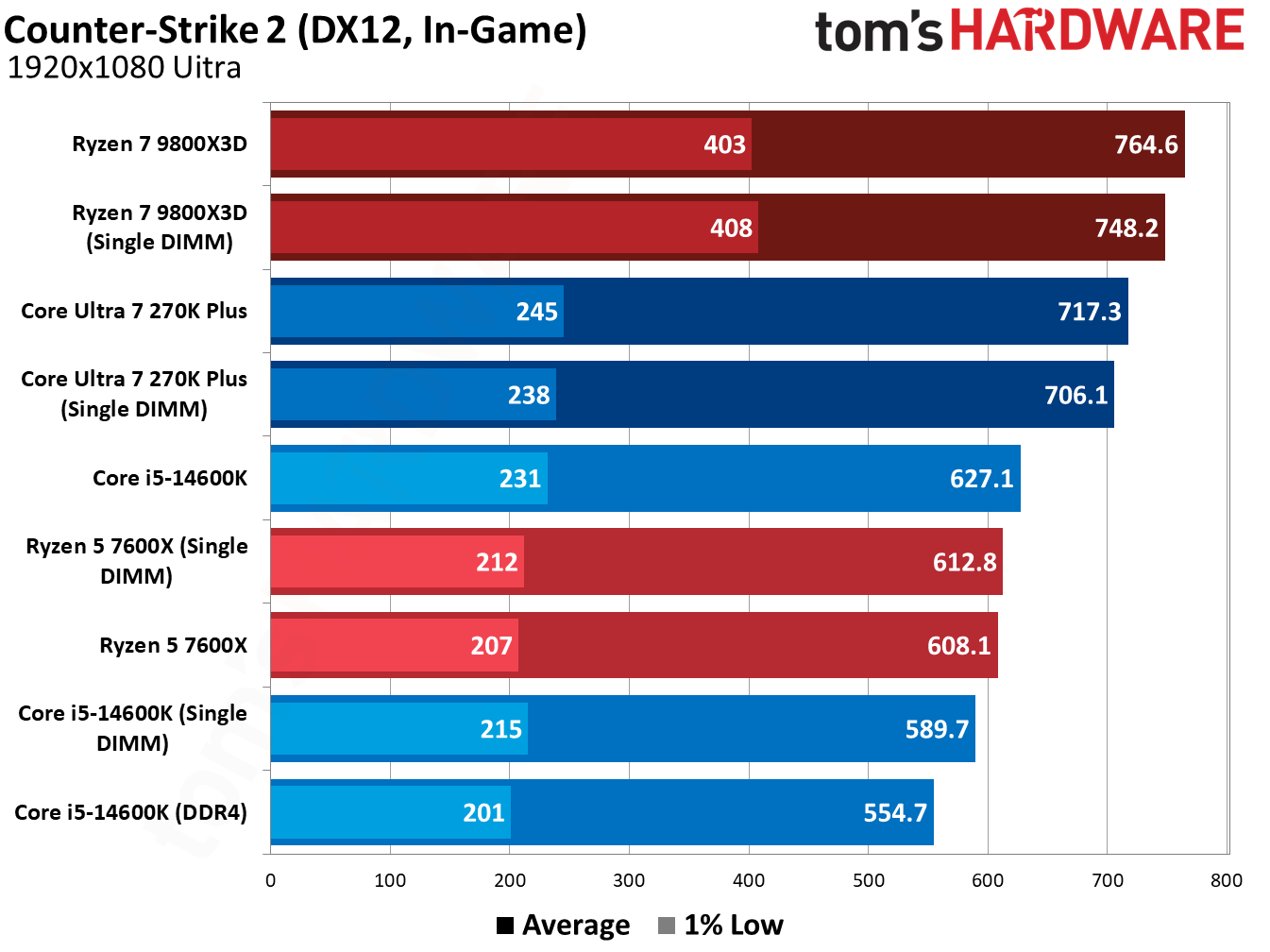
Similarly, the performance loss is minor in Counter-Strike 2, just a handful of frames even north of 600 FPS. Even the Core i5-14600K, which was hit the hardest by far, dropped just 5.9% of its average performance (and it’s still faster than a dual-channel DDR4 configuration).
You can browse the results of the other games we tested in the gallery above, though they tell much the same story as the titles we highlighted. The two biggest learnings from this testing are that a single, fast DDR5 DIMM often outpaces dual-channel DDR4, and that AMD’s 3D V-Cache can smooth over the rough edges of using a single DIMM, particularly in those memory-sensitive titles.
How we tested
We tested on our normal test bed that we use for CPU reviews, with the only difference being dropping one of our DIMMs. As usual, we enabled XMP/EXPO for testing, both on single- and dual-DIMM configurations, opting for higher speeds on Intel platforms. AMD’s sweet spot is around 6,000 MT/s.
The data rate is noteworthy for the DDR4 comparison, in particular. With slower DDR5, we expect the delta between dual-channel DDR4 and single-DIMM DDR5 to decrease.
In addition to enabling XMP/EXPO, we disable Virtualization-Based Security (VBS), enable Resizeable BAR, and disable any automatic overclocking features that aren’t covered by warranty, including AMD’s Precision Boost Overdrive and Intel’s Extreme performance profile.
DDR5 has much higher data rates compared to DDR4 (2x or more), and that’s the result of significantly more complexity on DDR5 DIMMs compared to DDR4. Notably for this testing are the two 32-bit subchannels of DDR5, as well as enlarged prefetch and bank groups. You are getting half the total bandwidth with a single DDR5 DIMM, absolutely, but it’s a little more nuanced than simply running your memory in a single-channel configuration.
DDR4 uses a single 72-bit channel, and 64 of those bits transfer data (the additional 8 are for ECC). With DDR5, you get two 40-bit subchannels, 32 of which are used for data transfer. Critically, these subchannels have their own Command/Address (CA) interface, allowing them to operate independently of each other.
In addition, DDR5 doubles the prefetch size to 16N, doubles the number of banks and bank groups, and increases burst length from 8 bytes to 16 bytes. The math here is straightforward enough. With DDR4, you can transfer 64 bits of data over the interface at a burst of 8 bytes, giving you 64 bytes of data and aligning with cache line sizes. Each of the subchannels in DDR5 can transfer 64 bytes of data, as well, with a 32-bit width and burst length of 16 bytes.
It’s pseudo-dual-channel memory on a single DIMM. There are two independent memory operations that can happen each cycle, both of which transfer 64 bytes of data. That is a big reason why even a single DDR5 DIMM (particularly one with a higher data rate) can outpace even a proper dual-channel DDR4 configuration.
The common wisdom about using a single DIMM comes mainly from previous DDR generations, where you can only get that single 64-byte transfer each cycle, necessitating a second DIMM to have two independent operations.
Let me be clear: two DDR5 DIMMs are still better. Instead of two operations per cycle, you can perform four. The main difference is that, for modern CPUs and games, just those two operations give you the vast majority of your performance, and you don’t run into a massive performance bottleneck as you do with just a single operation via DDR4. After all, there are still a lot of DDR4 systems out there.
On the issue of compatibility
The elephant in the room with upgrading to a DDR5 platform with a single DIMM is compatibility. If you get a single DDR5 DIMM now, you should plan to add another in the future. Unfortunately, there aren’t a lot of easy answers when it comes to combining two DIMMs that aren’t in a kit together. It should work, but mixing and matching can lead to stability issues and/or lowered performance.
Generally, combining two DIMMs of the same spec should work. For instance, if you bought this Patriot Viper Venom DDR5-6000 CL30 DIMM to start your new build, and then bought a second one later, it should work. “Should” carries a lot of weight on its shoulders, however. Maybe Patriot sources DRAM from multiple places, or your second DIMM’s timings don’t completely align with your first. That could cause stability or performance issues.
There have been some attempts to get past this hurdle, such as the ROG Certified program with select Asus motherboards, but it’s impossible to know for sure if two separate DIMMs will work together or not without testing. The best you can do is to make sure you buy the same brand of memory, with the same spec, if you add a second DIMM. Make sure to keep your receipt handy in the event you need to return it, as well.
Once you have your second DIMM, make sure to test it first at stock JEDEC speeds/timings (no XMP/EXPO). Run games or applications you normally run, and then use a utility like MemTest64 to check for stability. I’d recommend keeping your PC running in this state for a few days to see if any BSODs, application crashes, or poor performance issues pop up. After that’s done, repeat the process with XMP/EXPO enabled, assuming you’re using matching DIMMs (incompatible XMP/EXPO profiles won’t work together).
Assuming DRAM prices continue at an elevated rate before you upgrade, you may want to consider investing in a dual-channel kit down the line and selling your single DIMM. Even kits can run into compatibility issues, though the likelihood is far, far lower.
Unless you already have a kit of DDR5, or deep pockets for PC hardware, you’re stuck right now. Despite seeing some of the best CPUs for gaming released just in the past year, the DDR5 tax represents a major hurdle to building or upgrading your PC. Intel’s LGA 1700 CPUs hold an unintended solution, offering support for both DDR4 and DDR5. We wanted to see if this on-ramp to a next-gen platform was really as smooth as it looks at first glance.
The idea is simple. If you already have a DDR4 kit, you can upgrade to a relatively new CPU while keeping the door open for a transition to DDR5 without buying a new chip. It’s inexpensive, and a bit more of a practical solution than upgrading to DDR5 with a single DIMM and worrying about pairing it with another later.
Our testing shows how much of a performance difference there is with DDR4 in games. We’re focused on games here for a few reasons. First, in non-gaming applications, memory speed is highly dependent on the specific workload you’re running. Games, despite using different engines, are largely similar workloads that stress the hardware in similar ways. Further, those workloads are continually evolving as new games, new technologies, and new hardware targets are released.
We kept our testing focused on Intel’s LGA 1700 CPUs because they’re the only options that give us a true apples-to-apples comparison between DDR4 and DDR5. We don’t have any AMD CPUs in our test pool because there aren’t any chips that support both DDR4 and DDR5. This isn’t intended to be a competitive analysis between AMD and Intel. That conversation opens up a much broader conversation about total platform cost.
Testing DDR4 vs. DDR5 on Intel’s LGA 1700 CPUs
To test DDR4 and DDR5’s gaming performance, we ran Intel’s main LGA 1700 stack through a 15-game gauntlet of benchmarks. Notably, we don’t have results for the Core i9-12900K, as our sample has a janky memory controller that won’t boot on DDR5 systems. You can read a full breakdown of how (and why) we tested in the way we did in the section below.
We ran all of the games through our 16-game benchmark suite, though we cut Doom: The Dark Ages from the results here. An update for the game rolled out mid-way through testing and skewed our results, so we’re omitting it. The 15 remaining games still paint a clear picture of the performance difference between DDR4 and DDR5.
As usual, we tested with the RTX 5090 Founder’s Edition at 1080p with a mixture of High and Ultra settings. We test at 1080p to maximize the differences between CPUs, and it remains the most widely-used resolution for gaming. Deltas between CPUs will decrease as the resolution climbs and the GPU becomes a larger influence in performance.
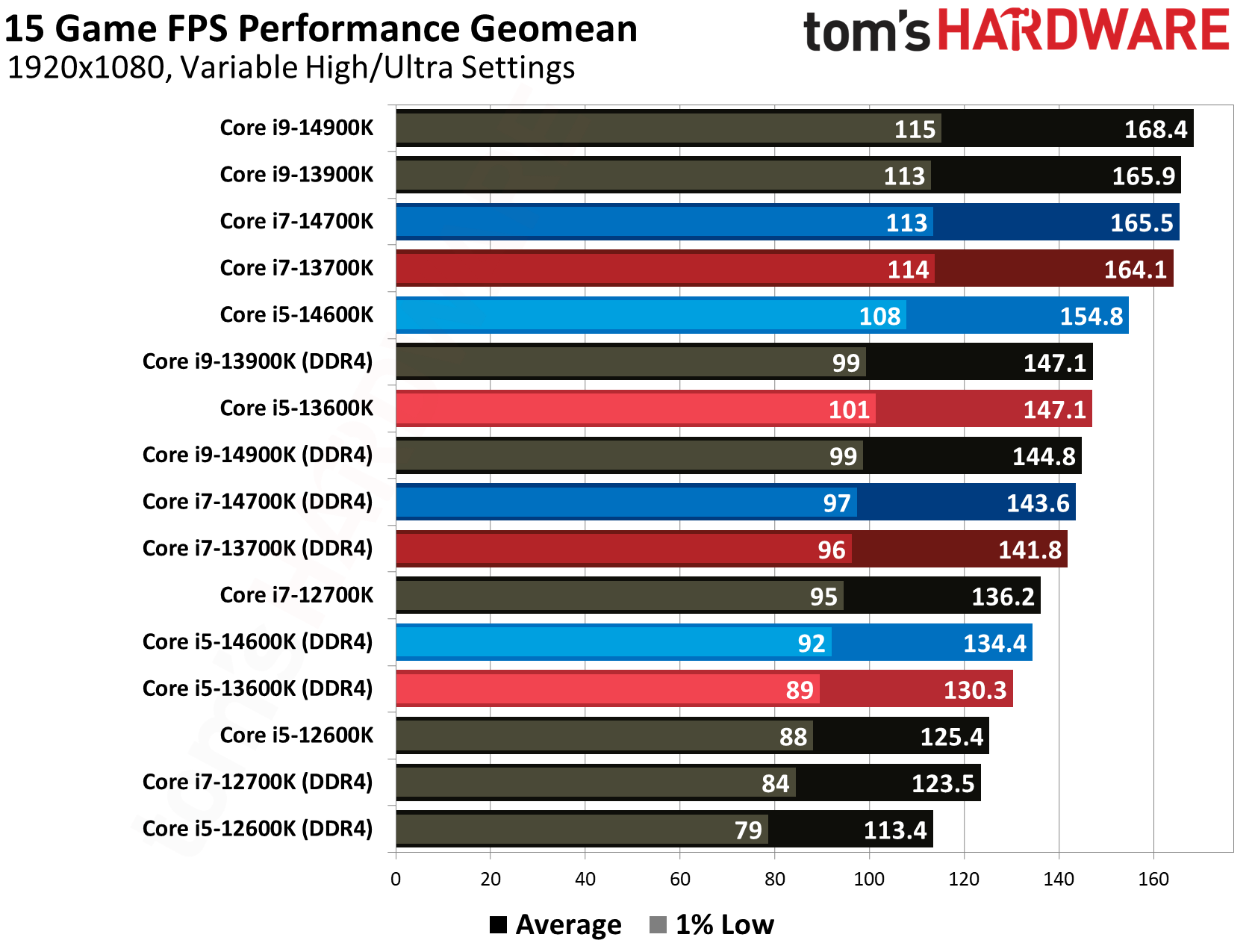
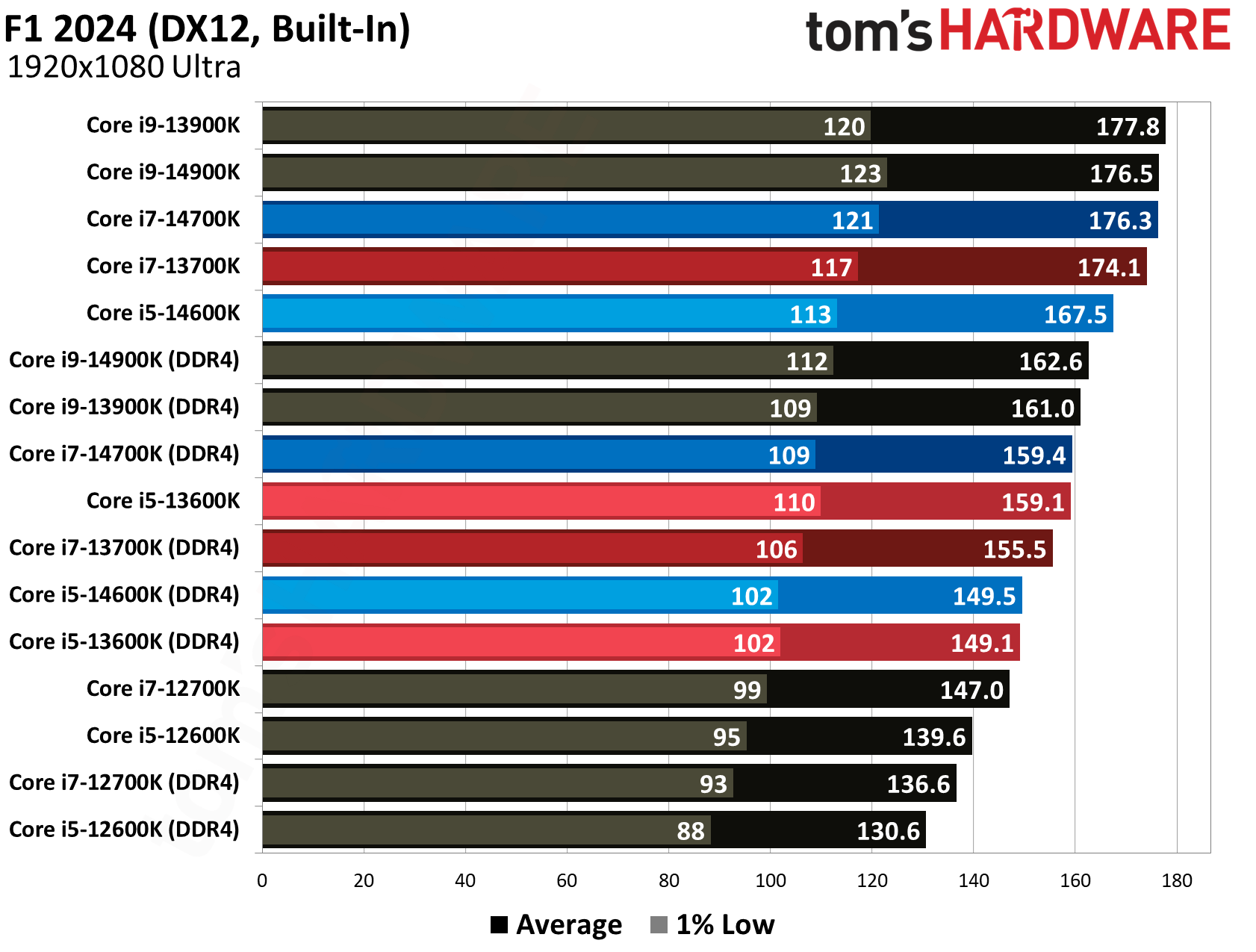
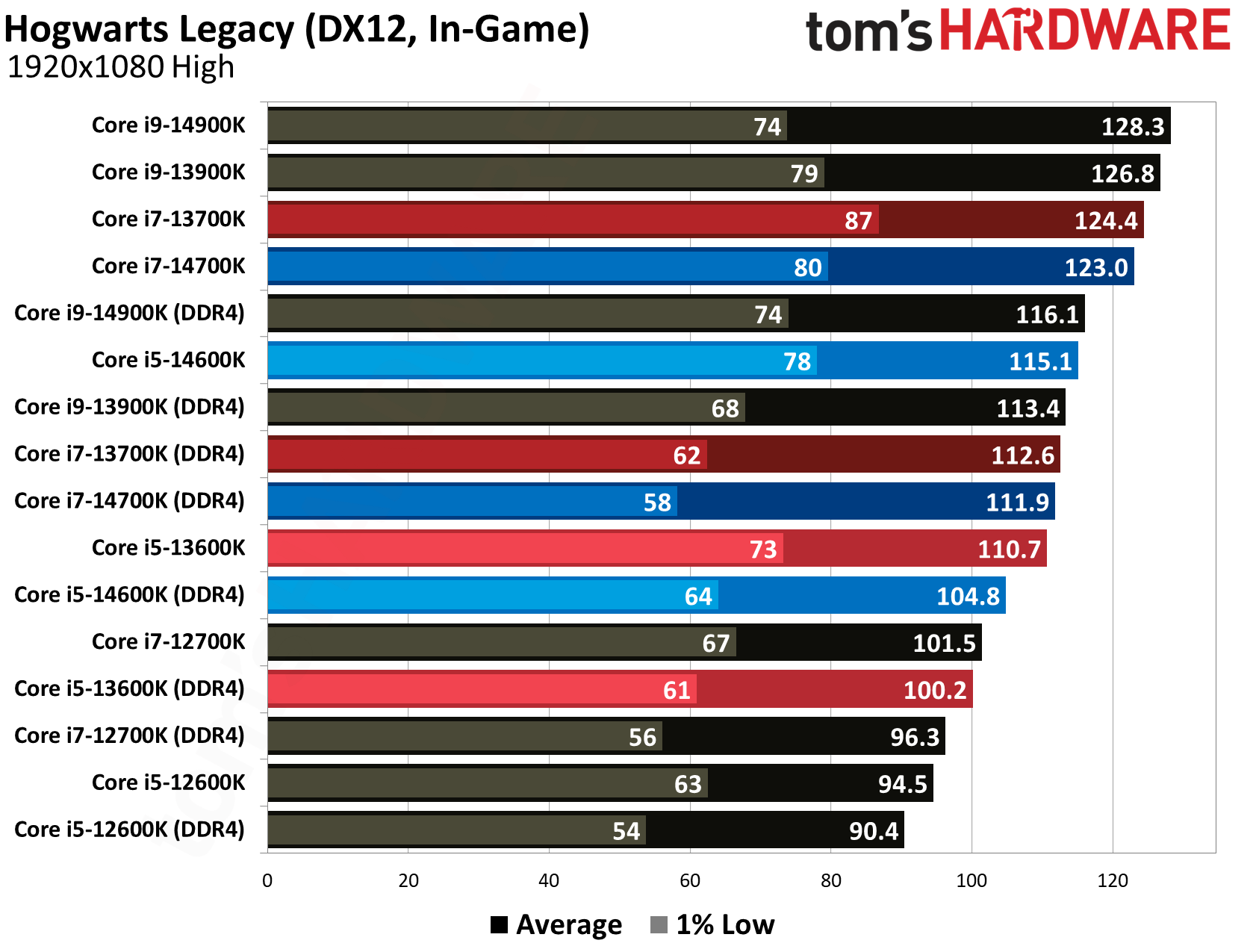
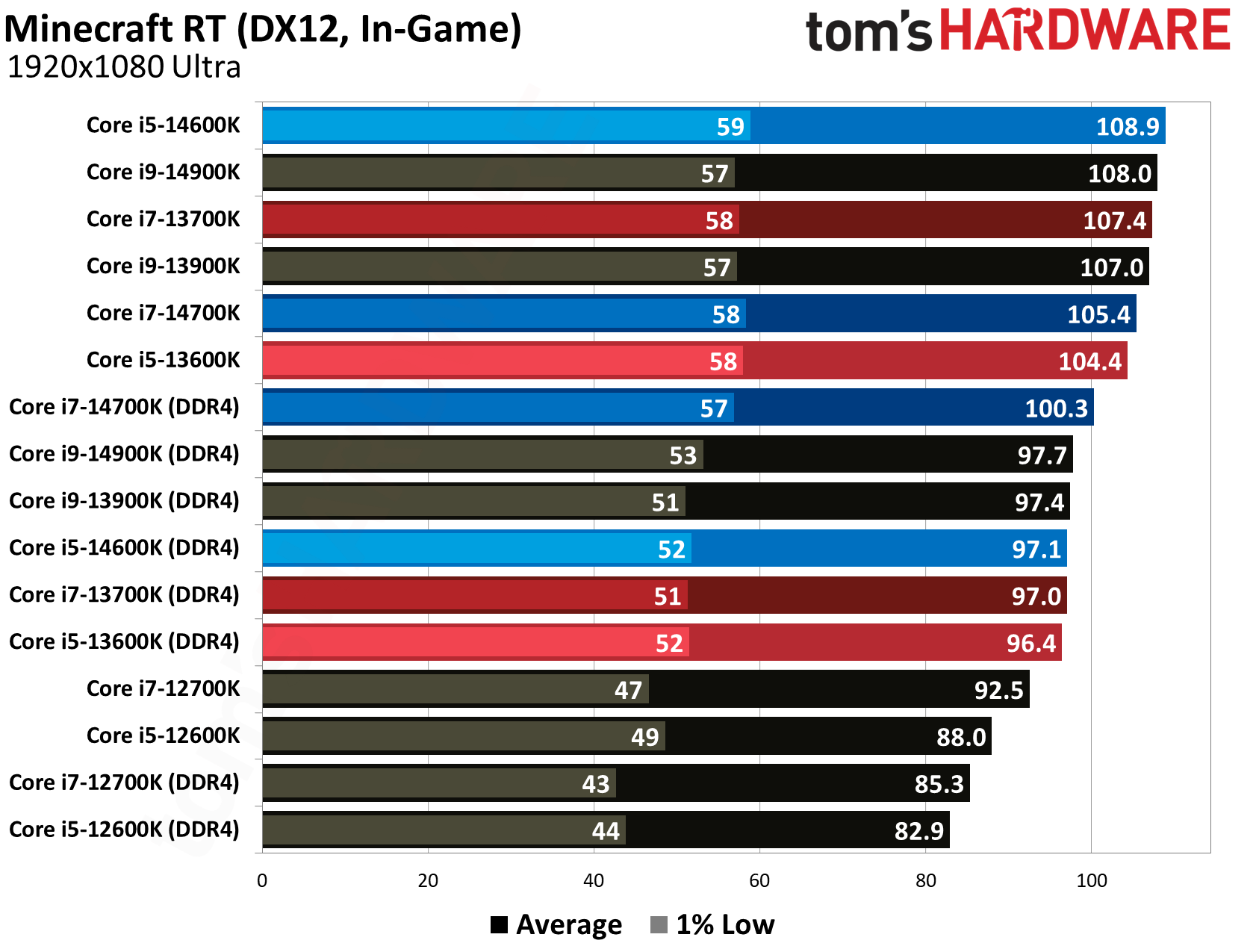
Below is our geomean from testing across the suite. Given that we’re looking to compare a single CPU’s performance with DDR4 and DDR5, we’ve highlighted some CPUs with the same color (13700K is always dark red, for instance, while 14700K is always dark blue).
(Image credit: Tom's Hardware)
The chart above is a bit difficult to parse, mainly because we’re often jumping several entries to get to a comparison point. For the stack of chips we tested, here’s a clearer overview of the performance difference with DDR4:
CPU
DDR4 % Difference
Core i9-14900K
-14%
Core i7-14700K
-13.2%
Core i5-14600K
-13.1%
Core i9-13900K
-11.3%
Core i7-13700K
-13.5%
Core i5-13600K
-11.4%
Core i7-12700K
-9.3%
Core i5-12600K
-9.5%
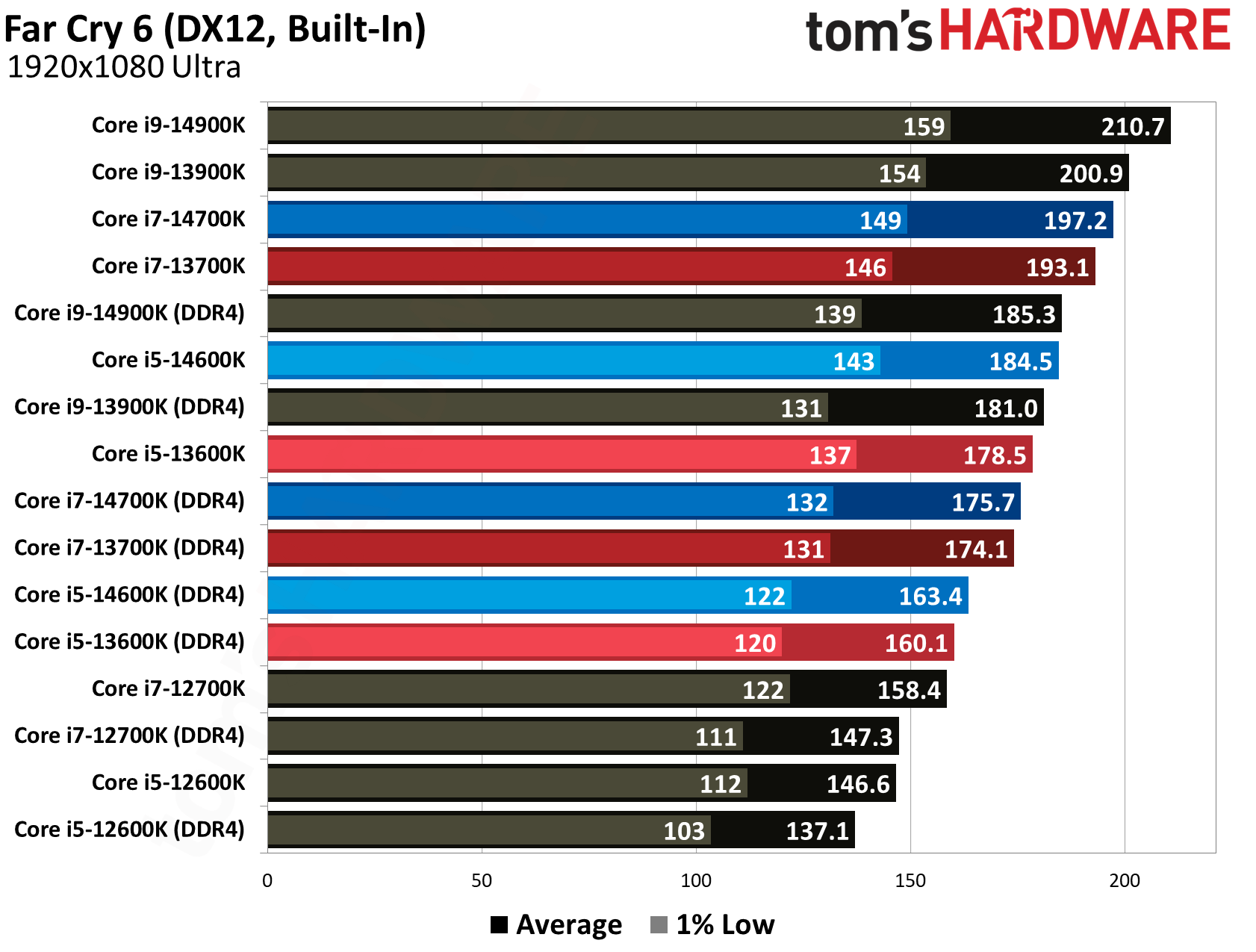
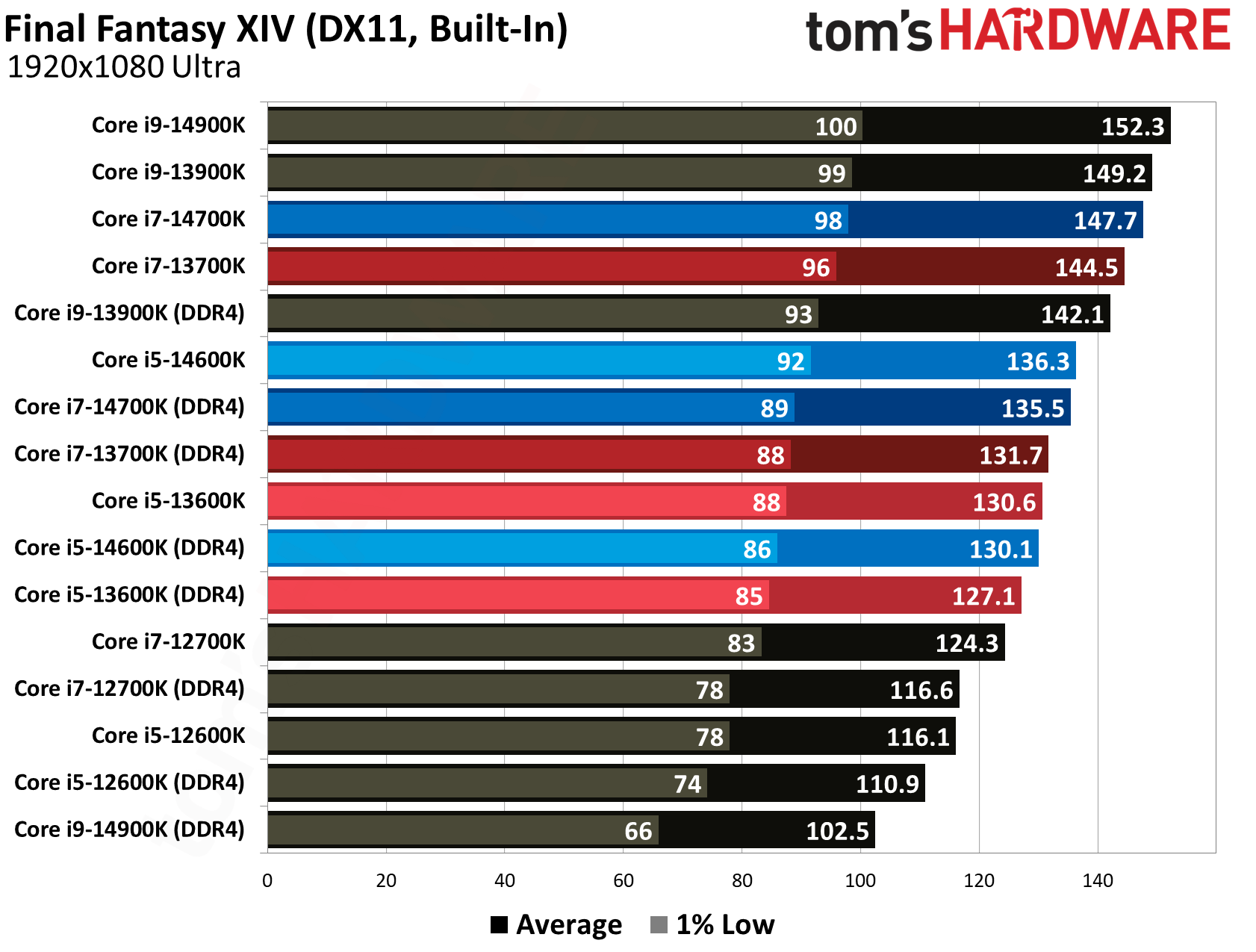
As we’ll get into with the individual game tests below, the drop in performance between DDR4 and DDR5 can be much larger than the comparison in our geomean (and, in turn, smaller in other games). What’s important for the overall performance drop is the trend as we move to newer chips. You can see a 9% drop grow to 14%, as DDR4 becomes a more significant bottleneck when the processor it’s feeding becomes more powerful.
That trend is one of the main driving forces behind our look at DDR4 and DDR5 gaming performance today. We looked at DDR4 and DDR5 performance extensively near the Alder Lake launch, and even more recently last year, evaluating performance across a wide range of applications. The testing here is focused solely on gaming to answer a critical question of building a PC today: Are you really giving up that much gaming performance with DDR4?
The answer is, yes, you’re giving up around 11% to 14% of your gaming performance overall when the memory is the only variable that changes. That’s a consistent drop, as well. Older titles care see less of a benefit from DDR5 generally, but we saw a steady decrease of around 11-14% across the games we tested, with some titles pushing above a 20% drop.
(Image credit: Tom's Hardware)
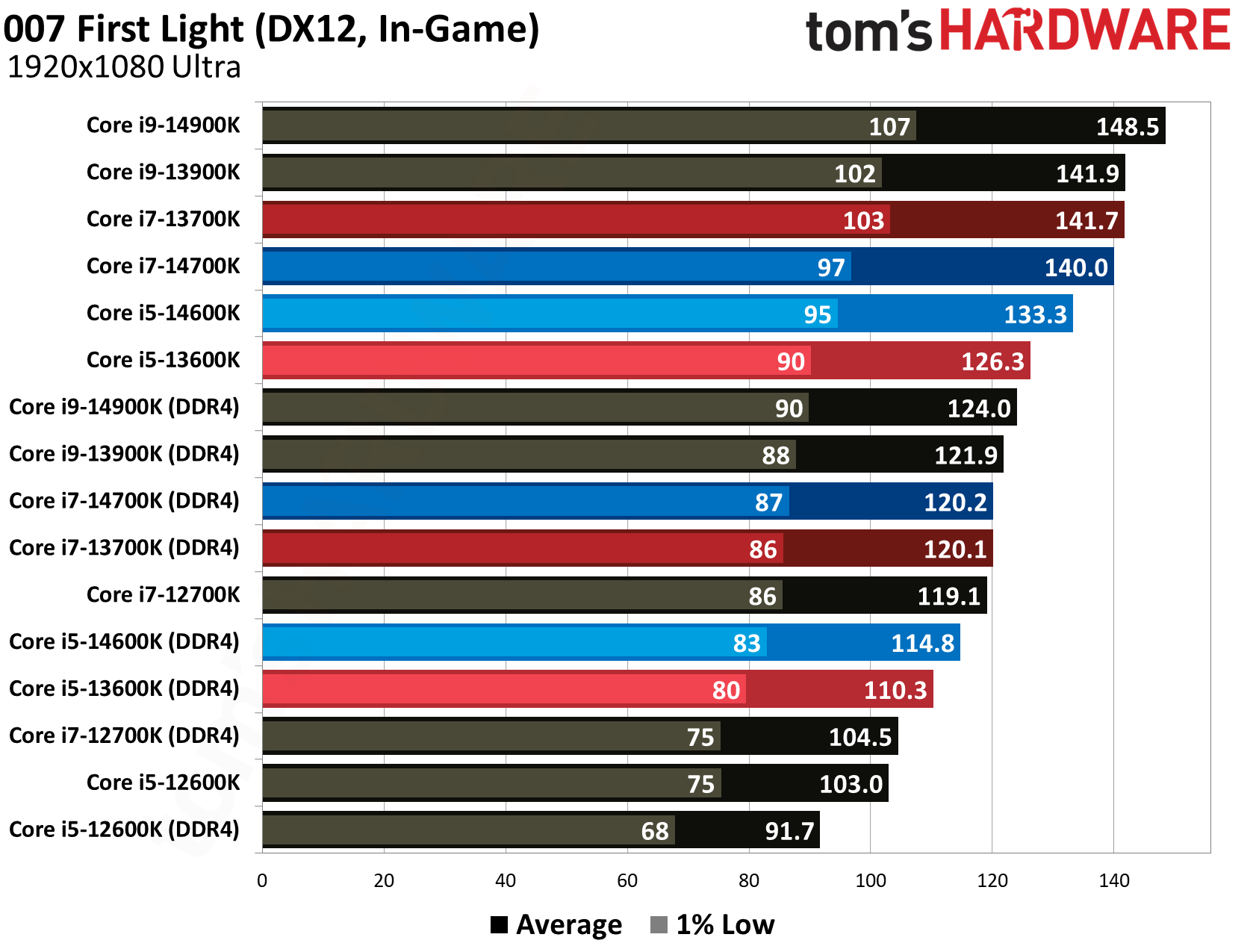
007 First Light is the newest game we tested, and it outpaces our averages. The 14900K sees a 16.5% drop with DDR4, while the 13600K drops 12.7% of its performance. Especially among the most powerful CPUs here, you can see DDR4 level off performance in a way that’s undesirable. The 14900K, for instance, is just 1.7% faster than the 13900K with DDR4, but it’s 4.6% faster with DDR5.
(Image credit: Tom's Hardware)
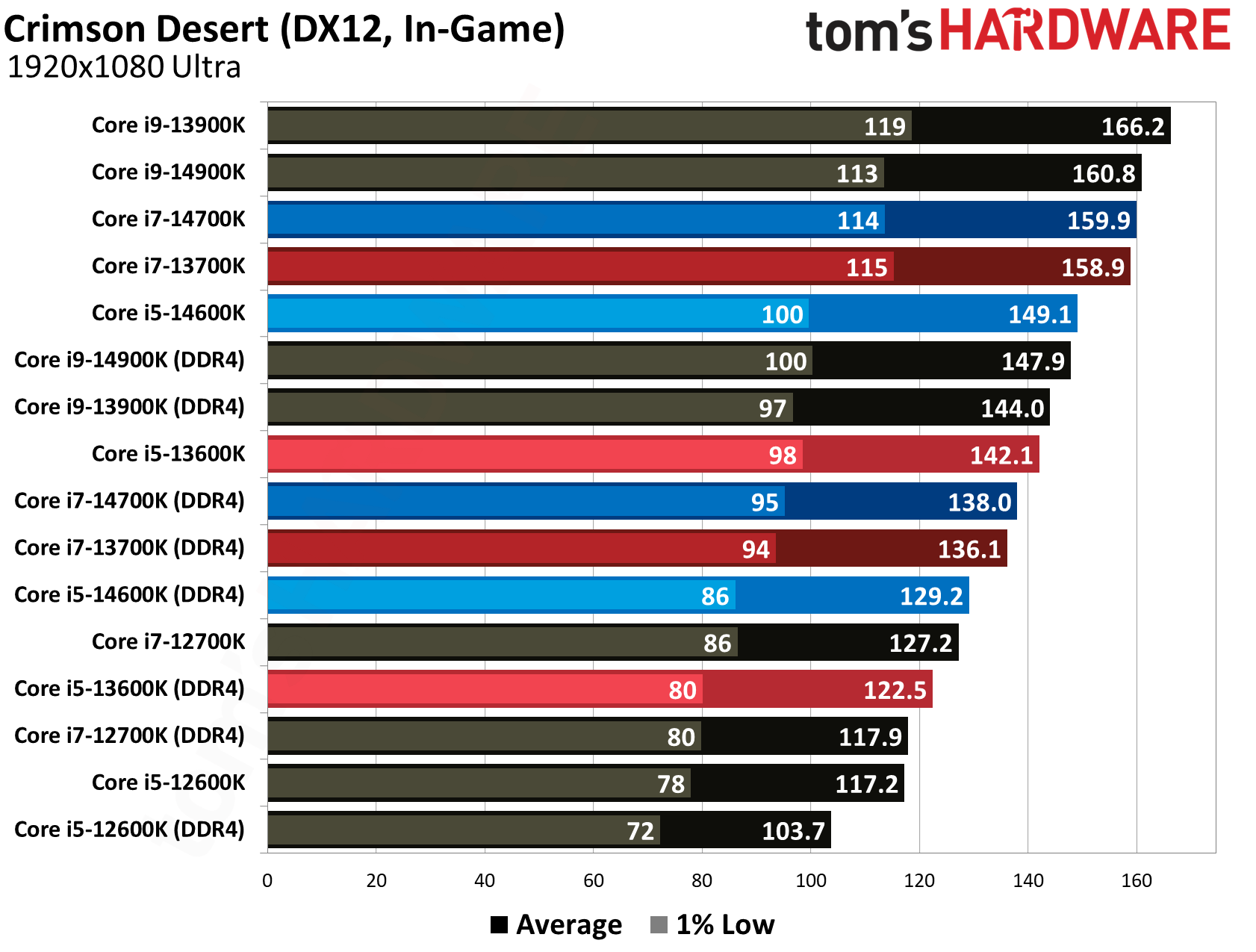
Similarly, in Crimson Desert, you can see the 13700K lose 13.7% of its performance with DDR4, and the 14600K drop 13.2% of its performance. It’s worth noting that neither of these games are particularly sensitive to memory speed. You can see in our recent Ryzen 7 5800X3D re-review that even a boost from 3D V-Cache doesn’t give CPUs with a robust memory chain an automatic advantage.
(Image credit: Tom's Hardware)
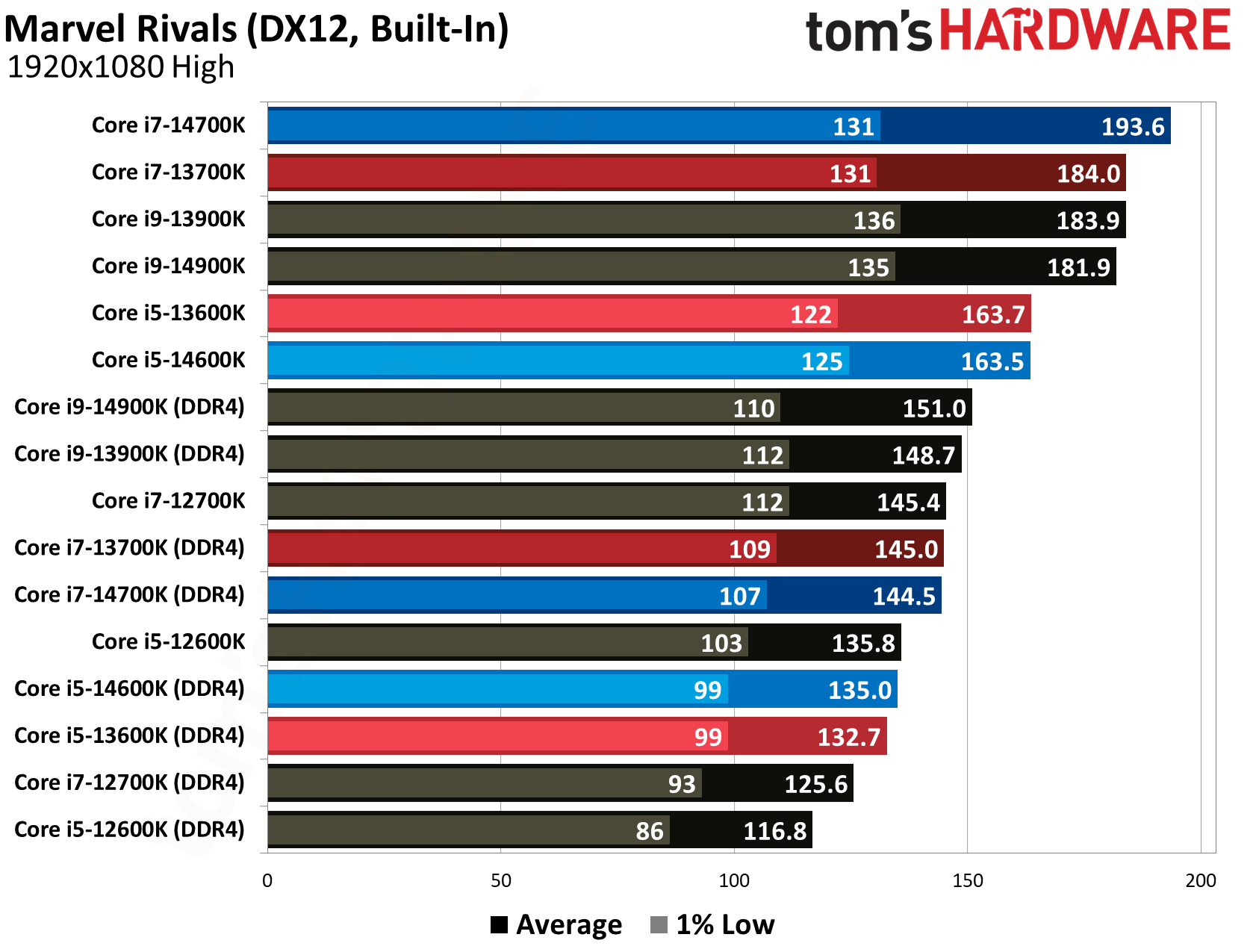
Perhaps the most consequential of the newer games we tested is Marvel Rivals, not only because it shows a much larger gap between DDR4 and DDR5, but also because it’s the most-played game in our test suite by a long shot (short of Counter-Strike 2). For weaker chips like the 12600K, the gap is 13.9%, just slightly above our geomean. For the more powerful 14700K, however, it shows a gap of 25.3%. Even the 14600K drops 17.4% of its performance with DDR4.
(Image credit: Tom's Hardware)
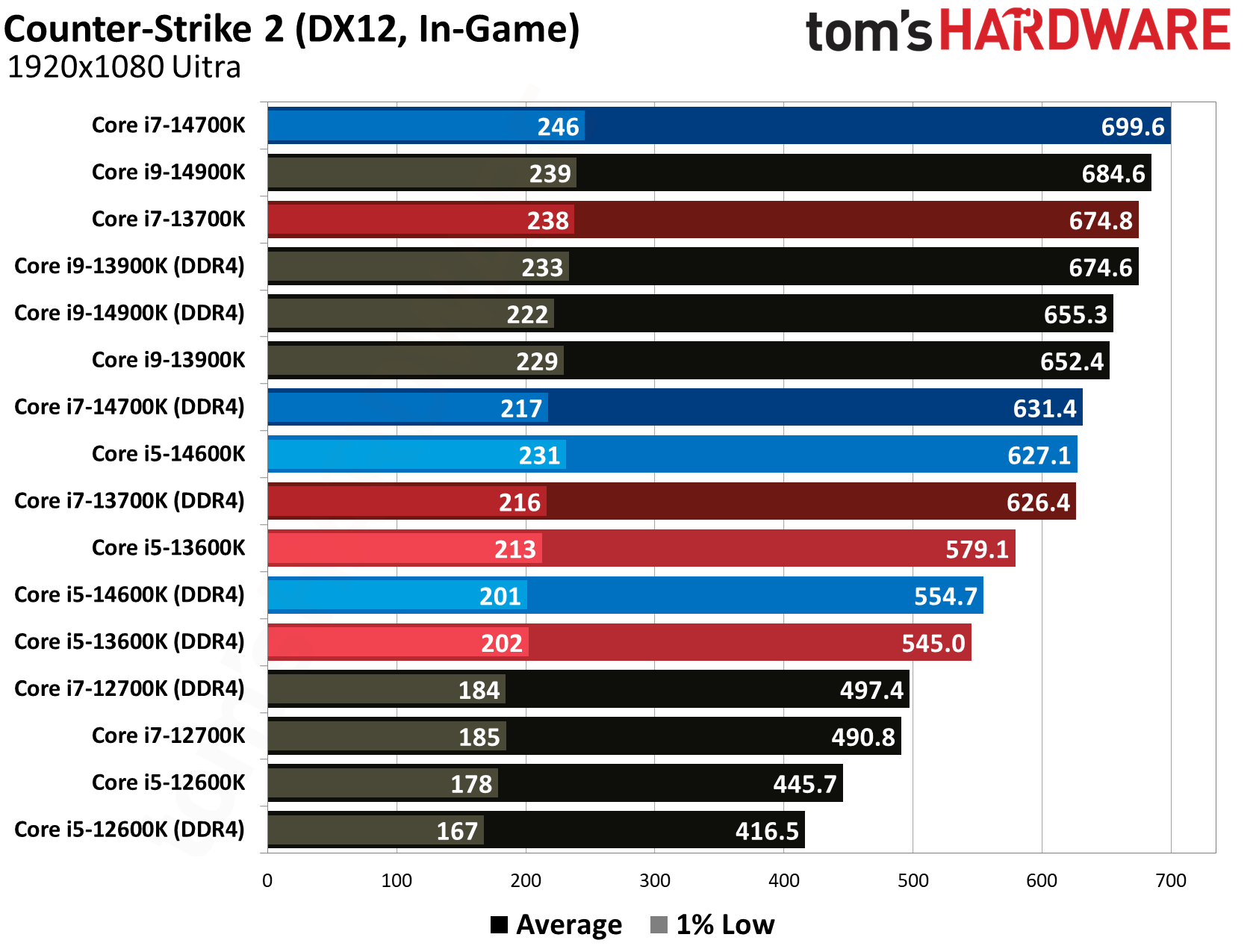
Counter-Strike 2 is less extreme, perhaps as a consequence of having such a high floor for average frame rates. You can see that the Alder Lake chips don’t care much about DDR4, with the Core i7-12700K performing identically across both memory standards. That gap grows with more powerful CPUs, however, with the 14700K creeping up toward a 10% delta.
(Image credit: Tom's Hardware)
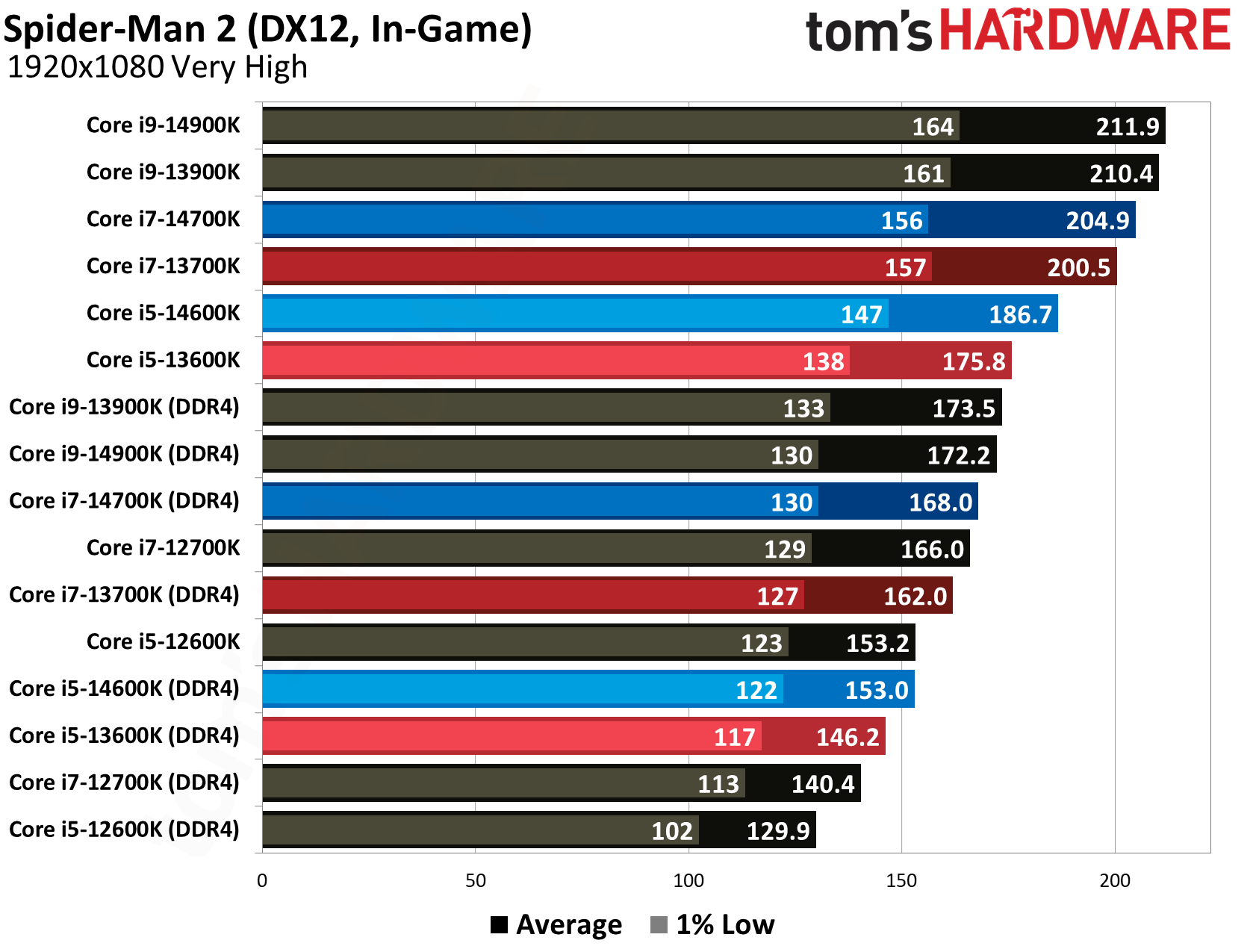
In Spider-Man 2, we can see more consistent drops across the stack of chips we tested, with most CPUs dropping around 18% of their average performance with DDR4. That’s true even on the weaker 12700K, which lost 15% of its performance. The 14900K, meanwhile, was 18.7% slower with DDR4.
(Image credit: Tom's Hardware)
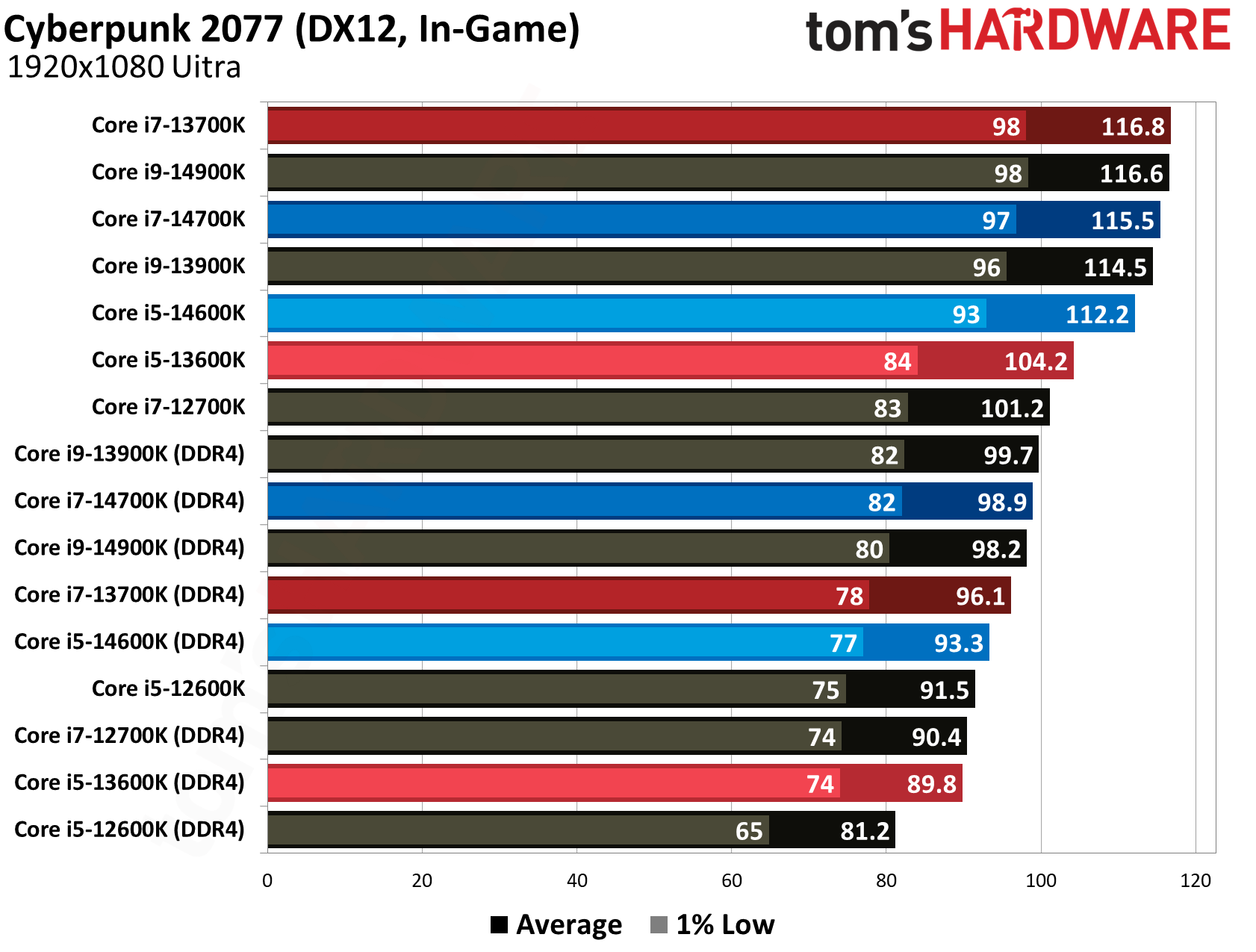
Even in an older, GPU-heavy title like Cyberpunk 2077, we can see a consistent drop. You can see in this game that we become completely bound by the GPU at the top of the rankings, but that’s a level these chips can’t hit when paired with DDR4. The 14700K drops about 14% of its performance, and the 13600K, about 13% of its performance.
You can browse through our remaining benchmarks using the gallery above, but most games tell a similar story. The gap between DDR4 and DDR5 persists, of course, but there’s another angle to look at the data. DDR4 flattens off performance, creating a bottleneck with faster CPUs. That could be justification for buying a weaker chip if you can only afford DDR4 memory right now.
(Image credit: Tom's Hardware)
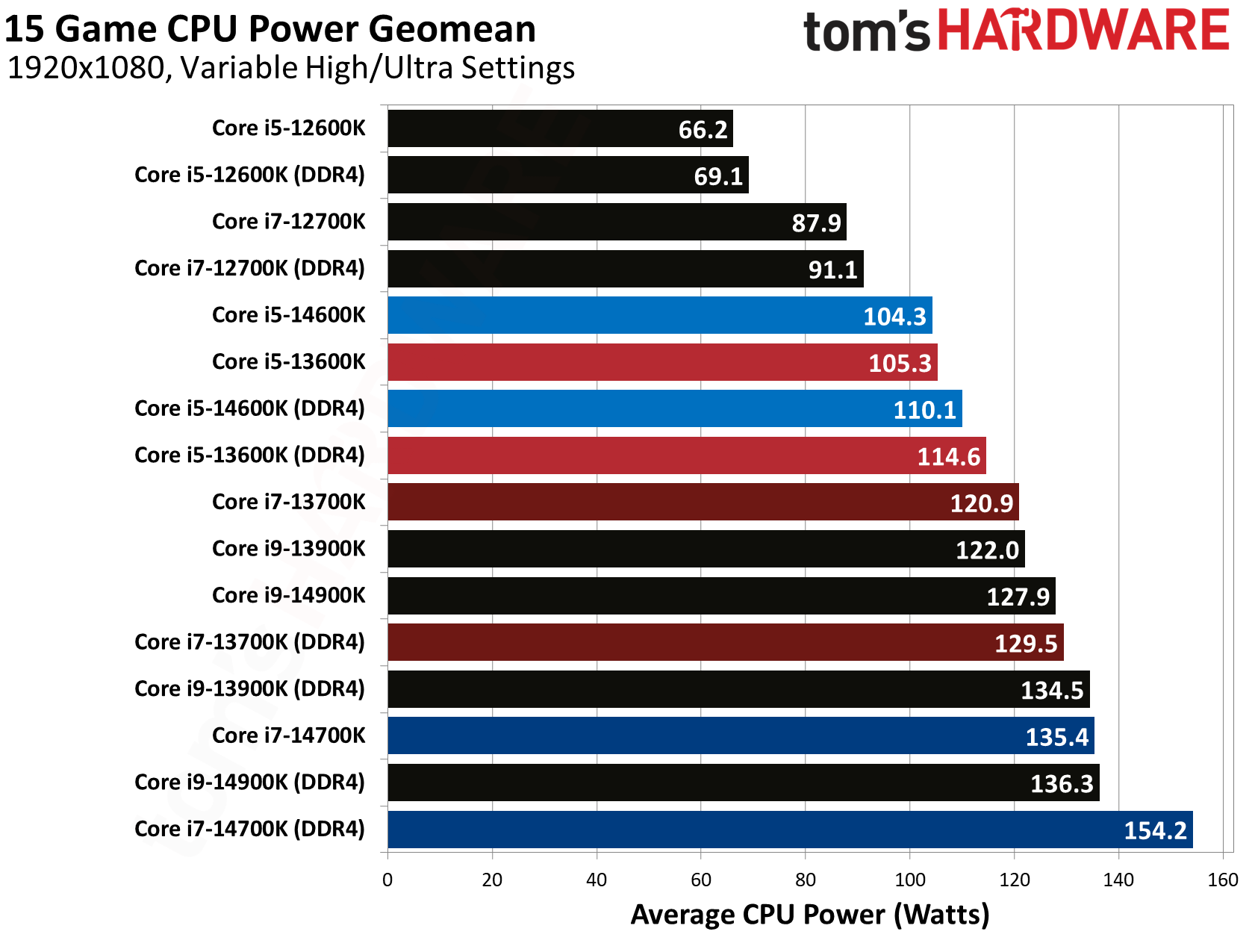
Outside of performance, one important aspect of using a DDR4 system compared to DDR5 is power consumption. With DDR4, power consumption of the CPU increases, as you can see in the chart above. The jump is generally only a few watts, but it’s worth noting nonetheless. In games, we’re well below the operating temperature of all the chips in our test pool, but when pushing toward maximum power draw, DDR4 will post yet another limitation.
How (and why) we tested DDR4 vs. DDR5 now
DDR5 is way too expensive, and Intel’s LGA 1700 CPUs represent a unique value proposition given the unprecedented increases in memory prices over the past several months. The idea is that you can upgrade to a newer platform while sticking with DDR4, giving you a stopgap for an eventual DDR5 upgrade. It seems Intel recognizes this value proposition, as well, as it’s reportedly slated to launch Raptor Lake Next CPUs on the LGA 1700 socket.
We tested the main stack of chips, short of the Core i9-12900K, as described above. We didn’t test variants like KS releases to keep our testing focused, as well as lower-end SKUs like the 12100F or 14400. The memory controllers in these lower-end chips are weaker, sustaining lower DDR5 speeds, so expect less of a difference in performance with them.
Below, you can see the test benches we used. In addition to keeping hardware consistent, we use a frozen OS image with an identical software stack. We’re running the same version of the same apps on the same OS update, with identical drivers.
In the BIOS, we enabled XMP for both kits of memory. We also tested with Resizeable BAR turned on, and Virtualization-Based Security (VBS) turned off. Most motherboard vendors off a profile with the power limits removed on Intel CPUs, which can push the processor outside of warrantied specifications. We stuck with the default “Performance” profile for our testing here.
It makes sense that we’ve seen a shift back toward DDR4. Although DDR4 prices have risen in lockstep with DDR5 prices, they started from a much lower base. A kit of DDR4 today is not much more expensive than a DDR5 kit of similar capacity a year ago. And, with estimates that the memory shortage could persist through 2030, there’s a strong argument for going with a DDR4 system if you’re in need of an upgrade.
The performance trade-off alone isn’t as big of a problem as it appears at first glance. You’re going to lose about 15% of your average gaming performance with Intel’s LGA 1700 CPUs (particularly Raptor Lake chips). You’ll spend more than twice as much on a 32GB kit of DDR5-6000 as you will on a 32GB kit of DDR4-3200, as you can see in our RAM price tracker. And, you might already have a DDR4 kit, cutting that cost completely out of an upgrade. Dollars spent for performance gained, DDR4 makes complete sense.
However, performance isn’t the only factor at play, and that’s the unfortunate reality of using a DDR4 platform right now. It’s a dead end, both for performance and upgrade potential. As we saw in our recent testing of the Ryzen 7 5800X3D, there’s a performance wall in games with DDR4, one which the 5800X3D often runs up against. The memory is a bottleneck, and it doesn’t seem like there’s a way around that problem without upgrading to DDR5.
We also aren’t seeing any new DDR4 CPUs, at least right now. AMD re-released the Ryzen 7 5800X3D, and there are murmurs of Raptor Lake Next. But given the current landscape, we don’t expect a CPU that will radically change the performance you can get out of a DDR4 platform.
Instead of sticking with DDR4 for a better CPU, the best course of action right now is to bite the bullet on DDR5 and buy a weaker CPU, particularly if gaming performance is your main concern. Given that memory prices are out of control, there are excellent deals on DDR5 CPUs right now, allowing you to offset the cost of an upgrade and giving you a kit of DDR5 to carry forward in future builds.
As an example, AMD’s recently-released Ryzen 7 7700X3D is $80 cheaper than the re-released Ryzen 7 5800X3D, despite coming in nearly 20% faster in average gaming performance. The $230 Ryzen 5 7600X3D shows similar gains, and it’s even more affordable.
In Intel’s camp, the Core Ultra 7 270K Plus and Core Ultra 5 250K Plus represent some of the best all-around value in the CPU world right now, with compelling gaming performance and chart-topping application performance, all for around $300.
You will spend more on a cheaper CPU and a kit of DDR5. There’s no indication that the memory shortage is ending soon, however. We’ve actually seen prices continue to increase despite the surge leveling off. Opting for DDR5 today buys you better gaming performance, but more importantly, it gives you a kit of memory that you can continue to use as new CPUs and platforms are released.
You're probably already well aware of the three largest memory vendors: South Korea's SK hynix and Samsung, and the United States' Micron. There's a fourth player up and coming in the market, though, and that's China's ChangXin Memory Technologies, more commonly known as CXMT. CXMT is pumping out RAM as fast as it can to soften the effects of the RAMpocalypse on domestic (to China) consumers, and it's also expanding capacity quickly. Given these factors and the size of the Chinese market, it should come as no surprise that motherboard vendors, including Gigabyte, are advertising fresh support for the chip.
MSI appears to have been the first major motherboard vendor to publicly promote BIOS optimizations specifically for CXMT DDR5 memory, initially through China-market BIOS releases and later with global announcements. What Gigabyte is saying is a little different: not only is CXMT RAM supported on Gigabyte motherboards for both AMD's Socket AM5 and Intel's LGA 1851, but it's supported at impressive speeds of up to 8200 MT/s on select boards.
Click to zoom in if you want a hope of reading this screenshot. (Image credit: Gigabyte)
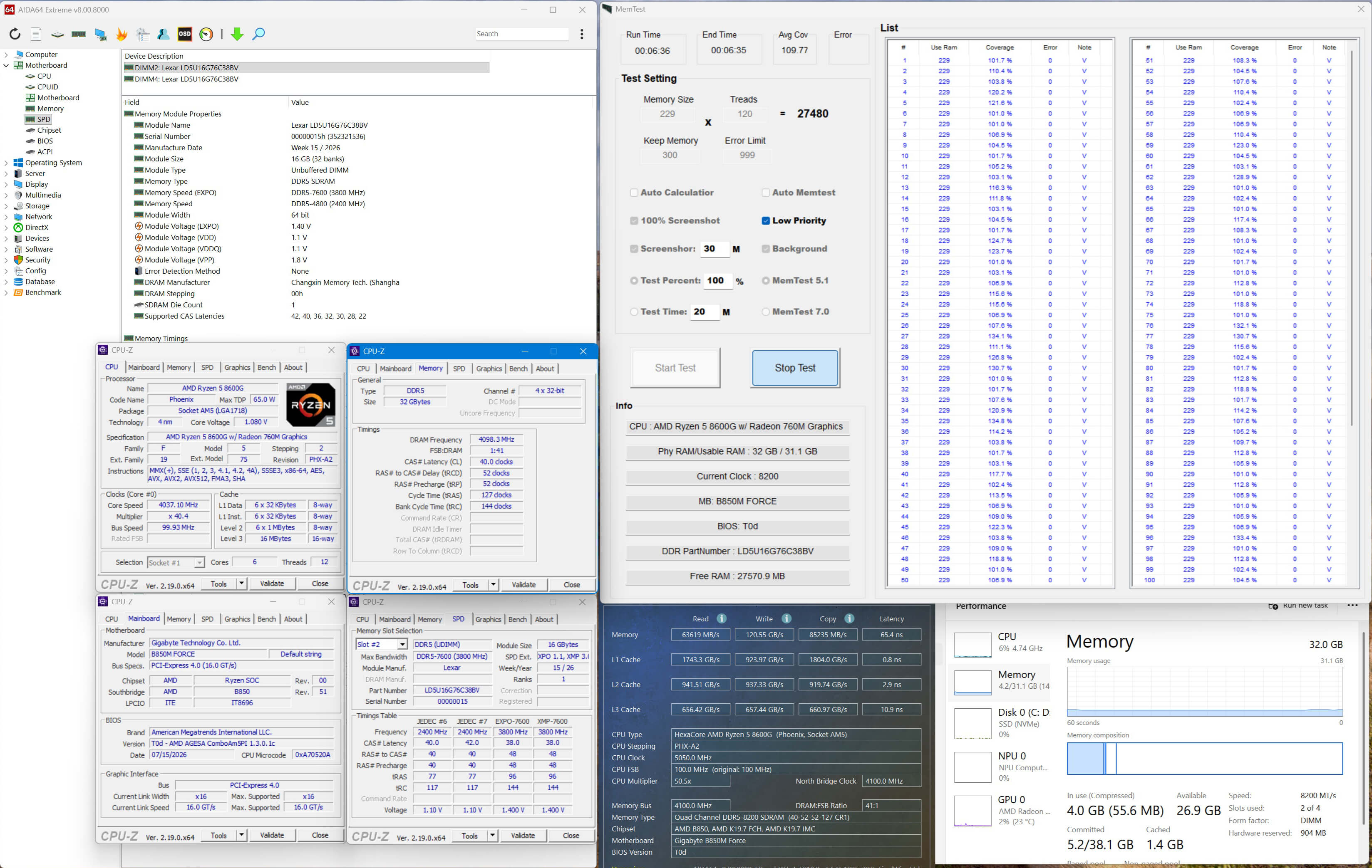
As proof, Gigabyte offers up a CPU-Z screenshot showing a pair of 16GB Lexar modules equipped with CXMT chips achieving a speed of 8200 MT/s with a CAS latency of just 40 cycles on one of its B850M FORCE motherboards. We have to remark that Gigabyte doesn't show the voltage required to hit these speeds, likely for good reason, but the firm did it without disabling the chip's integrated graphics. That doesn't prevent the chips from posting an excellent AIDA64 latency of just 65.4 nanoseconds on the monolithic Ryzen 5 8600G used for the test. For context, typical EXPO kits usually run around 80ns, JEDEC timings are more like 100ns, and LPDDR-based systems rarely come below 110-120ns.
As Gigabyte says, "CXSH (CXMT) chip-based memory offers a welcome additional source of supply for consumers." (CXSH is the JEDEC manufacturer ID code for CXMT) Gigabyte specifically notes that it is modules with 16-gigabit and 24-gigabit ICs that are supported; that means 16GB and 24GB single-rank modules, or 32GB and 48GB dual-rank modules.
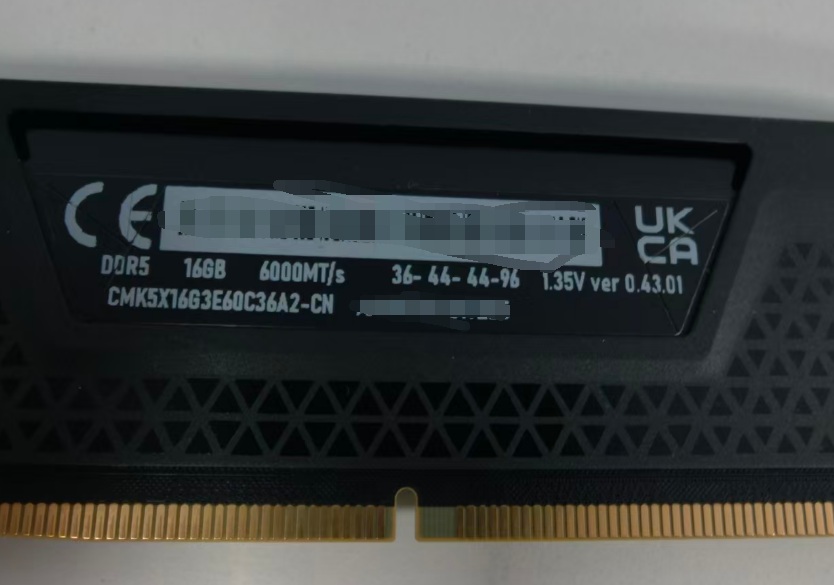
This Corsair module has CXMT chips inside, but it's also exclusive to China. (Image credit: @wxnod on X)
While CXMT memory is certainly a welcome additional source of supply, it's also not really clear how much of that memory is actually making its way outside of China, particularly to the US and Europe. CXMT isn't on the US Commerce Department's "Entity List" yet, so the firm's parts aren't actually banned, but the company is once again considered a Chinese military company by the Department of Defense after being briefly removed from the 1260H list in February. Lawmakers here in the states, likely laden with donations from the big three memory firms, want to see CXMT banned, while US tech companies like Corsair, HP, and Dell are already integrating ChangXin RAM into their products, and Apple wants in, too.
The reality is that, as a DIY builder, you are fairly unlikely to know or care if your memory is manufactured by CXMT. You don't usually buy RAM directly from SK hynix, Samsung, or Micron (certainly not since Micron unceremoniously executed Crucial); you buy your RAM from Silicon Power, G.SKILL, Patriot, Corsair, or one of the many other vendors who assemble DIMMs. If the RAM runs at its rated specifications, there's not a lot of reason for the individual consumer to care where it came from. It's nice to hear that the new chips are officially supported by familiar mainboards, though.
Homegrown DDR5 memory from China, manufactured by ChangXing Memory Technologies, has been making the rounds lately as more and more vendors start legitimizing it. However, new testing from overclocker Safedisk, shared by Uniko's Hardware, purportedly shows that it actually carries inferior performance compared to similar options from SK Hynix, alongside significant variance in the silicon between different batches.
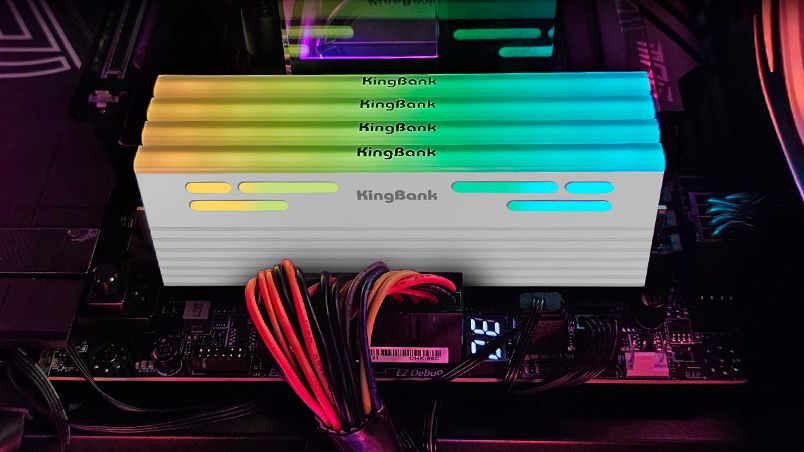
kingbank 2x24 6000c36 1.25 kit (cxmt 3gb dies) on asus c10amanual oc to 8600c44 mt 100%key characteristics of cxmt dies- dont scale with voltage- cant tighten timings- silicon variance appears to be massive between batches- not as strong as hynix when it comes to manual… pic.twitter.com/WNPRiHj233July 15, 2026
CXMT began producing DDR5 in late 2025 despite lacking any cutting-edge EUV lithography tools. Fast forward to today, and reports of the company matching Micron's memory capacity by this year are now floating around. If true, China would become the second-largest memory maker in the world. At such scale, it's no wonder that many companies in China have already started sourcing CXMT-made RAM to fill the gap in the consumer market.
Throughout 2026, we've seen motherboard manufacturers verify CXMT's DDR5 with official BIOS optimizations that allow it to run beyond 8,000 MT/s at this point. OEMs such as Dell and HP are using CXMT RAM in their region-bound systems, and even proper PC hardware companies like Corsair are using CXMT modules. Lexar, Kingbank, Netac, Asgard, Gloaway and more are also producing retail DDR5 kits with CXMT chips.
As such, the testing features a Kingbank 48GB (2x24) DDR5-6000 kit running at CL36 and found several weaknesses despite successfully achieving an 8,600 MT/s overclock at CL44. The first revelation is that CXMT modules don't scale with voltage, meaning you can't just increase voltage in hopes of achieving higher clocks. CXMT's DDR5 apparently doesn't respond well to tuning sub-timings either, forcing you to remain stuck with baseline CAS latency (or higher, like in this case).
Different batches of CXMT-equipped memory perform differently, too, so silicon lottery plays a much bigger role than it would with other vendors. Speaking of which, SK Hynix-made DDR5 modules allegedly performed better at identical clock speeds, while CXMT's modules were less susceptible to overclocking in general. We didn't get any comparative benchmarks for any metric, so take these claims with a grain of salt.
Overall, if the testing is to be believed, it serves as counterprogramming against the popular narrative forming around China as the savior of consumer interests. CXMT's strength lies in the fact that it doesn't have to cater to opulent AI clients as much as the Big Three, which reduces opportunity cost, allowing CXMT to produce more DDR5 memory. That doesn't mean it would be cheaper, though, or at least no evidence has suggested that so far.
CXMT has remained limited to the Chinese region for now, and breaking through to the Western market would mean impressing a lot of skeptics. Not only would pricing play a big factor, but the reliability of a new DRAM manufacturer would raise serious concerns. Stories like these certainly don't help, but with CXMT's IPO on the way, it's only a matter of time before it becomes a serious mainstream contender.
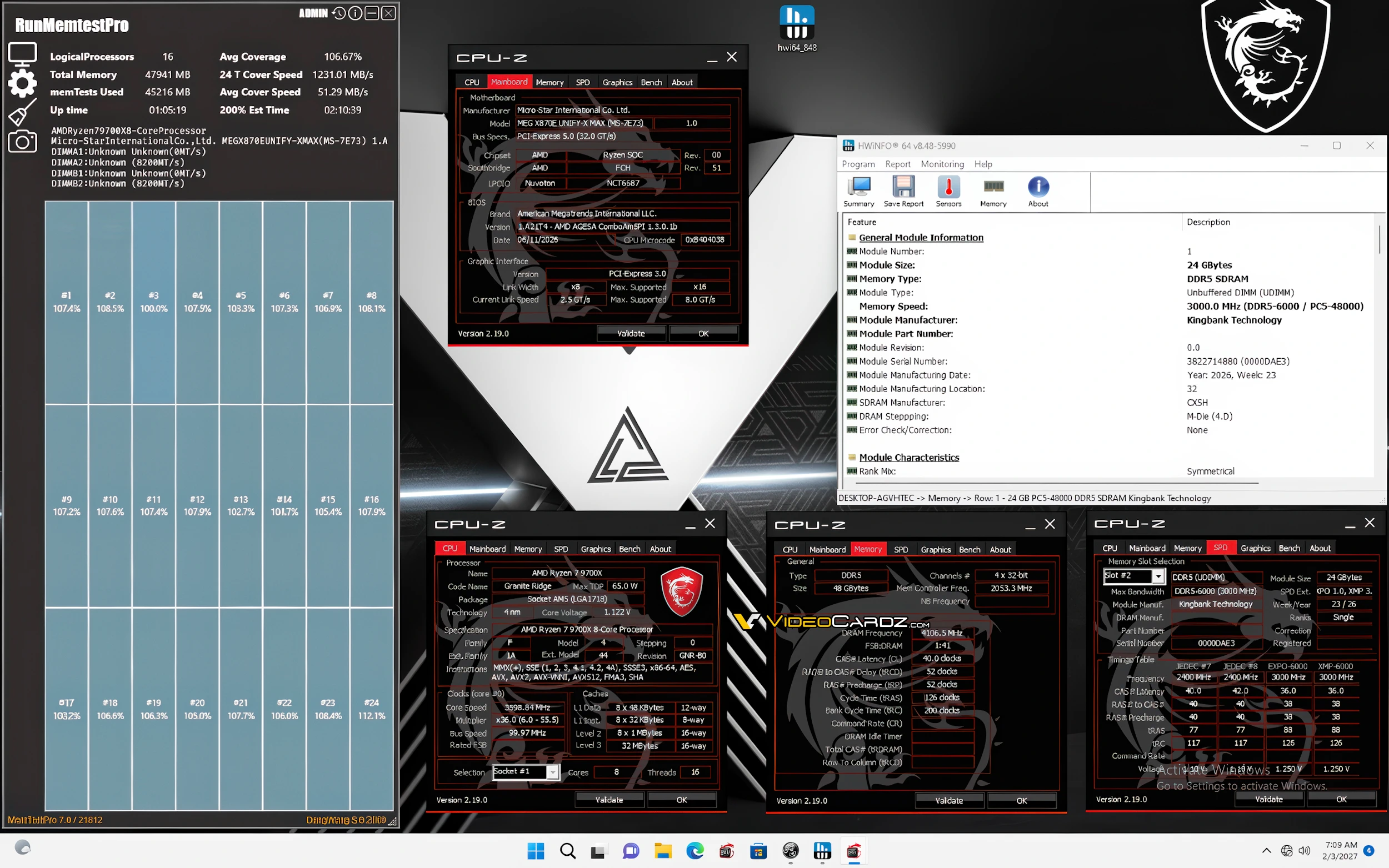
ChangXin Memory Technologies, or CXMT, has just received official validation from MSI for its high-speed DDR5 memory modules. The manufacturer has released new beta BIOSes across its AM5 lineup, unlocking stable frequencies up to 8,200 MT/s for 3GB CXMT chips on dual-DIMM motherboards. Previously, RAM using these modules was limited to around 6,800 MT/s despite the hardware itself being capable of much more.
Go deeper with TH Premium: Taiwan, trade, and tariffs
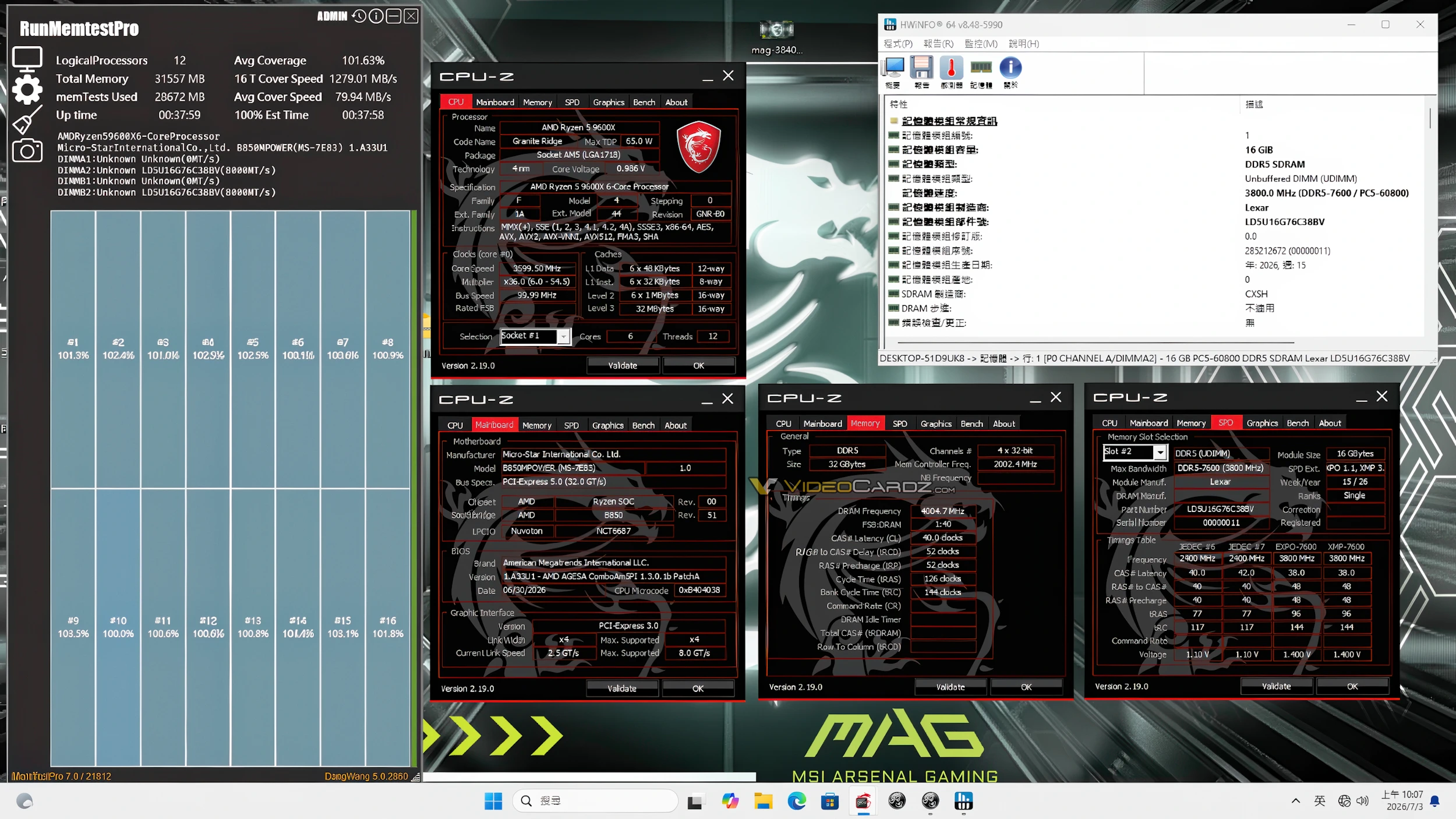
The test BIOS comes from MSI China — there's no announcement on global channels for some reason, and it's only available for select motherboards at the moment. MSI tested region-bound retail kits from Lexar and KingBank on boards with both two slots and four slots, but we only have screenshots for the former, courtesy of Videocardz.
One test was conducted using 24GB sticks (2x24) on the MEG X870E Unify model and a Ryzen 7 9700X CPU. This was mostly a standard kit since it came with a 6,000 MT/s EXPO profile. The other config consisted of 16GB sticks (2x16) with an EXPO profile already running at 7,200 MT/s, so it was somewhat cherry-picked silicon, paired with a Ryzen 5 9600X on a MAG B850 MPower motherboard.
MSI via VideocardzMSI via Videocardz
The results showed that on dual-DIMM motherboards, 24Gbit (3GB) modules from CXMT were able to clock up to 8,200 MT/s, passing MemTest with 101% coverage. Conversely, 16Gbit (2GB) chips were also stable at 8,000 MT/s on the same test bench with 101% coverage. Moving over to quad-DIMM, the patch notes for the BIOS say they've "also been raised to DDR5-7200," where the limit was stuck at 6,800 MT/s prior.
This is not the first time MSI has optimized Chinese RAM for some of its motherboards. Earlier this year, the company did the same thing for Intel's 800-series models in China. Anyway, these specific BIOSes are meant for the AM5 socket and they're based on existing stable releases — just patched with unlocked memory overclocking features. More motherboards should be supported soon, but for now you can check out the MSI China's community release channel if you want to try one yourself.
 登录
登录