❌

普通视图

发现新文章,点击刷新页面。
昨天以前IT News

MOZA AY210 Force Feedback Base and MFY Yoke review: Taking flight sim immersion to the next level

作者 Dan Mateescu
2026年10月17日 23:00

Over the past several years, MOZA Racing has become one of the most recognizable names in sim racing, earning a reputation for producing high-quality racing wheels and peripherals. Founded in 2012 by a group of automotive engineers and sim racing enthusiasts, the company initially focused on manufacturing and selling videography equipment before entering the sim-racing market.

More recently, MOZA has expanded into the world of flight simulation, bringing the same focus on build quality and performance that has made its racing products so popular. Today, we’re taking a look at the MOZA AY210 Force Feedback Base and MFY Yoke. We’ll be putting both products through their paces in Microsoft Flight Simulator 2024, testing them across a variety of challenging flight scenarios to see how they perform in the cockpit.

Inside the Box
MOZA AY210 Force Feedback Base & MFY Yoke
Tom's Hardware
MOZA AY210 Force Feedback Base & MFY Yoke
Tom's Hardware
MOZA AY210 Force Feedback Base & MFY Yoke
Tom's Hardware
MOZA AY210 Force Feedback Base & MFY Yoke
Tom's Hardware
MOZA AY210 Force Feedback Base & MFY Yoke
Tom's Hardware

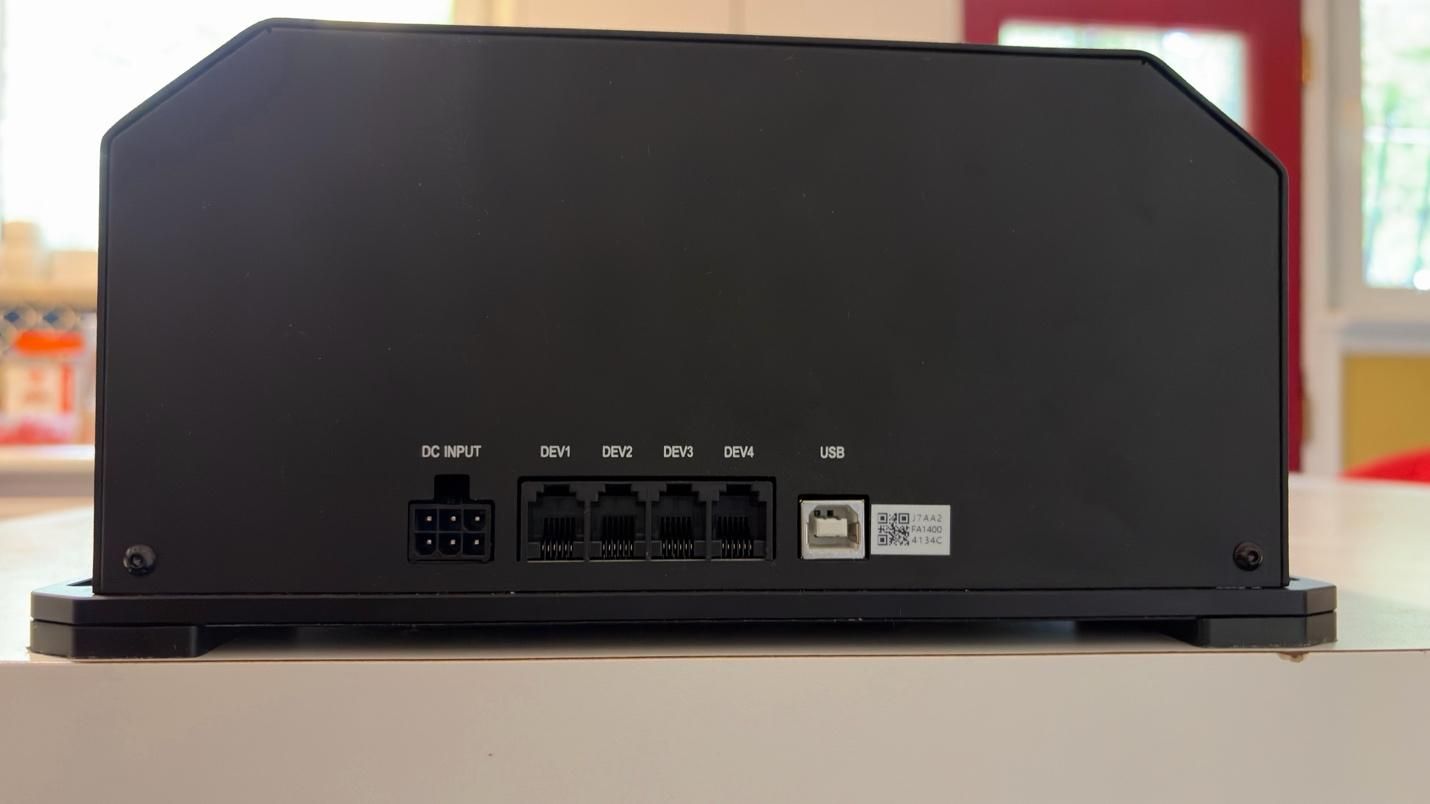
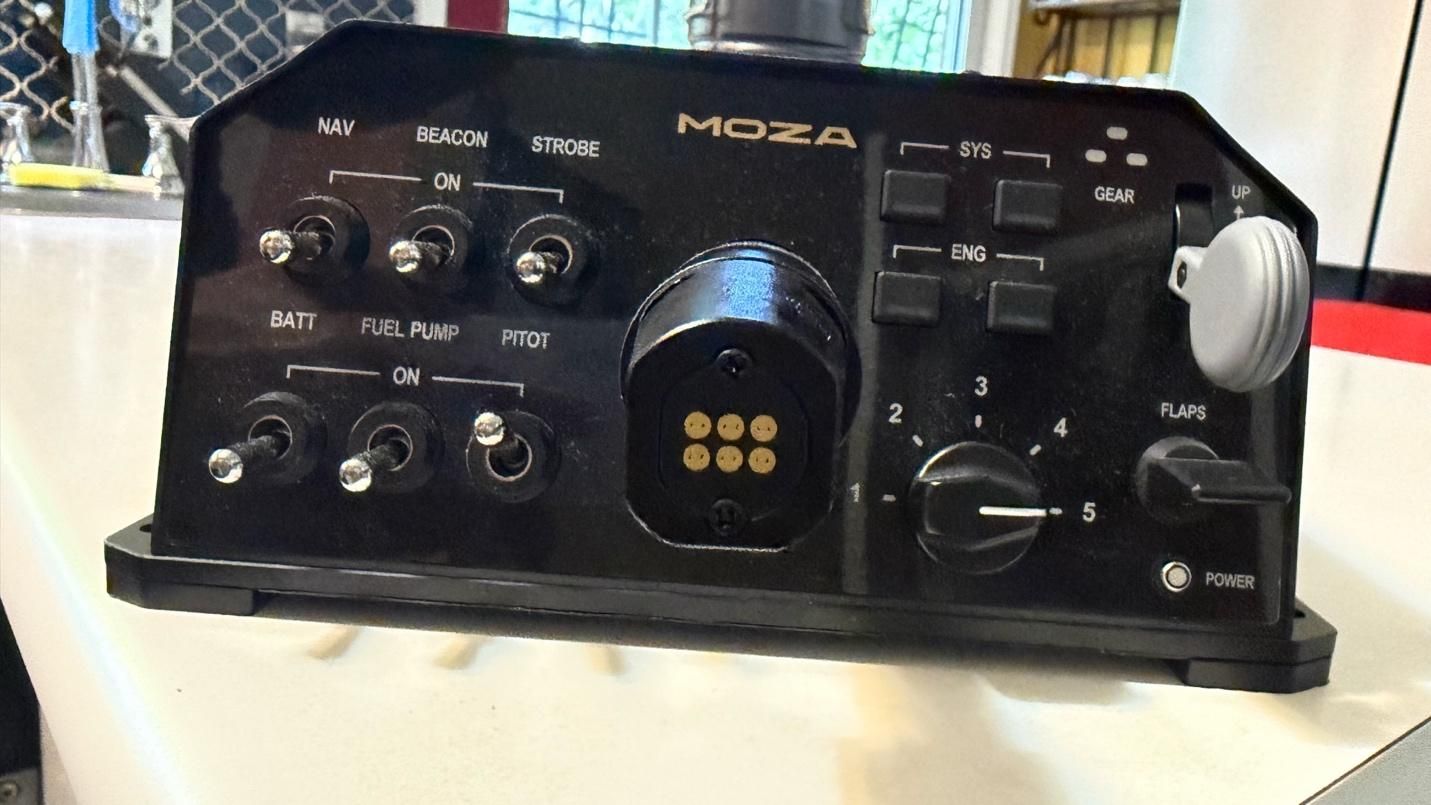
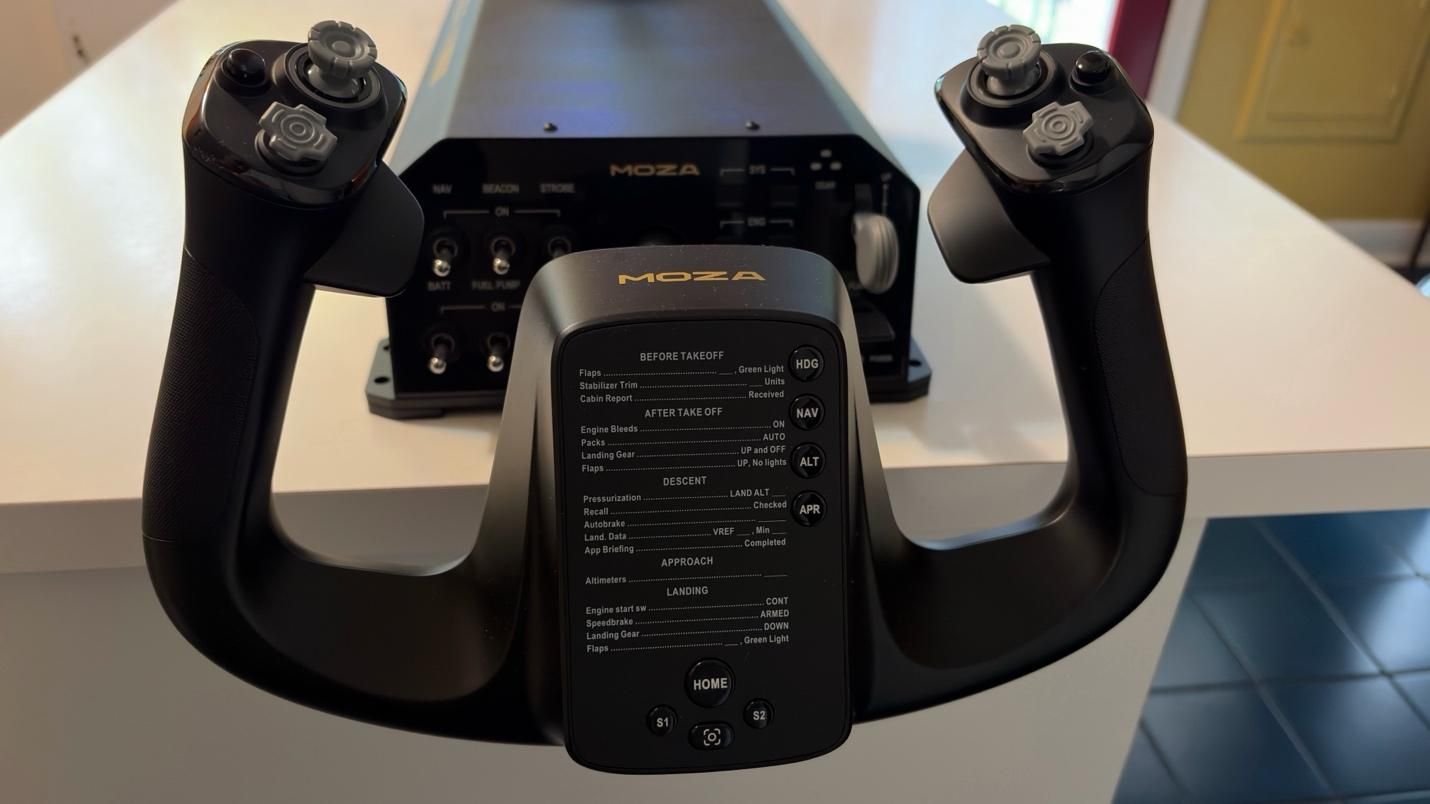
While you can purchase the base and the yoke separately, they also come in a bundle. With the bundle, you get both the yoke and the base in the box, along with a toolkit and user manual. The base comes with a power cable and a USB Type A to Type B cable.

MOZA also sent us a couple of table clamps for the yoke to secure it to our test setup. The clamps are sold separately.

MOZA MFY Yoke Specs

Case Material

Composite

Quick Release Material

Aluminum Alloy

Button Cap Material

ABS Plastic

Platform Compatibility

Windows 10/11 – MSFS, X-Plane

8-Way Switches

2

Hall Effect Joysticks

2

LB/RB Buttons

2

Triggers

2

Total configurable inputs

34

Software

MOZA Cockpit

Dimensions (LxWxH)

5.6 x 8 x 12.3 inches / 142.5 x 202 x 313 mm

Weight

2.9lbs / 1.3kg

MSRP

$129.99

Release Date

March 2025

MOZA AY210 FFB Yoke Base Specs

Connectivity

Wired connection via detachable USB-B to

USB-A cable

Platform Compatibility

Windows 10/11 – MSFS, X-Plane

Housing Material

Aluminum alloy

Motors

Dual servo motors

Sustained Roll Torque

9 Nm

Travel Distance

150mm

Power

216W

Voltage

110~220V AC -> 36V DC

Chip Precision

15-bit magnetic encoder

USB Refresh Rate

1000Hz

Native Force Feedback

Supported

Intelligent Telemetry

Force Feedback

Supported

Software

MOZA Cockpit

Dimensions (LxWxH)

9.6 x 15.9 x 4.4 inches / 243 x 403 x 112 mm

Weight

17.6lbs / 8kg

MSRP

$699.99

Release Date

March 2025

Customization

The base and yoke feature several programmable buttons and switches, but the real depth of customization comes from MOZA Cockpit Software. The software provides an impressive range of options for fine-tuning the yoke to your preferences. You can adjust individual settings to create your ideal feel, or choose from one of MOZA’s presets or community-created profiles.

Build Quality
MOZA AY210 Force Feedback Base & MFY Yoke
Tom's Hardware
MOZA AY210 Force Feedback Base & MFY Yoke
Tom's Hardware

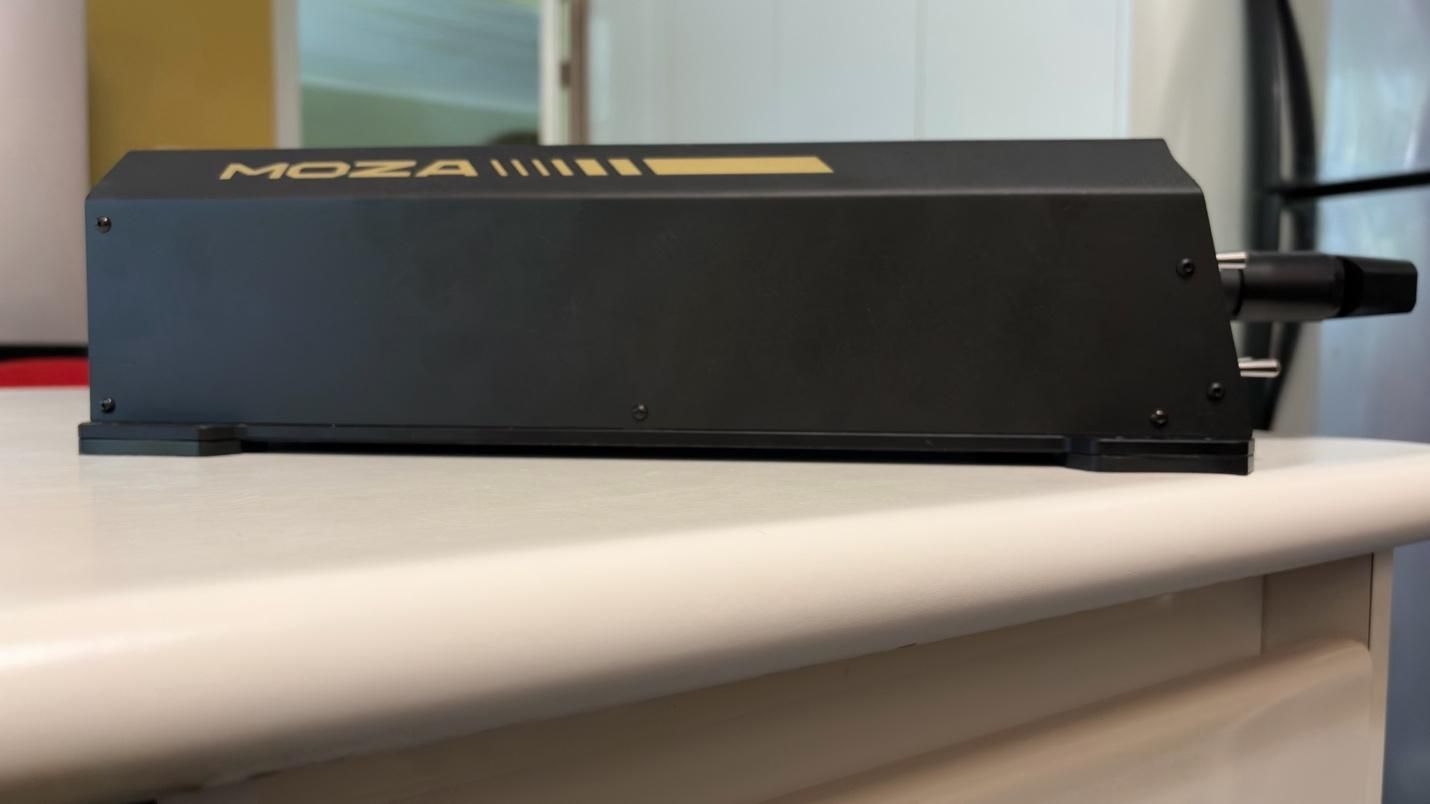
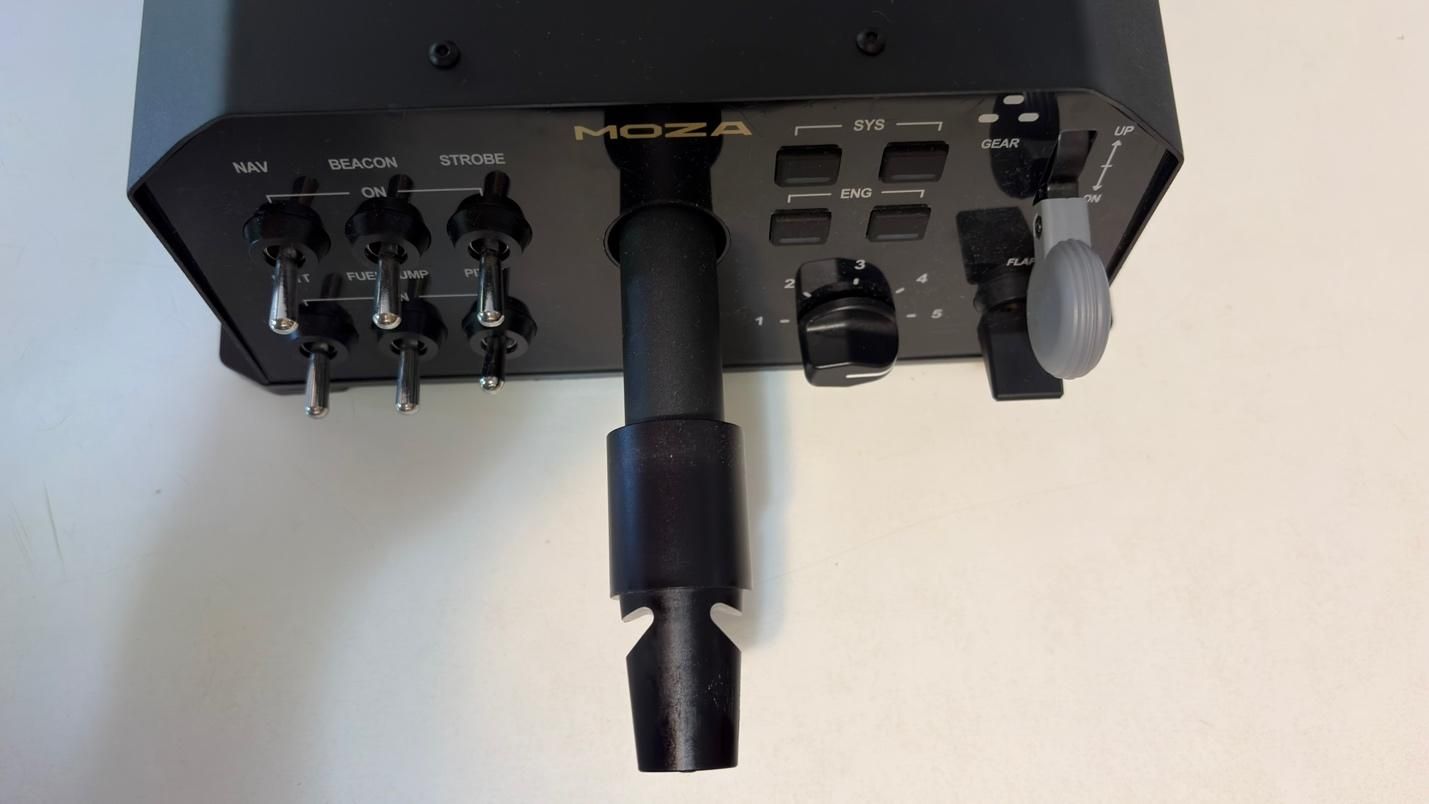
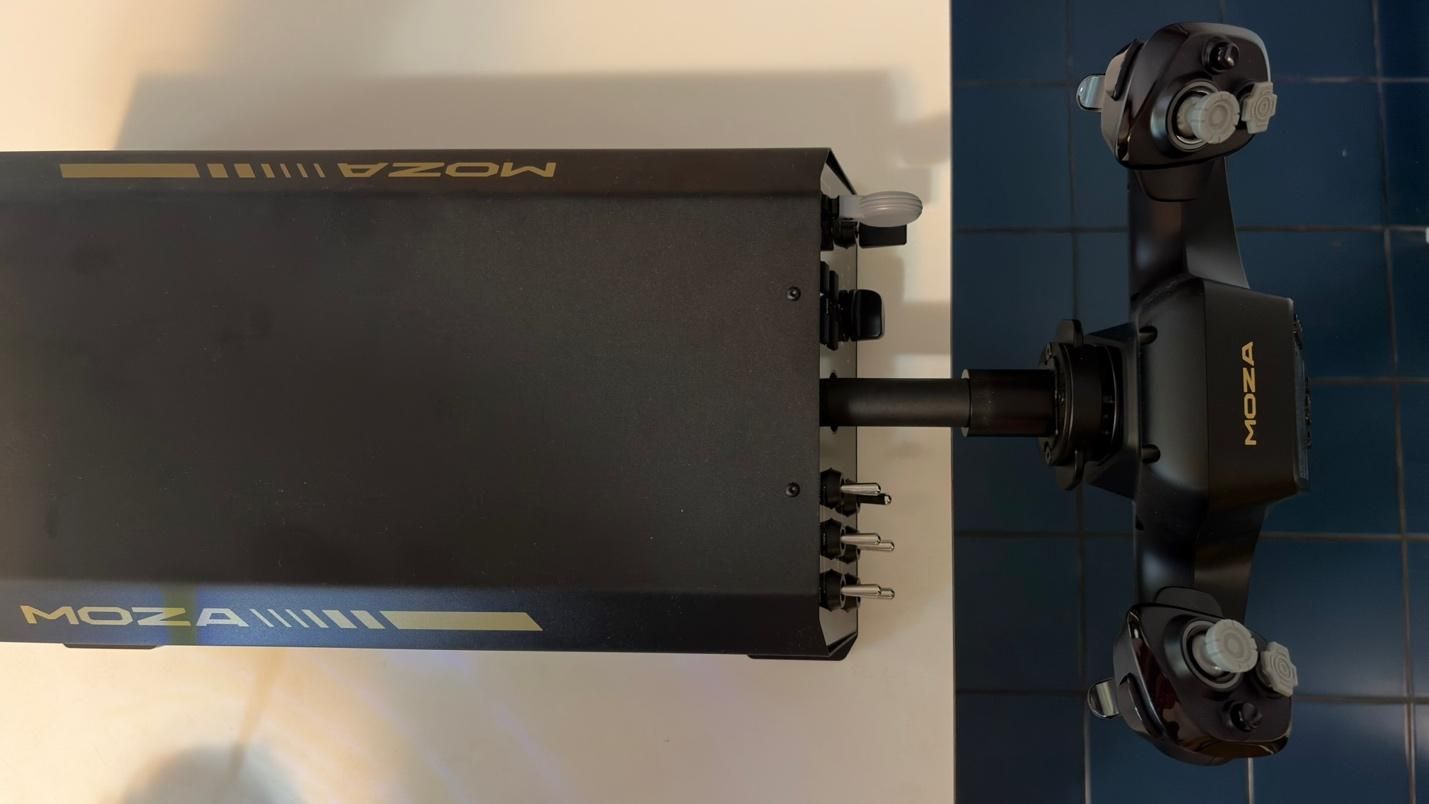
The base is constructed from aluminum alloy, giving it a sturdy, durable, and premium feel. An aluminum quick-release mechanism allows you to swap yokes quickly while keeping them securely attached.

Under the hood, the AY210 is powered by a 280 MHz processor and features a 15-bit high-resolution magnetic encoder. This is designed to provide precise and responsive inputs across the full range of motion, whether you’re making small, delicate adjustments or larger, more aggressive inputs. Combined with MOZA’s proprietary active force-feedback system, the AY210 is designed to deliver a high level of control while adding another layer of immersion to the flight experience.

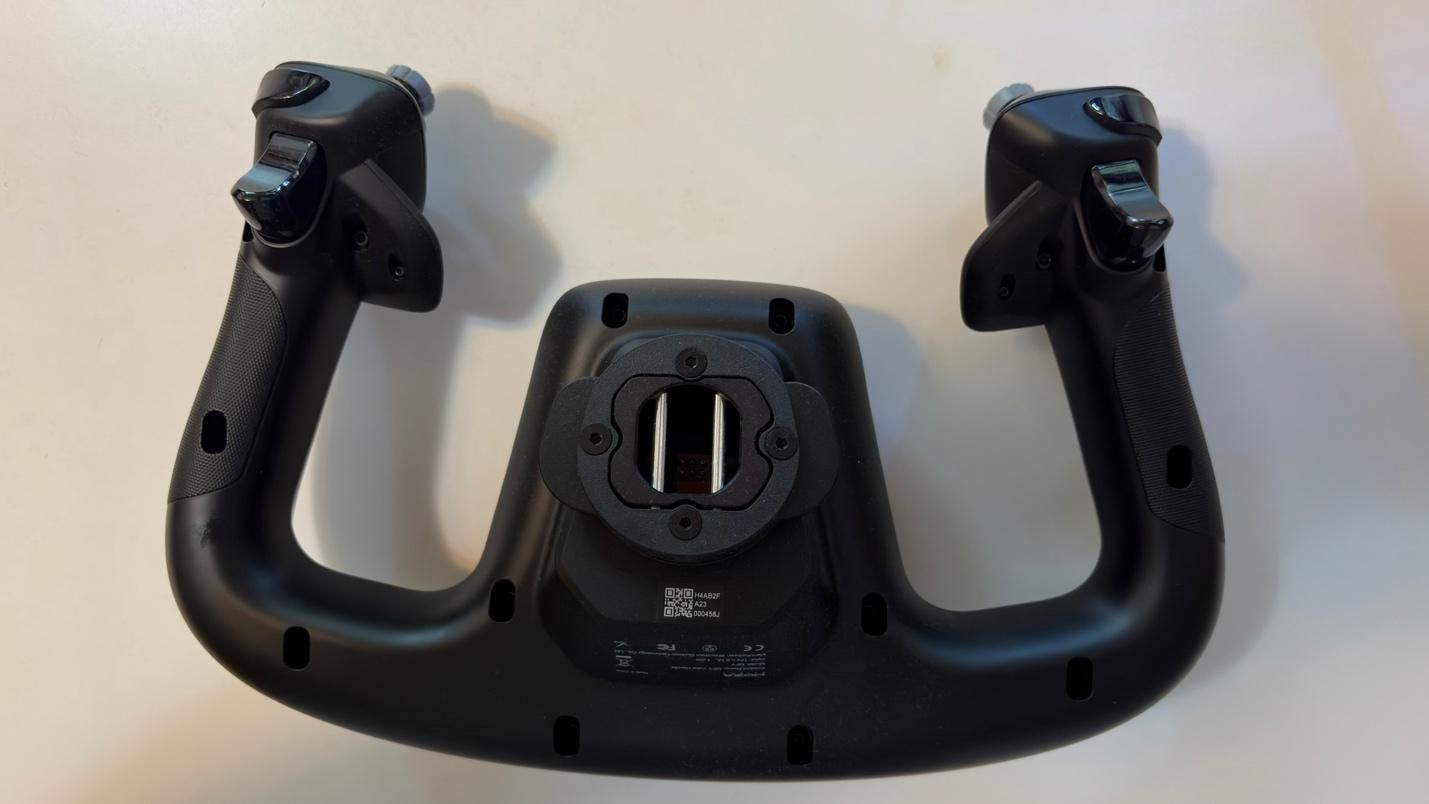
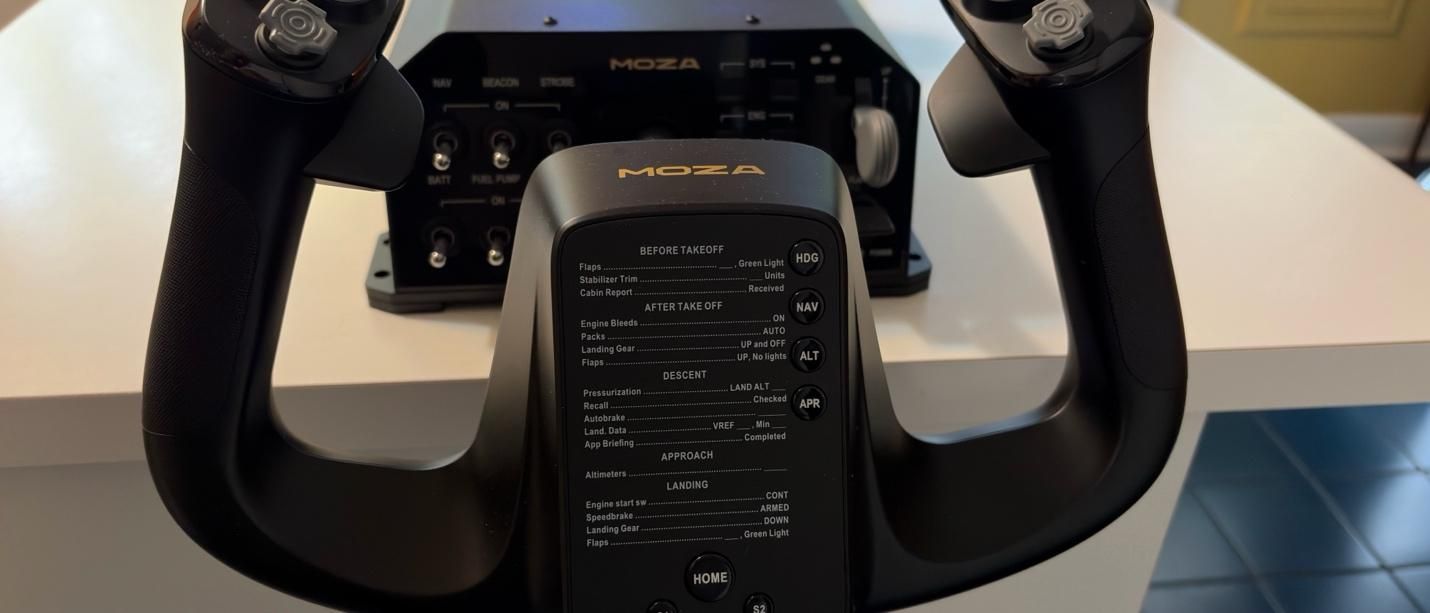
The MFY Yoke features a premium build made from high-quality synthetic engineering thermoplastic and ergonomic design that closely replicates the feel of a yoke found in a real commercial aircraft.

How Does it Feel?

The star of the show is undoubtedly the force feedback. With up to 9 Nm of torque and 210 N of push force, the system adds a level of immersion that simply isn’t possible with conventional yokes that lack force feedback.

When flying the PMDG 737, the yoke gives the aircraft a noticeably heavier feel through the control column, closely mimicking what we experienced in a 737 simulator. As airspeed increases, the yoke becomes progressively harder to deflect in both pitch and roll, accurately reflecting the aerodynamic forces acting on the aircraft.

But the force feedback goes far beyond simply simulating control forces. You can feel the vibrations from the engines, as well as the movement of the flaps and spoilers. After takeoff, the yoke conveys the increasing resistance of the airflow as the aircraft accelerates. Approaching a stall during a climb produces a noticeable buffet through the controls, while landing provides feedback as the wheels make contact with the runway.

The AY210 also replicates the movement of the aircraft's controls when the autopilot is engaged, with the yoke moving under the control of the autopilot servos.

All of these effects work together to create a remarkably convincing connection between the aircraft and the controls. It’s a level of immersion that most other yokes simply cannot replicate.

Microsoft Flight Simulator 2024 Testing

We tested the AY210 Force Feedback Base and MFY Yoke in Microsoft Flight Simulator 2024 primarily using the PMDG 737-800. While the iFly 737 MAX is a great addon with a superb flight model, especially in Microsoft Flight Simulator 2020, it is not yet natively built for MSFS 2024. As such, it does not handle wind and turbulence effects entirely well in MSFS 2024. We wanted to stick with MSFS 2024 because of its more realistic flight dynamics. We also tested the yoke with the PMDG 777. For our tests, we used the latest 737 NG and 777 profiles from Tonyaviation on Flightsim.to. Tony is a real-life pilot with experience in the 737 and 787. The 787 and 777 share many of the same flight characteristics.

We tested the base and yoke in three different scenarios:

  1. Basic maneuvering. Flying at 5,000 feet, we performed gentle turns and pitch changes to evaluate the precision of the base during small, accurate control inputs.
  2. Turbulent approach. We performed an approach into Las Vegas under hot, windy conditions with strong updrafts and downdrafts. This scenario required larger, more frequent control inputs to assess how the base handles turbulence and rapid corrections.
  3. Curved approach. Finally, we flew the RNAV Visual approach to Runway 1R at San Francisco International Airport. This approach is available in MSFS 2024 if you use the Navigraph database, but it is missing the RF leg between the waypoints KLAUS and SQIRL, so we added it to the navigation database of the PMDG 737 and 777 ourselves. The procedure features a sweeping right-hand arc that continues until roughly one mile from the runway threshold, requiring the aircraft to remain in a turn at very low altitude. The approach demands precise tracking of the flight path while also requiring a smooth, accurate transition to the runway centerline after the final waypoint. This scenario tested both the precision and responsiveness of the AY210 Base.

Basic Maneuvering

Basic maneuvering feels precise and smooth with the right settings. That last part is important, however, because the AY210 does not necessarily deliver this experience out of the box. Based on our previous experience with a 737 simulator, even with significant pitch input, the control column should maintain a smooth and consistent feel throughout its movement. With the AY210, we found that the motion could feel less natural and “sticky” unless Pitch Friction Correction was enabled in the MOZA Cockpit Software. Fortunately, this setting significantly improves the feel, giving the control column a response that is much closer to what we experienced in a 737 simulator.The 280 MHz processor and 15-bit high-resolution magnetic encoder also contribute to the AY210’s precise and responsive inputs. We were able to make accurate turns and precisely set our desired descent rate, with even small control inputs translating smoothly and predictably into the simulator.

Turbulent Approach

Here, we perform our usual turbulent approach, landing in Las Vegas during the summer. The combination of extreme heat, strong winds, and thermals along the approach path can create significant turbulence, making for a much less stable approach. Microsoft Flight Simulator 2024 is able to replicate these conditions through its Live Weather system, providing a challenging environment for testing the AY210.

The level of immersion provided by the AY210 is simply incredible. Through the force feedback system, you can feel the effects of wind and turbulence directly through the yoke, rather than relying solely on visual cues or the aircraft’s instruments. This provides useful feedback that helps you anticipate and make the necessary control corrections. The AY210 handled these conditions exceptionally well, accurately conveying the changing forces throughout the approach and giving us a much better sense of how the aircraft was responding.

Curved Approach

The RNAV Visual approach to Runway 1R at San Francisco International Airport contains an RF leg between the final two waypoints – KLAUS and SQIRL – which is a sweeping right-hand arc. The AY210 was responsive and precise throughout, allowing us to follow the arc all the way to SQIRL, at which point we were able to accurately align with runway 1R and perform a smooth landing.

By comparison, the Thrustmaster TCA Boeing Yoke felt noticeably jerkier throughout the approach. The two products are also in completely different price tiers, so this is not necessarily a direct or entirely fair comparison. However, the TCA Boeing Yoke is a popular choice among simmers flying Boeing aircraft in Microsoft Flight Simulator, making it a useful reference point. The difference was immediately noticeable, and the AY210’s ability to provide smoother, more natural control while conveying the effects of turbulence is a clear example of what you gain from its more premium design and force feedback system.

Bottom Line

The MOZA AY210 Force Feedback Yoke Base delivers one of the most immersive experiences available in desktop flight simulation. It comes at a premium price, but after spending time with the AY210, it is genuinely difficult to go back to a yoke without force feedback. The combination of realistic feedback, precise control, and the level of detail conveyed through the yoke adds an entirely new dimension to the flying experience.

It is not without its flaws. Some of the force feedback effects could be stronger, while the control column can feel slightly unnatural and “sticky” out of the box. Fortunately, both issues can be addressed to some extent through the extensive customization options in MOZA Cockpit Software.

Overall, the AY210 is an impressive piece of hardware. For those willing to pay the premium, its force feedback and overall level of immersion make it a compelling upgrade for any serious home cockpit.
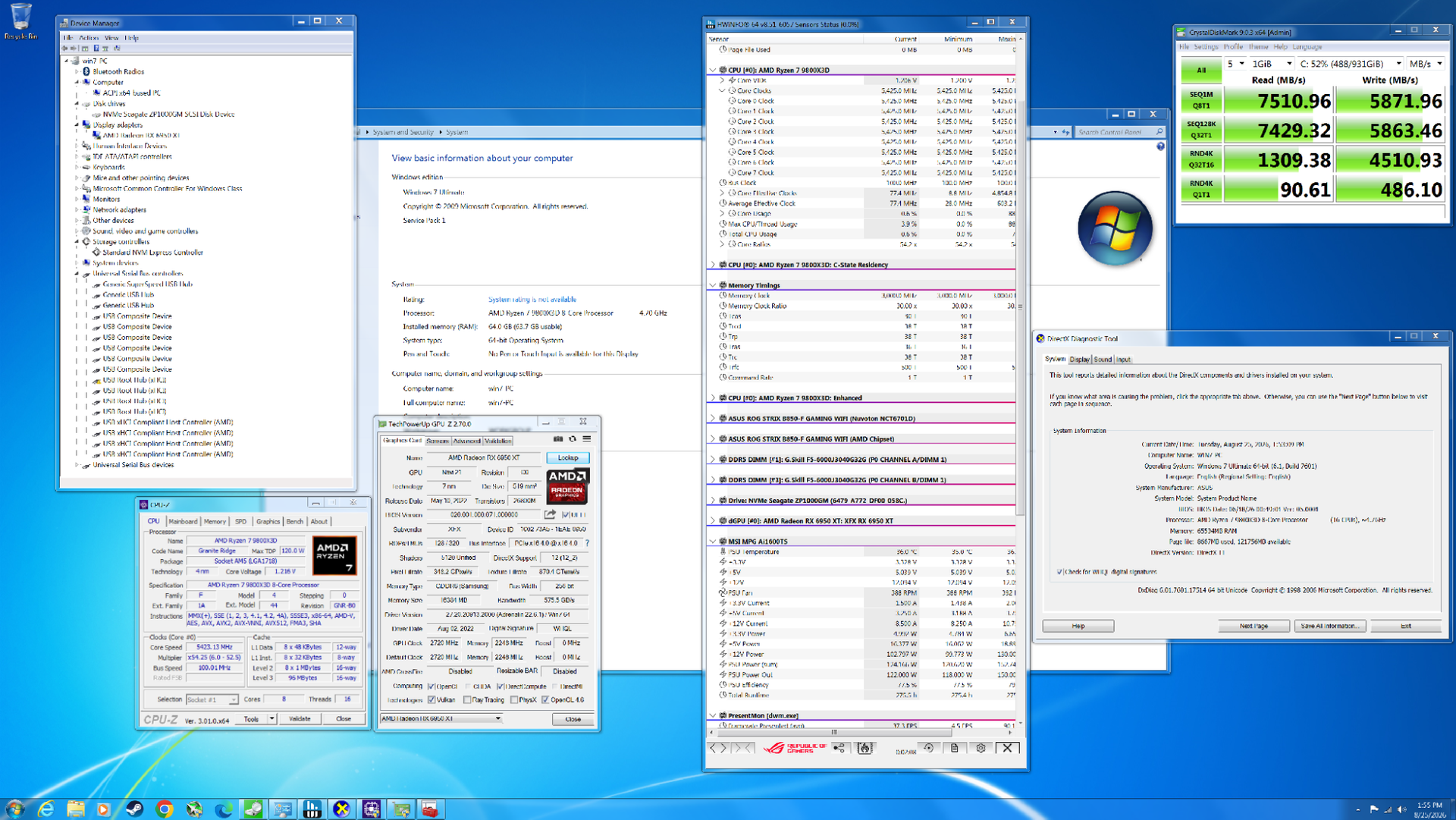
We tested gaming performance in 17-year-old Windows 7 on a modern gaming PC against Windows 11

作者 Dan Mateescu
2026年10月10日 21:40

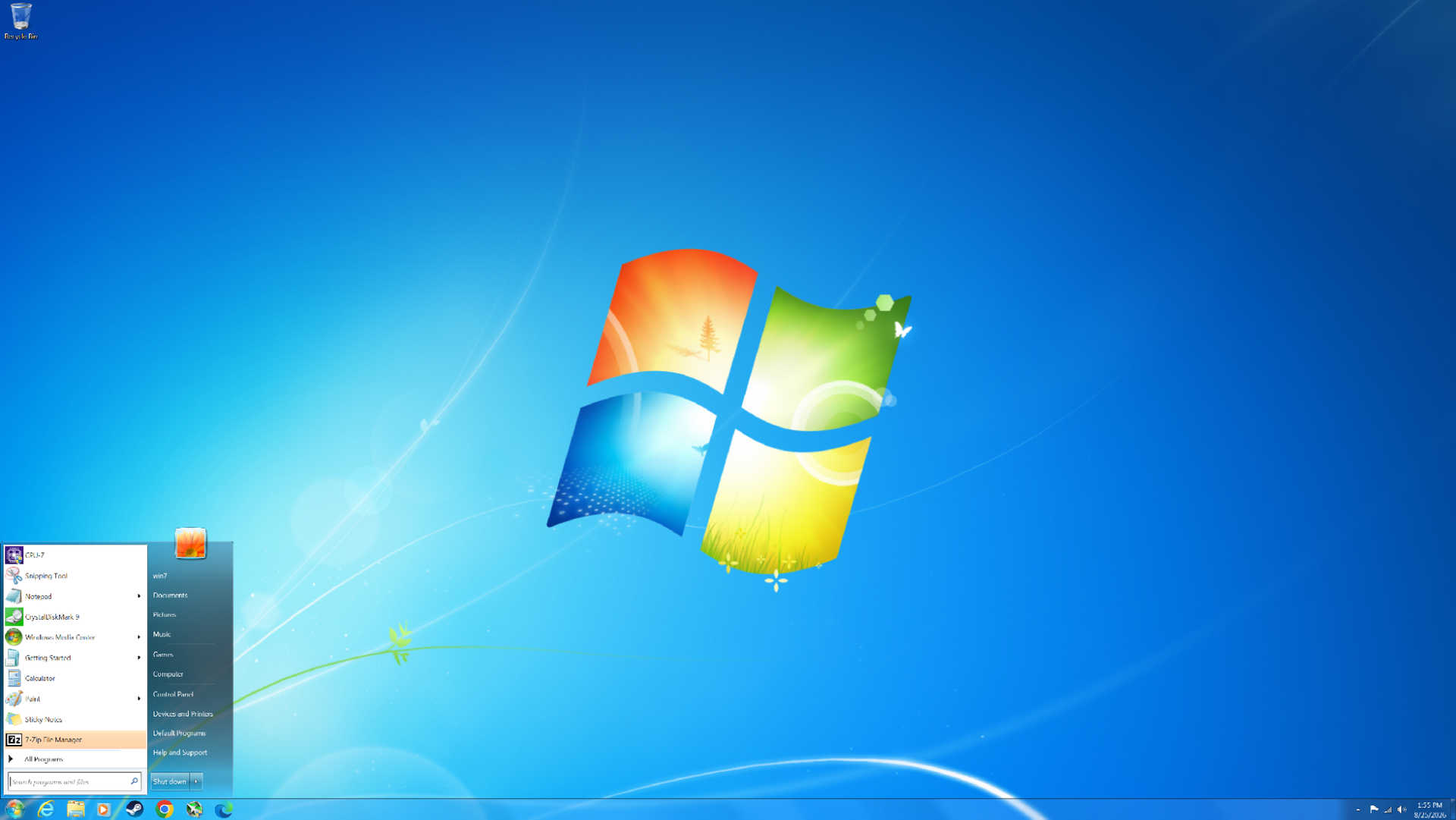
After the rough reception of Windows Vista, Windows 7 launched in 2009 to largely positive reviews. Even 17 years later, it remains one of the most beloved versions of Windows ever released. But how does this nearly two-decade-old operating system hold up on modern hardware? We managed to install Windows 7 on a modern PC and put it to the test across eight DirectX 11 games and two DirectX 9 titles to see how its gaming performance compares to Windows 11 today. Surprisingly, Windows 7 still carves out many notable wins over its successor.

At launch, Windows 7 was very similar to Windows Vista in many respects. Vista had introduced significant changes under the hood compared to Windows XP, including technologies such as SuperFetch, ReadyBoost, ReadyDrive, new asynchronous APIs, and other I/O improvements. It also introduced native processor power management and various memory-management enhancements. On the visual side, Vista was the first version of Windows to feature Windows Aero, with its distinctive glass-like window borders.

Windows 7 retained many of these underlying technologies while addressing several of Vista’s biggest criticisms. One notable improvement was greater control over User Account Control (UAC), allowing users to adjust how frequently they received UAC prompts. In Vista, these prompts could appear far too often, becoming a major source of frustration for many users.

Windows 7 also benefited from something that had nothing to do with the operating system itself: more powerful hardware. When Vista launched, many mid-range and budget PCs struggled to deliver smooth performance, particularly when using more demanding visual features such as Windows Aero. By 2009, however, PC hardware had advanced considerably, and the performance required to run these features smoothly was no longer a significant concern for most users.

The Challenge of Running Windows 7 on a Modern PC

Getting Windows 7 running on modern hardware is not as straightforward as installing a current version of Windows. At 17 years old, the operating system predates many of the technologies used by modern PCs, meaning driver support is extremely limited. For example, Windows 7 does not include native NVMe or USB 3.0 support, so the necessary drivers have to be slipstreamed into the installation ISO. Microsoft did eventually release patches that added NVMe support, but without injecting the appropriate drivers into the ISO, the Windows 7 installer will not recognize an NVMe drive.

Our system is based on AMD’s AM5 platform (with the full system specifications detailed later in the article), which presents another limitation: there are no official Windows 7 chipset drivers for the platform.

Fortunately, we are using an RDNA 2 GPU, which does have Windows 7 driver support, allowing us to use a relatively modern graphics card for our testing.

The motherboard is also an important consideration. Modern motherboards that have dropped CSM (Compatibility Support Module) and legacy boot support can make installing Windows 7 considerably more difficult, and in some cases may prevent the operating system from booting altogether. Fortunately, our motherboard still supports CSM, so this was not an issue for our setup.

Test System

We Tested Gaming Performance in Windows 7 on a Modern PC

(Image credit: Tom's Hardware)

Windows 7 system specs

  • AMD Radeon RX 6950 XT
  • Ryzen 7 9800X3D
  • 64GB (2x32GB) G.SKILL Flare X5 DDR5 @6000 MHz CL30
  • Seagate Lightsaber FireCuda (530) NVMe SSD
  • ASUS ROG STRIX B850-F Gaming WiFi
  • Corsair Nautilus 360 RS AIO Cooler
  • HAGS not supported by driver
  • Windows 7 Ultimate 64-bit Service Pack 1 (Build 7601)
  • AMD Adrenalin 22.6.1 for Windows 7 (2022)

Windows 11 system specs

  • AMD Radeon RX 6950 XT
  • Ryzen 7 9800X3D
  • 64GB (2x32GB) G.SKILL Flare X5 DDR5 @6000 MHz CL30
  • Seagate Lightsaber FireCuda (530) NVMe SSD
  • ASUS ROG STRIX B850-F Gaming WiFi
  • Corsair Nautilus 360 RS AIO Cooler
  • HAGS not supported by driver
  • Windows 11 25H2 (Build 26200.9278)
  • AMD Adrenalin 22.6.1 for Windows 11 (2022)

For Windows 7, we disabled Secure Boot, enabled CSM, and set Boot Device Control to Legacy OPROM Only. Enabling CSM means that we no longer have access to Resizable BAR (it's not supported anyway). For Windows 11, we disabled VBS (Virtualization-Based Security) and HVCI (Hypervisor-Protected Code Integrity).

It is important to note that while we used Adrenalin 22.6.1 for both Windows 11 and Windows 7 testing, the two packages contain different internal driver versions. Although both packages were released in June 2022, the Windows 11 driver is based on a more advanced codebase than the Windows 7 driver.

In both cases, we performed a clean install of each operating system and filled the SSD to about 50-60%.

Performance Testing

We tested ten games in total: eight using DirectX 11 and two using DirectX 9. The DirectX 11 titles are the primary focus, as both systems support them natively. By comparison, our Windows 11 system will run DirectX 9 games through the D3D9On12 mapping layer, while our Windows 7 system will run them natively. There are ways to get around the use of D3D9On12 on Windows 11, but we want to evaluate the out-of-the-box experience that most gamers would encounter. As a result, we expect Windows 7 to have an advantage in the DirectX 9 titles.

It will become apparent in the results below that the advantages of each operating system will vary depending on whether we are CPU-limited or GPU-limited.

Metro 2033 Redux (DX11)

Metro 2033 Redux was released in 2014 and features a new lighting engine, higher visual fidelity, and new locations for certain levels. The game is predominantly GPU-bound, but there are moments when GPU utilization drops sharply as you traverse the game world. At these points, the CPU becomes the limiting factor, resulting in a corresponding drop in performance.

We Tested Gaming Performance in Windows 7 on a Modern PC
Tom's Hardware
We Tested Gaming Performance in Windows 7 on a Modern PC
Tom's Hardware
We Tested Gaming Performance in Windows 7 on a Modern PC
Tom's Hardware

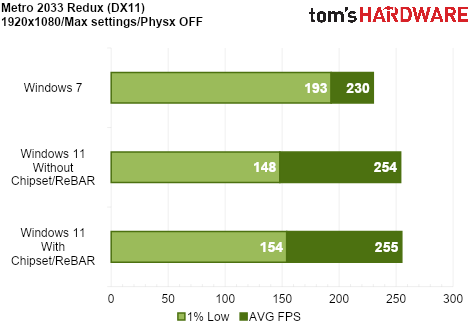
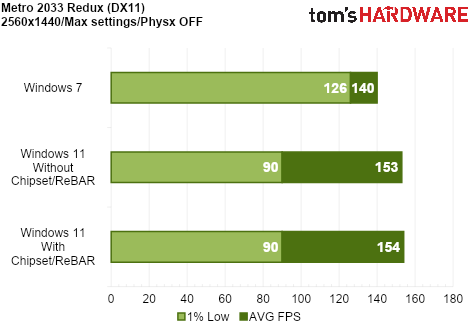
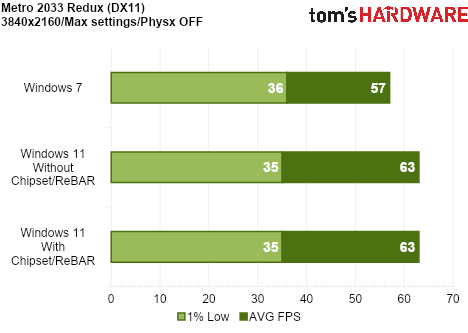
Although Windows 11 delivers a higher average frame rate, Windows 7 handles the CPU-related performance drops much better, resulting in significantly stronger 1% lows. Installing the AMD chipset drivers and enabling Resizable BAR improves 1% lows on Windows 11 slightly, but it still falls well behind Windows 7.

Windows 11’s more advanced graphics driver appears to provide an advantage in GPU-limited scenarios, while Windows 7’s lower CPU overhead offers more consistent frame pacing, though with lower peak performance.

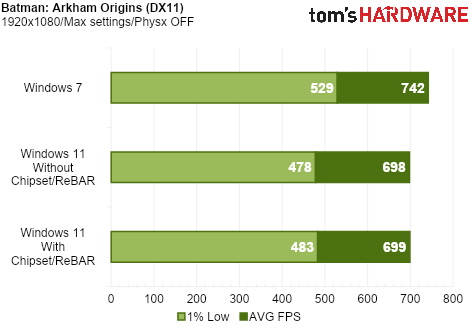
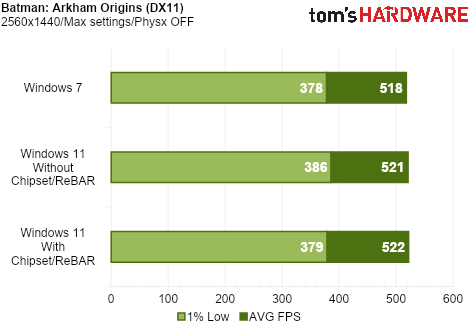
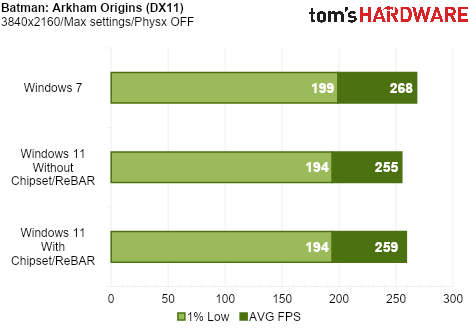
Batman: Arkham Origins (DX11)

Batman: Arkham Origins runs on a modified version of Unreal Engine 3 and uses several DX11 enhancements such as Tessellation, Ambient Occlusion HBAO+, Percentage Closer Soft Shadows (PCSS), and Depth of Field (DoF).

We Tested Gaming Performance in Windows 7 on a Modern PC
Tom's Hardware
We Tested Gaming Performance in Windows 7 on a Modern PC
Tom's Hardware
We Tested Gaming Performance in Windows 7 on a Modern PC
Tom's Hardware

When CPU-limited at 1080p, Windows 7 once again puts in a strong showing, outperforming Windows 11 in both average frame rate and 1% lows. Surprisingly, Windows 7 also comes out ahead at 4K in Origins, though with a far smaller advantage. As we will see throughout the remainder of our testing, however, this is a rare occurrence. Even so, Windows 7 maintains a slight performance advantage over Windows 11 at 4K in this title.

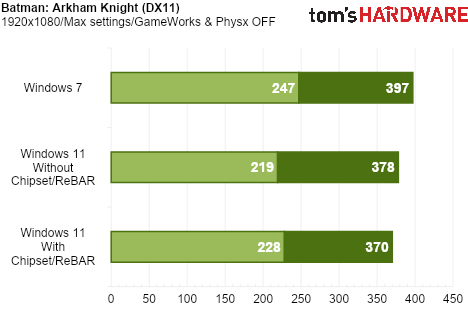
Batman: Arkham Knight (DX11)

Batman: Arkham Knight was both a critical and commercial success, despite a notoriously troubled PC launch plagued by severe bugs and major performance issues. Visually, however, the game still holds up remarkably well, and modern hardware is more than capable of brute-forcing this demanding PC port.

We Tested Gaming Performance in Windows 7 on a Modern PC
Tom's Hardware
We Tested Gaming Performance in Windows 7 on a Modern PC
Tom's Hardware
We Tested Gaming Performance in Windows 7 on a Modern PC
Tom's Hardware

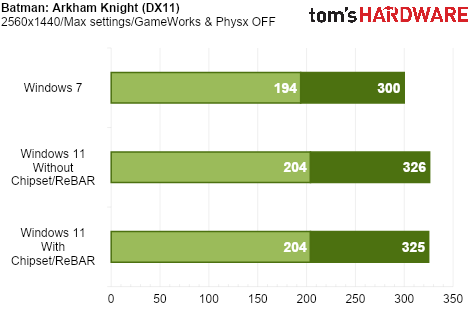
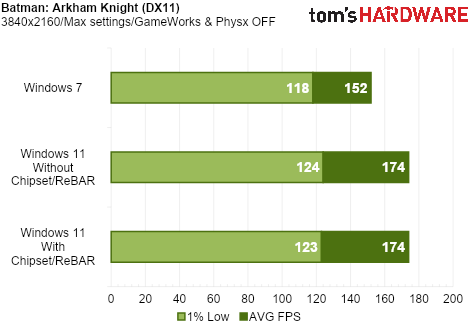
Windows 7 again delivers higher performance at 1080p when we are CPU-limited. Windows 11 jumps ahead when we become GPU-limited at 1440p and 4K.

Batman: Arkham City (DX11)

Batman: Arkham City was the second entry in the series, following Arkham Asylum, and the first to support DirectX 11. This introduced features such as tessellation, which adds greater geometric detail to characters and environments.

We Tested Gaming Performance in Windows 7 on a Modern PC
Tom's Hardware
We Tested Gaming Performance in Windows 7 on a Modern PC
Tom's Hardware
We Tested Gaming Performance in Windows 7 on a Modern PC
Tom's Hardware

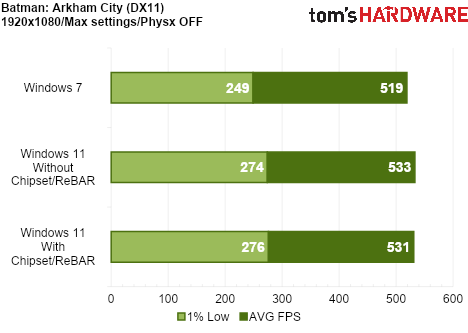
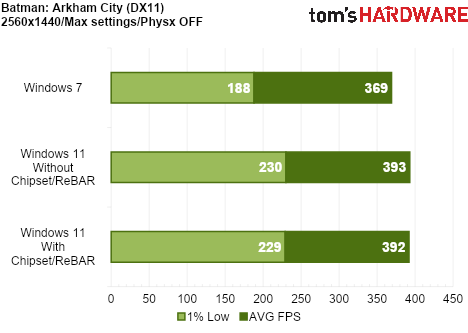
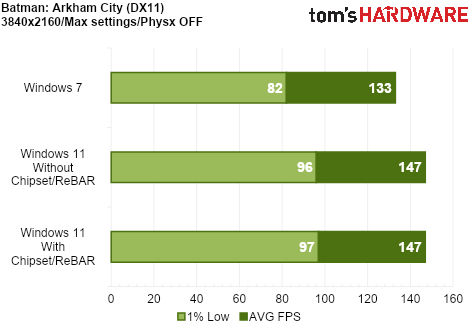
In Arkham City, our system is GPU-bound at every resolution tested, giving Windows 11 the advantage across the board.

The Witcher 3: Wild Hunt (DX11)

The Witcher 3 faced some controversy at launch over reductions in image quality compared to its initial reveal. CD Projekt Red quickly released a patch addressing these concerns and improving the game’s visuals. From a performance perspective, however, the game was extremely demanding at launch.

We Tested Gaming Performance in Windows 7 on a Modern PC
Tom's Hardware
We Tested Gaming Performance in Windows 7 on a Modern PC
Tom's Hardware
We Tested Gaming Performance in Windows 7 on a Modern PC
Tom's Hardware

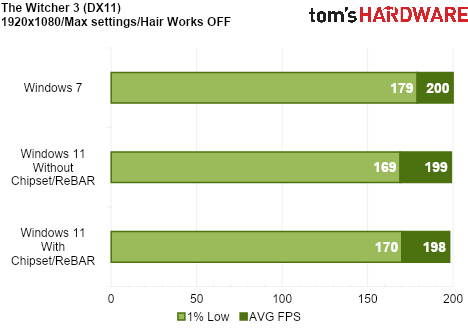
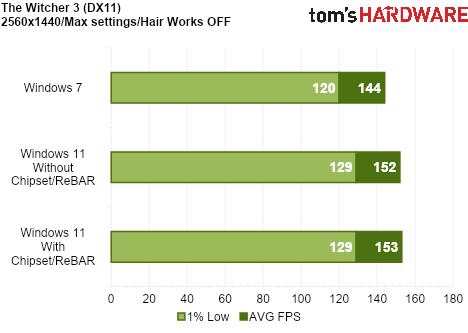
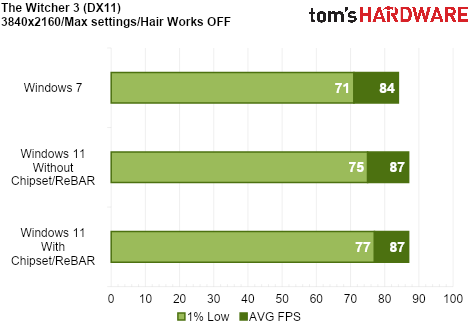
While the game is very GPU bound in general, at 1080p we did encounter a slight CPU bottleneck, which gave Windows 7 an advantage in 1% lows. At 1440p and 4K, Windows 11 takes a slight lead.

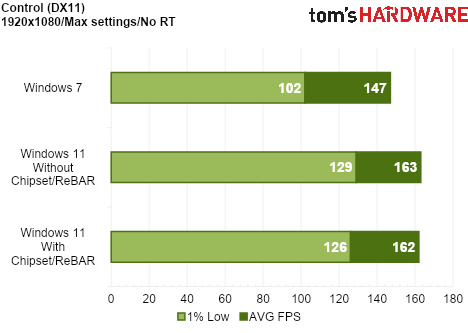
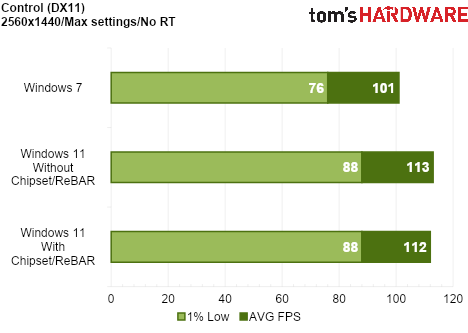
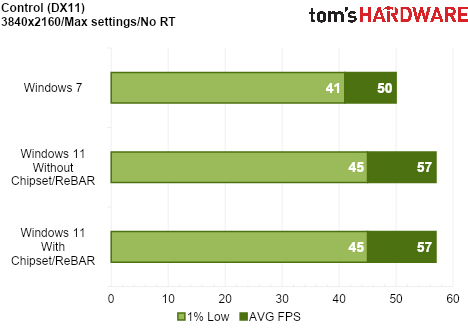
Control (DX11)

Control is the newest title we tested for this comparison, having launched in 2019. While the game introduced several ray tracing features, these were exclusive to the DirectX 12 API. Since Windows 7 does not support DirectX 12, we tested Control using DirectX 11 on both operating systems. Even without ray tracing, Control remains the most graphically advanced title in our Windows 11 vs Windows 7 comparison.

We Tested Gaming Performance in Windows 7 on a Modern PC
Tom's Hardware
We Tested Gaming Performance in Windows 7 on a Modern PC
Tom's Hardware
We Tested Gaming Performance in Windows 7 on a Modern PC
Tom's Hardware

Windows 11 wins across the board. This is not a surprise, as we are GPU-limited across all resolutions tested.

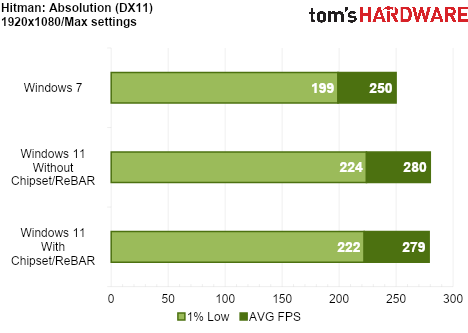
Hitman: Absolution (DX11)

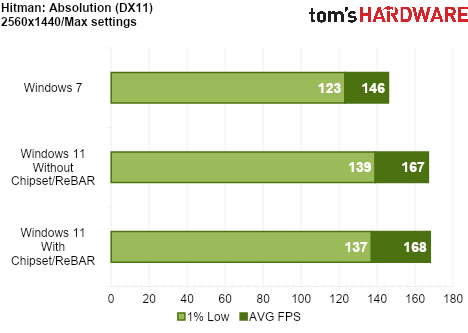
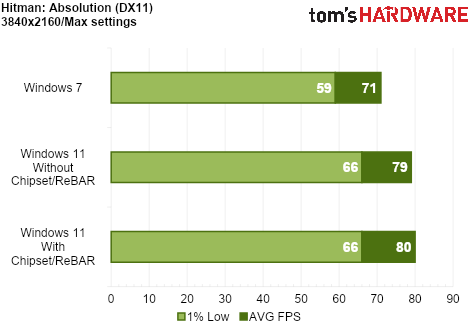
Hitman: Absolution was released in 2012 and was the first game to use the Glacier 2 engine. The updated engine could handle crowds of up to 1200 characters, which was unprecedented at the time. The game also featured several DirectX 11 enhancements, including global illumination and tessellation.

We Tested Gaming Performance in Windows 7 on a Modern PC
Tom's Hardware
We Tested Gaming Performance in Windows 7 on a Modern PC
Tom's Hardware
We Tested Gaming Performance in Windows 7 on a Modern PC
Tom's Hardware

This is another game that pushes the GPU hard, regardless of resolution. Our test system was GPU-limited even at 1080p.

Hitman 2 (DX11)

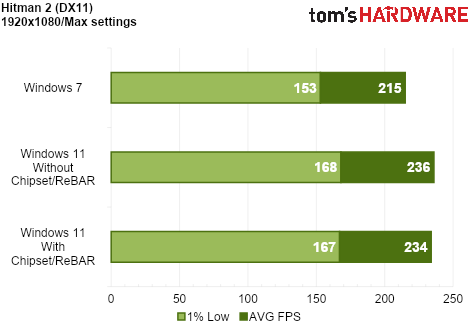
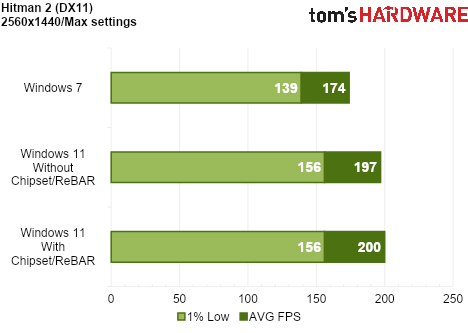
Hitman 2 was released in 2018, making it the second-newest game in our operating system comparison. It features detailed environments, dense crowds, and full reflections across many surfaces, making it an impressive-looking title overall.

We Tested Gaming Performance in Windows 7 on a Modern PC
Tom's Hardware
We Tested Gaming Performance in Windows 7 on a Modern PC
Tom's Hardware
We Tested Gaming Performance in Windows 7 on a Modern PC
Tom's Hardware

Hitman 2 is another example where our test system is GPU-limited at every resolution, giving Windows 11 a clean sweep across the board.

Batman: Arkham Asylum (DX9)

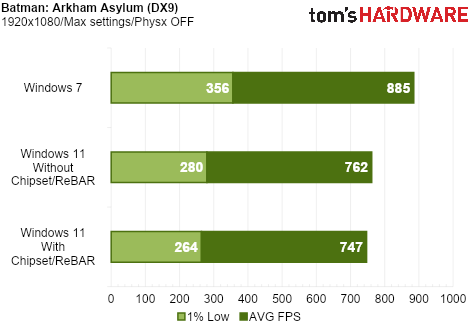
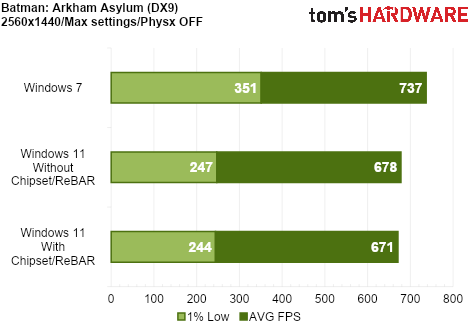
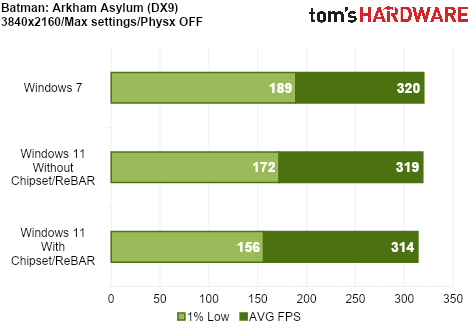
We now move to our first DirectX 9 game. As previously mentioned, Windows 7 should have an advantage here because our Windows 11 system must use the D3D9On12 mapping layer for DirectX 11 games. But just how much of an advantage?

We Tested Gaming Performance in Windows 7 on a Modern PC
Tom's Hardware
We Tested Gaming Performance in Windows 7 on a Modern PC
Tom's Hardware
We Tested Gaming Performance in Windows 7 on a Modern PC
Tom's Hardware

Significant advantages for Windows 7 in average frame rate and 1% lows, especially at 1080p and 1440p. The advantage is reduced at 4K, but the performance is still smoother overall in Windows 7. Another translation layer, such as DXVK, may close the gap.

Borderlands 2 (DX9)

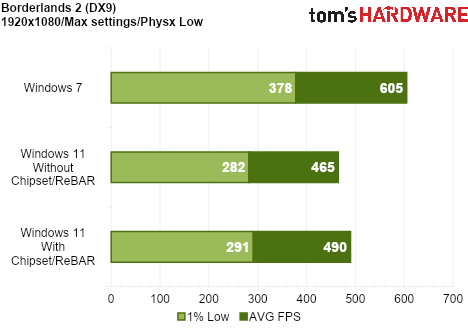
Borderlands 2 is our second DirectX 9 game and the final overall game tested.

We Tested Gaming Performance in Windows 7 on a Modern PC
Tom's Hardware
We Tested Gaming Performance in Windows 7 on a Modern PC
Tom's Hardware
We Tested Gaming Performance in Windows 7 on a Modern PC
Tom's Hardware

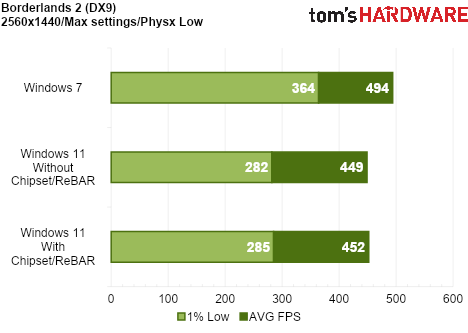
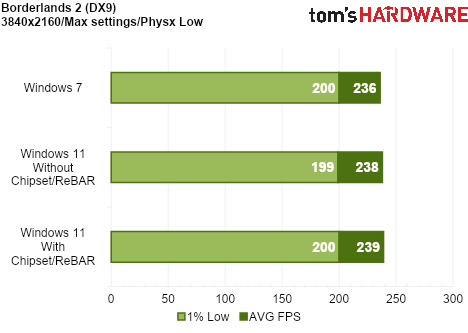
Once again, another massive win for Windows 7 at the lower resolutions. The performance at 4K is virtually identical.

Bottom Line

Windows 11 is optimized for GPU-hungry games

The results are interesting, but perhaps not entirely surprising. The DirectX 9 results are largely in line with our expectations, given that Windows 11 must run these games through the D3D9On12 mapping layer, yielding substantial advantages for Windows 7.

The DirectX 11 results are more nuanced, but a clear trend emerges: Windows 7 has the advantage when we are CPU-limited, while Windows 11 performs better when we are GPU-limited. This makes sense given that Windows 11 uses graphics drivers built on a more advanced codebase, while Windows 7 is a leaner operating system with fewer background processes and, consequently, lower CPU overhead.

Microsoft has recently detailed its K2 plan, which aims to improve the performance and reliability of Windows 11. We hope these continued efforts to improve Windows 11 pay off.

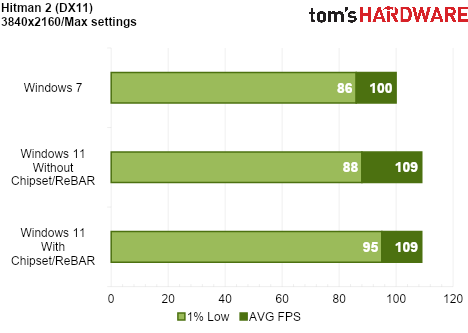
The lower CPU performance we observed in Windows 11 cannot be attributed to its most notable security features, such as VBS (Virtualization-Based Security) and HVCI (Hypervisor-Protected Code Integrity), as we disabled both during testing. Notably, Windows 7 does not support VBS or HVCI at the software level, while Windows 11 supports hardware virtualization extensions (such as Intel VT-x or AMD-V) and Second Level Address Translation (SLAT). Additionally, fixed-function hardware can reduce the impact of virtualization to varying degrees, based on the CPU architecture's capabilities. However, additional telemetry and other background services still pop up and use precious CPU cycles.

Using the latest chipset drivers and enabling features such as Resizable BAR does not help Windows 11 close the gap in CPU-limited scenarios by any significant margin. Ultimately, we would like to see Windows 11 become leaner and more efficient, as our results suggest there is still some performance left on the table, particularly on the CPU side.

Thrustmaster Airbus Add-On Grip with AVA Joystick Base Review: A First-Class Flight Experience

作者 Dan Mateescu
2026年9月13日 21:00

The past few years have been an exciting time for flight simulation hardware. Established brands and newcomers alike have introduced a wide range of new products, making it easier and more affordable than ever to build a capable home cockpit.
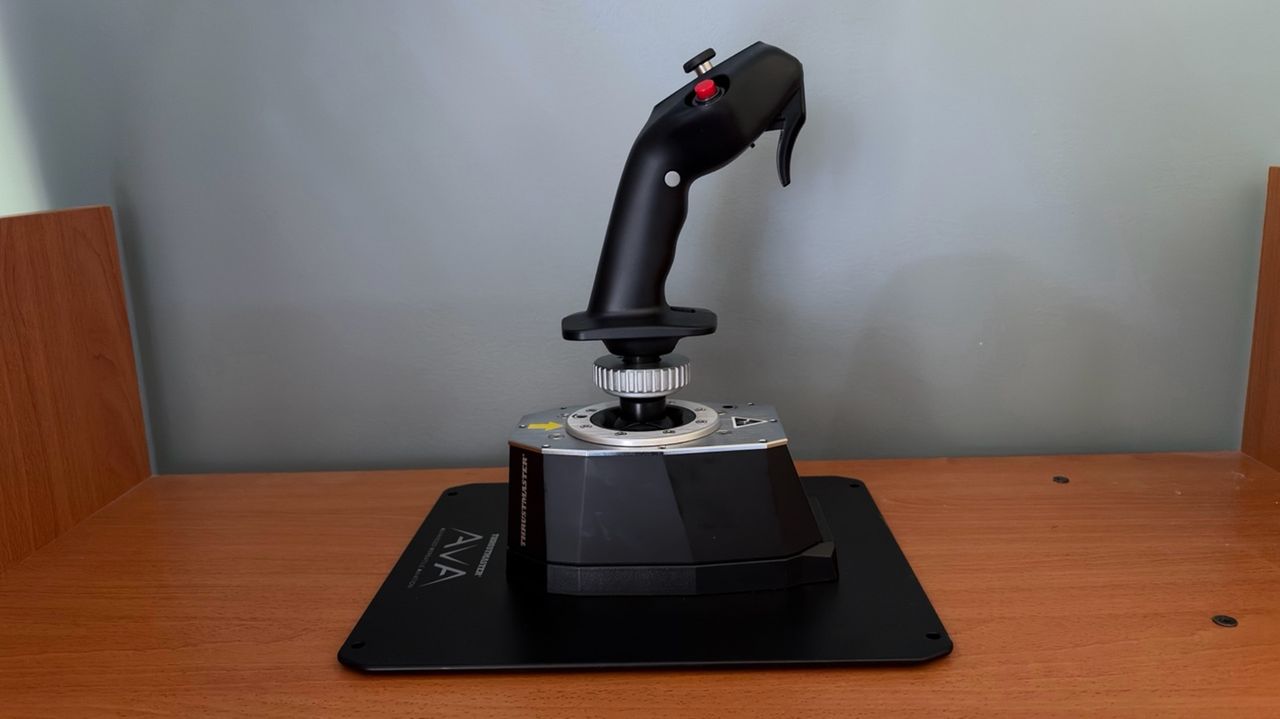
Thrustmaster has long been one of the leading names in flight simulation hardware. Its HOTAS Warthog has been a staple in home cockpits since its release, earning a reputation for its robust construction. In 2024, Thrustmaster introduced the AVA Joystick Base, bringing several notable improvements over the Warthog base. Until recently, however, there wasn't a dedicated Airbus grip compatible with the AVA base.

In this review, we'll be taking a look at the recently released Thrustmaster Airbus Add-On Grip paired with the AVA Joystick Base. We will put both the grip and the base to the test using the Fenix A320 in Microsoft Flight Simulator 2024.

Inside the Box

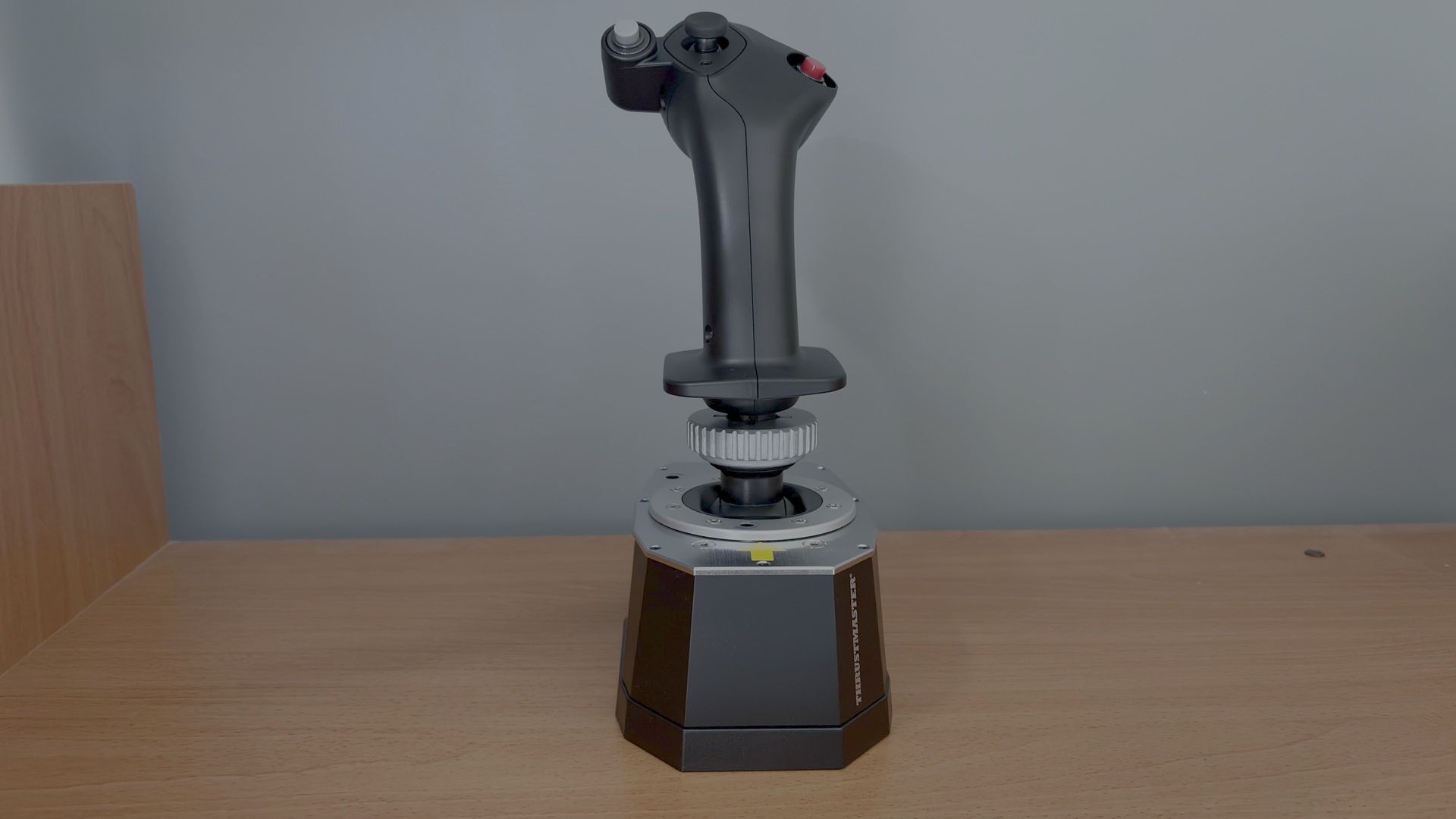
Thrustmaster Airbus Add-On Grip with AVA Joystick Base
Tom's Hardware
Thrustmaster Airbus Add-On Grip with AVA Joystick Base
Tom's Hardware

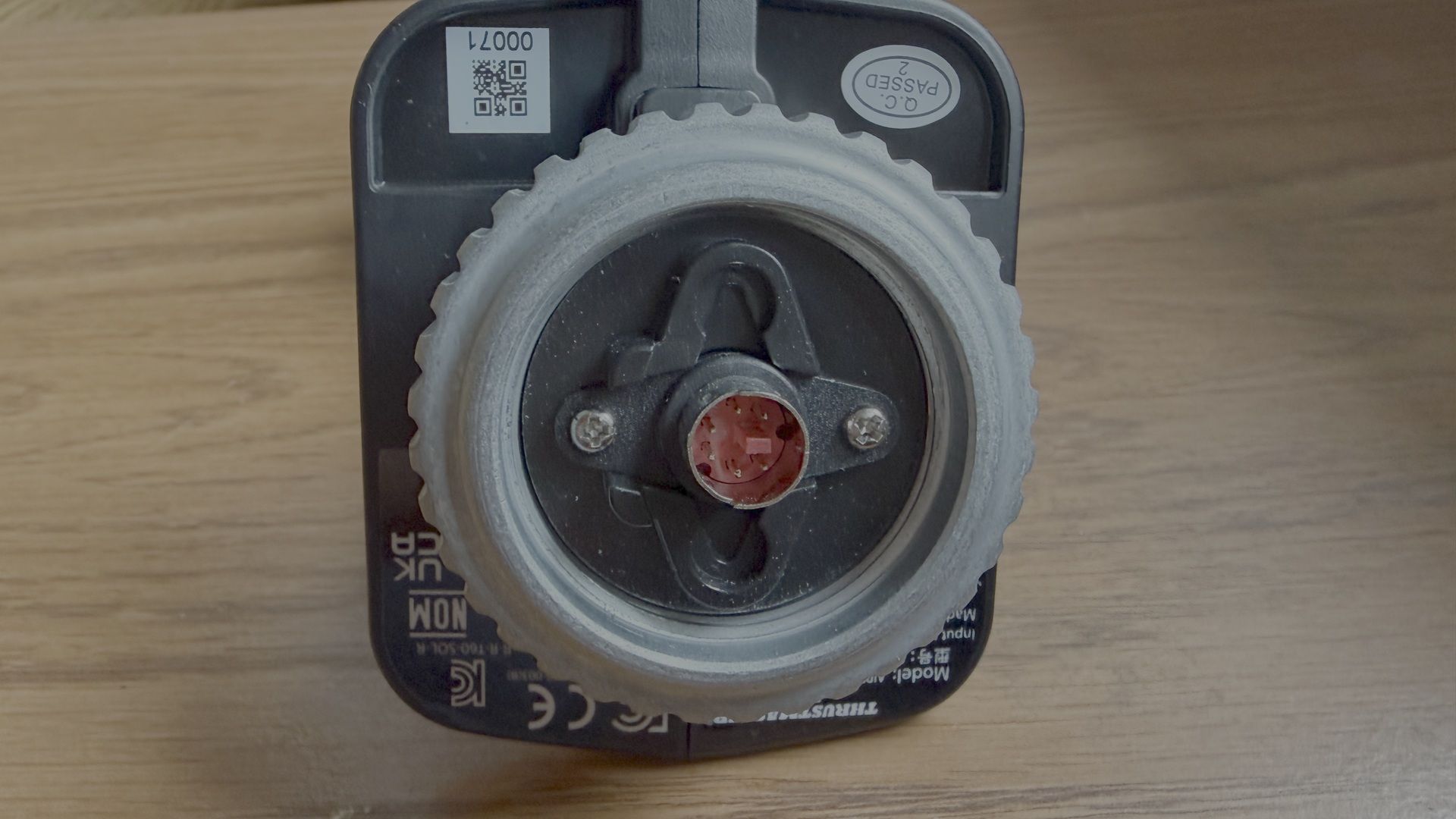
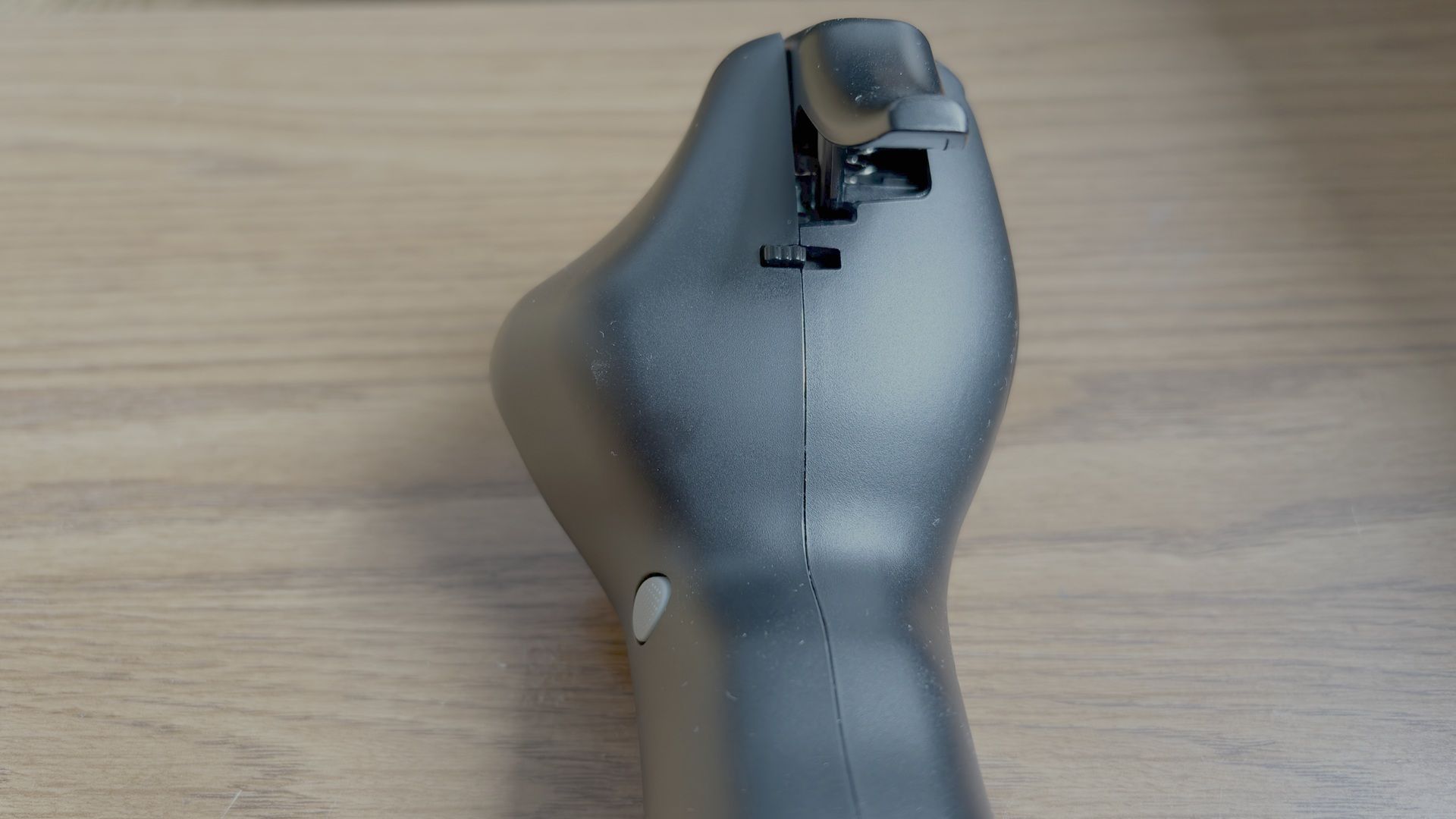
The Airbus Add-on Grip contains the grip itself, the A400M module, and a button cover.

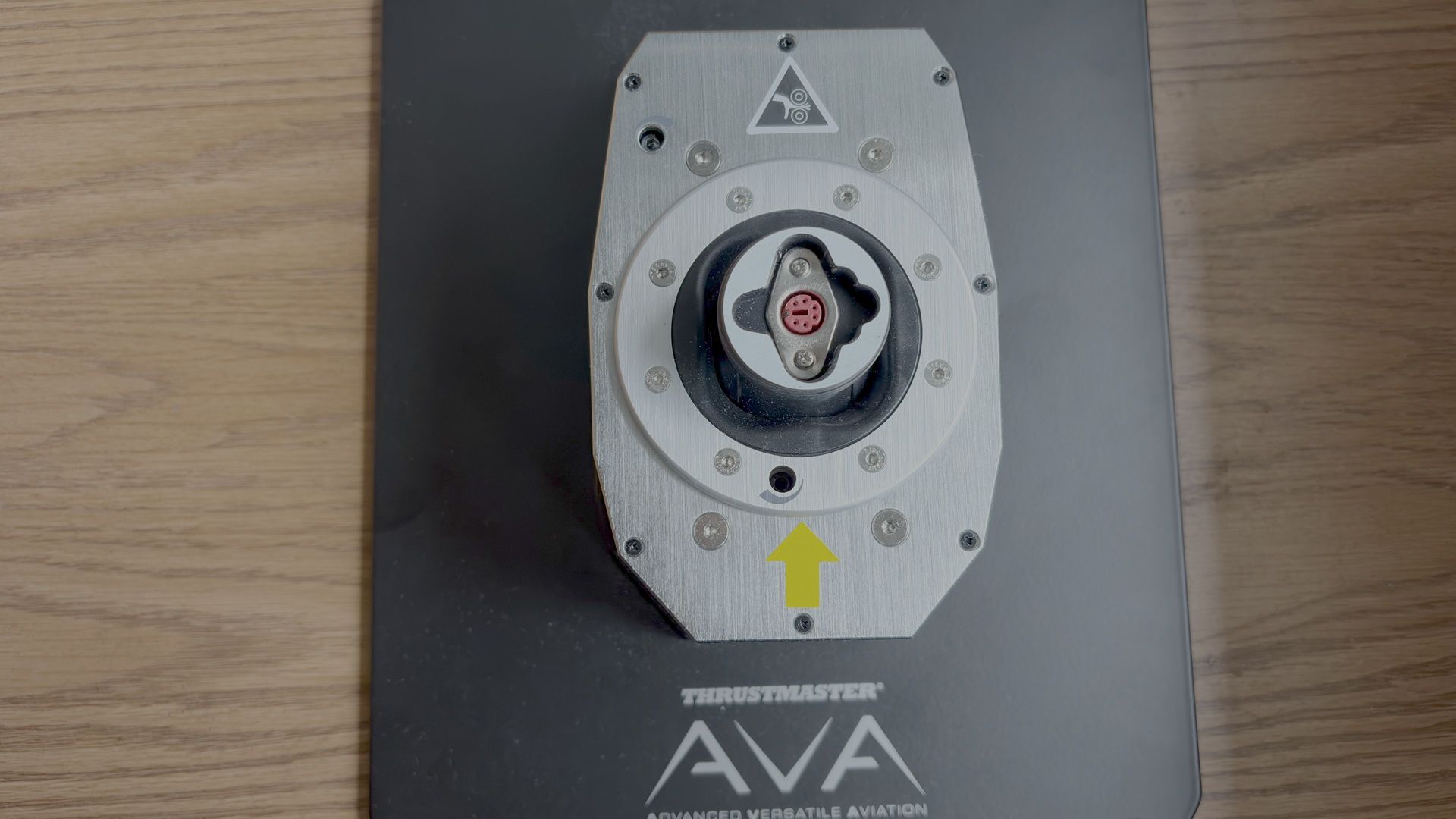
The AVA Base contains the joystick base, two sets of two cams (Aero and Jet), three sets of two springs (Soft, Medium, and Strong), three masks (Small, Medium, and XL), two Allen keys, and one detachable USB-C cable.

  • Airbus Add-on Grip Dimensions: 3.1 inches / 78 mm wide, 3.3 inches / 83 mm deep, 7.7 inches / 195 mm tall. Weight: 0.4 lb / 203 g.
  • AVA Base Dimensions: 4.3 inches / 108 mm wide, 6.7 inches / 170 mm deep, 2.8 inches / 72 mm tall. Weight: 2.4 lb / 1,069 g.

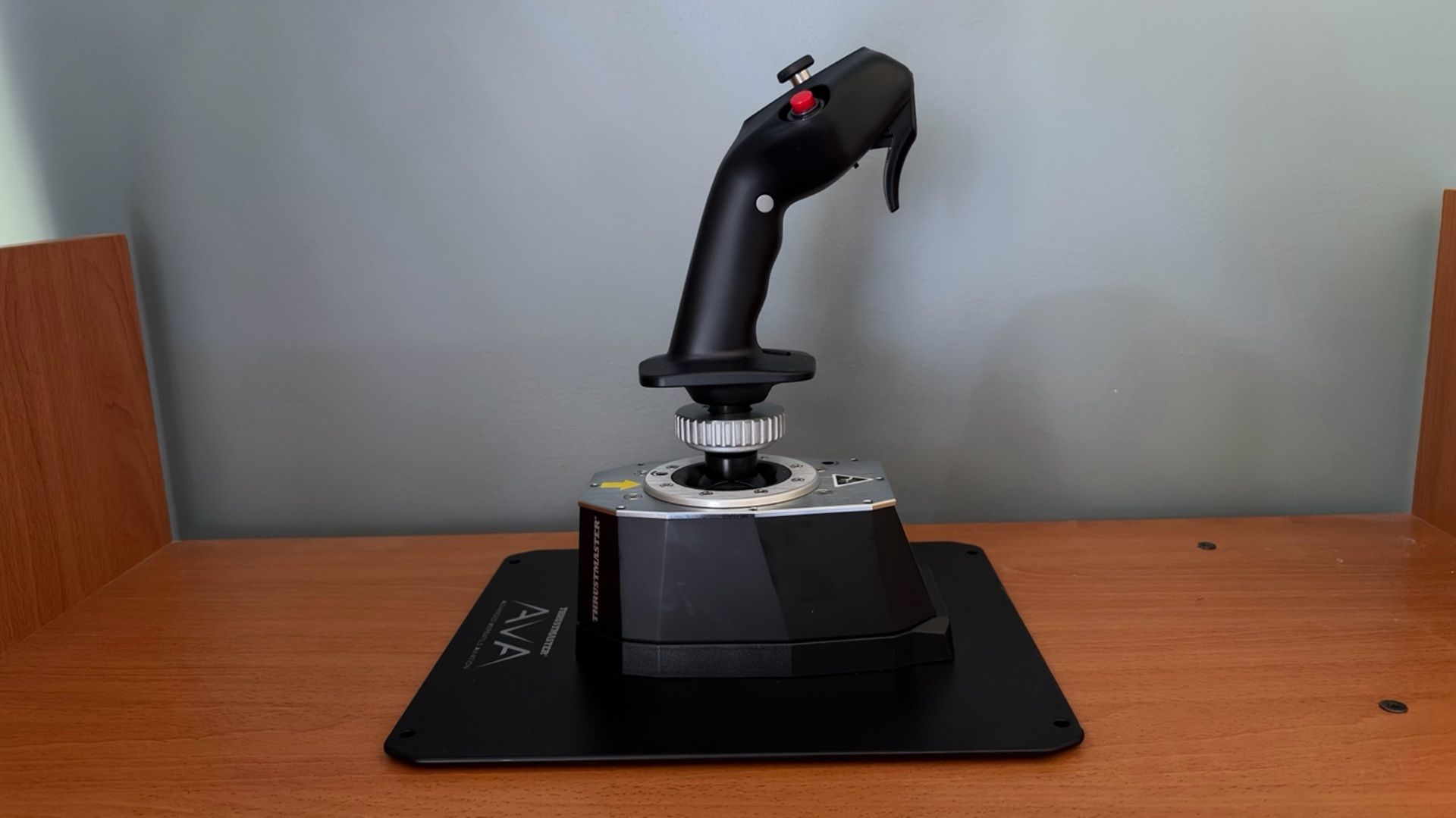
Thrustmaster also sent us an AVA Base Plate for easier desktop mounting, along with AVA Dual Pitch Cam. The Dual Pitch Cam contains two FBW (fly-by-wire) cams which are meant to simulate the sensation of a fly-by-wire aircraft.
All of these products are sold separately.
Airbus Add-on Grip Specs

Z-Axis

Twist axis with mechanical lock

Sensor Technology

Hall Effect

Physical Layouts

Dual mode: A300 series, A400M

Platform Compatibility

Windows 10/11 – MSFS, X-Plane

Base Compatibility

AVA Base, Sol-R, Warthog MKII

Construction

Plastic

Software

Thrustmaster T.A.R.G.E.T

Dimensions (LxWxH)

3.1 x 3.3 x 7.7 inches / 78 x 83 x 195 mm

Weight

0.4lbs / 203g

MSRP

$129.99

Release Date

July 2026

AVA Base Specs

Sensor Technology

Hall Effect

Connectivity

Wired connection via detachable USB-C to

USB-A cable

Platform Compatibility

Windows 10/11 – MSFS, X-Plane

Customization

Modifiable axis curves (cams), resistance (springs),

deflection travel (masks), and damping

Construction

Plastic outer shell

Metal top plate

Software

Thrustmaster T.A.R.G.E.T

Dimensions (LxWxH)

4.3 x 6.7 x 2.8 inches / 108 x 170 x 72 mm

Weight

2.4lbs / 1,069g

MSRP

$299.99

Release Date

May 2024

Customization

Thrustmaster Airbus Add-On Grip with AVA Joystick Base

(Image credit: Tom's Hardware)

One of the primary goals of the AVA Base is to provide a high degree of customization, allowing users to tailor the joystick to their preferred flying experience. The interchangeable cams let you adjust the axis curve, different springs allow you to fine-tune resistance, and the various deflection masks can be used to limit the range of travel.

The user manual includes recommended configurations for different types of aircraft. Since we’re testing the Airbus Add-On Grip, we’ll configure the AVA Base for an airliner-style feel. According to the manual, this involves using the Jet Cam with the Medium spring. However, as mentioned earlier, Thrustmaster also provided us with a pair of FBW cams that are designed to deliver an even more authentic experience by simulating the control feel of a fly-by-wire aircraft, such as those in the Airbus A3XX family.

The AVA Base also comes with T.A.R.G.E.T (Thrustmaster Advanced pRogramming Graphical EdiTor), which is an application that allows you to further tune the feel of the axes and access advanced profiles created by the Thrustmaster community.

Like the AVA Base, the Airbus Add-On Grip also offers several customization options. For example, it includes a module and button cover that transform the grip from an A3XX sidestick into an A400M sidestick. Additionally, the Z-axis can be locked out using an integrated mechanical lock, preventing unintended twist inputs.

Overall, customizing the base and the grip was very straightforward.

Build Quality

Thrustmaster Airbus Add-On Grip with AVA Joystick Base
Tom's Hardware
Thrustmaster Airbus Add-On Grip with AVA Joystick Base
Tom's Hardware
Thrustmaster Airbus Add-On Grip with AVA Joystick Base
Tom's Hardware

The AVA Base has a premium feel, with a high-quality plastic outer shell complemented by a metal top plate. The are only two drawbacks. On its own, the base is not stable enough to handle larger stick inputs. We therefore recommend pairing it with the optional AVA Base Plate, which significantly improves stability. Additionally, the base does not include enough damping out of the box, causing the stick to wobble if you move it with a finger. This is not noticeable during normal flight, but stronger damping would have been a welcome inclusion. Thrustmaster offers additional dampers, which are sold separately, that address this issue.

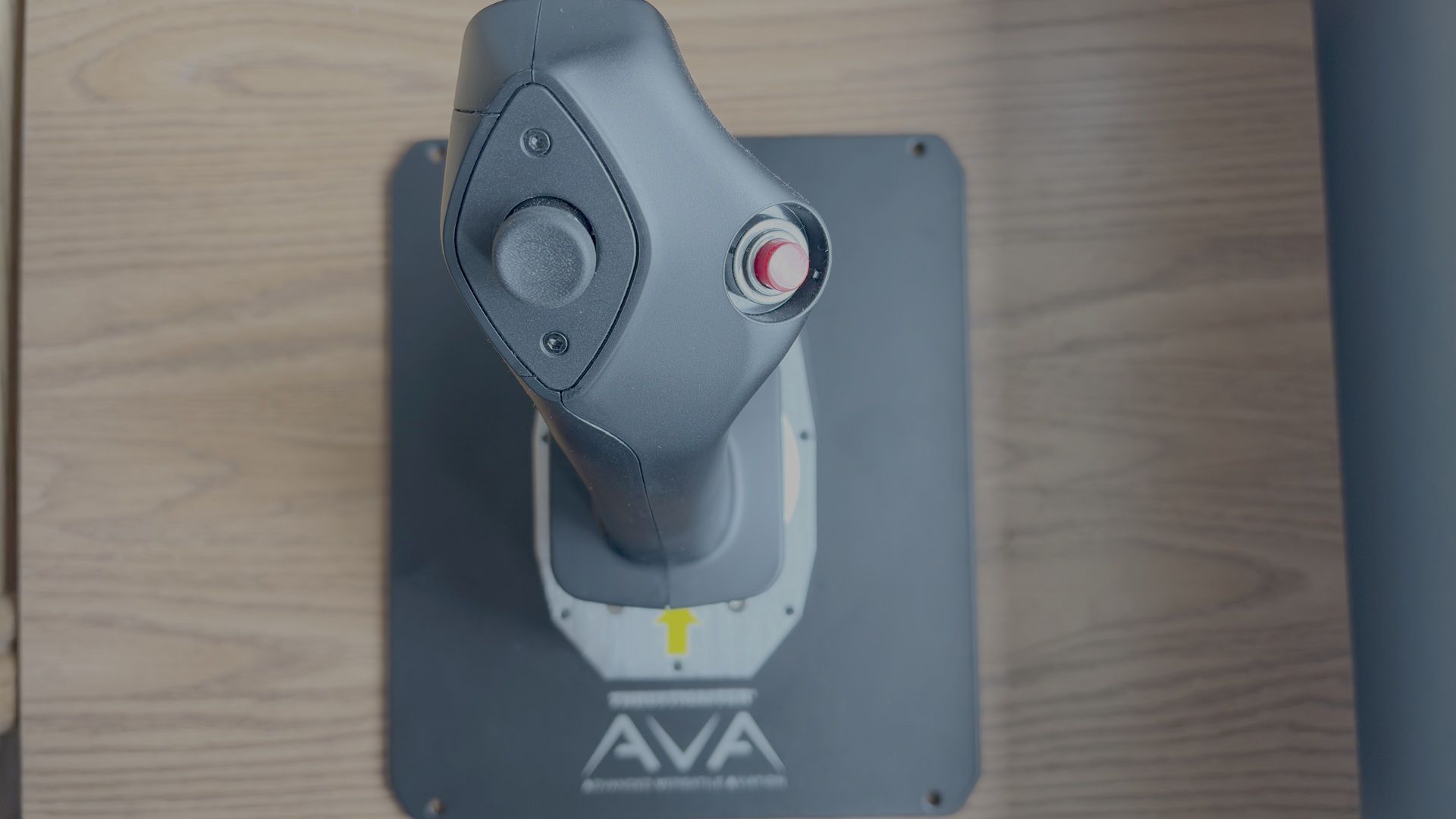
The Airbus Add-On Grip is designed as a 1:1 replica of the Airbus A3XX sidestick, closely matching the shape and ergonomics of its real-world counterpart. In its standard airliner configuration, it features the signature red autopilot disconnect button. It also includes an interchangeable module and removable button cover, allowing it to be converted into an A400M-style sidestick.

Both the AVA Base and Airbus Add-On Grip use Hall effect sensors with 16-bit precision. The base employs them on the X and Y axes, while the grip uses them for the twist (Z) axis and integrated mini-stick.

How Does it Feel?

The first thing that stood out was how much more authentic the AVA Base felt compared to the Thrustmaster Warthog. Unlike the Warthog, there is no noticeable center detent as you pass through the neutral position. Resistance increases progressively as the stick moves farther from center, resulting in smoother and more natural control inputs.

Compared to the Thrustmaster TCA Airbus Sidestick, the AVA Base also has less overall travel on both the X and Y axes, with a progressively increasing resistance rather than the TCA's more linear feel. Based on previous experience with an A320 simulator, this behavior closely matches the feel of the real Airbus sidestick, making the controls feel more authentic.

The Hall effect technology and 16-bit precision of the AVA Base also allow the user to make very fine and precise inputs. In normal conditions, that is exactly how one would fly an Airbus - using small, deliberate sidestick movements.

The Airbus Add-On Grip captures the look and feel of the real Airbus sidestick, with ergonomics that make it feel instantly familiar to anyone who has flown or used an Airbus simulator.

Microsoft Flight Simulator 2024 Testing

We tested the AVA Base and Airbus Add-On Grip in Microsoft Flight Simulator 2024 using the Fenix A320. While there are several Airbus aircraft available for MSFS 2024, we chose the Fenix because it offers one of the most accurate flight models and flight dynamics for an Airbus plane in the sim, making it the best platform for evaluating Airbus flight controls.

We also tested with a pair of FBW cams designed to replicate the feel of an Airbus fly-by-wire sidestick. However, based on our experience with an A320 simulator, we found that the standard Jet cams included with the AVA Base felt more authentic. The FBW cams introduced a more noticeable center detent, whereas the Jet cams provided a smoother transition through center, more closely matching the feel of a real Airbus sidestick.

We tested the base and stick in three difference scenarios:

  1. Basic maneuvering. Flying at 5,000 feet, we performed gentle turns and pitch changes to evaluate the precision of the base during small, accurate control inputs.
  2. Turbulent approach. We performed an approach into Las Vegas under hot, windy conditions with strong updrafts and downdrafts. This scenario required larger, more frequent control inputs to assess the resistance and how the base handles turbulence and rapid corrections.
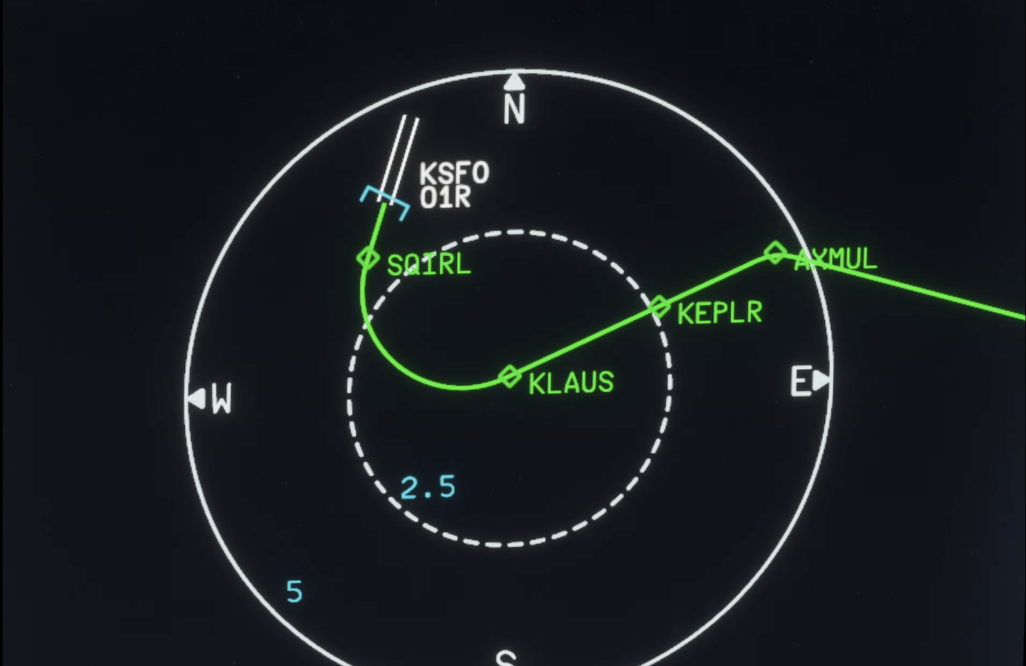
  3. Curved approach. Finally, we flew the RNAV Visual approach to Runway 1R at San Francisco International Airport. This approach is available in MSFS 2024 if you use the Navigraph database, but it is missing the RF leg between the waypoints KLAUS and SQIRL, so we added it to the navigation database of the Fenix A320 ourselves. The procedure features a sweeping right-hand arc that continues until roughly one mile from the runway threshold, requiring the aircraft to remain in a turn at very low altitude. The approach demands precise tracking of the flight path while also requiring a smooth, accurate transition to the runway centerline after the final waypoint. This scenario tested both the precision and responsiveness of the AVA Base.

Basic Maneuvering

While flying at 5,000 feet, we were impressed by the AVA Base’s precision when making small adjustments to both pitch and roll. Compared to the Warthog and TCA Airbus Sidestick, the AVA Base allowed for significantly finer roll inputs, making it easier to make small corrections and maintain a precise flight path.

When controlling vertical speed through pitch adjustments, we were able to consistently achieve the desired climb or descent rate within approximately 100 feet per minute, demonstrating the level of control possible with the high-resolution sensors.

Turbulent Approach

Landing in Las Vegas during the summer can be a challenging experience. The combination of extreme heat, strong winds, and thermals along the approach path can create significant turbulence, resulting in a much less stable approach. Microsoft Flight Simulator 2024 is able to replicate these conditions through its Live Weather system. While it is important to avoid overcorrecting and creating pilot-induced oscillations, these conditions require more frequent and sometimes larger control inputs than a typical approach.

The AVA Base handled this turbulent approach very well. The conditions forced us to make slightly larger inputs, so we felt the progressive resistance of the base as we moved further from center, which felt authentic. We were also able to make very quick corrections to counter the turbulence and keep the aircraft on the published approach path.

Curved Approach

Thrustmaster Airbus

(Image credit: Tom's Hardware)

During the RNAV Visual approach to Runway 1R at San Francisco International Airport, we were able to precisely track the sweeping right-hand arc all the way to the final waypoint, SQIRL. Once established at SQIRL, the AVA Base’s responsiveness allowed us to smoothly align with the runway centerline.

Other products, including the Warthog and TCA Airbus Sidestick, produced more noticeable jerky movements during this approach, which is likely due to lower precision around the neutral position.

Overall Thoughts

After putting the AVA Base and Airbus Add-On Grip through extensive testing, we came away extremely impressed with the experience. As competitors have continued to close the gap with Thrustmaster Warthog — and even surpass it — the AVA Base represents a return to the level of quality and refinement we have come to expect from the brand.

The AVA Base delivered exceptional precision, smooth control, and an authentic Airbus-like feel across a variety of challenging flight scenarios. The addition of the recently released Airbus Add-On Grip finally allows users to pair this high-end base with a dedicated airline-style sidestick, making it a compelling option for anyone who regularly flies Airbus aircraft.

The biggest obstacle is the price. The level of engineering and build quality comes at a premium, which may put the AVA Base and Airbus Add-On Grip out of reach for many users. However, for those looking for a high-quality Airbus stick and willing to invest in a premium setup, the Thrustmaster AVA Base paired with the Airbus Add-On Grip is a compelling option.

❌
❌