Edit 11/1/2026 4:25am PT: Clarified title to state the bill still has to pass the Senate after being added to the budget.
France has approved a proposed tax that aims to tax the amount of internet data per gigabyte sent to French users in the country, with major companies like Google, Netflix, TikTok, and Meta now in the crosshairs. According to minutes released by the National Assembly, members voted 11-10 in support of the motion on October 30 — which now means the new law has been added to the country’s next budget, despite major opposition from the government side and the finance committee rapporteur. The law still has to pass through the Senate for final approval. The latest amendment, introduced by socialist lawmaker Laurent Lhardit, could see content providers pay €0.055 (roughly $0.06) to the government for every gigabyte of content distributed to French users.
With approximately 154 million users and counting in France, the proposal’s authors say such a tax could generate around €10 billion ($11.2 billion) in annual revenue for the government. “This amendment proposes a tax on digital data flows emitted by content providers, to be borne by the providers themselves. Its revenue is estimated at €10 billion.” Said Laurent Lhardit. The said proposal, though yet to be passed as it must survive further parliamentary scrutiny, aims at companies that generate substantial internet traffic as opposed to taxing their advertising revenue, profits and subscriptions. Its explanatory notes particularly mention Google, Meta, Netflix, Amazon, and content delivery network Akamai as major potential contributors. Notably, TikTok and other similar platforms could fall under this broader scope depending on how these rules are applied.
Internet service providers, including Orange Free and Liad, would be required to measure the volume of data and identify the companies responsible for sending it to French users. The Data will then be collected and submitted quarterly to France’s tax administration under the supervision of telecommunications watchdog Arcep. Aside from the €0.055 per gigabyte levy, the proposal also includes a cap of 15% of a company’s French revenue or 2% of its worldwide revenue. It also accounts for content delivery networks (CDNs), which store copies of online content closer to users to reduce loading times and network congestion.
Approximately 200 billion GB of data pass through French internet providers annually, with about five major companies identified in the amendment accounting for about half of that traffic. Lhardit argued that tax would primarily affect global technology companies because they generate most of the data traffic reaching French subscribers. He also disputed that those platforms would merely push additional costs to users, using Facebook, Instagram, and TikTok, which provide free access, as examples. “The rapporteur keeps arguing that the taxes will be passed on to consumers. However, I fail to see how a tax can be passed on to users of Facebook, Instagram, or TikTok since these services are free,” He stated.
How much money are you willing to spend during the Black Friday sales?
Lawmakers opposed to the proposal, however, argue that it is likely to endanger user privacy. Government Minister David Amiel questioned whether the internet traffic could be measured and attributed to content providers without introducing complicated monitoring requirements. Those concerns extend to potential consequences for French business. Lhardit, however, noted that businesses would pay relatively modest costs, citing TF1 as an example, which requires broadcasters to contribute between €200,000 and €300,000.
Several European countries already impose digital service taxes, generally based on revenue from Ads, marketplaces and other digital activities. In March, Meta announced it would introduce location-based fees of between 2% and 55 for advertisers to offset digital services taxes and other government levies in several countries, including France, Italy, and Spain, from July 1, 2026 . Previously, the European Commission has rolled out major enforcement actions against major technology companies, including a €5 billion fine against Google over Android antitrust violations, Facebook’s €100 million fine for misleading European regulators, and the EU’s investigation into Facebook’s ability to link WhatsApp accounts.
Last year, Apple and Meta were also fined €500 million and €200 million, respectively, a move that strained the relationship between Brussels and Washington, with the U.S. calling the penalties ‘a novel form of economic extortion’ that it will not tolerate. That said, the amendments' adoption in parliament is only the first step. If it can clear the remaining stages of France’s 2027 budget process, it can become law, with parliament scheduled to vote on the budget’s first section in early November.
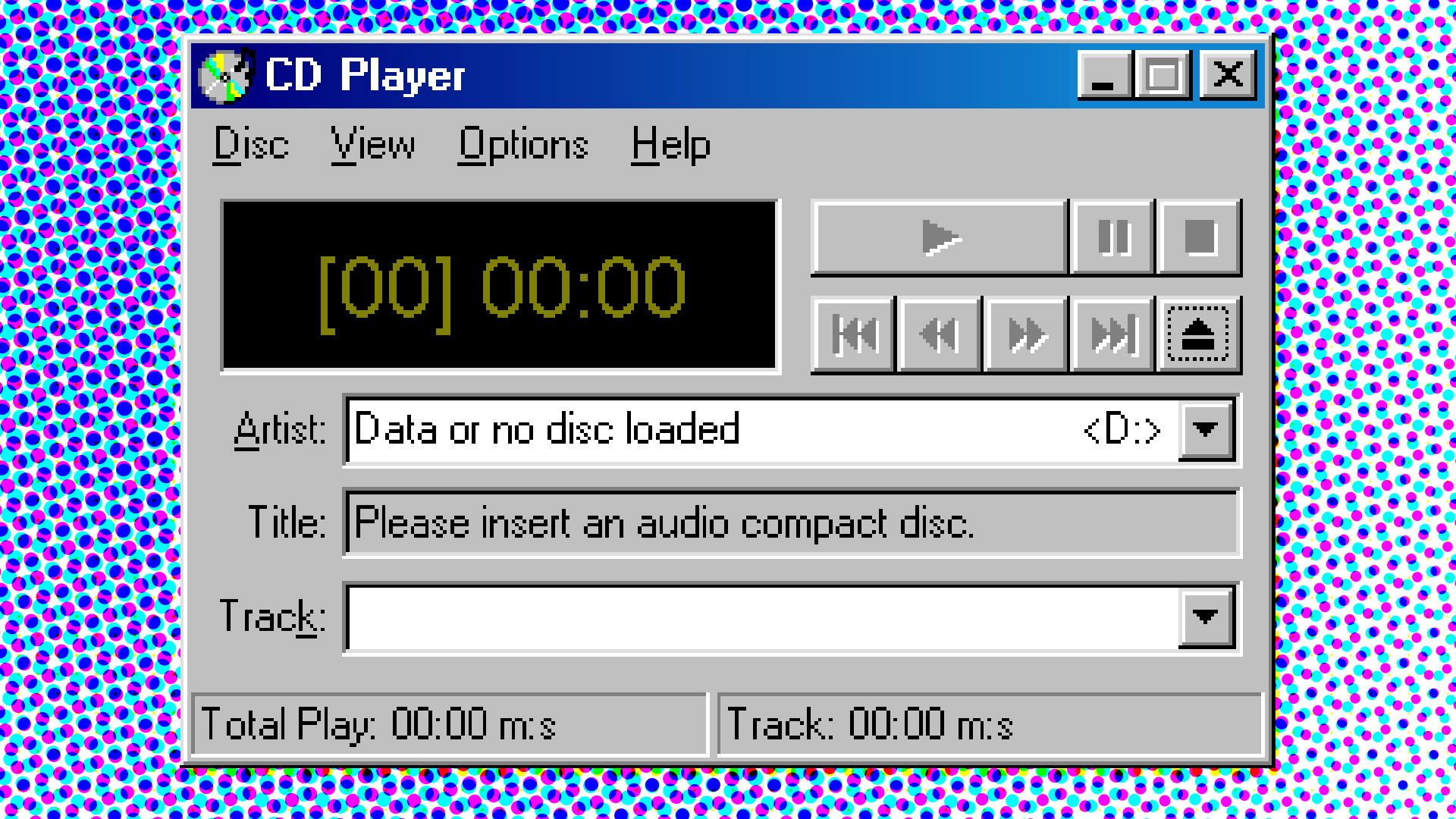
A technology enthusiast claims that the oldest GUI application that still runs on Windows 11 is CDPLAYER.EXE from November 1992. The app had to run on Microsoft’s newest consumer OS without modifications or emulation involved to be chosen as the ‘winner’ of their experiment. Blogger Enlyth expected something from the early NT era, as Windows 11 doesn’t support 16-bit apps, despite its strong backward compatibility. Finding an app that is almost 34 years old that still works with a simple double-click is a remarkable result.
At the beginning of their journey to find the oldest Windows UI app that just works on Microsoft’s newest OS, Enlyth confirmed FREECELL.EXE from February 1993 would still run without issues. This game was distributed alongside the Win32s environment, designed to allow some 32-bit applications to run on the 16-bit operating systems like Windows 3.1 and 3.11. Win32s was made available in beta in October 1992, but went mainstream in July 1993.
A tip Enlyth received via a tech forum suggested that FREECELL.EXE was a candidate for the oldest GUI app remaining compatible with Windows 11. However, the blogger wasn’t satisfied with this easy win and dug through “some early NT 3.1 pre-release versions that seemed promising.” Build 347 caught the detective’s eye, specifically CDPLAYER.EXE, linked on Nov 16, 1992. That indeed seems to be the earliest GUI app that works without modification or emulation on Windows 11. But this knowledge almost defied Enlyth’s eye as their system is, like many modern systems, optical-drive-less. Luckily, adding a small DLL (cdemu.dll) allowed Enlyth to emulate a CD drive and demonstrate that the 1992-era application still functions as intended.
I wanted to verify that CDPLAYER.EXE was still usable on the latest Windows 11 release. Unfortunately, the multi-part.ARJ archive of Windows NT 3.1 that I found on Archive.org threw up errors when I tried to pick through its contents. I have a USB-attached optical drive that plays CD audio in Windows 11, so I thought I could get CDPLAYER.EXE to run without any extra DLL.
Lastly, Enlyth wanted to push the envelope a little and see what even more ancient Windows apps might work if they got some help from the Winevdm project on 64-bit Windows. “Using otvdm does feel like cheating,” admitted the digital sleuth, and we’d agree. However, being able to run 16-bit apps in Windows 11 ratcheted back the wheels of time. The result was that Enlyth managed to enjoy “a fully playable version of REVERSI.EXE dated 15-Nov-1985.” That’s a GUI-driven game distributed as part of Windows 1.01 and is roughly 41 years old.
Is most programming code now made by AI? That's not hard to believe given the number of testimonies, but we now have exact figures behind that statement. GitHub, the world's largest code repository, says that over the course of this year, it added 4 million CPU cores, 160PB of storage, and 50 Tb/s of networking capacity to keep up with the influx of AI-generated code.
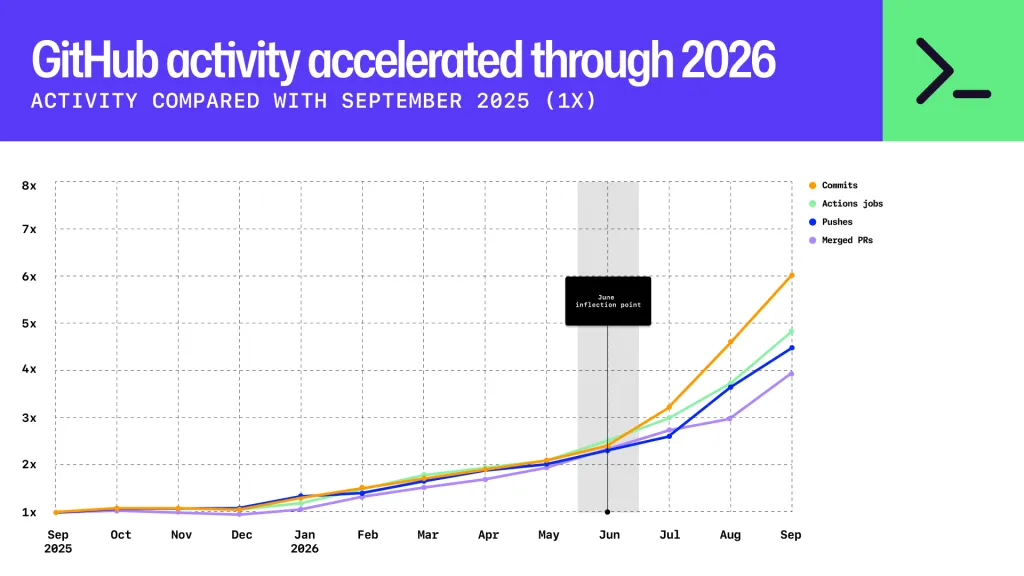
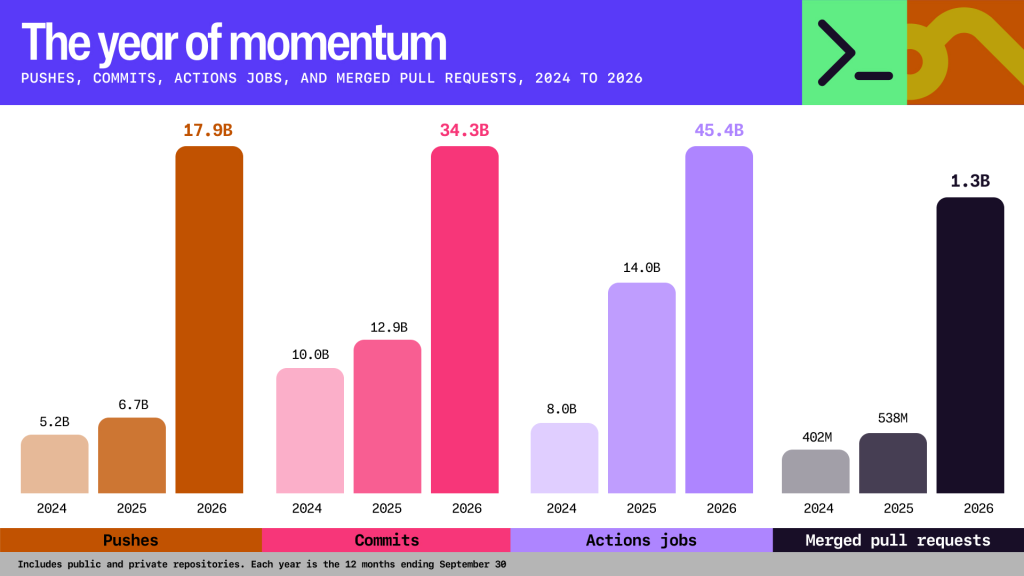
Raw repository activity saw a massive year-over-year increase, as per GitHub's technical report. Code commits (adding/removing code) grew sixfold, while merged pull requests (finalizing a feature or bugfix) jumped 4x.
The multipliers sound impressive enough, but the exponential growth pattern is even more so: half a year ago in April, there were already 1.4 billion commits per month — a figure that rose to 2.9 billion in August, and now sits at 7.4 billion for September. GitHub saw 17.9 billion code pushes in the past 12 months, which is more than all of 2024 and 2025 put together.
GitHub 2026 activity graph (Image credit: GitHub)
Predictably, the company says that agentic AI is behind the dizzying rise in the amount of code, and the need for it to both upgrade and rethink its technological infrastructure. By last September, over 40% of pull requests were started by an agent, up from 17% in March 2026. Moreover, repositories that kick off using AI generally see eight times the activity compared to handcrafted operations.
All this code activity puts disproportionate strain on CI/CD pipelines. In modern development, whenever someone commits code or merges a pending pull request, many actions are triggered: for example, checking for leftover "to-do" items, visually arranging code for consistency (linting), and running code and integration tests to check that the new code doesn't break existing functionality within the application and works correctly with associated programs, services, and APIs.
GitHub activity progress (Image credit: GitHub)
Triggering all of the above for each commit and/or pull request means that GitHub's hardware requirements have ballooned, now requiring massive amounts of computing power and I/O. The rise was so intense that the firm even had to reengineer its backend to try to decouple storage from compute as much as possible. Given how quickly demand is rising, GitHub is likely to have to upgrade sooner rather than later.
A new "Advanced Performance Extensions (APX)" option has been spotted in a version of Windows 11 made available to Windows Insiders on October 23, with the feature set to enable a boost in application performance on compatible chips. At the moment, those chips don't exist. But when they do, this feature is the one that you'll want to flick on if you're using one of them. The new toggle was reported by Neowin after it was first spotted by a poster on the X social network. The feature debuted in build 29295 as an Experimental build, so it's unlikely that it will make its way to the version of publicly available Windows 11 anytime soon.
Intel announced APX back in 2023, confirming that it features 16 additional general-purpose registers and three-operand instruction formats with a new data destination register for many integer instructions. Doubling the number of general-purpose registers from 16 to 32 will allow code compiled with APX to run with 10% fewer loads and 20% fewer stores than Intel 64's baseline, says Intel. APX has been available in the GCC compiler since version 14, with subsequent versions up to GCC 17, which is targeting a 2027 code freeze, adding additional support. LLVM and MSVC have preliminary support, as well. Although enablement has been going steady for the past two years, developers will still need to recompile their applications with the proper flags for APX-capable CPUs to leverage those instructions.
Here is how the new "Advanced Performance Extensions (APX)" setting would appear on compatible hardware on 29695 https://t.co/o5wrhnruJHOctober 23, 2026
Not that there's any real need to rush just yet. The fact that no APX-capable chips are on sale yet means that enabling the feature in Windows 11 build 29295 does nothing currently. But it's clear that Microsoft is getting its ducks in a row ahead of time. Intel's Nova Lake Core Ultra 400-series chips are expected to be the first to feature APX support, but they won't break cover until early 2027. Even then, it's likely that the 28-core version will debut first, with the 52-core model made to wait until later in the year. These are consumer chips, of course, with Intel's Xeon 7 'Diamond Rapids' bringing APX support and up to 256 cores to the data center, also in 2027.
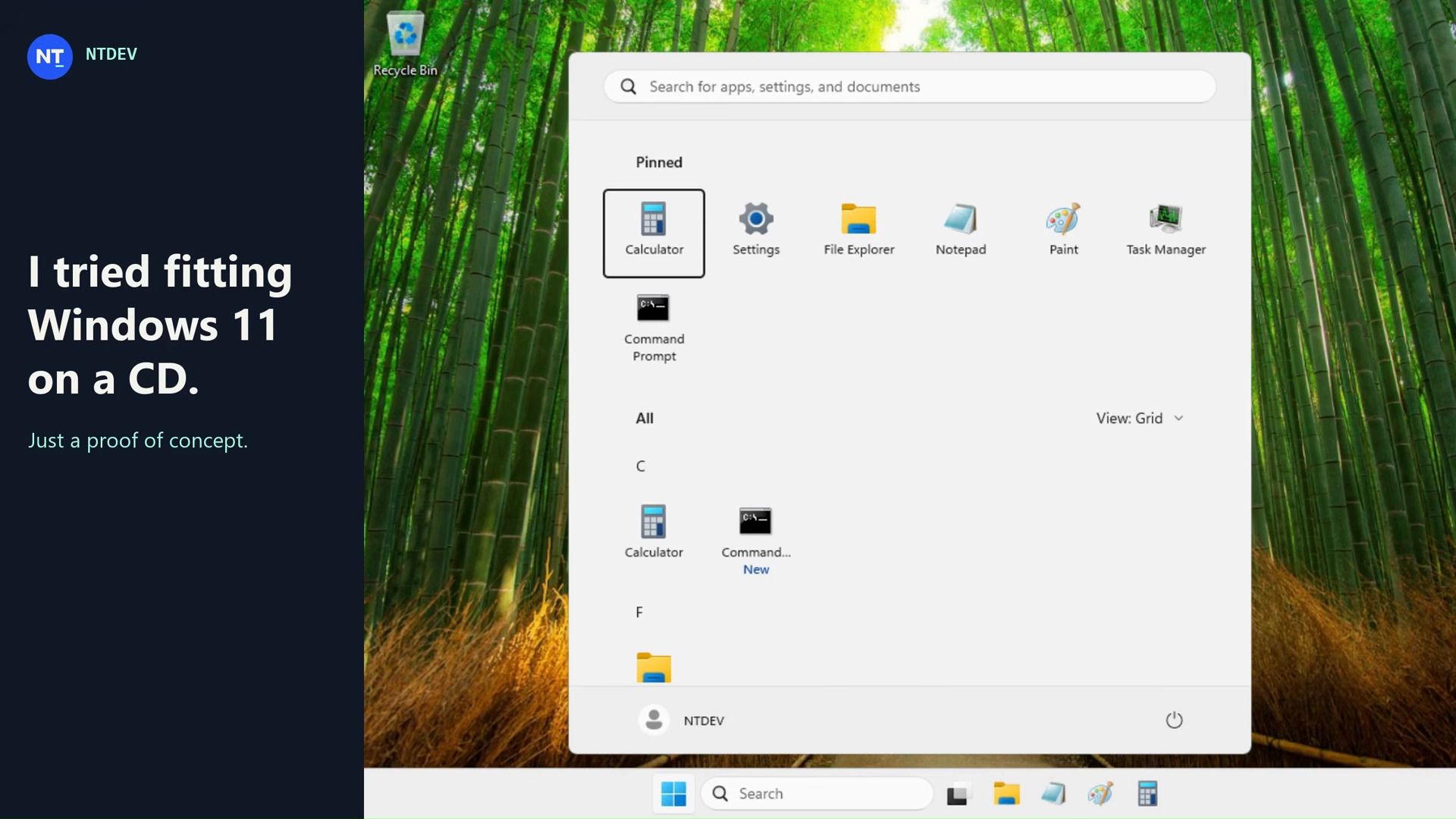
Professional Windows crusher NTDEV has showcased their next-generation tool for compressing Windows 11 into the tiniest of tiny installs. Based on their newest and unreleased Pico11, they managed to create a “proof of concept I put together to see how small I could make a Windows 11 ISO while keeping a working desktop and a few familiar apps.” Moreover, it’s a perfect installer to shove on a 700MB CD-ROM without wasting space, with this demo version weighing in at 699,811,840 bytes.
The test system (a VM with 4GB allocated) used around 883MB of RAM.
In the above video, NTDEV demos a freshly installed Windows 11 ISO that had been processed with Pico11. The desktop looks familiar to anyone currently using Windows 11. “Calculator and Settings still open, Notepad saves files, and Paint still lets me draw questionable logos,” highlights the dev. However, it is also pointed out that “Task Manager might look a little older than you remember.” The older Task Manager seems to be a lightweight legacy version. It may have been possibly swiped from Windows 7, but its exact origin isn’t divulged by NTDEV.
At this time, NTDEV admits what you see is “an experiment, not a replacement for a normal Windows installation,” and that’s mainly because Windows Update and general servicing have been removed to fit inside the constraints of CDR capacity. If you are interested in creating Windows installs like this, the good news is that NTDEV says they are working on adding what they describe as Pico11 capabilities to the Tiny11 builder tool, which you can find on GitHub.
Tiny11 has already demonstrated impressive Windows 11 ISO building capabilities with its Tiny11 mode, Tiny11 Core mode, and Custom mode. Pico11 sounds most closely related to Tiny11 Core as it eschews servicing and recovery support. However, there appears to be some more under-the-hood tweaking, which may have been evidenced in this new showcase by the presence of the older version of Task Manager.
Tiny11 has historically been responsible for even smaller Windows 11 installs, but the extreme 100MB distillation of the OS, for example, came without any Windows 11 UI. Builds could also be remarkable for using tiny amounts of RAM – as little as 176MB. More typical and useful were custom builds powered by Tiny11 where 'bloatware' was removed and that weighed in at around the 2GB mark.
Hopefully we will learn more about Pico11 and get greater insight into its capabilities soon.
Denmark’s Ministry of Digitization, which has since been merged with other ministries and is now called the Ministry for Research, Education, and Digitization, has reportedly ended its experiment to replace Microsoft Office with an open-source alternative. According to Danish publication Computerworld[machine translated], the pilot project was launched in 2025 and involved 38 employees, all of whom would start using the British open-source Collabora office suite instead of Word, PowerPoint, and Excel.
The experiment was initiated by the then Digitization Minister Caroline Stage, who wanted to reduce the country’s dependence on American technology. Denmark isn’t alone in moving away from U.S. software, with France and the Netherlands both taking steps to replace Microsoft Windows. However, it seemed that the experiment fizzled out less than six months after it started. It had reportedly ended by the time the Danish government called for an early election in February 2026, with some employees complaining about issues with style, paragraph formatting, blank pages, and challenges with tracking changes.
But even though it’s been months since the experiment reportedly ended, Prof. Mikkel Flyberbom of the Copenhagen Business School complains that the project hasn’t been properly evaluated. “It’s a good idea to test alternatives in a pilot project,” the professor said in an email. “However, I wish that the ministry would take the opportunity to learn from the pilot project and share those experiences with other parts of the public sector.”
The Microsoft Office alternative had to work with the then Ministry of Digitization’s central case management system called F2, but it’s unclear why it only chose Collabora for the project. While Collabora is based on LibreOffice, which is one of the most popular and mature open-source alternatives to Microsoft’s office suite, there are also several other alternatives it could have tested, like OnlyOffice, OpenOffice, and Calligra. There have also been recent attempts to use AI to create open-source versions of subscription-based software like Microsoft 365 and the Adobe Creative Suite, but governments would likely want to choose a reliable and stable build instead of these experimental AI-built apps.
It’s still a mystery why the Danish government chose to work with only open-source Microsoft Office alternatives in its testing. It probably would’ve been better if different teams used three alternatives and then the project proponents conducted a review after the testing period to determine the best solution. Nevertheless, the question is moot with the apparent failure of the open-source experiment.
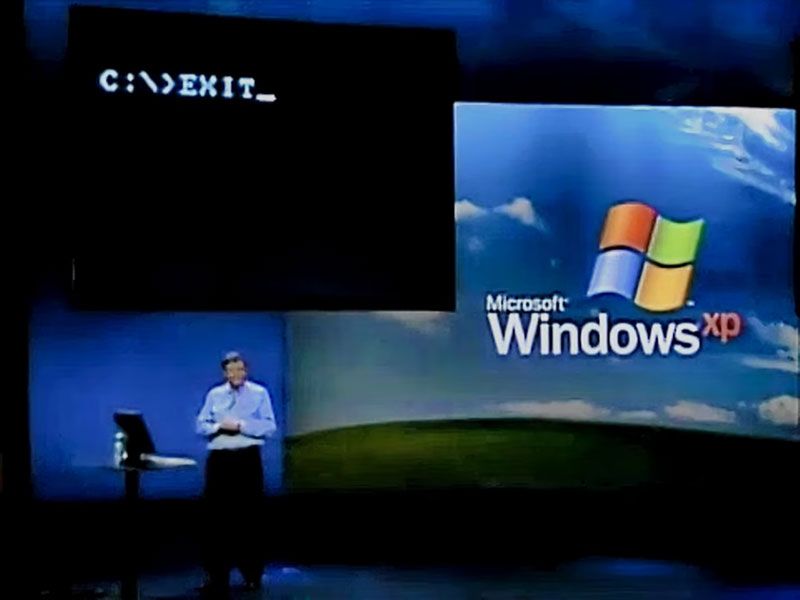
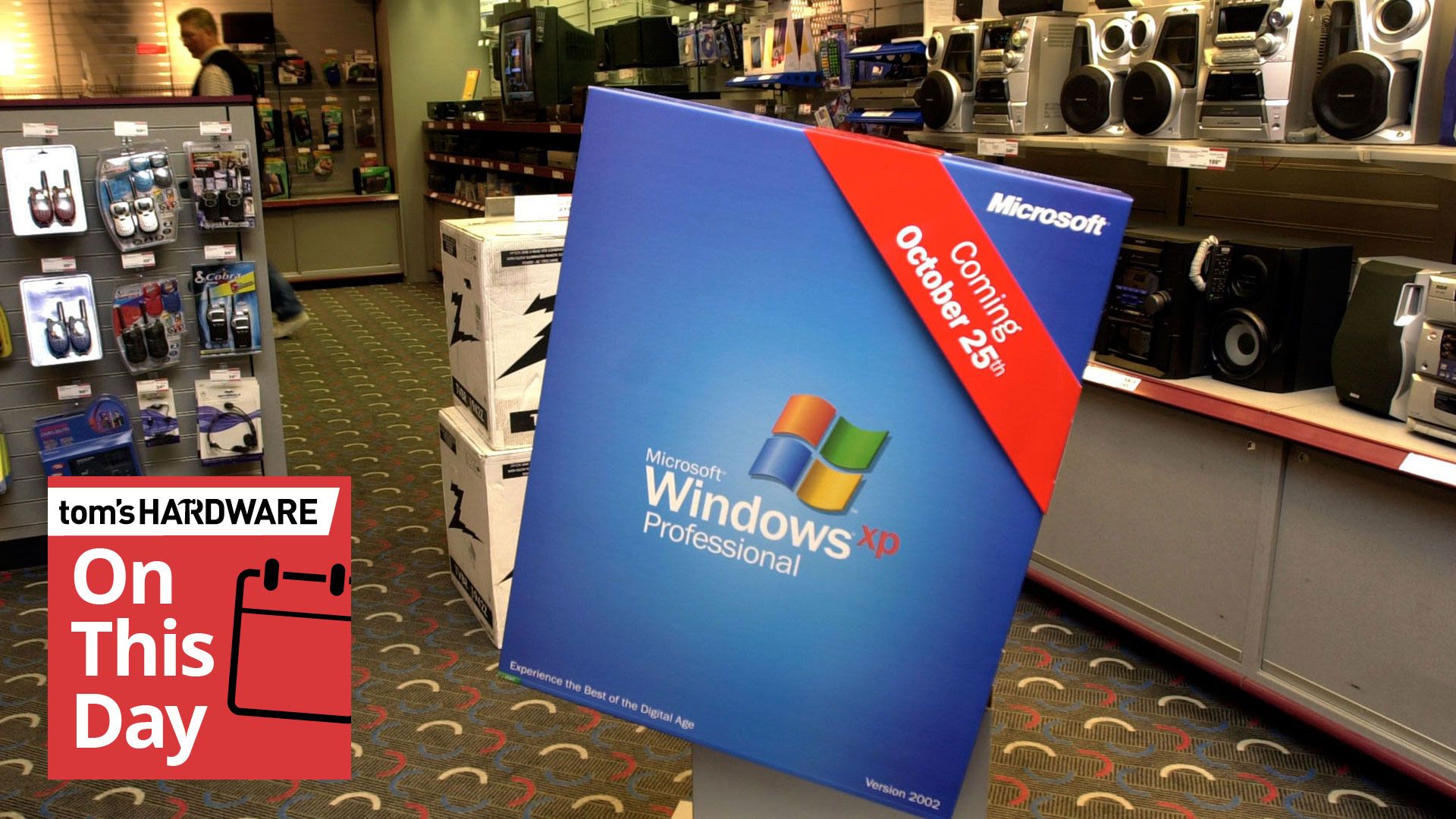
Windows XP became available at retailers for the first time on this day back in 2001. It was ushered in with Microsoft's largest and glitziest launch event since Windows 95, but the bigger news was its delivery of an OS with modern underpinnings and features. Thankfully, it lived up to the hype and would ensure nearly 13 years of favor among enthusiasts, but that might be partly due to the failure of the unloved Vista.
(Image credit: Microsoft Windows XP launch)
The NYC launch event for Windows XP in 2001 was the centerpiece of a lavish $500 million campaign Microsoft had planned for the new OS. However, celebrations were somewhat muted due to the aftermath of 9/11. Microsoft actually dumped its intended ‘Prepare to Fly’ launch slogan for ‘Yes You Can’ for this obvious reason.
Nevertheless, the launch was still a significant event and featured NYC Mayor Rudy Giuliani joining Bill Gates on stage. Gates framed the big launch as evidence that “New York is back and open for business.” There was also a free lunchtime concert in Bryant Park featuring Sting, followed by a Times Square NYC takeover. Meanwhile, retail stores like CompUSA, Circuit City, and Best Buy opened at midnight for eager tech beavers to grab a copy of Windows XP at its freshest.
(Image credit: Microsoft Windows XP launch)
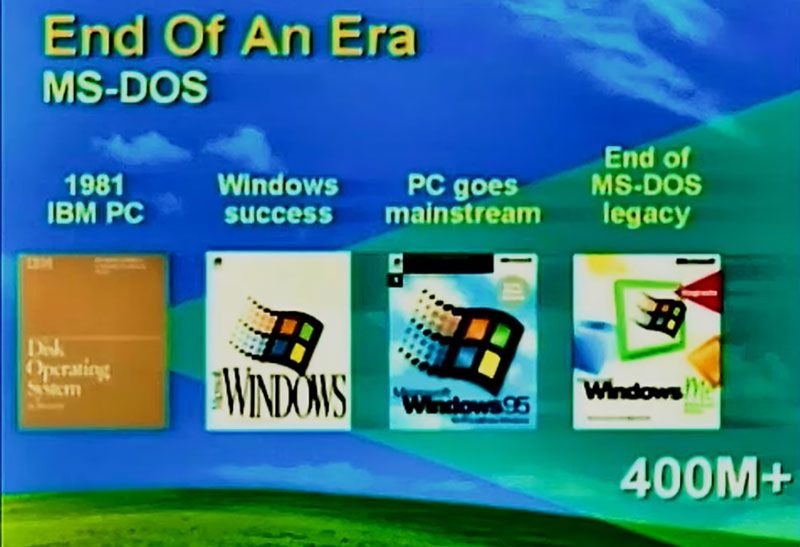
At the launch presentation, Gates said that the debut of Windows XP represented the end of the era of MS-DOS, which had underpinned a UI or shell known as Windows for many years. For consumers, that stretched all the way up to the much maligned Windows Me.
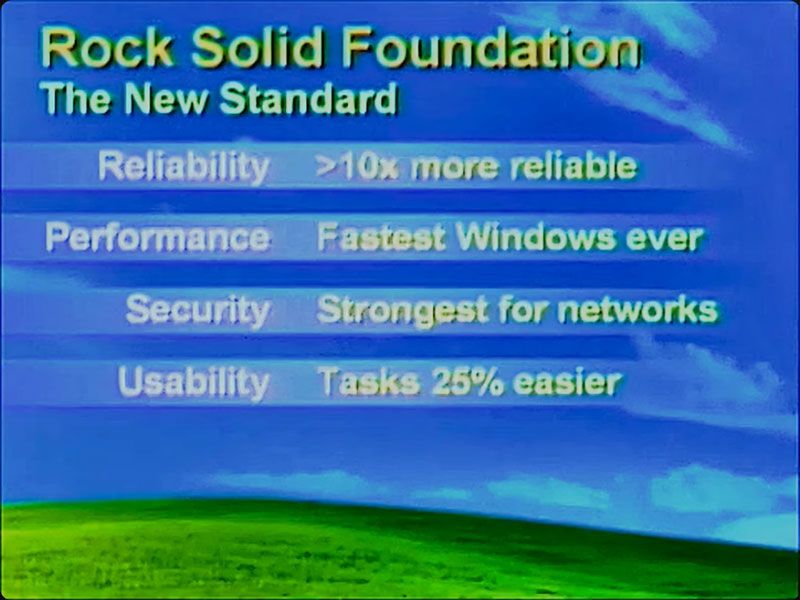
As we mentioned in our 40-year retrospective of Windows last year, Windows XP was the real ‘Start Me Up’ moment. That’s because it brought the Windows NT core to consumer PCs – replacing the archaic DOS and its restrictions and drivers. Thus, Windows XP would become well regarded for reliability, performance, and security (after a few teething troubles), and its new UI was claimed to make tasks 25% easier to complete, too.
(Image credit: Microsoft Windows XP launch)
Some of the technical features that would be widely welcomed in XP included USB plug-and-play support that worked, built-in CD burning software, and ClearType support as new LCDs started to usurp bulky CRTs on desks.
During Windows XP’s supported life (October 2001 to April 2014), there would be three major Service Pack (SP) releases. It also saw DirectX 8.1 to 9.0c arrive for gamers. In the meantime, Windows Vista made something of an unwanted splash, launched to consumers in January 2007. Windows XP’s lengthy extended support meant that folks could skip Vista entirely and move straight to Windows 7 when it hit retail and new-build systems in October 2009.
Overall, it is interesting to observe that Windows XP’s lifespan was actually over two years longer than Windows 10, which was (in)famously launched as “the last version of Windows.”
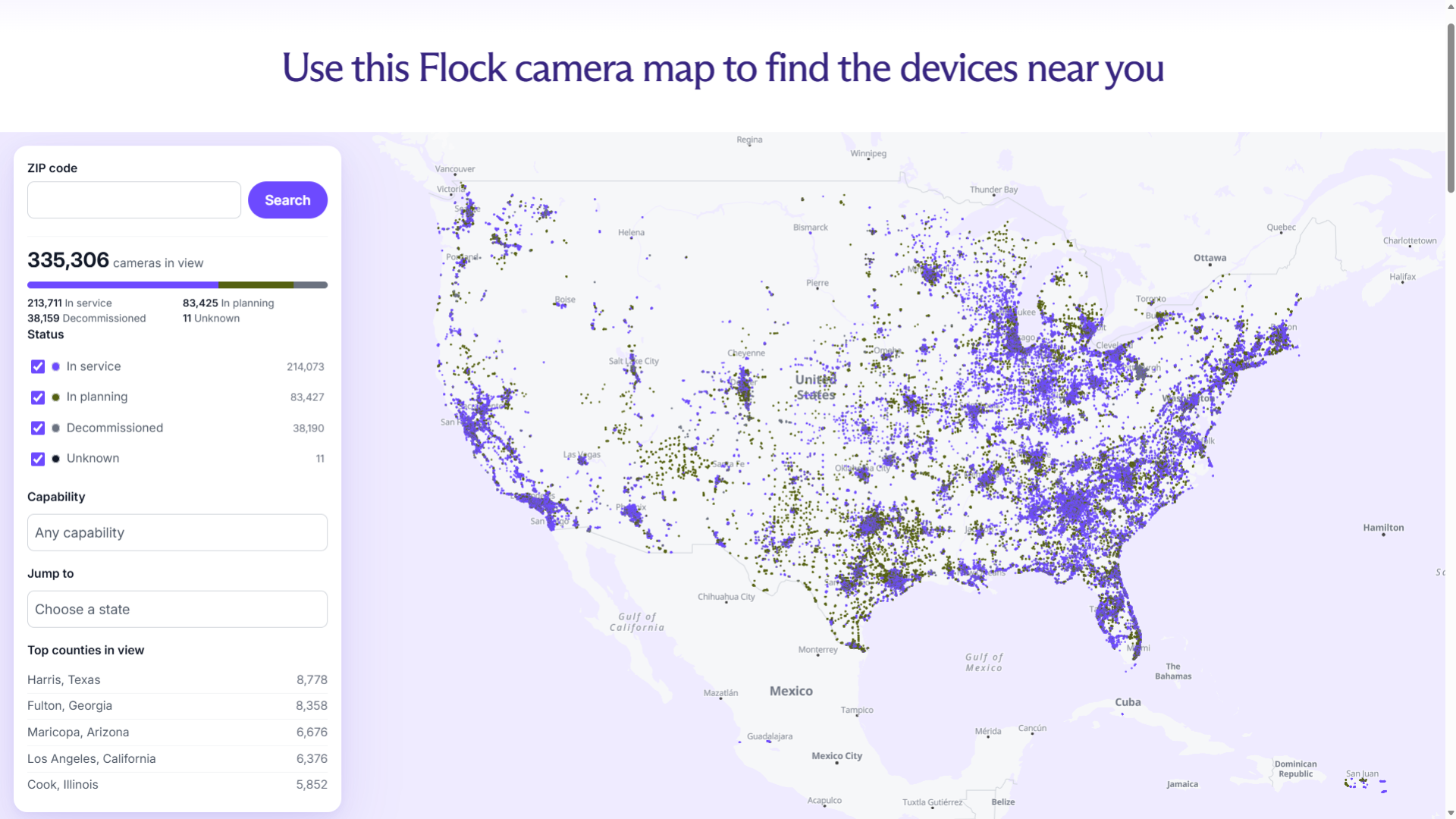
Proton AG, which provides privacy-focused services like Proton Mail and Proton VPN, has decided to host the Flock camera map that security researcher Joshua Michael built from leaked Flock data. While the original Flock Surveillance Map is still available online, its creator is facing legal threats from the company, especially after Flock sent the researcher a cease-and-desist letter. In addition, Michael’s website is accessible only from within the U.S., requiring users outside the country to use a VPN to access it.
By contrast, Proton’s Flock camera map is easily accessible worldwide. Its location in Switzerland also makes it a little more complicated for the surveillance company to take legal action. Its move to preserve Michael’s work also follows the company’s privacy ethos.
(Image credit: Proton)
“You have a right to know who’s recording you when you leave home, especially when a private company controls the data and it’s unclear how law enforcement uses that information,” the company said. “This map lets you search by ZIP code to see where Flock’s license plate readers are located. Use it [to] make informed decisions about how you move through your own area and whether you need to reach out to your municipal leaders.”
Flock and other automatic license plate recognition (ALPR) cameras are at the center of the privacy debate between law enforcement and citizens. While the former argues these machines help make communities safer, many of the latter worry about the technology's potential misuse. Their fears aren’t unfounded, either — there have already been multiple cases of police officers misusing Flock cameras to stalk romantic partners and even one case of mistaken identity due to a lapse in police procedure.
However, Proton’s map is based on data from November 2025. This makes it more of a snapshot of the company’s network at that time, rather than a live map of Flock’s ALPR cameras. For a more up-to-date map, consider downloading MapQuest, which recently released an update showing the locations of ALPR cameras from Flock and other companies. This could help you plan your trip if you have privacy concerns and want to avoid getting picked up by an ALPR camera.
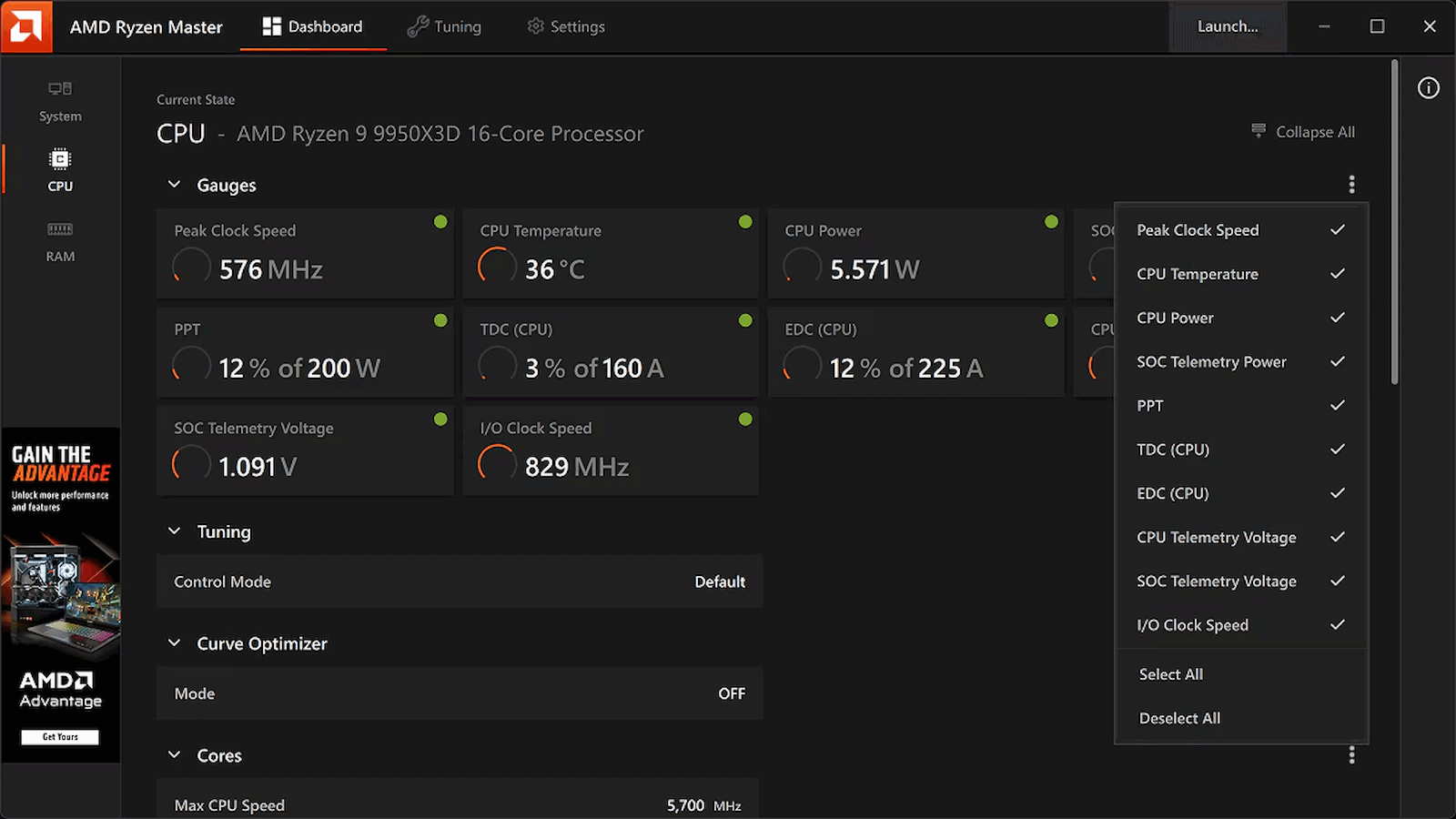
While Windows overclockers have spent years lazily sliding UI controls to adjust frequency curves and tweak voltages inside Ryzen Master, Linux users have largely had to treat their CPU tuning like an archaeological dig into the opaque veil of UEFI/BIOS firmware. Well, rejoice, Linux users, as AMD has officially published a fresh set of patches for the Linux kernel introducing AOD (AMD Overclocking Driver) support for Ryzen processors, Phoronix reports.
Instead of forcing developers to reverse-engineer closed-source firmware hooks or rely on messy, machine-specific ACPI workarounds, this new kernel driver is a direct pipeline to AMD's platform adjustments. By exposing core tuning capabilities straight through the standard sysfs interface, AMD is laying down an official, upstreamed foundation for software-level CPU management.
Right out of the gate, the driver handles platform-level SMT toggling, memory clock visibility, and power tunables. That's right: you can now toggle Simultaneous Multithreading (SMT) dynamically through this driver interface. That works through the CPU hotplugging mechanism and acts as a clean alternative to passing the old 'nosmt' boot parameter to the kernel. The new driver also allows real-time monitoring of memory clocks, and initial power controls are being wired up, too.
This tool isn't available on Linux, and may never be, but at least its functions will be soon. (Image credit: AMD)
Now, if you're expecting a polished, one-click official AMD application equivalent to Ryzen Master for Linux, just pump the brakes. AMD is following its open-source amdgpu graphics driver playbook here, building the kernel plumbing and then leaving the user-space presentation layer entirely up to the community. That means you're going to have to wait for utilities like CoreCtrl to build out interfaces for this new driver, but it shouldn't be long now before that work gets underway in earnest.
This approach is arguably a better fit for the Linux philosophy anyway. Because the controls are being exposed via clean kernel sysfs nodes, it won't be long before independent developers integrate these knobs into powerhouse open-source monitoring and tuning suites, or even write dedicated desktop environment extensions specifically for the purpose of tweaking Ryzen processors.
The new patches are currently winding their way through review on the mailing lists, meaning mainstream kernel integration is on the horizon. For a DIY enthusiast who loves squeezing every last MHz out of silicon while maintaining a fully open-source software stack, this is easily the most exciting hardware-enablement milestone I've seen in a long time.
MapQuest, a long-time online mapping and navigation service that predates Google Maps, just released an app update that added a new Surveillance Layer. The company said on Bluesky that it plots the locations of known license plate readers on the map and that it covers devices from Flock, as well as other companies like Motorola Solutions (Vigilant), Genetec, Axis Communications, Axon, Leonardo (ELSAG), Neology, Rekor, PlateSmart, Ubicquia, Verkada, and other brands.
The Roads Have Eyes! 👁️Turn on the Surveillance Layer in Map Options to see known license plate readers from Flock Safety, Motorola Solutions (Vigilant), Genetec, Axis Communications, Axon, Leonardo (ELSAG), Neology, Rekor, PlateSmart, Ubicquia, Verkada, and other outdoor surveillance cameras.
It’s unclear how the app developers found all this data, but it is similar to the Flock Surveillance Map that one security researcher built using Flock’s own data. Beyond showing each camera's location, it also indicates the direction it faces, allowing anyone who doesn't want to be captured by an automatic license plate recognition (ALPR) system to avoid known cameras, if possible.
While cities and police forces argue that systems like these help keep people safe by making it easier to track potential criminals, many people say that they’re a massive invasion of privacy, citing multiple incidents of police officers abusing the system and administrative mistakes, like one resulting in the detention of an innocent car reviewer. This is why some cities whose constituents have complained have started removing them.
A Canadian YouTuber built a “Flock-like” camera that tracked police vehicles and was visited by officers who, in an ironic twist, raised privacy concerns. These are the exact concerns critics have about ALPRs, especially when they connect to a wider federal or national system that lets police officers from another city or state track vehicles without a warrant. It’s unclear how police would react to this functionality, but many police departments have previously complained when Waze released a 2015 update that let users report officers' locations.
This new MapQuest feature can help you get around known ALPR camera locations. But if your destination has heavy camera coverage, you’ll have no choice but to pass through one and be detected, unless someone in the neighborhood has put a “Flock Sock” on one of them.
After a few revisions of his position on AI-assisted contributions to the Linux kernel, Linus Torvalds has posted his own first LLM-assisted patch. The development branch purports to fix an old issue with massive cache contention when many CPUs are reading the same file — a scenario potentially encountered when using shared libraries, databases, and web servers. Several developers had already made attempts over the years at fixing the issue, all with varied results, none quite ideal as an all-encompassing solution.
Torvalds posted his own draft for solving the problemin early 2024, and has used it on his own laptop since that time. However, he recentlytook the plunge and decided to "try to actually solve this thing using an LLM." He's now posted his solution in a development branch, and claims that he's seen a 23x performance improvement in a dedicated synthetic benchmark, though he notes that actual real-world impact will be far less significant, as "no real load" will witness those figures. If we had to guess, this improvement would benefit server workloads far more than desktop machines.
Over time, Torvalds hasbroadly taken a pro-AI stance on LLM tooling, at least within the purview of the tightly controlled, review-heavy environment of the Linux kernel code. Last July, he stated he's "willing to absolutely put [his] foot down" on AI haters, pointing out that an automated code review tool the kernel team uses outperforms humans, and that it caught basic programming mistakes that shouldn't have been submitted in the first place.
The team is even changing its policy tono longer require that patch authors disclose they used an AI tool when generating their code. Torvalds once again took an assertive stance, reiterating that users should treat LLMs as yet another tool, likening it to compilers or editors. In his view, he simply expects that "people do their best and [...] understand what they are doing."
Some might say that few people in the world are better-suited to properly employ an LLM than Torvalds, and by extension, kernel maintainers. There's an entire universe of difference between a senior master programmer using the LLM to speed up the boring parts of his work, and some newbie with a credit card going "claude make linux faster plz no mistakes."
However, It's not all roses. Thanks to how adept AI agents have become at recognizing common security flaw patterns, the Linux security mailing list became "unmanageable"earlier in the year. Linux has been fixing CVEs at an astonishingly rapid pace ofaround 2,000 per release. Still, the team's hand is being forced into dropping older hardware drivers, as they're often the target of numerous security reports, despite their negligible install base.
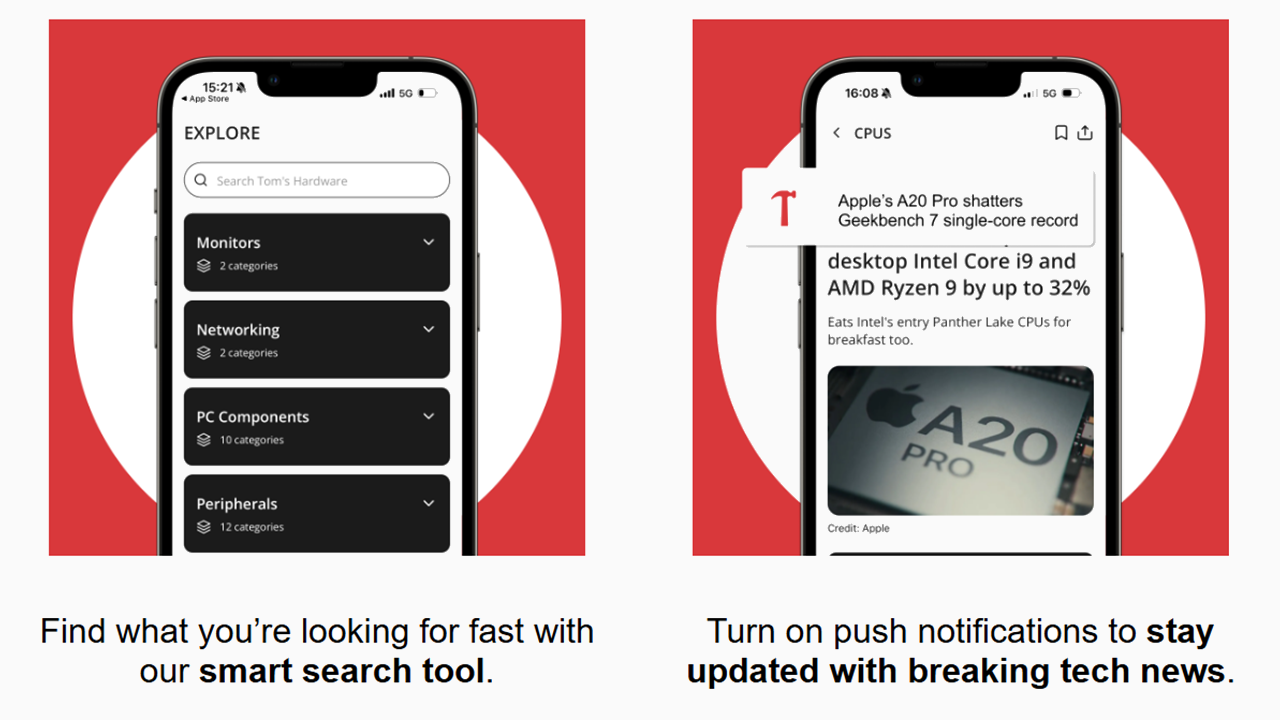
We’ve been sharing our passion for technology with you for 30 years, and today we’re introducing a faster, easier way to access all of our content while on the go. The official Tom’s Hardware app is live now, available for free on Android and iOS devices, bringing all of our content to your pocket in a clean, responsive application that is optimized for smartphones and tablets. Whether you’re hunting for parts for your latest PC build, evaluating prebuilt PCs, tuning your system, or just want to know the latest breaking industry news, the Tom’s Hardware app has the features you need.
(Image credit: Tom's Hardware)
The smart search feature allows you to quickly search through the thousands of deep-dive articles in our library to easily find what you are looking for, while push notifications allow you to keep your finger on the pulse of the latest breaking tech news. You can also personalize your feed based on your interests, honing in on the topics that matter to you most, as well as bookmark articles for later reading.
(Image credit: Tom's Hardware)
We’ve also brought the functionality of Bench, our benchmark analyzer tool that allows you to quickly compare our internal lab-tested benchmarks of CPUs, GPUs, SSDs, and laptops to refine your purchasing decision. This database not only holds tens of thousands of benchmark data points, but it also has detailed product pages with specs and pricing information. The app offers limited free access to Bench, but you can unlock unlimited use with a subscription to our Tom’s Hardware Premium service.
You can also access our Tom’s Hardware Premium service on the app. This subscription-based service provides our readers with longer-form news, analysis, testing, and features for those who want to dig even deeper into our core coverage areas.
Brandon Thomas, developer of ArtCraft, a suite of open-source creative tools meant to replicate Adobe applications for free, has now announced apps to replace Microsoft Office tools such as Excel, PowerPoint, and Word, respectively, named GridCraft, DeckCraft, and WordCraft, that are created with Claude. Thomas has shared his new clones to ArtCraft GitHub, making them free for all to download.
After our previous story covering ArtCraft, we have since discovered that u/ai_art_is_art is Brandon Thomas, a highly talented software engineer with 15 years of experience under his belt. After his ArtCraft project became popular, many criticisms followed about vibecoded software and AI slop, to which Brandon responded on his X account, saying that he does know how to code.
One of the biggest pain points for these software programs is OS compatibility, while Adobe runs on MacOS and Windows, Linux requires additional compatibility layers and Windows emulation to work. One of ArtCraft’s biggest selling points is being able to run all the software across all three platforms while still giving an identical user experience regardless of OS — this is also part of the parity that ArtCraft wants to achieve. While Google provides these tools for free with Google Sheets, Docs, and Slides available on all platforms through a browser, the online-only model takes away the ownership aspect of the software, fearing that one day the tools would suddenly require a subscription and users would not have any say in it.
My guy, I can codeIn college I was building laser games on skyscrapers and cloning the luciferase-luciferin system into plants via agrobacterium-mediated transfectionAI models enable me to work as an entire company. I'm doing 4x better than Google's revenue per employee https://t.co/sGCkdy92QMOctober 9, 2026
Microsoft sits among the most criticized companies for its business practices, similar to Adobe. What was once a one-time purchase now comes as a subscription package with various tools that many don’t need; many even have overlapping features and uses, essentially wasting some of the subscription value. It seems that Brandon Thomas is not only creating open-source alternatives, but is also creating a targeted protest against these practices.
ArtCraft’s Discord community is also growing very quickly, with constant recommendations of other software they would like to see, with CADcraft being commonly discussed among 3D printing and engineering enthusiasts who don’t like Autodesk, similar to Microsoft and Adobe. As many free alternatives as there were before the rampant vibecoding, it seems that this growing collection of tools is not only functional, but a message to the large companies as well. Most of these apps are still far from what they intend to replace, however, so we'll have to see how deep this message cuts.
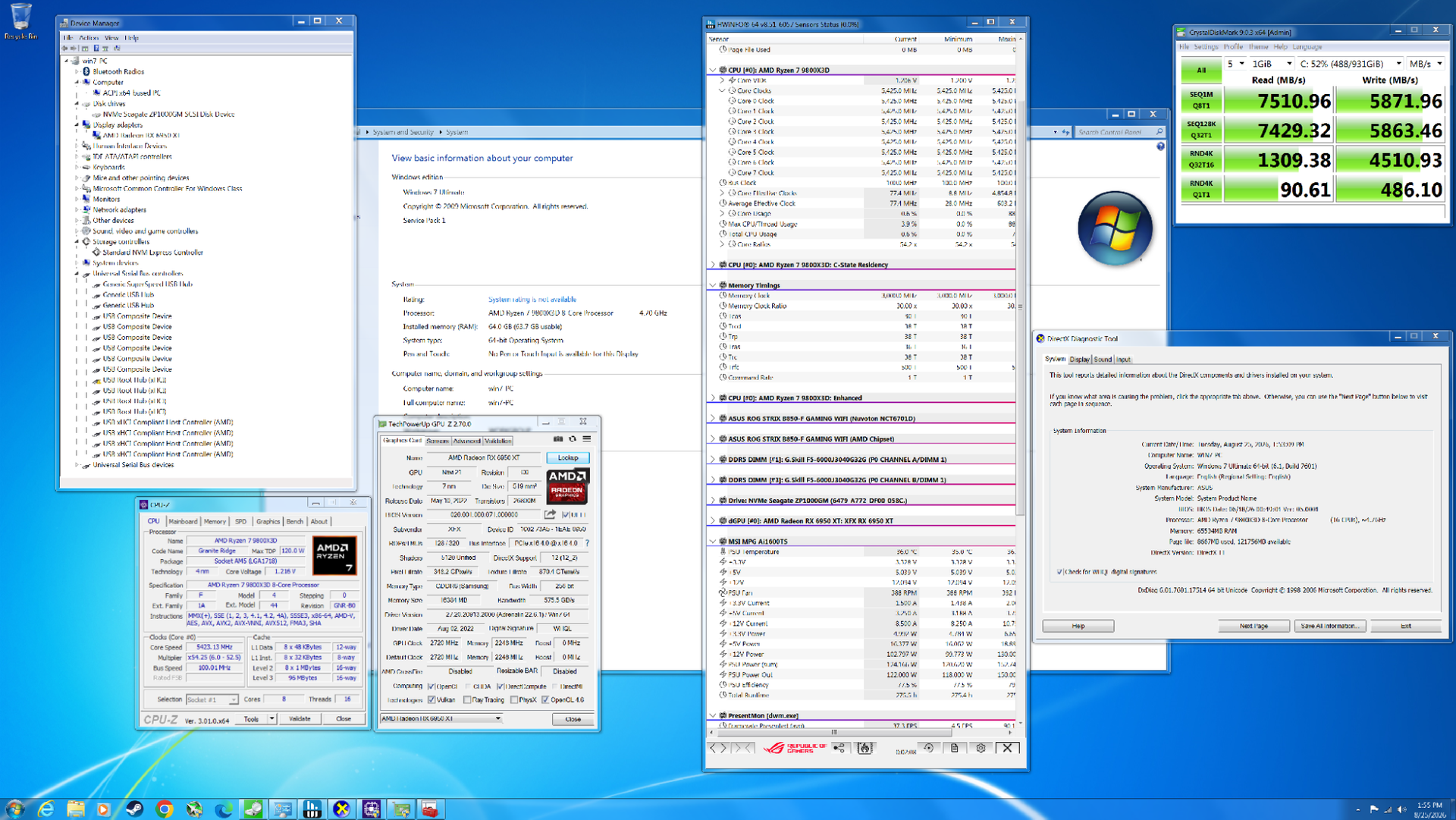
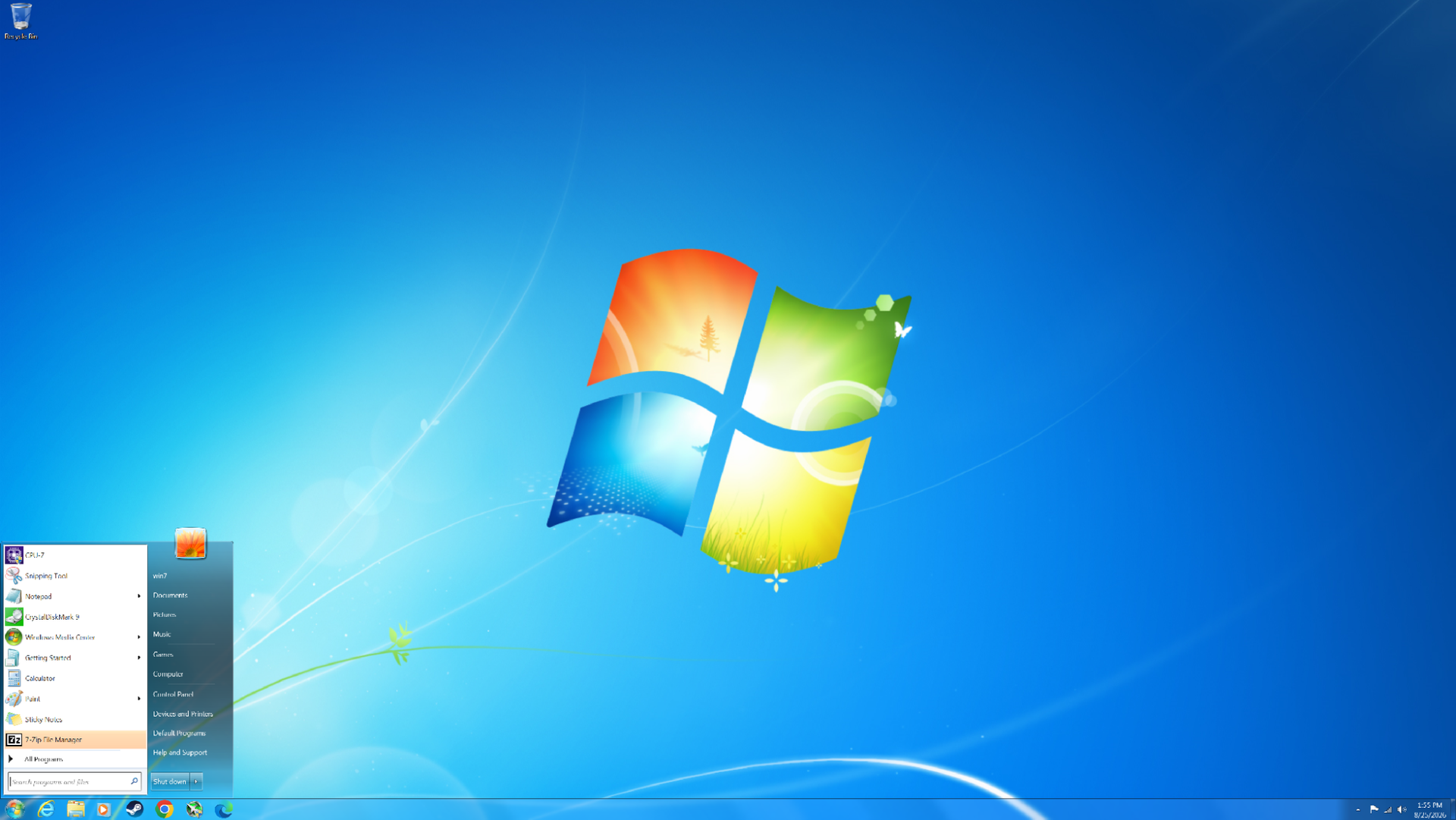
After the rough reception of Windows Vista, Windows 7 launched in 2009 to largely positive reviews. Even 17 years later, it remains one of the most beloved versions of Windows ever released. But how does this nearly two-decade-old operating system hold up on modern hardware? We managed to install Windows 7 on a modern PC and put it to the test across eight DirectX 11 games and two DirectX 9 titles to see how its gaming performance compares to Windows 11 today. Surprisingly, Windows 7 still carves out many notable wins over its successor.
At launch, Windows 7 was very similar to Windows Vista in many respects. Vista had introduced significant changes under the hood compared to Windows XP, including technologies such as SuperFetch, ReadyBoost, ReadyDrive, new asynchronous APIs, and other I/O improvements. It also introduced native processor power management and various memory-management enhancements. On the visual side, Vista was the first version of Windows to feature Windows Aero, with its distinctive glass-like window borders.
Windows 7 retained many of these underlying technologies while addressing several of Vista’s biggest criticisms. One notable improvement was greater control over User Account Control (UAC), allowing users to adjust how frequently they received UAC prompts. In Vista, these prompts could appear far too often, becoming a major source of frustration for many users.
Windows 7 also benefited from something that had nothing to do with the operating system itself: more powerful hardware. When Vista launched, many mid-range and budget PCs struggled to deliver smooth performance, particularly when using more demanding visual features such as Windows Aero. By 2009, however, PC hardware had advanced considerably, and the performance required to run these features smoothly was no longer a significant concern for most users.
The Challenge of Running Windows 7 on a Modern PC
Getting Windows 7 running on modern hardware is not as straightforward as installing a current version of Windows. At 17 years old, the operating system predates many of the technologies used by modern PCs, meaning driver support is extremely limited. For example, Windows 7 does not include native NVMe or USB 3.0 support, so the necessary drivers have to be slipstreamed into the installation ISO. Microsoft did eventually release patches that added NVMe support, but without injecting the appropriate drivers into the ISO, the Windows 7 installer will not recognize an NVMe drive.
Our system is based on AMD’s AM5 platform (with the full system specifications detailed later in the article), which presents another limitation: there are no official Windows 7 chipset drivers for the platform.
Fortunately, we are using an RDNA 2 GPU, which does have Windows 7 driver support, allowing us to use a relatively modern graphics card for our testing.
The motherboard is also an important consideration. Modern motherboards that have dropped CSM (Compatibility Support Module) and legacy boot support can make installing Windows 7 considerably more difficult, and in some cases may prevent the operating system from booting altogether. Fortunately, our motherboard still supports CSM, so this was not an issue for our setup.
For Windows 7, we disabled Secure Boot, enabled CSM, and set Boot Device Control to Legacy OPROM Only. Enabling CSM means that we no longer have access to Resizable BAR (it's not supported anyway). For Windows 11, we disabled VBS (Virtualization-Based Security) and HVCI (Hypervisor-Protected Code Integrity).
It is important to note that while we used Adrenalin 22.6.1 for both Windows 11 and Windows 7 testing, the two packages contain different internal driver versions. Although both packages were released in June 2022, the Windows 11 driver is based on a more advanced codebase than the Windows 7 driver.
In both cases, we performed a clean install of each operating system and filled the SSD to about 50-60%.
Performance Testing
We tested ten games in total: eight using DirectX 11 and two using DirectX 9. The DirectX 11 titles are the primary focus, as both systems support them natively. By comparison, our Windows 11 system will run DirectX 9 games through the D3D9On12 mapping layer, while our Windows 7 system will run them natively. There are ways to get around the use of D3D9On12 on Windows 11, but we want to evaluate the out-of-the-box experience that most gamers would encounter. As a result, we expect Windows 7 to have an advantage in the DirectX 9 titles.
It will become apparent in the results below that the advantages of each operating system will vary depending on whether we are CPU-limited or GPU-limited.
Metro 2033 Redux (DX11)
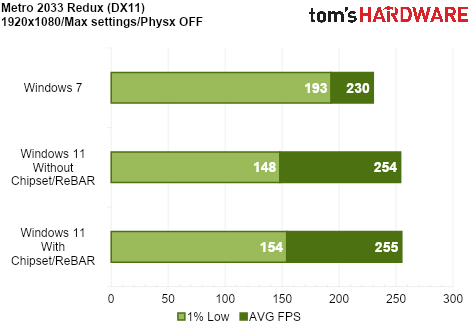
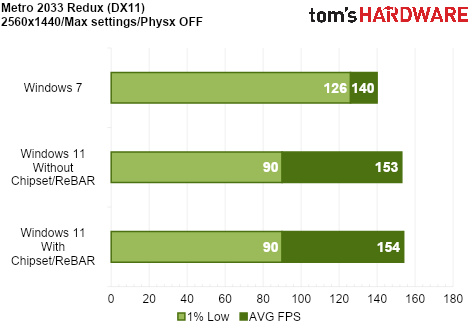
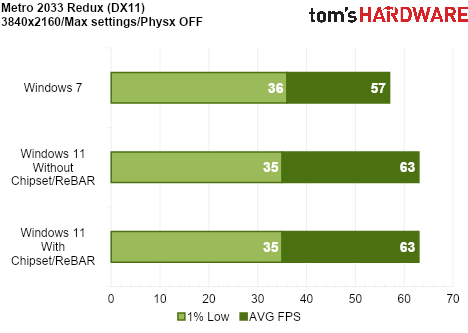
Metro 2033 Redux was released in 2014 and features a new lighting engine, higher visual fidelity, and new locations for certain levels. The game is predominantly GPU-bound, but there are moments when GPU utilization drops sharply as you traverse the game world. At these points, the CPU becomes the limiting factor, resulting in a corresponding drop in performance.
Tom's HardwareTom's HardwareTom's Hardware
Although Windows 11 delivers a higher average frame rate, Windows 7 handles the CPU-related performance drops much better, resulting in significantly stronger 1% lows. Installing the AMD chipset drivers and enabling Resizable BAR improves 1% lows on Windows 11 slightly, but it still falls well behind Windows 7.
Windows 11’s more advanced graphics driver appears to provide an advantage in GPU-limited scenarios, while Windows 7’s lower CPU overhead offers more consistent frame pacing, though with lower peak performance.
Batman: Arkham Origins (DX11)
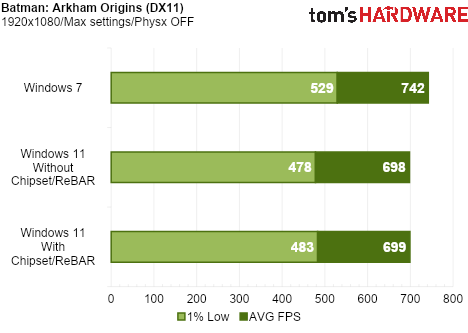
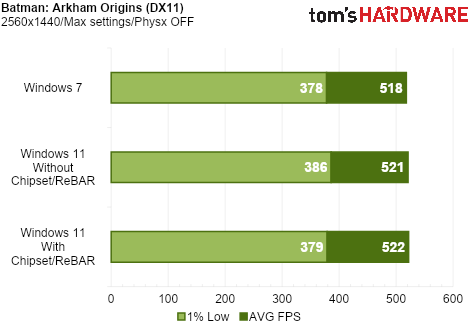
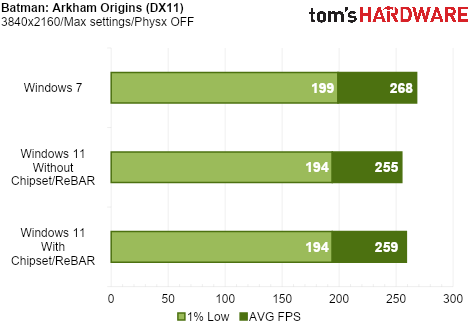
Batman: Arkham Origins runs on a modified version of Unreal Engine 3 and uses several DX11 enhancements such as Tessellation, Ambient Occlusion HBAO+, Percentage Closer Soft Shadows (PCSS), and Depth of Field (DoF).
Tom's HardwareTom's HardwareTom's Hardware
When CPU-limited at 1080p, Windows 7 once again puts in a strong showing, outperforming Windows 11 in both average frame rate and 1% lows. Surprisingly, Windows 7 also comes out ahead at 4K in Origins, though with a far smaller advantage. As we will see throughout the remainder of our testing, however, this is a rare occurrence. Even so, Windows 7 maintains a slight performance advantage over Windows 11 at 4K in this title.
Batman: Arkham Knight (DX11)
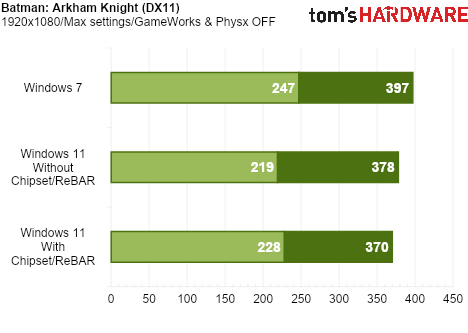
Batman: Arkham Knight was both a critical and commercial success, despite a notoriously troubled PC launch plagued by severe bugs and major performance issues. Visually, however, the game still holds up remarkably well, and modern hardware is more than capable of brute-forcing this demanding PC port.
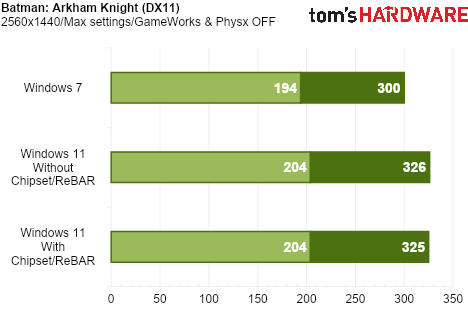
Tom's HardwareTom's HardwareTom's Hardware
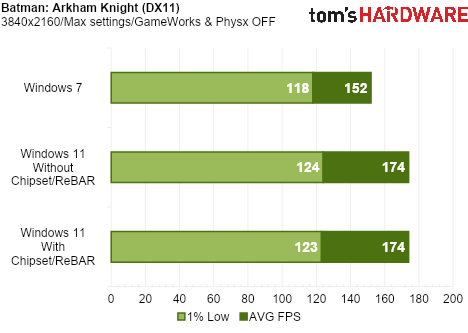
Windows 7 again delivers higher performance at 1080p when we are CPU-limited. Windows 11 jumps ahead when we become GPU-limited at 1440p and 4K.
Batman: Arkham City (DX11)
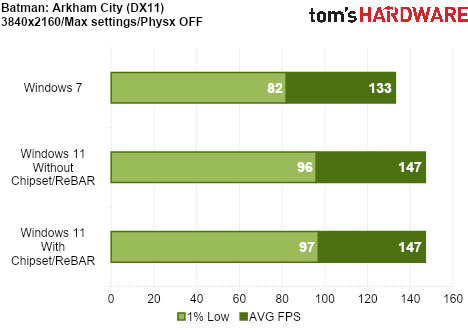
Batman: Arkham City was the second entry in the series, following Arkham Asylum, and the first to support DirectX 11. This introduced features such as tessellation, which adds greater geometric detail to characters and environments.
Tom's HardwareTom's HardwareTom's Hardware
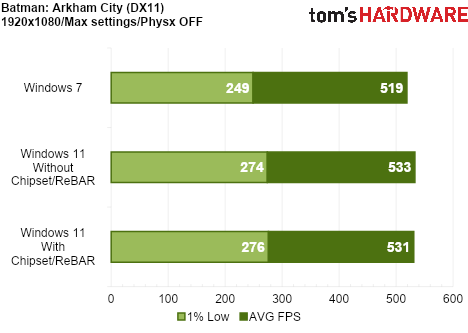
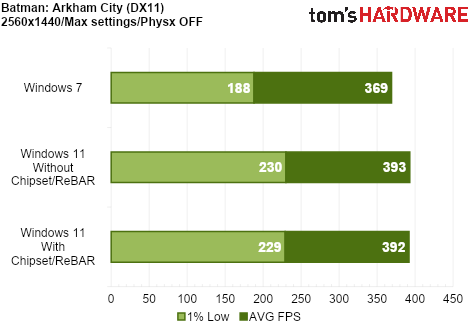
In Arkham City, our system is GPU-bound at every resolution tested, giving Windows 11 the advantage across the board.
The Witcher 3: Wild Hunt (DX11)
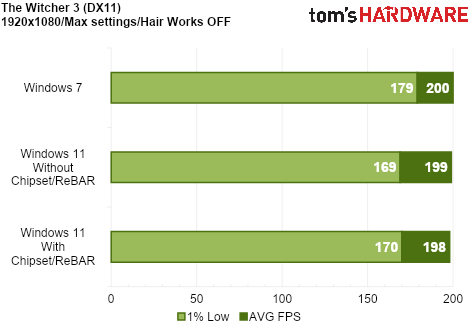
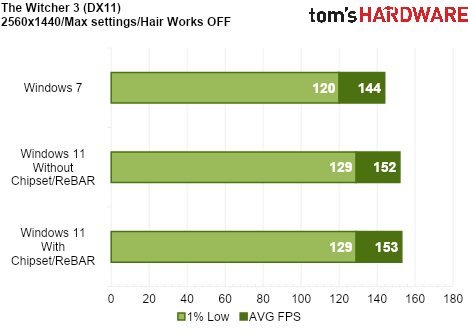
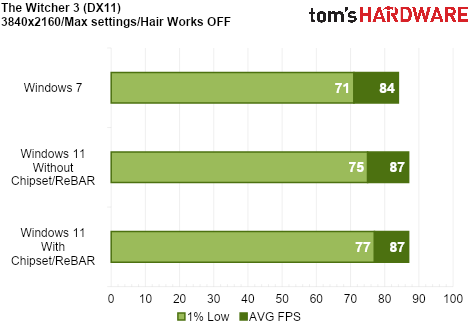
The Witcher 3 faced some controversy at launch over reductions in image quality compared to its initial reveal. CD Projekt Red quickly released a patch addressing these concerns and improving the game’s visuals. From a performance perspective, however, the game was extremely demanding at launch.
Tom's HardwareTom's HardwareTom's Hardware
While the game is very GPU bound in general, at 1080p we did encounter a slight CPU bottleneck, which gave Windows 7 an advantage in 1% lows. At 1440p and 4K, Windows 11 takes a slight lead.
Control (DX11)
Control is the newest title we tested for this comparison, having launched in 2019. While the game introduced several ray tracing features, these were exclusive to the DirectX 12 API. Since Windows 7 does not support DirectX 12, we tested Control using DirectX 11 on both operating systems. Even without ray tracing, Control remains the most graphically advanced title in our Windows 11 vs Windows 7 comparison.
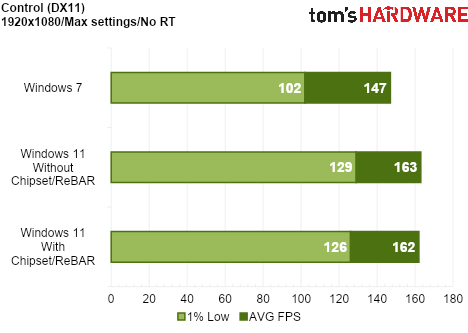
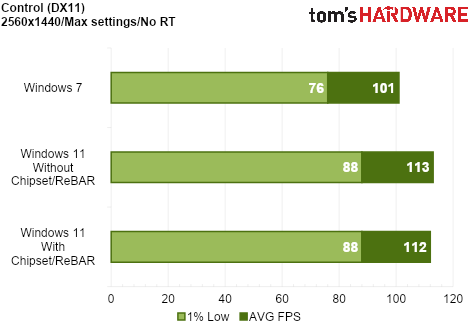
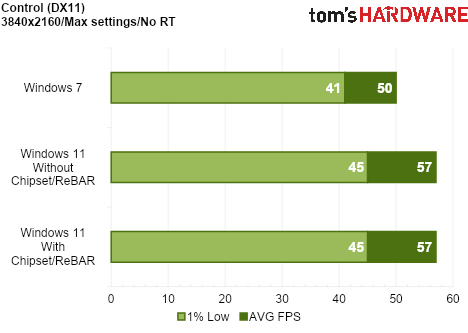
Tom's HardwareTom's HardwareTom's Hardware
Windows 11 wins across the board. This is not a surprise, as we are GPU-limited across all resolutions tested.
Hitman: Absolution (DX11)
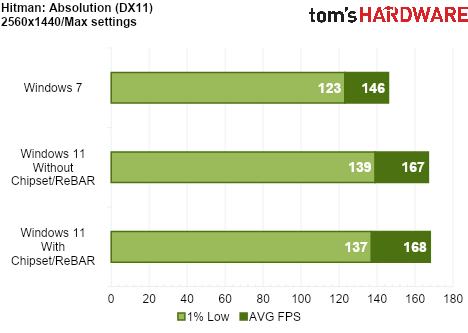
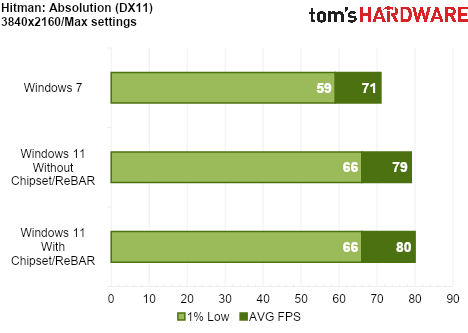
Hitman: Absolution was released in 2012 and was the first game to use the Glacier 2 engine. The updated engine could handle crowds of up to 1200 characters, which was unprecedented at the time. The game also featured several DirectX 11 enhancements, including global illumination and tessellation.
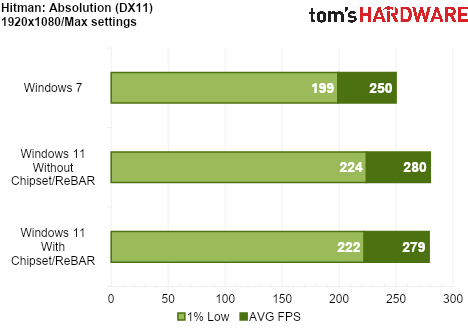
Tom's HardwareTom's HardwareTom's Hardware
This is another game that pushes the GPU hard, regardless of resolution. Our test system was GPU-limited even at 1080p.
Hitman 2 (DX11)
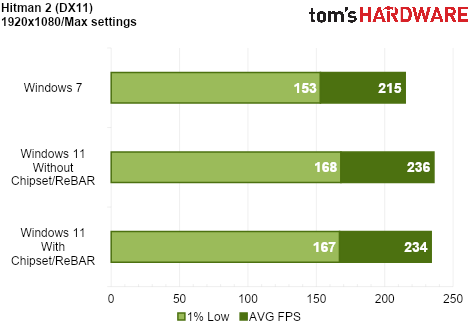
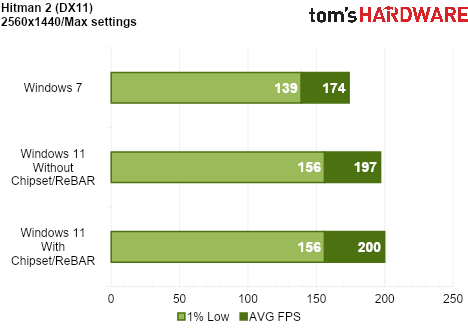
Hitman 2 was released in 2018, making it the second-newest game in our operating system comparison. It features detailed environments, dense crowds, and full reflections across many surfaces, making it an impressive-looking title overall.
Tom's HardwareTom's HardwareTom's Hardware
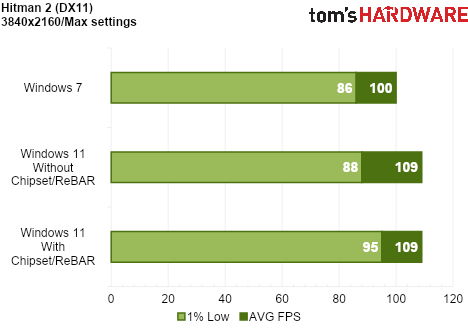
Hitman 2 is another example where our test system is GPU-limited at every resolution, giving Windows 11 a clean sweep across the board.
Batman: Arkham Asylum (DX9)
We now move to our first DirectX 9 game. As previously mentioned, Windows 7 should have an advantage here because our Windows 11 system must use the D3D9On12 mapping layer for DirectX 11 games. But just how much of an advantage?
Tom's HardwareTom's HardwareTom's Hardware
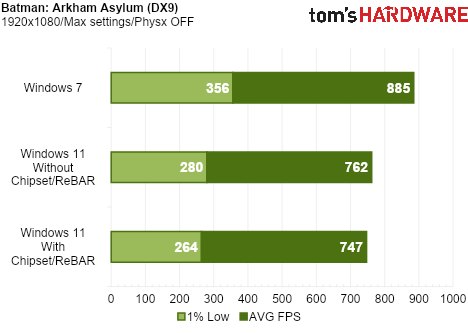
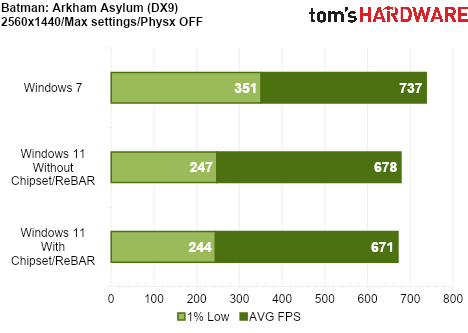
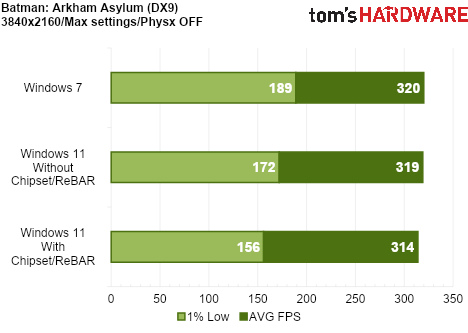
Significant advantages for Windows 7 in average frame rate and 1% lows, especially at 1080p and 1440p. The advantage is reduced at 4K, but the performance is still smoother overall in Windows 7. Another translation layer, such as DXVK, may close the gap.
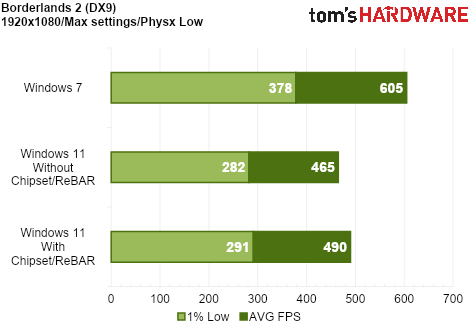
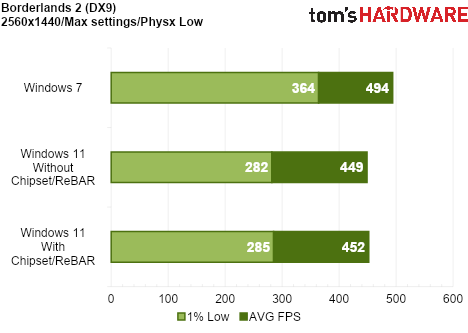
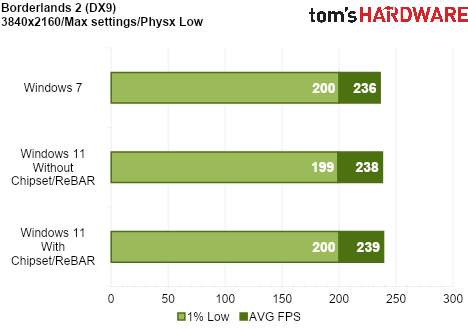
Borderlands 2 (DX9)
Borderlands 2 is our second DirectX 9 game and the final overall game tested.
Tom's HardwareTom's HardwareTom's Hardware
Once again, another massive win for Windows 7 at the lower resolutions. The performance at 4K is virtually identical.
Bottom Line
Windows 11 is optimized for GPU-hungry games
The results are interesting, but perhaps not entirely surprising. The DirectX 9 results are largely in line with our expectations, given that Windows 11 must run these games through the D3D9On12 mapping layer, yielding substantial advantages for Windows 7.
The DirectX 11 results are more nuanced, but a clear trend emerges: Windows 7 has the advantage when we are CPU-limited, while Windows 11 performs better when we are GPU-limited. This makes sense given that Windows 11 uses graphics drivers built on a more advanced codebase, while Windows 7 is a leaner operating system with fewer background processes and, consequently, lower CPU overhead.
Microsoft has recently detailed its K2 plan, which aims to improve the performance and reliability of Windows 11. We hope these continued efforts to improve Windows 11 pay off.
The lower CPU performance we observed in Windows 11 cannot be attributed to its most notable security features, such as VBS (Virtualization-Based Security) and HVCI (Hypervisor-Protected Code Integrity), as we disabled both during testing. Notably, Windows 7 does not support VBS or HVCI at the software level, while Windows 11 supports hardware virtualization extensions (such as Intel VT-x or AMD-V) and Second Level Address Translation (SLAT). Additionally, fixed-function hardware can reduce the impact of virtualization to varying degrees, based on the CPU architecture's capabilities. However, additional telemetry and other background services still pop up and use precious CPU cycles.
Using the latest chipset drivers and enabling features such as Resizable BAR does not help Windows 11 close the gap in CPU-limited scenarios by any significant margin. Ultimately, we would like to see Windows 11 become leaner and more efficient, as our results suggest there is still some performance left on the table, particularly on the CPU side.
Microsoft just made a major change to its storage policy affecting Microsoft 365 subscribers with shared accounts. According to the company, the Microsoft 365 Family, Premium, and Pro plans will move from an assigned 1TB of cloud storage for each user to a shared 2TB for all users. This means that a subscription shared across six users will have its total cloud storage capacity slashed by 66.6%. This change will take effect on subscription renewals after May 2, 2027, unless the subscribers change their plan earlier. Some affected subscribers might also receive bonus storage when their account switches to the share limit model, although the company did not mention its eligibility requirements.
The company said it made this change so that the cloud storage allocation for Microsoft 365 subscribers will automatically go where it’s needed, and that individual users are less likely to hit individual storage limits. Aside from that, it also said that unused storage can benefit the entire family, and that any additional storage that the main subscriber purchases will benefit everyone.
This new setup is indeed advantageous for subscribers who only have one power user that uses up the majority of the cloud storage capacity, while all the rest take up a fraction. It would also be cheaper for an individual who intends to use more than 1TB of cloud storage to just switch to the Microsoft 365 Family plan (which costs $129.99 annually) instead of getting the Microsoft 365 Personal plan ($99.99 annually) and paying an extra $9.99 per month or $119.88 per year to bring their total cloud storage capacity to 2TB. However, if you have four users under one account using 500GB each, you will be forced to purchase additional capacity, starting at $1.99 per month for 200GB.
While Microsoft hasn’t increased the prices of its subscription, this move simultaneously reduces the burden on its storage servers while forcing accounts with multiple large users to purchase storage separately. This seems like a reaction to the storage shortage hitting the industry, with hard drive prices surging by 46% from September 2025 to January 2026. Enterprise SSDs have been hit hard, too, with 30TB drives now costing $22,600 while supply remains sold out until 2027.
It's a reasonable assessment that everyone and their dog is tired of Electron-based desktop apps that pack a full web browser and waste gobs of RAM. Spotify lovers now have a reprieve from the memory blues in the form of the Spotifast client.
Spotifast is an OS-native application written in Rust, with an emphasis on lowering memory consumption and CPU utilization. The author claims that the app ought to use 150-200 MB of RAM, compared to the usual 600 MB to 1 GB that the official application chews through.
By default, Spotifast offers a reasonable facsimile of the standard Spotify UI, though with additional features including an EQ-like visualizer on the play bar, and dozens of keyboard shortcuts and playlist management features.
The alternative client also packs a bevy of add-ons, including dark, light, and custom themes, Milkdrop visualization support, and a Winamp mode that turns Spotifast's UI into the much-beloved player.
There's even support for Winamp skins in the .wsz format, too. Those features may be tugging at nostalgia, but they're also a breath of fresh air in this age of excessive minimalism.
To use Spotifast, you'll need to have a Spotify Premium account, as presumably the ad delivery of the free version is tied to the official client. Once installed, you'll configure Spotifast as a connected device and grant it permissions to your account.
For now, there's no support for lossless audio, but that's subject to change — the librespot library underpinning Spotifast's playback doesn't yet support DRM'd lossless files, but might add the feature at some point, as popular demand seems quite high.
You can download Spotifast for Windows, macOS, and Linux and let your machine enjoy some additional free RAM. Since the client is quite new, you might run into some turbulence — but development is active and going at a fast clip. Predictably, Spotify even extended a job offer to the author, who said they'd prefer to remain independent.
Controversially named Reddit user u/ai_art_is_art posted on r/creativecloud about their suite of alternatives for the most-used Adobe products recreated using Claude. Their post has since been removed, but their comment with links to their GitHub page remains. PhotoCraft, LightCraft, ImageCraft, FilmCraft, and more are equivalents to multiple Adobe products and are available for download, but commenters warn of safety concerns and actual functionality.
Adobe’s dominance in creative tools is nothing new; it has been the industry standard for decades, with entire workflows depending on it. The Redditor wanted to create an open-source version with all the familiar layouts and functions for each product, planning to reach 100% parity within a month. The projects were all built in Rust, as the creator emphasizes multiple times in their GitHub repositories.
There is no shortage of free alternatives to Adobe products; however, the alternatives often have largely different layouts and workflows. Affinity does its best to compete with Photoshop, and it doesn’t fall short; however, Affinity still has a learning curve, and it doesn’t offer an integrated suite of products like Adobe. It seems that the developer’s goal with this is to unify the experience, unlike having multiple free creative products all built by different developers. The developer is also focused on AI integration and has also made it so that the creative software is agent-native, allowing AI to easily use the tools and menus over a JSON control channel and an MCP server, essentially intending for users to let the AI create art directly using the software.
This project has had mixed reactions, with some saying it is stealing from Adobe and warning the developer of a lawsuit; responses to those warnings state that it is a clean-room reimplementation and no Adobe source code was used or copied in the creation of the software. One commenter sarcastically responded to a post on X sharing the developer’s Reddit comment: ‘“Something really cool is happening:” Piracy,’ while others are in support, saying Adobe deserves this due to its shady buisness practices.
Skeptics also warn of safety concerns with vibecoded software; a single person has generated potentially hundreds of thousands of lines of code for multiple pieces of software very quickly, and verification of the code becomes a mountain of a task for a developer without a team; a 2026 State of Code Developer Survey of 1,100 professionals by Sonar indicates that 96% of developers do not fully trust AI-generated code. Privacy problems, malicious code, unsafe file handling, and more are among the list of concerns.
Excited testers say this could be a legitimate Adobe alternative, but others claim it may just be more vibecoded AI slop. It remains to be seen how many will collaborate to improve upon this project and fill in the missing features that it plans to replicate.
A new compression model, called CRAM, offers a different path to compression that avoids swap entirely by keeping the compressed data in memory, and it offers up to 452x the performance of ZRAM. I was a kid in the 1990s when the idea seemed so simple to me: I can use PKZIP to compress my files, so why can't we do that with RAM? Indeed, I am not a singular genius, and many other people had the same idea, so memory compression has been a feature of most operating systems for a long time. In Linux, the most popular options are zswap and ZRAM, but both of these options are fundamentally swap-layer features. CRAM is a new take that claims to boost performance tremendously.
(Image credit: Gregory Price/Meta)
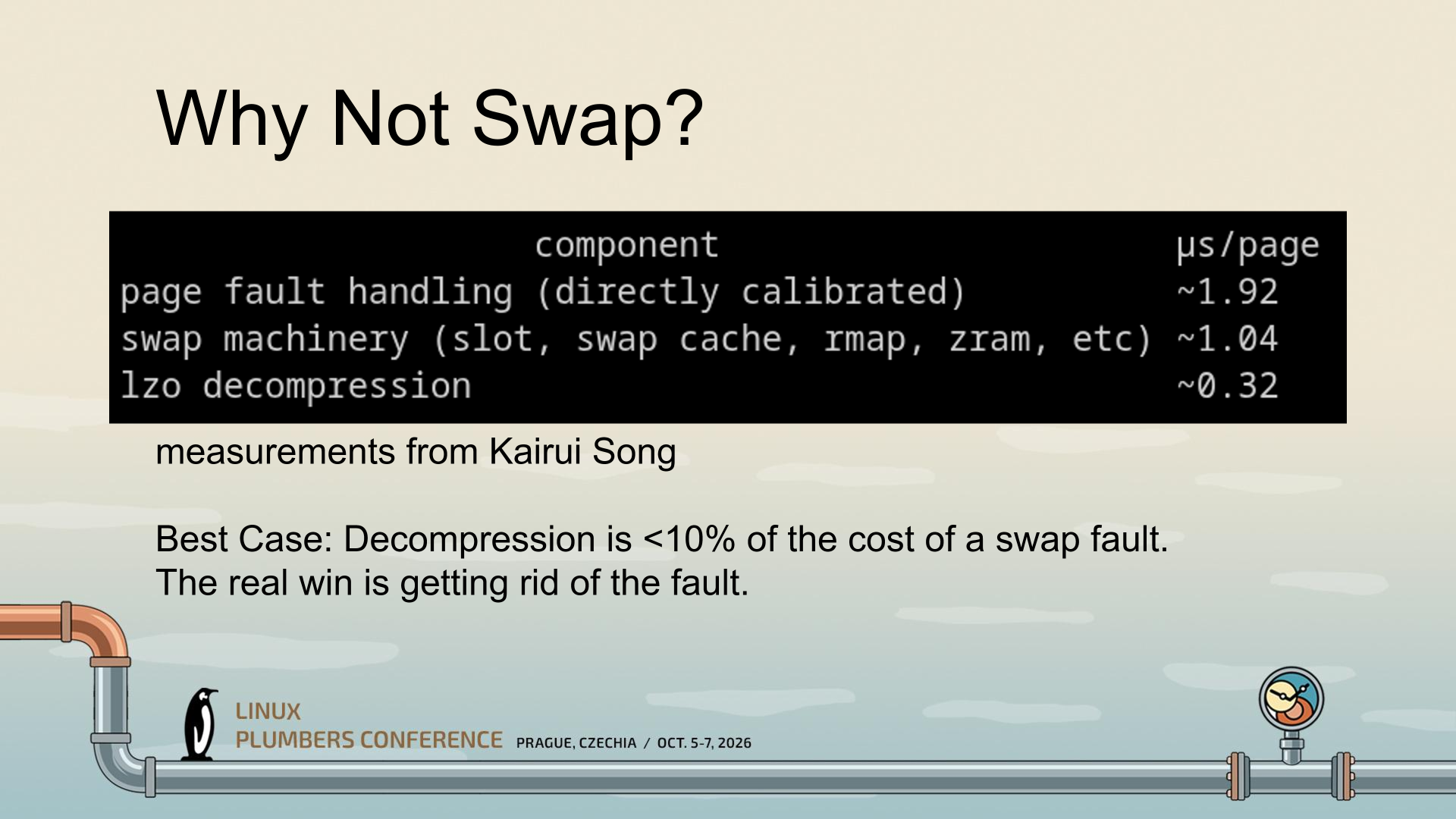
CRAM was conceptualized by Gregory Price and his team at Meta. The central realization that seems to have spurred the development of CRAM is that the largest portion of the performance hit from compressed memory isn't the compression; that's tiny. No, the largest hit apparently stems mostly from the fault itself and the swap behavior. So the thinking seems to have been "what if we just do zram, but completely in memory instead of as swap?"
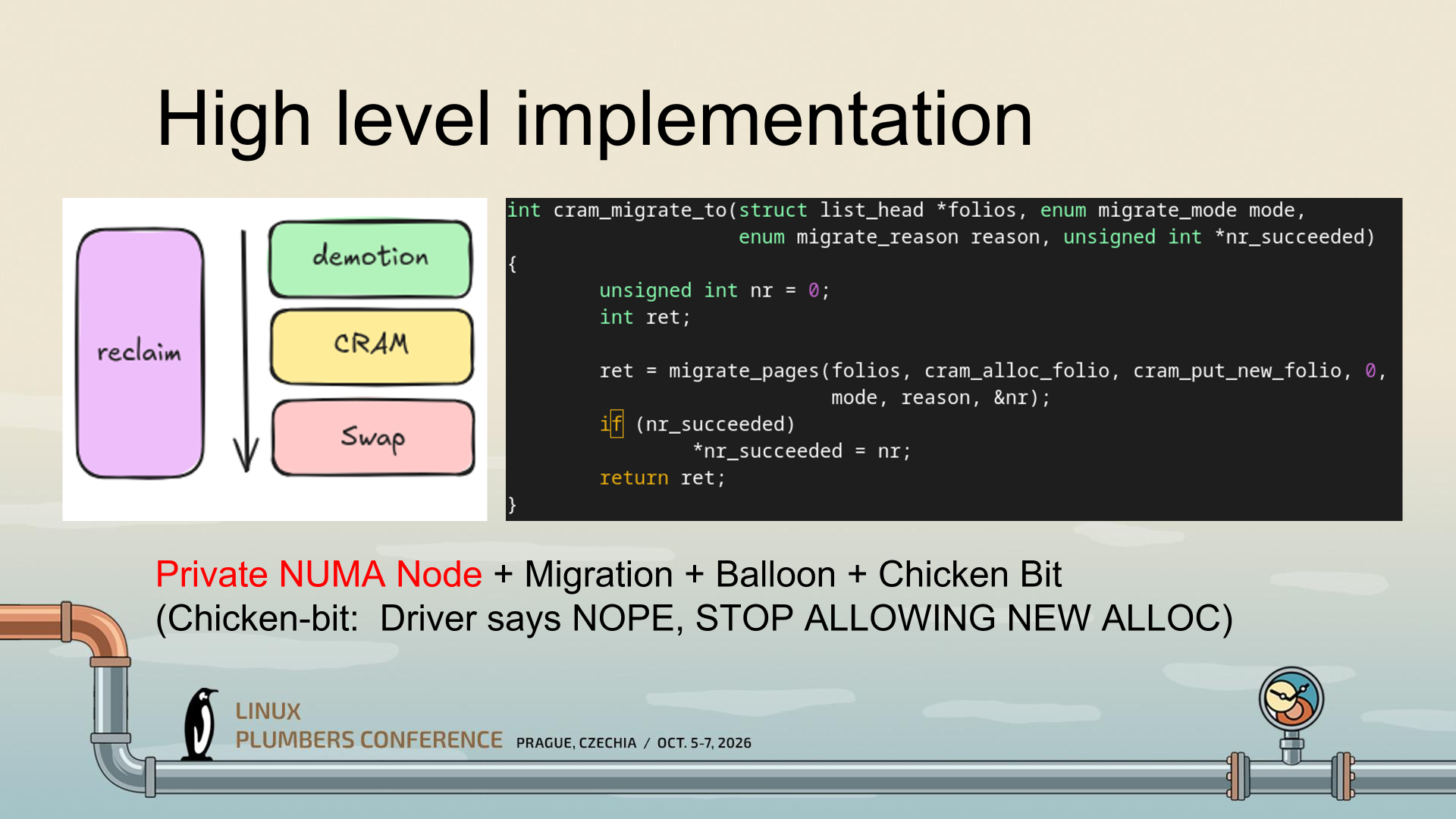
That's a gross simplification of an enormously complex project, but what CRAM seems to be doing is making use of mechanisms Linux already has to enable radically higher-performance compressed memory, particularly on reads. It uses a private NUMA node (essentially, a ghost CPU) instead of pretending to be a block device, and this lets Linux continue using all of its memory semantics, including migration and ballooning, to manage CRAM.
(Image credit: Gregory Price/Meta)
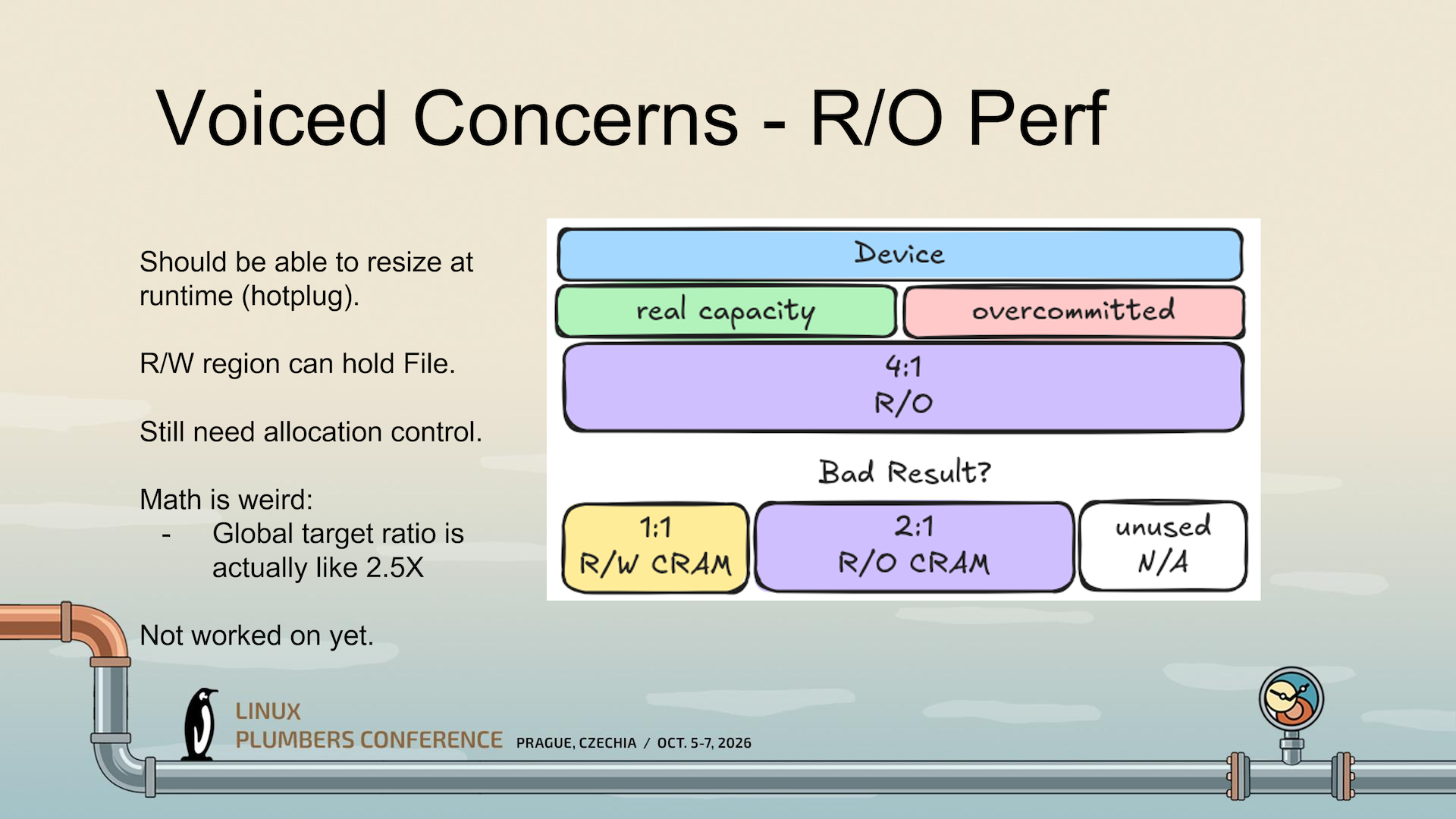
A critical part is the "Chicken Bit," which tells Linux that it has to stop trying to use CRAM while it is busy managing allocations. See, compressed memory seems straightforward until you start actually thinking about it. Compressibility of data varies tremendously based on what you're compressing, all the way from big piles of zeroes (perfectly compressible) up to already-compressed data (non-compressible). Given that, how do you know how much "logical" RAM you have when some of it is compressed? And how do you know when you're going to run out?
(Image credit: Gregory Price/Meta)
CRAM hasn't actually solved that problem yet, it seems; the slides I'm working from seem to establish this as an unsolved problem and an area of ongoing research. But the Chicken Bit is one way it can at least stop cascading failures (colorfully called a "poison storm" in the presentation) from happening when writes outpace CRAM's ability to allocate them.
(Image credit: Gregory Price/Meta)
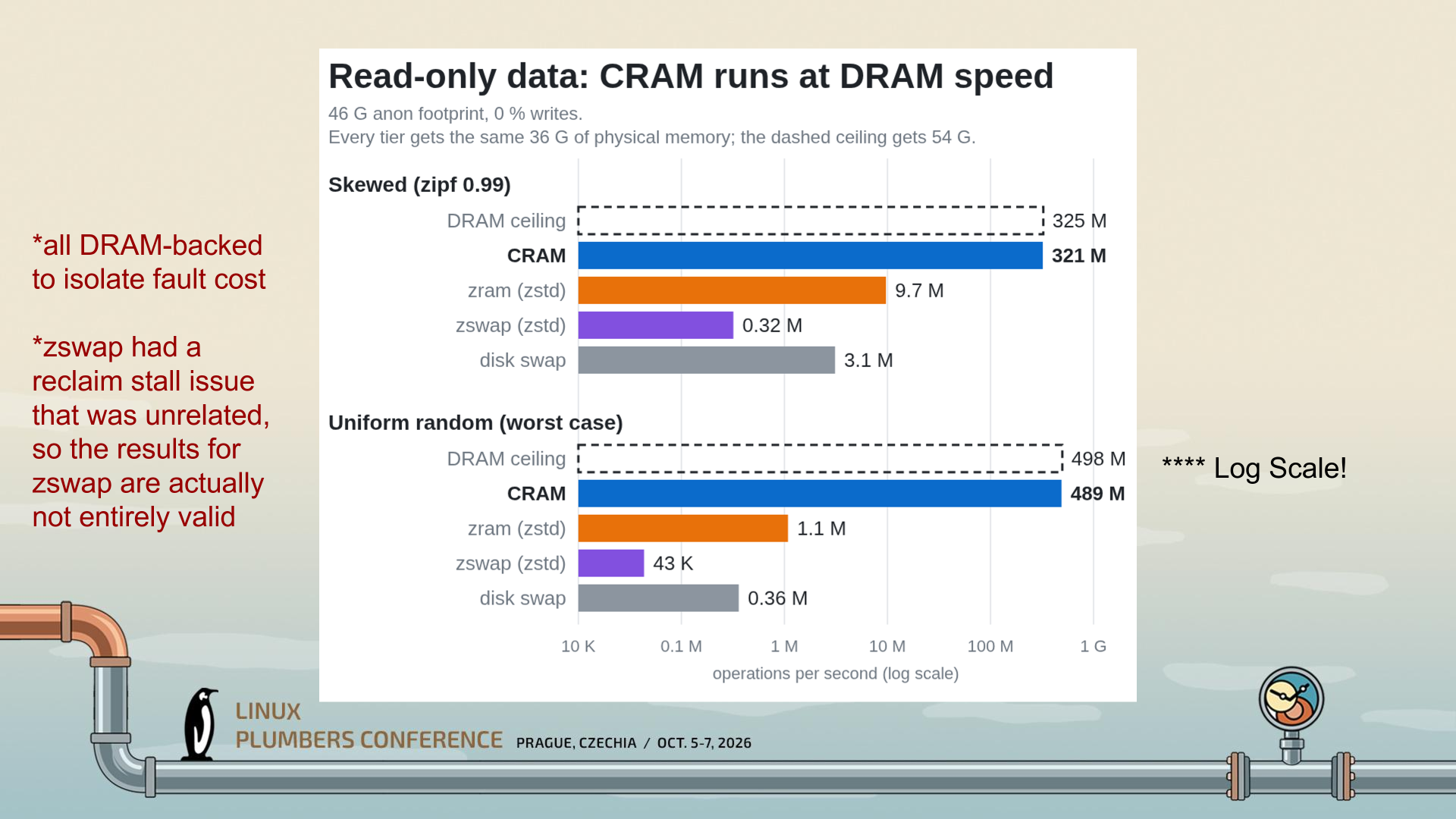
Because CRAM is stored in RAM and treated as RAM, with full cacheline/byte access, it can be accessed in a read-only fashion with little delay; just the cost of hardware-offloaded compression. As a result, CRAM "runs at DRAM speed," as the creator says in the slide above. While the graph already looks impressive, it's a logarithmic scale; CRAM, in the worst case, is doing 489 million operations per second versus ZRAM's 1.1 million. It's barely comparable.
(Image credit: Gregory Price/Meta)
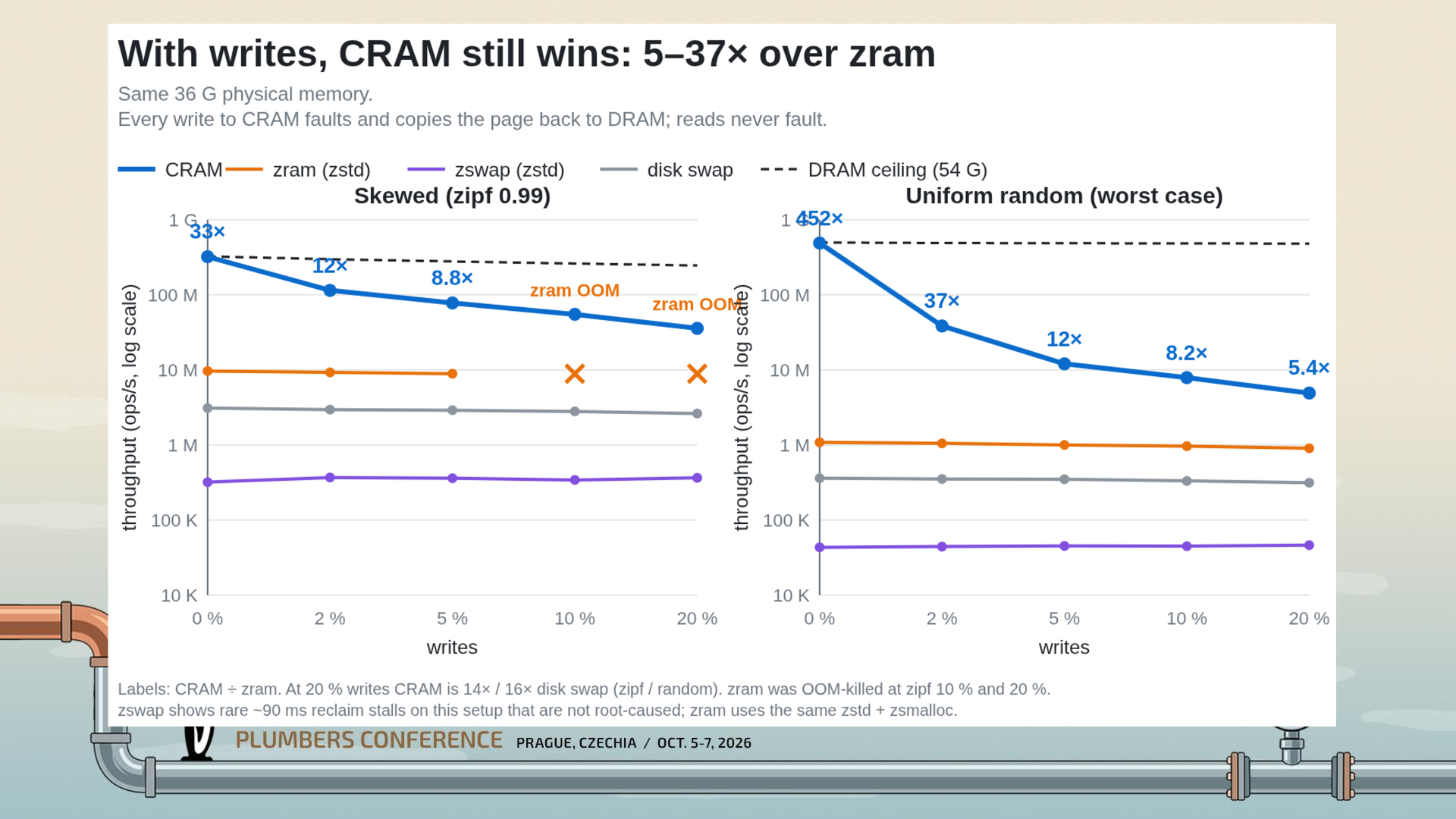
Even when you enable writes, CRAM is still much faster than ZRAM; 5.4x in the worst tested case of 20% writes. That's a huge drop from the 452x read-only case, but keep your context; a 5.4x speedup is still titanic. The massive performance cliff when writes are involved comes down to the need to page fault and migrate folios back to the original NUMA domain, as you can't write directly to compressed data; you'd corrupt everything.
My explanation of CRAM might not be completely correct; I wasn't at the Linux Plumbers' Conference in Prague to hear the presentation directly, so I'm working off of the slides available from the session information site (h/t to Phoronix for the spot) I think I've managed to grasp the gist of what Price is getting at, though.
While the obvious target of the work here (given its origin at Meta Platforms) is big Linux servers, ZRAM and Zswap are used all over the Linux ecosystem, even on machines as constrained as the Steam Deck. Many distributions enable one or the other by default. CRAM seems like it could offer a considerable speed-up for some of these machines, so hopefully it finds its way into the kernel once the remaining implementation questions are answered.
Windows 11 was released five years ago, on October 5, 2021. It feels like it's been around longer, as Microsoft’s latest OS has generated numerous headlines, mostly concerning the pain it put users through. We’ve all aged with it. Things might be settling down, at last, though, as the 26H2 update started to roll out just a few days ago, and it is not promising a revolution, simply a “predictable and low-disruption” update.
After the crowd-pleasing Windows 10’s return to form, it was all too predictable that Windows 11 would misstep in some unexpected way, or actually in several ways. Microsoft is pretty creative with its misreading of the market. At release, the biggest issue with the new OS was that it sought to force lots of capable hardware into retirement. This issue churned for months, with folks wrangling system files to bypass minimum system requirements, and Microsoft seemingly shifting the goalposts around at the same time.
Another early controversy was Microsoft continuing to push users into setting up Windows using an online Microsoft account, and cutting off avenues of avoidance. Again, communities had to fight the OS to make it work the way they wanted, often with a simple local account. This struggle continues to this day. Microsoft paints the requirement as good for users, providing OneDrive backups, syncing across devices, and providing extra recovery and security features. However, forced online accounts are also a commercial vehicle for selling digital goods and services.
Things had settled down in Windows land by 2024, but Microsoft spoiled the broth again with the introduction of the Copilot+ PC era. In some ways, it showed some foresight in sensing that AI was going to be big. Nevertheless, this was another clear misstep, with gaffes/scares like the AI-centerpiece Windows Recall app.
Copilot+ PC’s failure was confirmed by Microsoft and its OEM partners when they quietly killed off all Copilot+ PC branding earlier this year. For now, built-in AI is being de-emphasized, and Microsoft is looking at a cross-platform agentic model.
A change of direction
This year has also seen Microsoft publicly realize that people need Windows 11 as a foundation for their productivity tasks and gaming fun. The OS isn’t the destination. Thus, in spring, execs promised to clean up and optimize Windows 11 for its basic everyday use. Going forward, Microsoft has dangled the carrot of faster built-in apps, lower memory/resource use, and other foundational OS optimizations.
Windows 11 26H2 was released to consumers last week. As a battle-scarred Windows veteran, I’ve not clicked the update button yet on any of my machines, but there are reasons to be optimistic that it doesn’t deliver new nightmares. Version 26H2 is being distributed with the promise to deliver a “predictable and low-disruption” update. Boring is good.
Despite the aforementioned controversies, as well as the usual collection of silly/scary bugs that needed ironing out, people are still using Windows 11. It is widely adopted and dominates the PC landscape. MacOS and Linux have made inroads in terms of users, but Windows still looks mostly unassailable on roughly 76% of all desktop/laptop computers. Among Windows versions, it holds nearly 72% of the market, with Windows 10 rapidly declining and dipping under 28% at the most recent count.
When the U.S. government imposed sanctions on the International Criminal Court (ICC) in The Hague, Netherlands, it also meant that its chief prosecutor lost access to Microsoft services, including email. It was then that the Dutch government decided that it was time to make plans that would reduce its reliance on software and services that were made or based in the United States. The result of that decision was DAWO, or Digitaal Autonome Werkomgeving Overheid (Digital Autonomous Work Environment for Government in English). And work is underway to bring it to fruition.
As Tweakers reports, via It's FOSS, the program was aimed at refreshing the technologies used by the Dutch government in such a way that it would no longer be in a situation where it could lose access to critical systems at the whim of a foreign country. From operating systems to office software and cloud services, a new system had to be devised and rolled out.
That system is built around NixOS, with three service providers tasked with the job. While SSC-ICT, DICTU, and DUO-ICT were the three chosen, the whole thing is overseen by the Ministry of the Interior and Kingdom Relations.
From a technical point of view, the use of NixOS was a key one. Its use of the Nix package manager means that each package is installed in its own directory with immutable and signed contents. That alone means that the setup is incredibly easy to reproduce across multiple machines, something that is an obvious benefit when dealing with different facets of a government. It's been suggested that up to 90% of a configuration can be carried over from one deployment to another. And as a bonus, NixOS can also run on computers that Windows 11 would usually balk at.
While the switch from Microsoft software and services to brand-new alternatives is a long and complicated process, steps are very much being made in the right direction. Eight municipalities are running trial programs right now, with the first stable version of the platform expected to be ready by the end of 2027.
The Netherlands is far from the only European country to be concerned about the ability of the United States' government to cut off access to software and services. Germany has already jumped ship from Microsoft-based systems, while Denmark and France are also in the process of a similar rethinking of their tech stacks as the one carried out by the Dutch.
 登录
登录