❌

普通视图

发现新文章,点击刷新页面。
昨天以前首页

HyperX Omen 35L review: A polished gaming PC for deep pockets

2026年10月29日 22:00

HP’s HyperX Omen 35L is ambitious, and it’s hard not to be impressed by it in our maxed-out test guise with a Ryzen 9 9950X3D and Nvidia RTX 5080. From its monochrome design and extensive RGB lighting to its top-tier components, it checks the boxes enthusiasts are looking for.

But when a PC is $6,211 like our test configuration, it raises the question of whether the Omen 35L’s blend of style, performance, and premium features is enough to justify a purchase, even if that's what high-end PCs cost right now.

Design of the HyperX Omen 35L

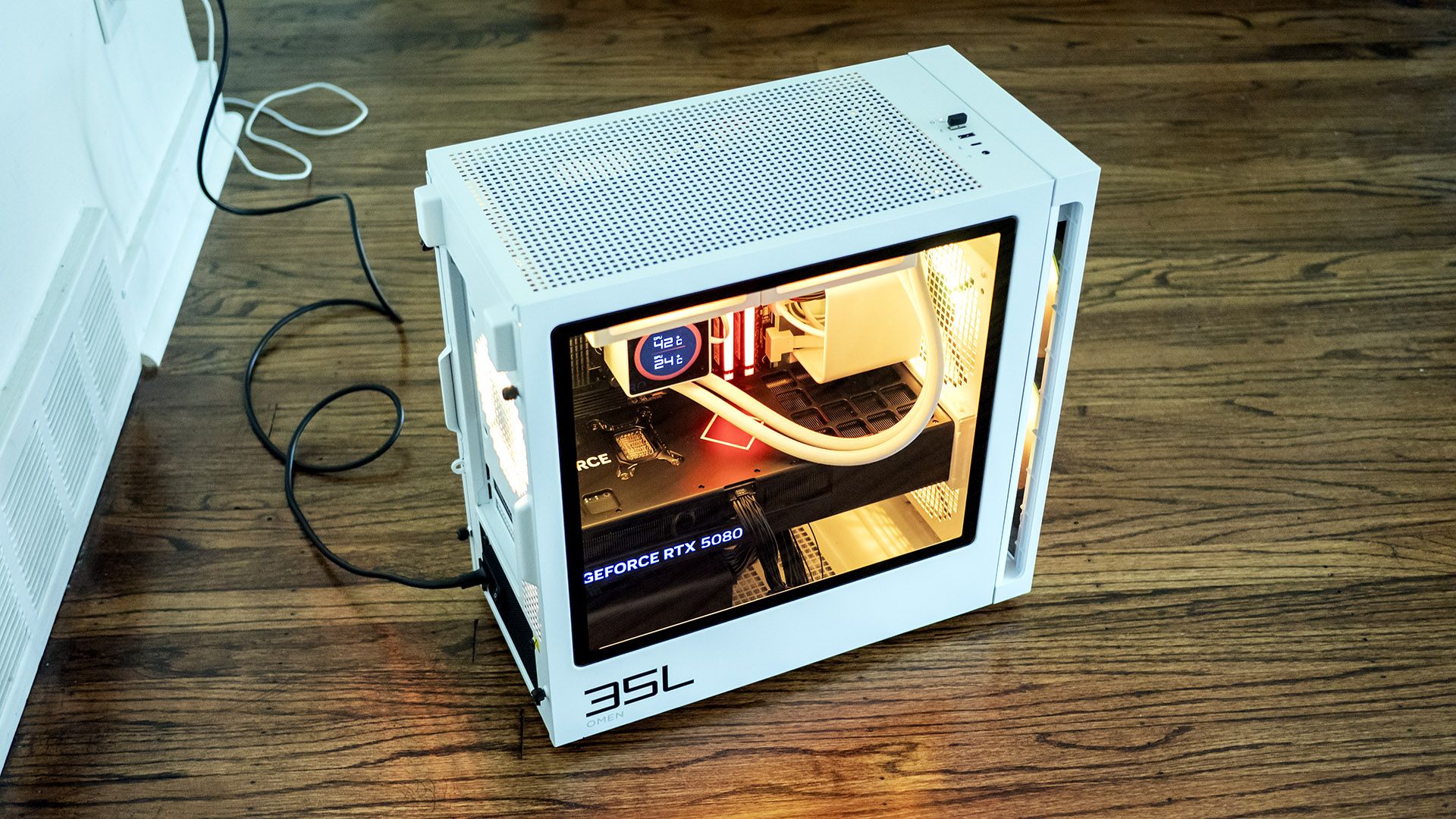
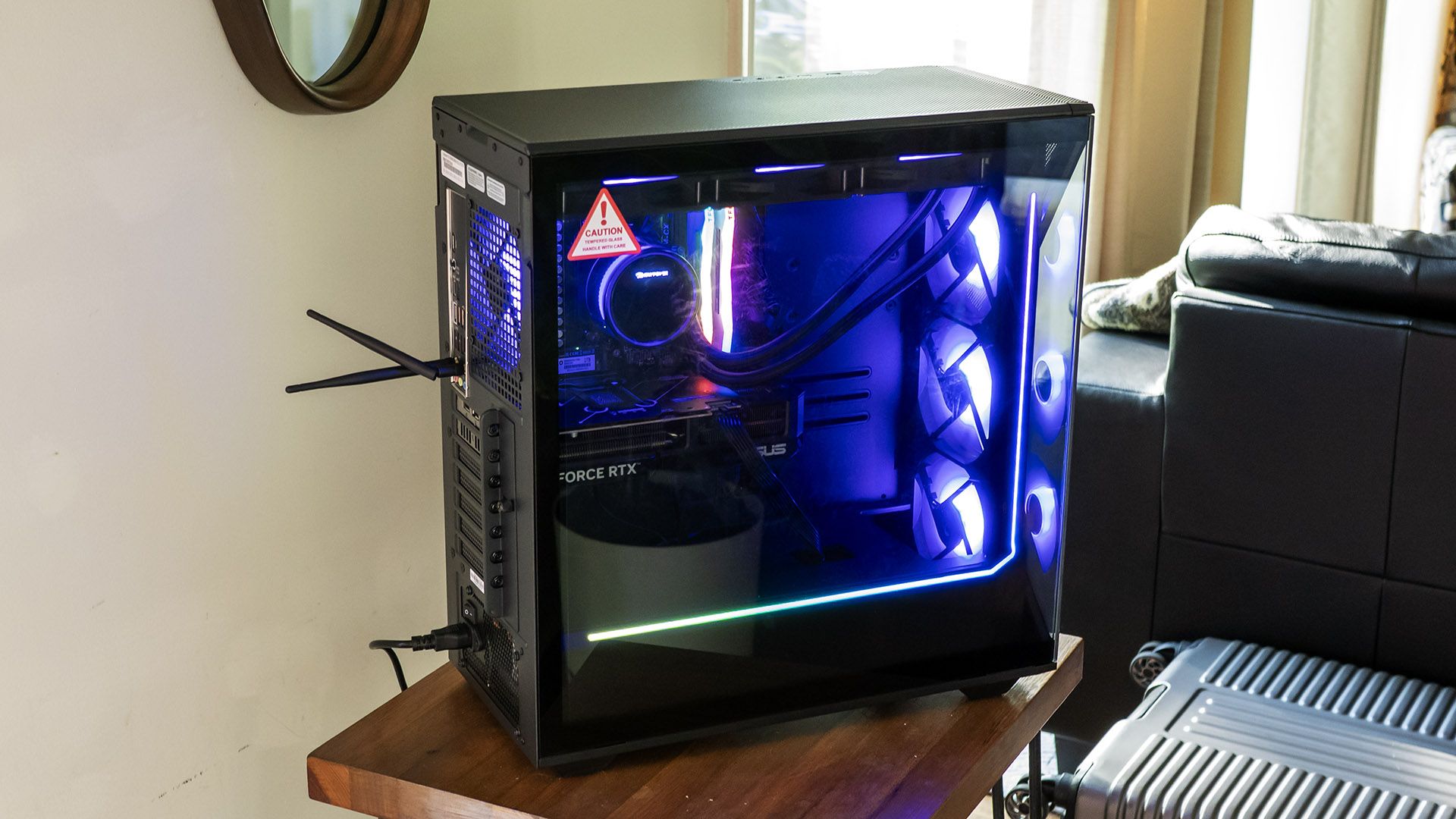
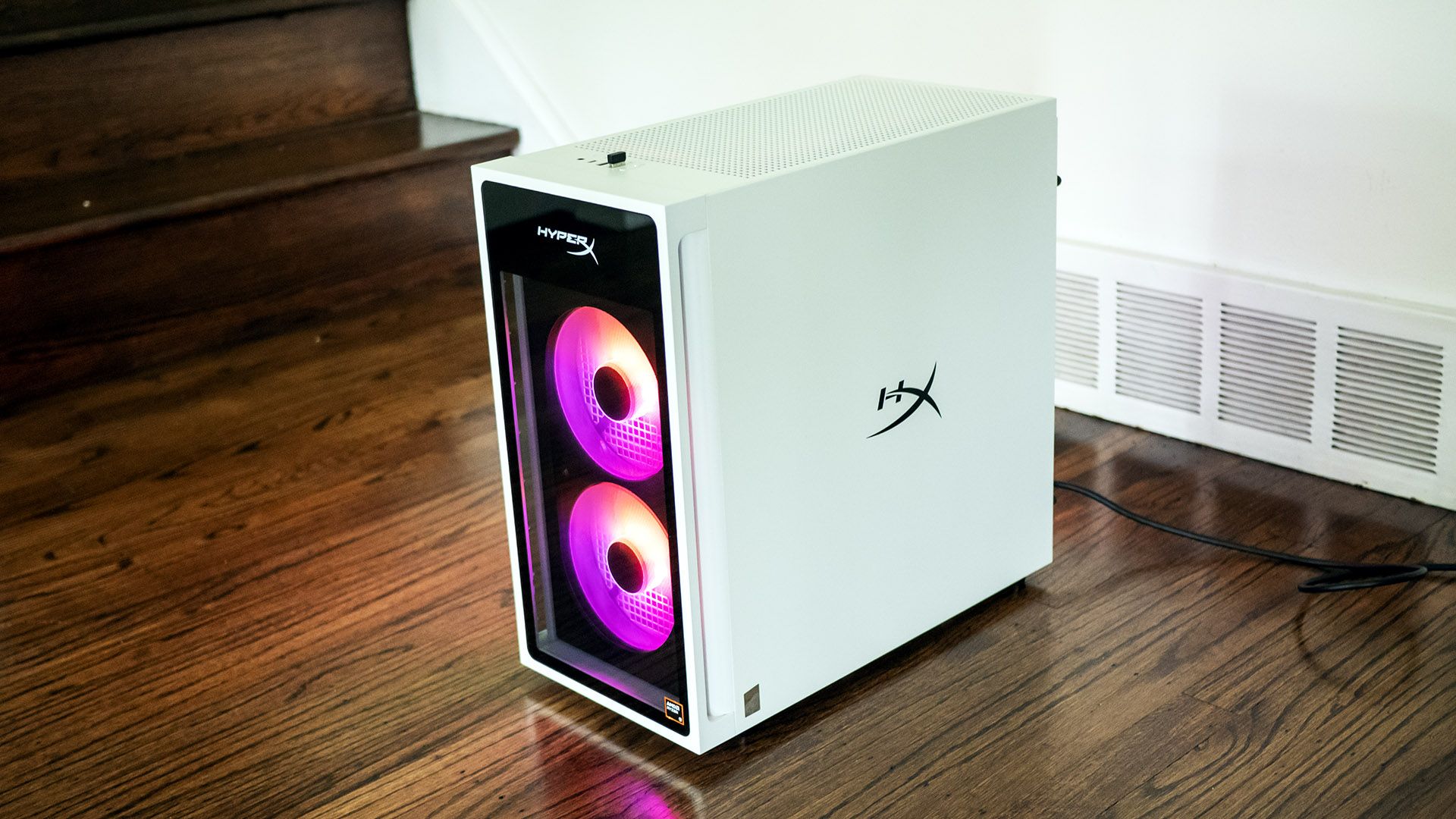
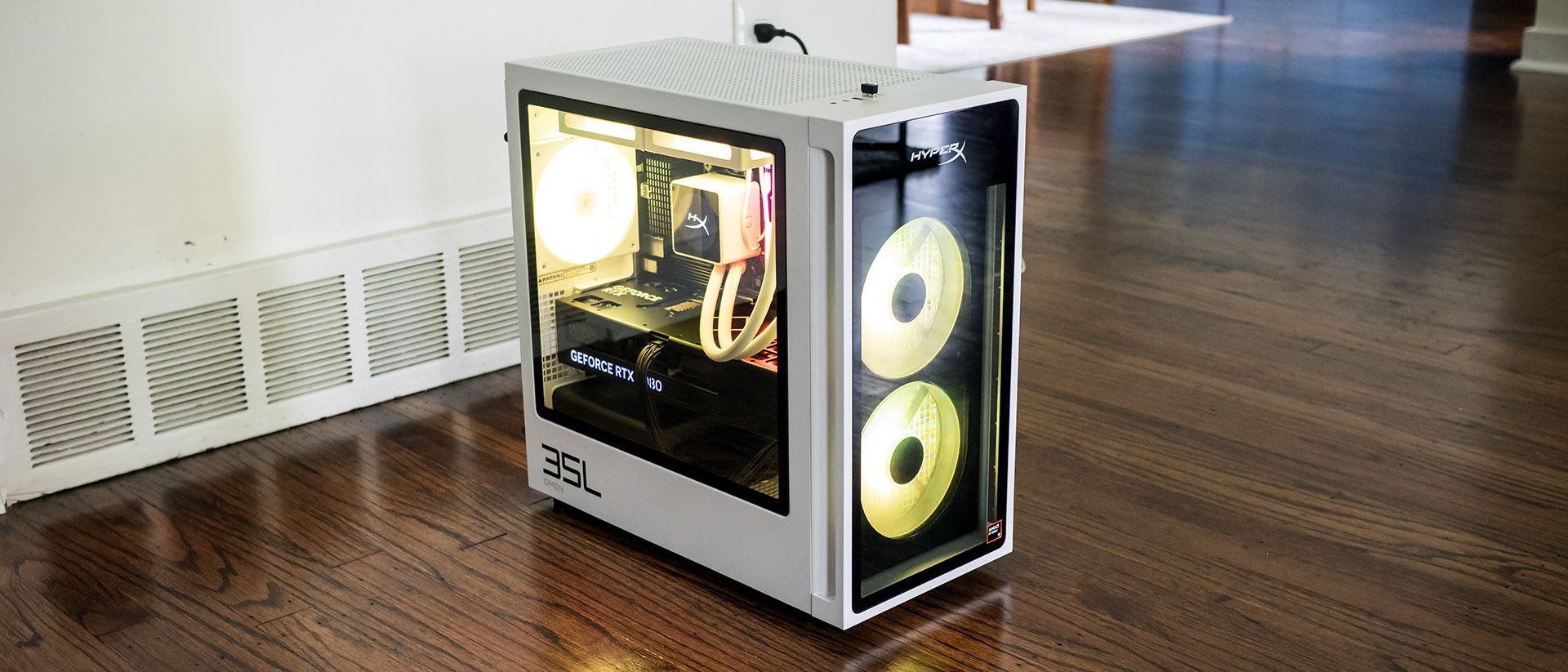
The HyperX Omen 35L’s black and white case stands out, looking refreshingly modern, even though parent company HP has used similar designs before. At 8.27 by 16.06 by 16.14 inches, it’s firmly in mid-tower territory. The metal case feels reassuringly solid and makes extensive use of tempered glass. Bright RGB fans shine through the front while many RGB-lit components are visible through the side panel. It’s a classy system.
HyperX Omen 35L
Tom's Hardware
HyperX Omen 35L
Tom's Hardware
HyperX Omen 35L
Tom's Hardware

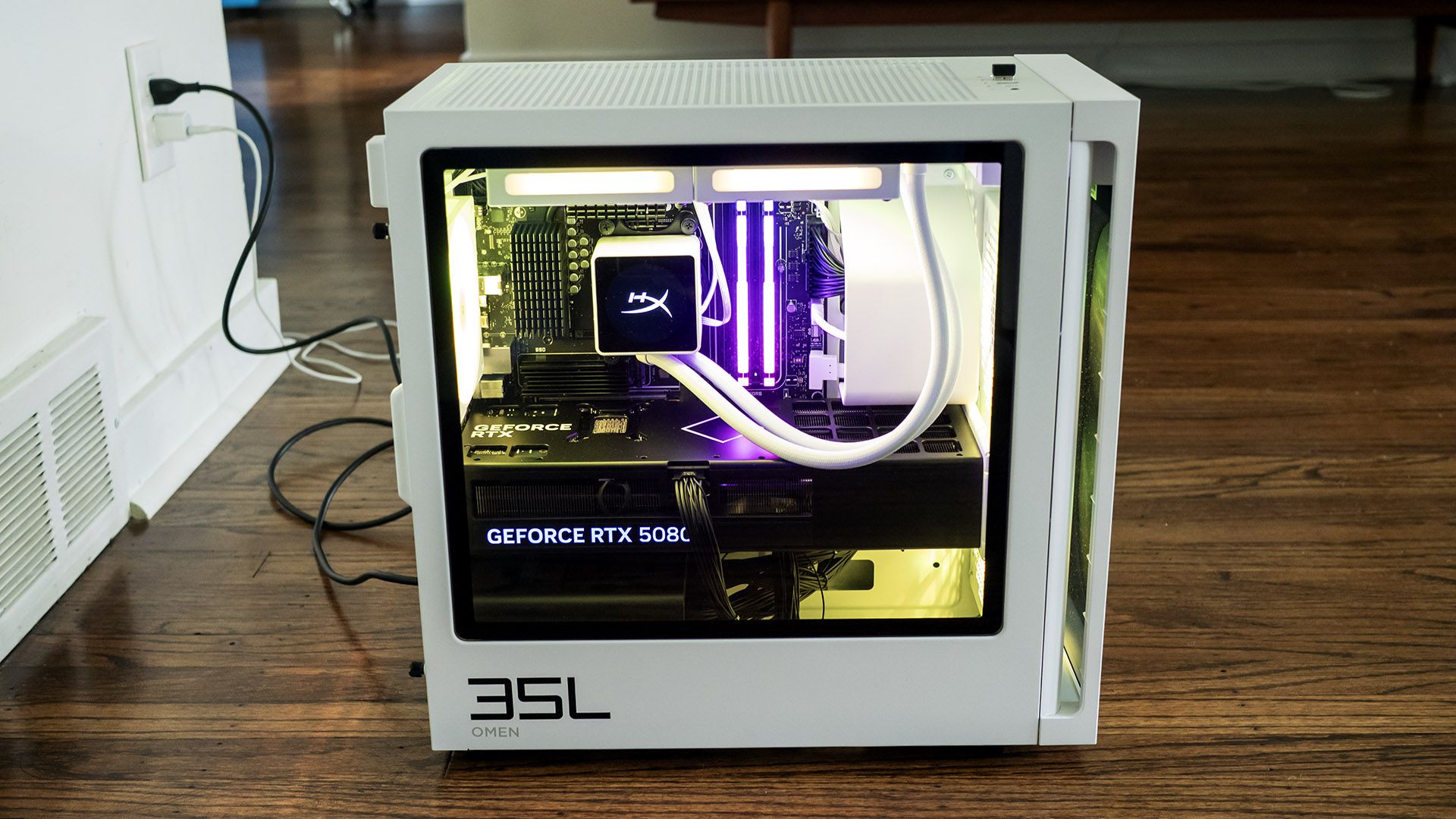
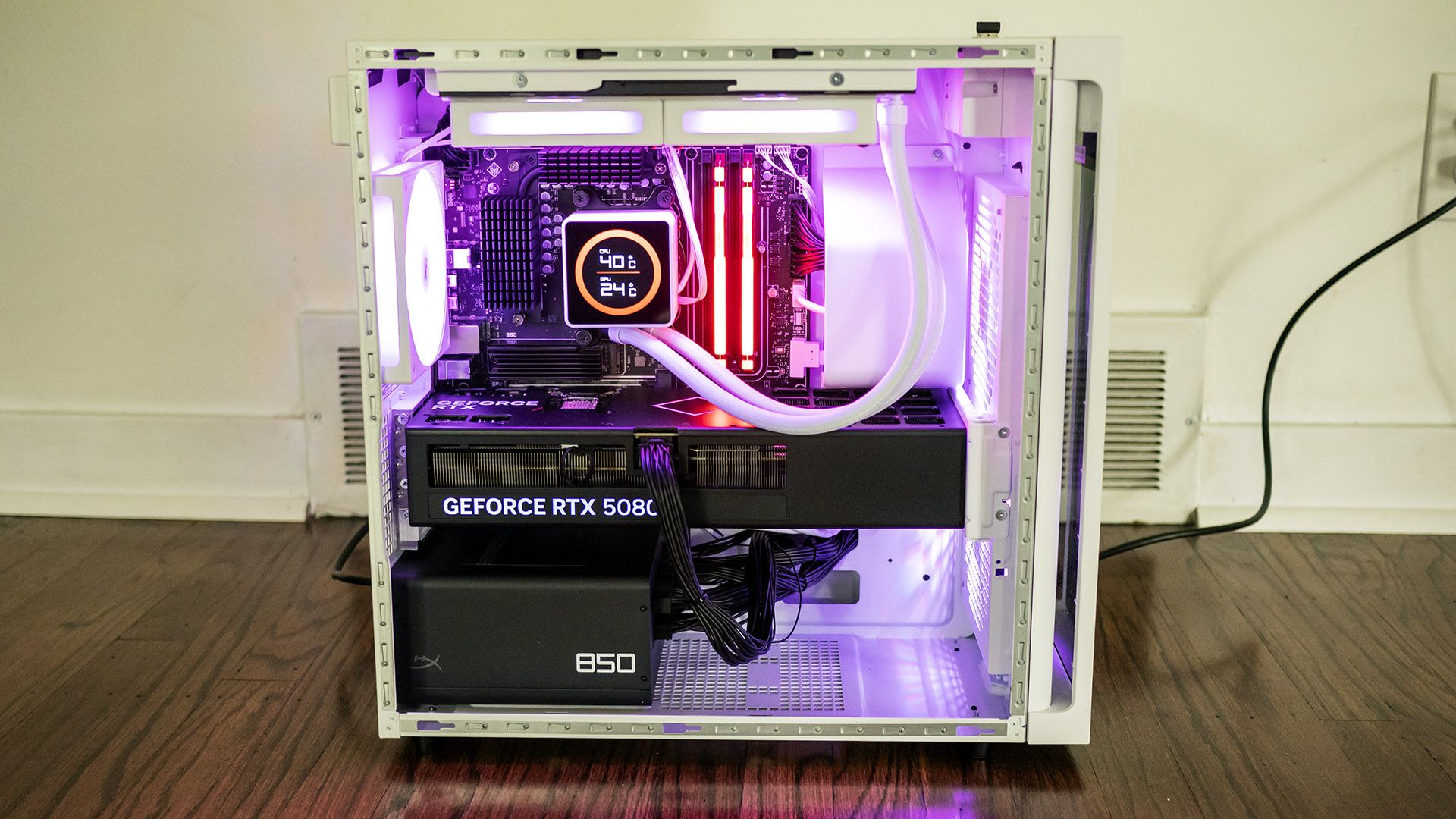
The contrast continues inside, where the black motherboard, graphics card, and power supply are easily visible against the white case. The white liquid cooling loops are especially attractive, as is the CPU cooler featuring its own LCD panel. The latter shows CPU and GPU temperatures.

HyperX Omen 35L Specifications

CPU

AMD Ryzen 9 9950X3D

Motherboard

HP AMD B850

Memory

64GB DDR5-6000 (2x 32GB)

Graphics

Nvidia GeForce RTX 5080 (16GB GDDR7, 2,617 MHz boost clock)

Storage

2x 1TB PCIe 5.0 SSDs (non-RAID)

Networking

Realtek 8922AE Wi-Fi 7 and Bluetooth 6.0

Front Ports

10 Gbps USB-C, 2x 5 Gbps USB-A, audio combo jack

Rear Ports

2x 10 Gbps USB-C, 2x 5 Gbps USB-A, 4x USB 2.0, DisplayPort 1.4, Ethernet

Power Supply

1,000 W fully modular

Cooling

240 mm LCD liquid cooler

Operating System

Windows 11 Pro

Dimensions (WxDxH)

8.27 x 16.06 x 16.14 inches (210 x 408 x 410 mm)

Price (as configured)

$6,210.98

Ports and Upgradeability on the HyperX Omen 35L

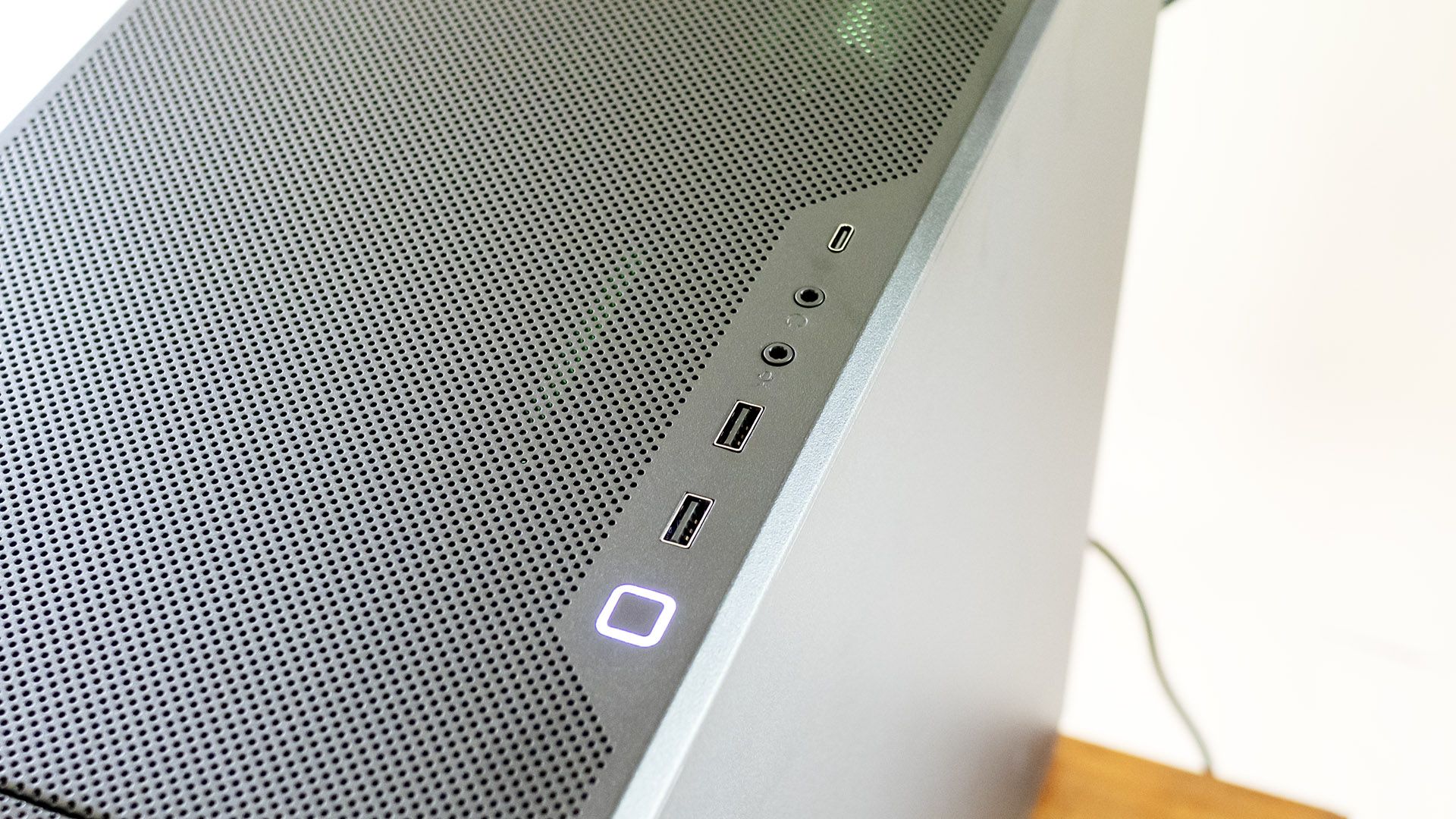
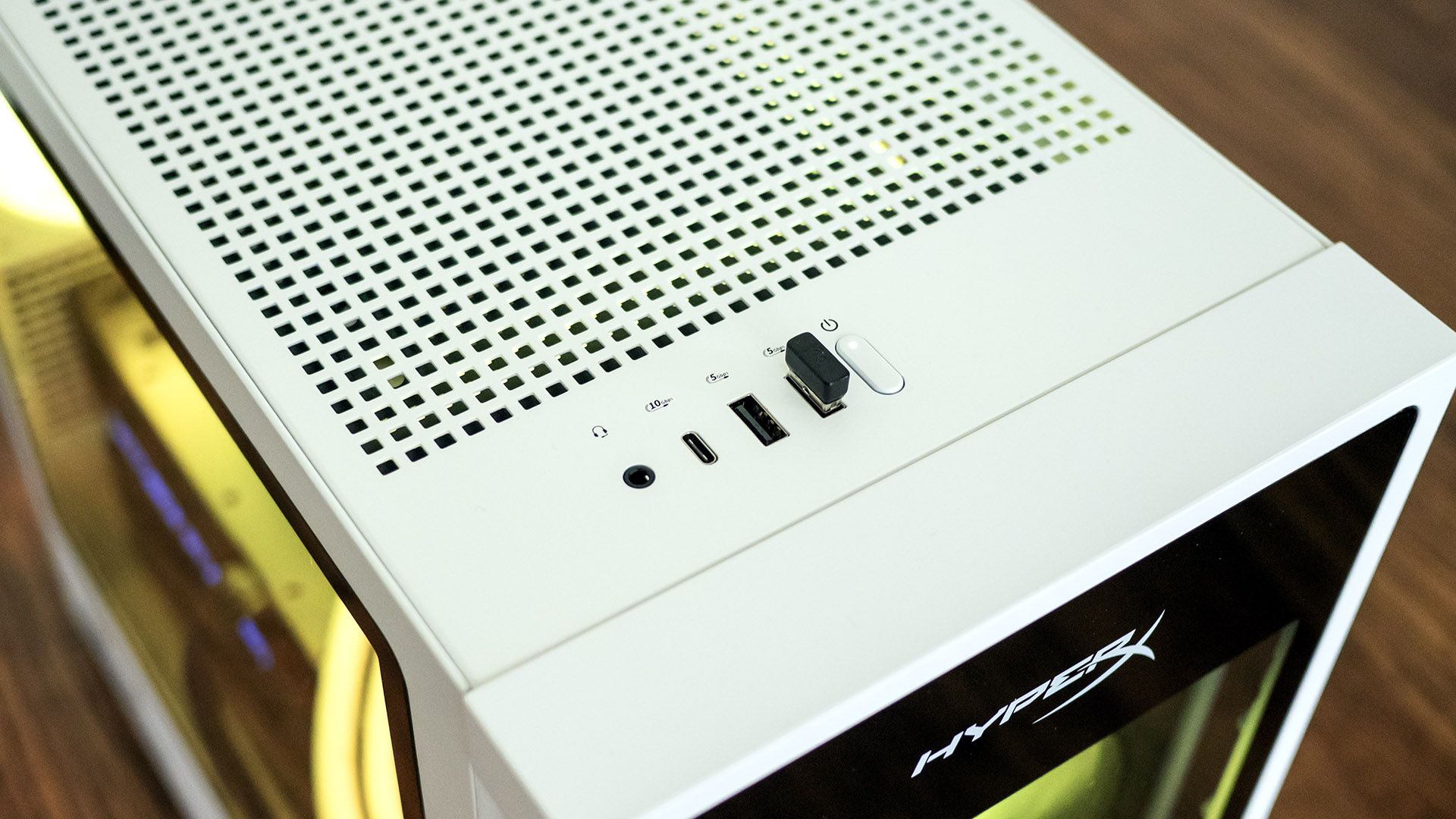
HyperX’s top-mounted front ports include USB-C (10 Gbps), two USB-A (5 Gbps), and an audio combo jack. This location works well if the desktop is on the floor.
HyperX Omen 35L
Tom's Hardware
HyperX Omen 35L
Tom's Hardware

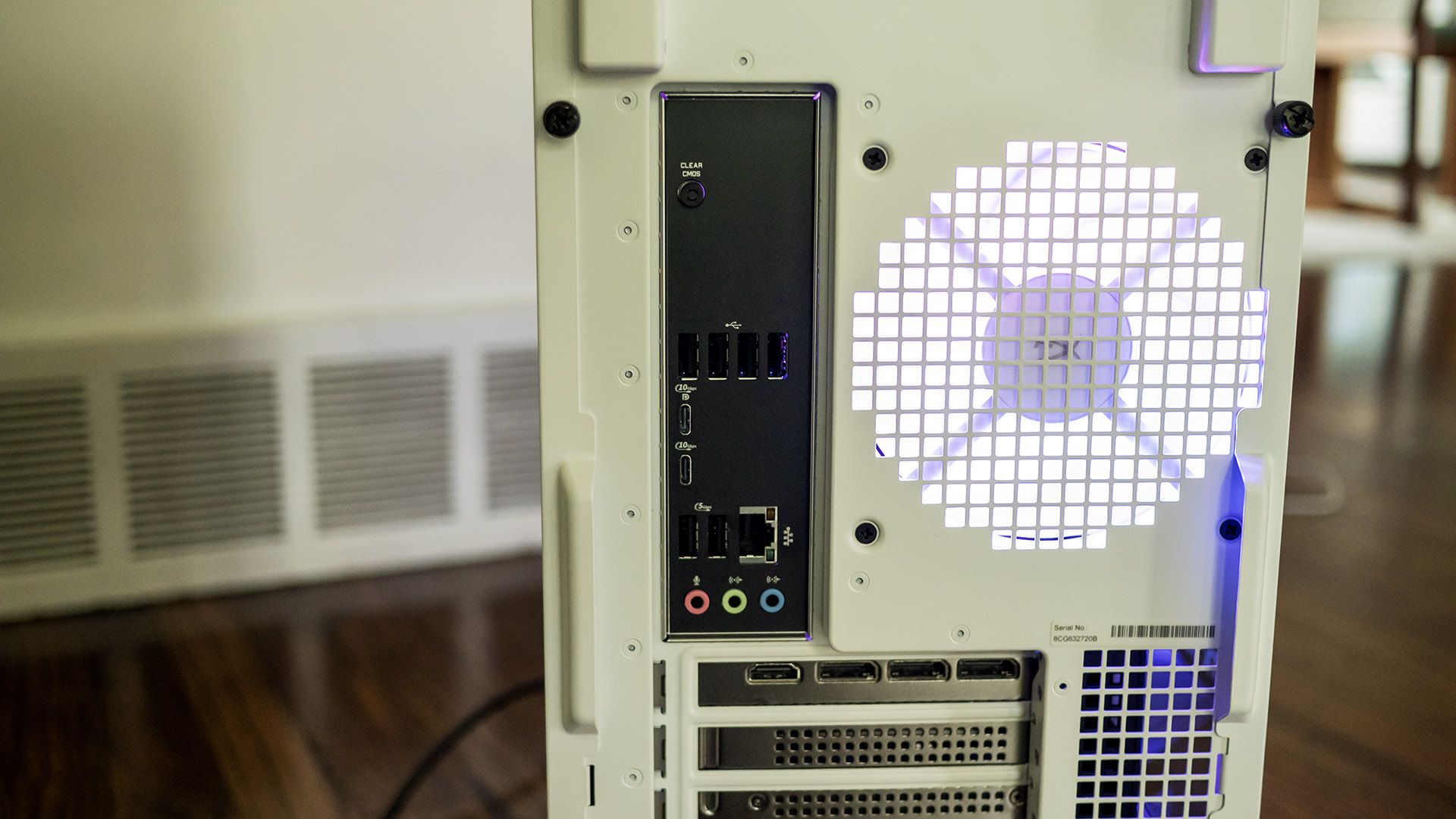
At the back, the tower offers a pair of USB-C ports (10 Gbps), two USB-A (5 Gbps), four USB 2.0, DisplayPort 1.4 output, Ethernet, and audio jacks. It’s disappointing to see a desktop this expensive offers neither USB4 nor Thunderbolt 4, though it does include Wi-iFi 7 and Bluetooth 6.0 from a Realtek 8922AE networking card. The wireless antennas are built into the chassis, eliminating the need for external protrusions. It’s also notable that HP offers a Clear CMOS button, a surprise on a mainstream tower.
HyperX Omen 35L
Tom's Hardware
HyperX Omen 35L
Tom's Hardware

The HyperX Omen 35L offers about as much upgradeability as expected from a mid-tower, without proprietary parts. Its side doors are secured with thumbscrews; the slide rearward and away. The mATX-style motherboard offers four DDR5 DIMM slots, populated in our review unit with two 32GB RGB HyperX modules running at 6,000 MHz.

The system also supports two M.2 2280 drives. The primary slot is covered in a substantial heatsink just above the RTX 5080. Accessing the other slot requires removing the RTX 5080. The card is secured with five screws, two of which hold it to the front support bracket. Deft fingers are required to reinstall the screws at the back of the card.

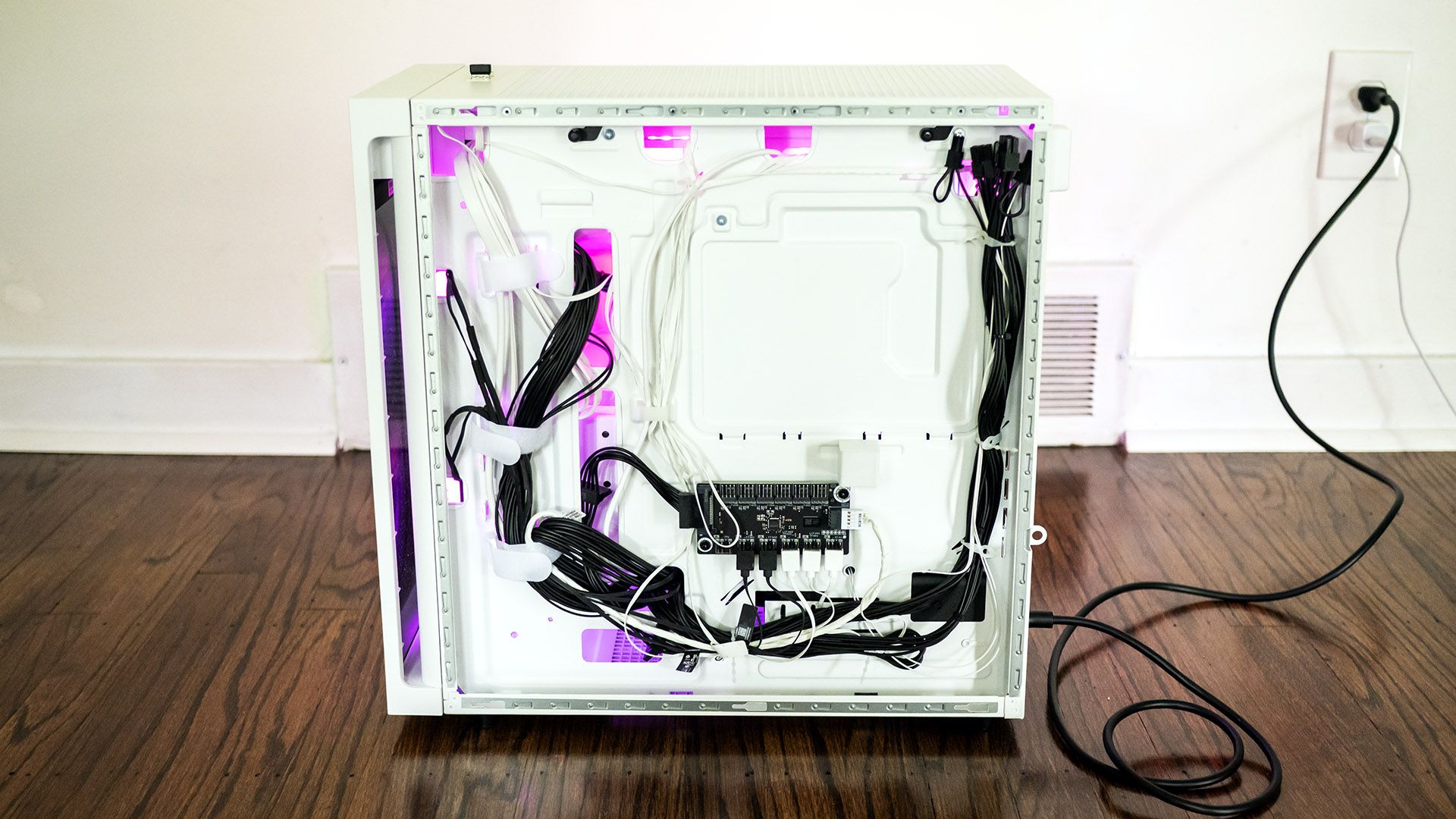
HP’s wiring work is tidy for a mainstream tower. Sleeved cables would have improved the refinement. On the plus side, HP includes a fully modular power supply, an uncommon feature in big box systems.

Gaming and Graphics on the HyperX Omen 35L

We tested the HyperX Omen 35L in a maxed-out configuration featuring a Ryzen 9 9950X3D processor, 64GB of RAM, and a GeForce RTX 5080.

I fired up 007 First Light to test out this system’s prowess. At a 3840 x 2160 resolution with high settings and post effects enabled, I saw up to 120 frames per second (fps) indoors and in the mid-90 fps range in more complex scenes without DLSS. The game never stuttered and remained supremely playable.

The systems we’re using for comparison include a pair of RTX 5090 towers, the Alienware Area-51 (Ryzen 9950X3D, $5,749.99 when tested, $8,899.99 as of this writing) and the Maingear MG-1 (Ryzen 9 9950X3D2, $7,067 when tested, $9,076 as of this writing), plus Corsair’s Vengeance a7500 powered by a Ryzen 7 9800X3D and an RTX 5070 Ti ($2,799.99 when tested, $3,299.99 as of this writing). With its RTX 5080, the HyperX desktop ought to slot in the middle of this group.
HyperX Omen 35L
Tom's Hardware
HyperX Omen 35L
Tom's Hardware
HyperX Omen 35L
Tom's Hardware
HyperX Omen 35L
Tom's Hardware
HyperX Omen 35L
Tom's Hardware
HyperX Omen 35L
Tom's Hardware

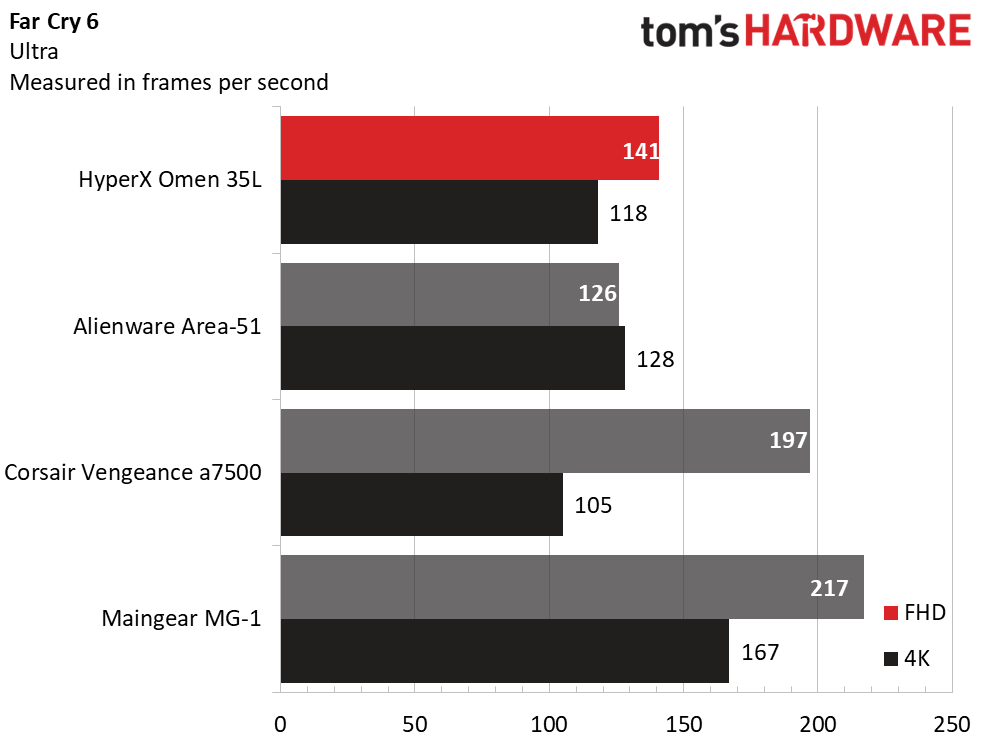
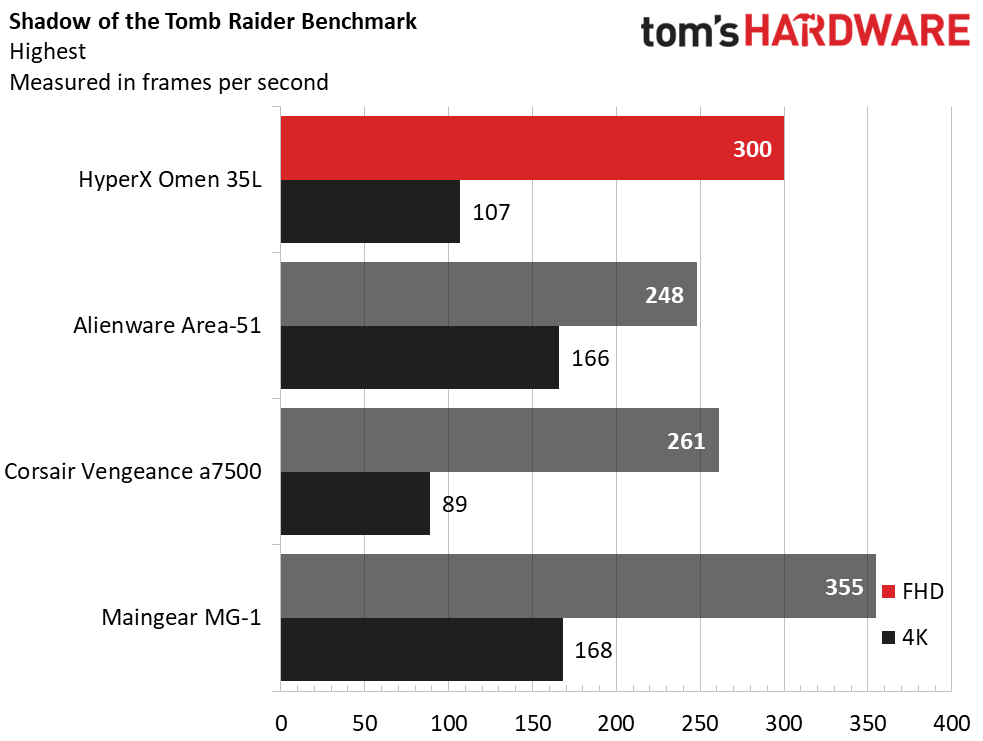
The HyperX desktop performed as expected given its RTX 5080. That said, the 1080p numbers show significant variance from system to system. In Shadow of the Tomb Raider (Highest detail preset), the HyperX produced 300 fps to outperform even the Alienware (248 fps), though it couldn’t catch the Maingear (355 fps). In other instances, even the RTX 5070-powered Corsair was able to pull ahead as seen in Far Cry 6 (Ultra settings), where it produced 197 fps against the HyperX’s 141 fps.

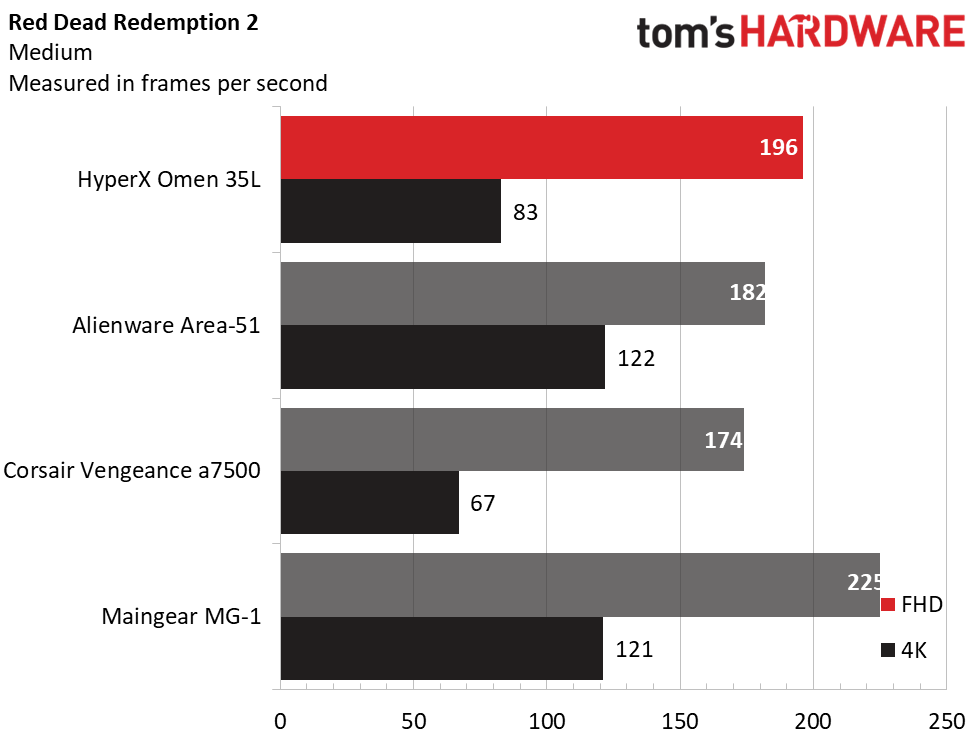
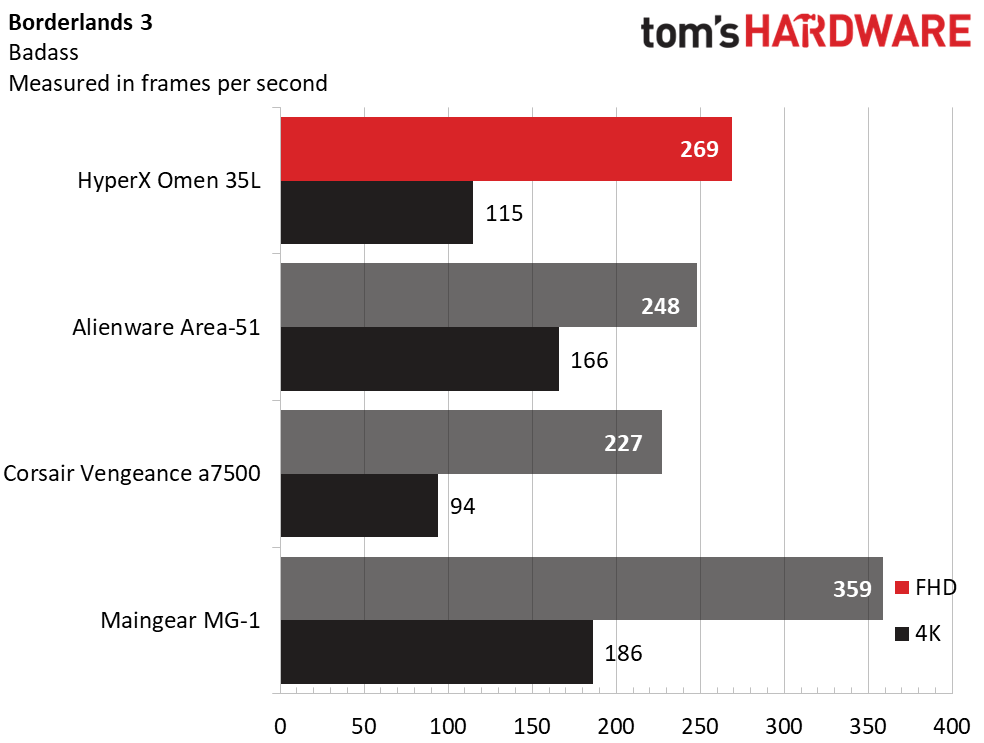
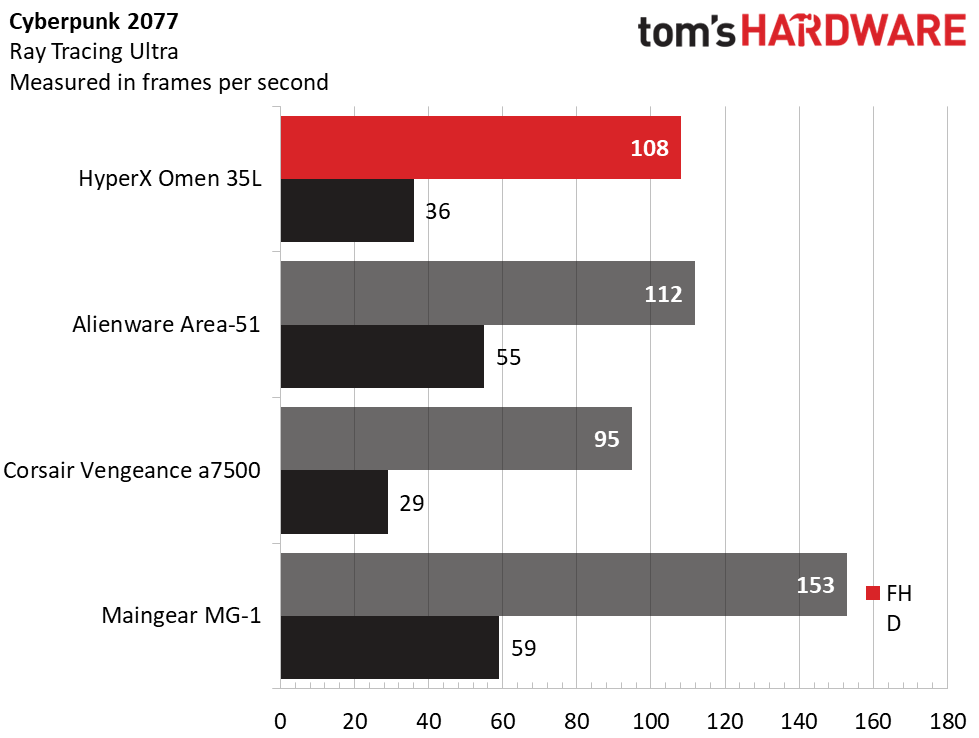
But these desktops are designed for 4K play. At that resolution, the HyperX’s RTX 5080 produced admirable numbers. Naturally, it wasn’t in the same league as the RTX 5090 systems; in Red Dead Redemption 2 (Medium settings), the HyperX produced 83 fps against the Alienware’s 122 fps and the Maingear’s 121 fps, and in Borderlands 3 (Badass settings), the HyperX landed at 115 fps against Alienware’s 166 fps and Maingear’s 186 fps. The differences narrowed in Far Cry 6, with the HyperX producing 118 fps to Alienware’s 128 fps. The largest deltas were seen in Cyberpunk 2077 (Ray Tracing Ultra preset), where the HyperX produced 36 fps, well ahead of the Corsair’s 29 fps, but significantly behind the Alienware’s 55 fps. Overall, though, this HyperX desktop is well-suited to 4K play.

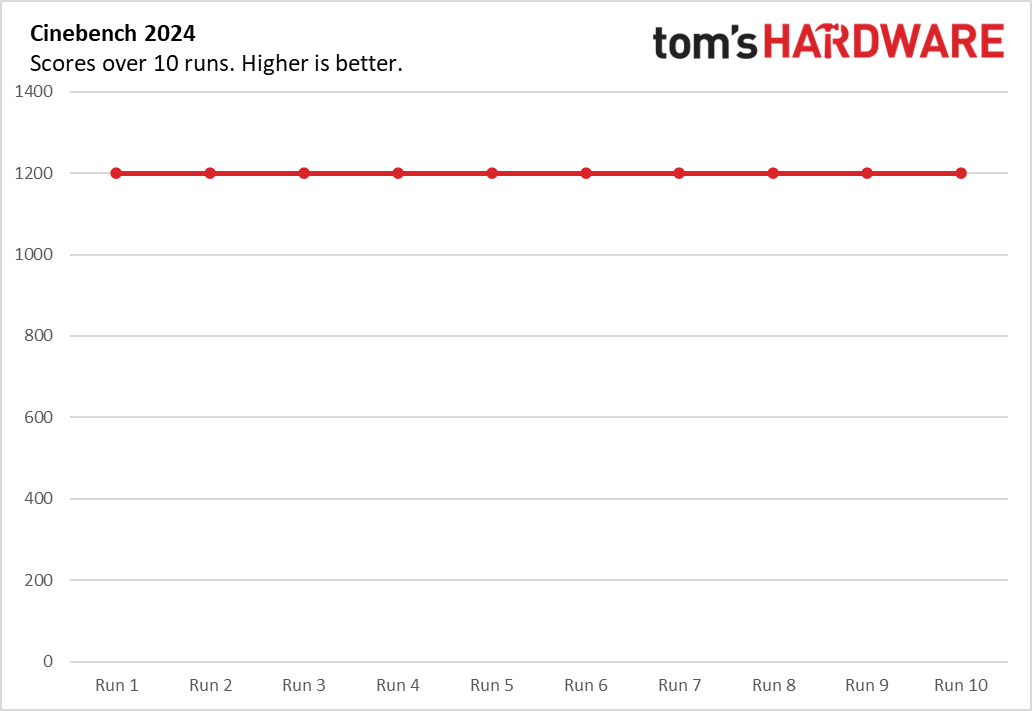
We stress-test gaming desktops running 15 loops of the Metro Exodus benchmark at RTX settings, simulating about half an hour of gameplay. During the test, the HyperX desktop averaged 172.21 fps across all runs with a sub-one fps variance, indicating stable performance. During the test, the Ryzen 9 9950X3D averaged 4.79 GHz and 48 degrees Celsius while the RTX 5080 ran at 2.74 GHz and 50 C.

Productivity Performance on the HyperX Omen 35L

Our HyperX test unit features a Ryzen 9 9950X3D processor, 64GB of RAM, and two 1TB PCIe 5.0 drives running separately, one hosting the OS andthe other for storage.
HyperX Omen 35L
Tom's Hardware
HyperX Omen 35L
Tom's Hardware
HyperX Omen 35L
Tom's Hardware

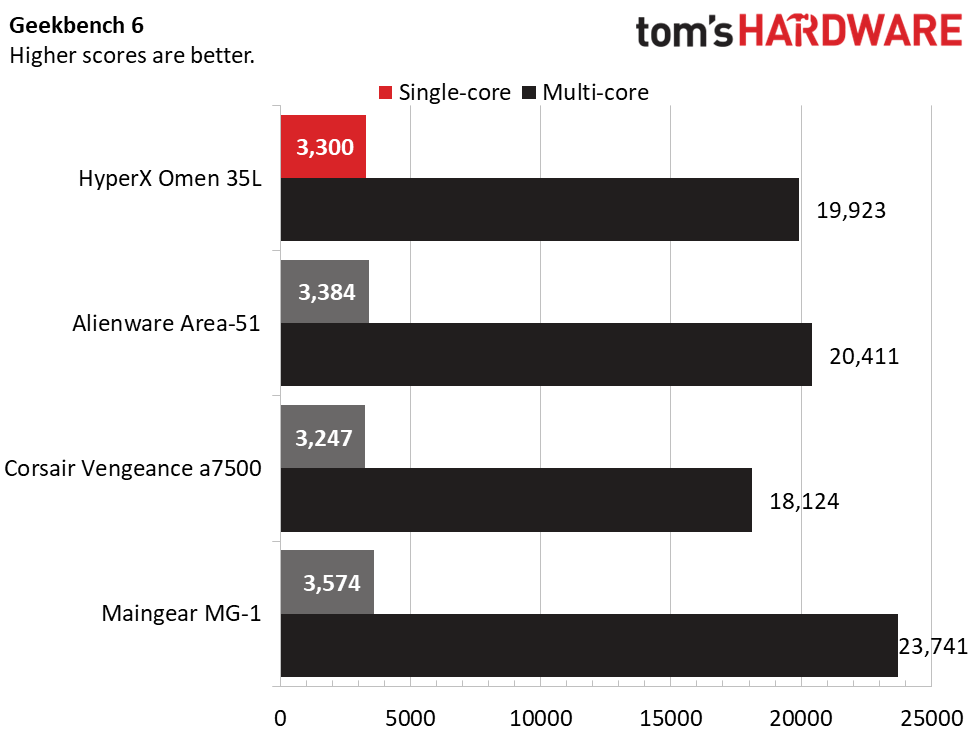
Featuring the same Ryzen 9 9950X3D processor, the HyperX and Alienware systems performed similarly across our CPU tests. In Geekbench 6, the HyperX system produced 19,923 points against Alienware’s 20,411 points, though it was handily outperformed by the Ryzen 9 9950X3D2-powered Maingear, at 23,741 points. With fewer cores, the Ryzen 7 9800X3D-powered Corsair finished last, at 18,124 points.

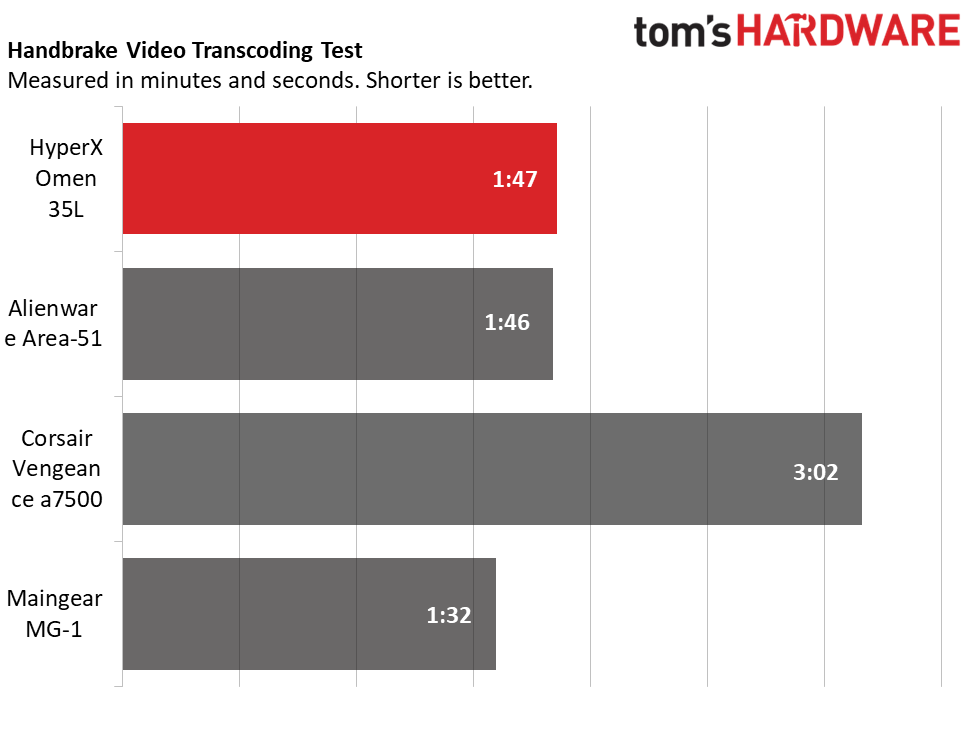
The HyperX desktop finished our Handbrake 4K-to-1080p video transcoding test in 1 minute and 47 seconds, tying the Alienware, though the Maingear edged ahead, at 1:32. The Corsair took nearly twice as long, at 3:02.

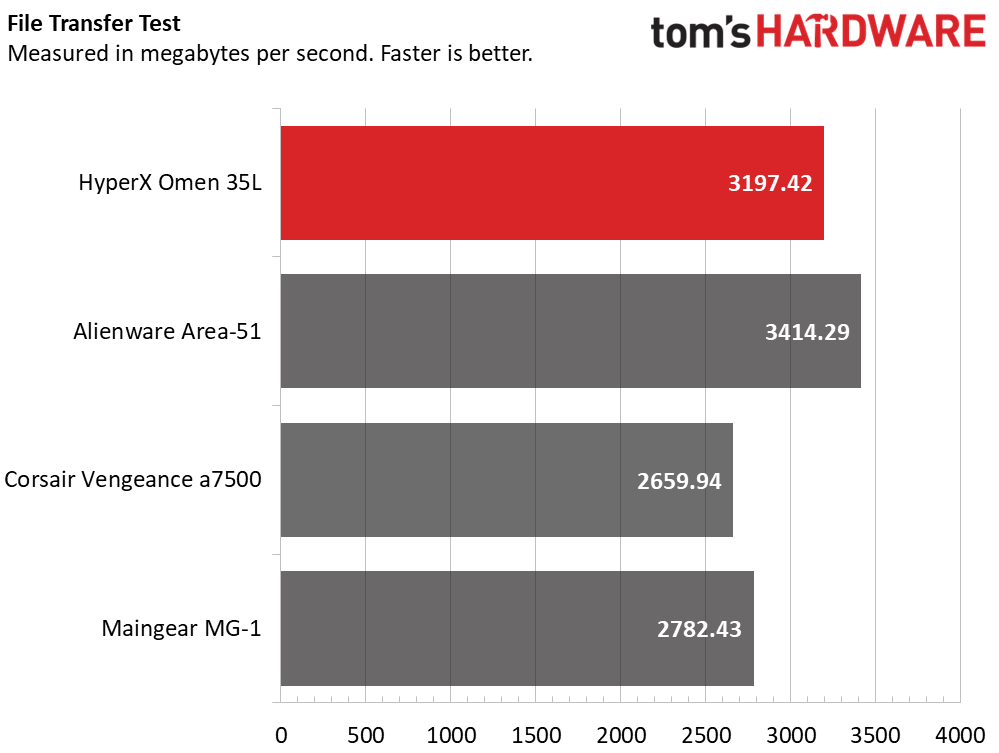
In our 25GB file transfer test, the HyperX’s average transfer speed of 3,197.42 MBps was excellent, just behind Alienware’s 3,414.29 MBps and ahead of the Corsair’s 2,659.94 MBps and Maingear’s 2,782.43 MBps.

Software and Warranty on the HyperX Omen 35L

HP includes several useful apps. Omen Gaming Hub app provides performance control, with per-fan RPM settings and, in Extreme mode, PPT and EDC settings for the Ryzen 9 CPU. The Advanced Performance Tuning section also provides PBO, CPU Boost, and voltage curve controls plus a benchmark to test your settings. For quick access, the app provides an overlay that shows your power profiles and system monitoring, including component temperatures and fan speeds.

Gaming Hub also provides customization of the LCD display on the liquid cooler. Many faces are available, from system monitoring to static images, GIFs, videos, and a clock. It seems simple, but it’s one of the most fun features of the system, allowing you to easily change up the look.

Lighting is managed through Omen Light Studio, which provides per-device RGB control. Fine control is possible – each of the five fans has 10 LEDs, which are individually selectable. Clicking and dragging selects multiple fans and LEDs at a time, to which you can apply preconfigured light recipes – Galaxy, Ocean, Jungle, Volcano, and Omen – and apply an effect, such as wave, static, ambient, breathing, color cycle, an audio visualizer, and radial. The speed and direction of the effect is also configurable. You can also create layered effects and save everything in profiles that you can export or import. HP covers the HyperX Omen 35L with a standard one-year warranty.

HyperX Omen 35L Configurations

We tested the HyperX Omen 35L with a Ryzen 9 9950X3D processor, 64GB of dual-channel DDR5-6000 RAM, GeForce RTX 5080 graphics, Windows 11 Pro, and two 1TB PCIe 5.0 solid-state drives. The system uses a 1,000W power supply and a 240 mm liquid CPU cooling with a built-in LCD display. This configuration represents the top of the stack, retailing for $6,210.98.

The entry-level is probably where the Omen 35L offers the least value – with standard liquid cooling and a modular power supply, this system is for premium builds. AMD-based starter configurations begin at $2,399.99 with a Ryzen 5 9600X or $2,589.99 with an Intel Core Ultra 5 250KF Plus. Standard components include a GeForce RTX 5060 Ti (8GB), 16GB of memory, and 1TB of PCIe 4.0 storage. Memory tops out at 128GB and two SSDs are supported up to 2TB each.

Bottom Line

HyperX Omen 35L

(Image credit: Tom's Hardware)

Primarily, the HyperX Omen 35L gets one thing right: it feels genuinely premium. Its sharp black-and-white design, quality lighting, quiet operation, and enthusiast-grade components like a modular power supply give it the polish it needs to compete against boutique builders and aftermarket systems. Its performance in our test system with a Ryzen 9 9950X3D and an RTX 5080 match the expectations for this lofty price point.

That said, it’s clear that this desktop is aimed at the more premium side of the market, as prices of the entry-level configurations are difficult to justify given their level of hardware. But if you have deep enough pockets for a well-equipped configuration, the HyperX Omen 35L is a highly compelling gaming desktop well worth considering alongside anything the market has to offer.
iBuyPower Slate Gaming Desktop review: Strong gaming value and extras

2026年9月30日 21:50

The $1,999 iBuyPower Slate arrives with a formula that's hard to argue with: an RTX 5070, a Ryzen 7 7700X3D, a 360mm liquid cooler, and a tempered-glass chassis with plenty of RGB lighting. It even goes beyond expectations by including gaming peripherals that don't feel like afterthoughts.

But in an increasingly competitive mid-range desktop market, attractive extras and gaming prowess alone aren't always enough. The question is whether the Slate's gaming-first focus justifies its price when rivals offer stronger all-around performance for similar money.

Design of the iBuyPower Slate Gaming Desktop

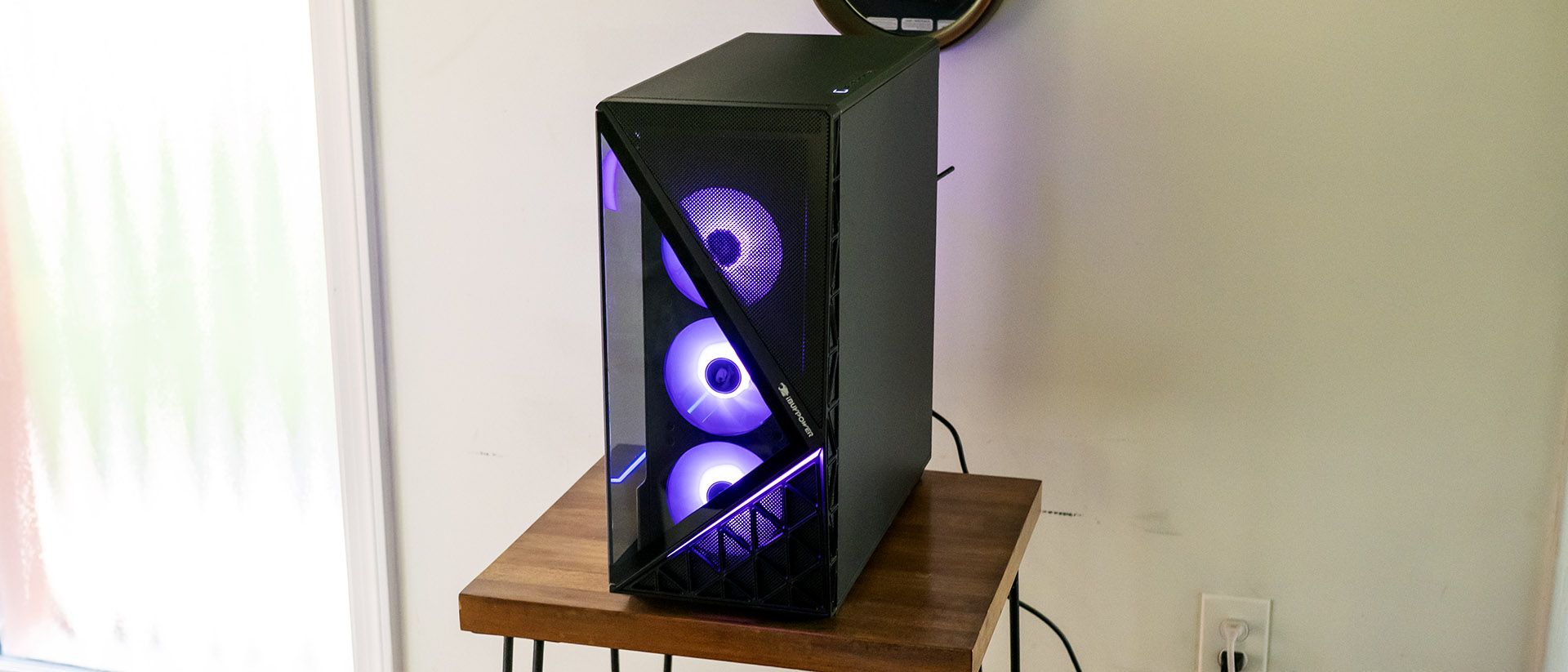
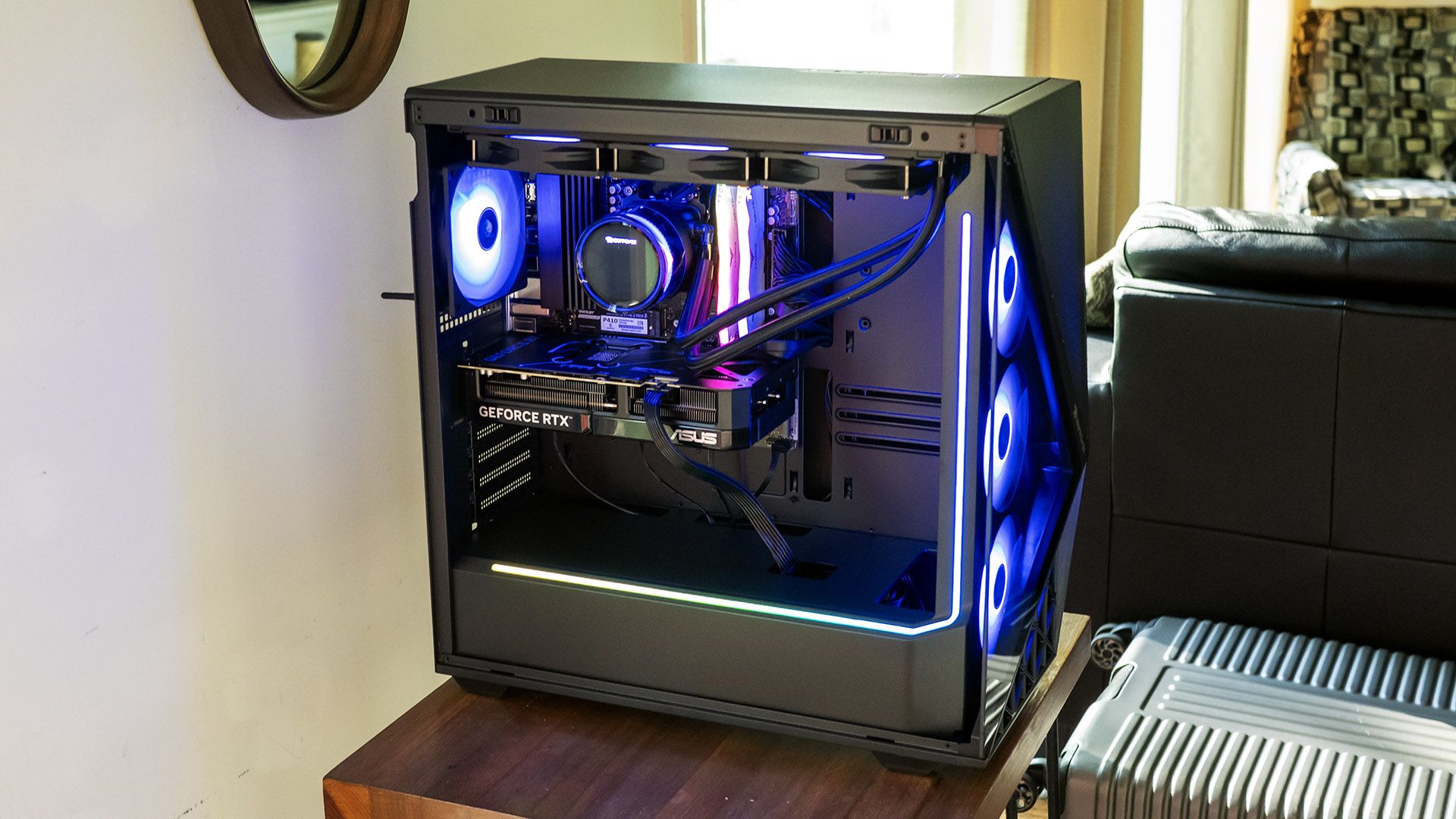
There’s no mistaking the Slate for anything but a gaming machine. It’s designed to be seen inside and out, with a full-view tempered glass side panel. The front panel’s triangle glass partially shows off a trio of 120 mm RGB fans. The tower sits firmly in mid-tower territory, at 8.7 x 19.3 x 19.5 inches.

iBuyPower Slate Gaming Desktop
Tom's Hardware
iBuyPower Slate Gaming Desktop
Tom's Hardware

The mesh covering the rest of the front and top permits airflow and should do a decent job of blocking dust, though the case’s only removable air filter is under the bottom-mounted power supply.

Inside, the Slate’s blacked-out interior offers an RGB light strip running along the power supply compartment and up the front panel. Additional lighting comes from the two memory DIMMs. The GPU, an Asus Dual RTX 5070 in our review unit, lacks illumination. The lighting can be controlled via the Hyte Nexus app, though not on a per-component basis. (See the Software section later in this review.)

iBuyPower Slate Gaming Desktop Specifications

CPU

AMD Ryzen 7 7700X3D

Motherboard

ASRock B560M-CX R2.0

Memory

32GB DDR5-5200 (2x 16GB)

Graphics

Nvidia GeForce RTX 5070 (Asus Dual Gaming OC; 12GB GDDR7, 2,542 MHz boost clock)

Storage

1TB PCIe 4.0 SSD (Patriot P410)

Networking

RZ616 Wi-Fi 6E

Front Ports

USB-C 3.2, 2x USB-A 3.2, headphone and microphone jacks

Rear Ports

USB-C 3.2 (10 Gbps), USB-A 3.2 (10 Gbps), 2x USB-A 3.2 (5 Gbps), 4x USB 2.0, Ethernet, HDMI, audio jacks

Power Supply

750 watts, non-modular

Cooling

360 mm liquid (iBuyPower)

Operating System

Windows 11 Home

Dimensions (WxDxH)

8.7 x 19.3 x 19.5 inches (221 x 490 x 495 mm)

Price (as configured)

$1,999.99

Ports and Upgradeability on the iBuyPower Slate Gaming Desktop

Mid-tower desktops tend to include lots of ports, and iBuyPower’s Slate doesn’t disappoint. The top-mounted front connectivity includes one USB-C and two USB-A (all 5 Gbps) plus separate headphone and microphone jacks. The positioning of these ports works best if the desktop is placed on the floor; it’s less ideal on a desk.

iBuyPower Slate Gaming Desktop

(Image credit: Tom's Hardware)

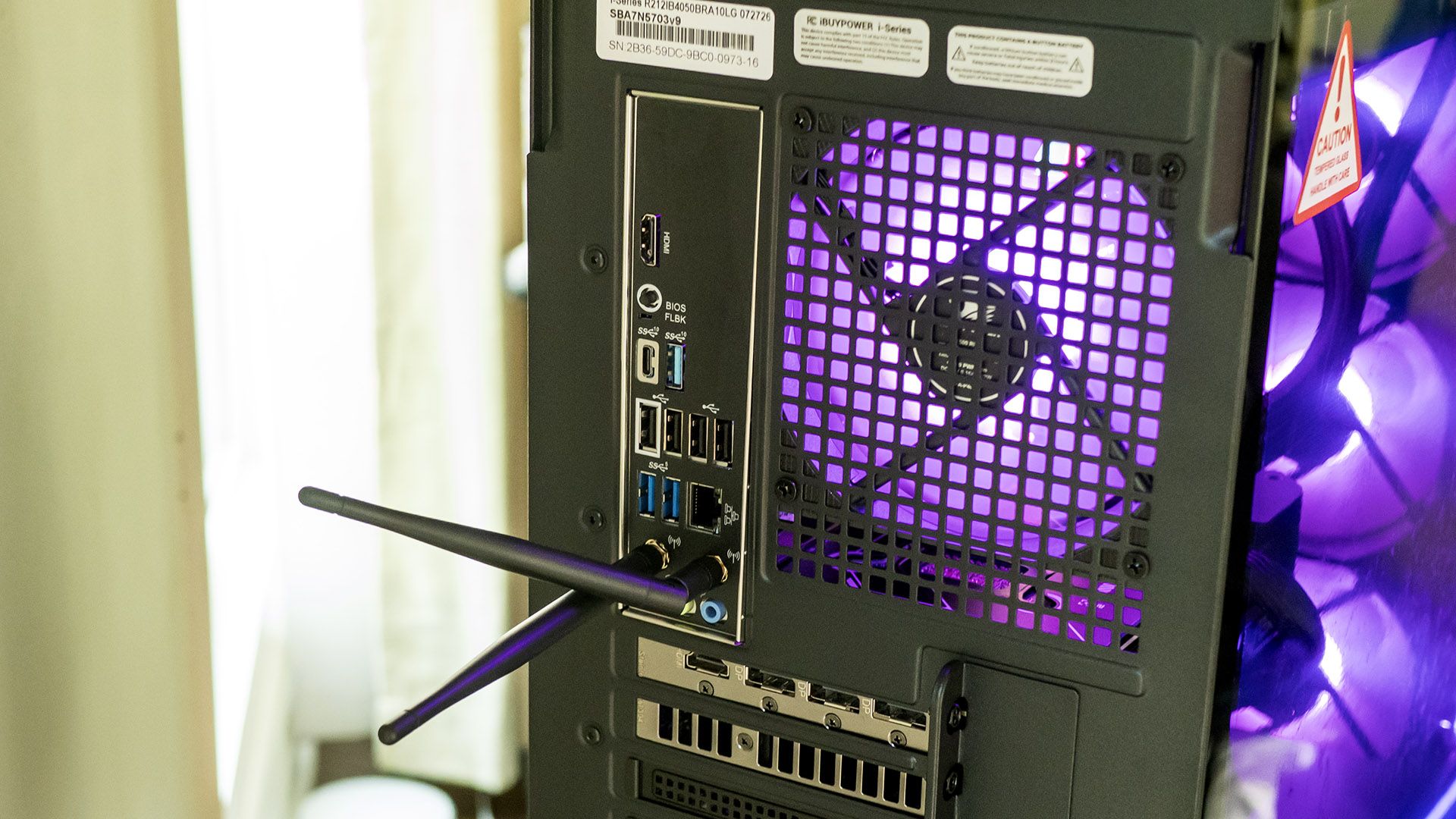
Rear connectivity on the ASRock B650M-CX motherboard includes one USB-C 3.2 (10 Gbps), one USB-A 3.2 (10 Gbps), two USB-A 3.2 (5 Gbps), four USB 2.0, Ethernet, HDMI, and audio jacks. Though there are no truly high-speed ports, they aren’t expected outside of high-end towers with pricier motherboards. The desktop also includes Wi-Fi 6E and Bluetooth – the antennas must be connected as shown here for meaningful range.

iBuyPower Slate Gaming Desktop

(Image credit: Tom's Hardware)

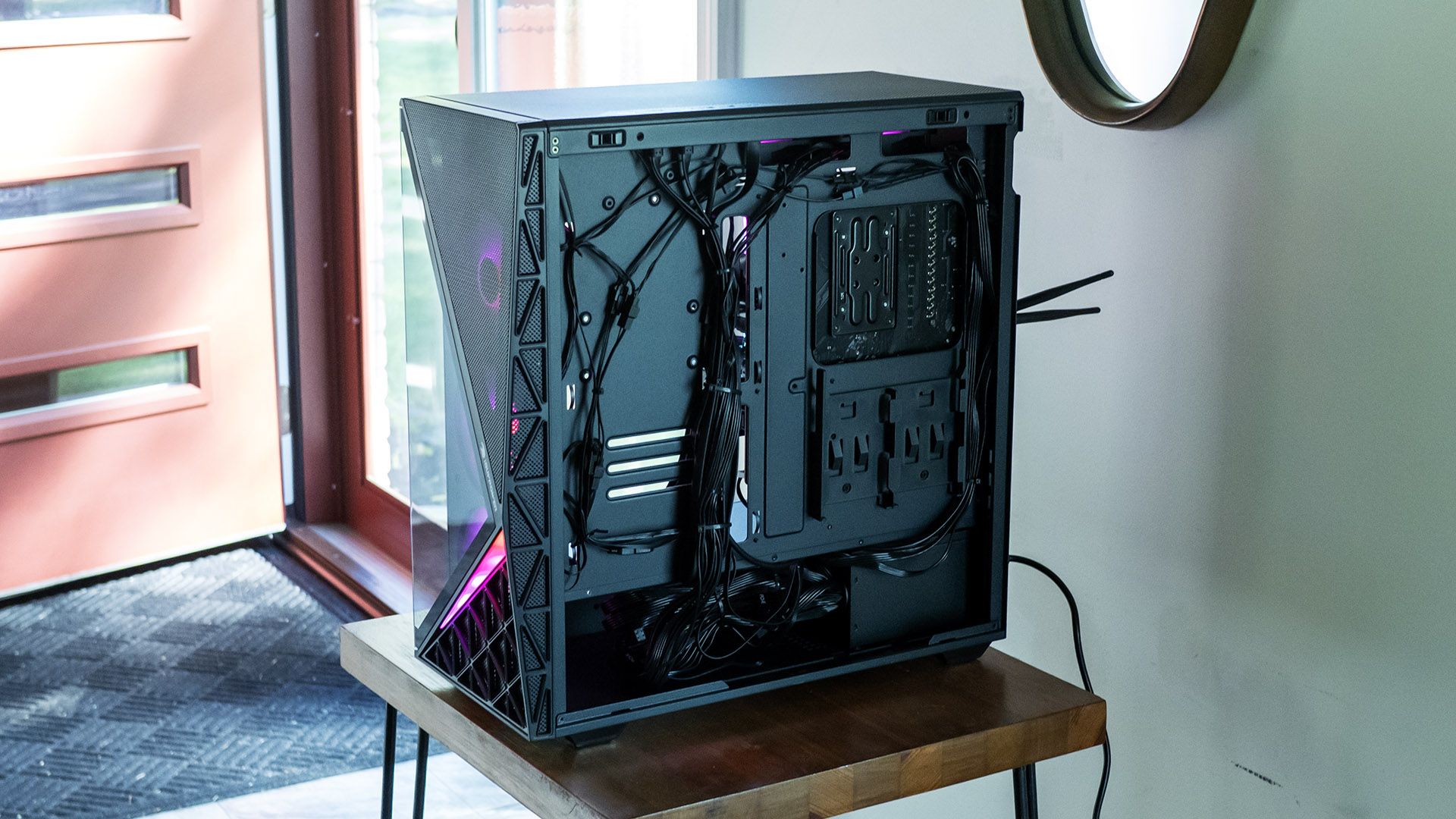
The side panels come off with a tug at the top rear, hinging outward and away. Seven 120 mm fans – three front, three on the top-mounted 360 mm CPU cooling radiator, and one rear – provide plentiful airflow. Cabling is reasonably tidy, though the bundle of unused cables from the non-modular 750-watt power supply is a bit of a mess.

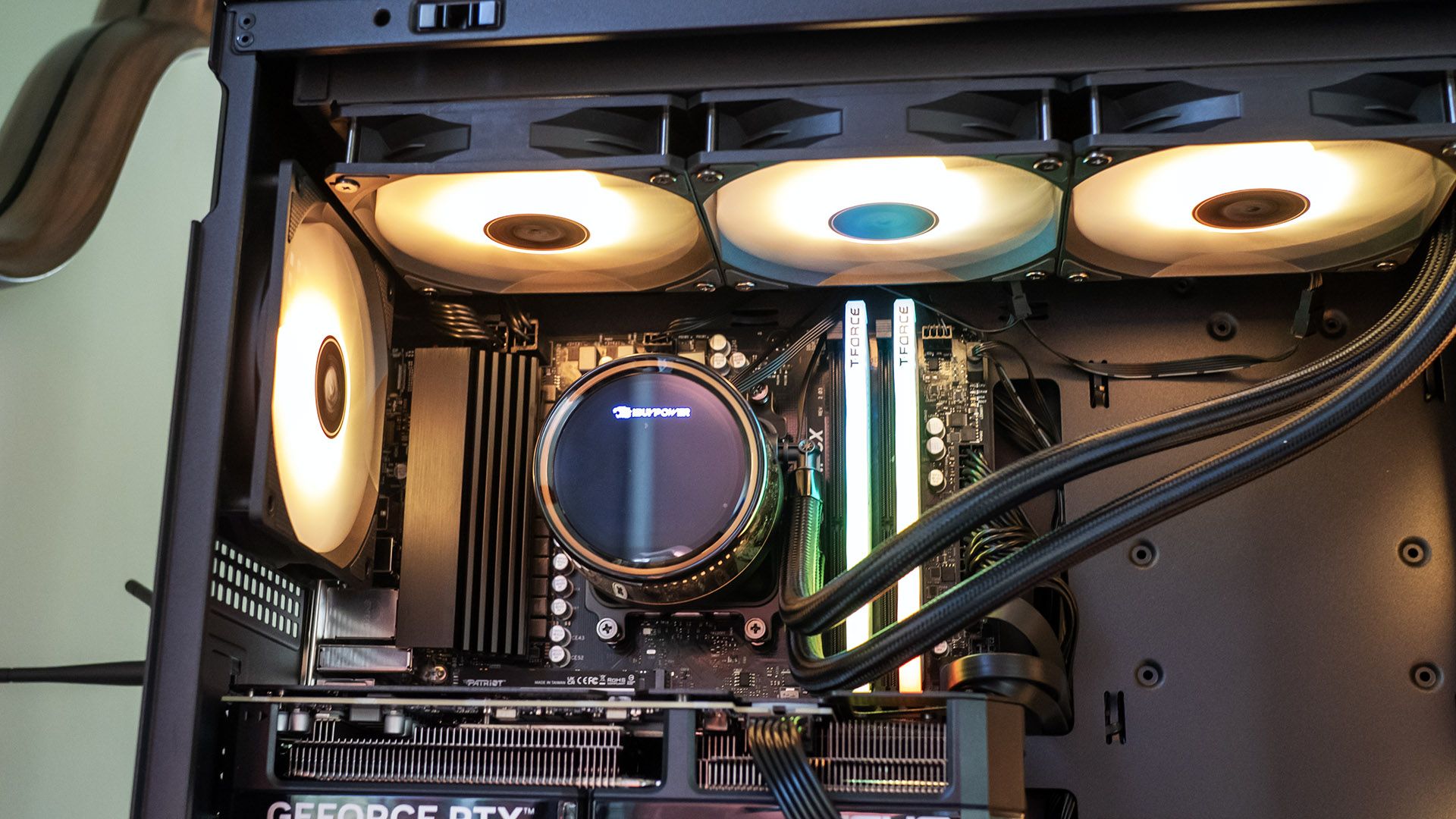
The CPU cooler is more than a basic model, with an LED screen showing CPU temperature, frequency, and load. The display can’t be customized, though it can be toggled off in the Hyte Nexus app.

iBuyPower Slate Gaming Desktop
Tom's Hardware
iBuyPower Slate Gaming Desktop
Tom's Hardware

The Slate’s expansion options include one open PCIe x16 slot and four DIMM slots, two of which are unpopulated. The motherboard offers two M.2 2280 drive slots. There are two 2.5-inch drive sleds behind the motherboard, but no room for a 3.5-inch drive.

Gaming and Graphics on the iBuyPower Slate Gaming Desktop

We are testing the iBuyPower Slate with a Ryzen 7 7700X3D processor, GeForce RTX 5070 GPU, and 32GB of RAM.

Playing 007 First Light, at 3840 x 2160 with High settings and DLSS enabled, I observed between 60 and 70 frames per second (FPS) in outdoor scenes and closer to 80 FPS indoors. Using DLSS was required for smooth gameplay, as I saw roughly half the FPS without it.

Our comparison desktops include the Asus ROG G700 (Core Ultra 7 265KF, RTX 5070, $2,029.99 when reviewed) and the CyberPowerPC Gaming Desktop GXi3800BSTV2 (Core Ultra 7 270K Plus, RTX 5070, $2,309.99), both mid-tower systems with the same GPU but Intel processors.

iBuyPower Slate Gaming Desktop
Tom's Hardware
iBuyPower Slate Gaming Desktop
Tom's Hardware
iBuyPower Slate Gaming Desktop
Tom's Hardware
iBuyPower Slate Gaming Desktop
Tom's Hardware
iBuyPower Slate Gaming Desktop
Tom's Hardware

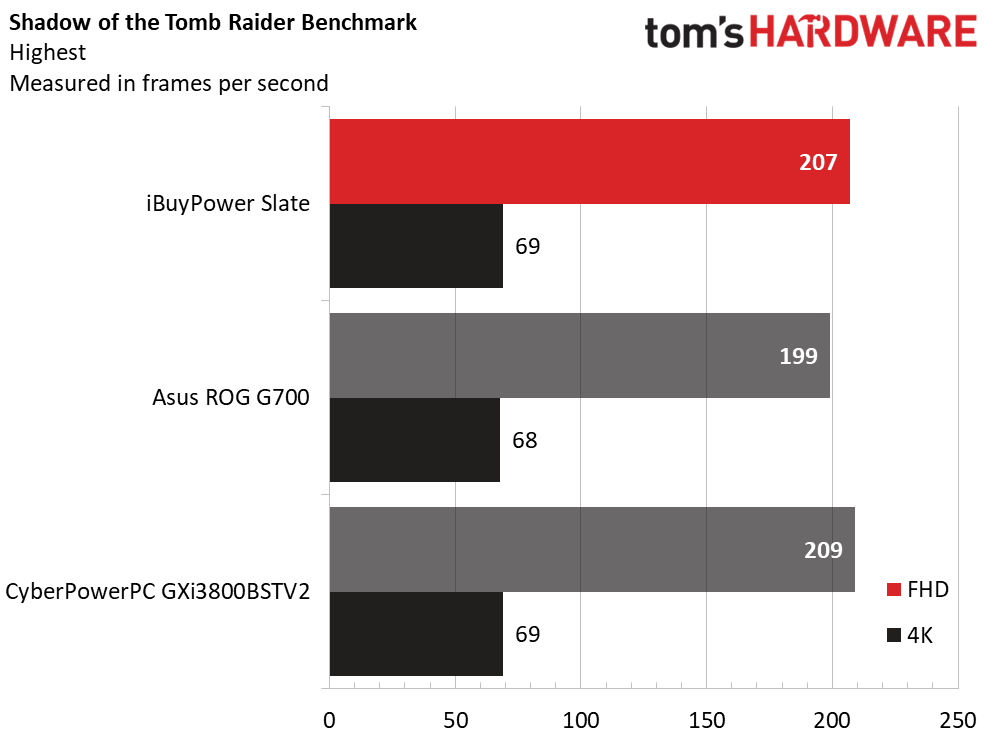
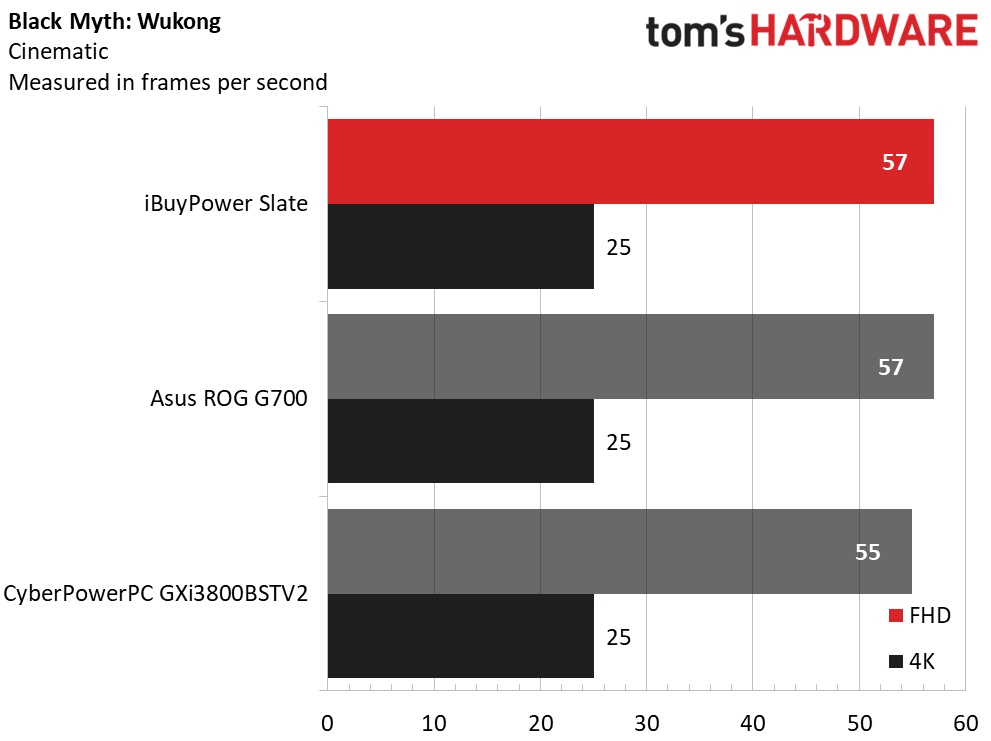
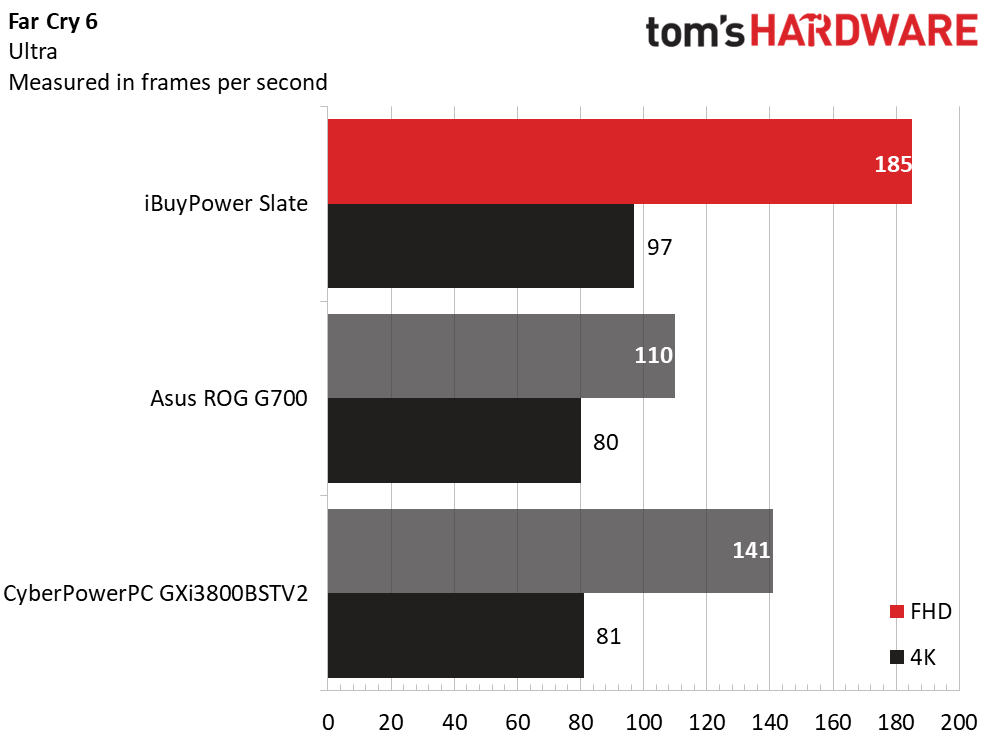
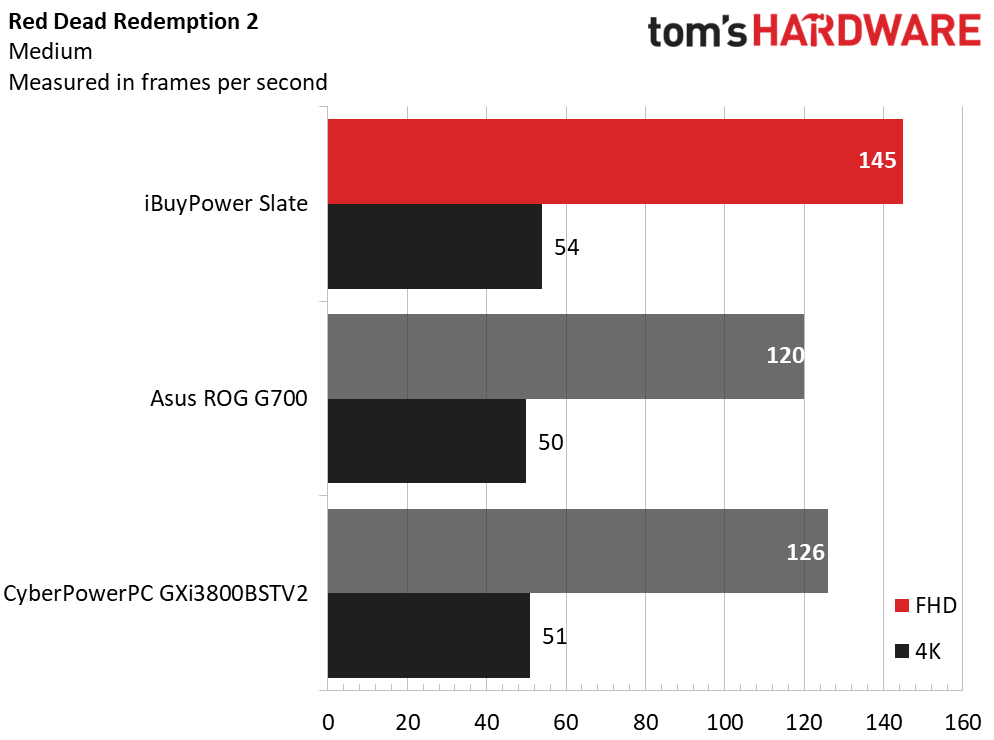
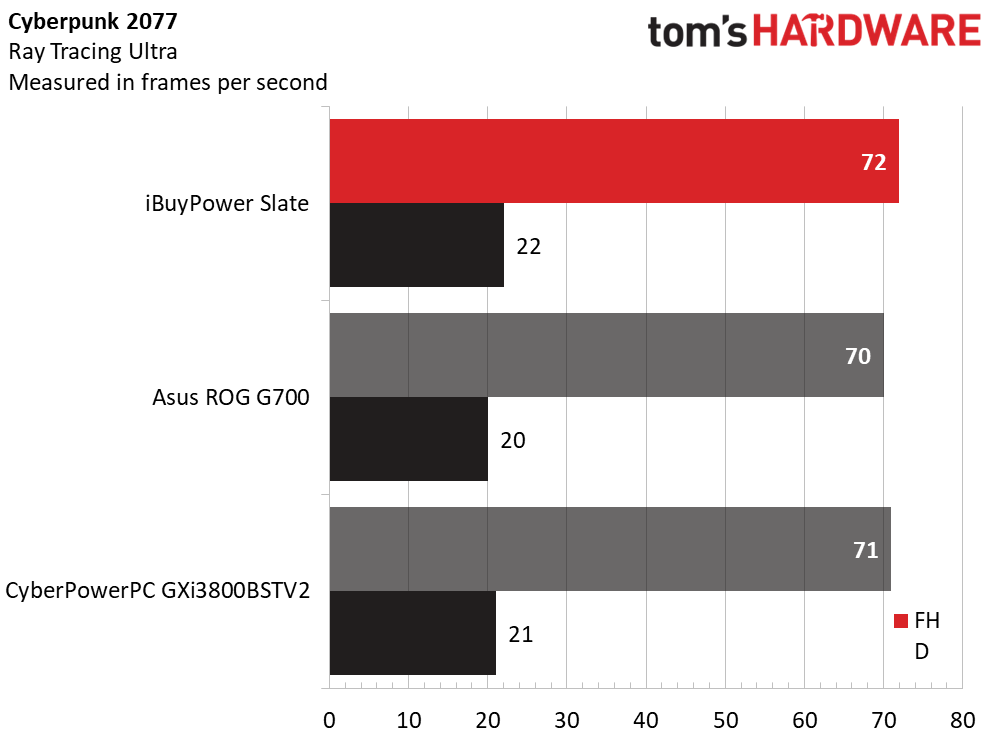
At 1080p, iBuyPower’s Slate proved competitive overall, matching the Asus and CyberPowerPC in Shadow of the Tomb Raider (Highest settings), Cyberpunk 2077 (Ray Tracing Ultra), and Black Myth: Wukong (Cinematic). However, its Ryzen 7 7700X3D paid dividends in Far Cry 6 (Ultra), where its 185 FPS was well ahead of the Asus (110 FPS) and CyberPowerPC (141 FPS). It led by a similar amount in Red Dead Redemption 2, with 145 FPS against the Asus’ 120 FPS and the CyberPowerPC’s 126 FPS.

The Slate generally didn’t differentiate itself from the other desktops at the 4K resolution, an expected result since that resolution is almost always GPU-limited and these systems all rely on an RTX 5070. The exception was Far Cry 6, where the Slate’s 97 FPS greatly outperformed the 80 and 81 FPS produced by the Asus and CyberPowerPC, respectively.

Overall, despite its Ryzen 7 7700X3D not being nearly as powerful for general use as the Core Ultra 7 265K and Core Ultra 7 270K Plus featured in our competing systems, it can outperform both chips in games.

We stress-test gaming desktops running 15 loops of the Metro: Exodus benchmark at RTX settings. The iBuyPower desktop posted highly stable performance, averaging 145.7 FPS across all runs with less than a one frame variance across all runs. The Ryzen 7 7700X3D’s average temperature was 43 degrees Celsius and its average clock was 4.29 GHz. The RTX 5070 ran at 64 C and had an average core clock of 2.64 GHz.

I noticed a decent amount of fan noise from the Slate particularly when the CPU was stressed, causing the triple-fan CPU cooler to quickly ramp up to high speed. The fan noise was hardly noticeable for daily use and was relatively low while gaming as well.

Productivity Performance on the iBuyPower Slate Gaming Desktop

We tested the iBuyPower Slate gaming desktop featuring a Ryzen 7 7700X3D processor, 32GB of dual-channel DDR5-5200 RAM, and a 1TB PCIe 4.0 solid-state drive (a Patriot P410 as tested).

iBuyPower Slate Gaming Desktop
Tom's Hardware
iBuyPower Slate Gaming Desktop
Tom's Hardware
iBuyPower Slate Gaming Desktop
Tom's Hardware

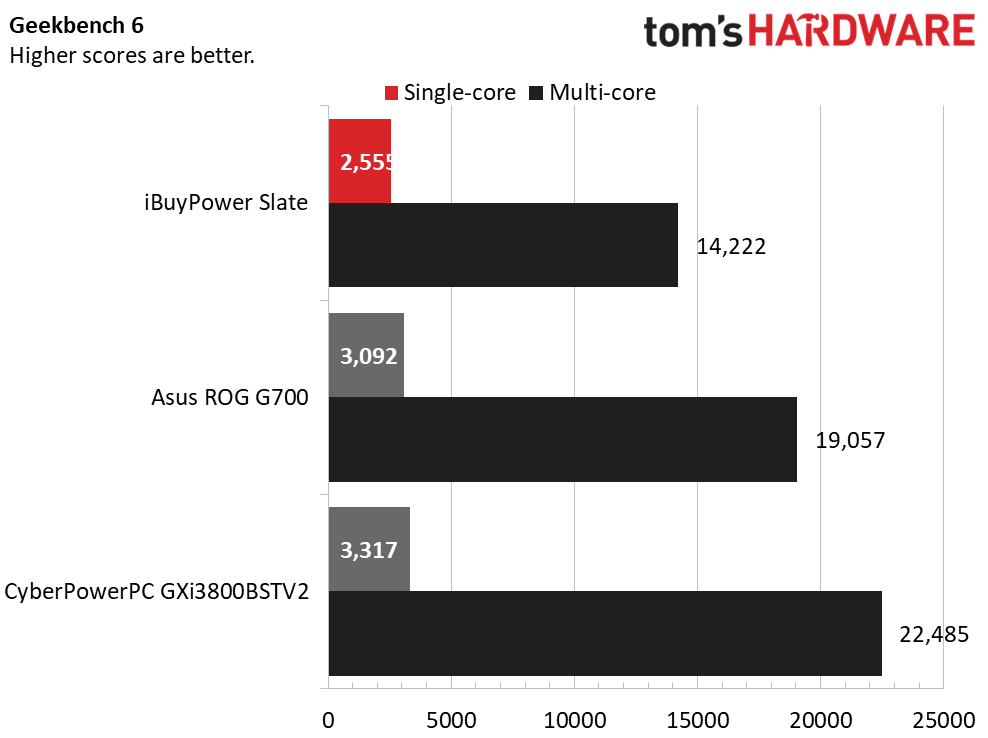
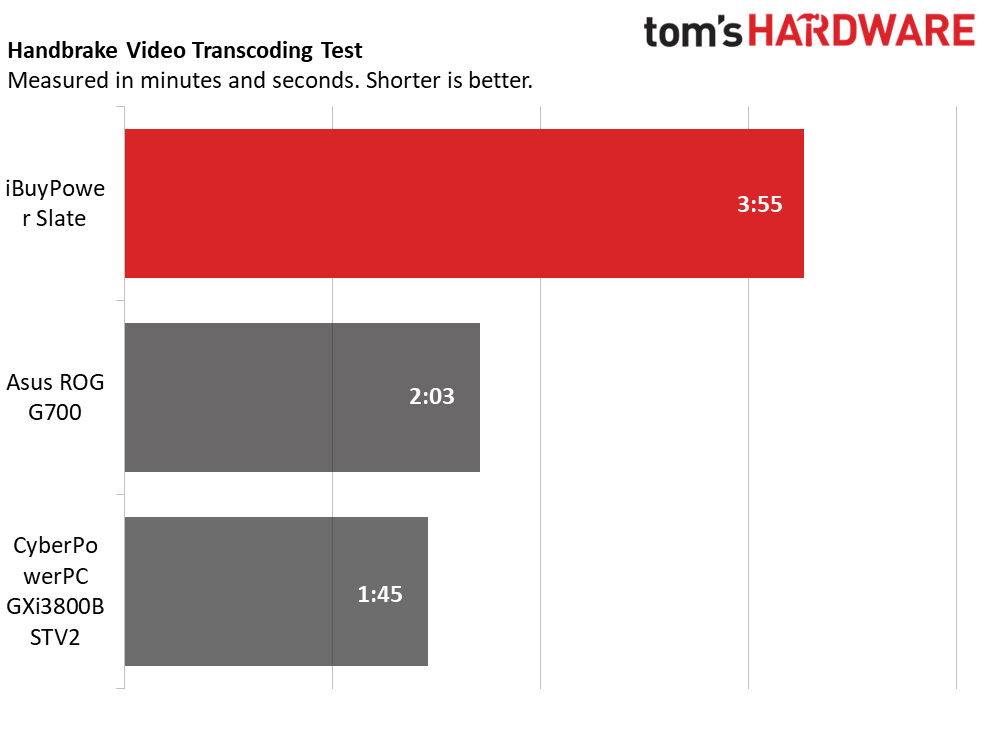
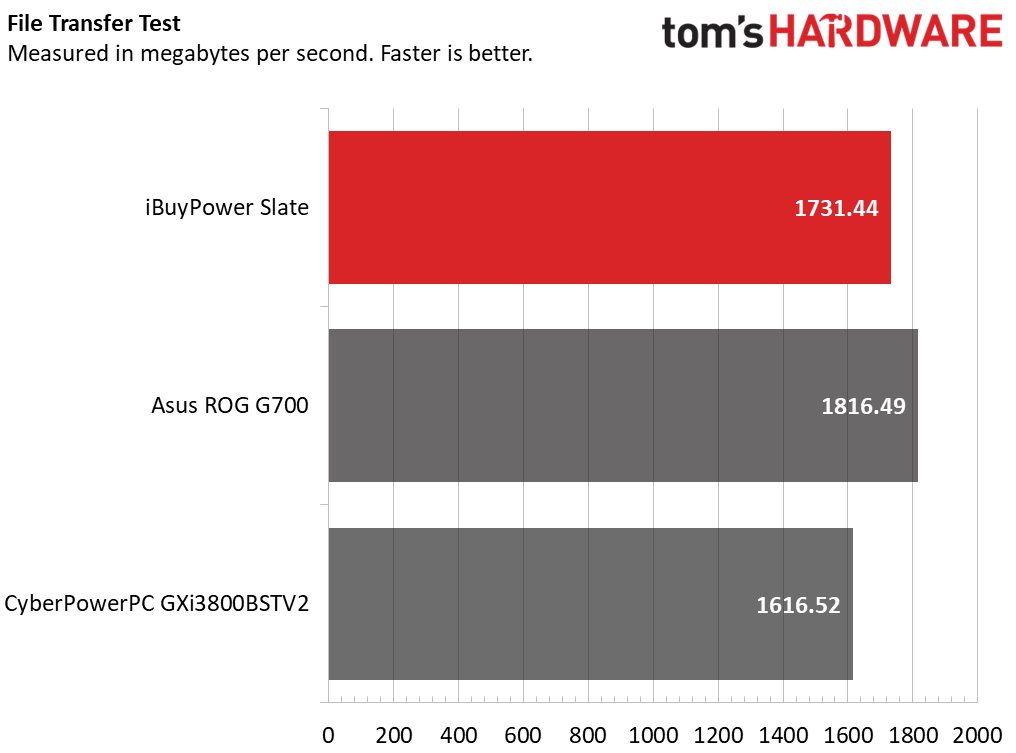
Productivity performance isn’t a strong point for this Slate configuration. Though its Ryzen 7 7700X3D remains potent for gaming, its previous generation eight-core architecture is outmuscled by the Core Ultra 7 K-class chips in both the Asus and CyberPowerPC systems, particularly the latter with its refreshed Core Ultra 7 270K Plus. The delta was significant: iBuyPower's system scored 14,222 in Geekbench multi-core versus 22,485 for CyberPowerPC, and took 3:35 to complete our 4K to 1080p Handbrake transcoding test versus just 2:03 for the Asus and 1:45 for the CyberPowerPC. The iBuyPower system does, however, include a decent storage drive, proving competitive in our 25GB file transfer test.

Despite the Slate’s performance delta versus the Core Ultra 7 systems, this PC is still highly capable for daily productivity and moderate content creation, such as video editing. Only those squeezing every last drop of performance out of their CPU will find it compelling to go with a more powerful chip than the Ryzen 7 7700X3D.

Keyboard and Mouse with the iBuyPower Slate Gaming Desktop

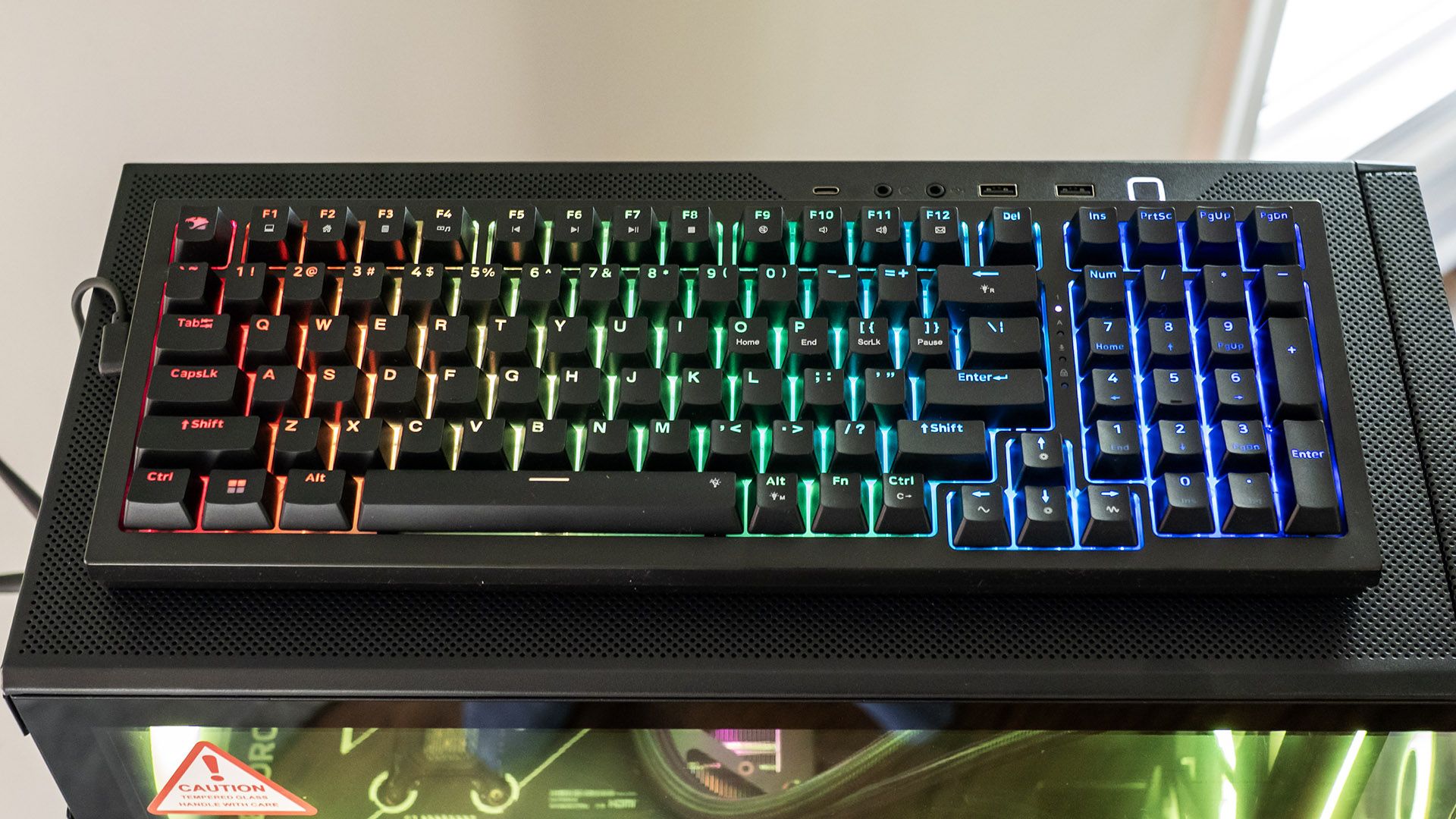
The Slate includes much better than average peripherals. The mechanical keyboard is the standout. Though not stated in the specs, it feels like it uses linear switches favored by gamers for their predictability. It felt rock solid in my testing and wasn’t overly loud. The keyboard supports RGB backlighting, though not per-key – the lighting can be set in the included Hyte Nexus app for various colors and patterns. You can also control the lighting through keyboard shortcuts – Fn+Ctrl cycles colors, Fn+Left/Right arrows alter brightness, Fn+Space Bar disables lighting, and Fn+Alt cycles through 16 backlighting patterns, such as breathing, pulsing, and steady. It’s also nice to see that the keyboard uses a detachable USB-C cable.

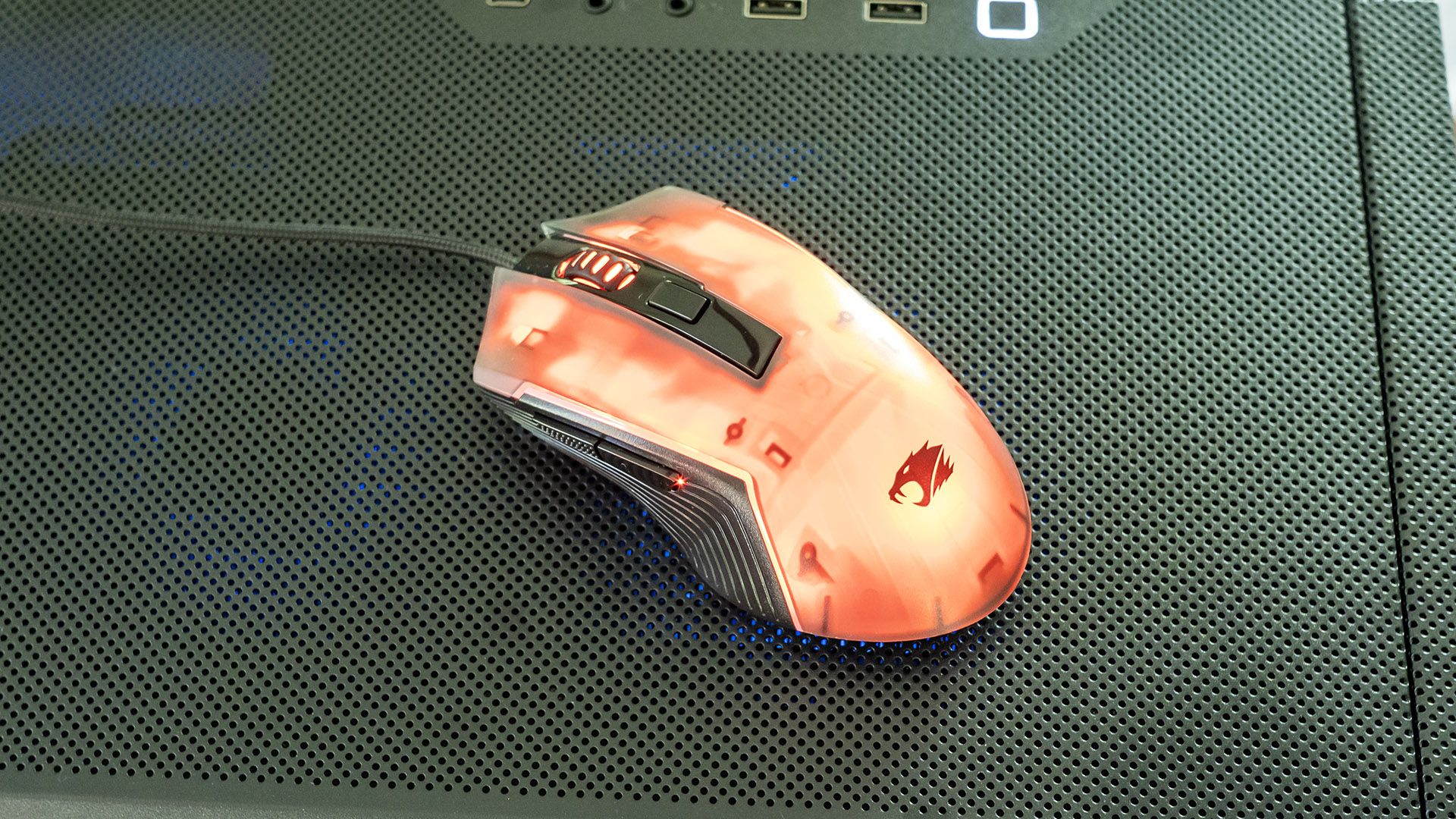
The mouse is also better than average, though it’s only for right handers. The standard buttons offer a solid feel, with two side buttons and a notched scroll wheel. The DPI button behind the scroll wheel switches between 1,200, 2,400, 3,500, 5,500, and 7,200 DPI, which are visually indicated by the DPI button illuminating in red, blue, green, purple, and yellow, respectively. The mouse fits my medium-size hand well. It’s internally backlit in RGB color, which can be configured in Hyte Nexus or toggled through 10 modes pressing the button on the underside. Patterns include color streaming, steady, and breathing, to name a few.

iBuyPower Slate Gaming Desktop
Tom's Hardware
iBuyPower Slate Gaming Desktop
Tom's Hardware

Software and Warranty on the iBuyPower Slate Gaming Desktop

Besides the usual preinstalled Windows 11 apps, iBuyPower only preloads one app – Hyte Nexus. It provides basic component temperature and frequency monitoring, but its real focus is RGB lighting control.

The menu is confusing – there are tiles for different components, such as the case, but these have no effect since the particular case used in the Slate isn’t recognized. Instead, all the action happens in the Lighting section. Many preset lighting recipes are included, such as Rainbow, Aurora, Ice, Fireplace, and Forest, which even apply to the keyboard and mouse. There are also options for screen mirroring, audio visualization, and static colors. You can save your settings in profiles.

That said, there’s no way to control lighting on a per-component basis – colors and patterns apply to all components at once since they are all connected to ARGB header 1. Confusingly, the app lets you change settings for the other headers, but this has no effect since nothing is connected to them. If the app indicated that those headers aren’t connected, this would have been more straightforward. The Slate nonetheless allows a decent amount of lighting customization despite lacking an advanced lighting controller, which would have increased the cost.

iBuyPower covers the Slate with a one-year parts and labor warranty.

iBuyPower Slate Gaming Desktop Configurations

We tested the iBuyPower Slate Gaming Desktop with a Ryzen 7 7700X3D processor, GeForce RTX 5070 graphics card, 32GB (2x 16GB) of DDR5-5200 RAM, and a 1TB PCIe 4.0 SSD. A mechanical backlit gaming keyboard and mouse are included in the box.

Best Buy offers several other variations of the Slate. A $1,679.99 starter model included a Core i7-14700F and RTX 5060 while a $1,799.99 model stepped up to a Core Ultra 7 265F and RTX 5060 Ti. Above our test model, a $2,299.99 variant included a Ryzen 9 9900X3D, while a range-topping $2,999.99 model offered a Ryzen 9 7900X, an RTX 5080, and a 2TB SSD.

Bottom Line

iBuyPower’s Slate gets the mid-tier gaming desktop formula almost exactly right. Visually, its RGB lighting is attractive and reasonably configurable even if it lacks per-component control, and its RTX 5070 and Ryzen 7 7700X3D comfortably power through today’s games at 1080p and 1440p, with 4K possible using dialed-down visual quality or DLSS. iBuyPower goes above expectations by including a liquid CPU cooler with a built-in screen and by including a mechanical RGB keyboard and gaming mouse.

Where the Slate stumbles, as least in our reviewed configuration, is processing power. Though the Ryzen 7 7700X3D remains potent for gaming, it’s outclassed by Core Ultra 7 K-class chips for general use, which can be had in systems costing similar money. But for pure gamers, this Slate is a standup performer.

❌
❌