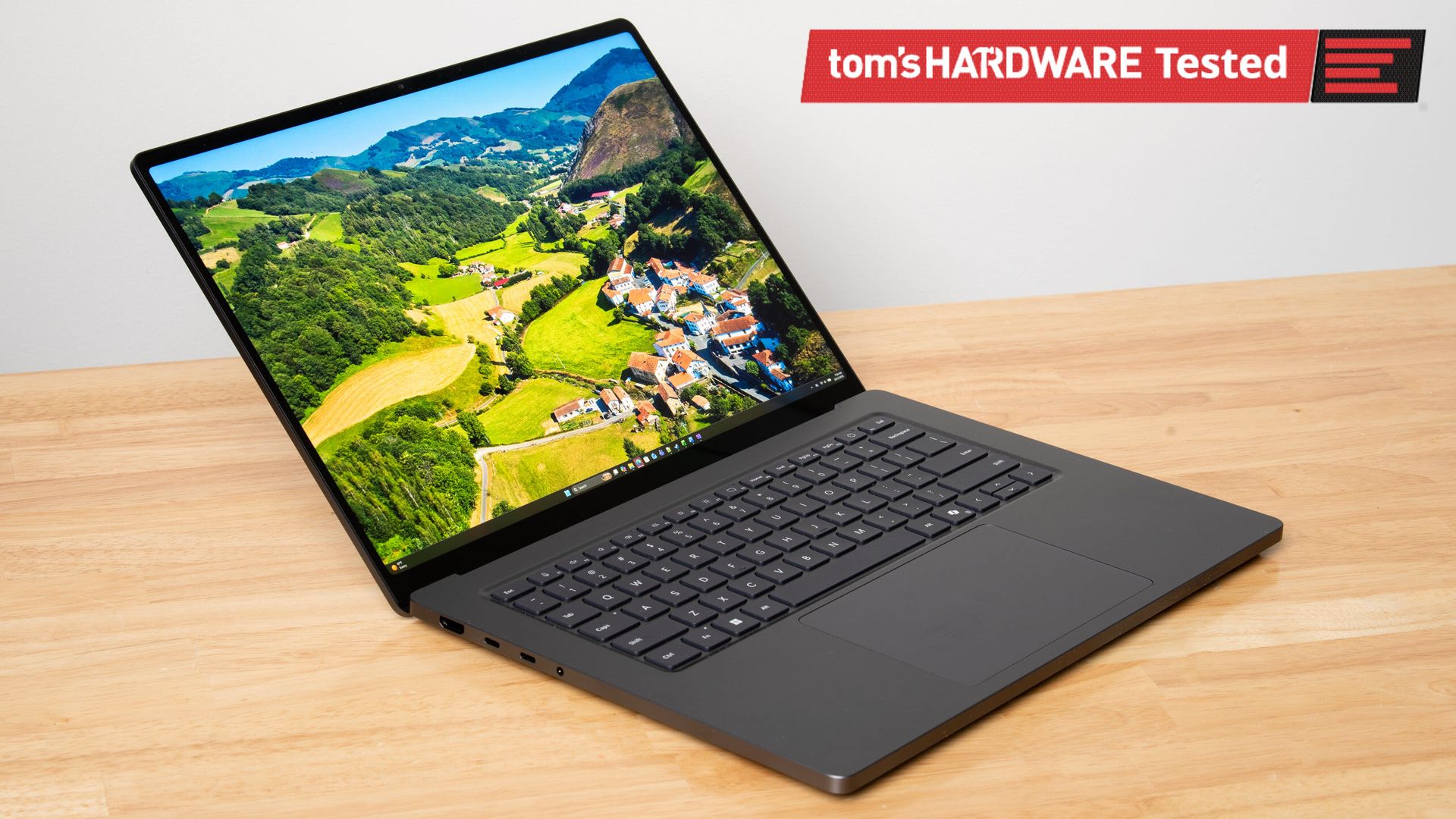
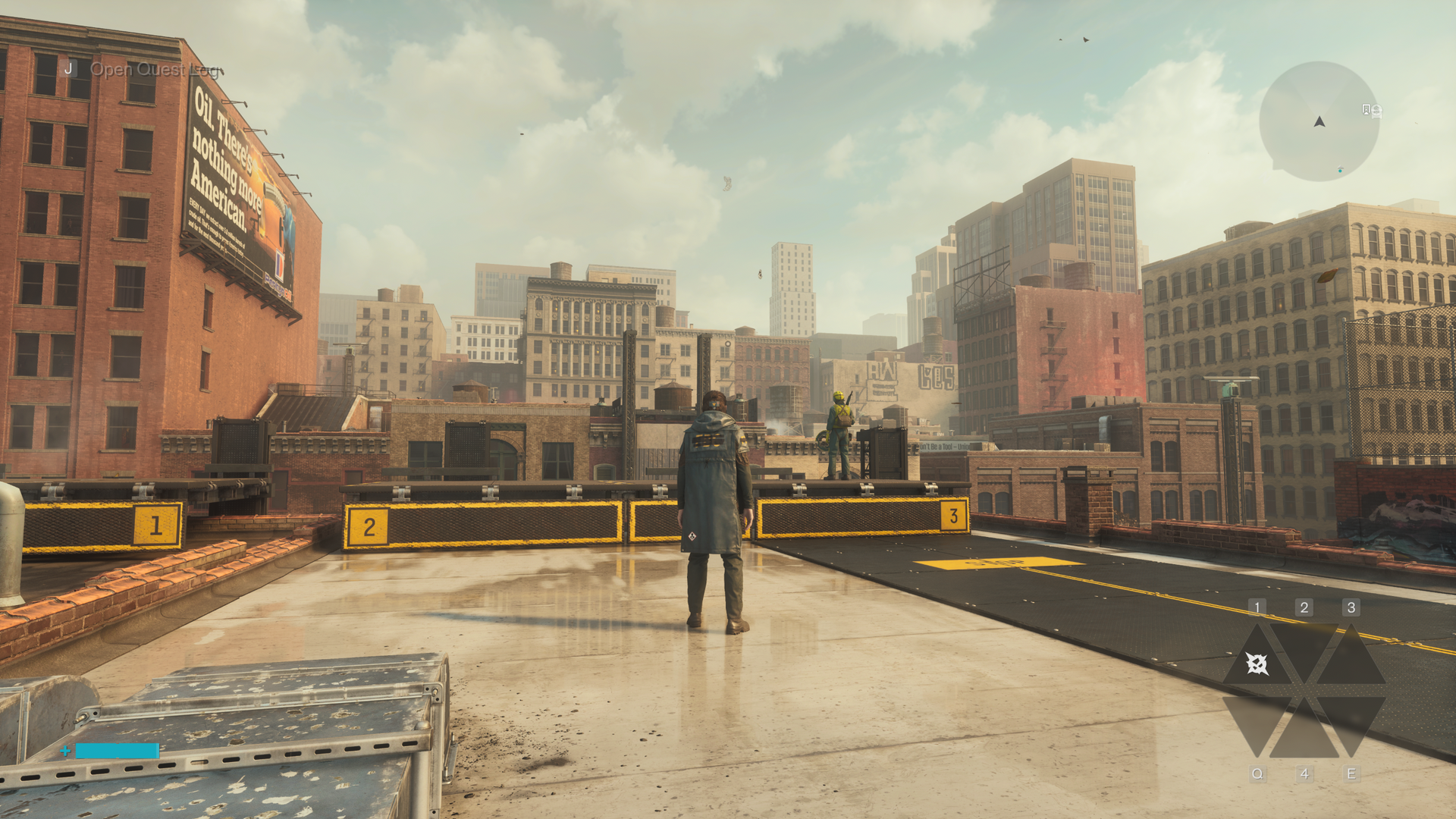
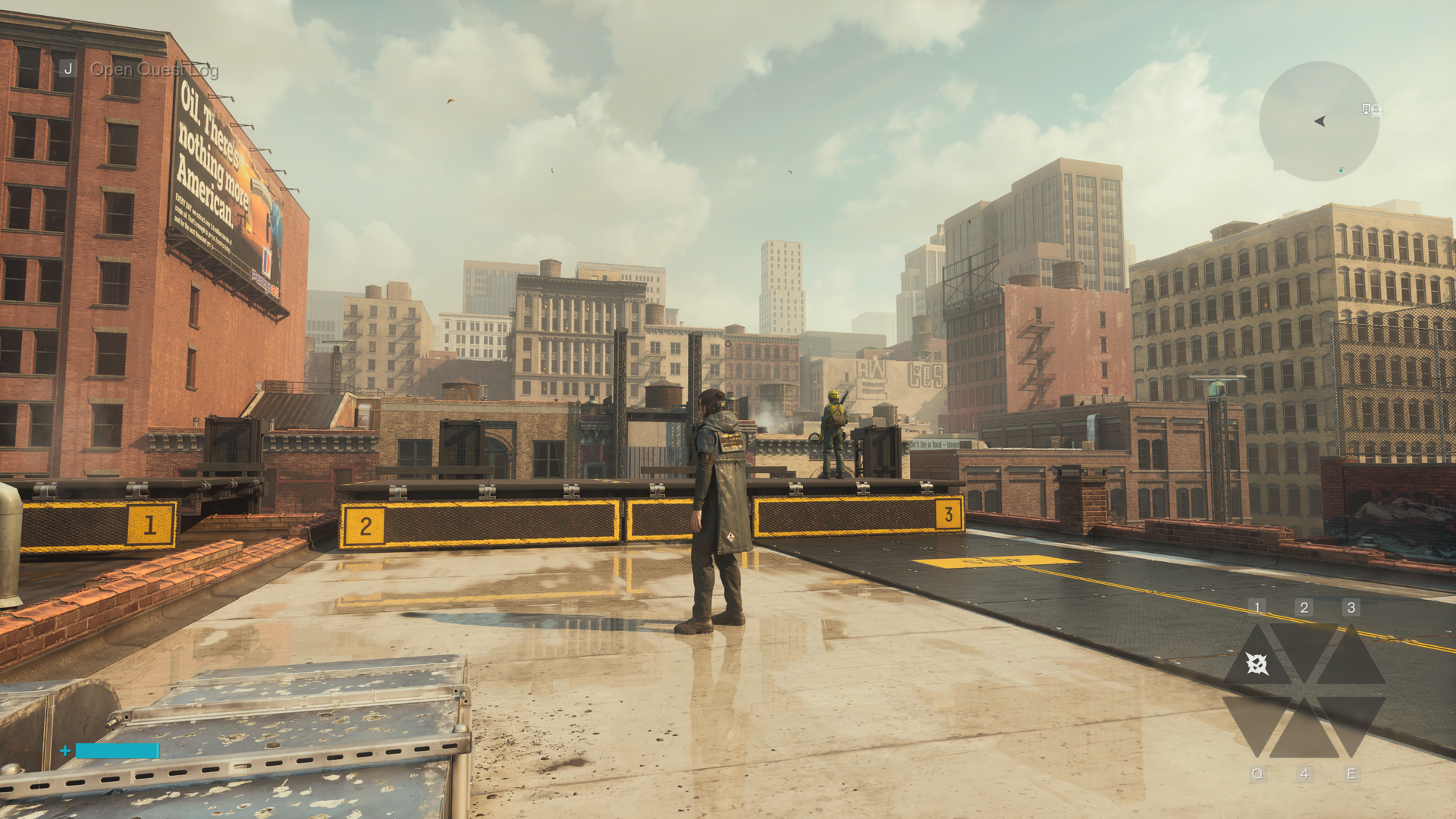
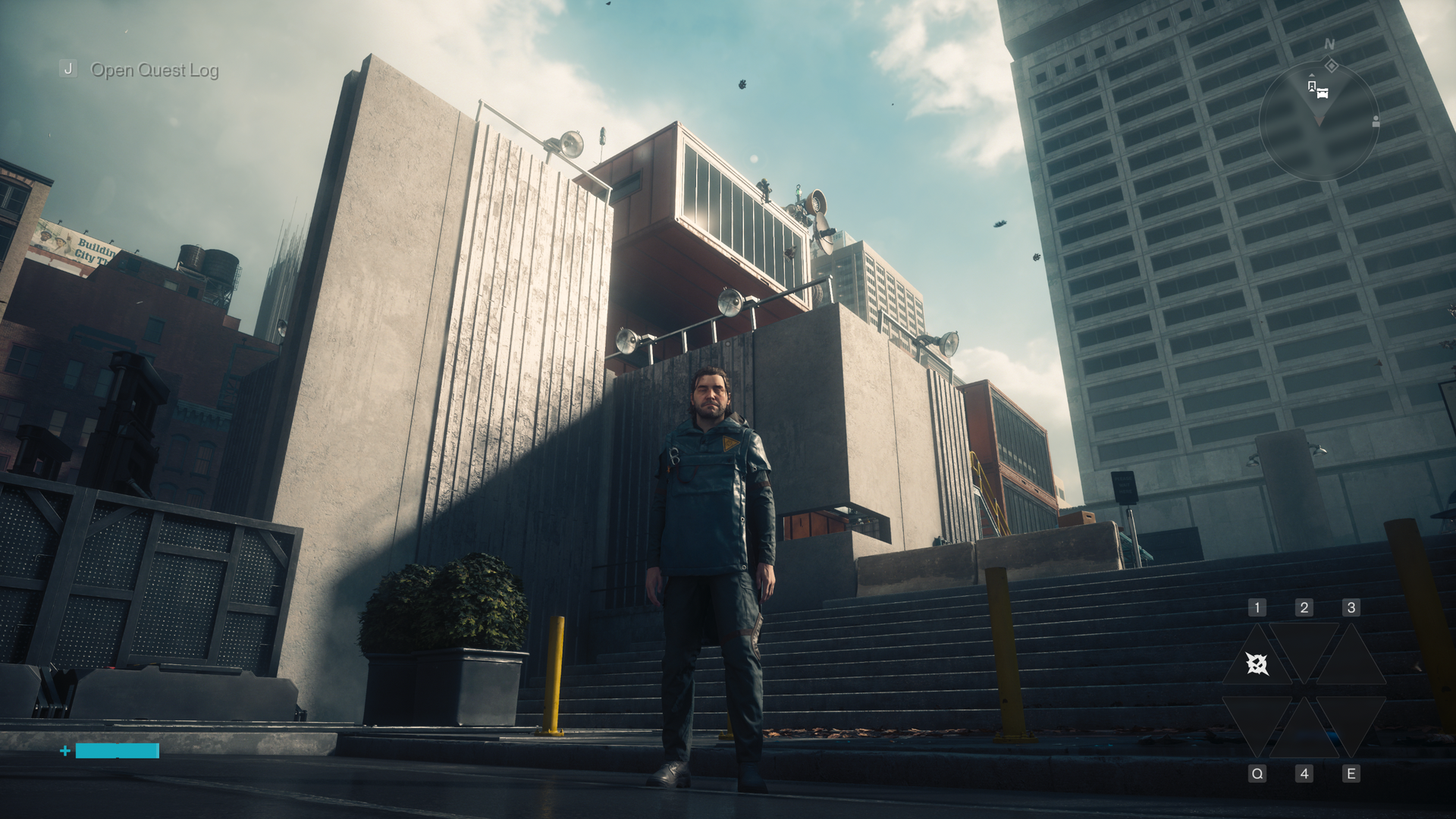
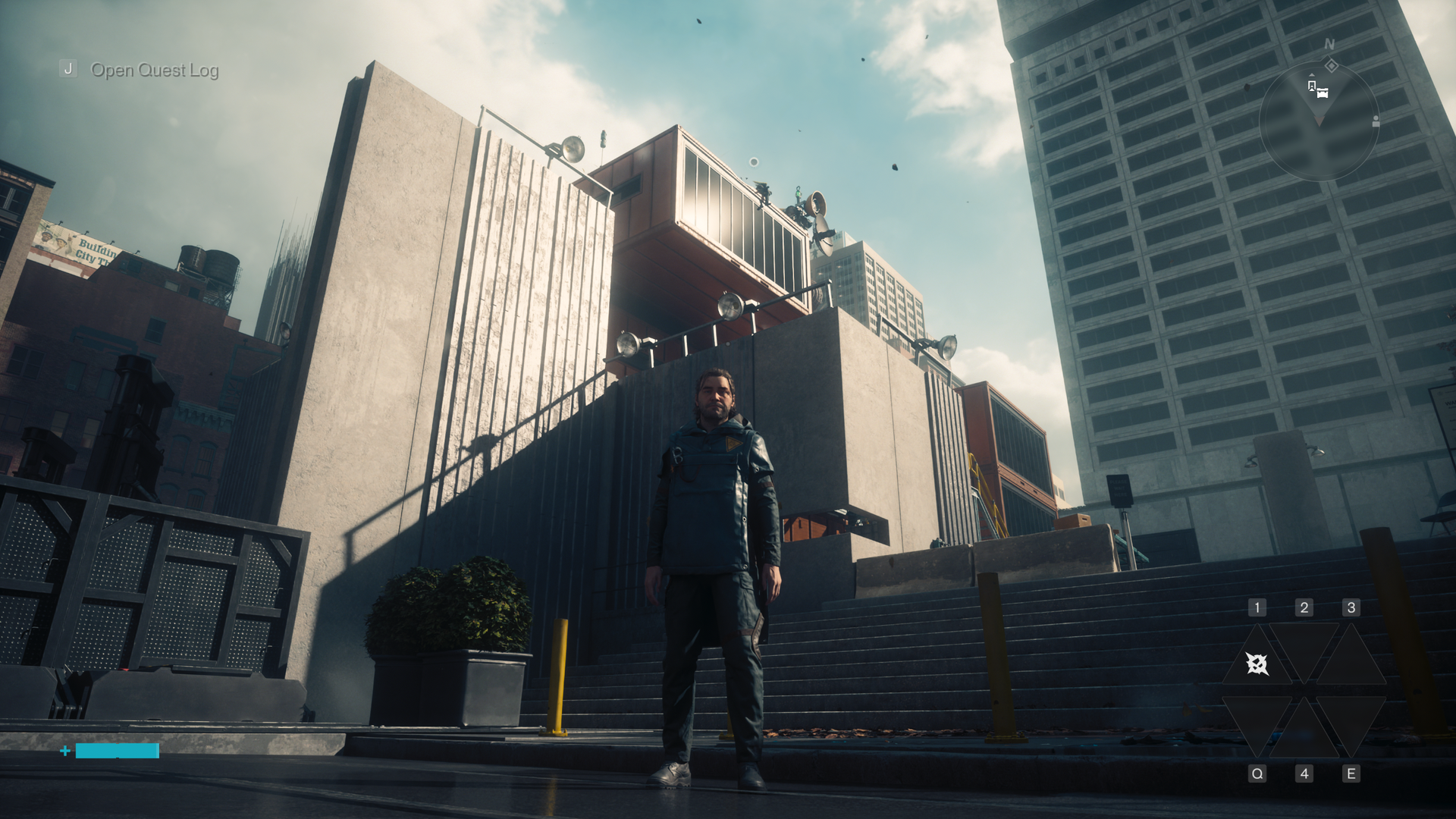
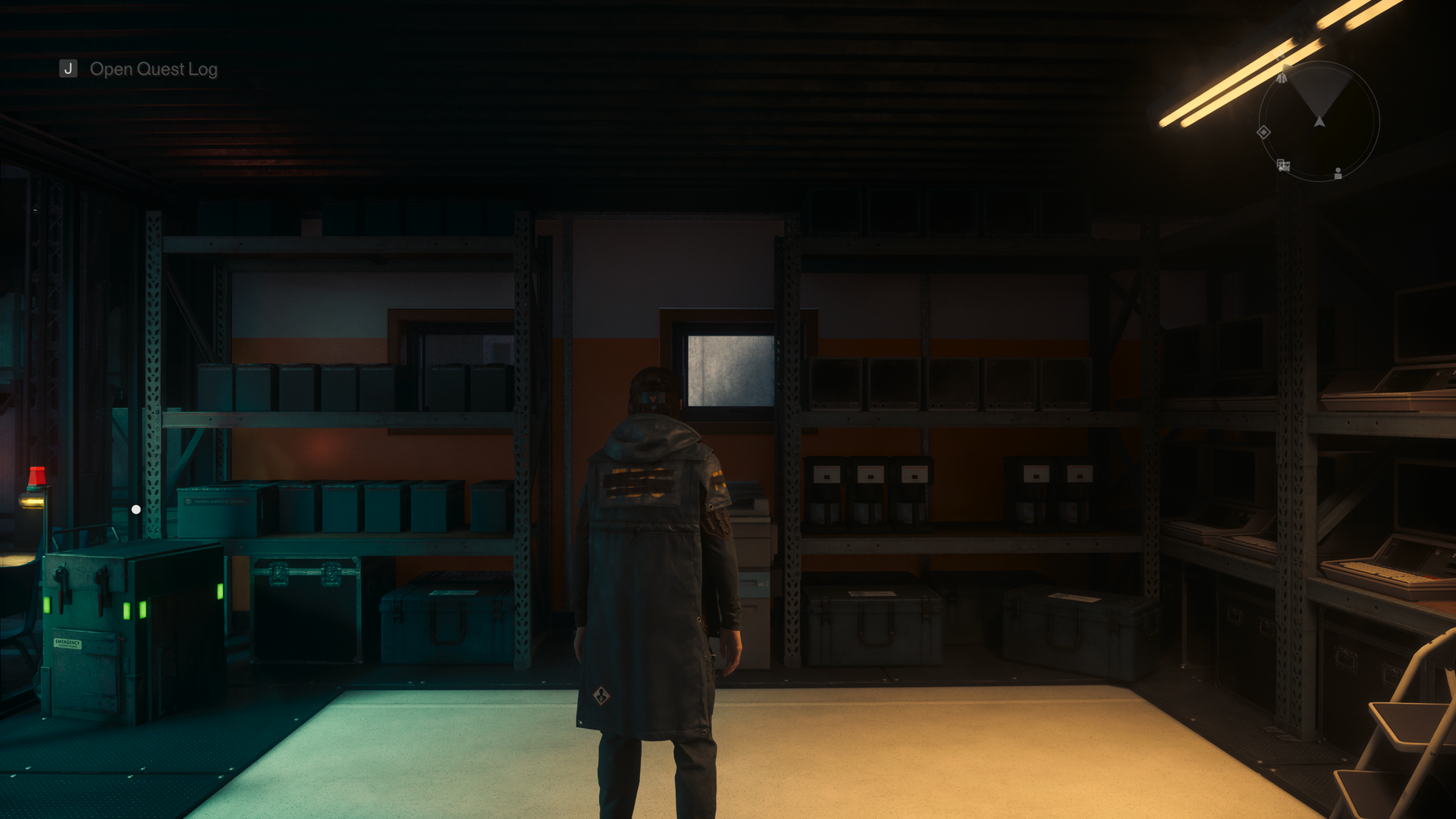
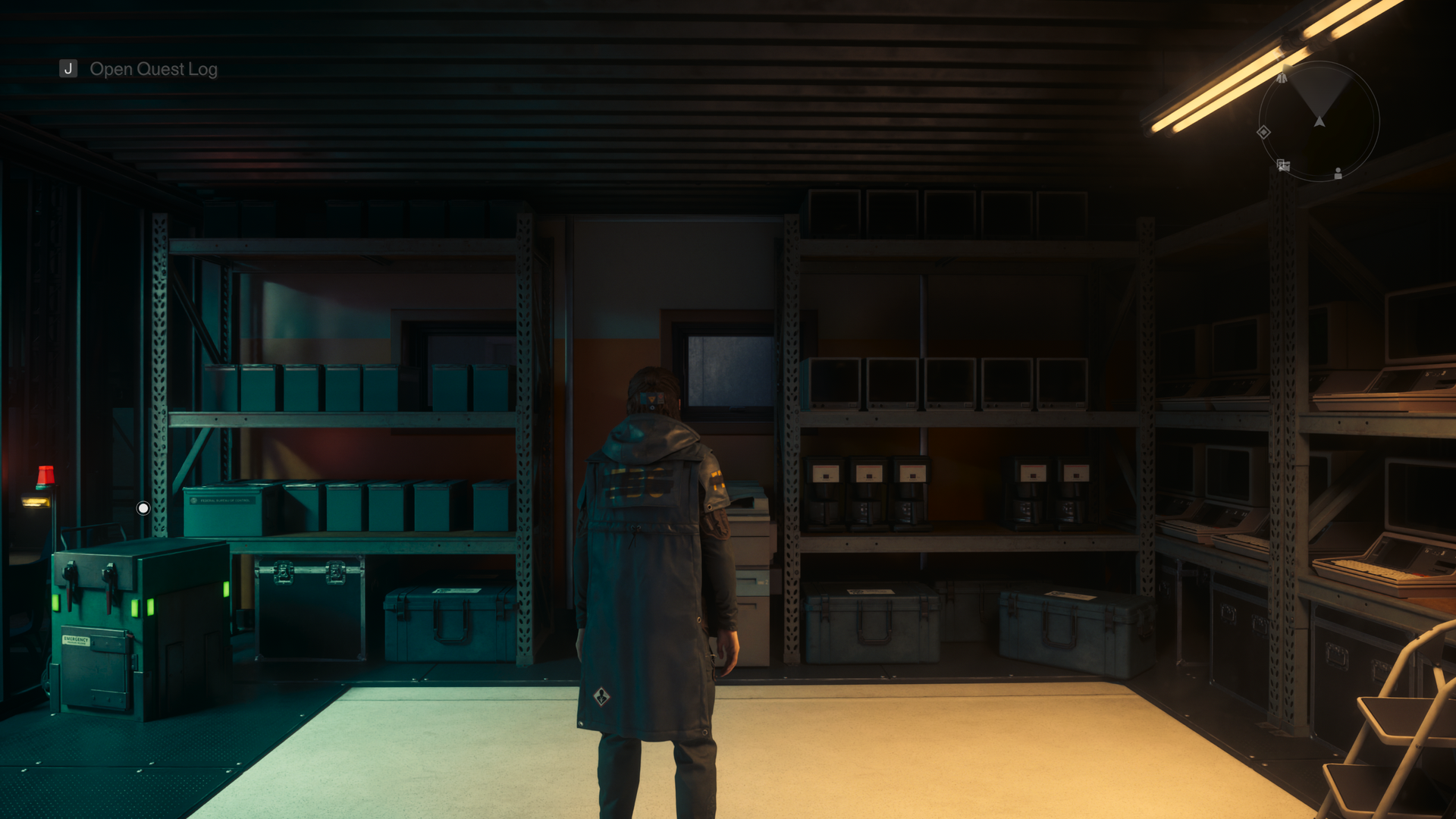
Nvidia's RTX Spark platform puts local AI inference and content creation first, but Microsoft's Surface Laptop Ultra really wants to game, too. The vented keyboard keeps the critical WASD keys cool under load by design, the smooth 120Hz screen can get as bright as 2000 nits with HDR games, and the built-in speakers may be the best I've ever heard on a laptop, period.
There's just one problem: that 3270x2180 screen asks a lot of DLSS upscaling. The computation that DLSS performs doesn't come for free, and the load increases with higher output resolutions. This is especially relevant with the Surface Laptop Ultra's high-density panel, which has just 14% fewer pixels than a 16:9 4K display.
The Surface's unusual 3:2 aspect ratio (at least compared to the average gaming laptop) also means that scaling content up to fill the screen isn't straightforward in many games. 16:9 and 16:10 content gets stretched vertically, causing obvious distortion of character models and objects like tires. And if you use windowed mode instead, playing in a 16:9 or 16:10 window on a relatively small screen like this quickly tires the eyes.
The thing is, all this is easy to solve—easy enough, in fact, that I'm surprised I had to do it myself at all.
Microsoft seems aware that lower 3:2 resolutions are useful for this system, as it put a 1600x1024 custom resolution in the list of display modes that's slightly less than half of native on both axes. But at roughly 1.6 megapixels in total, that image offers less resolution than even a 1920x1080 display does. Scaling up from such a low-res baseline on the Surface screen results in a noticeably soft image even before we dial in DLSS.
What we really want, for reasons of both performance and adequate sharpness, is a 3:2 resolution that comes close to the 2.07 megapixels that 1920x1080 yields. Some quick math and rounding to whole numbers gives us 1764x1176 as an optimal target.
With those ideal dimensions in hand, the next step was to create a custom resolution to match. The Nvidia Control Panel doesn't work on Windows on Arm, but we can still use the Nvidia App to set custom resolutions.
(Image credit: Future)
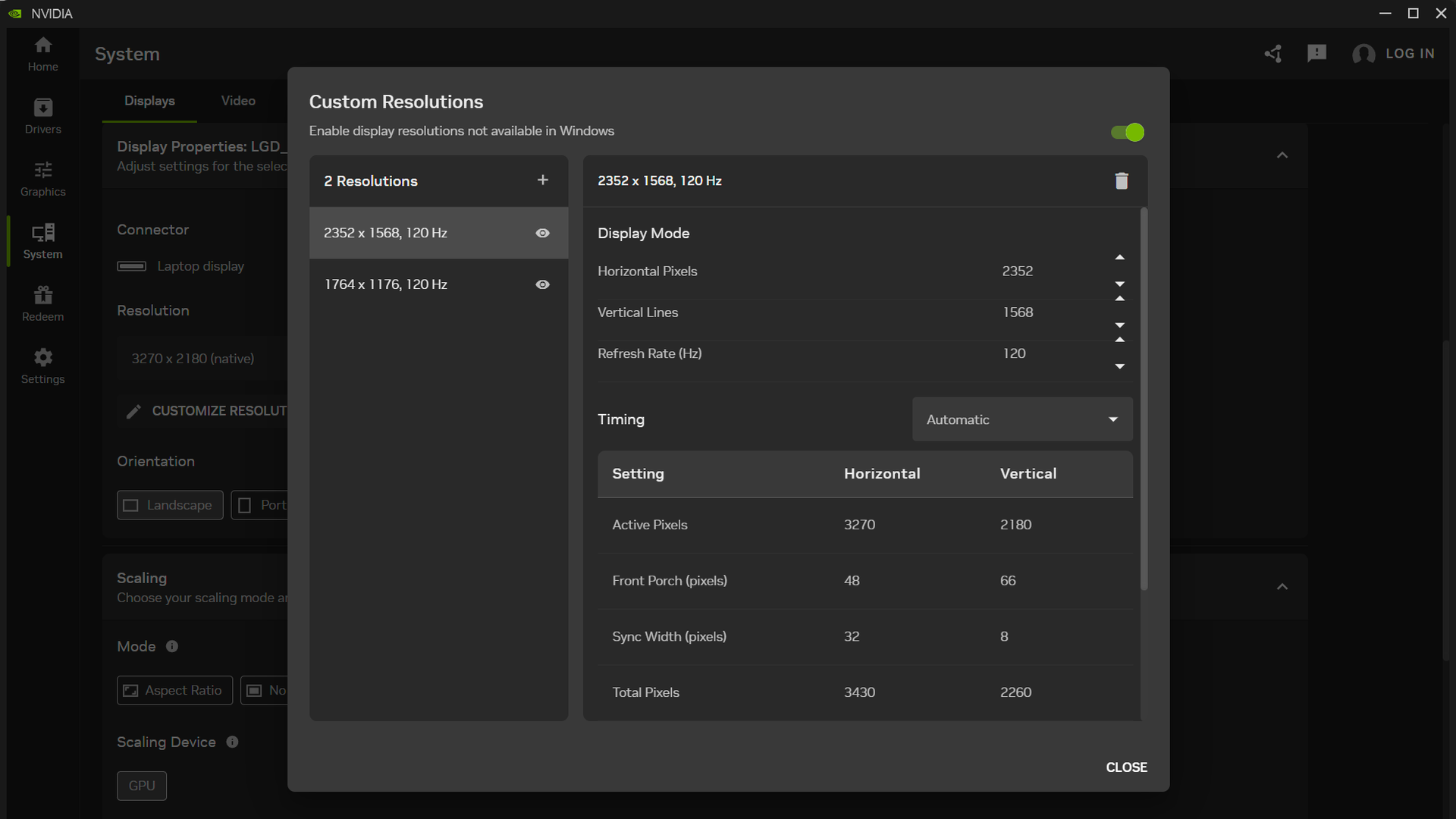
After diving into the System tab and expanding the Display Properties pane, I found the "Customize Resolution" button to open an editor to that end and added 1764x1176 at 120Hz. I then tested it and confirmed that it worked as a supported display mode. (If you want to match the 3.7 MP of 2560x1440, set up a 2352x1568 resolution while you’re at it.)
If for some reason you don't want non-3:2 content to fit the entire Surface Laptop Ultra screen, there is a Scaling pane in the Nvidia App that lets you control that behavior. The "Aspect Ratio" scaling mode will letterbox 16:9 and 16:10 material if you set the display resolution accordingly. But if you're paying $5899 for this system, I presume you want to use every one of its pricey pixels rather than leaving some of them dark.
So what does that bit of tweaking buy us compared to our initial gaming results with Control Resonant?
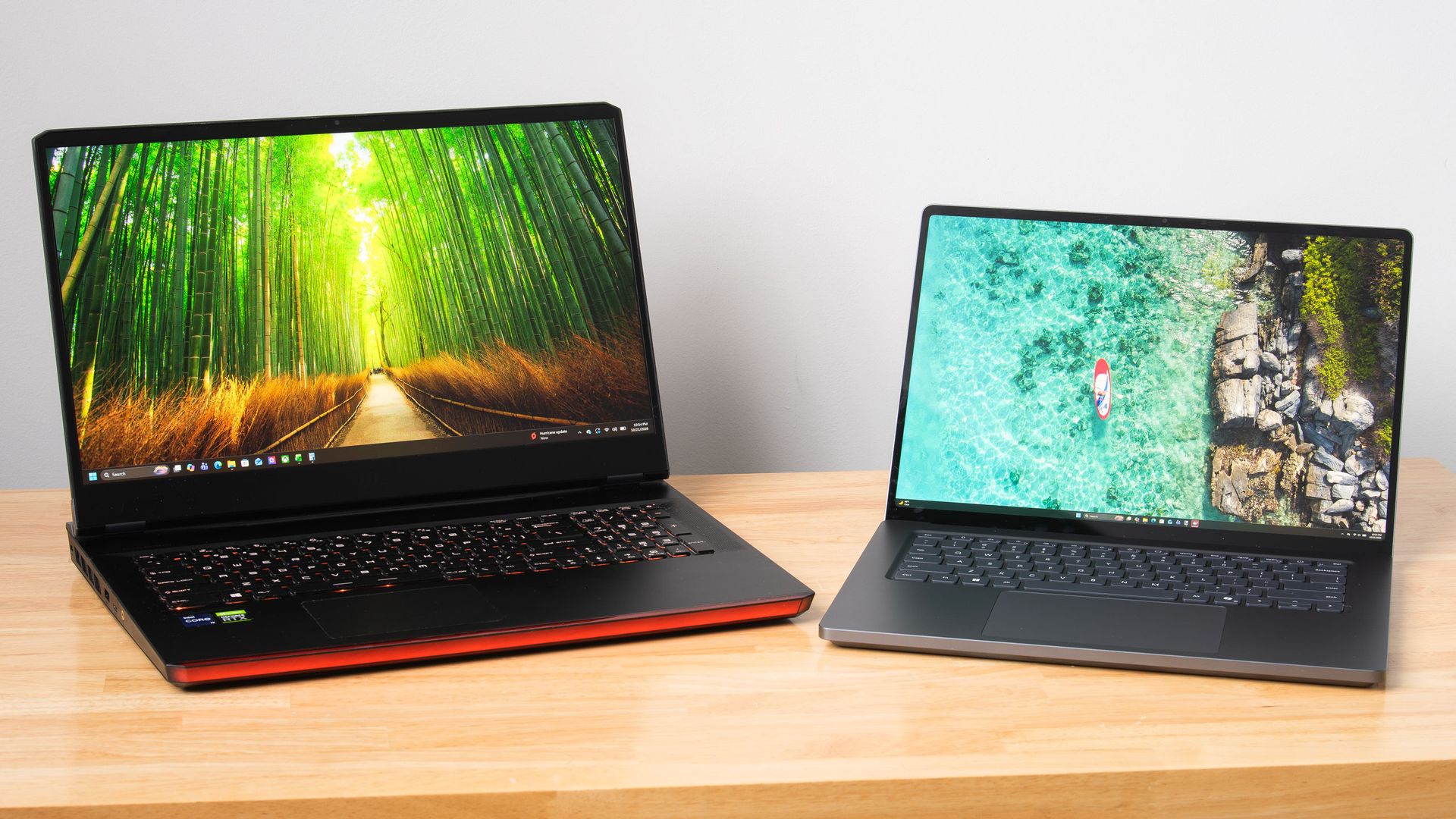
As someone who primarily games on our Ryzen 7 9800X3D GPU testing system and not a laptop, I wanted to make sure I wasn't setting unreasonable expectations for the Surface Laptop for input latency or CPU performance. So I hauled out an older 17" gaming laptop with a Core i9-11980HK and an RTX 3080 Mobile 16GB inside to get some perspective.
To level the playing field with the Surface Laptop Ultra and its native support for frame generation, I modded Optiscaler into Control Resonant on that system to enable Intel's Xe Frame Generation and Xe Low Latency features.
I conducted my testing with Control Resonant's High raster preset and medium RT preset, which gets you a noticeable boost in image quality thanks in part to DLSS Ray Reconstruction.
Control Resonant performance - High raster, Medium RT, DLSS Ultra Performance, FG 2X
Average FPS
1% Low FPS
Average input latency (ms)
Surface Laptop Ultra - 3270x2180
63.5
38.1
87. 9
You can see that with these settings, trying to upscale Control Resonant to the Surface Laptop Ultra's native resolution is too much to ask for a smooth or responsive gaming experience. Even with DLSS Ultra Performance (an input resolution of 1090x727) and 2X frame generation, we only just break 60 FPS, and latency is at an unacceptable 87 ms average. There's no latency budget left to turn up MFG without turning down other image quality settings.
Control Resonant performance - High raster, Medium RT, DLSS Quality, FG 2X
Average FPS
1% Low FPS
Average input latency (ms)
Surface Laptop Ultra - 1764x1176
83.4
42.9
67.8
RTX 3080 Mobile + 11900HK - 1920x1080
87.1
53
69
With our 1764x1176 custom resolution, however, we're off to a great start with DLSS Quality upscaling (an input resolution of 1176x874). The resulting 83.4 FPS average, 42.9 1% low FPS, and an average input latency of 67.8 ms is a fine experience. We still have room to dial in MFG 3X, leading to a 123 FPS average and 55 FPS 1% lows while keeping latency a reasonable 71 ms.
The RTX 3080 Mobile system with XeFG and XeLL, meanwhile, turns in an 87.1 FPS average, 53 FPS 1% lows, and a 69 ms average input latency at 1920x1080 with the same image quality settings. Its key advantage is in 1% lows, but that win comes with significant trade-offs.
Plugged into our Watts Up meter, the RTX 3080 system draws 250 W from the wall to deliver the experience it does, but according to a USB-C power meter, the Surface Laptop Ultra pulls between 110 W and 120 W under load. Silicon has come a long way since Tiger Lake and Ampere.
The RTX 3080 system and its enormous power adapter together also weigh over nine pounds (4.1 kg). It's technically portable but practically a pain to haul around. The Surface Laptop Ultra and its 140W adapter weigh just 5.3 lb (2.39 kg), which isn't featherweight but won't break your back.
And the Surface will actually fit on a tray table or your lap, with enough battery life that you can use it through a transcontinental U.S. flight, say, and still have plenty of juice left for either side of the trip.
So at least in Control Resonant, the Surface Laptop Ultra is delivering largely the same gaming experience as that high-end RTX 3080 Mobile system, but in a much smaller and lighter total package that draws less than half the wall power. And if you want to stretch frame rates further with MFG 3X, the Surface has MFG support that the older system doesn't. Just add in the 1764x1176 intermediate resolution that Microsoft forgot, and you’ll be well on your way to a better gaming experience.
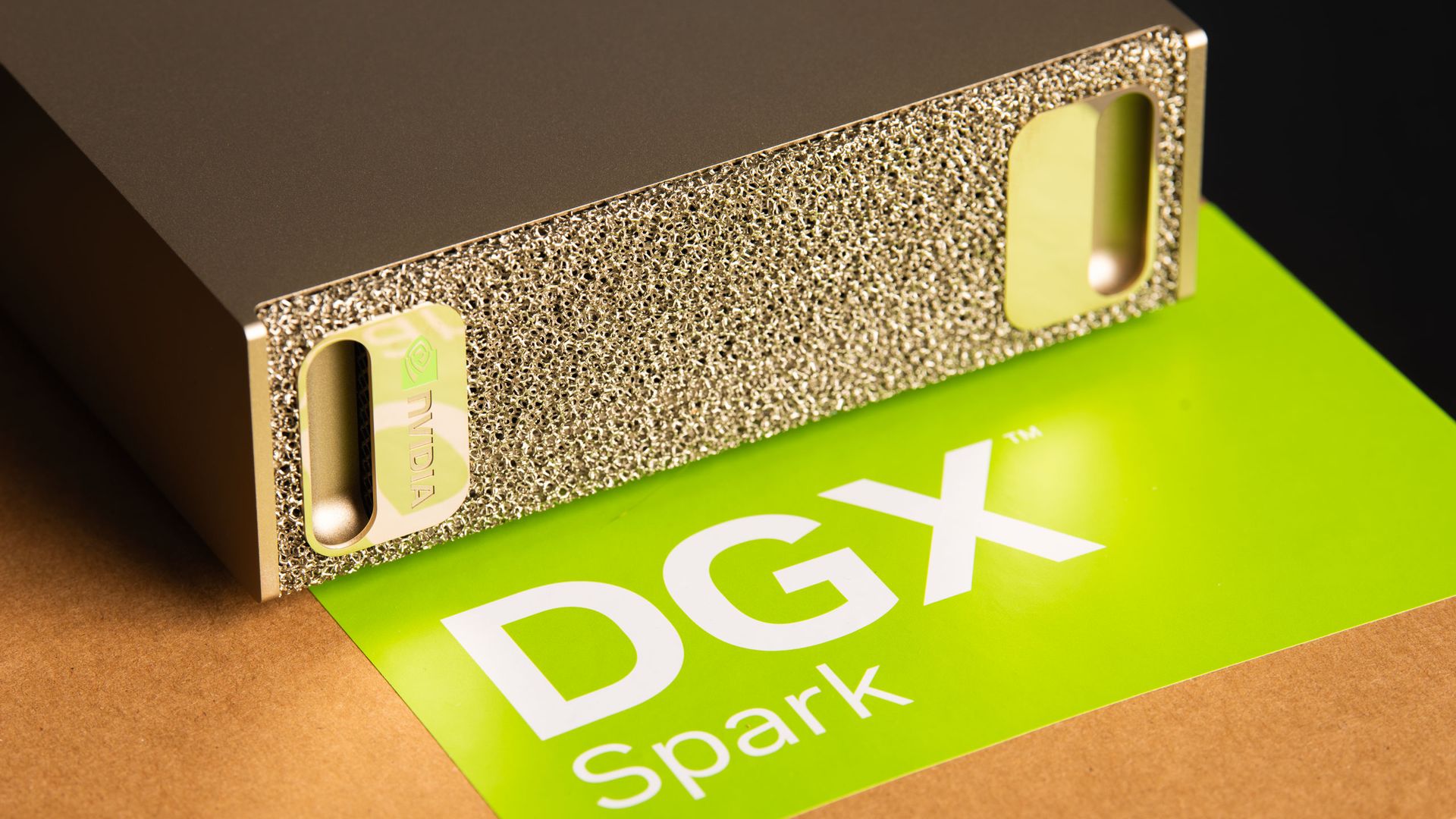
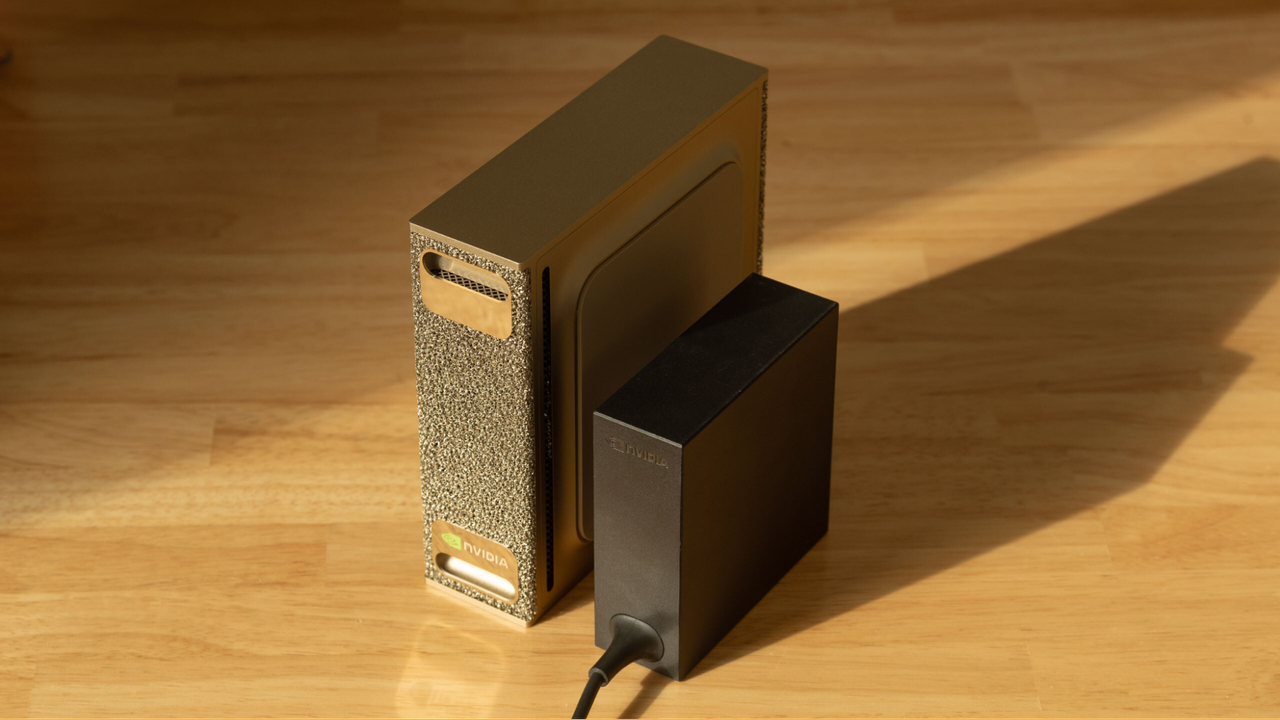
Nvidia CEO Jensen Huang announced the RTX Spark platform with the grand ambition to “reinvent the PC” back at Computex 2026. By pairing the GB10 Superchip with a version of Windows on Arm tailored for the secure and contained execution of local AI agents, Nvidia and its partners at Microsoft, Dell, HP, MSI, Lenovo, and Asus are all hoping to pave the way to a future where the PC is an active, autonomous companion for work and creation.
The hardware foundation for that vision of the future is now in place. Last week, we flew out to San Francisco to get all the details on the RTX Spark platform, and we returned home with Microsoft’s Surface Laptop Ultra in top-end trim to put it all to the test.
This system has the full RTX Spark Superchip with 20 CPU cores and 6144 CUDA cores alongside 128GB of LPDDR5X-9400 RAM, and I’ve been putting it through its paces over the past week to see just what it can do.
The embargoes for the RTX Spark launch are a bit peculiar. Today, we’ll be sharing our broad experience with the Spark platform, as well as competitive performance evaluations, but not any system-specific results such as battery life, build or display quality, or other details of that nature. We have other RTX Spark laptops in the Tom’s Hardware labs, and detailed reviews of those systems will be coming soon.
No, this approach doesn’t make a lot of sense when the experience of a mobile platform is intimately and inextricably tied to the specific implementation of that chip in a particular laptop design. And we know that battery life is the first and foremost concern of many interested in this platform. But again, all that information is coming soon.
For this first round of testing, we compared the Microsoft Surface Laptop Ultra with RTX Spark against two systems. The first is a 14" MacBook Pro with Apple's highest-end M5 Max SoC inside. That Mac has a 40-core GPU and an 18-core CPU, as well as 128 GB of LPDDR5X RAM. We don't have a mobile Ryzen AI Max+ 395 system in the labs right now, but we do have AMD's compact Ryzen AI Halo as a source of fresh data with the latest ROCm stack and llama.cpp builds.
Local AI performance
Judging local AI performance is a constantly moving target, and this review is no different. Our past testing has exercised the prompt processing and token generation phases of AI inference separately, with the understanding that a system that's fast at both those phases provides the best experience.
But in an agentic workflow, that benchmarking technique doesn't capture the total time required to complete a task across all the inference turns needed to reach a particular goal. To capture that entire end-to-end time, the folks at Artificial Analysis have developed a new benchmark, AgentPerf-local, that precisely replays inference traces across several agentic AI tasks. The value of this approach should make immediate sense: the faster an AI agent finishes a job, the more productive a system can be.
So instead of presenting raw time-to-first-token and tokens-per-second figures, as we have in the past, we’re sharing time-to-completion values as we would for more traditional CPU and content creation benchmarks.
Again, local AI benchmarking is a continuous work in progress, so let us know what you think of this approach, and we’ll take that feedback into account as we continue to develop our methods.
We ran AgentPerf-local with two compatible models: the dense Qwen 3.8-27B, which is popular as one of the most intelligent local models available for its size, and the Qwen 3.6 35B A3B mixture-of-experts model, which is less intelligent but easier for a wide range of systems to run quickly. We used the latest build of llama.cpp as our inference backend and built it from source on each test system to take advantage of CUDA, Metal, or ROCm acceleration, as appropriate.
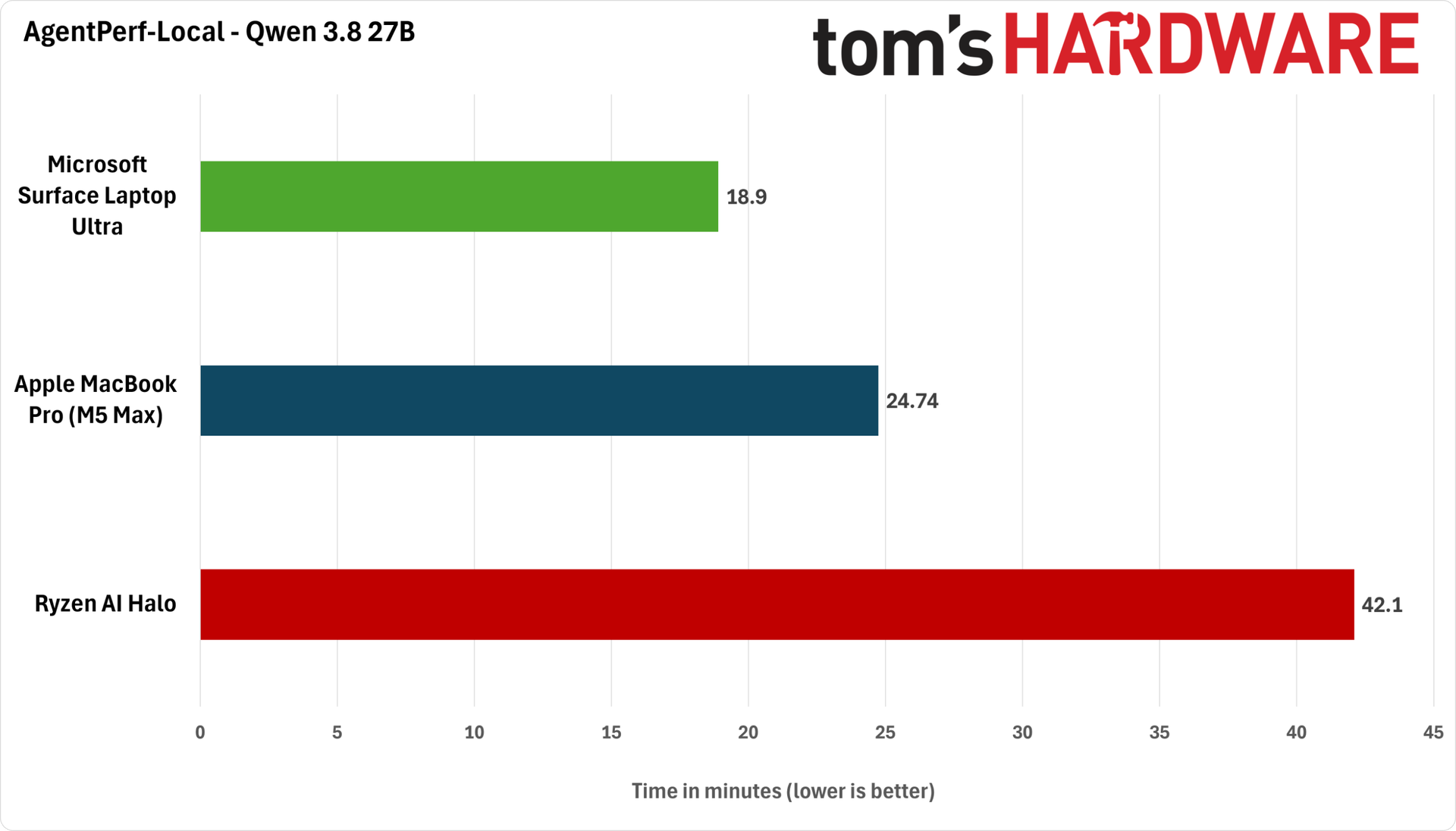
Let’s look at Qwen 3.8 27B’s behavior first. We used Unsloth’s Q4_K_M quantization of the model. We ran it with DFlash2 speculative decoding on the RTX Spark and MacBook Pro, and with Qwen 3.8 27B’s built-in MTP on the Ryzen AI Halo for the best performance.
(Image credit: Future)
As we found in our benchmarking of Apple's Mac Studio with the M4 Max SoC, memory bandwidth is only one constraint for local AI performance. Despite its memory bandwidth advantage on paper, the M5 Max MacBook Pro still ends up taking about 25% longer to finish the AgentPerf benchmark with Qwen 3.8 27B than the Surface Laptop Ultra with RTX Spark.
Part of that may be down to software maturity, but it's also worth remembering that our Surface Laptop Ultra is a 15" system with a much larger 140W power adapter versus the 14" MacBook Pro's 96W charger.
The 16" M5 Max MacBook Pro also comes with a 140W adapter, and we'd be curious to see whether the extra power and higher thermal headroom afforded by that system’s larger chassis help close the gap here. But in any event, the RTX Spark platform is the fastest overall at this task today.
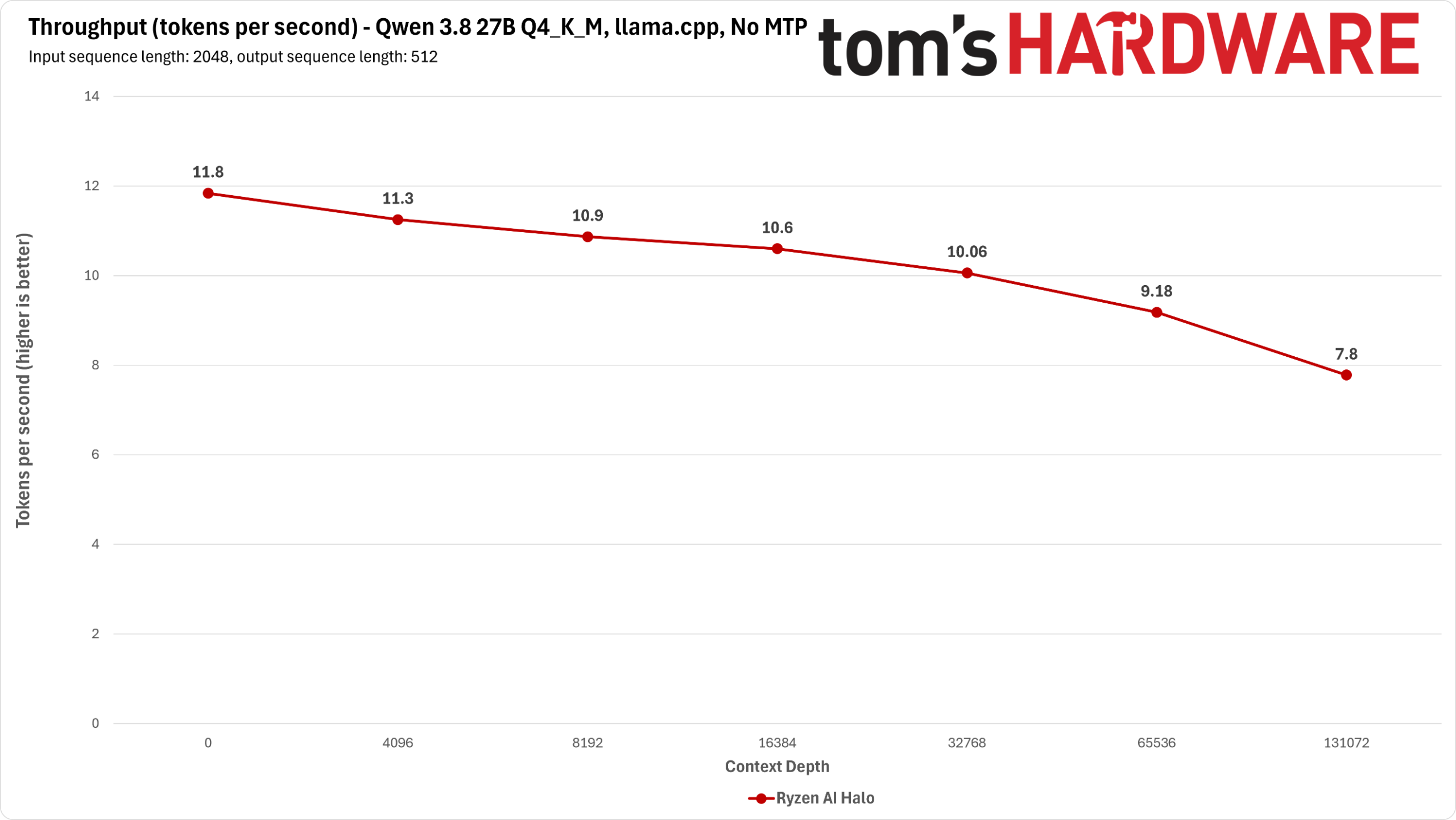
Meanwhile, AMD's nearly two-year-old Ryzen AI Max+ 395 just can't keep up with either of these newer systems in this demanding test. It needs about twice as long to finish our agentic tests with Qwen 3.8 27B as either the RTX Spark or the MacBook Pro do, at a whopping 40 minutes.
The fact that the Ryzen AI Halo is a mini desktop form factor rather than a notebook doesn’t much matter to these results, as any power and thermal headroom that design might afford can’t possibly overcome the performance gap here.
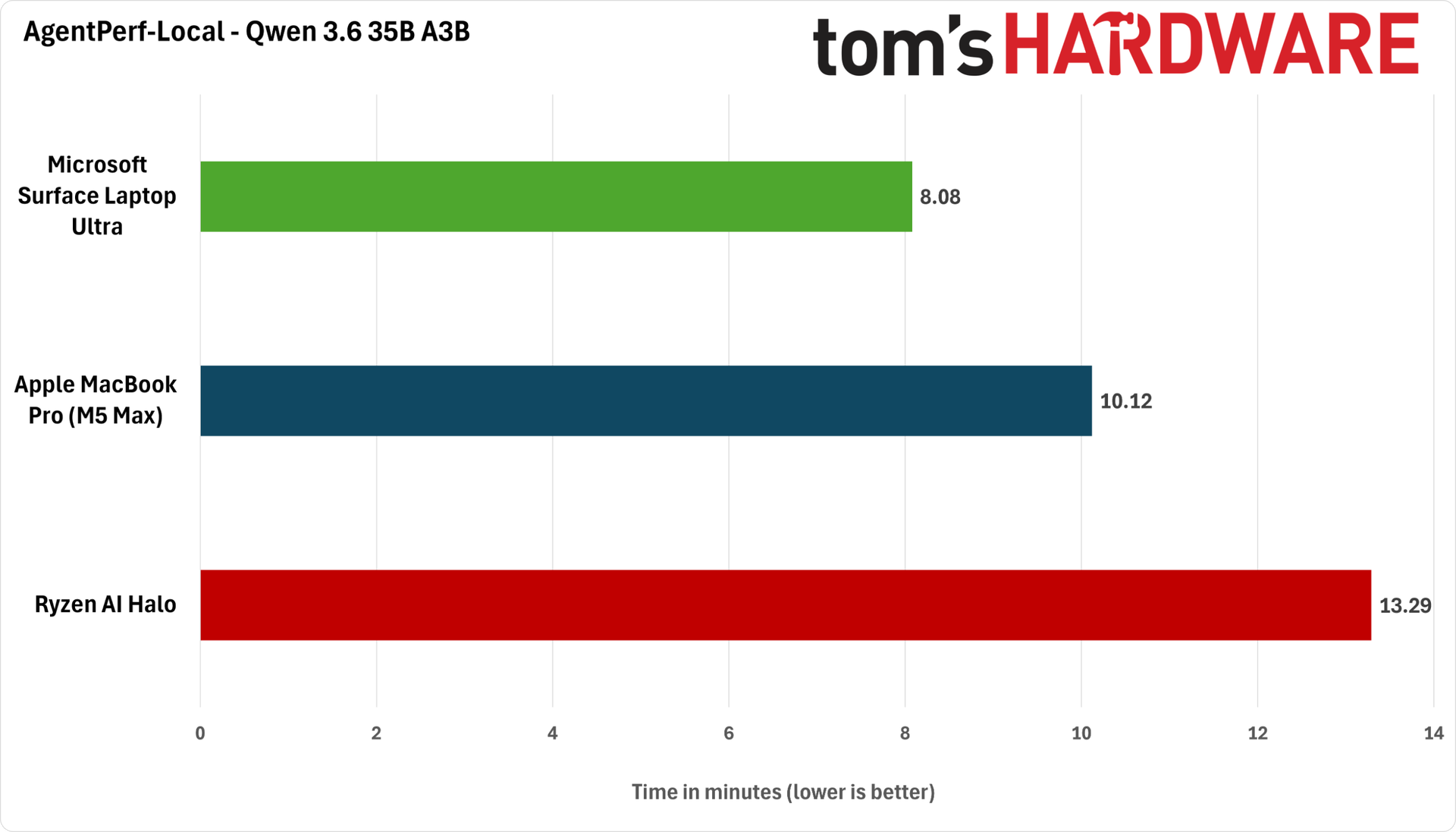
Next up, we have the lighter-weight Qwen 3.6 35B A3B. We ran Unsloth’s Q4_K_M quantization of this model with MTP enabled.
(Image credit: Future)
The Surface Laptop Ultra ends up completing this test in just eight minutes, or about 25% faster than the 14” MacBook Pro’s 10 minutes. This test is also much friendlier to the Ryzen AI Halo, which finished the benchmark in a more reasonable 13 minutes. But that just emphasizes that you have to trade away model intelligence to get a reasonable level of performance out of Strix Halo.
AMD has recently gone on a publicity blitz to highlight the relatively low cost of entry for Strix Halo systems versus DGX Spark desktops and now RTX Spark laptops. But if time is money, and getting more intelligent tokens out of your local AI system faster means more potentially profitable agentic work gets done, then a more expensive system upfront will be able to do more of that work and potentially generate more value over time.
Gaming performance: first impressions
Despite its RTX branding and the emphasis Nvidia places on its 6144-CUDA-core GPU (or 48 SMs), the RTX Spark platform faces some tough challenges for gaming. Most games available today are not going to be natively compiled for its Arm CPU, and even for those that might be, the maximum 300 GB/s of shared memory bandwidth the platform offers is well below that of even the RTX 5060 Mobile's dedicated 384 GB/s feeding 26 SMs.
The entire GB10 SoC is competing for a relatively small amount of memory bandwidth, and because graphics is generally a memory-bandwidth-bound workload, that's not a great start for feeding all of those SMs in games.
I started my gaming explorations with Gears of War: E-Day. In this exceptionally CPU-heavy game, it's clear that the baseline performance of the Grace CPU cores and the added overhead of the Prism x86 emulator are doing this title no favors.
GPU utilization only reaches the 85% mark on average at a near-1080p (1908x1272) render resolution with the High preset and 2X framegen, and we saw at least one major hang during a map transition that was less than confidence-inspiring for an immersive experience as we progress further into the game.
Gears of War: E-Day (1908x1272, High Preset, Mega Geometry On, MFG 2X)
Average FPS
1% Low FPS
Avg PC Latency (ms)
Microsoft Surface Laptop Ultra with RTX Spark
77.7
39.9
83.5
Because of its CPU dependence, Gears is probably a worst-case scenario for this platform, but the fact remains that it's not a great experience, and turning down settings or lowering upscaling input resolutions just exacerbates the CPU-boundedness of this title. If any game could use a native Arm build, this is the one.
Control Resonant is significantly less dependent on the CPU, but that just means that the other potential gaming shortcomings of the RTX Spark Superchip seem to come into play.
After struggling a bit to achieve a solid frame rate and input latency at the Surface Laptop Ultra's native 3270x2180 output resolution even with DLSS upscaling, I found that running the game in windowed mode at 2560x1440 with DLSS Performance upscaling, the High preset, and MFG 3X to keep frame rates near the Surface Laptop Ultra's 120Hz refresh rate provided better results. (This system's tall 3:2 aspect ratio means that 16:9 fullscreen games don't cleanly scale up.)
Control Resonant (2560x1440, High Preset, RT Off, MFG 3X)
Average FPS
1% Low FPS
Avg PC Latency (ms)
Microsoft Surface Laptop Ultra with RTX Spark
109.2
51.6
78.3
But even then, input latency was above what I would consider acceptable on our standard GPU test rig, and enabling ray tracing at all dipped frame rates and spiked input latency even further, so I had to stick to raster-only rendering for the best results.
Overall, my early RTX Spark gaming verdict is that you can do it, and you can have a fine enough time, but it is not the primary focus of this platform. Gaming performance with the relatively limited memory bandwidth of the RTX Spark Superchip, combined with the system's CPU performance and the overhead of Prism emulation, mean that you'll be searching for a narrow range of settings where baseline frame rates, upscaling, image quality, and the smoothness boost of frame generation still yield acceptable input latency.
When I first approached gaming on this platform, I had expected that DLSS upscaling would be a required part of the experience, but in practice, you really need to lean on DLSS Frame Generation, as well, whether that's for added smoothness (as in Gears of War) or for both smoothness and the benefits of Nvidia Reflex due to developer choices behind the scenes (as in Control Resonant).
Even with Reflex, though, the Grace CPU generally seems to deliver input latencies significantly higher than I'm used to on our Ryzen 7 9800X3D test rig, and it's hard to get them much lower in these AAA titles by tweaking settings.
If you demand the lowest input latency and the highest performance with cutting-edge games, especially if you plan to enable RT, a separate gaming laptop with a dedicated RTX 50-series GPU will still provide a superior experience. And if you just don’t care about local AI at all, that advice applies even more strongly.
Bottom line
Nvidia's RTX Spark is an ambitious new PC platform for the traditional workloads of today and the potential agentic AI work of tomorrow. How often do we see an entirely new player try to elbow into the crowded and competitive PC space, especially one with a sweeping vision for how the PC will be used in the years to come? An incremental move this is not.
Our general performance tests and new agentic AI tests show that despite providing merely solid CPU performance and relatively low bandwidth for a unified memory architecture on paper, the Blackwell GPU on board GB10 has enough AI horsepower in practice to let the RTX Spark platform come out ahead of Apple's latest top-end M5 Max and AMD's Ryzen AI Max+ 395, aka Strix Halo, SoCs.
Whether you choose the highly intelligent dense Qwen 3.8 27B model and trade raw speed for intelligence, or make the opposite trade with the lighter and faster Qwen 3.6 35B A3B, the RTX Spark comes out on top. That bodes well for pairing popular agents like Hermes with intelligent local models on this platform.
But Nvidia's mission to reinvent the PC isn't a total grand slam in this first iteration.
First, this platform won't replace a dedicated gaming laptop. Even for those who only game on the side and have more forgiving standards for frame rates and input latency, the RTX Spark's gaming performance may not measure up to expectations.
When you put the overhead of Prism x86 emulation on top of the merely adequate performance of the Grace CPU, it’s clear that the Spark platform will have to work hard to keep up in the vast range of games that don’t have an Arm port.
The CPU-heavy Gears of War: E-Day is particularly unkind to the Prism-on-Grace stack, but even when a title like Control Resonant doesn't lean so heavily on the CPU, the limited and shared memory bandwidth of the GB10 SoC still poses an obstacle to cranking settings to the max despite the large amount of theoretical compute horsepower on tap.
We're also still waiting for Windows to fully catch up to Nvidia's ambitions for secure, manageable local agents. Our laptop expert Andrew Freedman and I couldn't test Microsoft's secure agentic AI promises within Windows 11, as the supporting features that Microsoft and Nvidia have promised to that end just aren't ready yet.
Still, for a first-generation mobile platform that joins complex silicon IP from multiple design teams onto one chip and relies on several OEM partners to bring it to life in highly integrated notebook form factors, the maturity of the RTX Spark platform is an impressive achievement. (Take it from someone who has seen a couple of rough product launches from the inside.)
Over the past week, I've been using the RTX Spark-powered Surface Laptop Ultra as I would any other Windows laptop, and aside from a couple of tiny paper cuts, I have mostly just gotten my work done as I would with any other computer. And that’s a great — albeit a very, very expensive — place to be as the local agentic AI future coalesces.
Perhaps the biggest challenge for the RTX Spark platform is that the eye-watering price tags for the range of systems available at launch still buy a lot of cloud tokens from OpenAI and Anthropic. Emphasis on a lot. The Surface Laptop Ultra we tested lists for $5899 with only 1TB of storage, and lead times for that system are already out to late December.
If you're not as concerned about keeping sensitive data out of those labs’ clouds, or you don't expect to run afoul of acceptable usage policies, you'll get much smarter tokens much faster than you will from a local token factory like the RTX Spark, and you can get them on most any reasonably powered traditional PC you have available.
But if you're surfing the AI wave on local hardware for reasons of privacy, offline model availability, freedom to tinker, or just because you think it's cool, the RTX Spark platform blends the memory capacity, compute performance, and software resources you need to get there with the familiarity and broad compatibility of Windows on top. The fact that Nvidia, Microsoft, and their partners have delivered such a capable, compatible, and polished platform even in its first at-bat should put the rest of the PC industry on notice.
Nvidia’s efforts to reshape personal computing will face strong headwinds in the immediate future from the sky-high DRAM and NAND price hikes that the company’s own Vera Rubin rollout is partially responsible for. Perhaps when the dust settles in the next two to three years, and products built around the next-generation RTX Spark Superchips arrive, we can more confidently assess whether the company has accomplished its goal.
For now, the RTX Spark feels like a platform for those who fervently believe that open AI models will continue to get more intelligent within relatively small memory footprints, and that those potential future improvements are worth a hefty chunk of change to get ready for today. Maybe that's a smart bet in a world where compute is an increasingly precious resource. But unless you're a true believer with cash to burn, our first impressions suggest that you should wait until Microsoft and Nvidia fully lay the software foundation needed for this platform to deliver on its promises.
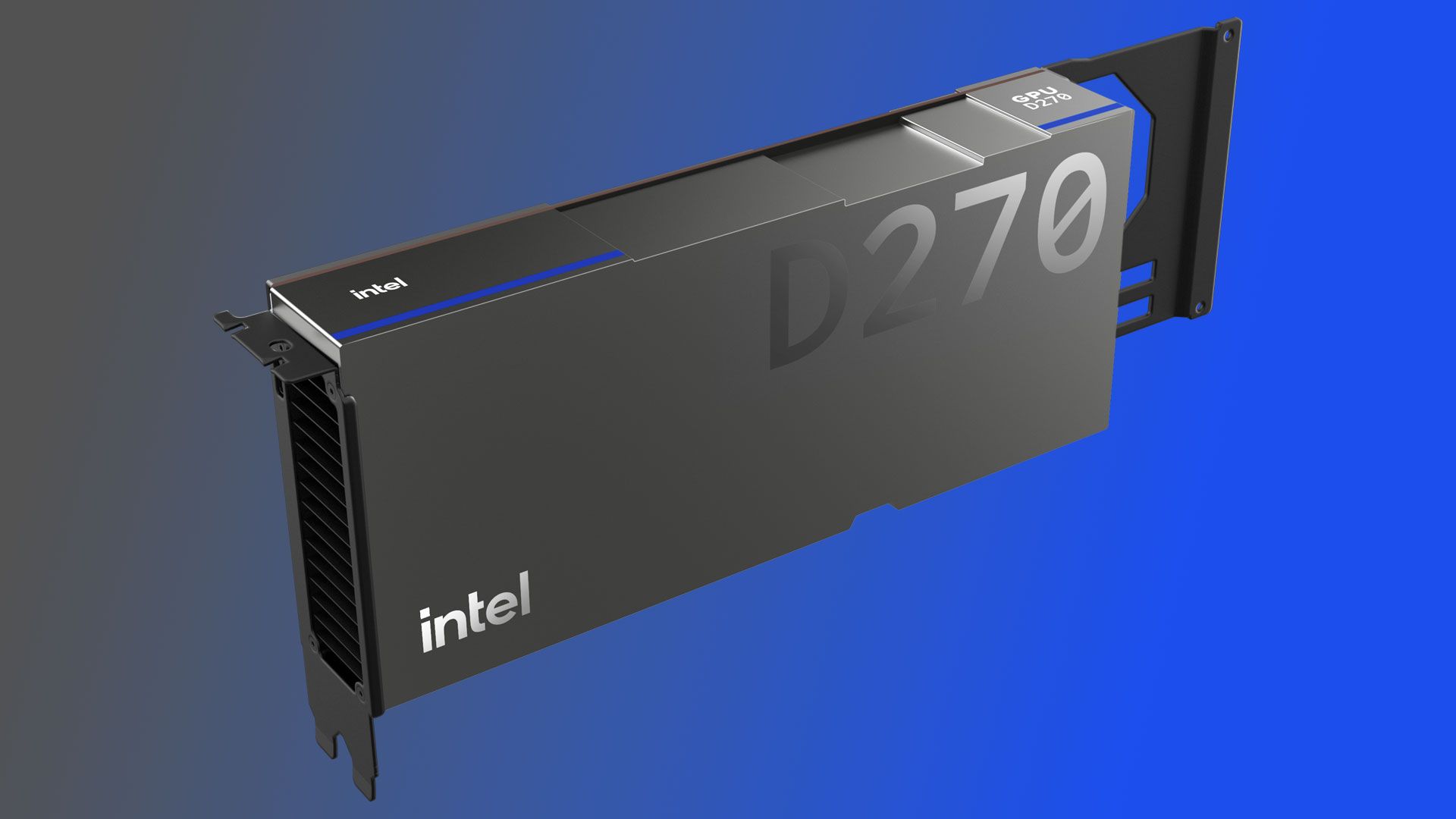
At OCP 2026 today, Intel has given Crescent Island a proper name: the Intel GPU D-Series. For the first time, the company also shared a theoretical peak performance target for the chip: 1.3 PFLOPS of FP8. It also disclosed the final memory bandwidth to expect from these AI inference accelerators: 1.5 TB/s. This new information adds to the slow drip of disclosures Intel has made about Crescent Island throughout 2026.
We already knew that Crescent Island is the first chip to be built on Intel's Xe3P graphics architecture (or massively parallel computing architecture, really, as the chip lacks most or all of the graphics-specific functional units that would characterize a true GPU). Intel will release GPU D-Series products in an air-cooled PCIe form factor with a TDP of 350W and up to 480GB of LPDDR5X memory.
For reference, each of the 72 Rubin GPUs in Nvidia's Vera Rubin NVL72 rack-scale system can push a theoretical 17.5 PFLOPS of FP8 throughput, but each of those chips requires liquid cooling and likely has a TGP measured in kilowatts. In any event, it should be clear that the GPU D-Series is targeting an entirely different performance envelope and infrastructure requirements than Rubin.
Intel GPU D-Series products, in contrast, are meant to be deployed in traditional air-cooled rack servers scaling up to eight GPUs, like Nvidia's HGX systems. In such a configuration, Intel says that GPU D-Series chips could power inference on models spanning more than one trillion parameters. Intel also highlights the chip’s suitability for “large language models, long-context inference, and concurrent inference services," creating a foundation for "multi-tenant AI services, robotics, and other latency-sensitive workloads."
In order for that kind of distributed inference deployment to work, in which multiple GPUs will presumably act as one, Intel will also need a robust software stack. The company is highlighting the “common Xe software foundation” it’s already built for AI across its Xe Cores in iGPUs and discrete GPU products.
To bring Xe accelerators into the data center, Intel says it’s working with “a broad ecosystem of OEMs, ODMs, neoclouds, independent software vendors, appliance providers, and AI-native companies.” To that end, Intel says customer sampling of GPU D-Series products is in progress, although it didn’t provide any details of a broad launch.
It’ll remain to be seen whether the Intel GPU D-Series is the product that finally gives Intel an AI accelerator toehold after the failure of the Data Center GPU Max family (code-named Ponte Vecchio) and its mothballed follow-ons, as well as a series of silicon acquisitions that failed to coalesce into a coherent AI strategy.
But in a world that’s hungry for every compute cycle for inference, a product with a proven architectural shape that’s targeted specifically at that workload in an accessible thermal and electrical envelope might be just the recipe Intel needs to start getting traction as AI models keep advancing in intelligence and agentic workflows assume ever-greater importance in the computing vision of the future.
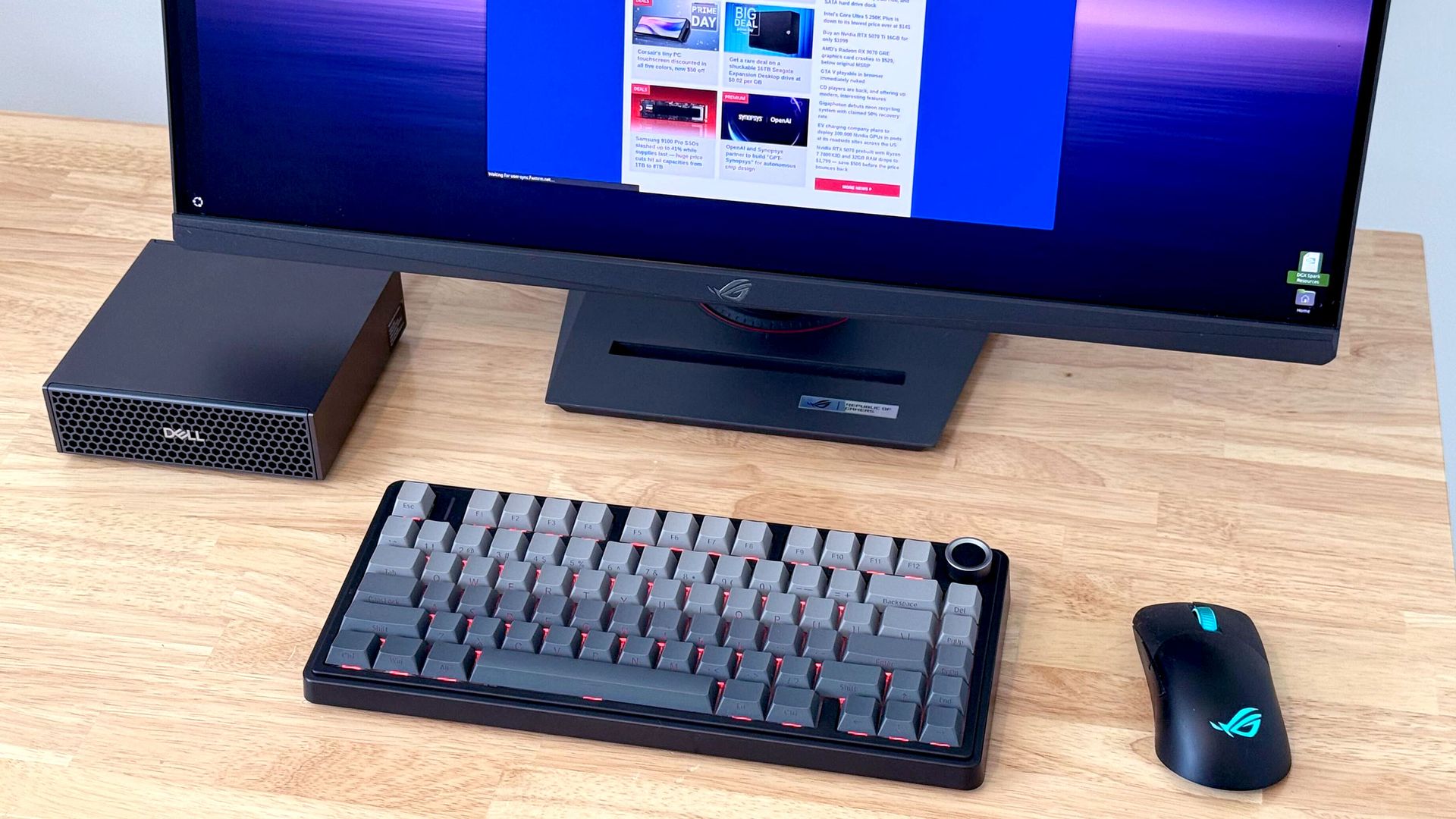
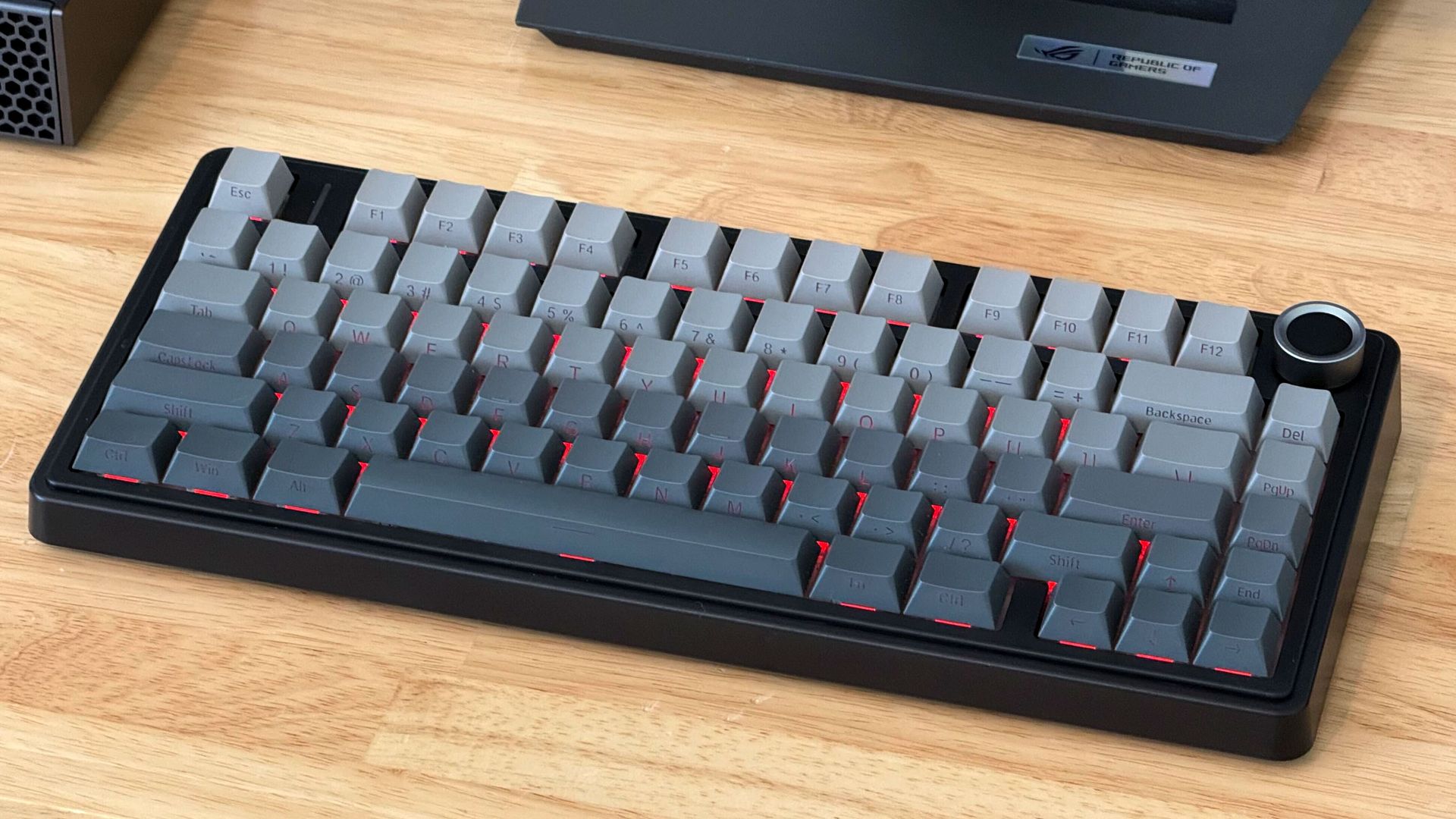
Sometimes you need a keyboard, and you need it now. That was where I found myself a couple months ago during local AI testing with one of the Nvidia GB10 boxes on my bench. Those systems are incredibly picky about which wired keyboards they'll work with for some reason, and moving the one known-good board I have on hand between systems under test was becoming a massive headache.
After one too many inconvenient keyboard swaps, I had had enough. I wanted a compact Bluetooth board that I could dedicate to my workbench, and I wanted it now. Testing on that GB10 system couldn’t wait, and I didn't want to get stuck in analysis paralysis. So I hopped on Amazon, filtered my choices down to items with same-day delivery, and found the Epomaker x Aula F75 Pro for just $65.
(Image credit: Future)
AULA
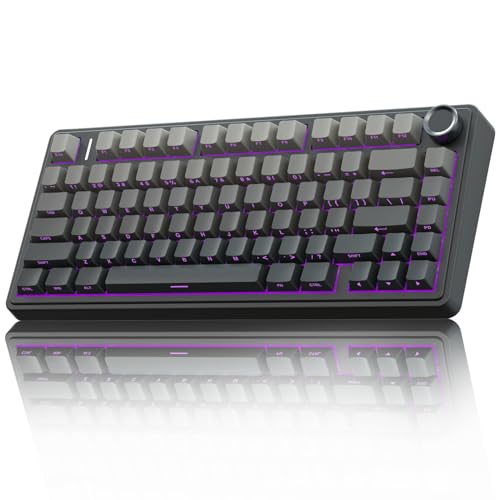
Aula F75 Pro Wireless Mechanical Keyboard
The Aula F75 Pro keyboard is feature packed with Leobog Reaper switches, dual-tone PBT keycaps, a volume knob, and wired, 2.4 GHz, and Bluetooth connectivity, among other features.
I was suspicious of this board at first, given the lack of in-depth independent reviews online and its unfamiliar switches. It uses Epomaker’s Leobog Reaper switches, which didn't map directly to any of the standard Cherry MX switches or their knockoffs that I'm used to.
But according to the spec sheet, they were linear and didn't have an incredibly heavy actuation force, which is the most important spec I look for in a keyboard when protecting my RSI-ravaged wrists. And they claimed to come pre-lubed, which is an upgrade I’ve never performed myself on any of my prior boards. So we were off to a good start.
The rest of the F75 Pro's feature list suggested custom keyboard DNA in its lineage. Spiffy dual-tone PBT keycaps with side legends? Check. A stack of noise-shaping and noise-reducing materials inside, including a cotton layer and a hefty silicone foundation? Check. A dedicated volume knob that doubles as a mute button? You got it.
Throw in wired, 2.4GHz wireless, and Bluetooth connectivity (with multiple Bluetooth pairing profiles), along with customizable RGB LED backlighting, and I was sold. And for such a low price, plus a few bucks extra for same-day delivery, I was willing to risk it if some aspect of this board wasn’t quite up to snuff.
A couple hours later, my Amazon delivery driver dutifully dropped the F75 Pro at my doorstep. And after a few minutes with the printed shortcut guide so I could pair it over Bluetooth, I had it connected to my GB10 box and was typing away in a terminal.
(Image credit: Future)
Despite this board’s low price, the Leobog Reaper switches underneath its keys are honestly the nicest I’ve ever felt. They’ve ruined me for every other board with MX-style switches I have. Whether it’s down to their pre-lubed treatment or inherent construction quality, they don’t have the tiniest bit of wobble or grit in their strokes like the red switch clones in many of my other mechanical keyboards.
The Reapers have a light 36gf initial force, a 45g actuation force and a 55gf bottom-out force, so they don’t place undue stress on my hands and wrists, and they have a nice, high-pitched audible “thock” at the bottom of their range that serves as pleasant reassurance for a successful keypress without rising to the level of a deafening click like blue-type switches might. The five-layer acoustic dampening stack within this board makes it the nicest-sounding one I own, too. And if I ever get tired of these particular switches, the Aula F75 has hot-swap support for easy modding.
I feel like I’m more accurate with these switches than I am with other boards in my office, and at 107 wpm with 99% accuracy on the MonkeyType test, I’m slightly faster than average on this board, too.
For all the thoughtful stuff that might be happening inside the F75 Pro's chassis, the outer plastic shell does feel a bit cut-rate. If you want the pleasure of knowing your board is clad in milled aluminum, carved stone, or some other exotic solid, this board doesn’t offer that satisfaction. But you're not touching the shell as you type. You're touching (and listening to) the keys. And I can attest that the tactile and auditory experience of typing on this board is far, far better than you would expect given its low price.
I also appreciate that most of the Aula F75’s functionality is available without installing any extra software. Although a utility is available, I’ve never felt the need to install it. I do have to refer to the included cheat card to figure out certain Fn combos, though, so don’t throw yours away if you get an F75 Pro of your own.
I do wish this board’s 75% layout dropped the volume knob for a dedicated Home key, but I can live with its existence on a Fn layer given the rest of this board’s virtues. And again, this board sells for $65 (and possibly even less during the current Prime Big Deal Days event). Given the hundreds of bucks that boards from big brands usually go for, I’ll enjoy what I hope is a long-lived and premium typing experience and keep the extra cash in my pocket.
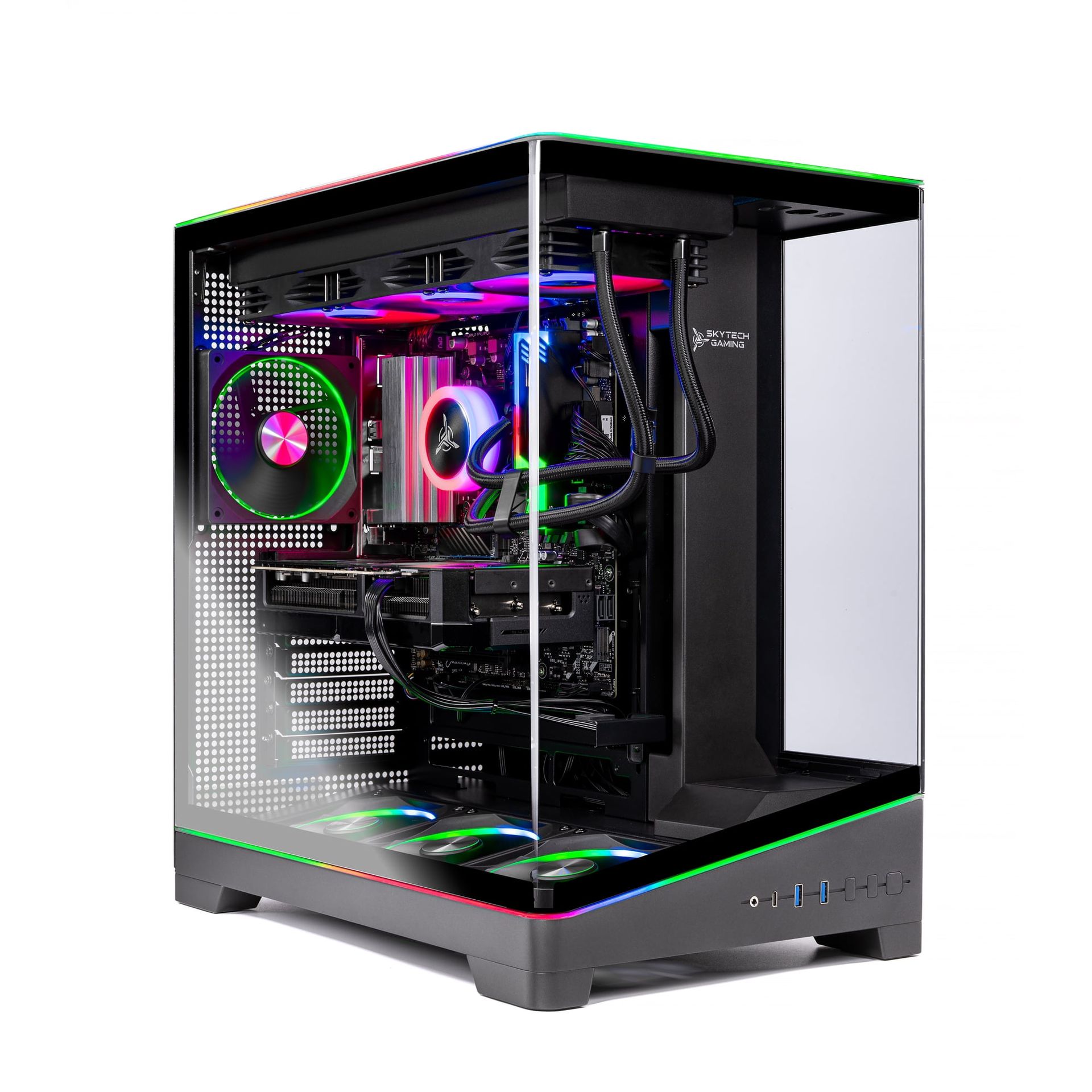
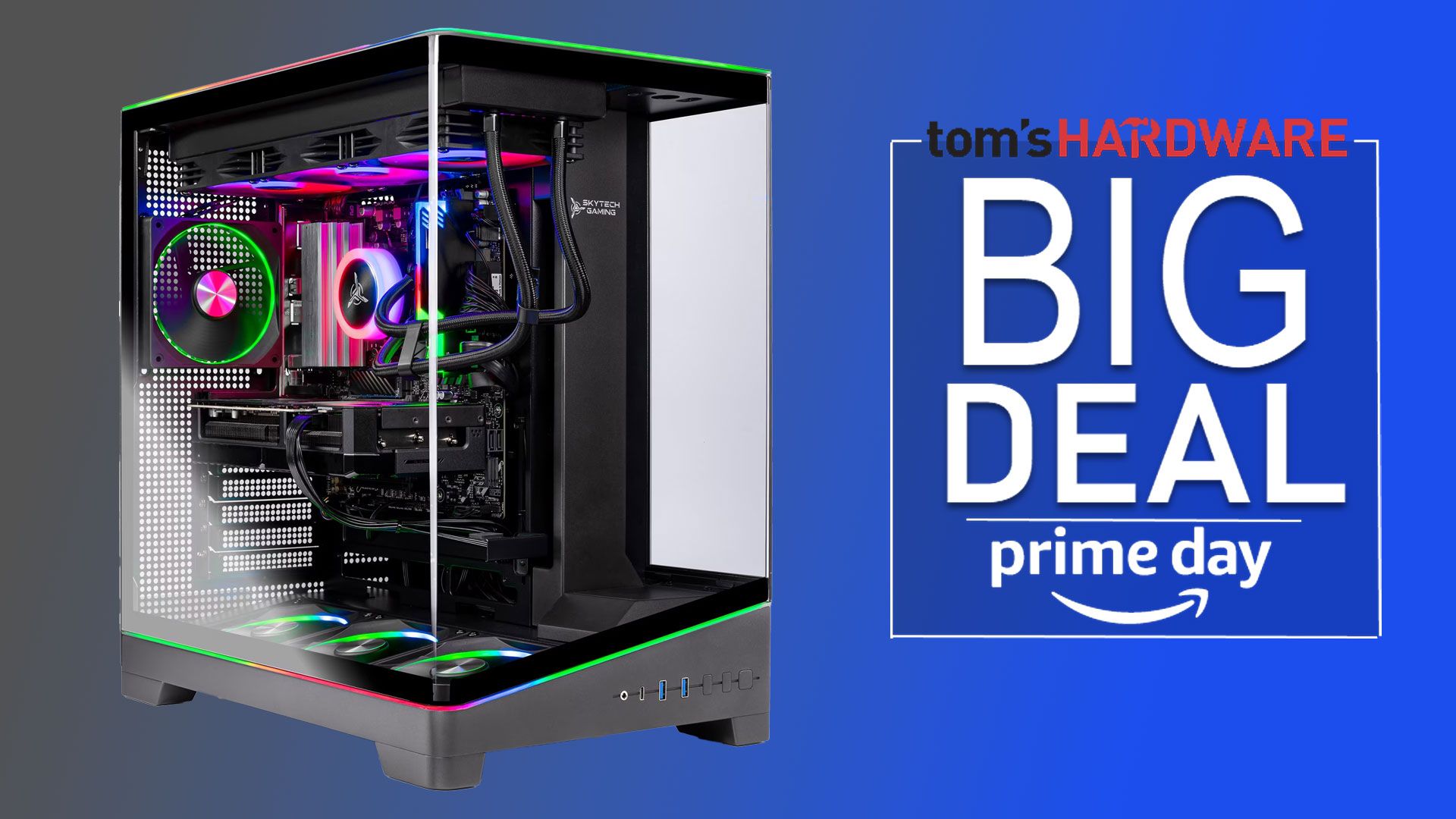
We've seen some sweet deals on entry-level and high-end prebuilts during this Prime Day event, but a great midrange system has been a little harder to find. We've uncovered some treasure, though, in the form of Skytech Gaming's Harpy prebuilt. This PC pairs a Ryzen 7 7800X3D CPU with a powerful GeForce RTX 5070 graphics card and 32GB of DDR5-6000 memory, all for just $1799 right now.
The Ryzen 7 7800X3D isn't AMD's latest and greatest gaming champ any longer, but its 3D V-Cache still lets it land in fifth place in our demanding CPU hierarchy game testing.
You'll want that cutting-edge tech at hand because the RTX 5070 has enough juice to power enviable high-refresh-rate gaming experiences at 1080p and 1440p even before you start dialing in DLSS 4.5 upscaling and Multi Frame Generation. It's ready to deliver great performance in demanding RT and path-traced titles like Gears of War: E-Dayand Control Resonant.
This system only includes a 1TB SSD, but given its otherwise excellent specs for the price, we think it's worth having to live with the possibility that you might have to shuffle games around occasionally. And if you have an older drive from another build, you can probably find space to bring it over without much trouble.
Skytech rounds out this system with a 360mm liquid cooler, an 850W 80 Plus Gold PSU, and a fancy case with a wraparound tempered glass panel to show off the components inside.
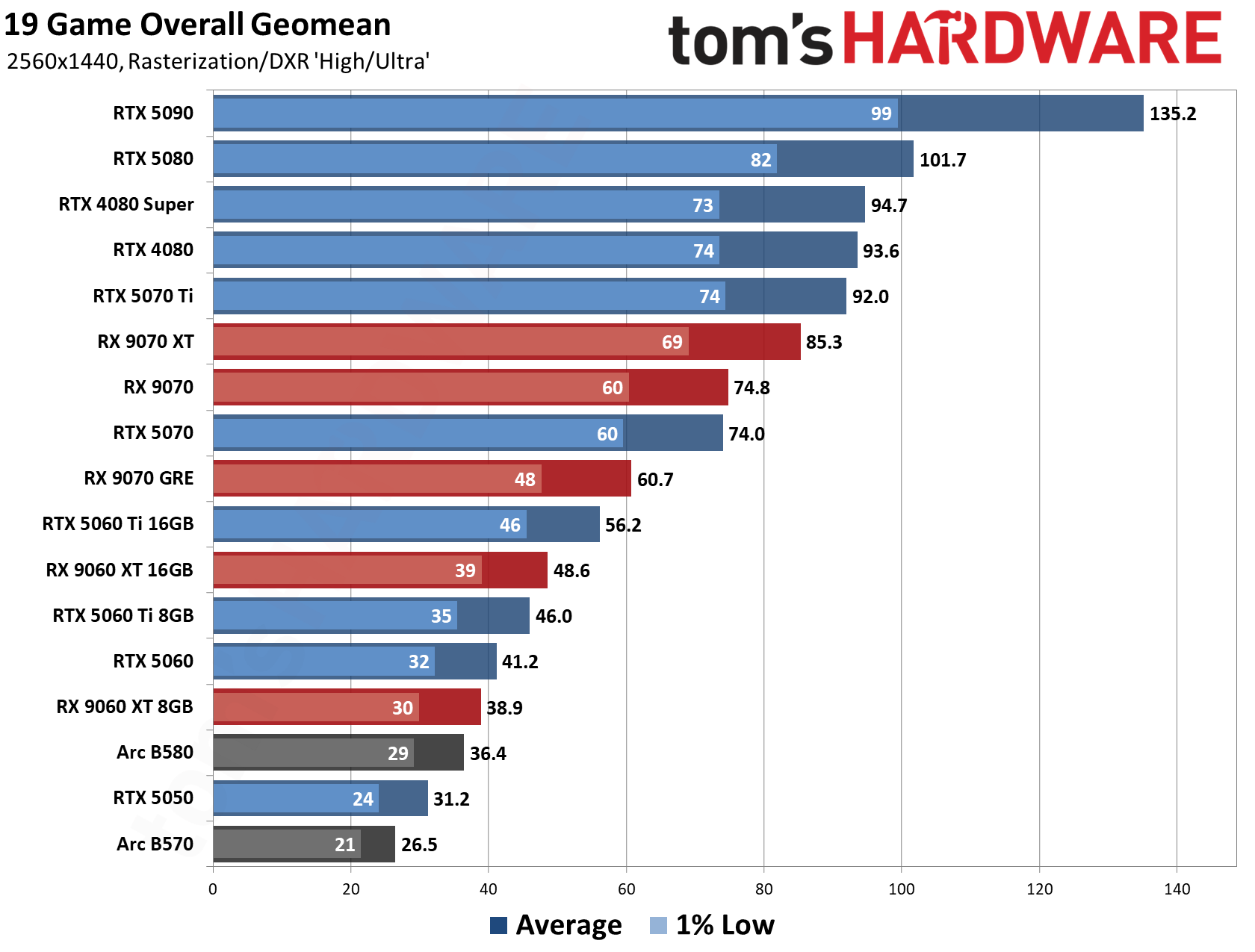
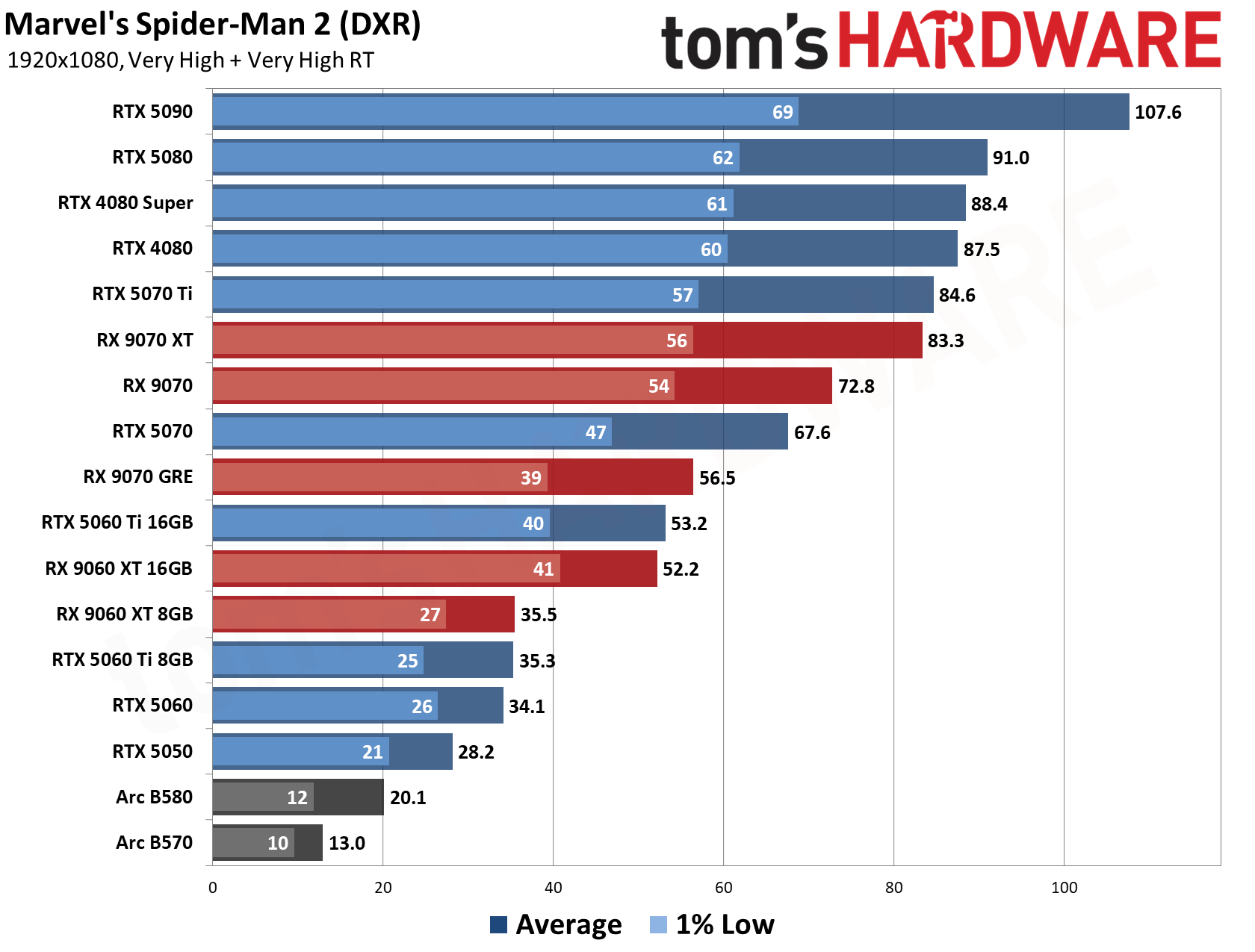
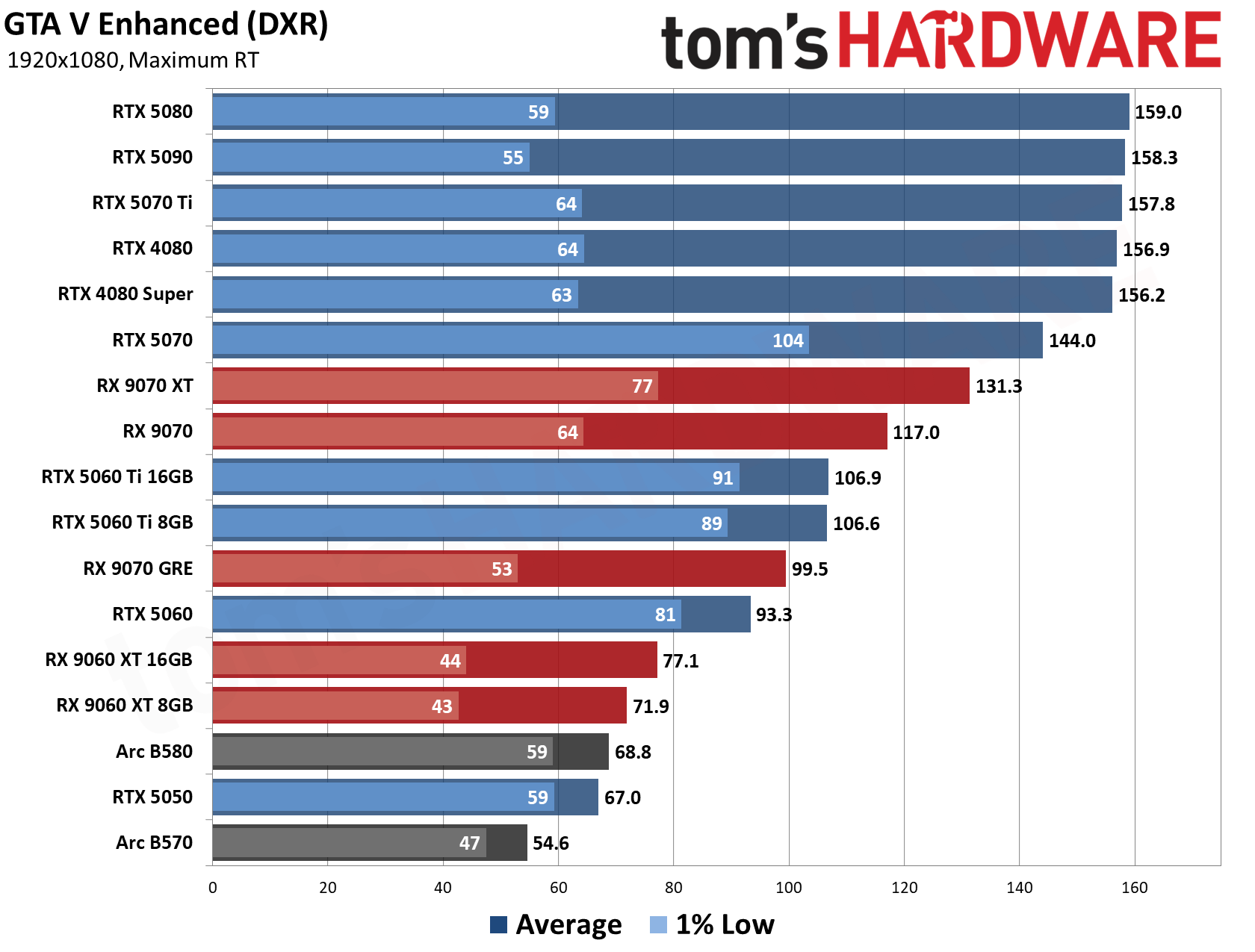
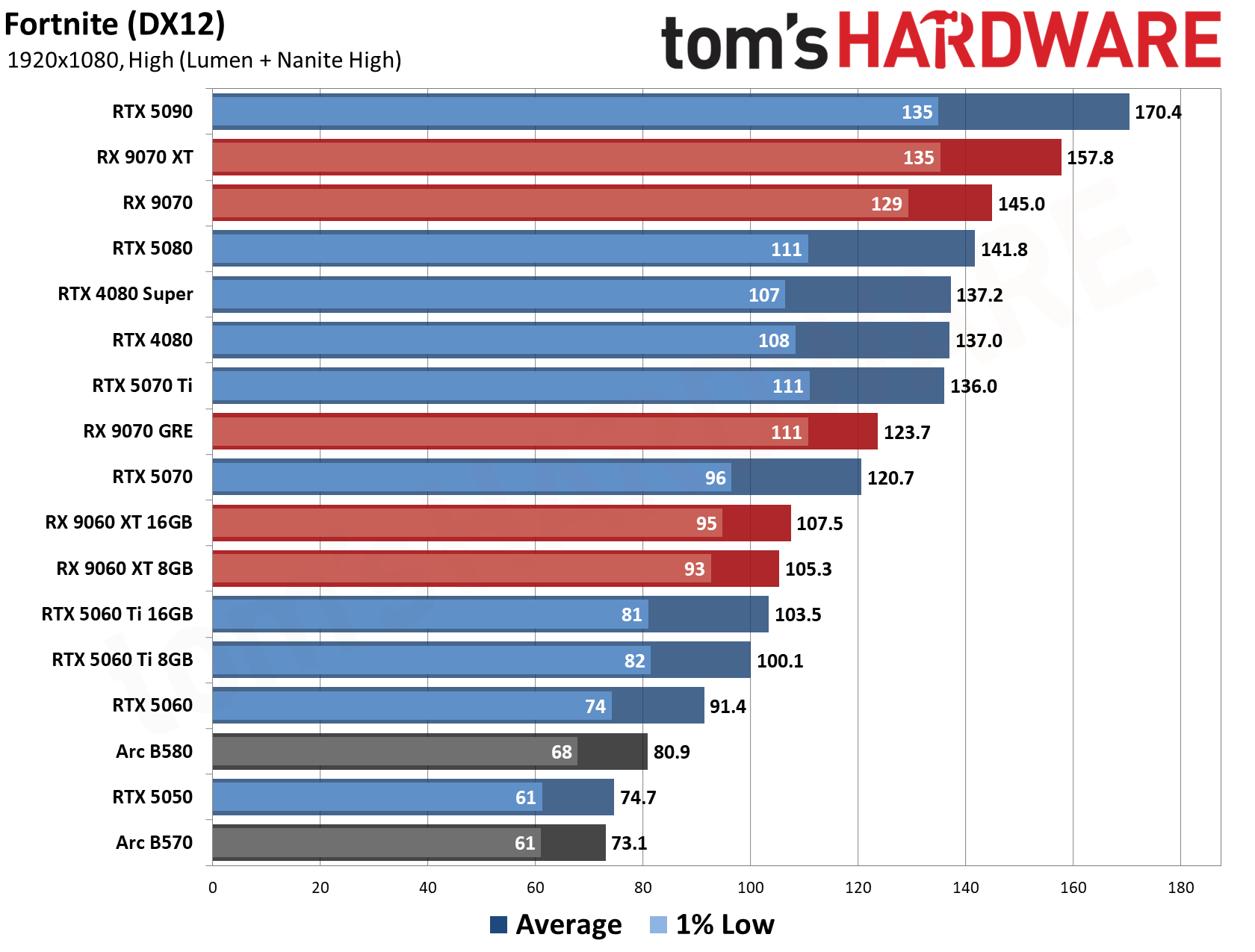
Our GPU hierarchy testing proves that whether you're gaming at 1080p or 1440p, the RTX 5070 in this PC stands ready to deliver a great experience across both raster and RT titles. Check it out:
And if you run into a game that's too tough for the RTX 5070 to conquer at native resolution, you have superior DLSS 4.5 upscaling and frame generation at your disposal with this system to get the optimal experience. The 12GB frame buffer gives you plenty of room for Multi Frame Generation, as well.
If you're looking for a midrange AMD X3D-powered gaming upgrade for a surprisingly low price in today's wild and crazy PC market, get on this deal quick, because it surely won't last long with these specs.
If you need some relatively cheap RAM for your gaming rig during this Prime Big Deals Day event, we've dug up some solid discounts on a trio of dual-channel 32GB DDR5 kits that might help you finish up a build or upgrade an existing system for less.
32GB is still a comfortable amount of memory for most gaming rigs, and these kits are still relatively affordable compared to much costlier dual-DIMM 64GB kits that use denser RAM chips that face white-hot competing demand from AI servers. In this economy, any future-proofing afforded by a 64GB kit is greatly outweighed by the eye-watering prices those kits demand.
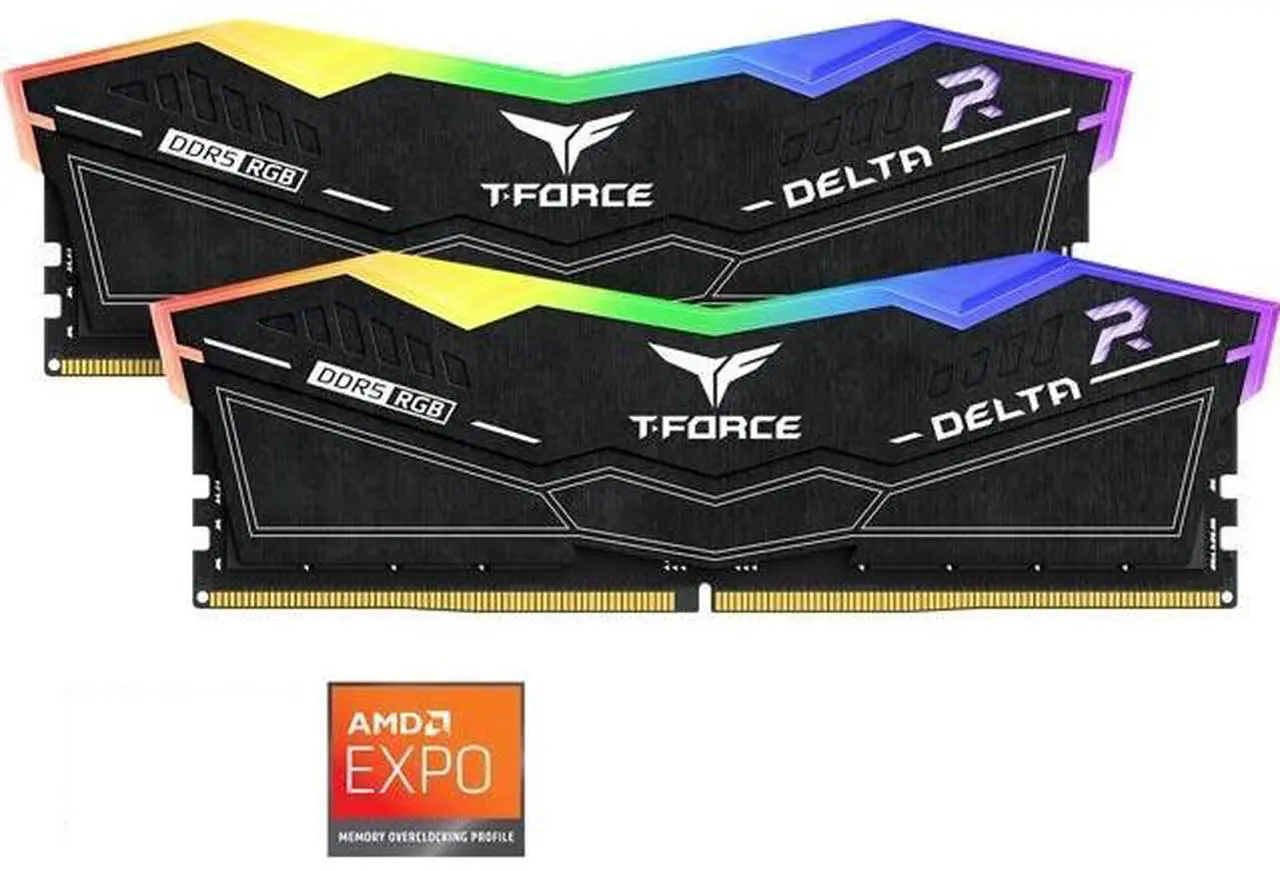
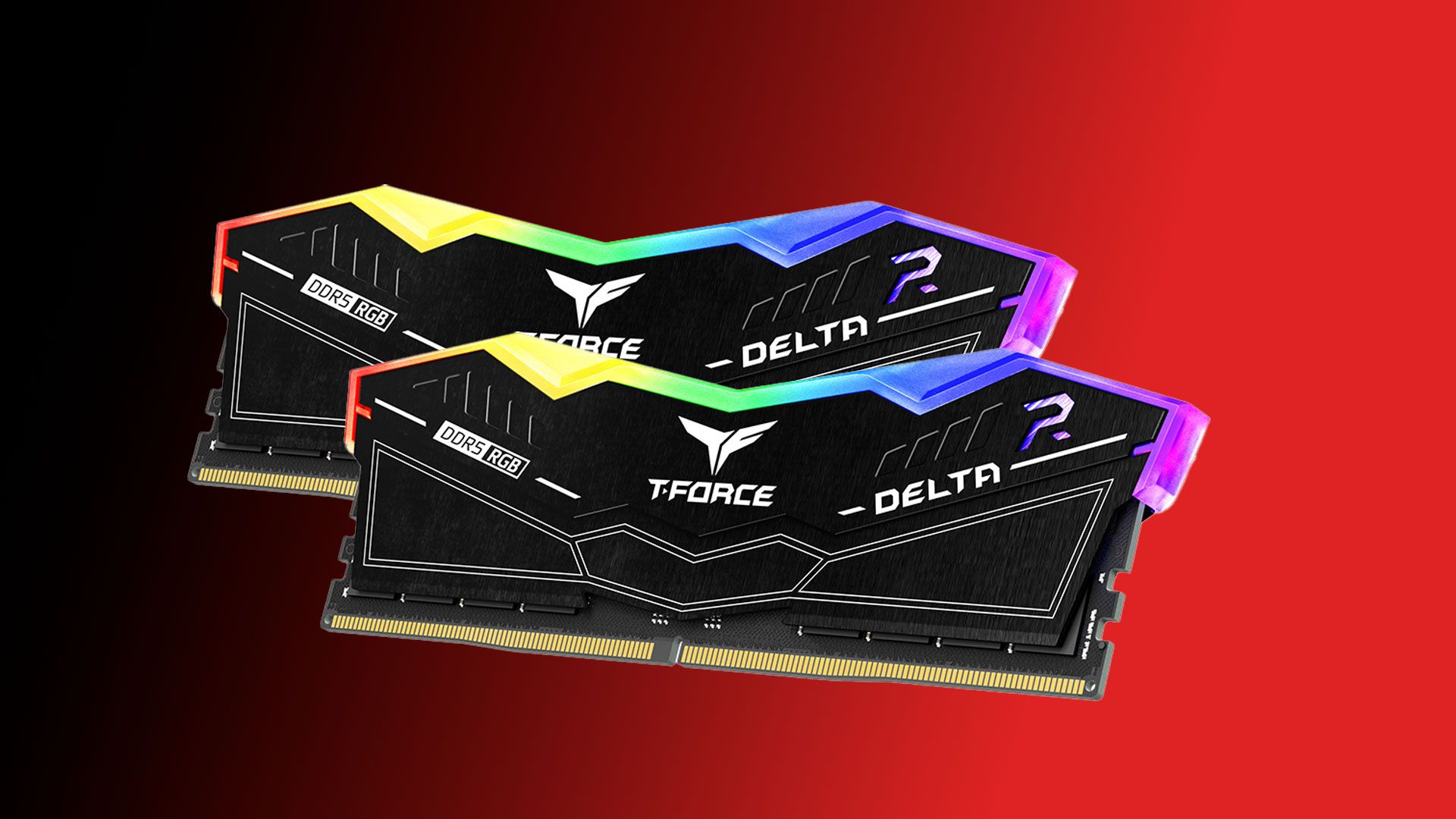
First up, we have Team Group's Delta RGB 32GB (2x16GB) DDR5-5200 kit. This memory isn't the fastest thing going, but it's the cheapest thing going, and for many builders, that's what's going to matter most right now.
T-Force Delta RGB 32GB (2 x 16GB) DDR5-5200: was $473.99 now $389.99 Additional $70 off with promo code FTTF8296 This RGB kit from Team Group unlocks 32GB of DDR5 memory for your gaming PC or workstation rig. CAS and memory timings of 40-40-40-76, with speeds of 5,200 MT/s, mean this isn't the fastest memory out there, but it's currently the cheapest 32GB DDR5 kit you can buy.View Deal
Especially if you're building with an AMD Ryzen X3D CPU, raw RAM speed isn't as important to the highest gaming performance as it would be for a chip without V-Cache. So this Delta kit could do just fine for such a build, or for an Intel system where absolute speed isn't the first priority.
This RAM's black heat spreaders and RGB LED flair will complement any build, and you can get it for $389.99 right now at Newegg after applying promo code FTTF8296, making it one of the cheapest 32GB DDR5 kits on the market, if not the cheapest, period. With Intel XMP and AMD EXPO support, this kit comes ready for one-click overclocking in your BIOS.
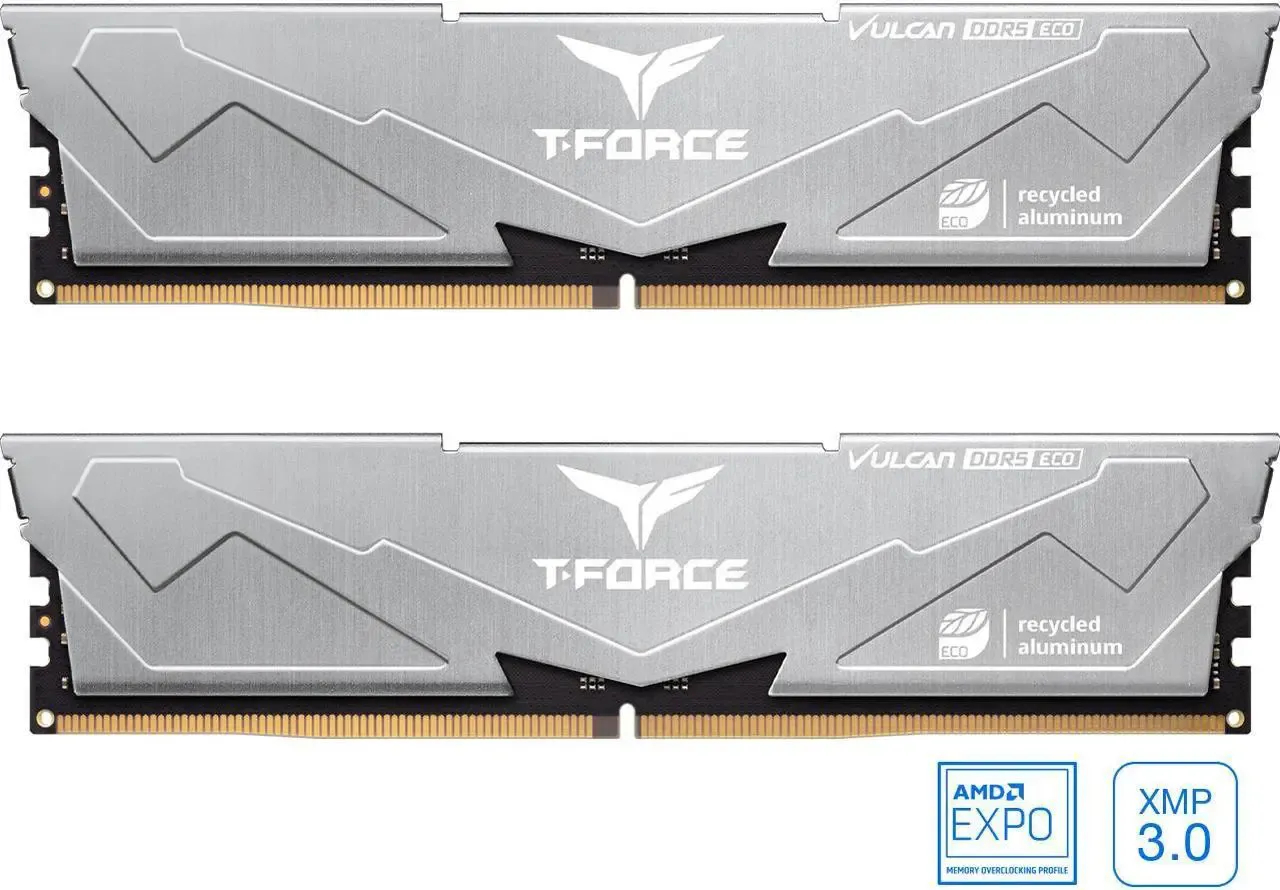
If you want faster DDR5 RAM, perhaps for an Intel CPU, Team Group's T-Force Vulcan Eco DDR5-6400 CL 32GB kit is also available for $459.99 at Newegg with promo code FTTF8342 for $90 off.
The next best 32GB DDR5 RAM kit deal, also from Team Group, with much faster speeds of 6,400 MT/s. CAS and memory timings are 38-46-46-84. Probably the better option, if your budget can stretch to get it.View Deal
This dual-DIMM kit offers simple silver heat spreaders to go with its high speeds and relatively low CL38 latencies. Like the fancier Delta kit above, this memory comes with XMP and EXPO profiles for easy overclocking across CPUs from both vendors.
This RAM wouldn't be our first pick for a Ryzen CPU, as running it at the full DDR5-6400 speed would introduce a small latency penalty because of the way the Infinty Fabric and the memory controller clocks interact, counteracting the entire point of faster memory to begin with.
But if push comes to shove, you can still tune this memory to DDR5-6000 speeds to avoid that pitfall if need be while maximizing performance on AMD chips. If you are looking for a native DDR5-6000 kit, though, read on.
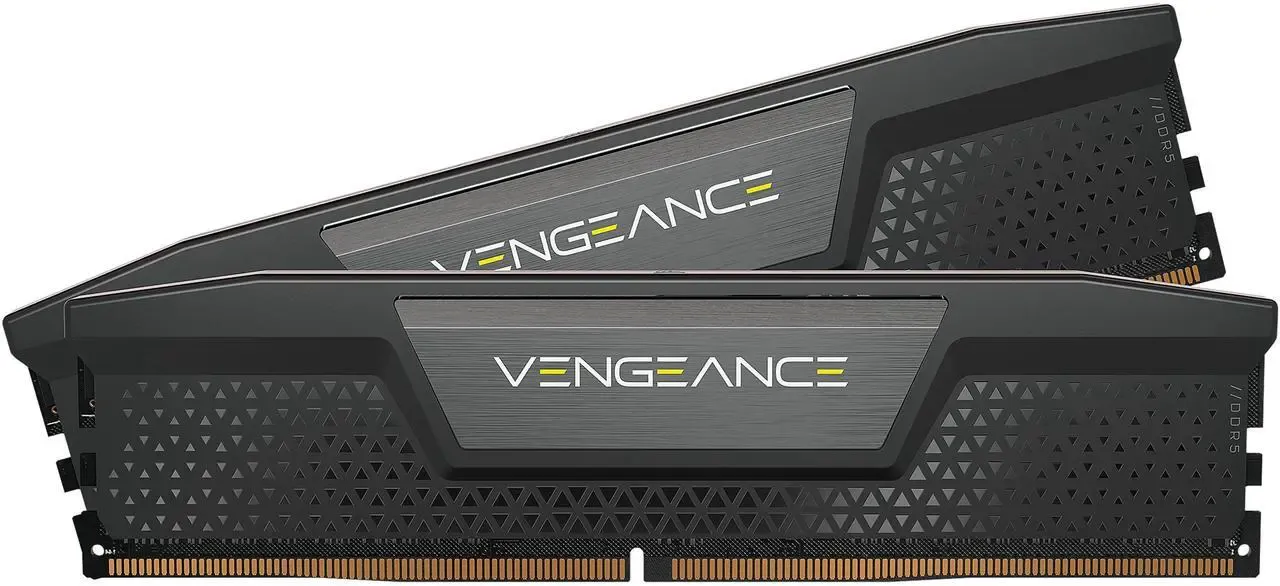
Corsair's Vengeance DDR5-6000 32GB kit hits the sweet spot for AMD CPUs with its 6000 MT/s speed and low CL30 latency.
This Corsair kit hits the sweet spot for AMD CPUs with DDR5-6000 speeds and a low CL30 primary timing. View Deal
This memory isn't the flashiest thing out there, but we doubt that's the criterion at the top of most builders' minds right now. As an older kit, it doesn't come with an AMD EXPO profile preloaded, but it'll still overclock just fine in AMD boards. Do be aware that the 1.4V spec is higher than some other DDR5-6000 kits, though.
Despite its lack of flair, this kit still comes with classy Corsair styling and the full backing of that company's reliable warranty and support. Take $70 off and grab this RAM for $459.99 at Newegg with promo code FTTF8324.
RAM pricing is just one of the tough challenges facing PC builders right now. But with these deals, you might be able to save a few bucks to put towards another component like a bigger SSD or a more powerful video card, or just take it off the bottom line of your build sheet. Happy hunting.
Nvidia is tailoring its popular DGX Spark platform and the GB10 SoC to better fit the realities of today's AI models and the broader silicon supply crunch. The company is introducing a 64GB version of the Spark that's meant to be more affordable to local AI trailblazers who just don't need 128GB of RAM.
Back when we first began exploring the capabilities of the DGX Spark and similar systems, the general assumption was that lots of RAM would be necessary to hold the most intelligent models one might want to run, and so unified memory systems built around AMD's Strix Halo, Nvidia's GB10, and Apple's M-series chips could all be configured with 128GB of memory or more.
But the AI field moves fast. Highly intelligent dense models like Qwen 3.8 27B can now fit comfortably within 32GB of RAM (albeit with limited context), so the original Spark's 128GB of memory isn't essential for local inference alone. And skyrocketing RAM prices mean that a chip that’s permanently paired with too much costly LPDDR5X is more of a barrier to entry than an asset. So a more affordable Spark with less RAM makes sense for those who need the capabilities and supporting software stack of Nvidia's GB10 Superchip and can live with less memory.
A "more affordable" DGX Spark is of course relative in today's market. 64GB GB10 systems from Acer, Asus, Dell, Gigabyte, HP, and MSI are slated to start at $4999 when they launch on October 23. Given the ever-shifting prices of memory and storage right now, they might not stay there for long. Assuming you can find a 128GB GB10 system in stock, you can expect to pay roughly $7000 to $9000 for one right now, far above even Nvidia's adjusted MSRP.
Memory capacity change aside, 64 GB Sparks will retain the same ConnectX 7 RDMA NIC as their 128 GB stablemates, meaning that they can still be clustered to boost memory capacity and inference performance if a user does eventually outgrow the bounds of 64GB of RAM. The same 20-core Arm CPU complex from the original Spark carries over unchanged, as does the 273 GB/s of shared memory bandwidth for the CPU and GPU.
To help make use of that ConnectX 7 NIC, Nvidia is also making it easier to join Sparks together with a new software tool, the Nvidia Sync Cluster Assistant, that automates the process of yoking those systems together. (Sync is a remote connectivity and management app for the Spark that allows users to use their Spark’s AI horsepower from other Macs and PCs.)
That tool supplements a variety of community-developed utilities that have sprung up over the past year to make clustering a more seamless process, as we used in our experiments with clustering two Dell GB10 systems together earlier this year.
Nvidia is also adding a feature to Sync called Model Launcher that automatically downloads and starts models like the aforementioned Qwen 3.8 27B across one or more systems and links them to the OpenCode browser-based coding agent so that users can start using their local token factories right away for agentic workflows.
The 128GB DGX Spark and Spark-alikes will remain available for those who need space for larger models and for scaling across clusters, or for more memory-hungry local AI work like model fine-tuning, so there’s basically no downside to this addition to the DGX Spark lineup. In today’s volatile market, it’s good to have options, and a 64 GB Spark gives local AI enthusiasts another choice to better fit their budgets and workflows.
Gears of War: E-Day takes us back to the very beginning of one of the most beloved sagas in gaming: Emergence Day. And to tell this new chapter in the Gears story, developers at The Coalition rebuilt Gears entirelyfrom the ground up in Unreal Engine 5. On top of all-new assets, E-Day is the first shipping title that uses UE5’s MegaLights technology. This tech allows artists to light a space with hundreds of dynamic ray-traced light sources, all in real time.
MegaLights immediately stands out as something different and distinctly next-gen for real-time graphics. Right from the start, Gears of War: E-Day made the hair stand up on the back of my neck with its haunting use of light and shadow. As I fought through the first bloody minutes of Emergence Day with protagonists Marcus and Dom and some new recruits in tow, I was struck by the power of dynamic lighting from sources like the flashing lights on police cars and ambulances.
And as I walked through a ravaged supermarket, I was amazed by the diversity of realistic light sources in the scene, from flickering TVs to fluorescent tubes in the frozen foods aisles. To find out what level of graphics horsepower Gears' incredible presentation demands in exchange for a 60 FPS average, I wiped the Locust guts off and got to testing performance across 43 of our graphics cards to see which GPUs were up to the job.
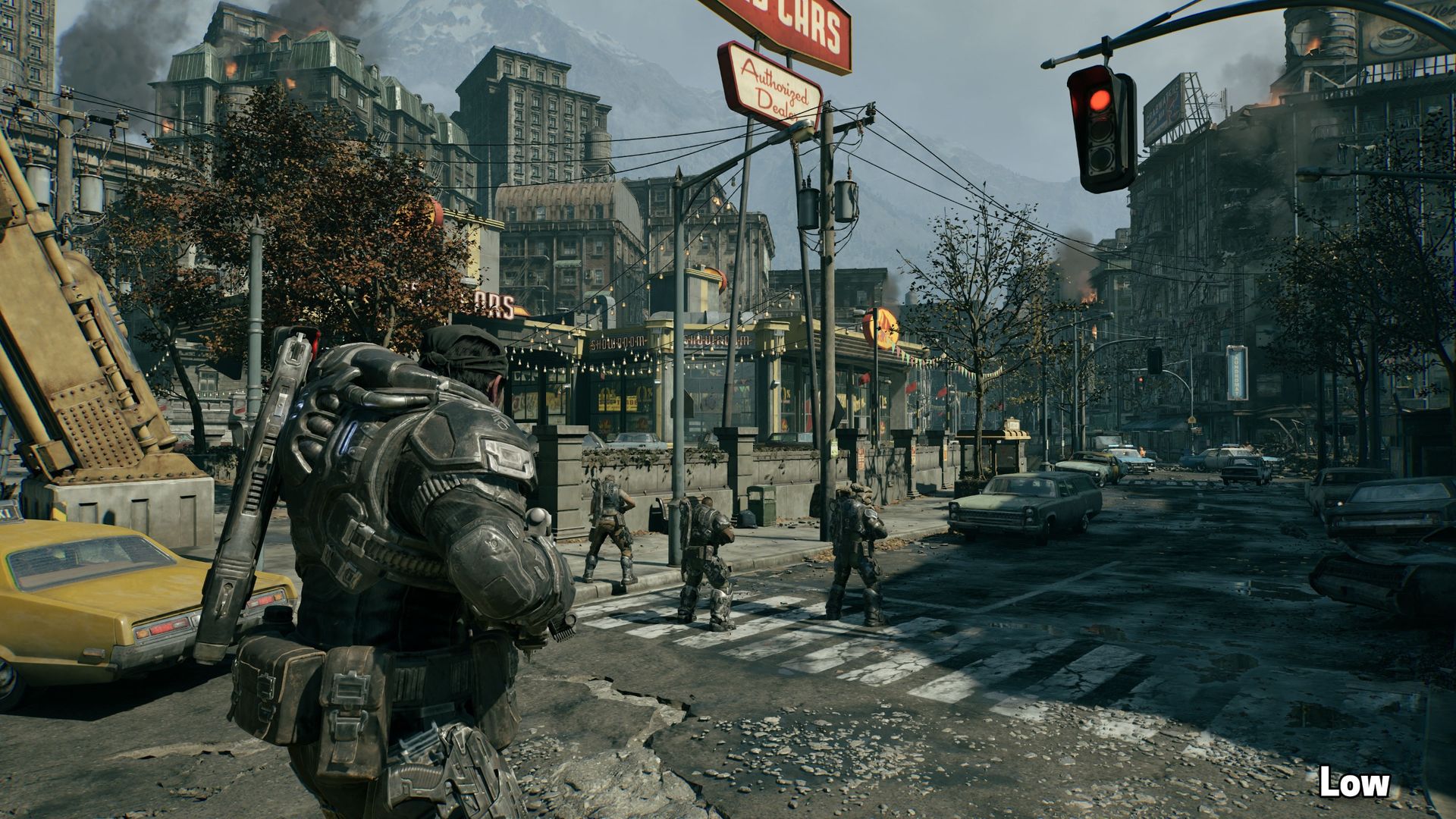
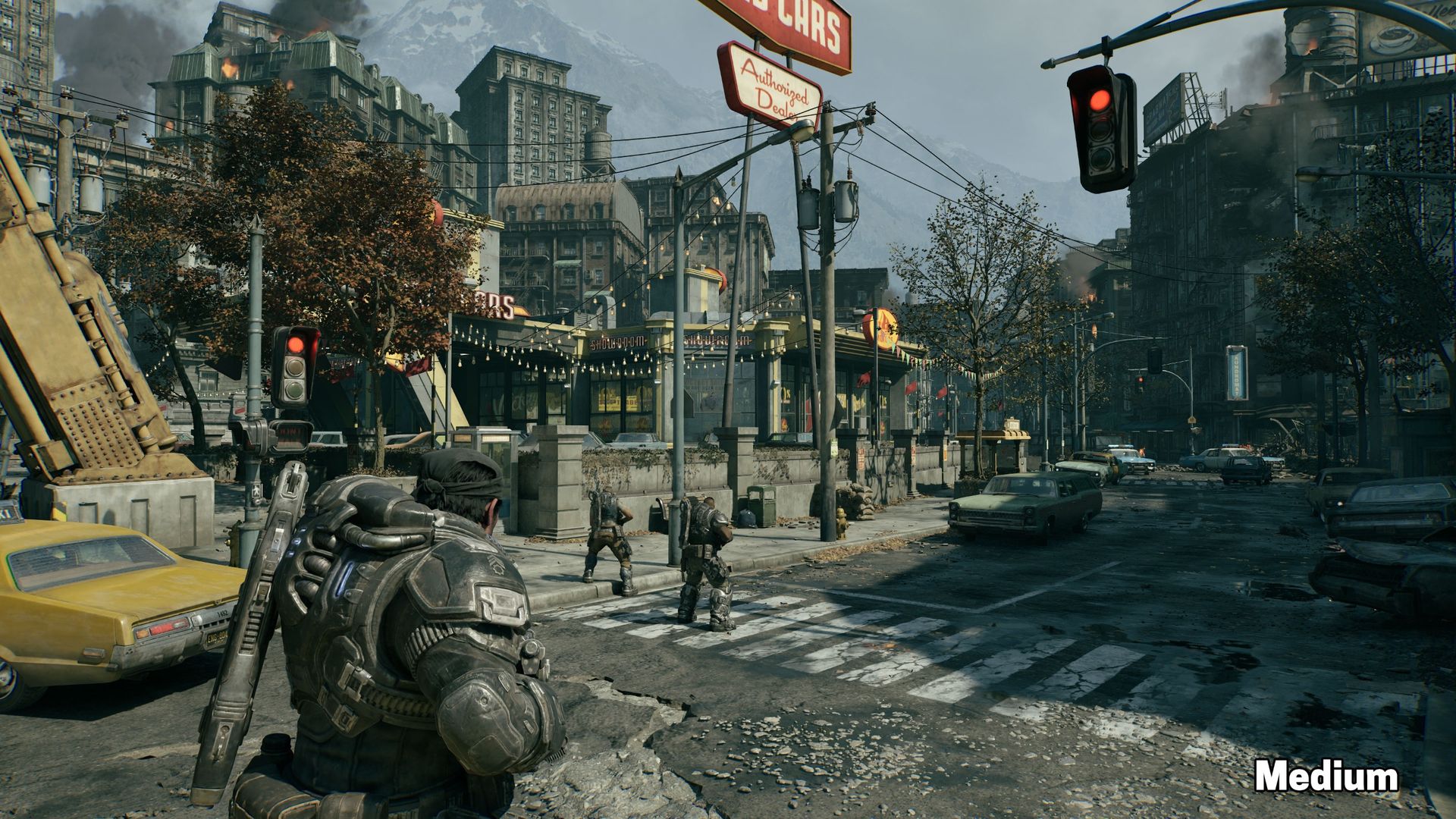
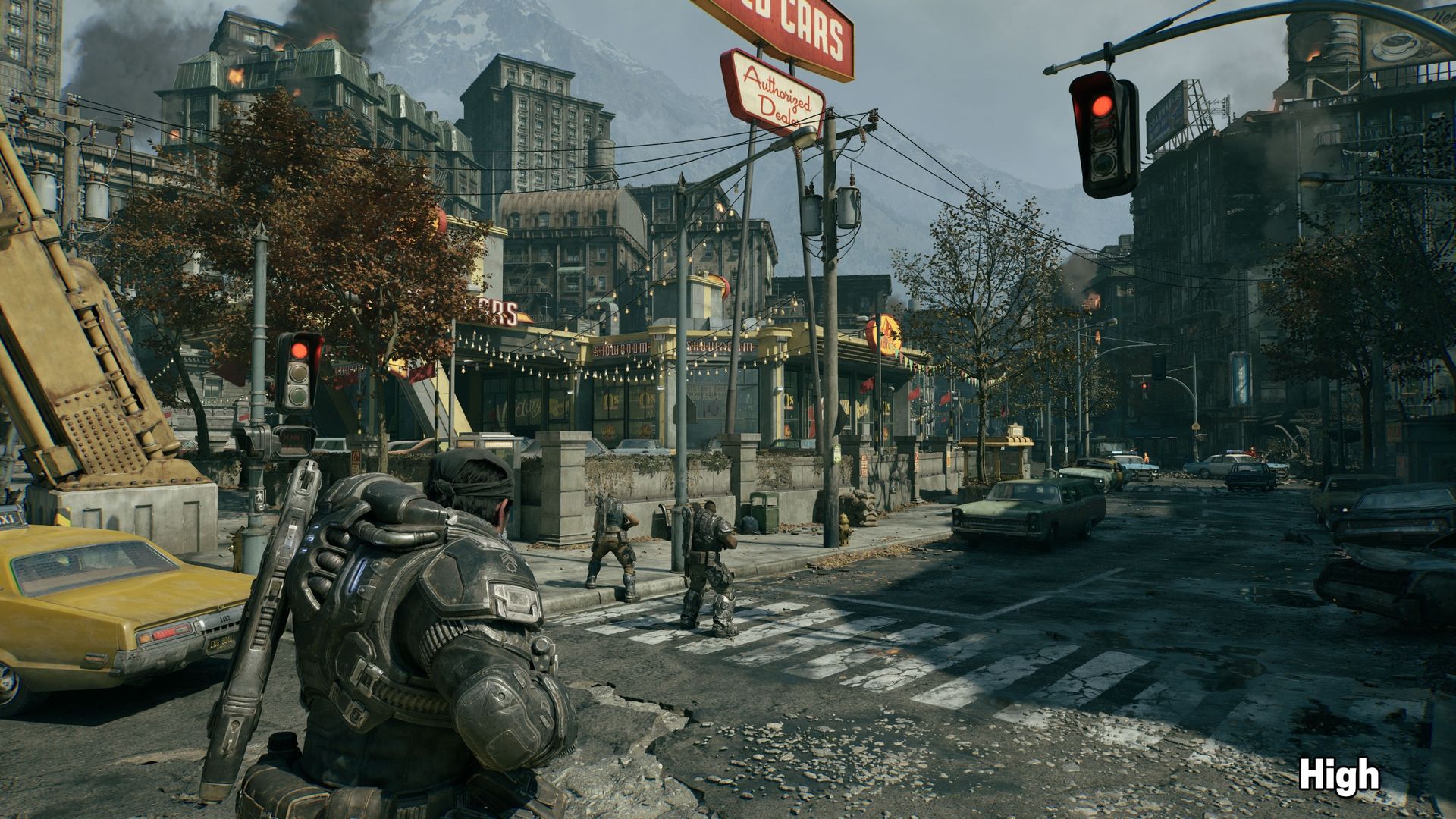
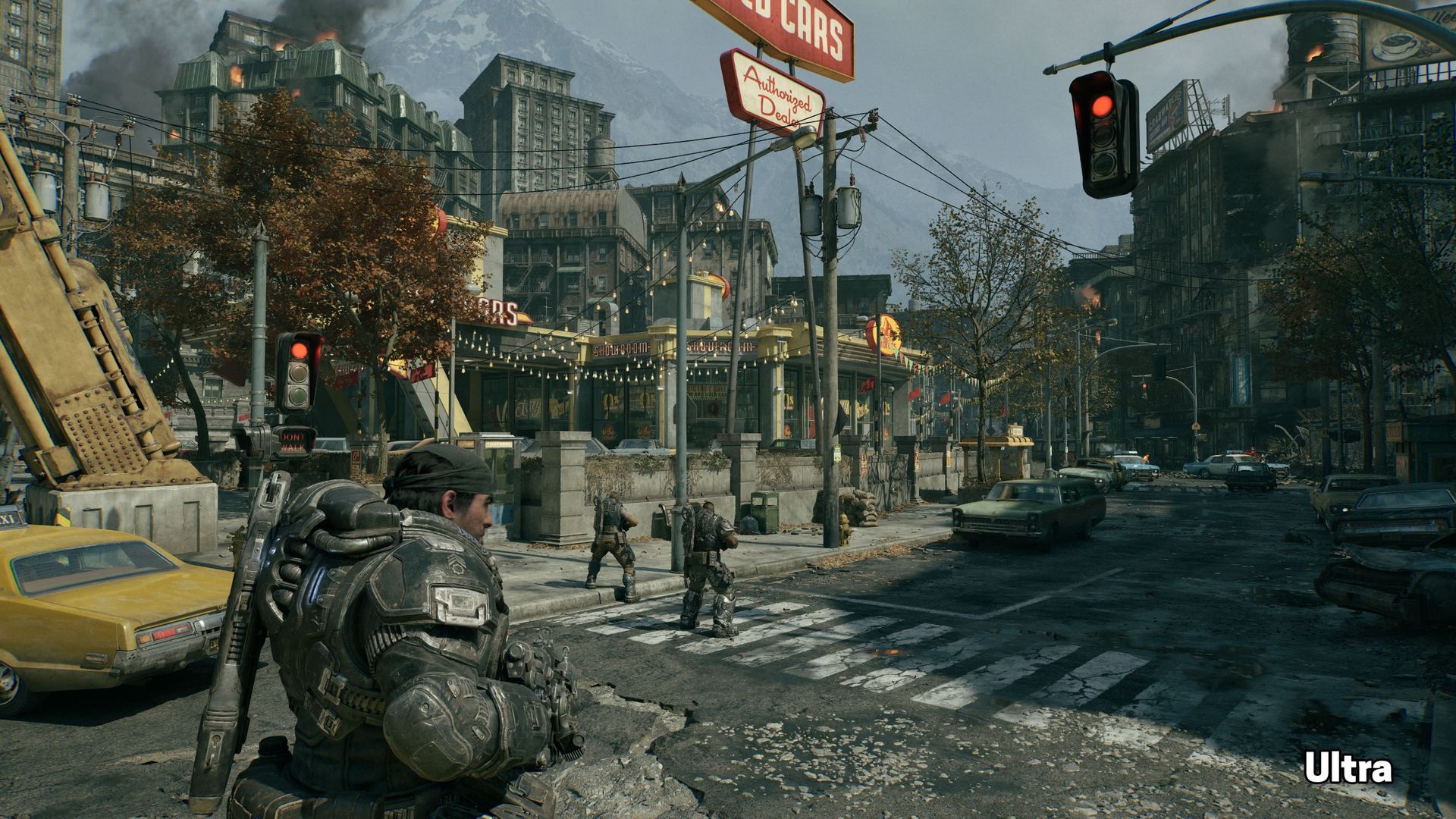
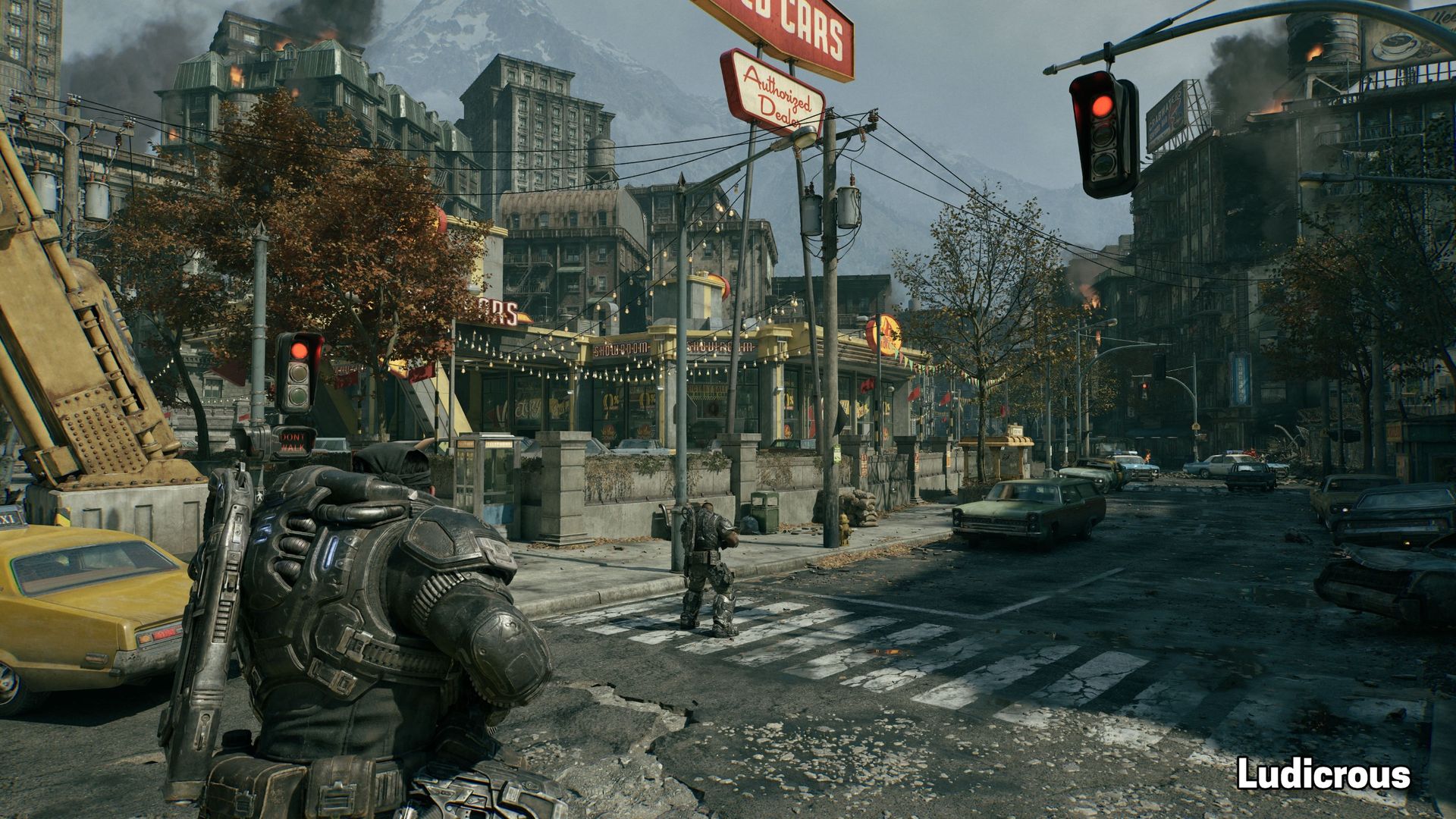
Gears of War: E-Day offers five quality presets: Low, Medium, High, Ultra, and Ludicrous (seemingly equivalent to Cinematic in other Unreal Engine 5 titles). We captured screenshots at the same location in-game using all five of these presets so you can get a sense of the image quality changes at each one.
If you have to turn down settings to achieve playable performance, I wouldn’t personally go any lower than Medium, as Low brutally crushes the shadows (which may or may not be a bug) and loses a lot of ambient occlusion, creating a sort of cardboard cut-out look on surfaces like the car headlights in the comparison scene above. Check out the rather cartoony-looking destroyed building on the right edge of the frame, too, where the destroyed interior and intact exterior aren’t naturally shadowed.
From Medium on up, the differences are more subtle. Shadows from foliage become softer and more detailed as we move from Medium to High to Ultra, more bounce light might be visible on some surfaces, and textures might be slightly sharper, as expected. But you’re not losing a ton of visual richness if you have to step down to Medium. And as you’ll see in our performance results, that’s a good thing for older and lower-end hardware.
Image quality with RTX Mega Geometry
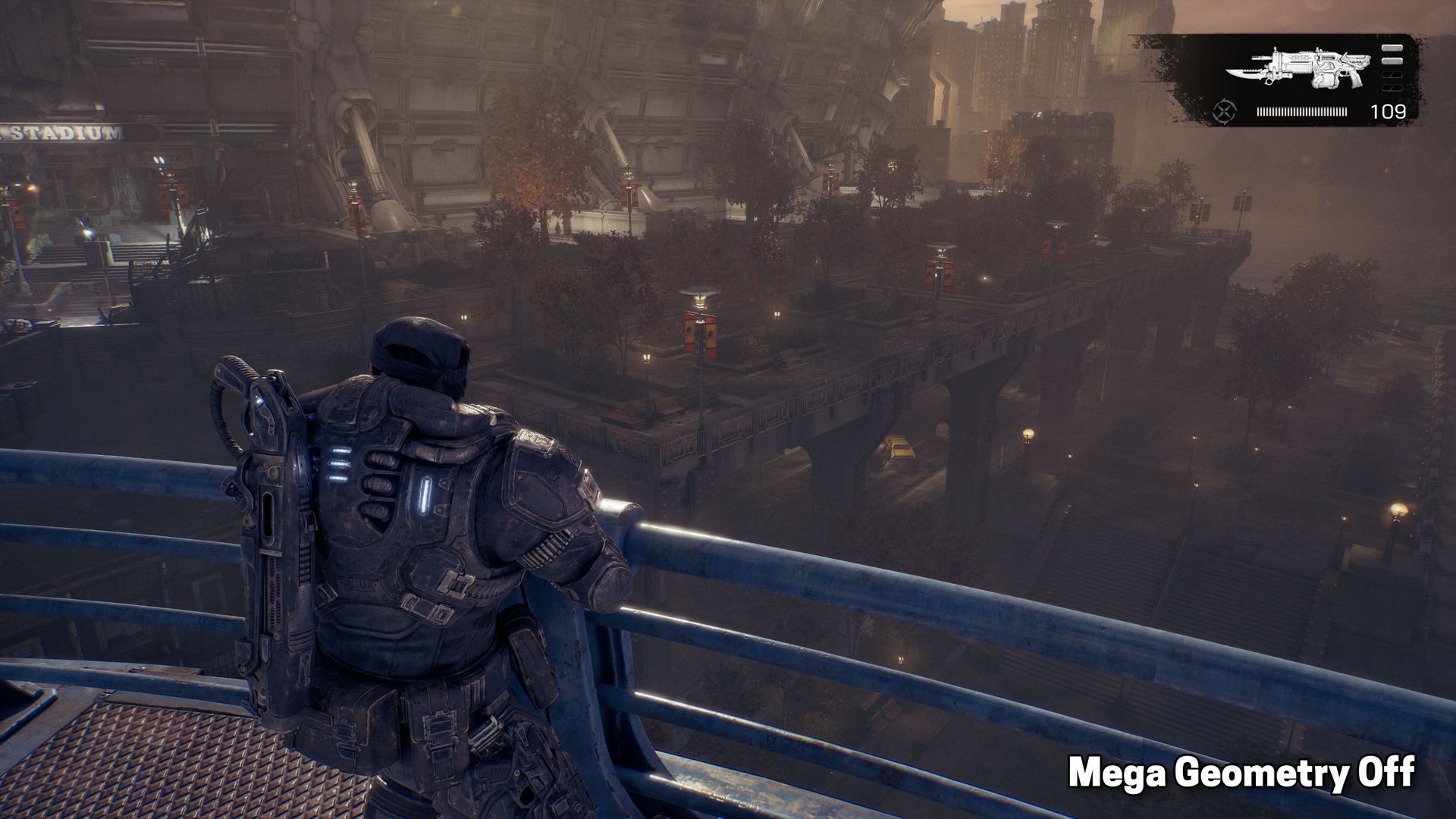
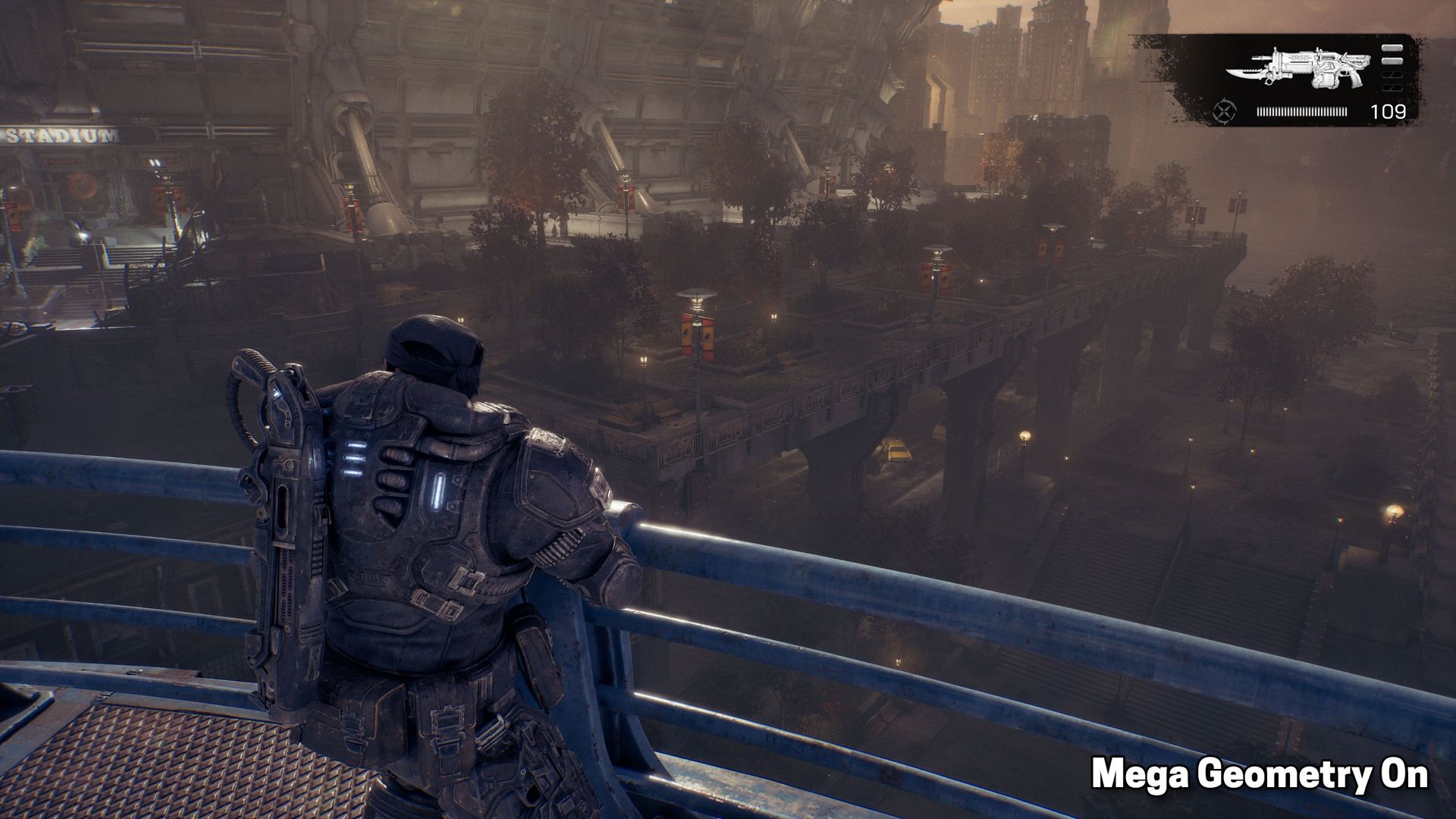
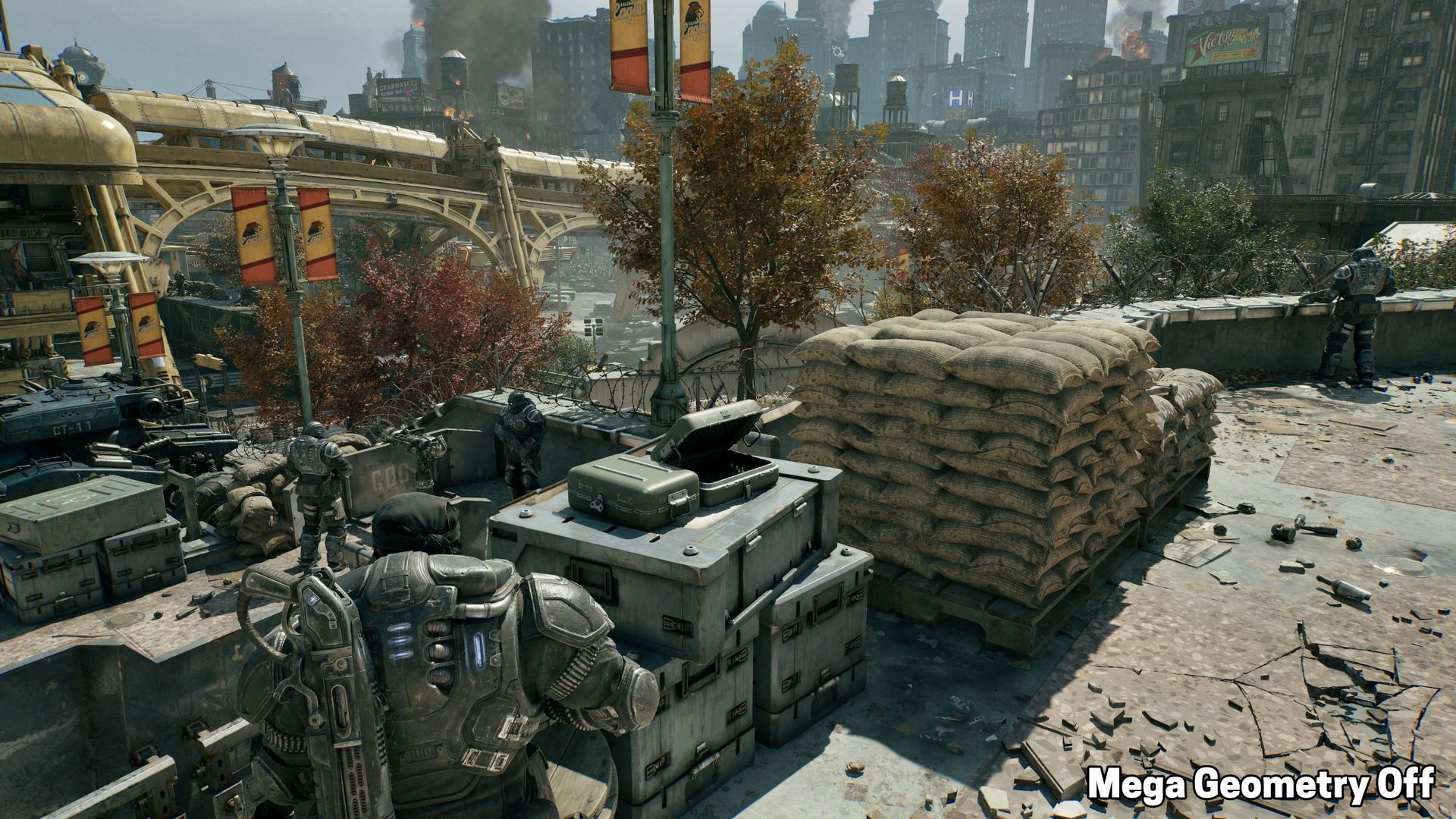
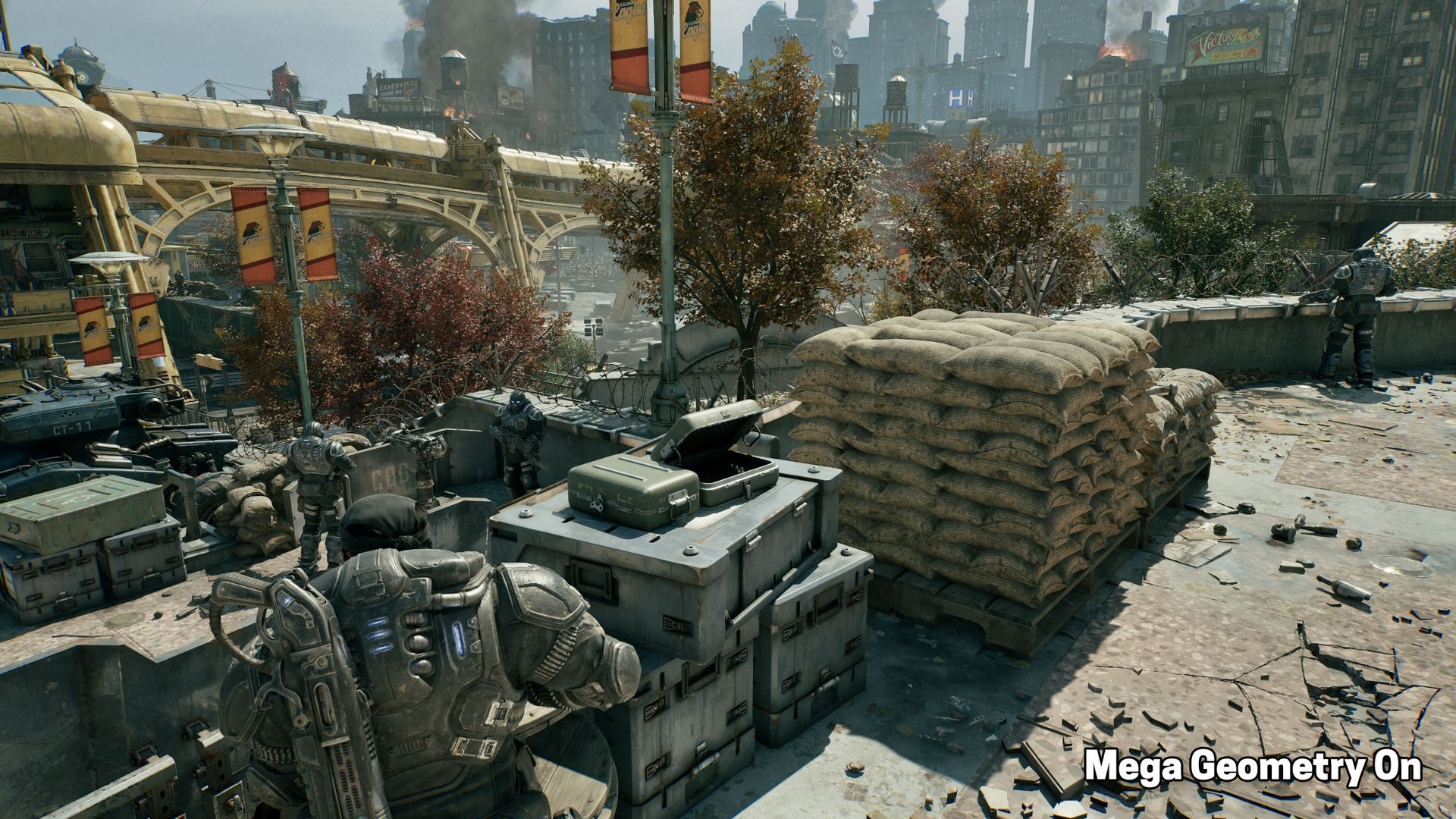
In addition to Unreal Engine's MegaLights, Gears of War: E-Day is also one of the first titles to ship with Nvidia’s RTX Mega Geometry tech. Mega Geometry allows for efficient ray-tracing of highly complex meshes like those used for foliage. E-Day exposes Mega Geometry as a toggle, so it’s easy to compare its impact on scenes.
In the examples above, RTX Mega Geometry creates subtle but solid improvements. The most noticeable effect of the feature is that trees have more natural self-shadowing in their cores, and shadows and ambient occlusion on some surfaces can also be visibly improved. We also found that hanging foliage (as can be frequently seen spilling out of planters in the game’s early segments) cast more accurate shadows with the feature enabled, but you’re not generally sticking your nose up close to those objects. Small objects in rubble piles might also show crisper and more accurate shadows, too.
RTX Mega Geometry is technically compatible with graphics cards ranging all the way back to Turing, but Gears will only let you enable it on cards with 12GB of VRAM or more, which wasn’t a common spec before the RTX 40-series family rolled around.
I didn’t have time to test the performance cost of Mega Geometry on every compatible card, but for those I was able to test, I saw a roughly 10% performance cost, and that drop seemed consistent across GPU generations.
If you’re looking for the absolute best image quality with E-Day, I would certainly enable Mega Geometry, especially after creating the side-by-side comparison images above. But this also isn’t a game where you’re standing around and appreciating pretty trees too much, so if you want better performance, you can also leave Mega Geometry off without raining potatoes on Gears’ image quality.
Notes on upscaling and frame generation tech
Gears of War: E-Day is refreshingly vendor-inclusive when it comes to upscaling and frame generation technologies. It features the latest DLSS, FSR, and XeSS tech on compatible graphics cards, as well as Epic's cross-platform TSR upscaling.
As we've come to expect, DLSS upscaling looks the best of the three vendor-specific upscaling solutions. It offers the sharpest and most stable image quality at rest and in motion.
FSR 4 on RX 9000-series and RX 7000-series cards looks great, if a tiny bit less stable on the finest details in motion compared to DLSS. But because you’ll want to steer clear of super-low input resolutions for upscaling to begin with to avoid placing more load on the CPU, DLSS’s current advantages at low input resolutions are less important in this title than they are in Control Resonant, for example. In short, RDNA 4 and RDNA 3 gamers will have a great time with upscaling enabled.
If you’re on an RX 6000-series Radeon, whatever fallback version of FSR is being used in this game is really showing its age. Surfaces visibly boil and crawl when the player is at rest, and high-contrast edges show distracting flickering. This option considerably worsens the presentation of the game.
The cross-platform version of XeSS available to RX 6000 cards doesn’t totally correct these issues, but it looks far better than FSR 2 or 3. If you’re still gaming on an RDNA 2 card and want the best possible image quality, we’d favor Intel’s upscaler.
Frame generation is also available across all three major graphics vendors. DLSS Multi Frame Generation is present and works as expected. AMD’s FSR ML Frame Generation appears to be present, as well, and it works on RX 9000-series cards without a (figurative) hitch.
But if there’s a fallback to an older FSR version for earlier graphics cards, it seems to be broken, as the feature is grayed out on RX 7000 and RX 6000 series cards. We expect that this is a bug or oversight and will be fixed, but it made it hard to see whether framegen was possible or working properly on those older cards.
Finally, for Intel, XeSS 3.0 with Multi Frame Generation is also present and functional, although the level of performance on offer from Arc cards might not be high enough to allow for large amounts of frame generation at acceptable input latencies. Still, XeFG is another handy tool for tuning your Gears experience to taste.
Performance analysis at 1080p, 1440p, and 4K
Since Gears requires RT and takes a mostly vendor-neutral approach to its graphics feature set, the performance story is pretty simple. We don’t have to generate tons of comparison data for RT on and off, and we don’t have to contort various settings to create a scalable workload across GPU vendors.
FutureFutureFuture
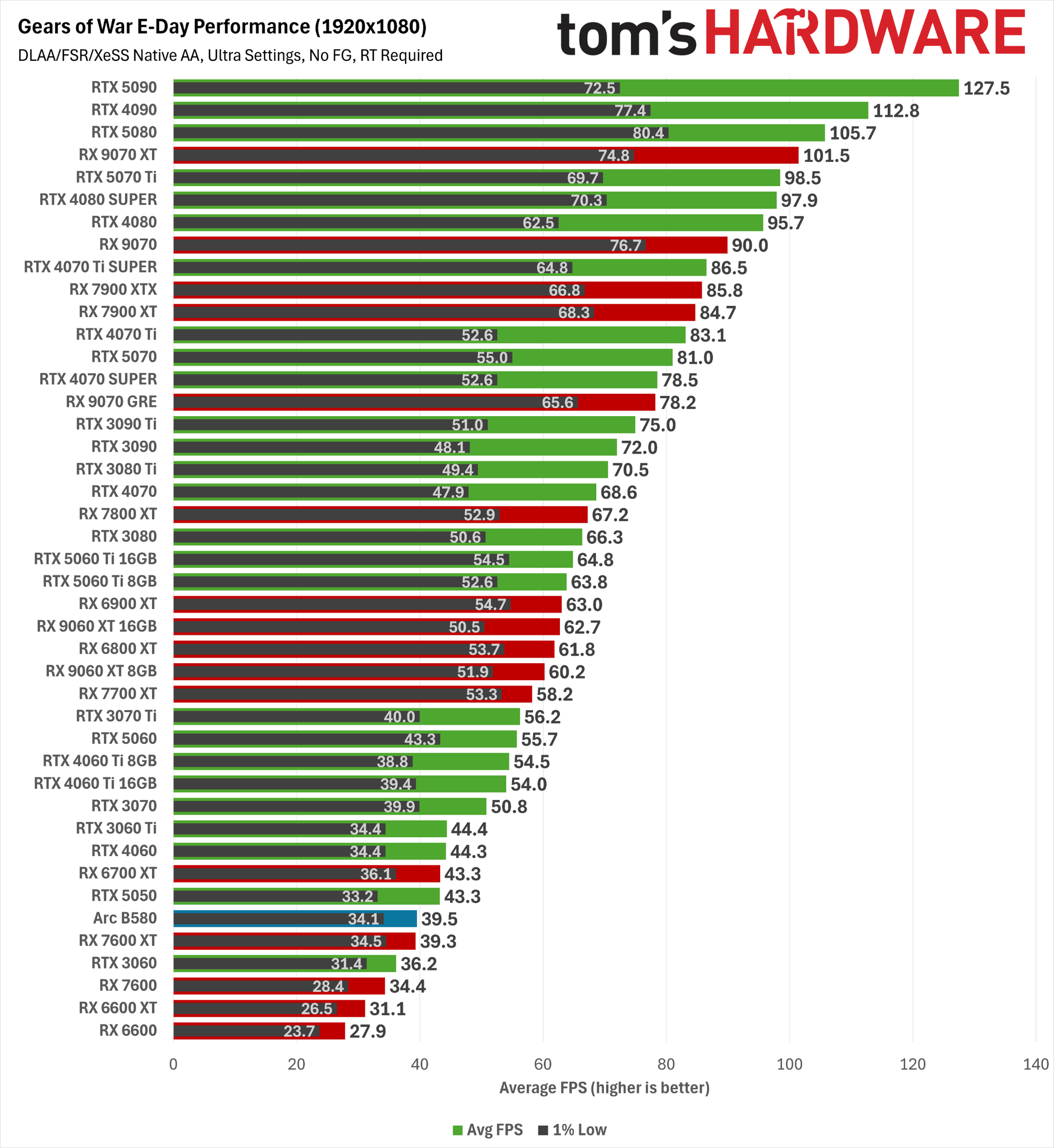
At 1080p, some clear performance trends immediately emerge. RTX 50-series cards hold a slight raw performance edge in average FPS over Radeon RX 9000-series hardware, but the Radeons demonstrate significantly higher 1% low frame rates.
Subjectively, Gears seems to exhibit more obvious hitches than we’ve seen in a modern game of late, and Nvidia cards might suffer more from that behavior than Radeons, especially at this lower resolution. But on a high-refresh-rate, variable-refresh-rate monitor, those hitches only occasionally poke through on cards from either vendor.
The 1% low superiority of the RX 9000 series isn’t universal, either, as the combination of FSR 4 and RT seems to weigh more heavily on RX 7000-series cards. The RX 7900 XTX and RX 7900 XT would generally land close to the RX 9070 XT, but here they fall below even the RX 9070. The RX 7800 XT also performs more in line with the RX 9060 XT than the RX 9070 GRE here. That’s the price you pay for the superior image quality of FSR 4 on GPUs that lack the matrix math accelerators needed to run the model at its best.
The TL;DR for those seeking a 60 FPS average at the 1080p Ultra preset is that among current-gen cards, you’ll want an RTX 5060 at the bare minimum and preferably an RX 9060 XT or RTX 5060 Ti (at least if you were lucky enough to get one before prices for those products shot through the roof). The RX 9070 GRE and RTX 5070 provide a solid higher-refresh-rate experience, while the RX 9070, RX 9070 XT, and RTX 5070 Ti all clear the 90 FPS mark.
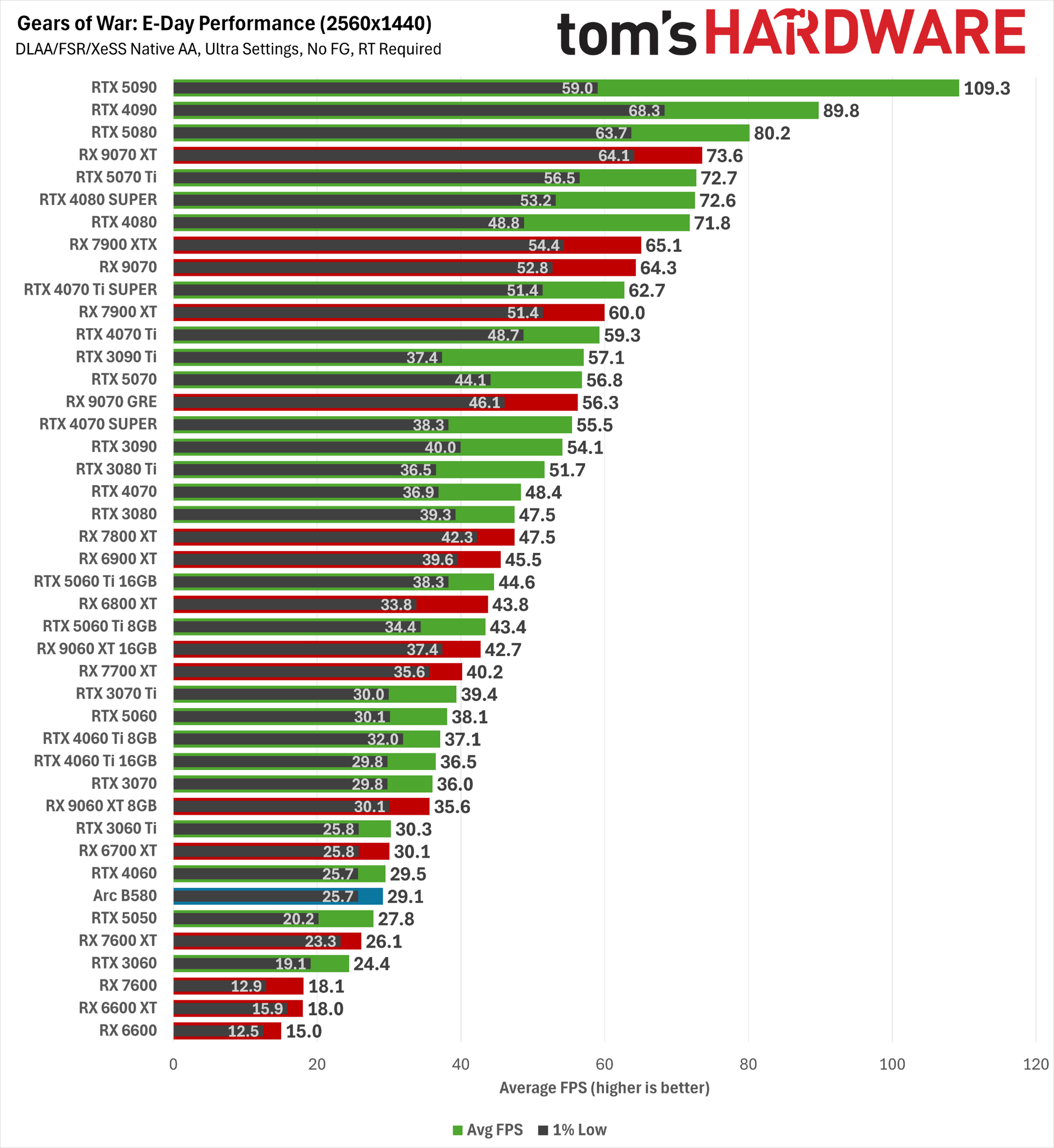
If you want a native 60 FPS-ish average at 2560x1440 Ultra, you need an RX 9070 GRE or RTX 5070 at minimum, and you really want an RX 9070, RX 9070 XT, or RTX 5070 Ti.
But given the broad availability of high-quality upscaling and frame generation options in this game, it’s worth grabbing FrameView (for all vendors) or pulling up the Nvidia Overlay and seeing whether your baseline PC latency is low enough with Quality upscaling (say) to consider adding framegen to the mix on compatible cards. Gears features Nvidia Reflex and responds well to AMD’s Radeon Anti-Lag feature in the driver, so it’s a great candidate for frame generation.
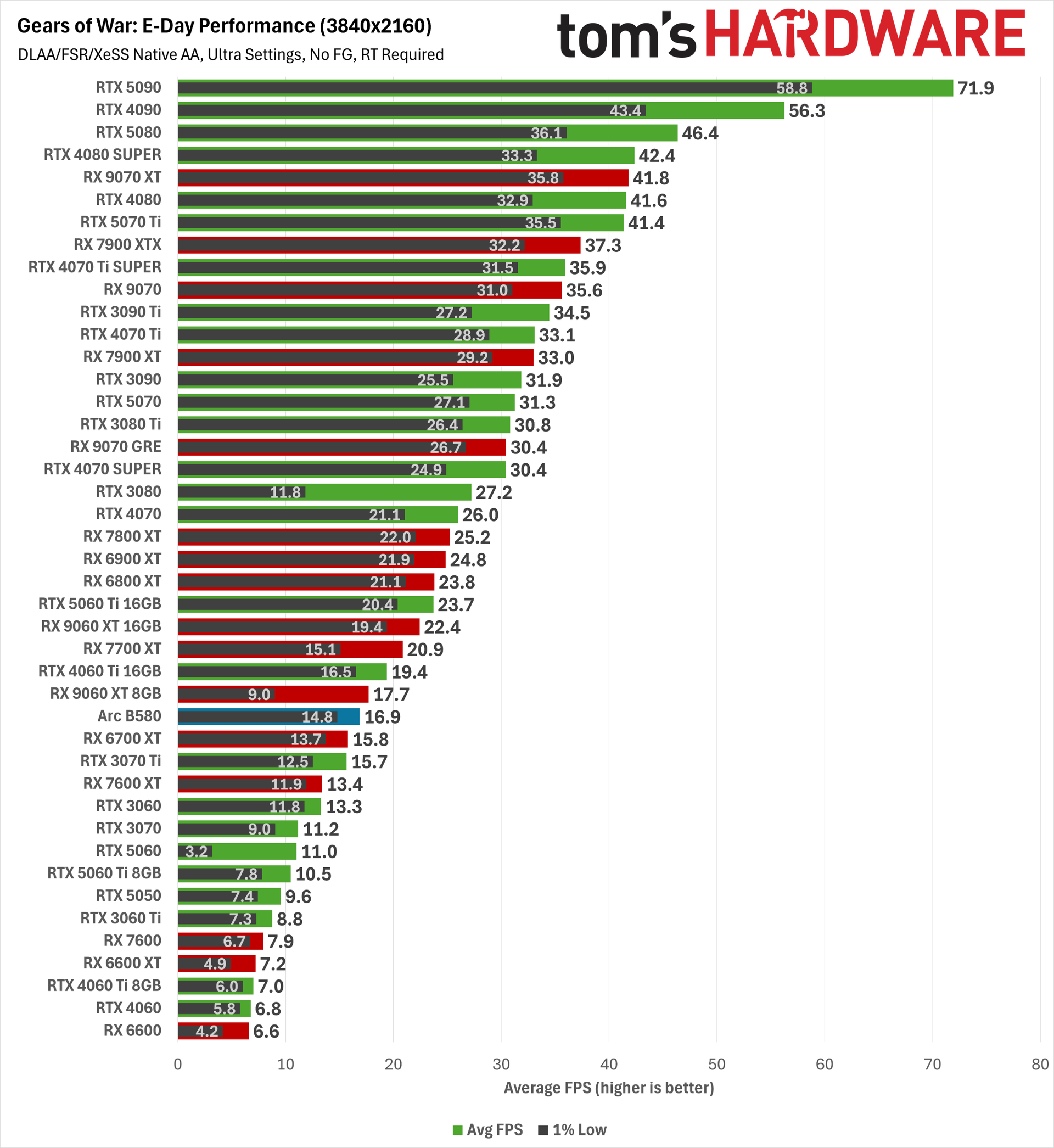
And that’s good news indeed, because at a native 4K Ultra, Gears simply can’t run at a 60 FPS average on anything short of the RTX 5090. The RTX 4090 comes close, but even it could really use a dose of DLSS upscaling and (optionally) frame generation to provide a fluid experience. Lesser hardware will require some personal dialing-in of upscaling and frame generation settings to arrive at the ideal balance between a smooth experience and solid image quality.
Gears of War: E-Day 1080p performance scaling on RTX 3060
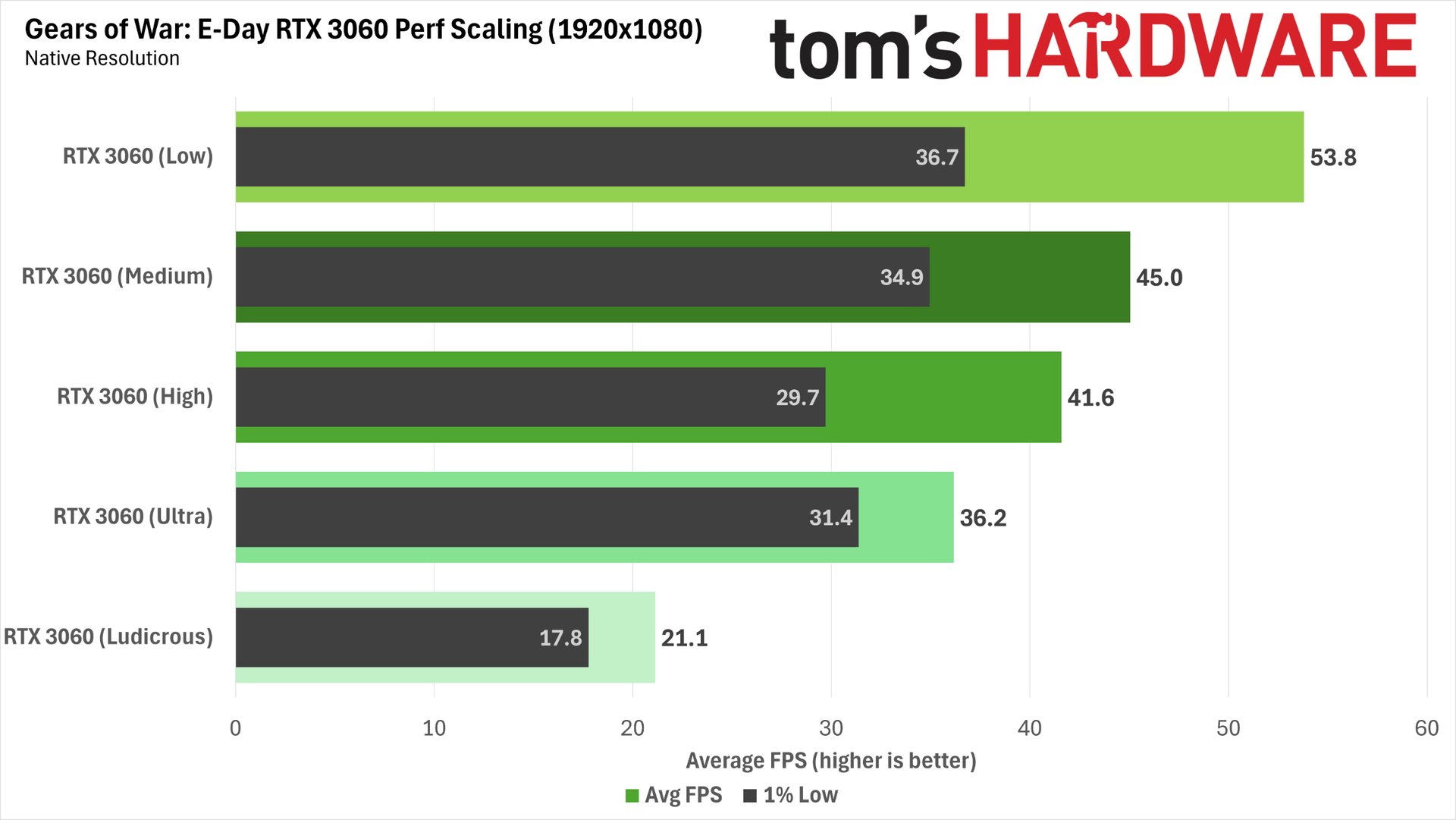
The RTX 3060 remains the most popular graphics card on Steam. We've already seen that it isn't well suited to running Gears at native resolution with Ultra settings, so we used it to test performance scaling across all of the game's available presets, both with and without upscaling, to see what a large group of gamers needs to do to achieve a good experience.
(Image credit: Future)
At native resolution, not even the Low preset can get the RTX 3060 over the 60 FPS hump. We wouldn't recommend using Low alone to boost performance for the reasons outlined in the image quality analysis earlier in this review. You're giving up a lot of image quality for no good reason when upscaling is available.
You can also see why the maxed-out Ludicrous preset isn't realistic for most cards, as it cuts performance roughly in half versus Ultra. If you're going that route on most GPUs, you will certainly need a dose of upscaling and frame generation, and since the build of Gears we used doesn't expose cross-platform framegen options, you're stuck in the mud on the 3060. (You can't mod in framegen using Optiscaler without risking a ban, either, as Gears uses Easy Anti-Cheat.)
(Image credit: Future)
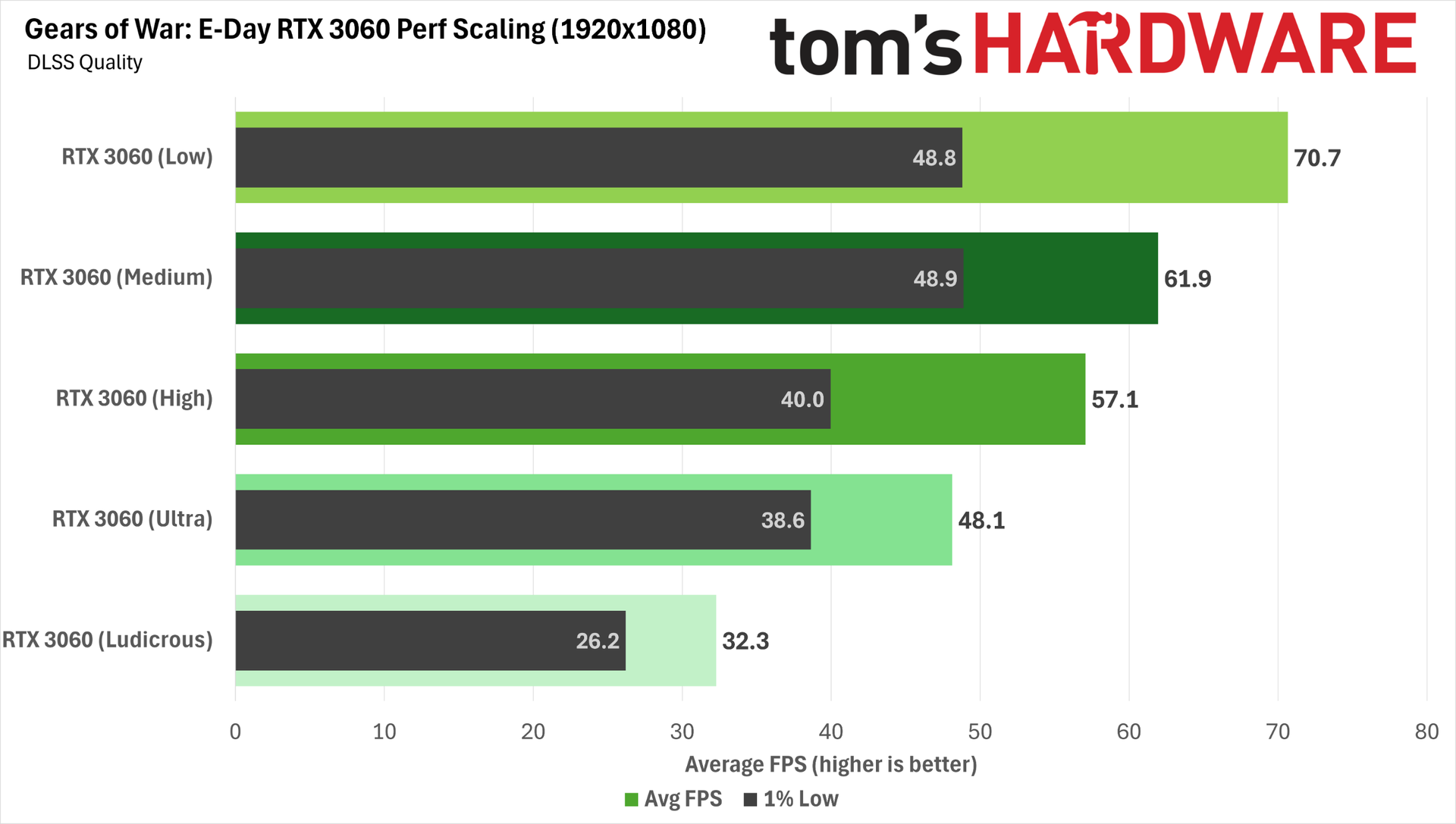
Dialing in DLSS Quality at 1080p affords more freedom for balancing image quality and performance on the RTX 3060. Medium settings plus DLSS Quality gets us over a 60 FPS average with reasonable 1% lows, and we know from our earlier analysis that Medium looks quite a bit better than Low, so this is a fine place to be.
If you're willing to tolerate the potential for larger performance drops, you can even shift up to High, but 1% low frame rates take a big hit, and more demanding scenes might chug a little. We'd stick with Medium for the best all-around experience, but you can choose your own adventure.
Dialing in more aggressive upscaling settings at 1080p to boost performance on the 3060 isn't a great idea, as residual RT noise is already creeping into parts of the scene with DLSS Quality. We'd really love to have DLSS Ray Reconstruction at our disposal here, given the extensive RT effects and poor apparent image quality of Gears' internal densoiser. One can only hope that such an update is coming later.
Bottom line
Gears of War: E-Day is an incredible technical showcase for the PC. As the debut title for Unreal Engine 5’s MegaLights feature, it uses light to gorgeous, often cinematic effect. The dynamic lighting and shadows in this game feel distinctly next-gen. If you obsess over the artistic qualities and usage of light like I do, you will frequently be wowed by the variety and intensity of effects on display. And the assets that those lights fall on mostly look like a million bucks. In short: this game is a feast for the eyes.
In exchange for its jaw-dropping lighting and detail, E-Day requires a strong CPU for the best performance in addition to a powerful graphics card. Check out our full CPU performance analysis for more details.
Given its demands, Gears may have some gamers with older hardware contemplating an upgrade. At a native 1920x1080 Ultra, the ever-popular RTX 3060 falls well short of a 60 FPS average, and anything less powerful than a Radeon RX 7700 XT or RX 6800 XT is also way off that pace.
In our supplementary tests, we found that the RTX 3060 needs 1080p Medium settings and DLSS Quality to clear the 60 FPS bar. But Gears still looks decent at Medium, so you’re not giving up too much eye candy in the bargain.
For a native-res 1080p Ultra and 60 FPS-ish experience, you want an RTX 5060 at a minimum, or a Radeon RX 9060 XT for a considerably smoother ride.
For higher-refresh-rate displays at 1080p, the RX 9070 GRE comes out as a bang-for-the-buck champion, shadowing the RTX 5070 for roughly $300 less at current pricing. And if you want even higher performance, the RX 9070 hits the 90 FPS mark on average for not that much more cash.
At 2560x1440 Ultra, an RTX 5070 or RX 9070 GRE both fall just short of a 60 FPS average, so upscaling or frame generation (or both) may be required to get over the hump. But you really want an RTX 5070 Ti or an RX 9070 XT for the best experience and value.
Native 4K Ultra gaming in this title is practically impossible without frame generation, upscaling, or both. Only the RTX 5090 can clear a 60 FPS average, and the RTX 4090 falls just short. Every other graphics card is way behind, so if 4K is your goal, it’s time to start dialing in those performance boosts.
Since input latency is well-controlled with Nvidia Reflex or AMD’s driver-level Radeon Anti-Lag in this game as a baseline, you can usually enable DLSS FG at will on Nvidia cards (or FSR frame generation with more care) and go about your gory business.
Although this game isn’t an Nvidia-backed path-tracing showcase like many of the headline AAA releases of 2026, GeForce gamers still get one unique feature that Radeon owners don’t. Gears implements RTX Mega Geometryfor more accurate RT on objects with lots of fine geometric detail, like leaves and rubble, and it seems to improve shadows and ambient occlusion on some surfaces, too. If you have a GeForce card with 12GB of VRAM or more, Mega Geometry is well worth its roughly 10% performance cost.
Given E-Day’s already extensive integration of Nvidia tech, we really would have liked to see DLSS Ray Reconstruction included in this game. The stock RT denoiser seems far from perfect and leads to visible boil or instability in shadows and reflections, and the overall detail in reflections isn’t quite up to par with what we’d expect. Ray Reconstruction makes a major difference for the quality of those effects in Control Resonant, and we’d like to see what it can do here, too.
But even so, Gears of War: E-Day sets a new high-water mark for what's possible from PC graphics, and I can't wait to dig deeper into the game to see how MegaLights enhances the rest of the experience. Don't be surprised if this title takes a spot in our next GPU Hierarchy update.
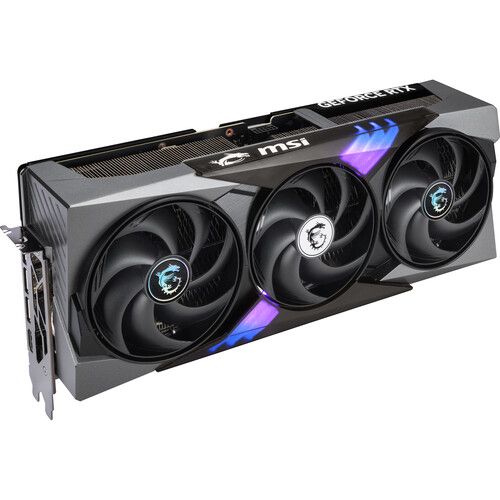
The indomitable GeForce RTX 5090 is getting harder and harder to find at any price, let alone for anywhere near its $1999 MSRP. If you can find one in stock, it's likely from a third-party seller, and prices from those sources are often over $8000 right now. But it's GeForce Week at Walmart, and as part of that deals event, you can get MSI's Gaming Trio RTX 5090 for just $4299 direct from a reputable seller — a screaming bargain in today's market.
The RTX 5090 needs no introduction as the most powerful gaming graphics card on the market today. If you're trying to max out path-traced lighting effects with all of Nvidia's DLSS 4.5 technology enabled at 4K (or even beyond), the RTX 5090 is still the king of graphics performance today.
It's also an amazing card for fast local AI work like LLM inference and image generation, and that multi-purpose appeal is part of why prices have shot up of late. New GeForce cards are still nowhere in sight, so if you're looking for the best gaming upgrade possible, the RTX 5090 is still it.
MSI's Gaming Trio GeForce RTX 5090 puts a huge, quiet triple-fan cooler on Nvidia's best-performing gaming graphics card. If you need a relatively affordable RTX 5090 upgrade, this is the way to go right now. View Deal
In our 2026 GPU Hierarchy testing at 4K, the RTX 5090 comes out on top, no matter what you throw at it. Whether you're trying to push raster or RT performance to the max, this card can do it all, without question.
If you're contemplating an RTX 5090 upgrade, be sure that your power supply is up to the task and that you're using a quality 12V-2x6 cable with it to minimize the chances of a costly meltdown. Be sure to consider an upgrade to one of our best picks for a 4K gaming monitor, too, as this card really is wasted on any other resolution.
The current AI boom means graphics card prices only seem set to rise for the foreseeable future, so even at this elevated price versus its MSRP, this MSI RTX 5090 is a rare opportunity to get the very best gaming GPU at a relatively attainable price. If you've been waiting, now is the time to jump.
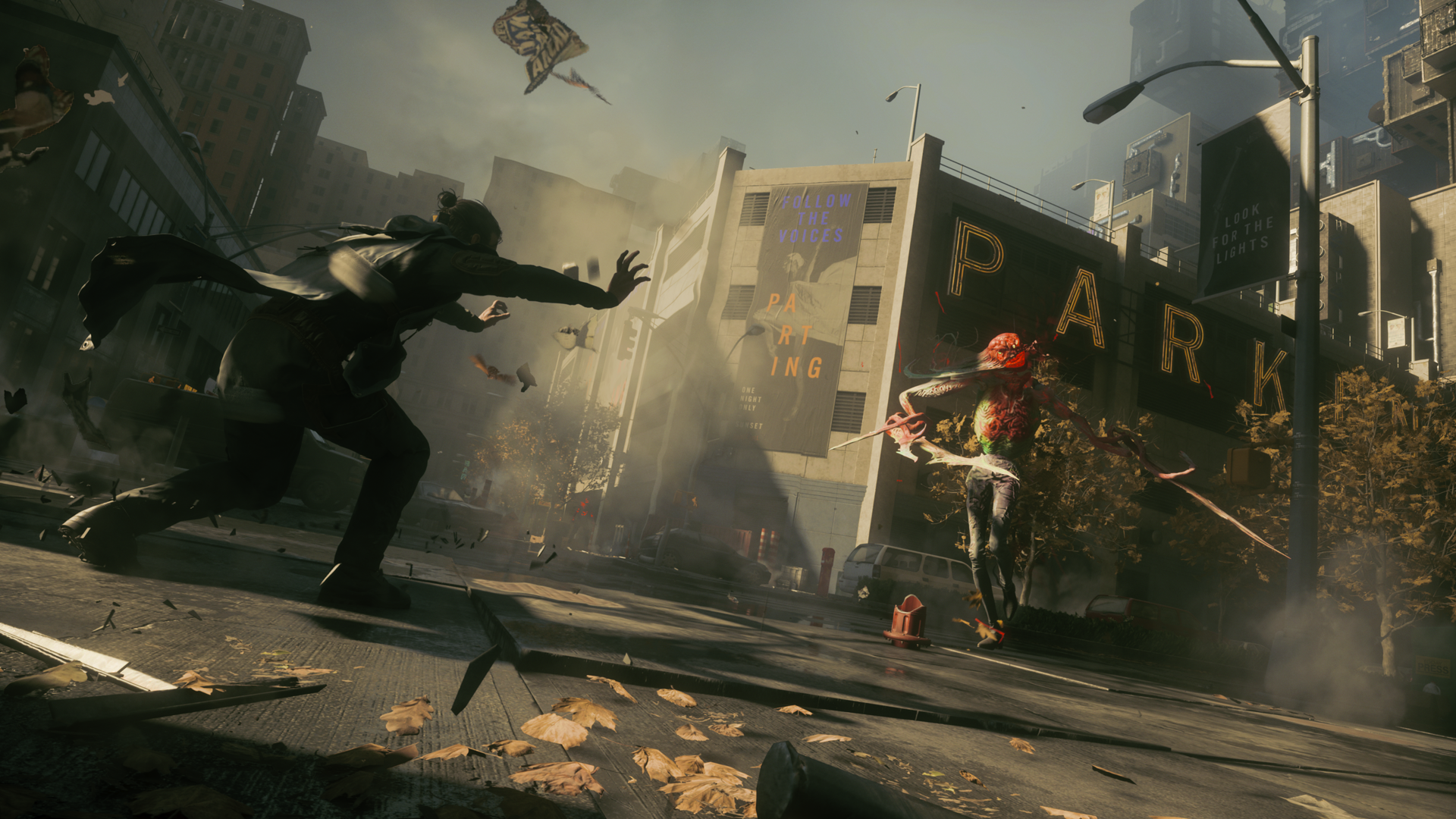
2019’s Control followed Jesse Faden into the ever-shifting, paranormally corrupted brutalist innards of the Oldest House, the headquarters of the Federal Bureau of Control, where she became the new FBC director, fought the invading forces of the Hiss, and sought the truth about the fate of her kidnapped brother Dylan.
Control Resonant marks the next chapter in the siblings’ story, as Dylan reawakens to discover that Jesse has gone missing and that the Hiss threat has escaped the Oldest House and corrupted Manhattan. Using his own powers and guided by the mysterious Board, Dylan sets out to find Jesse, combat the Hiss incursion, and uncover the mysteries of a new paranormal entity at work in the twisted Manhattan cityscape.
We’ve had access to Control Resonant for the past few days, and we’ve been exploring its performance and image quality across a range of hardware and settings.
Control was one of the first games to show off the capabilities of GeForce RTX 20-series graphics cards and their ray-tracing capabilities, and it was also one of the first titles to incorporate DLSS upscaling. It’s only fitting, then, that Resonant is a technical showcase of its own. It features path-traced lighting effects bolstered by Nvidia’s RTX Mega Geometry tech, as well as support for the full suite of DLSS 4.5 features: Super Resolution (aka upscaling), Ray Reconstruction, and Multi Frame Generation.
With that extensive spread of cutting-edge rendering tech at its disposal, I expected Resonant to look incredible, as both Control and Alan Wake II did before it.
(Image credit: Remedy Entertainment/Future)
Even without ray tracing or path tracing and DLSS Ray Reconstruction, Control Resonant already looks good, as we’ve come to expect from Remedy games. If performance is a priority, you certainly won’t make the game bad by leaving RT off.
Control Resonant RT off versus RT UltraRemedy Entertainment/FutureRemedy Entertainment/Future
But ray tracing or path tracing is certainly worth enabling if you can. Outdoors, RT primarily improves the rather blobby shadows and soft reflections that appear in the numerous puddles around Manhattan.
Remedy Entertainment/FutureControl Resonant RT off versus RT UltraRemedy Entertainment/Future
Sometimes this is subtle; other times it’s dramatic, as with the railing shadow above.
At its highest settings, path tracing turns shadows into the crisp, accurate renderings you would expect in direct sunlight and makes reflections much stronger and clearer not only in water but in glass like car and shop windows.
Inside, RT models the behavior of strong artificial light sources more accurately. Overhead lights properly shadow Dylan’s face from above and let his back fall into darkness if he’s occluding them. Metallic objects like trash cans look and shine like roughed-up metal as you move around them, not a flat and static game asset.
Remedy Entertainment/FutureControl Resonant RT off versus RT ultraRemedy Entertainment/Future
In the examples above, you can see how path tracing accurately represents the light from a fluorescent tube outside the storeroom, casting a hard shadow on the wall and a green glare on Dylan's uniform. WIth RT off, this effect is only represented on the floor.
Everything looks more alive and more real, in other words, and these subtleties need to be appreciated in motion, not just in stills. I enable path tracing for those moments where something unexpectedly realistic catches the corner of my eye and makes me double back to explore it.
Despite all the environmental magic that path tracing and DLSS Ray Reconstruction lend to Control Resonant’s setting, that level of polish isn’t evenly applied across all the game’s assets.
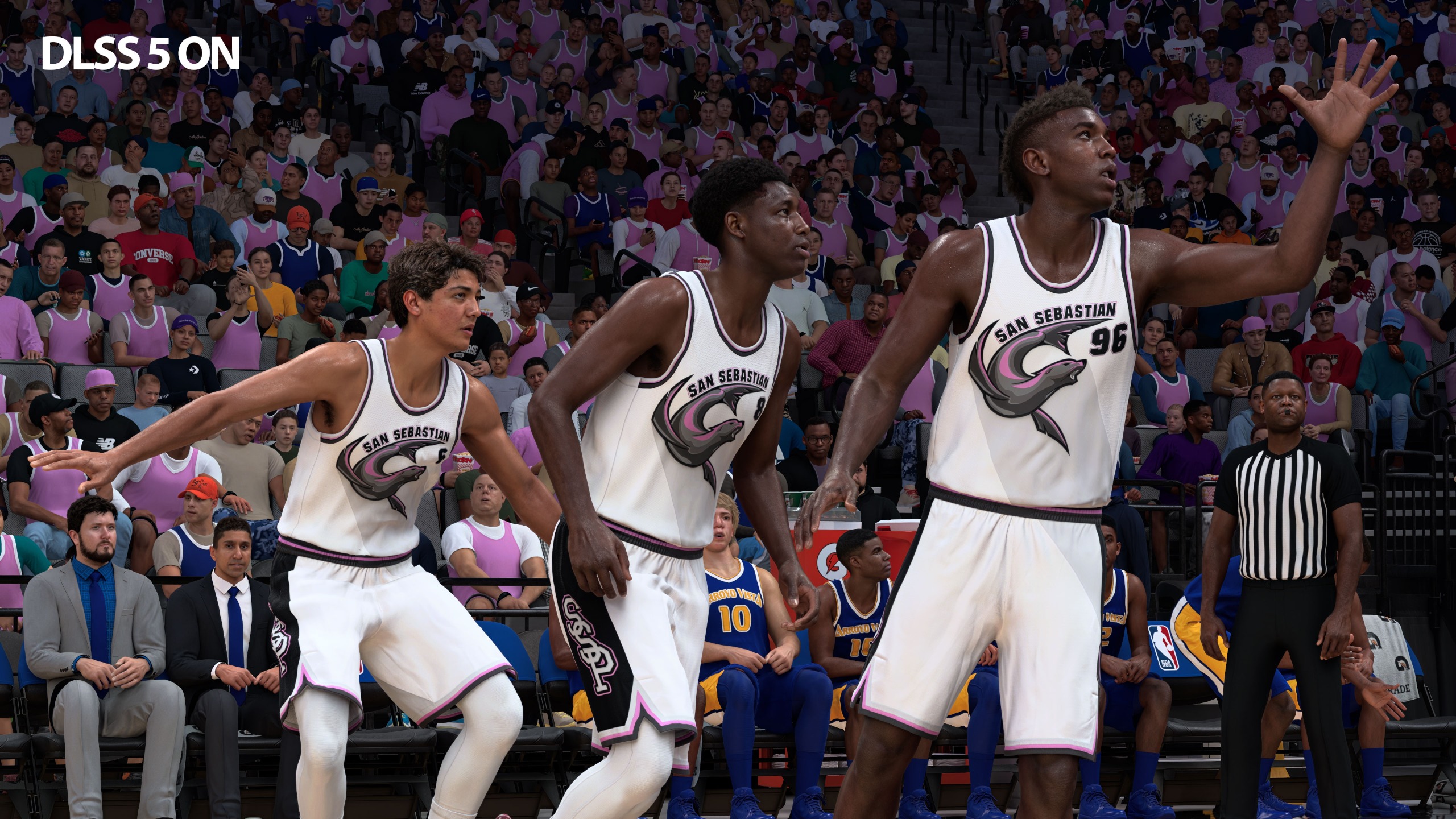
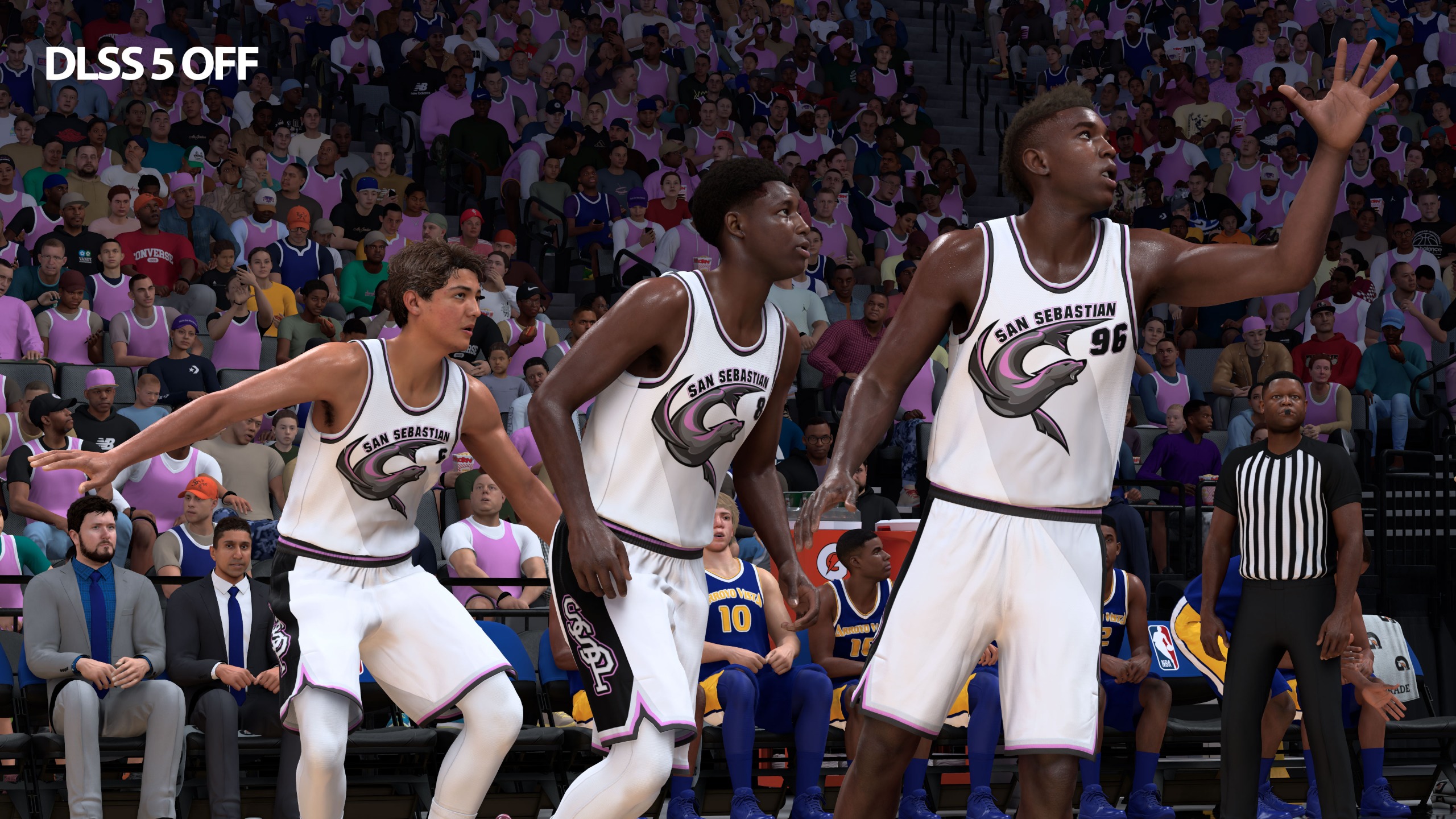
Control stood out to me not only for its lighting effects but also for its amazing facial modeling work. In Resonant, however, the character models of Dylan, Zoe, and supporting characters like Langston all look like a step back from the level of detail achieved in past Remedy games. Maybe I’ve been staring at too much DLSS 5 output, but the faces in Resonant don’t match up to the environmental quality, and that gap stands out.
Control Resonant raster gaming performance
FutureFutureFuture
Our gaming performance results start off with native res, raster-only settings.
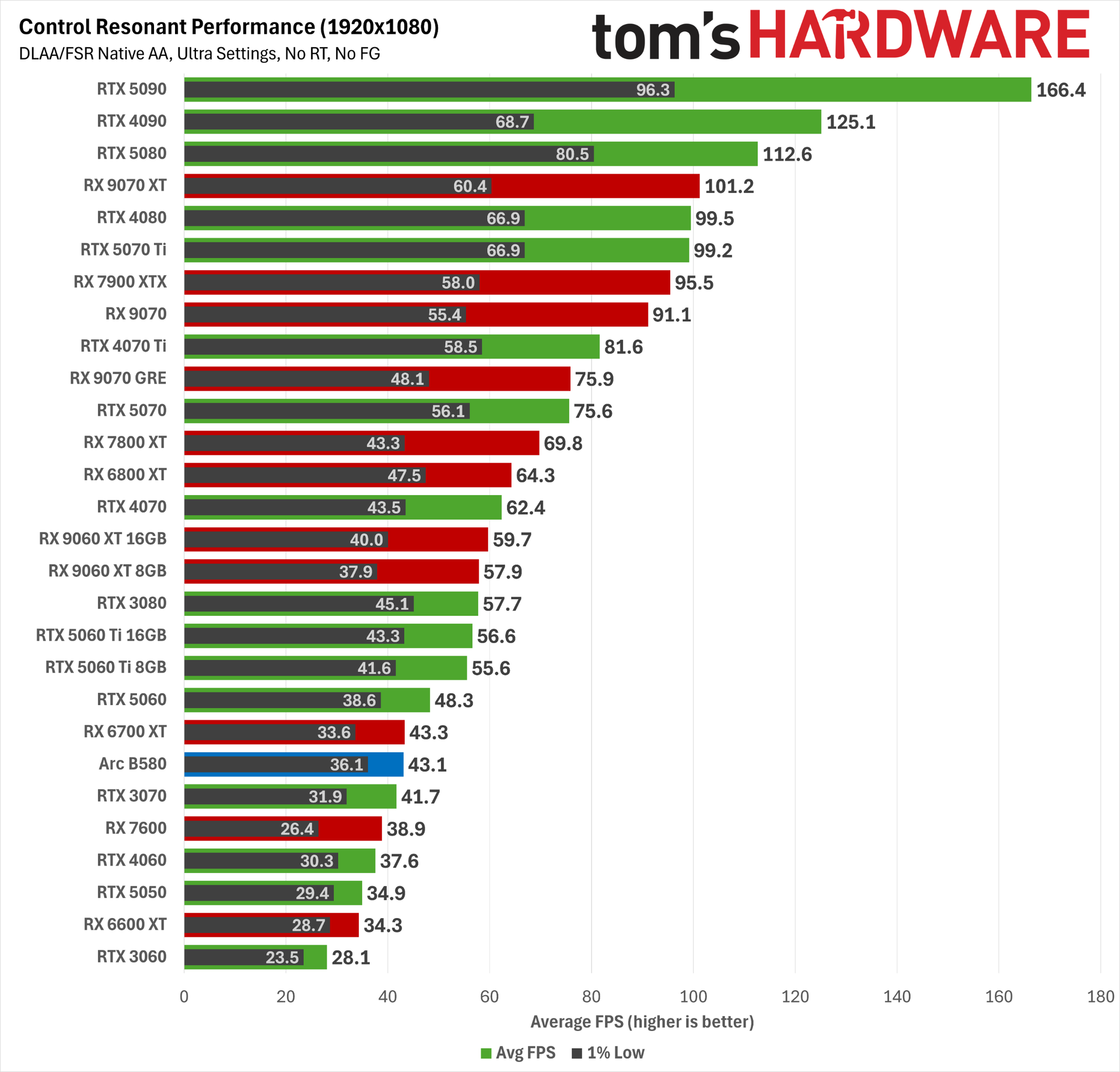
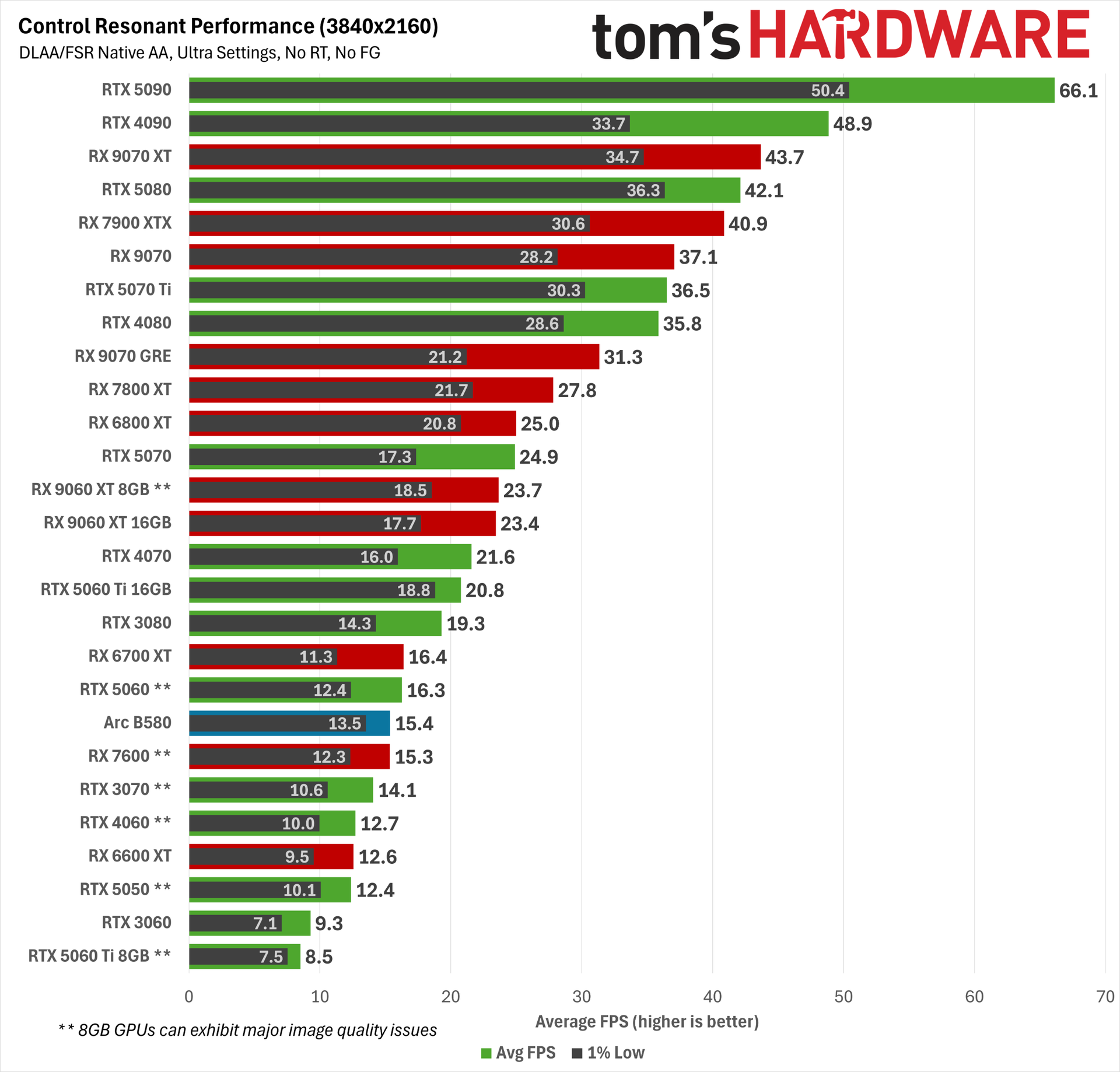
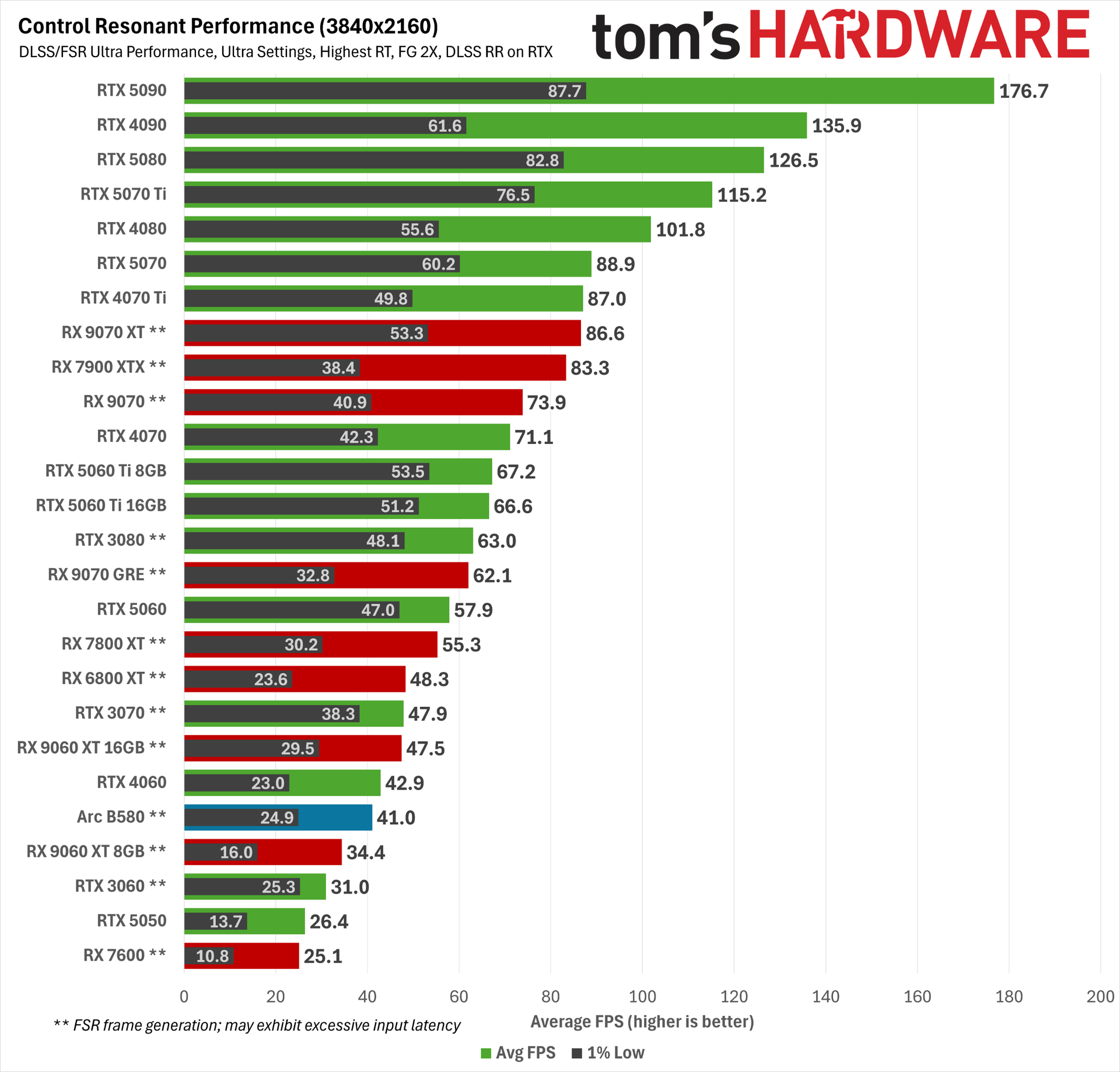
At 1080p Ultra with RT off, Control Resonant is already placing heavy demands on our tested cards. You want an RTX 5060 Ti or better or Radeon RX 9060 XT or better for 60 FPS (ish) average among current-gen cards, or an RTX 4070, RTX 3080, or RX 7800 XT among earlier cards. The RTX 3060 can’t even break 30 FPS on average, and that’
Radeons also tend to turn in lower 1% lows than GeForces, although that didn’t translate to a bumpy experience with our high-refresh-rate, variable-refresh-rate monitor. If you’re only playing on a 60 Hz display, that difference may be more apparent.
Even though it still lands above a 60 FPS average at 1080p, the older Radeon RX 6800 XT is stuck with FSR 3.x upscaling, so its output image quality is noticeably worse than RX 9000- or RX 7000-series cards that get FSR 4.1.
Control Resonant is also the first game we’ve tested where the demands of running the DLSS 4.5 transformer upscaling model hits RTX 30-series products hard, so if you’re not trying to perform heroic feats of upscaling, you can probably get a few frames per second back by shifting to older DLSS models at the cost of some output image quality.
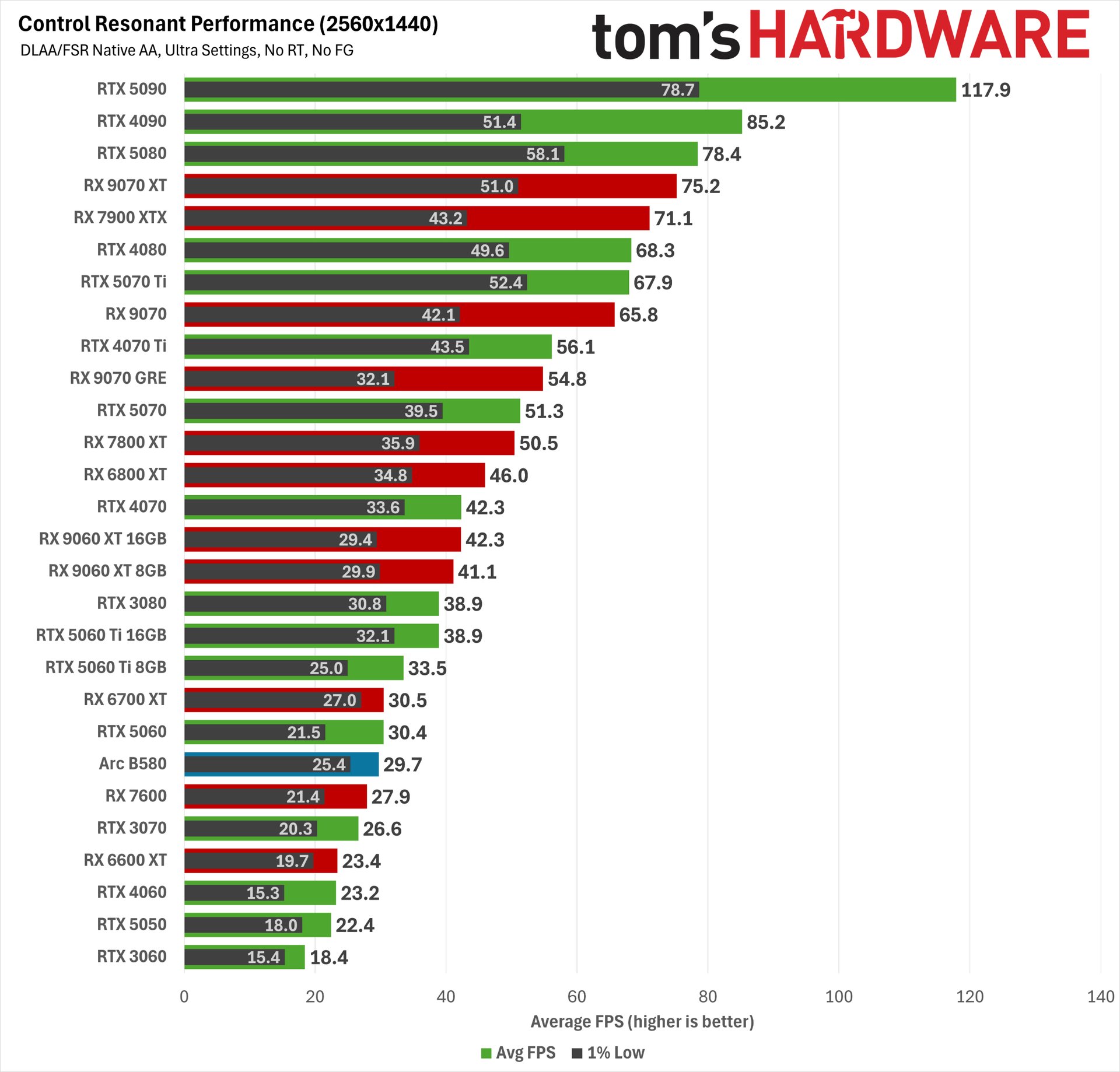
2560x1440 Ultra is similarly punishing. Here, the RX 9070 GRE and RTX 4070 Ti end up just below a 60 FPS average, while the RX 9070 and RTX 5070 Ti end up slightly above it. Any weaker card will likely need lower settings, a dose of upscaling, or both to deliver a smoother experience.
Finally, at 4K, only the RTX 5090 can deliver the coveted 60 FPS average. Some degree of upscaling, frame generation, or both will be needed on every other graphics card here for this resolution (and possibly on the RTX 5090, depending on your desired experience).
Control Resonant ray-traced performance
FutureFutureFuture
Given the already punishing raster baselines we just saw, we had little reason to believe that RT would be an attainable feat in Control Resonant at native resolutions, and it’s not.
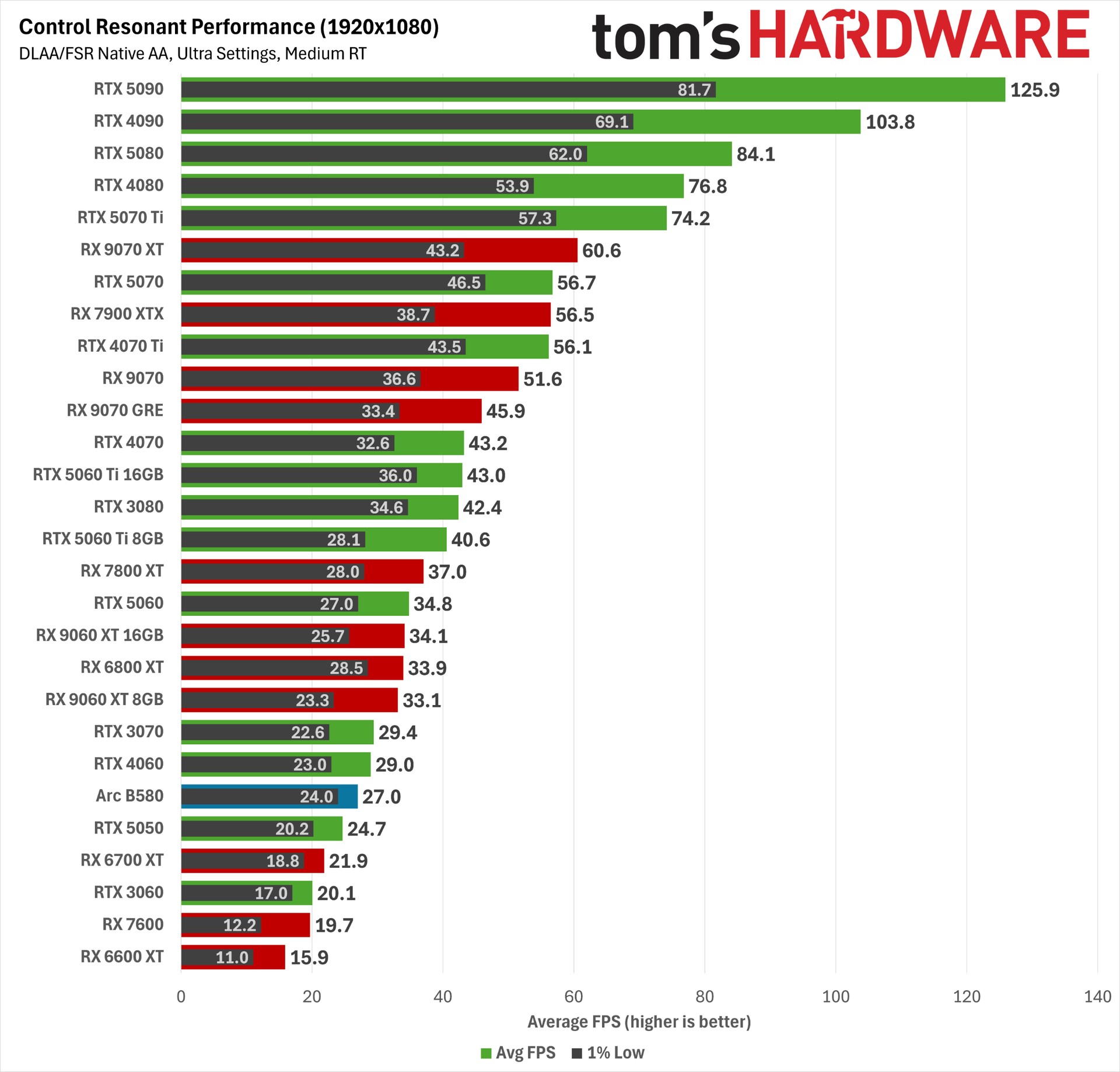
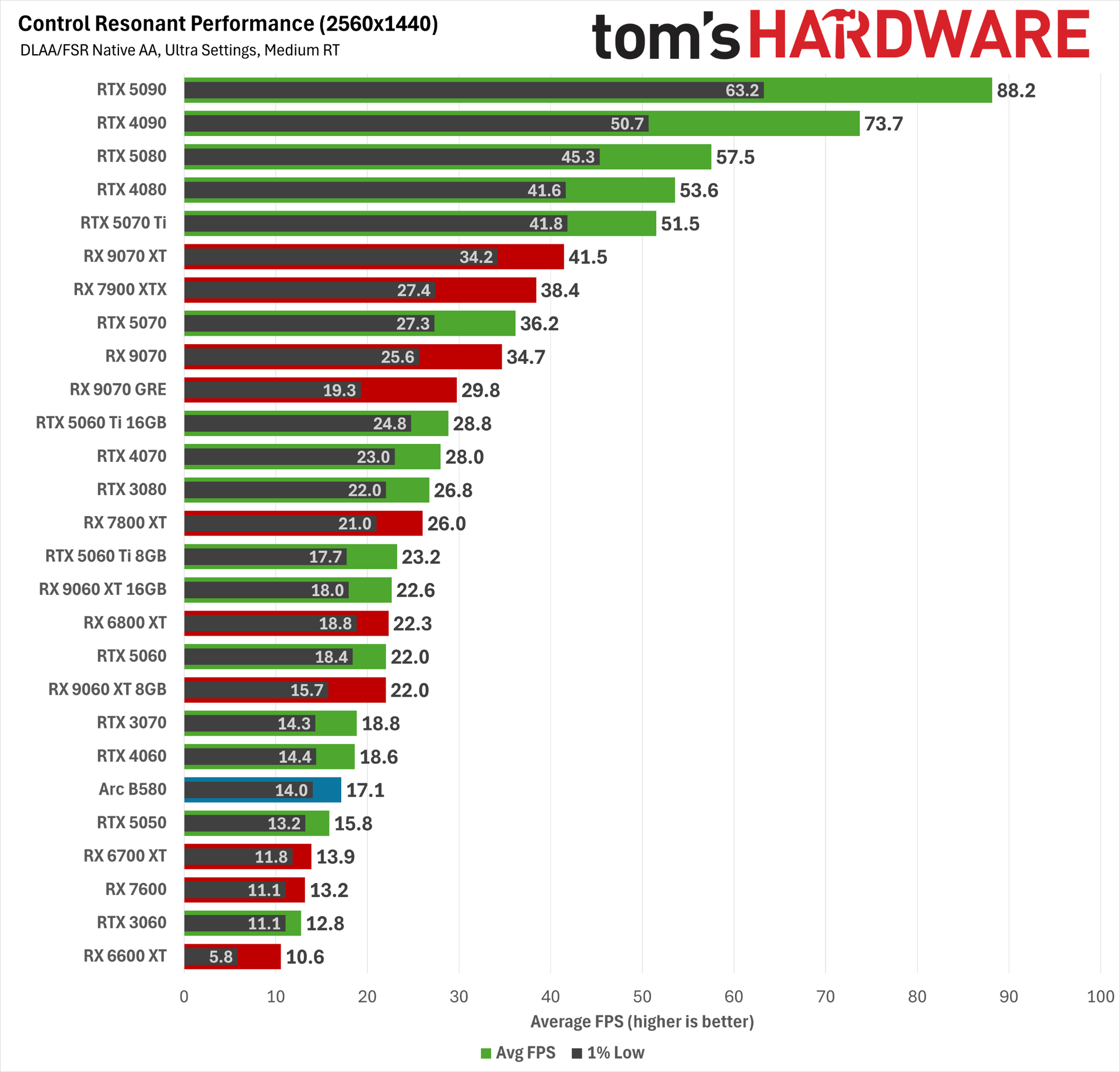
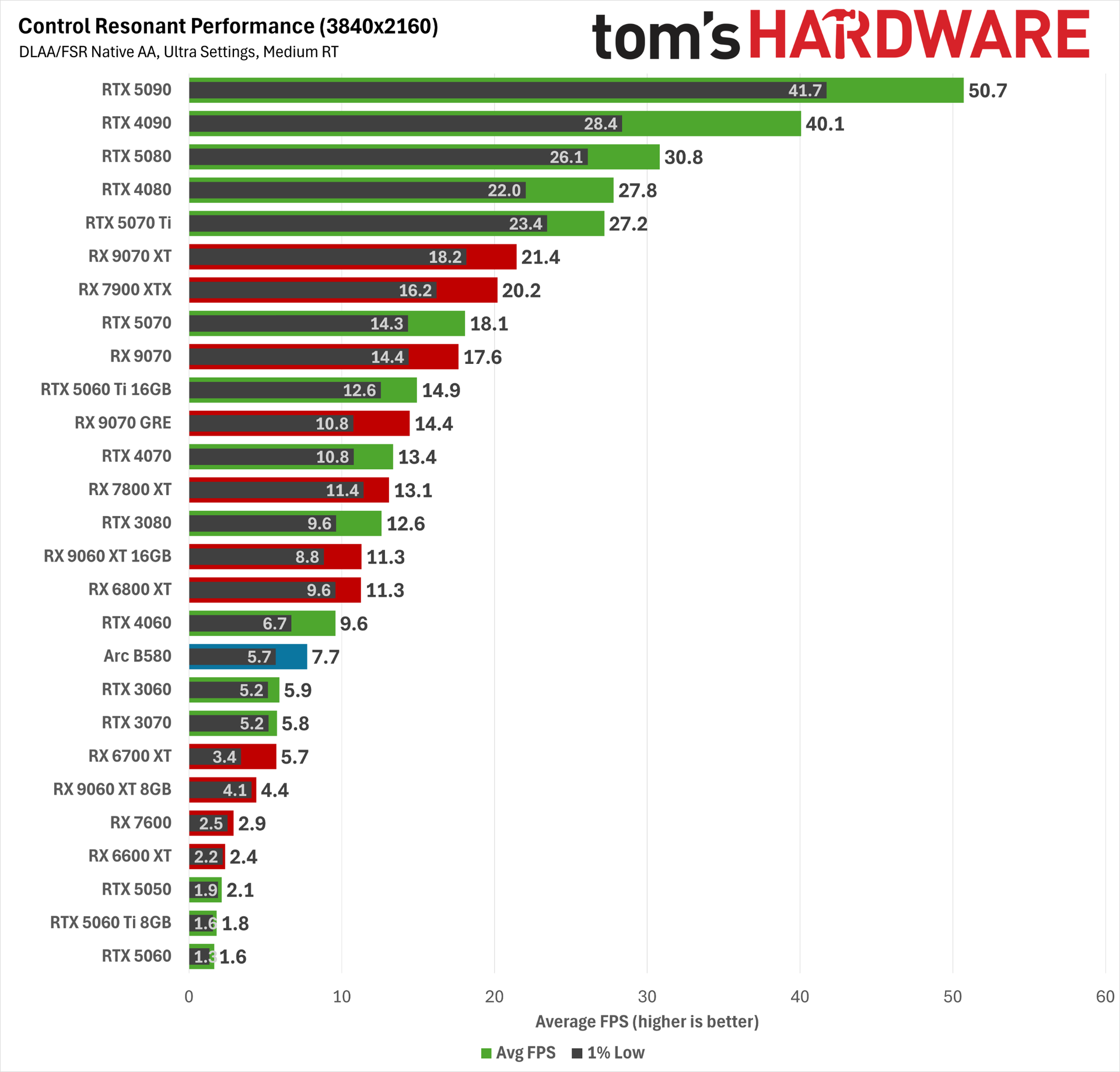
Enabling even the medium RT preset at 1080p smacks down a wide swath of our tested cards. The RTX 4070 Ti, RX 7900 XTX, and RTX 5070 all land just below the 60 FPS mark, while the RX 9070 XT lands right on it. The RTX 5070 Ti offers a significantly more comfortable average frame rate and 1% lows for a smoother experience.
At 1440p, even the RTX 5080 isn’t quite enough to manage a 60 FPS average, and at 4K, not even the RTX 5090 can conquer Control Resonant with these settings. Oof.
These results mean that upscaling and frame generation will be mandatory if we’re going to chase RT glory in Control Resonant.
Control Resonant path-traced performance with upscaling and frame generation
There are two problems with trying to gauge competitive performance when we go ham on upscaling and frame generation, as we’re about to here.
For one, DLSS 4.5 produces a much more stable image than FSR 4, especially at extreme settings like 4K Ultra Performance. FSR 4 can look slightly sharper at rest, as reviewers usually are when creating side-by-side comparison images, but in motion, it can exhibit strong and distracting flickering artifacts, especially on fine structures with repeating elements like fire escapes and chain-link fences.
DLSS 4.5 isn’t entirely free of those artifacts, but they affect much smaller portions of the screen and to a much less intrusive degree.
The net result is that DLSS 4.5 frames are not the same as FSR 4.x frames, so that makes for two different experiential variables we have to account for in any comparison: raw performance and delivered image quality.
And the third variable is that FSR Frame Generation (whether in its ML-powered or traditional shader-based form) isn’t backed up with a robust latency reduction technology like Nvidia’s Reflex or Intel’s Xe Low Latency in Control Resonant.
Radeon Anti-Lag does reduce input latency, but even with the RX 9070 XT in full path-tracing trim, it is at best taking a high input latency and making it somewhat less high. Even with Anti-Lag enabled on the RX 9070 XT, the average latency before framegen is enabled is well above the roughly 60 ms threshold we try not to exceed.
What’s frustrating is that AMD has a more robust input latency handler for devs to use. Radeon Anti-Lag 2 exists and works well in Cyberpunk 2077. But like FSR 4 Ray Regeneration, it’s not implemented in Control Resonant.
Worse, FSR Frame Generation isn’t compatible with the performance counters that Nvidia FrameView monitors to estimate PC latency, so we’re left with only our eyes and our guts to decide whether the net result of FSR FG is a truly playable experience. Even Intel’s XeFG supports these performance counters properly, so it’s all the more annoying that AMD doesn’t, even two years after the arrival of FSR 3.1.
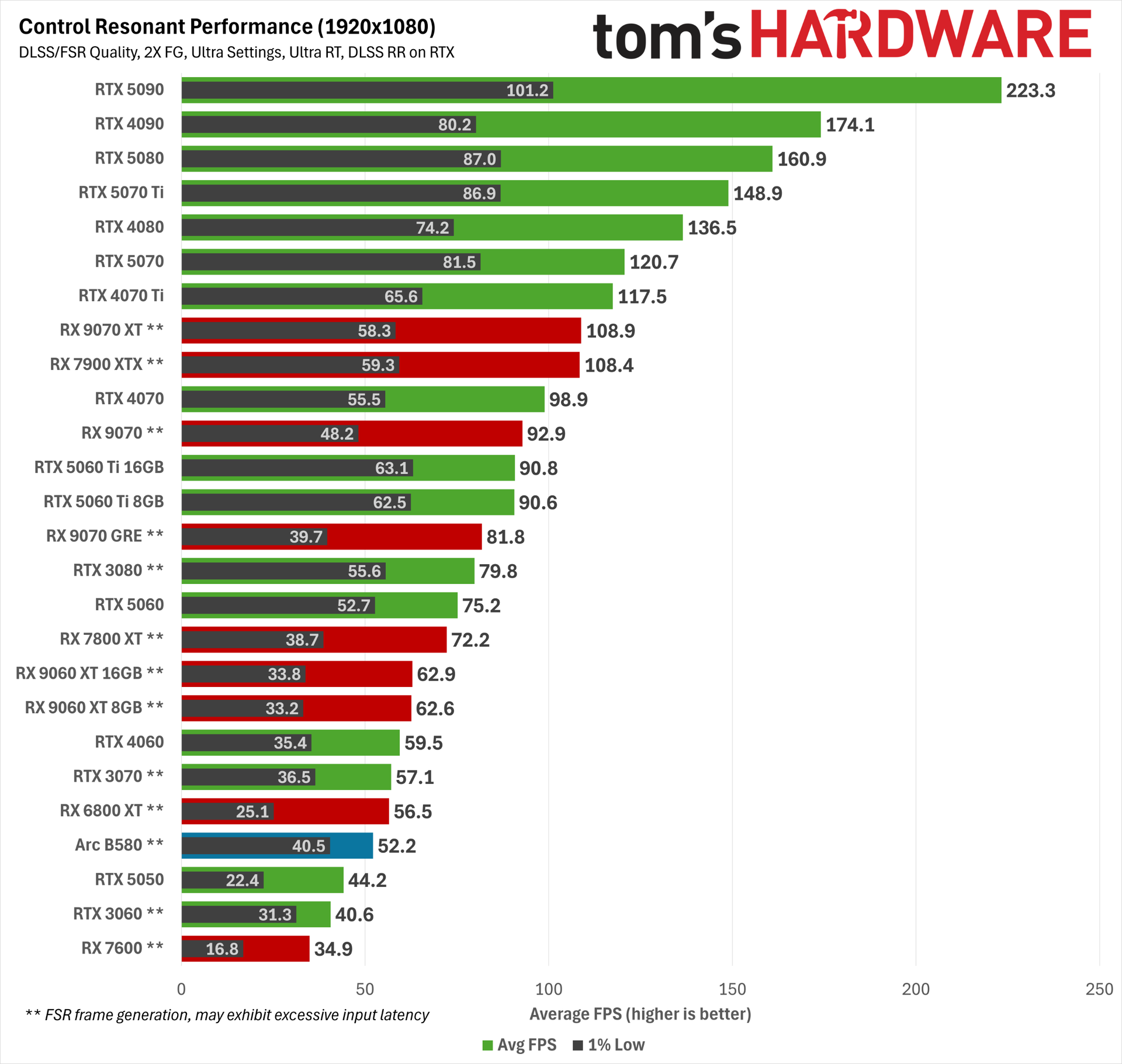
So before we get into these results, bear a couple asterisks in mind. Path tracing as Nvidia envisions it and as Control Resonant implements it—with upscaling, denoising, frame generation, and lag reduction all working together—is not possible to replicate 100% on AMD hardware.
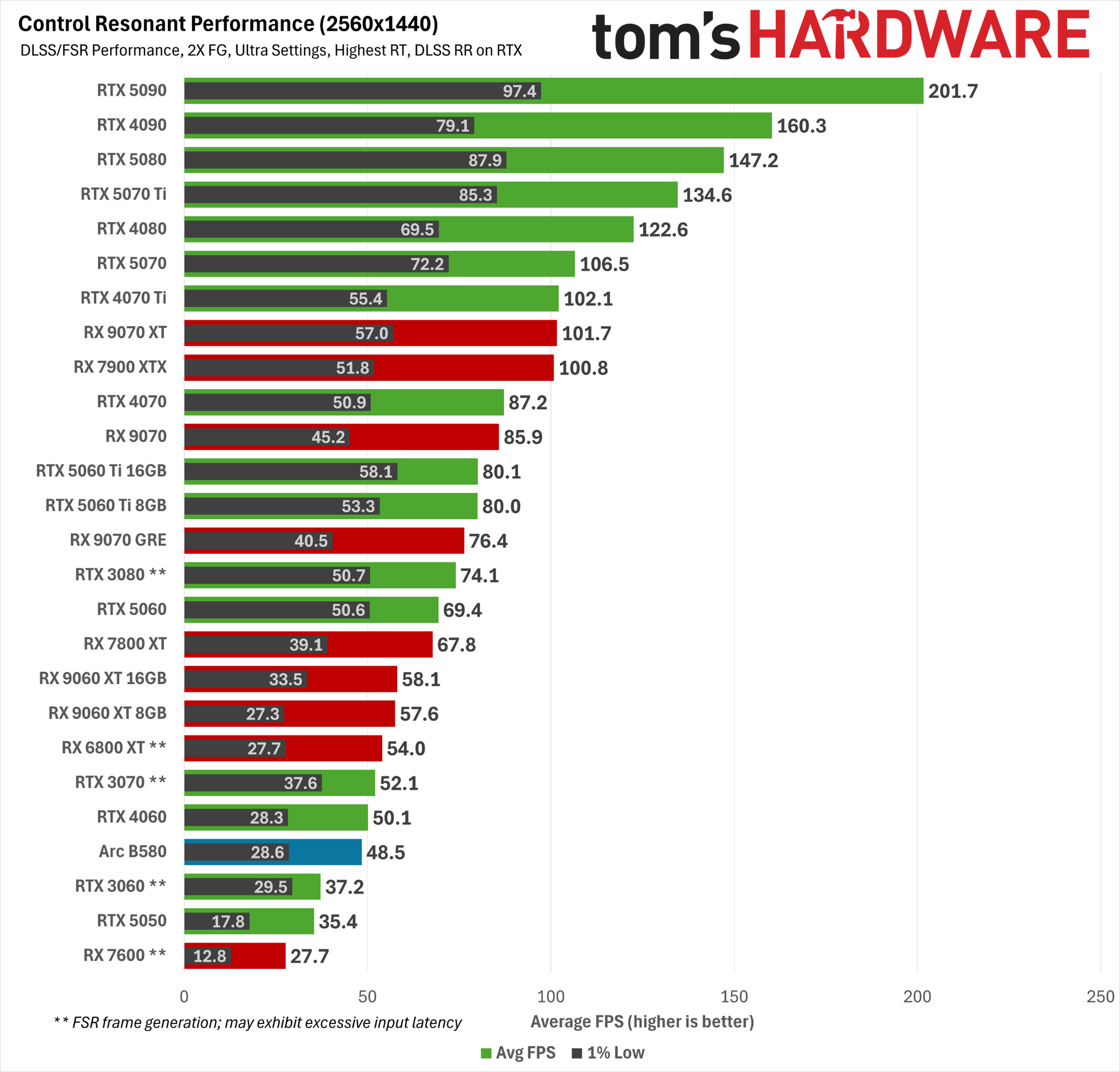
We include AMD results (and RTX 30-series cards with FSR framegen) as a sort of best-effort reference point for maxed-out RT behavior with this game, but because these are doubled frame rates, any figure below 60 FPS on these charts for RTX 30-series and AMD cards should be understood as an unpleasant (or even unplayable) experience, whether due to input latency, significant artifacting, or both.
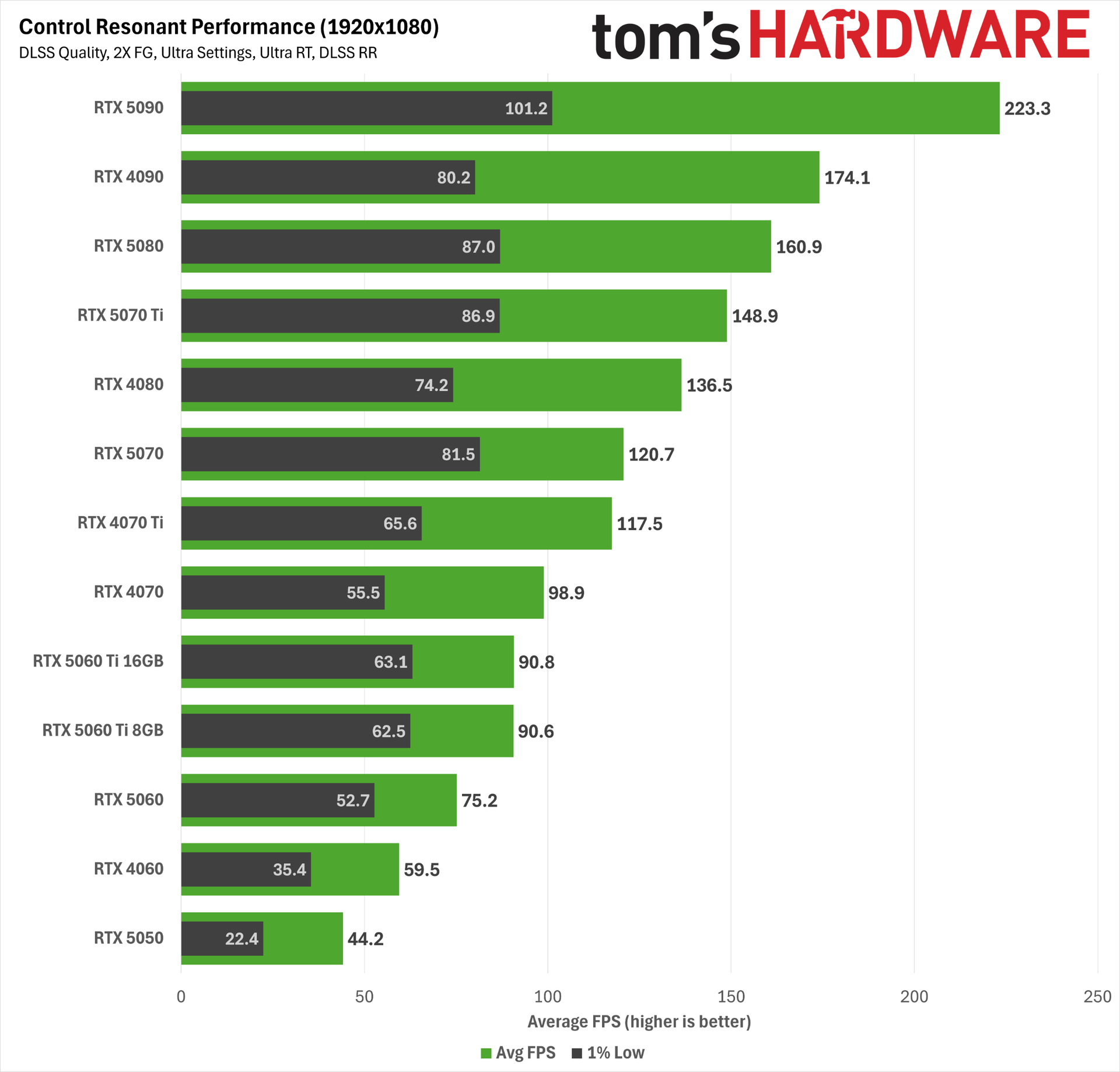
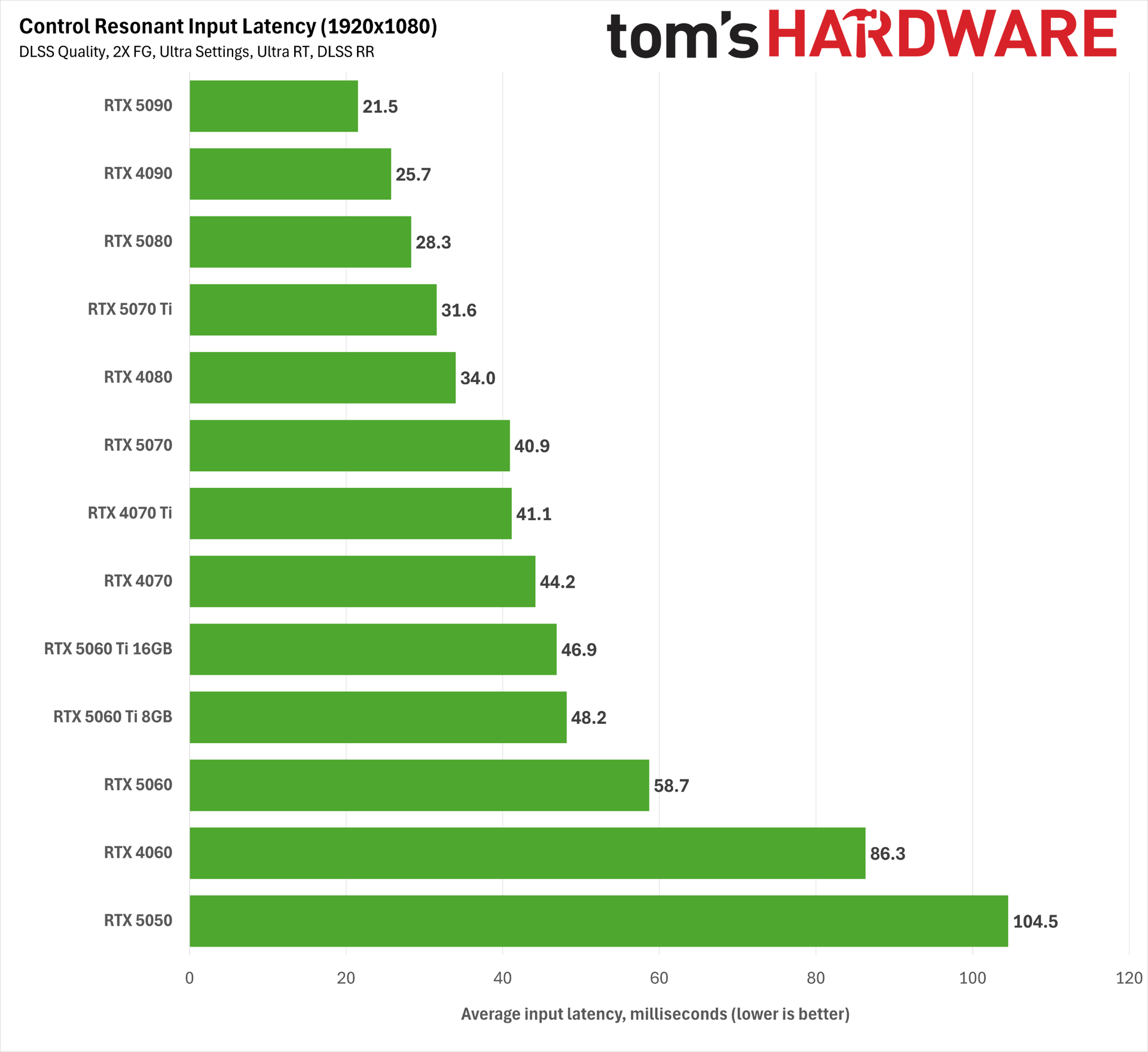
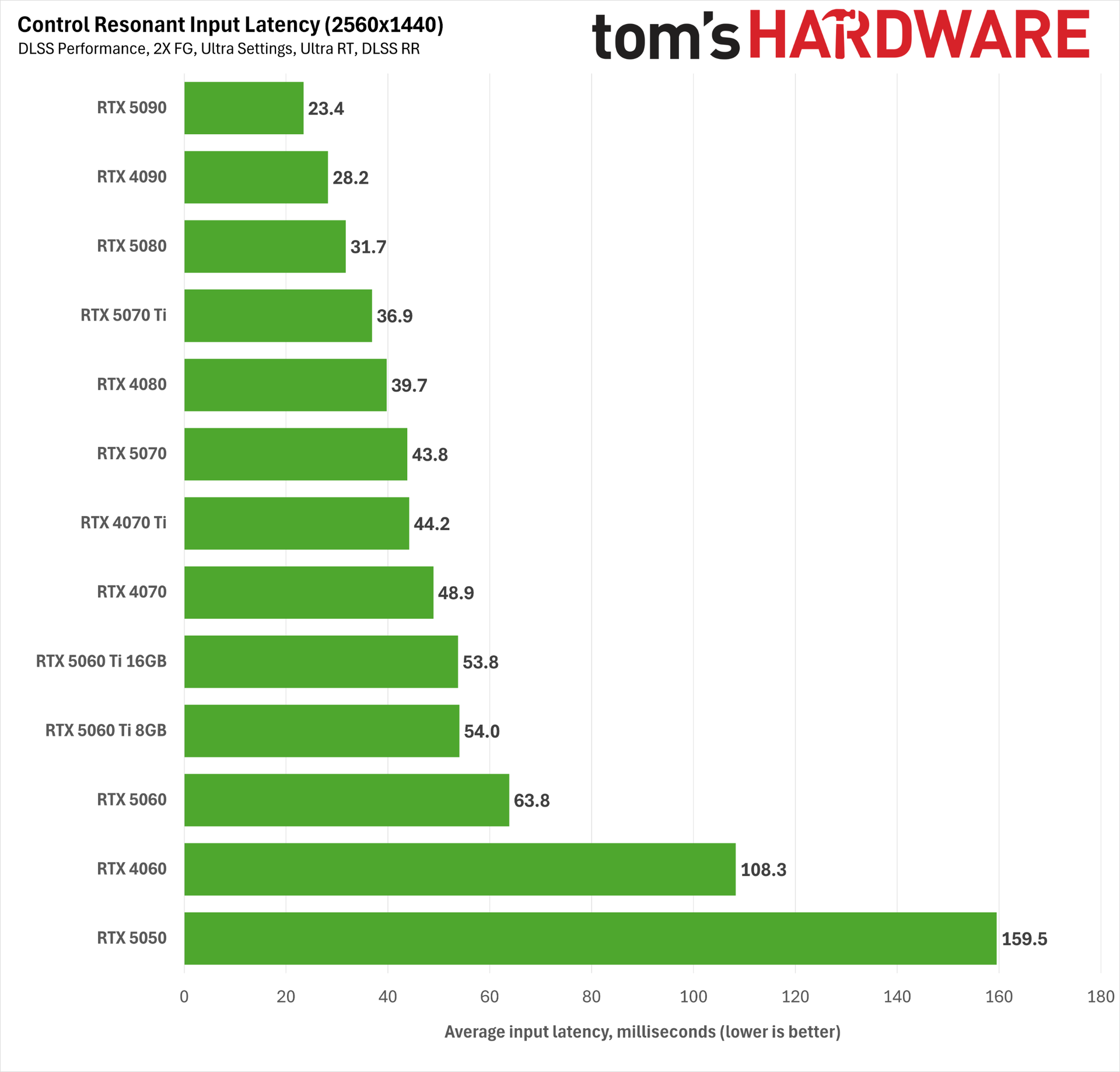
At 1080p with Ultra RT, DLSS Quality, 2X Frame Generation, and DLSS 4.5 Ray Reconstruction, only the RTX 5050 and RTX 4060 fail to deliver playable input latency. Even the RTX 5060 squeaks in under the 60 ms threshold we want for a responsive experience. That’s great news for the accessibility of path tracing on relatively affordable hardware, or at least what used to be relatively affordable hardware.
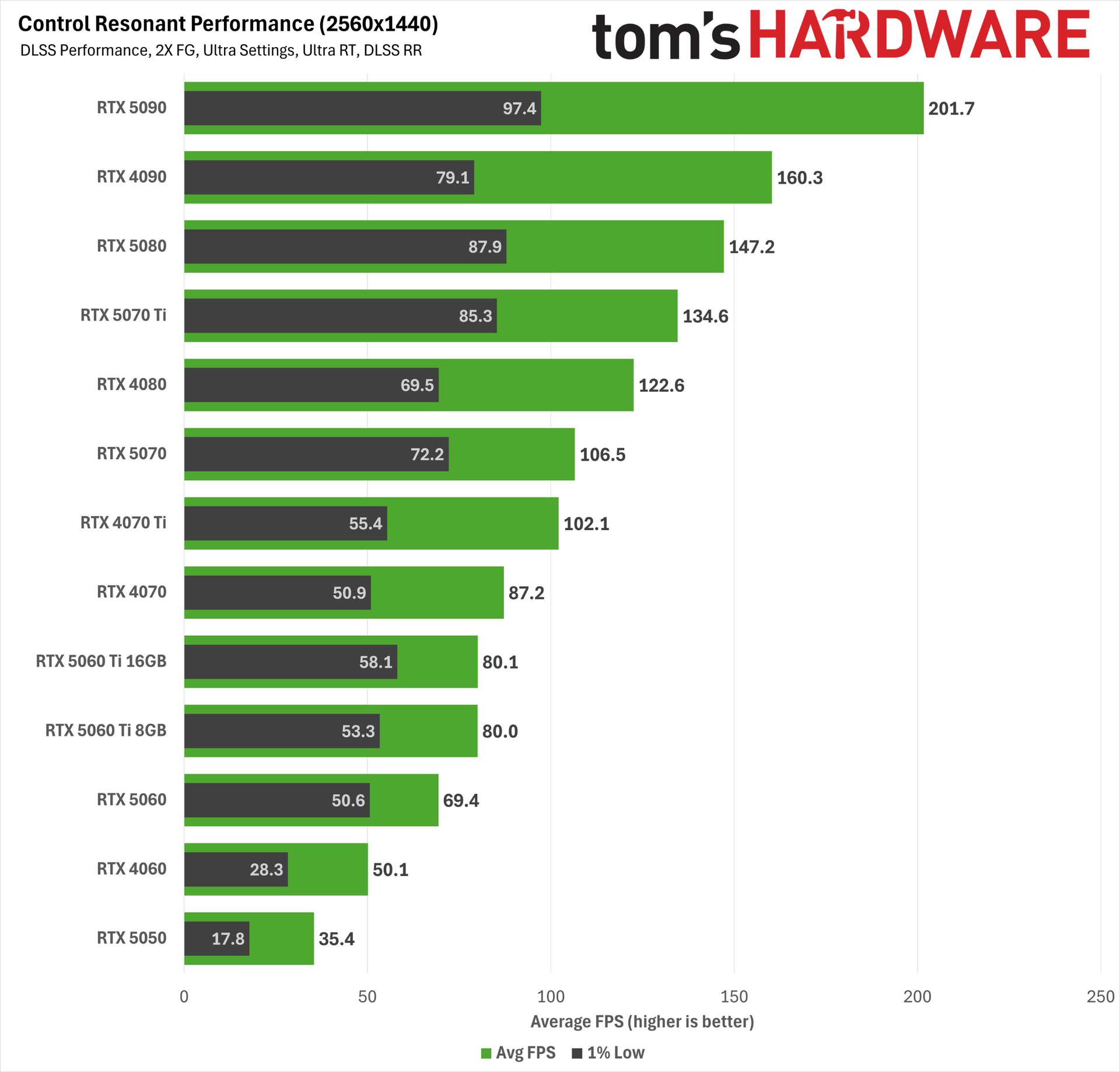
At 1440p with DLSS Performance, the RTX 5060 just barely fails to meet the 60ms mark for acceptable input latency. This is more the territory of the RTX 5060 Ti and up.
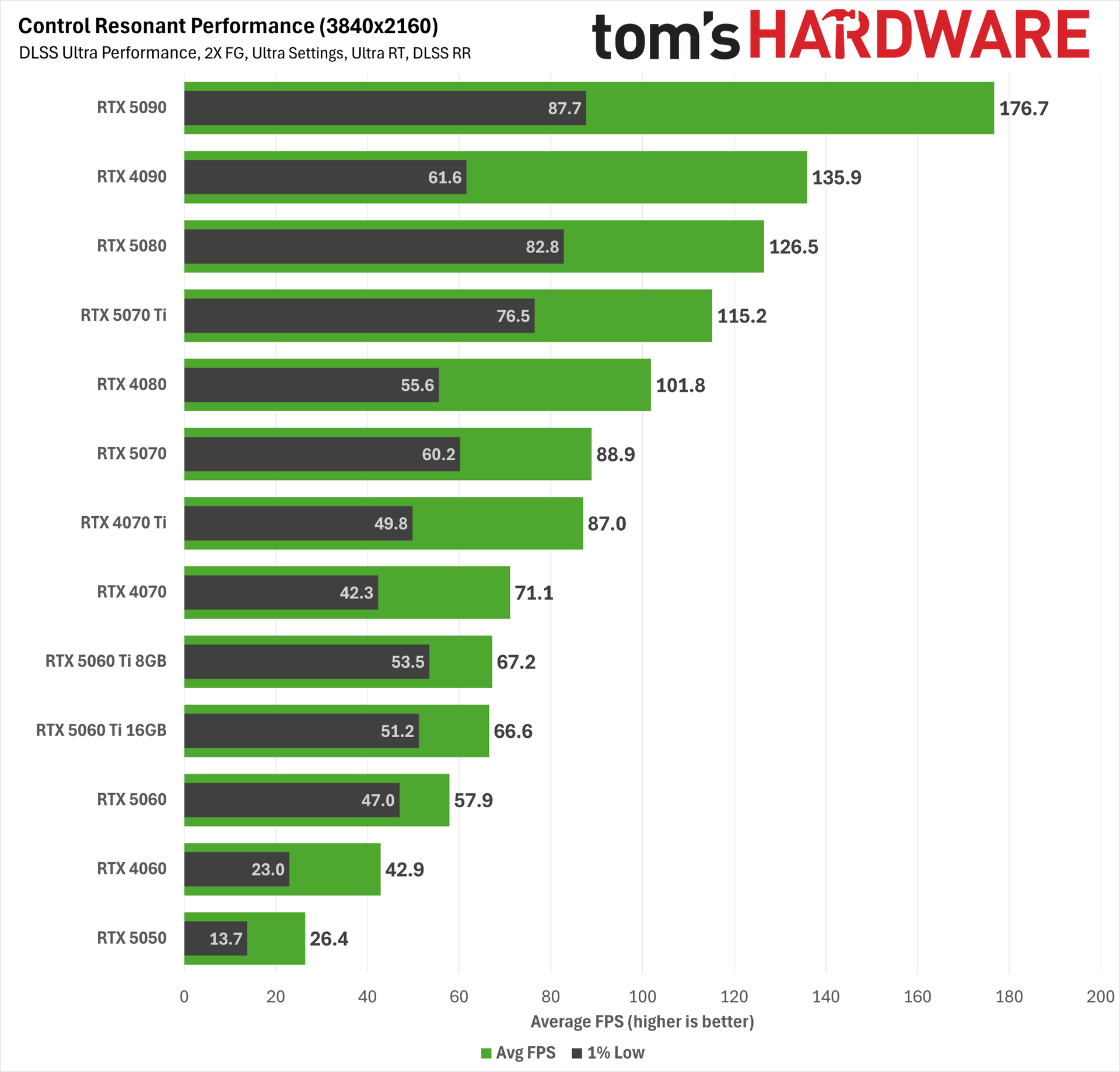
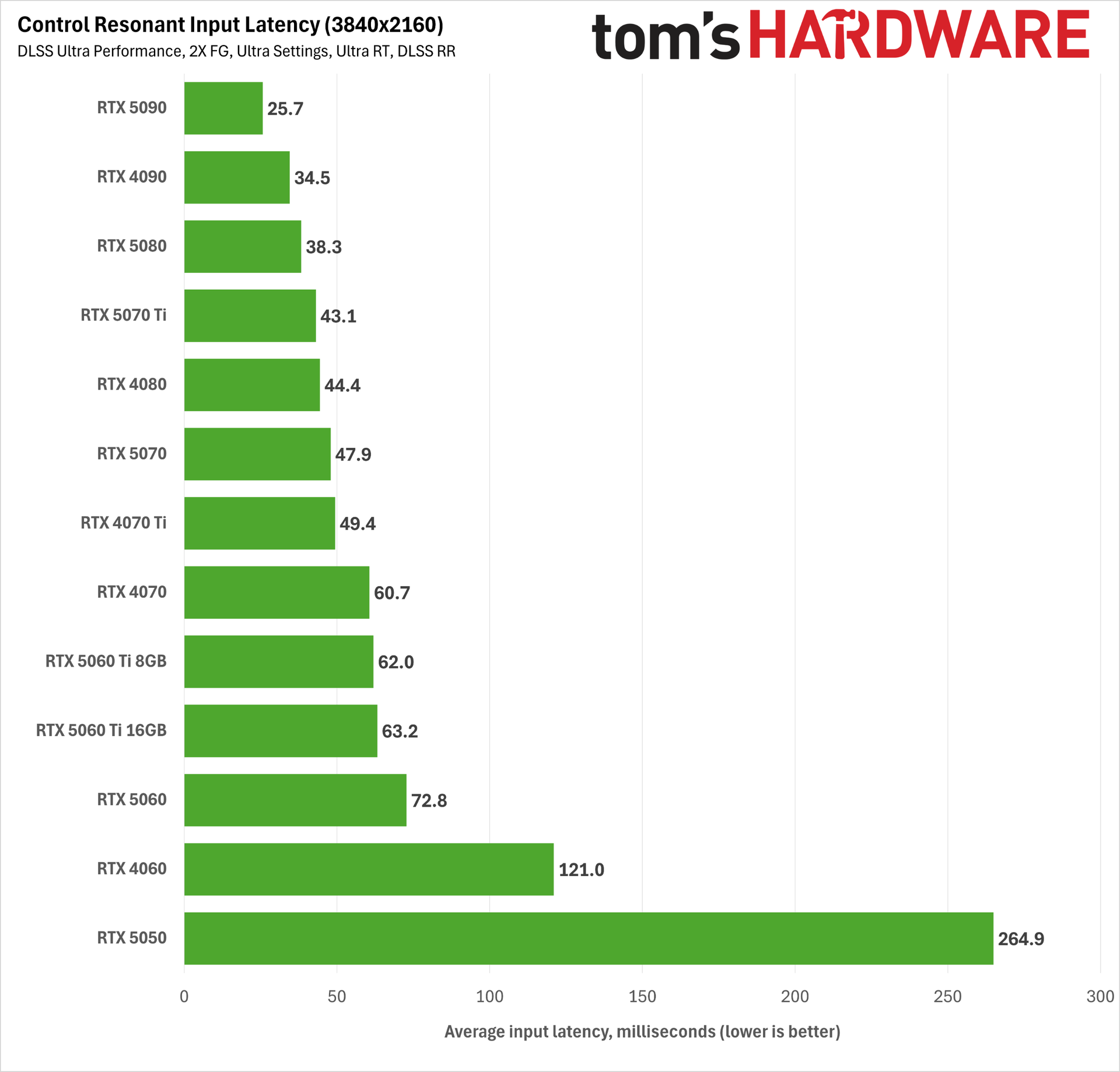
And at 4K with DLSS Ultra Performance, we’d strongly recommend an RTX 4070 Ti or better, although you can get away with an RTX 5060 Ti or RTX 4070 in a pinch.
The combination of DLSS 4.5 technologies and Reflex makes for a perfectly playable path tracing experience in Control Resonant across a wide range of hardware, and as we’ve already noted, it’s impossible for AMD gamers to enjoy the same experience.
Bottom line
Control Resonant marks a new chapter for one of my favorite gaming sagas, and I was thrilled to step back into the Oldest House. The Hiss-corrupted Manhattan setting looks fantastic, even if I’m still waiting for the story to fully grab me. I need to fully explore the full range of weapon forms, skill trees, and builds the game offers as our protagonist Dylan Faden fights through hordes of Hiss in close-quarters, split-second combat. Death is just one wrong move away in this game, and I've been frequently reminded of that fact.
For all its path-traced environmental splendor, there are some wrinkles on the tech side in Control Resonant that stand out. The character models, even main characters like Dylan and Zoe, look a bit basic for a 2026 game, especially with all the other graphical fireworks happening around them. Perhaps I’m ruined by DLSS 5 (and perhaps this game was meant to have it alongside more capable hardware), but I've come to expect more from Remedy given the artistic heights of Control and Alan Wake II.
Any graphical shortcomings like that stand out given how crushing Control Resonant is for many graphics cards. This is a game that really demands some degree of upscaling for good performance on less powerful hardware, and Ultra settings may not be possible on older, lower-end cards, period.
But at least for Nvidia RTX 50-series gamers, the aggregate improvements to the DLSS 4.5 software stack in 2026 make Control Resonant’s fanciest graphics settings incredibly accessible, and you really should take advantage of every DLSS feature at your disposal in this title.
Thanks to DLSS 4.5 Super Resolution’s remarkable capabilities, even the RTX 5060 can do path tracing at 1080p with DLSS Quality upscaling, DLSS Ray Reconstruction, and frame generation enabled, all with a reasonable input latency and solid output image quality. And if you’re willing to tolerate slightly higher input latency, you can get away with the same settings at 1440p using DLSS Performance.
The RTX 5070 provides a great experience at all resolutions with those same settings, and you really only need more powerful hardware like an RTX 5070 Ti if you’re chasing higher DLSS input resolutions. I would normally shout out the RTX 5060 Ti here, but that card’s 16GB version especially is so close in price to the RTX 5070 that you should just get the more powerful card if gaming is your goal.
The situation is less rosy on the AMD side, even for the latest RDNA 4 cards. FSR 4.x upscaling is available in this title for RX 9000- and RX 7000-series graphics cards, but it isn’t as strong at image reconstruction as DLSS 4.5, so lower RT settings and higher FSR input resolutions may be necessary on RX 9000-series cards than on comparable RTX 50-series hardware to achieve the right balance of performance and image quality.
And the lagginess of FSR Frame Generation means that you’ll have to carefully test that feature if you want to try to use it to boost smoothness, unlike the general no-brainer that is DLSS 4.5 (M)FG.
All told, the incomplete implementation of AMD’s gaming tech suite in Control Resonant, as well as the generally lower RT performance of RDNA 4 cards versus Blackwell, means that you can max out RT settings in this game, but you still won’t enjoy the same image quality as on GeForce cards, especially in the areas of the frame that DLSS 4.5 Ray Reconstruction enhances.
Once again, this situation proves that having a software feature in your toolkit is meaningless if you can’t convince a developer to adopt it. Every new game that comes out with only a patchwork of AMD features like this is another paper cut for RX 9000-series GPU owners who are left with a distinctly lower-tier experience than RTX 50-series cards get. Fine wine, this is not.
But maybe you’re totally unmoved by RT and neural rendering techniques and just want strong raster performance with a touch of upscaling where it’s needed. RX 9000-series cards deliver that experience with strong performance per dollar in today’s ever-pricier gaming graphics card market.
Going off what I’ve played of Control Resonant so far, I’d suggest checking some full gameplay reviews to see if it’s for you and perhaps giving it a post-launch point release or two to iron out some minor technical issues we saw.
But one thing is for certain: the full array of Nvidia tech in this title, and its general accessibility across a wide range of hardware, means that a GeForce graphics card is the best way to play it.
It’s been a heck of a time lately for PC gamers willing to get their hands dirty with mods. Hot on the heels of the discovery of the DLSS 5 DLL in a prerelease version of NBA 2K27, modder dashdogy found a way to bring Multi Frame Generation, one of the crown jewels of GeForce RTX 50-series graphics cards, to RTX 40-series (and earlier) products.
As already elevated graphics card prices seem set to continue rising, and hardware upgrades get further and further out of reach of the average PC gamer, more and more folks are going to want to hold on to the RTX 40-series hardware they have for as long as they can, especially if smoothness-boosting features like MFG are just a few clicks away on those older cards.
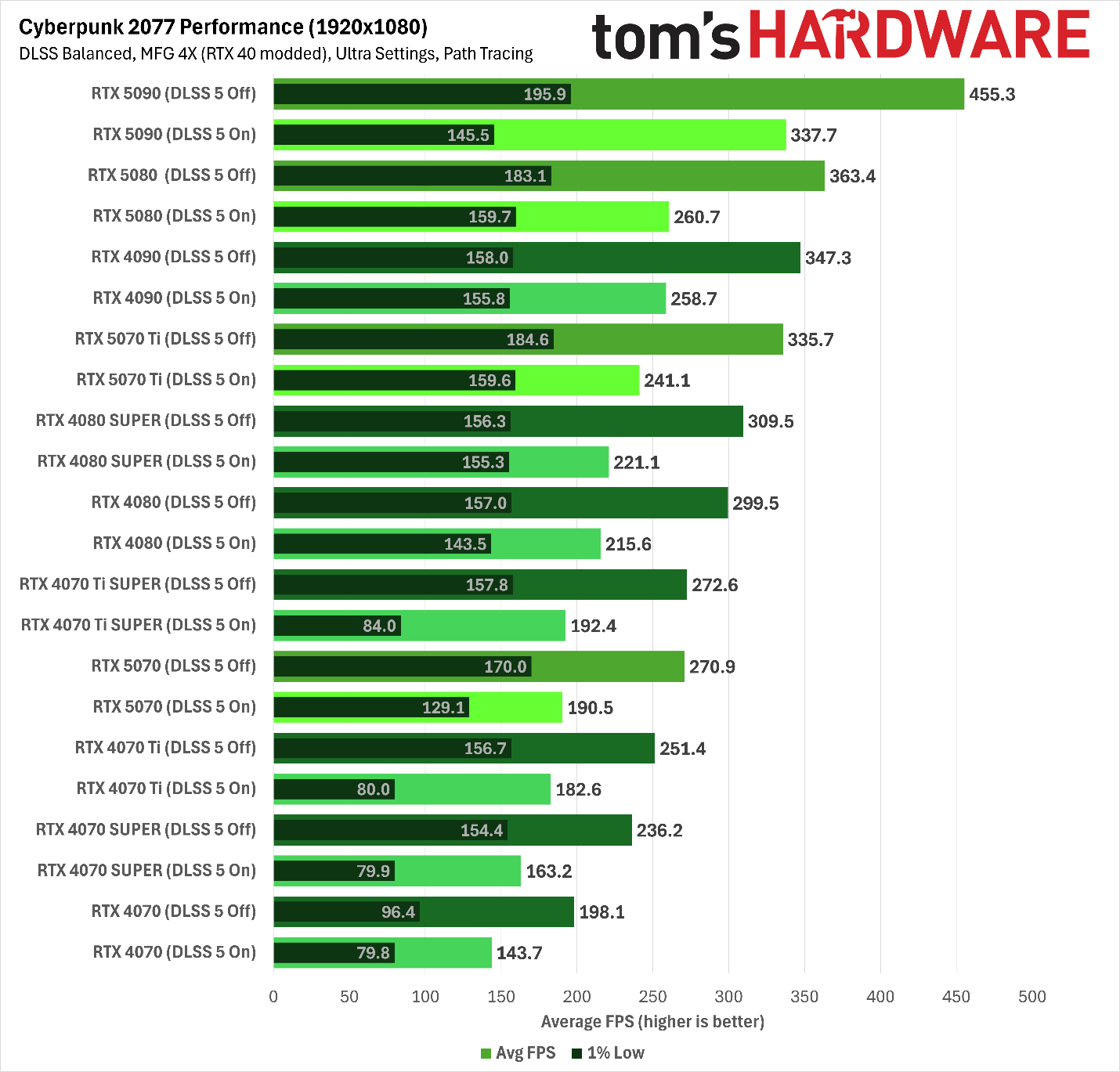
So we had to see MFG working on Ada for ourselves—assuming it works at all. We grabbed the mod files and got to playing with them in Cyberpunk 2077, since it’s likely in many TH readers’ Steam libraries already and has a healthy modding community. You can find the latest instructions for enabling MFG on Ada through dashdogy’s GitHub page.
Before spending a ton of time testing, we verified that the mod works at all. While spinning the camera at a high, constant speed, we could indeed see that increasing MFG multipliers beyond the officially supported 2X factor on Ada cards does greatly increase perceived smoothness or fluidity of motion in Cyberpunk 2077, as you would expect.
Another tell is that the same visual artifacts are visible in certain regions of the screen on both RTX 40-series and RTX 50-series graphics cards as you add more generated frames. MFG 4X and above, especially, tend to add some visual “junk” at the bottom of the frame that appears regardless of the game, and we could see that artifacting on Ada.
At least in Cyberpunk 2077, then, we’re confident that MFG is really doing its thing on RTX 40-series cards with this mod.
We also didn’t see any perceptible issues with frame pacing or frame delivery, although playing on a high-refresh-rate, G-Sync-Compatible monitor like our test bench’s ROG Strix XG27UCS smooths out all but the worst such issues. If you don’t have a high-resolution or high-refresh-rate monitor to begin with, the utility of MFG will be seriously limited for you anyway.
The latency question
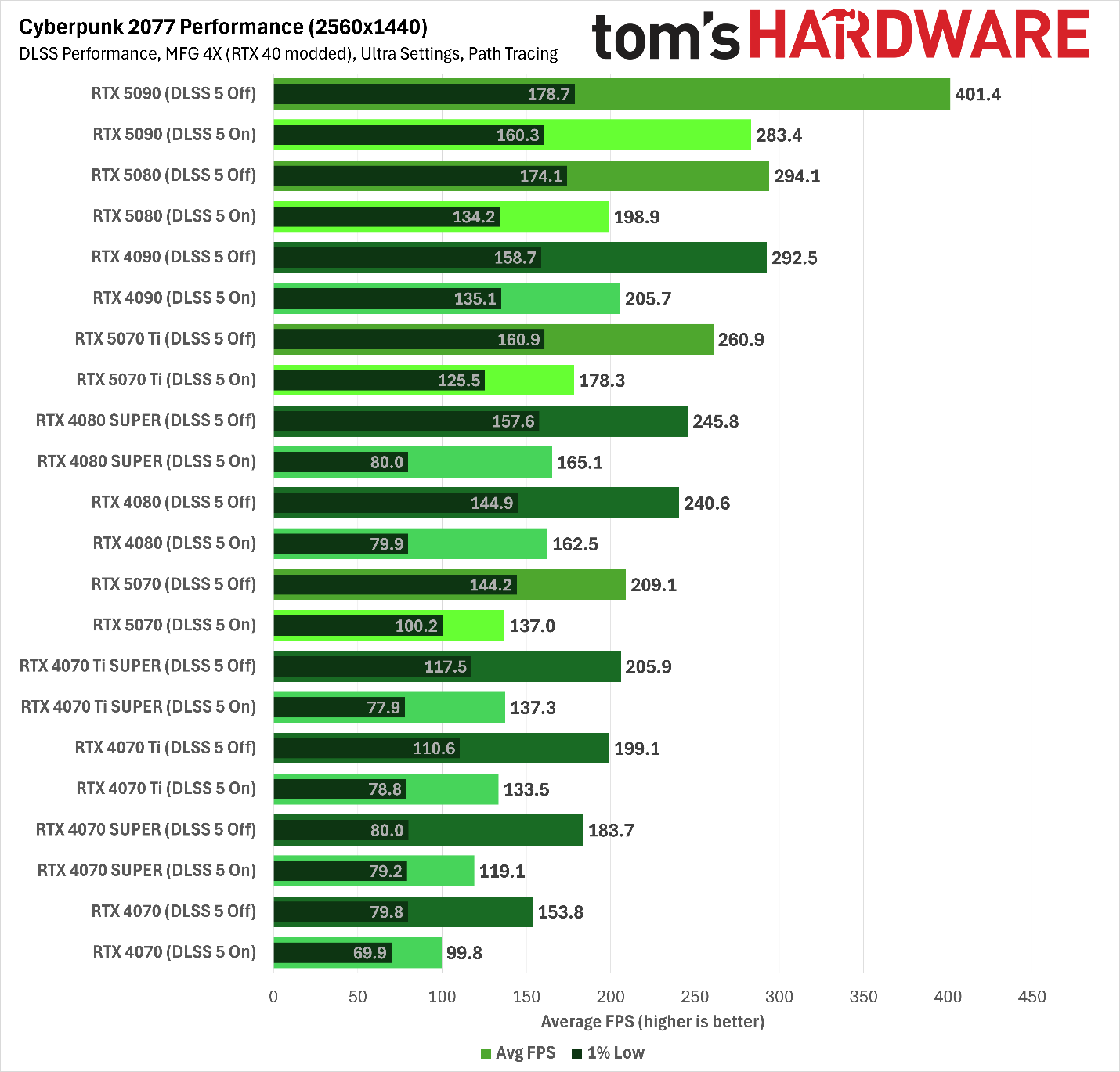
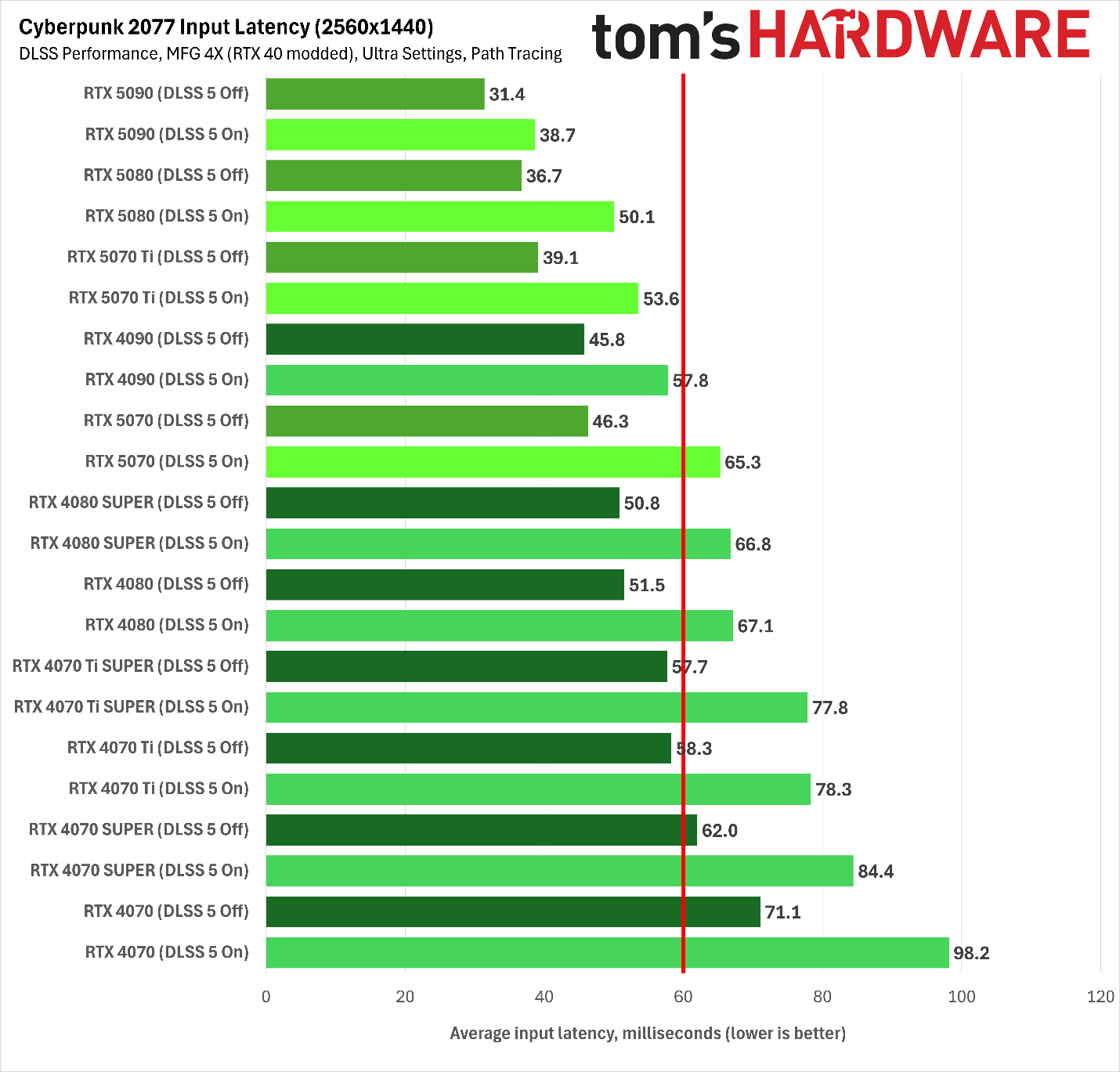
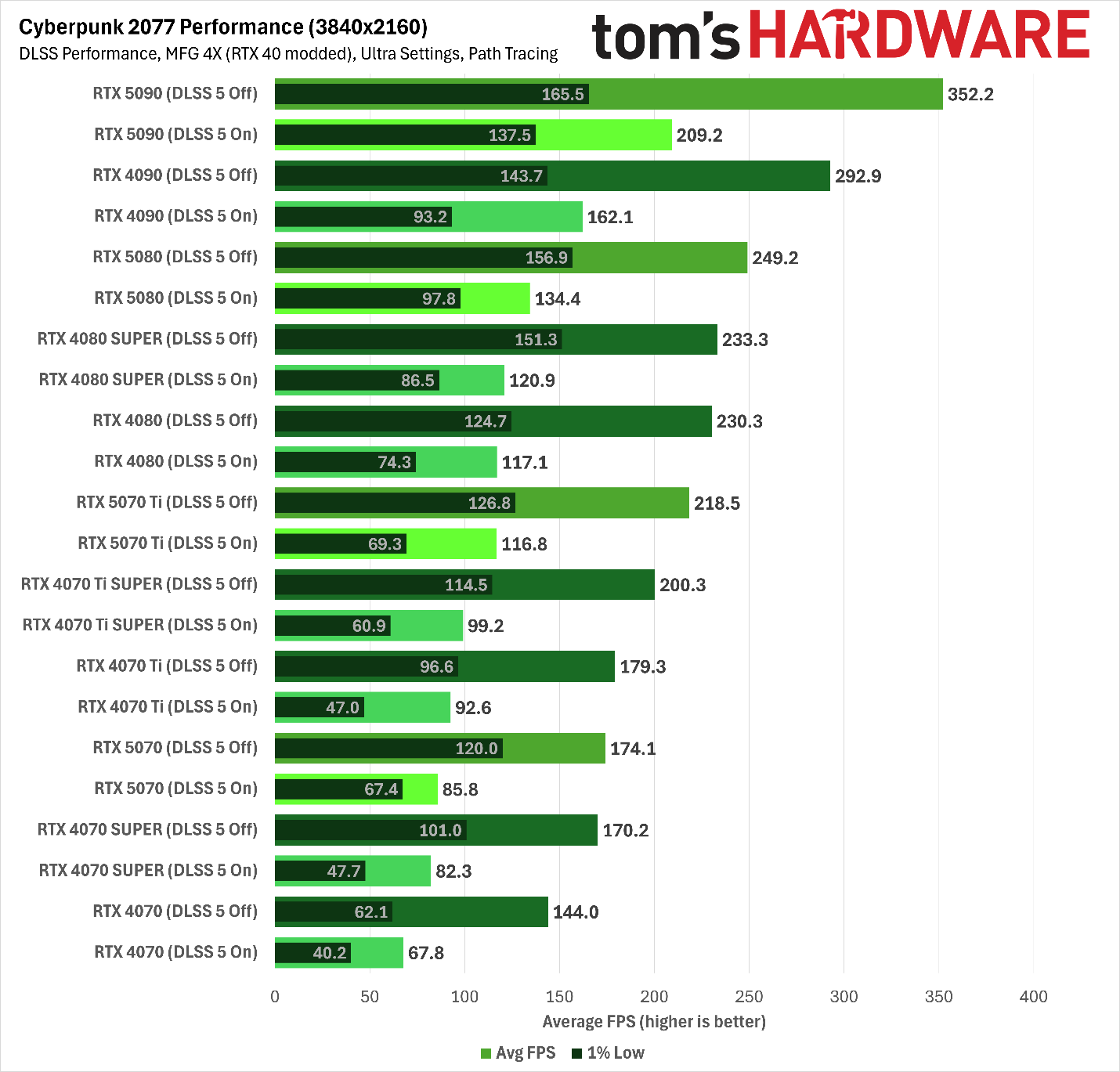
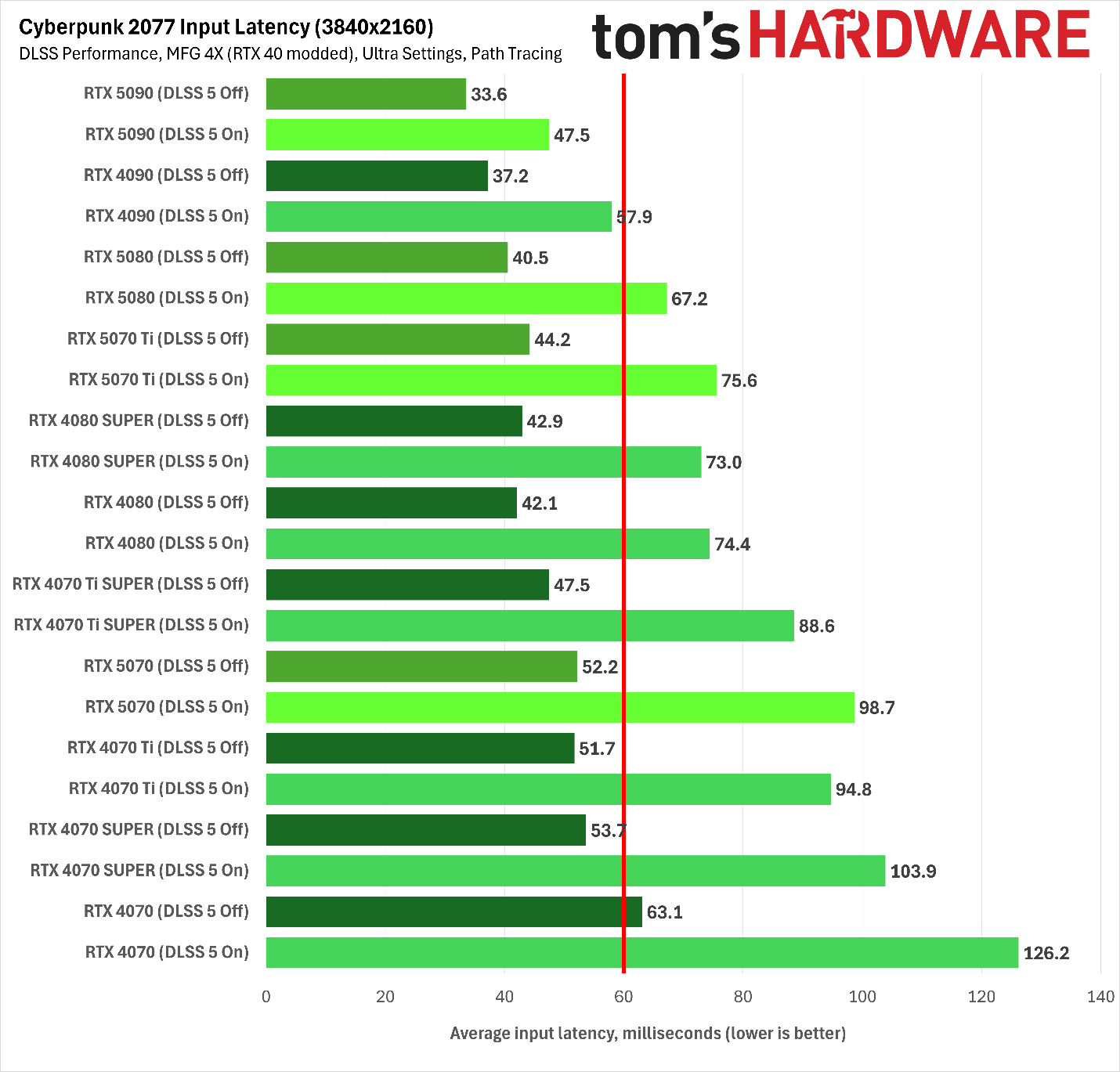
So is this a free lunch? Is Nvidia soft-locking MFG to Blackwell purely for marketing reasons? That’s where performance testing comes in, since it has the potential to reveal whether there’s a catch in running MFG on Ada. The question is not so much whether MFG juices output frame rates, but whether it runs on Ada within acceptable latency thresholds.
As we’ve long emphasized, when you have essentially arbitrary control over output frame rates like MFG allows, input lag becomes the final barrier to a playable experience. So in the performance results that follow, we’ll certainly present output frame rates as you would expect. But you should view those in the context of your own monitor’s refresh rate. As long as the delivered frame rates we recorded exceed your display’s peak refresh rate, you have headroom to play with to keep your monitor at or near that number during gameplay.
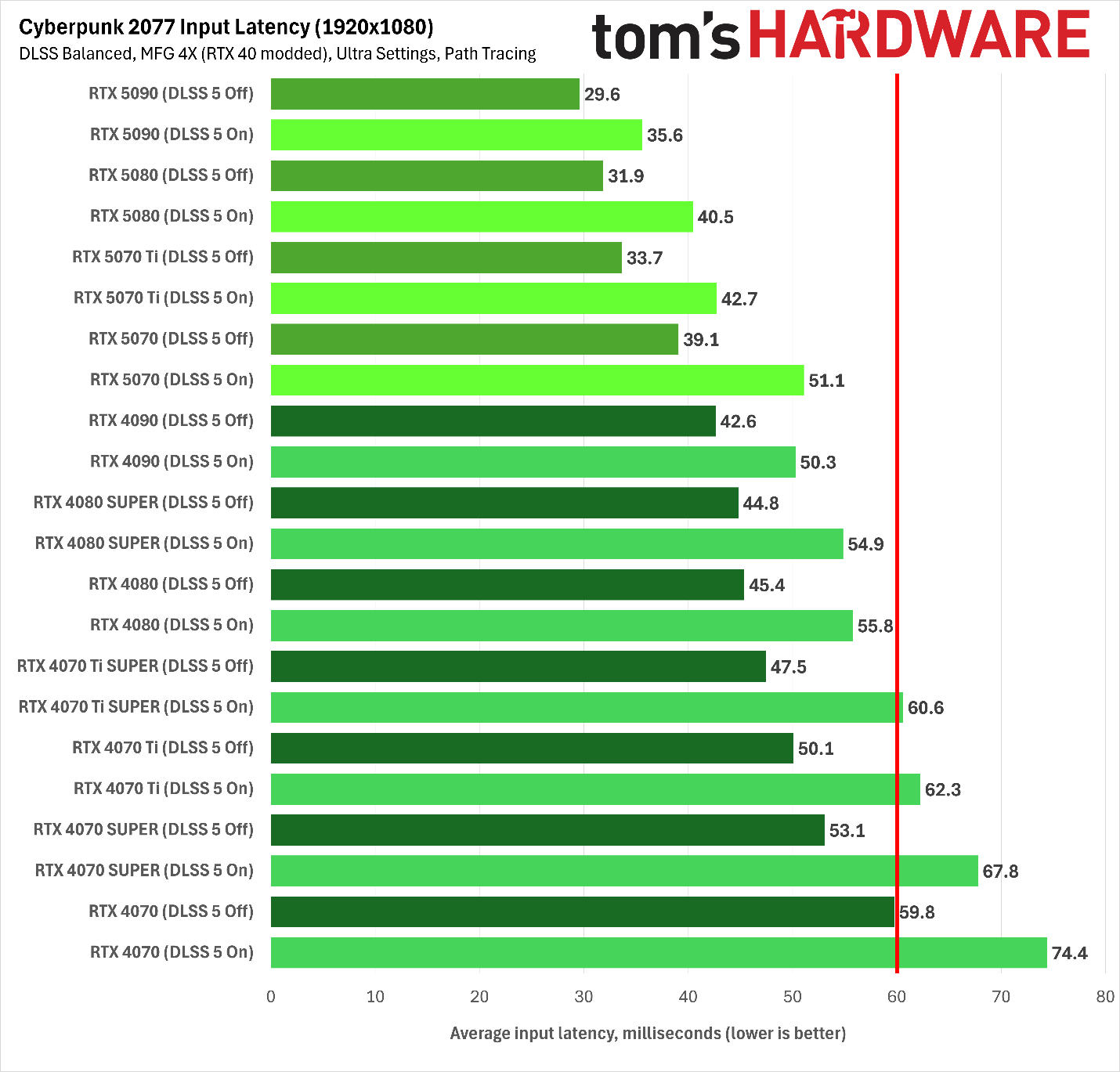
The real issue, then, is whether both RTX 40-series and 50-series cards deliver an acceptable input latency under our test conditions. In our past testing, we’ve determined that a roughly 60ms average latency threshold, as indicated by Nvidia’s FrameView app, is the point at which player inputs and displayed frames start to become noticeably decoupled in AAA single-player experiences like Cyberpunk.
If you’re only slightly on the wrong side of this threshold, a game might still be playable, but if you totally blow past it, you’re likely to notice laggy inputs and increasingly distracting visual artifacts as the MFG model struggles to fill in the gaps between sparser and sparser input data.
Testing methods and notes
As one of the biggest technical showcases of the current PC gaming era, Cyberpunk 2077 lets us enable all the modern rendering features we’d want for Nvidia cards. It implements not only ray tracing and path tracing, but DLSS Super Resolution, Ray Reconstruction, and Multi Frame Generation. The number of AI-generated pixels per frame can be quite high in this title.
We enabled all those features to expose the full potential complexity of running all of their associated AI models in a modern rendering pipeline. If RTX 40-series cards are going to stumble for some reason with modded MFG enabled, we want to put as many obstacles in their way as possible.
And because benchmarking the performance of an unofficial mod is venturing into the Wild West anyway, we also added a DLSS 5 mod to the mix to see whether Blackwell GPUs have a distinct edge in the neural rendering future that the arrival of that feature promises to usher in. DLSS 5 is supposed to come to RTX 40-series cards later this year, so we think it’s good to understand where performance sits today, even if it’s subject to the same disclaimers as this MFG mod.
For reference, then, we tested Cyberpunk with maxed-out raster settings, path tracing, and MFG 4X at three resolutions: 1080p with DLSS Balanced, 2560x1440 with DLSS Performance, and 4K with DLSS Ultra Performance upscaling enabled.
We only tested cards ranging from the RTX 4090 down to the RTX 4070 for these experiments, both because of time and Cyberpunk’s VRAM requirements. We didn’t want to deal with potential performance pitfalls due to running out of VRAM, so the 12GB RTX 4070 is where we’re drawing the line for now.
Modded Cyberpunk 2077 1080p performance
(Image credit: Tom's Hardware)
At 1080p, Cyberpunk 2077 with MFG 4X scales fine on Ada, but it’s clearly scaling better on Blackwell. The RTX 4090 lands between the RTX 5070 Ti and RTX 5080. Introducing DLSS 5 to the mix doesn’t change any relative standings, although it does create some larger gaps between average frame rates and 1% lows than we might like on the RTX 4070 Ti Super, RTX 4070 Ti, RTX 4070 Super, and RTX 4070. The RTX 5070 has no such trouble.
(Image credit: Tom's Hardware)
But again, the real story is in our latency results. Here, we can see that every card we tested falls under our 60ms threshold with MFG 4X alone. But Blackwell hardware has a clear advantage in the standings, as even the RTX 5070 delivers a lower input latency than the RTX 4090 with our DLSS 5 mod off and a comparable input latency with it enabled. All the other Ada cards shake out as you would expect from there. But in absolute terms, even with DLSS 5 enabled, only the RTX 4070 Super and RTX 4070 are far beyond our acceptable latency thresholds.
Blackwell might have a latency edge with MFG enabled and a smoothness edge with a modded version of DLSS 5 on top, but at least with the RTX 4070 on up, there’s certainly enough headroom to use the feature on Ada.
And as we went to press, a version of the RTX 40-series MFG mod came out that removes the need for ReShade. That more streamlined approach might cut down latency, but we couldn’t test it because it currently crashes Cyberpunk 2077. Again, this is the Wild West, not a validated, bulletproof solution from Nvidia like you get with RTX 50-series products.
Modded Cyberpunk 2077 2560x1440 performance
(Image credit: Tom's Hardware)
At 2560x1440, generational performance standings and scaling between cards remains much the same as we saw at 1080p. The RTX 4090 still falls short of the RTX 5080, and the RTX 4080 duo falls behind the RTX 5070 Ti.
We also still see the wide gap between average frame rates and 1% lows rear its head on more Ada cards with our DLSS 5 mod enabled, though to be fair, these lows are still being smoothed over by MFG to the point that you’re unlikely to notice them with a high-refresh-rate, variable-refresh-rate monitor like we’re using.
(Image credit: Tom's Hardware)
On the latency side, all of the Ada cards except the RTX 4070 still run our modded MFG 4X with acceptable input latency. But enable the DLSS 5 mod we’re using, and input latency climbs past 60ms for all Ada cards except the RTX 4090. The RTX 4080 Super and RTX 4080 still provide acceptable performance under this full load, as they’re only slightly over our latency threshold. But for any less powerful RTX 40-series cards, you’d need to start choosing between DLSS 5 and other eye candy, like lighter RT settings instead of path tracing or no RT or PT at all.
Modded Cyberpunk 2077 4K performance
(Image credit: Tom's Hardware)
Our modded performance results at 4K with DLSS Ultra Performance demonstrate why it’s so important to discuss MFG-boosted frame rates in the context of input latency. If you’re not mentally dividing by four, everything on our output frame rate might look playable.
At this high output resolution, the RTX 4090 finally takes the lead over the RTX 5080, both with plain MFG 4X and with our DLSS 5 mod on top. The 16GB of VRAM of the RTX 4070 Ti Super would seem to be giving it an edge over the RTX 4070 Ti and RTX 5070, and the RTX 4080 duo would seem to beat out the RTX 5070 Ti.
(Image credit: Tom's Hardware)
Our latency chart for MFG 4X shows a weird, but entirely reproducible result: input latencies at 4K with DLSS Ultra Performance are actually much lower than they are at 2560x1440 for most Ada cards, despite the fact that both of these output resolution targets share the same input resolution.
We’re not sure why Ada cards run into such a latency hump with this MFG mod at 2560x1440 with DLSS Performance, but we double-checked our results, and this behavior is reproducible. Blackwell cards experience the more linear rise in input latency as output resolutions rise that you would expect.
Again, this is the Wild West of modded performance, and we have nobody to blame but ourselves here, but it’s an unfortunate result given the prevalence of 2560x1440 monitors. Perhaps the maintainers of this mod can track down the root cause and fix it, but nothing is guaranteed.
In any event, input latency with MFG 4X alone at 4K with DLSS Ultra Performance isn’t an issue for any card here. You might be pushing your luck with the RTX 4070, but both Blackwell and Ada cards are delivering on the promise of MFG here: smoother output with responsive input.
Add DLSS 5 to the latency picture, though, and as we’ve come to expect, you really want an RTX 5090, RTX 4090, or RTX 5080 for acceptable responsiveness. And you’re pushing it with the RTX 5080. No other cards in this bunch need apply.
Bottom line
Our experience with the purportedly Blackwell-exclusive Multi Frame Generation on RTX 40-series cards through modding suggests that there isn’t any glaring reason why Nvidia couldn’t enable the feature for Ada Lovelace cards, and that’s kind of wild given how heavily it was touted as a Blackwell-exclusive feature back when those cards launched.
At least as long as Nvidia doesn’t find a persistent way to lock it out, our experience is that MFG generally just works on Ada. Even if input latencies aren’t quite as low on those older cards as they are on comparable Blackwell hardware, all else equal, they’re still perfectly acceptable, even under the combined load of path tracing, DLSS Super Resolution, DLSS Ray Reconstruction, and MFG 4X in Cyberpunk 2077.
We only had time to test cards ranging down to the RTX 4070 for this quick look, but for folks looking to extend the useful life of their Ada hardware, the availability of MFG could certainly stretch those cards’ lifespans.
But our experience also shows that MFG on Ada isn’t perfect. It’s still a mod in active development, and the unusual and reproducible input latency behavior we charted at 1440p on RTX 40-series cards is the sort of unexpected pitfall you might expect from an unofficial implementation of the feature. Cross your fingers that it’s an issue that can be fixed by the community.
The fact that MFG works as well as it does on Ada, even in this modded form, also makes us wonder whether Nvidia might just enable official support for it at some point, given the apparently bleak prospects for gaming graphics card pricing and future hardware generations as the AI boom shows no signs of abating. And such a move would provide much broader and more immediate performance relief for gamers than re-introducing ancient silicon like the RTX 3060.
Given that Nvidia is already working on bringing DLSS 5 to RTX 40-series GPUs, maybe this mod will convince it to throw in official MFG support, too. Fingers crossed.
Alibaba’s Qwen 3.8 27B open-weight AI model came out a couple of weeks ago, and it immediately created a wave of hype among local AI enthusiasts thanks to its impressive intelligence benchmark results for a model of its size and capabilities.
Totaling around 17GB for four-bit quantized weights and offering built-in multimodal capabilities on top of its general aptitude, Qwen 3.8 27B immediately grabbed the attention of everybody with an RTX 5090, RTX 4090, or RTX 3090 (as well as a Radeon RX 7900 XTX, Radeon AI Pro R9700, or Arc Pro B70).
Were we on the verge of frontier-level intelligence from a four-bit quant on a single graphics card? Could everybody with a capable enough local AI setup go and cancel their Claude or ChatGPT subscriptions?
The answer, of course, as with every open-weight AI model hype cycle, is more complicated than just eyeballing the size of the model weights and comparing it to your available VRAM pool. Does the card or system you're using to host the model have enough VRAM left over to provide useful amounts of space for the model's context once everything is running? Do your host system and LLM inference engine deliver acceptable time-to-first-token, as well as high throughput beyond just bench-racing from an empty context window?
It's one thing if you just want to chat with a model and see what happens; it's another entirely if you want to put it to work, especially as impatient agents take the limits of human perception out of the picture.
We wanted to see what hardware and software stack Qwen 3.8 27B really wants in order to deliver solid performance, so we ran it on systems ranging from a desktop PC with discrete GPUs to systems with unified memory architectures like the DGX Spark, Mac Studio, and Ryzen AI Halo.
Our discrete GPU AI testbed includes the following components:
Tom’s Hardware Local AI Testbed
CPU
Ryzen 7 9800X3D
Memory
64GB (4x16GB) DDR5-5200
Motherboard
Asus TUF Gaming X670E-Plus Wifi
SSD
Corsair MP600 Pro XT 4TB
Power supply
MSI MPG Ai1600TS
Operating system
Ubuntu 26.04 LTS
Where it was possible to do so, we tested performance with Qwen 3.8 27B’s built-in multi-token prediction capabilities both enabled and disabled. Not all of the model runners we tested were able to support MTP within the amount of VRAM available to us on some of our platforms. We note where MTP was and wasn’t possible in our analysis of each platform, as well as in our charts.
RTX 5090 performance
We started with the RTX 5090, whose 32GB of GDDR7 and 1.8 TB/s of memory bandwidth would seem to make it an absolute no-brainer for getting the best local inference performance with this dense model. (Mixture-of-experts models tend to be friendlier to performance on lower-end hardware like the DGX Spark and AMD's Strix Halo, as their limited numbers of active parameters mean less data movement during inference).
As a baseline, we followed our usual local AI benchmarking approach: grab the latest build of llama.cpp from GitHub, build it, grab an Unsloth quantization of the model from Hugging Face, and run it. But our testing quickly ran into a speed bump.
Although llama.cpp will happily allocate the full 262K context length with this model on an RTX 5090, its processing speeds at long contexts on this card are dire.
Time-to-first-token with a single 5090 stretches to roughly 30 minutes, suggesting that something is just broken here. And tokens-per-second throughput drops far, far below what you would expect for having one of the world's fastest graphics cards at your disposal. No matter how you slice it, llama.cpp is not the right model runner for this hardware right now.
Next, we tried vLLM, a production-grade inference engine that's more at home in the data center than it is on the desktop, although it can comfortably serve in both roles—at least if your host system is up to its requirements. Even with 64GB of main memory in our test rig, we had to allocate another 64GB of swap just to let vLLM load Qwen 3.8 27B successfully for the first time. A lightweight stack this is not.
The vLLM maintainers provide an NVFP4 quantization of Qwen 3.8 27B and deployment recipes for both one and two RTX 5090s. We just so happen to have two RTX 5090s in the TH labs, so we were able to try out both configurations.
(Image credit: Tom's Hardware)
(Image credit: Tom's Hardware)
Serving Qwen 3.8 27B on one 5090 with vLLM certainly works in a pinch, but it's not ideal for long-context inference because the base recipe for it limits you to just a 32K context. To get the full 262K context, you really want a single card with more memory (like an RTX Pro Blackwell card with 48 or 72GB of RAM) or two 5090s, as we were able to test.
And a single card doesn't have enough memory to enable Qwen 3.8 27B’s built-in multi-token prediction (MTP), which is super helpful in getting faster decode performance from this setup. 20 tokens per second across the board without MTP is not an impressive baseline for a card of this caliber.
Tom's HardwareTom's Hardware
Get two 5090s into the picture, though, and decode speeds rocket upwards for vLLM (albeit at a high cost to prefill). 70-80 tokens per second across the context depth sweep is a fantastic result for a local setup, and TTFT remains fairly reasonable. But we can go faster.
Enabling MTP with vLLM gets us to 100-110 tokens per second on the decode side for only a small hit to prompt processing speed. This setup provides consistent performance at prompt processing speeds that don’t make you question whether something has gone seriously wrong. But it ought to be fast, because our dual RTX 5090 platform as tested here would currently ring in at over $13,000.
We also tried the SGLang inference engine on the RTX 5090 across similar configurations as we did with vLLM.
Tom's Hardware Tom's Hardware
SGLang is much faster on a single 5090 for some reason – almost 3x faster than vLLM’s single-5090 recipe – and also ekes out a bit more context (37,740) versus vLLM. But if you want to get the full 262K that the model natively supports, you still need a second card or a different one with more VRAM.
Tom's Hardware Tom's Hardware
Like vLLM, SGLang supports tensor parallelism across multiple GPUs, so enabling dual-GPU inference is as simple as adding another launch flag. And as with vLLM, there are a number of speculative decoding strategies you can add to the recipe to enhance output performance.
The takeaway from this first phase of testing: if you have a single RTX 5090 and don't need long-context inference from it, you can certainly get usable performance from one with this dense model. But you need to choose your model runner carefully.
And if you want the full context window, reasonable prompt processing times, and high throughput from Qwen 3.8 27B all at once, you really want a graphics card with more than 32GB of VRAM as a starting point (or multiples).
RTX 3090 and RTX 4090 performance
With the RTX 5090’s behavior settled, we turned to some older consumer cards to see how they handle Qwen 3.8 27B. The 24GB RTX 4090 and 3090 are evergreen favorites among local LLM fans thanks to their relatively large VRAM pools and relatively affordable prices on the used market, but as we've already emphasized, just being able to load the model weights is far from the whole picture.
These cards can fit the Q4_K_M GGUF of Qwen 3.8 27B with llama.cpp just fine, but they require using the Q8_0 quantization of the KV cache to fit the results in their smaller VRAM pools from the get-go, and they also require limiting the context depth to well under the model’s 262K native limit. We found that a context length of about 112K tokens was about the most we could get away with before running out of VRAM.
And unlike the 32GB RTX 5090, which can usually get away with having the Linux desktop window manager running next to the LLM and its infrastructure, these GPUs need every last byte of VRAM for the AI workload and nothing else. So you really want a separate graphics card at hand for these two cards if you're not running a headless server, which can introduce some setup headaches of its own as you discover how your particular motherboard handles PCIe slot bifurcation and enumeration of the primary graphics device.
Once you overcome those obstacles and get Qwen 3.8 27B up and running on these cards, llama.cpp exhibits the same performance cliff at long contexts on the RTX 4090 that we saw with the RTX 5090. But the RTX 3090 is oddly not affected. This suggests a bug somewhere.
We didn’t have time to dig into SGLang or vLLM behavior on these products, but given that you’re already tight for context on an RTX 5090, we’re doubtful that either of those inference engines would be an awesome way to run the model on these 24GB cards, unless you’re somehow ready to roll with multiple 3090s or 4090s from past acquisitions.
DGX Spark performance
Hardcore local LLM enthusiasts will scoff at the DGX Spark’s mere 27 GB/s of memory bandwidth for a dense model like Qwen 3.8 27B, and indeed, we've found that this platform isn't the fastest with dense models in our past testing.
But now that models like Qwen 3.8 27B support MTP with nothing more than a server launch flag, you can often get a major free boost to the decode speeds of platforms with limited memory bandwidth.
In our actual tests, the Spark's solid prefill processing performance means that it will often end up finishing inference turns at longer context lengths well before the RTX 5090 does with llama.cpp.
And beyond llama.cpp, the Spark is also well supported by SGLang and vLLM, so you can take advantage of those inference engines if they’re more to your taste. Consider also that a single Spark is still available for about $5000, and it’s a turnkey system that can be expanded into a handy cluster down the line if you want. So it shouldn’t be ruled out, even for serving this dense model.
Apple Mac Studio with M4 Max performance
The M4 Max-powered Mac Studio in our labs has the most memory bandwidth of any of the unified memory systems we have available, but as we've described in previous testing, that's only one metric that matters for local AI inference.
Prompt processing on this platform is slower than on Spark, so even if the Mac Studio can turn out more tokens than GB10 in the decode phase, it still ends up spending more time per inference turn than Nvidia's platform at longer contexts because that’s where it has to spend most of its processing time.
And at least in llama.cpp, using MTP on the Mac Studio actually causes a performance loss at shorter contexts for decode in exchange for a small boost at longer contexts, where it generally leads to improvements for other platforms. This demonstrates the value of actual benchmarking rather than spec-racing.
Ryzen AI Halo (Strix Halo) performance
AMD’s Ryzen AI Halo presents the worst-case performance scenario for this dense model: relatively low memory bandwidth and low prompt-processing performance.
Although MTP wakes up tokens-per-second throughput a bit on this system with llama.cpp, it can’t make up for the lengthy prompt processing times required for longer contexts. You can certainly run this model if a Strix Halo is the only box you have, but we’d seek out something more capable if you’re trying to do interactive long-context work.
Bottom line
When I first set out to explore Qwen 3.8 27B's performance, I figured this would be a relatively straightforward series of tests: plug in a single graphics card, load the model, get tokens, done. In practice, our experience required a lot more tinkering. And systems we might have initially written off as being not up to the task of running a dense model like this proved surprisingly useful.
In general, breathless claims of hundreds of tokens per second of throughput from an empty context window do not account for the full range of behavior one might see from an LLM on a given inference setup.
For just one example, whether it's down to a problem with (or just the expected behavior of) llama.cpp or something else about our software stack, the notion that you'd want to wait as much as 30 minutes or more for a response from Qwen 3.8 27B at long context lengths on an RTX 5090 is outrageous. But if you naively load Qwen 3.8 27B using llama.cpp right now, this is the experience you'll get.
Changing up inference engines is a natural next step, but there are trade-offs with that approach, too. You can load Qwen 3.8 27B on one 5090 using vLLM or SGLang, but those inference engines are much more conservative about the amount of usable context they’ll give you. The recipes we used only resulted in a context window of 32K tokens on a single 5090.
To enable the full 262K context length, we had to grab another RTX 5090 from the TH testing arsenal, at which point we got both great throughput and a TTFT sweep that could be considered interactive all the way out to the maximum context length from both model runners. But the price of replicating such a setup would exceed $13K right now.
You also might expect that a DGX Spark and its 273 GB/s of memory bandwidth wouldn't be useful for this dense model, but the prefill speed of the Spark ends up being fast enough that the TTFT remains relatively interactive even with a decode throughput of just 20 or so tokens per second with MTP, and that behavior holds out to the model's full native context length.
The M4 Max-powered Mac Studio has plenty of memory bandwidth on tap for decode, but its prompt processing speed means that the total time of an inference turn is dominated by that activity on this older Apple Silicon chip. The newer M5 Max and brand-new M5 Ultra would doubtless perform better, but we didn’t have those chips handy for this testing. And AMD’s Ryzen AI Halo gets the worst of it, with both low prompt processing speeds and relatively low TPS due to its memory bandwidth.
For all this, we really need to take a step back and consider the economics of local AI once again. $5K, $10K, or $15K or more for local AI hardware is a lot of tokens from leading-edge models at Anthropic or OpenAI (and even more from providers serving the recent slate of Chinese open-source models). A lot. And if time is money for you, barring compute constraints, those tokens will get back to you or your agent faster than anything you can run at home short of a DGX Station with its GB300 GPU.
So unless you’re working with sensitive data that requires on-premises processing, you’re an enthusiast who just wants to tinker, or you’re worried about the fate of open model distribution and inference more generally for some reason, you probably don’t need to rush out and build a box just for this model.
But if you do, be aware that delivered performance is more than just VRAM capacity or memory bandwidth, and that you might not get the best performance from your setup with the most common model runners like llama.cpp. Let experimentation and careful benchmarking lead you to the best results for your specific config.
Nvidia's DLSS 5 has arrived in NBA 2K27, and we've been up since midnight testing it across every RTX 50-series graphics card to see what the first official implementation of this tech can do and how it compares to the community-implemented mods that have been circulating over the past couple weeks.
Before we discuss the performance cost of DLSS 5, many will ask whether this tech is even worth getting excited about, given the intense controversy that it's sparked ever since Nvidia revealed it earlier this year.
In short: yes, absolutely.
This first-party implementation of DLSS 5, tuned under the full control of 2K Games' art directors and artists, looks incredible, full stop. If you see it running, you will want to leave it on. It doesn't look like "slop" or a cheap filter. It just looks correct, or at least more correct.
2K2K
For just a couple of examples, without DLSS 5, even at ultra settings and with RT, the game has a slightly "plastic" or "flat" look. Faces can have a waxy uniformity that immediately indicates that you're looking at a video game, not a live broadcast. Hair looks totally and unnaturally flat. The whites of eyes can be unnaturally bright, giving a sort of googly-eye or doll-like effect that immediately broke my sense of immersion. I didn't think any of this would be a big deal for a sports game, but it all stands out.
2K2K
DLSS 5 breathes incredible life into NBA 2K27. Skin looks like real flesh and blood. Eyes are rendered with the proper tones, depth, and sparkle. Hair looks a billion times more realistic. Every human on screen just looks more alive. You won't entirely forget that you're looking at a game, but it becomes much easier to suspend disbelief and get lost in the action.
My experience slapping DLSS 5 mods into games has produced promising but sometimes mixed results. If the polished experience that NBA 2K25 delivers is any indication, I can't wait for more studios to get their hands on it and integrate it into their games under the care of the same artists that created them.
Our testing methods
We did our best to deliver clean test numbers in the short time we've had with NBA 2K27. Performance in this can be tricky to measure. Benchmarking in the hub worlds or cutscenes will deliver lower performance than on the court, and even then, in-game events like fouls and time-outs will also result in skewed numbers if you're not careful. We picked a repeatable match-up from the game's career mode and sampled 60 seconds of continuous gameplay with DLSS 5 on and off, making sure to restart if we ran into any of the scripted events above.
We used NBA 2K27's maximum graphics settings as our baseline, including RT. We tested at native resolutions without upscaling, and we didn't test with Multi Frame Generation enabled. We view MFG as a cherry on top of an already solid baseline experience, not a baseline in itself.
Our test system is built with the following components:
All of our performance results are captured using Nvidia's FrameView 2.0 utility. We measure graphics card power consumption directly with Nvidia's PCAT hardware power logging tool.
If you have any questions about our testing methods, let us know in the comments and we'll do our best to answer them. On to the numbers.
NBA 2K27 1080p performance
(Image credit: Future)
At 1080p, everything from the RTX 5070 on up is CPU-bound without DLSS 5 enabled, even with maxed-out settings and RT on. Turn on DLSS 5, though, and the differences in Tensor Core compute across the cards quickly becomes obvious. But even the RTX 5060 can manage nearly 60 FPS on average with DLSS 5 enabled at 1080p, so almost anybody with a Blackwell card can at least try out the feature.
Given these results, you might think to enable DLSS Super Resolution (aka upscaling). But because the amount of time needed to run the DLSS 5 model has a fixed cost per output frame that scales with your target resolution and largely dominates the total frame time, especially on lower-end hardware, you may find that enabling DLSS SR doesn't have as much of an effect on performance as we've come to expect. The game still has to wait for that final generative step to occur, even if DLSS SR cuts down some of the total frame time.
As noted, we didn't use MFG for these tests, simply because there's no need for us to make the numbers on these charts artifically large. If you do want to enable it, the multiplier you want will be determined by your monitor's refresh rate and your own personal tastes.
(Image credit: Future)
We did chart PC latency as estimated by FrameView, so you can get a sense of whether there's enough of a latency budget to enable MFG at all. At 1080p, every card is a solid candidate for enabling MFG without adding unreasonable amounts of input latency, although the RTX 5050 is in a borderline position. And all three of the 8GB cards might have trouble fitting the MFG model into their VRAM with these maxed-out settings and DLSS 5 enabled, so you might need to turn off RT at a minimum to use MFG on these lower-end GPUs.
(Image credit: Future)
As we already saw in early testing of the leaked DLSS 5 builds circulating in the community, enabling the model has a large impact on power consumption, likely due to the intense Tensor Core load required to run the DLSS 5 model.
NBA 2K27 1440p performance
(Image credit: Future)
Moving up to 1440p separates our cards some more. The RTX 5080 and RTX 5090 are still CPU-limited without DLSS 5. The RTX 5060 Ti 8GB, RTX 5060, and RTX 5050 all get a "Low VRAM" warning with these settings, so if you're trying to push this higher resolution with those cards, you might want to start tuning your DLSS upscaling settings to relieve VRAM pressure, even if it doesn't result in additional performance with DLSS 5.
(Image credit: Future)
But you really want an RTX 5060 Ti at a minimum here to get acceptable input latency with DLSS 5 enabled, and the RTX 5070 is the true baseline for a good experience. At the higher end, the RTX 5070 Ti and RTX 5080 both provide fluid frame rates even without MFG, and you have the latency budget to enable framegen without worry on anything from the RTX 5070 on up.
(Image credit: Future)
DLSS 5's power consumption on all these cards (except the chugging RTX 5050) rises as expected with the higher-resolution output frame we're asking it to generate. Everything from the RTX 5060 up to the RTX 5070 Ti ends up running at its power limit, while the RTX 5080 and RTX 5090 still have room to stretch out. The unconstrained MSI RTX 5090 Lighting Z sucks down a ton of power to deliver its scorching performance.
NBA 2K27 4K performance
(Image credit: Future)
Running NBA 2K27 at 4K with DLSS 5 is extremely demanding, since the model has to generate an output frame with more than twice as many pixels than at 1440p. Even the RTX 5070 Ti is straining here, as its input latency with DLSS 5 is potentially too high to enable MFG while still delivering a responsive gameplay experience.
(Image credit: Future)
You can see why Nvidia only recommends the RTX 5080 and RTX 5090 for a 4K DLSS 5 experience in this title, as they're the only two cards that deliver high enough baseline performance with low enough input latencies to make MFG practical. And even then, the RTX 5080 is on the edge of what we'd consider an acceptable input latency before enabling MFG.
(Image credit: Future)
Our power consumption chart at 4K is a bit of a mess at the low end since the RTX 5050 and RTX 5060 are crushed by the demands of DLSS 5 and end up chugging. Really, though, we're here to see how the RTX 5080 and RTX 5090s handle this incredibly Tensor Core-intensive work. Both cards end up running at their power limits.
The MSI RTX 5090 Lightning Z shows how much power scaling the GB202 GPU has left in it once you remove the constraint of a single 12V-2x6 connector. We were wondering whether the power numbers we saw from a modded version of Control were a fluke, but DLSS 5 in NBA 2K27 goes even harder and pushes the RTX 5090 Lightning Z to nearly 850W on average in this test. For 48% more power than the RTX 5090 Founders Edition, you get 22% higher performance.
On a big 4K screen like an OLED TV, a fluid 90 FPS at a native 4K resolution with the level of detail and realism that DLSS 5 adds is an astounding gaming experience. You really haven't seen anything like it. But mere mortals with single-plug 5090s will probably want to enable MFG 2X at a minimum.
Bottom line
It's early days for DLSS 5 performance, and in its first official showing in NBA 2K27, it certainly has a large performance cost—sometimes well over 50% on lower-end hardware. But the generational leap in realism it provides for every human on screen is well worth it to my eye, at least. Now that I've seen a first-party, developer-driven implementation of DLSS 5, I want it in every game where its photorealistic enhancements would make sense, without question.
And as it's implemented in NBA 2K27, our performance results show that the tech is accessible enough that almost anybody with an RTX 50-series graphics card can try it out and still enjoy a fluid and responsive experience, even without Multi Frame Generation. Most of us aren't playing on 4K monitors, and at 1080p and 1440p, the Blackwell card you may already have is probably up to the task of running DLSS 5 with acceptable baseline performance.
DLSS 5 does upend some intuitions we've developed around the interactions of upscaling and frame rate. The large fixed frame-time cost that's required to generate the DLSS 5 output frame is entirely dependent on your target output resolution, making the lowered input resolution of DLSS 4.5 upscaling far less of a performance multiplier than it might otherwise be.
Given those realities, DLSS MFG can still make for a more fluid experience alongside DLSS 5 with a couple of clicks in a menu—at least assuming you have enough VRAM to hold the game assets, the DLSS 5 model, and the MFG model all at once. On 8GB graphics cards, this may require some tweaking to get working.
Nvidia has promised to continue improving the fundamental performance of the DLSS 5 model with time, and the fact that it's moved from requiring a dedicated RTX 5090 to run in the demos we saw at GTC to running on an RTX 5060 today is a sign that such promises do bear fruit.
Boosting the fundamental performance of the DLSS 5 model is vital, because as we all well know, prices for most Blackwell cards have spiked across the board to the point that former midrange options like the RTX 5060 Ti 16GB and RTX 5070 are many hundreds of dollars more expensive than their MSRPs and well out of whack with their former performance-per-dollar propositions. A hardware upgrade to get better performance is no longer a no-brainer for many PC builders, and that problem is going to get even worse as the AI boom continues unabated.
Those elevated prices are also why Nvidia's post-launch pledge to bring the DLSS 5 model to RTX 40-series cards later this year is a welcome development. In our limited experience with community mods, Ada GPUs run the current DLSS 5 model about as well as Blackwell cards do, and gamers who haven't already upgraded from their 40-series cards certainly won't be raring to move off that hardware any time soon. Locking DLSS 5 to new GPUs that are prohibitively expensive to buy for non-technical reasons isn't a winning strategy for goodwill or broad adoption, and it's good to see Nvidia acknowledge that reality.
For all that, we shouldn't lose sight of the fact that DLSS 5 is a huge, exciting leap forward in the never-ending pursuit of photorealism in real-time graphics. When you toggle it on and off in NBA 2K27, it feels like a generational improvement in rendering technology at the press of a button. Now that I've seen it in action, I don't want to play NBA 2K27 without it, and I hope to see more first-party integrations of it soon.
If you're a token-hungry AI enthusiast, and if you or your family happen to have PCs with idle GPU cycles to spare in this economy, Nvidia wants to make it possible to harness those cycles so you can save cash on cloud tokens and keep your work private. At IFA 2026, the company is introducing a local distributed AI clustering tool called the Personal AI Router (PAIR) that dispatches agentic AI sub-tasks from your main PC to systems on your home network that have suitable GPU cycles to spare.
As Nvidia tells it, when a user runs a local AI agent and gives it a goal to complete, that central agent might then spawn several sub-tasks carved out of that larger goal. If those sub-tasks or sub-agents are all running on the same GPU, the contention they create might cause the task to finish more slowly than it could if each sub-agent had a dedicated compute node to work with.
PAIR is a tool that can make that distributed AI work happen on a home network. Assuming that a family or shared household is sufficiently flush with idle GPU resources, PAIR canYEa assign each participating system one of those sub-tasks to perform and return the results to the main node, potentially resulting in faster completion of the larger agentic task.
Of course, systems on your local network won't always be idle. Their owners will frequently use the GPUs in their systems for gaming, creative work, or AI tasks of their own. If a user needs their GPU back, PAIR purports to gracefully deal with those changing conditions. It doesn't reserve dedicated capacity from other PCs; it's elastic by design and will make the best of the resources available to it at any given moment.
This unpredictable availability of spare cycles does, of course, mean that quality of service is not assured from a PAIR cluster. But for long-running tasks that don't need to be done on a strict deadline, being able to put spare compute to work could still be more effective than running an agent swarm on a single node.
PAIR sounds relatively simple to set up. It creates a proxy for popular AI front-ends like LM Studio and Ollama to connect to. PAIR then orchestrates work across available nodes on the network and returns the results of that work to the originating application on the head node.
In turn, participating PAIR nodes also need to be running Ollama or LM Studio and have a PAIR installation of their own. Nvidia says that enrolling systems in a PAIR cluster is straightforward and relies on mDNS or an IP address fallback for discovery. PAIR will also help initiate model downloads on participating systems, but Nvidia says that nodes don’t need to have identical models or sets of models downloaded to participate.
If more systems do have a given model available, though, it broadens the pool of potential nodes that can handle a request if the orchestrator agent needs a particular model’s capabilities.
PAIR will run on any DGX Spark (or other GB10) box, as well as GeForce RTX 20-series graphics cards or newer. It also supports Macs with M4-series processors or newer for inference. Accordingly, the PAIR client will be available for Windows, macOS, and Linux.
It's been a wild few days for gamers, as a version of the DLSS 5 model leaked with NBA2K27 and promptly got modded into every game under the sun. After initial builds that relied on ReShade to make the model work, the community has since wrapped up DLSS 5 into an Optiscaler package that makes adding it to most games nearly painless. With that development, we wanted to get a sense of how the tech performs ahead of its official release.
We're not going to weigh in on the aesthetic or philosophical implications of applying DLSS 5 to a particular title here. That ground has been extremely well trodden already, and if you haven't been stuck under a rock this past week or so, you've likely seen what DLSS 5 can do for yourself.
We're more interested in getting an idea of the performance cost of getting DLSS 5 running, along with the power requirements it incurs. Whether you love or hate this model's effect on a game's appearance, you can weigh your feelings against the performance cost involved in getting there.
Before we get to the numbers, some caveats: the Optiscaler DLSS 5 injection method may not represent the behavior of this model when developers integrate it through Nvidia's Streamline framework. Streamline may offer less overhead and better performance than what we saw here.
But Nvidia's technical paper on DLSS 5 says that the model takes 8 ms to execute on a 4K frame, and that's essentially identical to the performance metrics that we saw from Optiscaler when it's running. So it seems unlikely that the official version will be far off the performance we measured if it's implemented in these titles using the proper channels.
For these limited tests, we chose to focus on the RTX 5090 Founders Edition's behavior under DLSS 5 to explore the largest performance drop one might expect from this community implementation of the tech.
Out of curiosity, we also grabbed MSI's RTX 5090 Lightning Z from the TH arsenal. This RTX 5090 has a unique two-12V-2x6 connector power setup and a 1000W power limit available through its Extreme vBIOS. Given the apparent arithmetic intensity of DLSS 5, we wanted to see whether running it would consume any of the extra available power headroom from that card's twin-plug design.
For our small sample of games, we used the following basic settings: a 4K output resolution target fed by DLSS Performance upscaling (i.e., a 1920x1080 input) without frame generation, as well as maximum raster and ray-tracing quality settings (or path tracing, in the case of Cyberpunk 2077) and DLSS Ray Reconstruction where it was available.
We didn't use Multi Frame Generation in these tests. We want to cleanly represent the performance baseline you can expect from DLSS 5 given the above constraints.
Cyberpunk 2077 performance
We started our performance explorations with Cyberpunk 2077. Optiscaler was an easy install for this game, and we confirmed that neural rendering was making the expected difference in facial detail and lighting realism when we activated it.
(Image credit: Future)
In exchange for those enhancements, the RTX 5090 Founders Edition takes a 42% hit from DLSS 5. Although the Lightning Z takes a slightly smaller 39% hit, its baseline performance is higher than the Founders Edition, so the MSI card maintains a 60 FPS average and much higher 1% lows than the single-connector card. That difference in smoothness is evident.
(Image credit: Future)
Part of that difference in performance comes down to power. As we noted, the RTX 5090 Lightning Z has a much larger 1000W power limit to play with, and it puts that headroom to use here.
The jump in power consumption from DLSS 5 on the Lightning Z is eye-popping: 580 W to 723 W, or a 25% increase. The RTX 5090 Founders Edition only goes from 482 W to 551 W, which means that it's practically power-limited.
Hogwarts Legacy performance
Unlike Cyberpunk 2077, Hogwarts Legacy doesn't implement path tracing, but its extensive RT effects are still impressive. Importantly for our purposes, it's easy to get Optiscaler into this title.
(Image credit: Future)
Hogwarts exhibits the largest performance drop of these three games on the RTX 5090 FE, at 49%. The Lightning Z card drops just 42%, though, and its higher baseline performance makes for a smoother experience.
(Image credit: Future)
The Lightning Z once again illustrates just how much power DLSS 5 can pull if it's available, even in this "lighter" RT title. Without DLSS 5, the MSI card draws 480 W on average. With neural rendering enabled, it pulls 720 W, or a whopping 50% more power.
Control performance
Finally, we tried the game that started the community DLSS 5 wave last week: 2019's Control. This early RT title still poses a stiff challenge for modern hardware if you crank its RT settings to the absolute max, as we did here.
(Image credit: Future)
The RTX 5090 Founders Edition takes another 42% hit to performance under these conditions, and the Lightning Z also drops 42%. But the higher power limits of the MSI card let it deliver 20% higher average frame rates and much higher 1% lows than the Founders Edition, and that's a smoothness boost you can really feel.
(Image credit: Future)
That extra performance does come at the expense of significantly higher power draw. The Lightning Z is already pulling a shocking 691 W without DLSS 5, but enable neural rendering, and it jumps to 802 W. The Founders Edition just runs into its 575 W power limit again.
Bottom Line
At least in our experience with the community-made mod packages available so far, DLSS 5 has a large performance cost, similar to what we saw with ray tracing before the wide availability of DLSS: in the range of 39% to 49%, according to our small sample of results so far.
Official versions of DLSS 5 may perform better, but we won't know for sure until later this week. In any event, our observations of the behavior of the tech as implemented by the community match up with Nvidia's published guidance so far.
We don't expect vastly different or better performance from first-party implementations, although a developer's official DLSS 5 recipe could certainly look better in a given title than the current free-for-all with sliders that were never meant to be exposed to end users. We'll have to see what happens as developers take the time to tune DLSS 5 for their games as the tech makes its way into more titles through official channels.
Officially, DLSS 5 only supports RTX 50-series graphics cards, and if you're interested in running it with RT or PT, our results show that you're likely going to need to enable the full stack of Nvidia software tech available from Blackwell: DLSS Performance or Ultra Performance to achieve solid baseline frame rates, plus Multi Frame Generation for acceptable output fluidity.
Some have suggested that you don't need to run RT or PT alongside DLSS 5, but that doesn't make any sense at all given our experience thus far. Applying DLSS 5 to purely rasterized input does make it look better than it otherwise would, but it makes the higher-quality input of RT or PT titles look even better still. You definitely don't want to give up those advanced rendering techniques just because DLSS 5 exists.
But those software factors aren't the biggest hurdle that might affect DLSS 5's delivered performance, at least at the extremes. We were surprised to find that the RTX 5090 Founders Edition design is probably holding back the performance of DLSS 5 on that card, even with its 575W TGP. The Founders Edition was consistently at or near its power limit in our tests with neural rendering enabled, which tracks with the demonstrated evidence that, like other image generation models, DLSS 5 is extremely demanding of the Tensor Cores that power its underlying diffusion model.
The exotic MSI RTX 5090 Lightning Z and its 1000W power limit show that when it's stacked on top of ray tracing or path tracing, DLSS 5 can and will happily slurp down hundreds more watts than the Founders Edition—or any other RTX 5090 with a single power connector—is built to provide.
And when you pair that fact with its large performance cost on today's hardware, it's clear that DLSS 5 is a multi-generational technology built to take full advantage of graphics cards that don't exist yet, whether they're RTX 50 Super-series products with higher power limits or future GeForce products built with more advanced Tensor Cores on a newer silicon process node.
Even as it stands, the results we've seen from DLSS 5 so far in both official demos and in its rapid proliferation through community mods suggest that neural rendering techniques like this will mark a new epoch of photorealistic fidelity for real-time graphics and new generations of hardware that are better suited to running demanding AI models like this in real time.
It's an exciting new frontier out there, even if things feel a bit like the Wild West for DLSS 5 right now. Hold on to your hats.
 登录
登录